-
Face Transfer 2
Artini said:
Thanks for the tips and the explanation, Paulawp.
I am still amazed, how Face Transfer evolved.
I have tried every Daz-based product I know of for this task, since my main purpose in even being here to begin with was to create images of my story's characters; it's literally been my mission in life.
 There's something to be said for all of the products but as of today, I best like shapes created by Face Transfer (with Face Transfer Shapes) and textures created by FaceGen, and of late, I've been working more on G9 than G8 (thanks to the ManFriday converter). I am as anxious as anyone to see what FT2 brings to the table and I bought it the morning it came out. I guess we can all regoup once it hits the streets to exchange notes.
My gallery linked below shows two years of progress (I hope!)
Face Transfer 2Thanks for the tips and the explanation, Paulawp.
I am still amazed, how Face Transfer evolved.
Face Transfer 2Artini said:
It looks like, Face Transfer 1 is also improved.
I have tested it on Genesis 8 - just need to have a better photo,
but the conversion does not need any additional morphs to be usable.
Need to edit somehow texture on the temples.
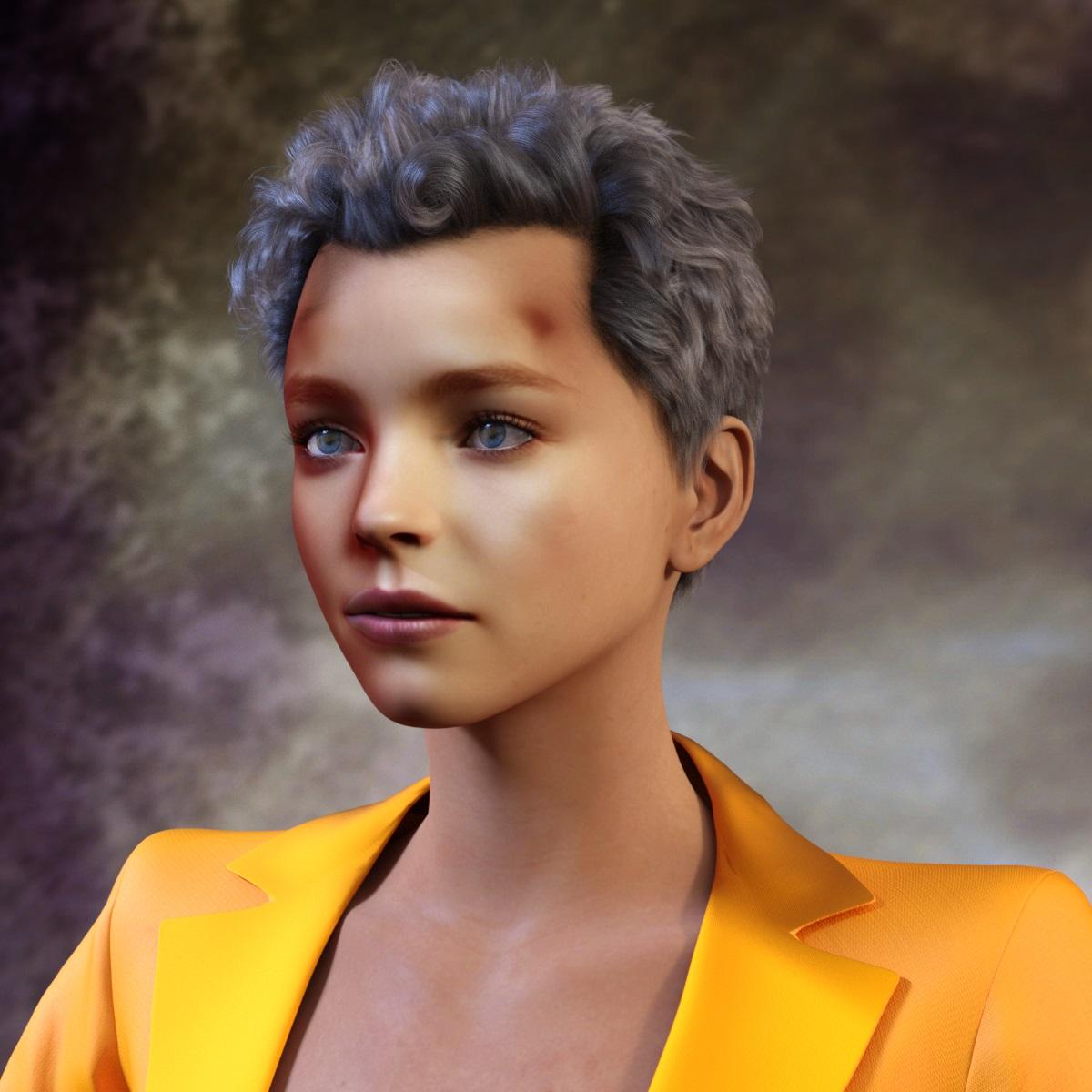
I refer to these as "Face Transfer stains". They come from the shadows that are present on most typical photos and photorealistic images. You also get white/too-bright areas that are from the highlights of the source photo. I spent two years learning various tips, tricks and techniques in Photoshop to improve the source image and the resulting mat file for this use. In recent months, I switched to using FaceGen-generated textures from the same source image that I used for the Face Transfer shape. FaceGen textures also have staining and whitewashing but are almost always better in this regard.

On closer inspection from different angles, the issue on this particular character is actually more the whitewashed face than stains on the side. This image is typical of the last generation of my fully Face Transfer-sourced "instant people," done last spring/summer. (I redid this version just now with an updo so none of the face is hidden.) Most of these were sourced from touched-up source images but I rarely took the time to fix up the textures, hence why I called them "instant people." I could create one of these from a source in about two or three minutes and I used them to make product testing more fun. But they were never good enough in my eyes to use for my "real" characters.
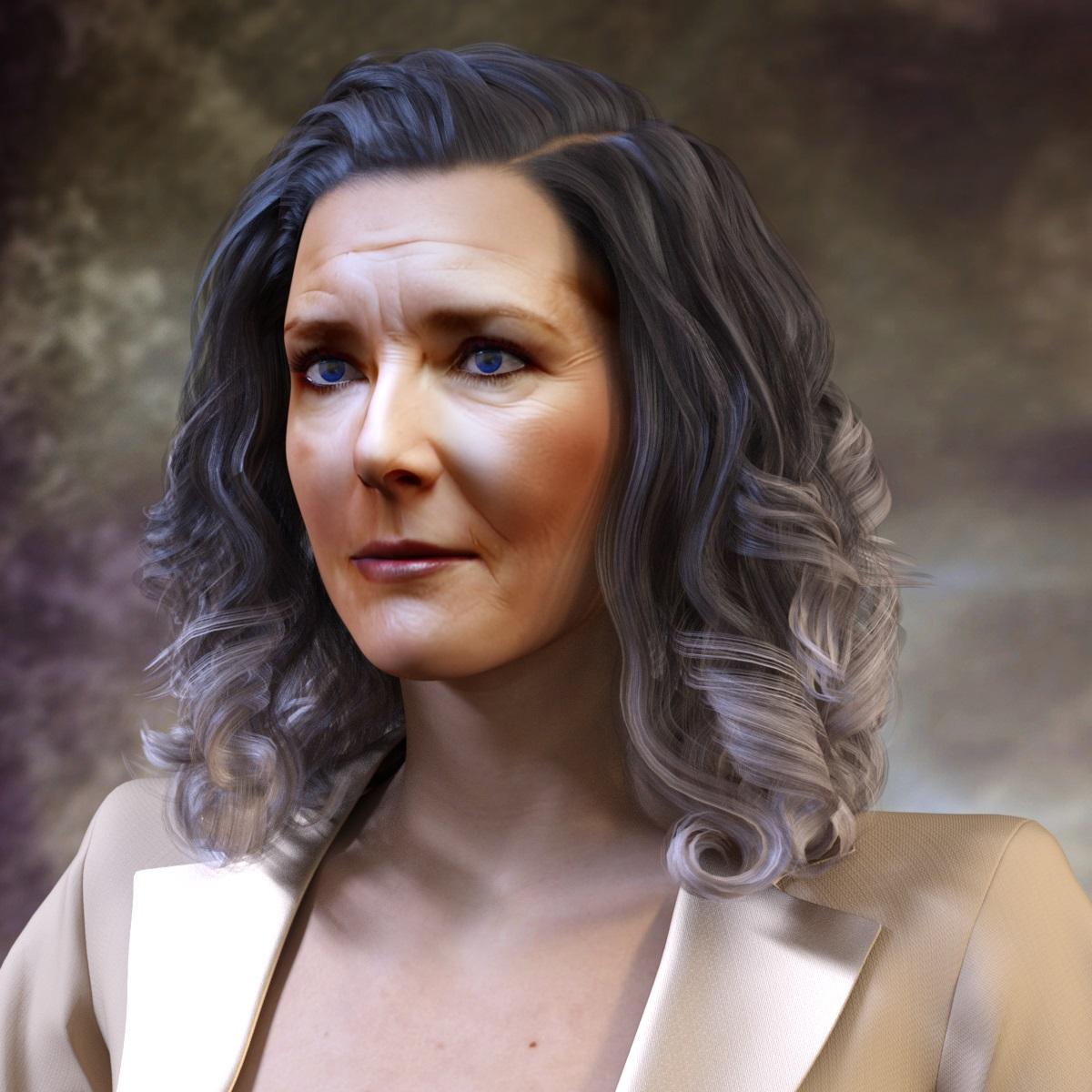
Face Transfer 2No need to wait for FT2, while Face Transfer 1 works so well on Genesis 8 figures.
The improvements are even more visible on the reference photos of older people.
 Face Transfer 2
Basic Overview
Face Transfer 2 (sku::92487)...
- ... utilizes a newer version of a 3rd party library (itSeez3D)
- ... performs better image projection than the previous version
- ... produces higher resolution textures than the previous version
- ... is Genesis 9 centric
- ... does not add or improve support for prior generation figures
- ... does not improve the image projection quality on prior generation figures
- ... does not increase the texture resolution on prior generation figures
- ... for Windows 64-bit
- ... Genesis 9 is the preferred figure if the plugin is present/enabled (when Figure: Base: is "Auto")
- ... Genesis 8 is the preferred figure if the plugin is not present/enabled (when Figure: Base: is "Auto")
- ... for macOS 64-bit (macOS Ventura 13.2 or newer)
- ... is compatible with Apple silicon (e.g., M1, M2, M3) via Rosetta 2
- ... only supports Genesis 9, so the plugin must be present and enabled
- ... extends the Face Transfer pane from the previous version (sku::63529)
- ... if the previous version is not present/enabled, it does not matter if this plugin is - the previous version provides 'core' functionality
- ... will use the selected figure if it is a supported figure on the platform
- ... will watermark previews of projected images unless registered
- ... will remove the watermark during the trial for the first 3 saves
- ... the previous version and this version have separate 3 save trials - the previous one for Genesis 8/8.1, this one for Genesis 9
- ... will not watermark previews or saves if registered
Trials/Registration Breakdown
Breakdown of the expected behavior as it pertains to trials/registration (when Figure: Base: is "Auto") and the Generate button is clicked:
- If Face Transfer (1) is not registered...
- If Face Transfer 2 is not registered...
- If no figure is selected...
- If Face Transfer 2 trial saves remain...
- Load clothed Genesis 9
- Watermarked preview
- Save enabled
- If no Face Transfer 2 trial saves remain...
- Windows
- If no Face Transfer (1) trial saves remain...
- Load clothed Genesis 9
- If Face Transfer (1) trial saves remain...
- Load clothed Genesis 8
- If no Face Transfer (1) trial saves remain...
- macOS
- Load clothed Genesis 9
- Watermarked preview
- Save disabled
- Windows
- If Face Transfer 2 trial saves remain...
- If a Genesis 9 figure is selected...
- If Face Transfer 2 trial saves remain...
- Modify selected Genesis 9
- Watermarked preview
- Save enabled
- If no Face Transfer 2 trial saves remain...
- Modify selected Genesis 9
- Watermarked preview
- Save disabled
- If Face Transfer 2 trial saves remain...
- If a Genesis 8(.1) figure is selected...
- If Face Transfer (1) trial saves remain... (Windows only)
- Modify selected Genesis 8(.1)
- Watermarked preview
- Save enabled
- If no Face Transfer (1) trial saves remain...
- Windows
- Modify selected Genesis 8(.1)
- macOS
- Load clothed Genesis 9
- Watermarked preview
- Save disabled
- Windows
- If Face Transfer (1) trial saves remain... (Windows only)
- If no figure is selected...
- If Face Transfer 2 is registered...
- If no figure is selected...
- Load clothed Genesis 9
- No watermark
- Save enabled
- If a Genesis 9 figure is selected...
- Modify selected Genesis 9
- No watermark
- Save enabled
- If a Genesis 8(.1) figure is selected...
- If Face Transfer (1) trial saves remain... (Windows only)
- Modify selected Genesis 8(.1)
- Watermarked preview
- Save enabled
- If no Face Transfer (1) trial saves remain...
- Windows
- Modify selected Genesis 8(.1)
- macOS
- Load clothed Genesis 9
- Watermarked preview
- Save disabled
- Windows
- If Face Transfer (1) trial saves remain... (Windows only)
- If no figure is selected...
- If Face Transfer 2 is not registered...
- If Face Transfer (1) is registered... (Windows only)
- If Face Transfer 2 is not registered...
- If no figure is selected...
- If Face Transfer 2 trial saves remain...
- Load clothed Genesis 9
- Watermarked preview
- Save enabled
- If no Face Transfer 2 trial saves remain...
- Load clothed Genesis 8
- No watermark
- Save enabled
- If Face Transfer 2 trial saves remain...
- If a Genesis 9 figure is selected...
- If Face Transfer 2 trial saves remain...
- Modify selected Genesis 9
- Watermarked preview
- Save enabled
- If no Face Transfer 2 trial saves remain...
- Modify selected Genesis 9
- Watermarked preview
- Save disabled
- If Face Transfer 2 trial saves remain...
- If a Genesis 8(.1) figure is selected...
- Modify selected Genesis 8(.1)
- No watermark
- Save enabled
- If no figure is selected...
- If Face Transfer 2 is registered...
- If no figure is selected...
- Load clothed Genesis 9
- No watermark
- Save enabled
- If a Genesis 9 figure is selected...
- Modify selected Genesis 9
- No watermark
- Save enabled
- If a Genesis 8(.1) figure is selected...
- Modify selected Genesis 8(.1)
- No watermark
- Save enabled
- If no figure is selected...
- If Face Transfer 2 is not registered...
Support Assets
The Genesis 9 Starter Essentials product has been updated (2023-12-15) to include files used by Face Transfer 2 while performing certain tasks. Not installing the update will result in warning messages that indicate a referenced file cannot be found.
Face Transfer 2It looks like, Face Transfer 1 is also improved.
I have tested it on Genesis 8 - just need to have a better photo,
but the conversion does not need any additional morphs to be usable.
Need to edit somehow texture on the temples.
Diffeomorphic DAZ Importer version 1.6.0 releasedHi,
I tried to import the character as HD mesh with dicktator. Everything works in blender except the shell: the shell doesn't seem to transfer when exported in HD - when you select the body and the graft in daz with the geometry editor the shell itself "disappear" and thus nothing gets ported in blender. Any solution?
Any way to split a morph, like eyeballsHmmm, I don't think it's my morph. I actually revised it to have the lids set to a more slightly relaxed look but I need the blink morphs to cooenside with that so they look right. Right now.... see the screen shot...
Never mind. NOW the eyes are open to the value they should be. Not sure what changed. Perhaps when I slaved the morphs together? It's all very strange. Not complaining but strange!
Now he just needs fur.
Any way to split a morph, like eyeballsRAMWolff said:
OK, figured out why the ERC method wasn't working for the teeth. I moved the teeth and eyes (as well as tear, eyelashes and eyebrow card) from the main figure so I guess ERC didn't "see" them but funnily the eyes were seen so that's kinda strange. The morph works great now but I still need to figure out how to tamper down how much of Fuzzy's eyes from "over opening". I looked all over to see how to limit the blink morph to open only to the 75% range. At 100% range it's just too much. I looked all over in the Property Hierarchy and just couldn't find a way to control that for the morph there but I was sure it's located there....
That's great !
As for limitation, you may try to set Min - Max value in Parameter Settings of the dial(s) or use Attributes Type - ERC [Keyed] to define the keyed values in Property Hierarchy. However, you shouldn't have to do that, as TBH I'm still afraid that there might've been something wrong in the corrective morphs when you made/fix them with Zbrush.
As a tinker, I've ever fixed lots of pairs of eyeballs and eyelids (tiny, huge, real and toons...) for PHM, eJCM, cbs... whatever, I never had to set specific formulas to "control" them "open/close", just made them work in very standard ERC way(s), because all these corrective morphs should be only "delta" to the existing expression property dials. As long as "delta" is correctly made and set up, they'll work with no issue.
Pls DO further check or remake some corrective morphs to test.
Any way to split a morph, like eyeballsOK, figured out why the ERC method wasn't working for the teeth. I moved the teeth and eyes (as well as tear, eyelashes and eyebrow card) from the main figure so I guess ERC didn't "see" them but funnily the eyes were seen so that's kinda strange. The morph works great now but I still need to figure out how to tamper down how much of Fuzzy's eyes from "over opening". I looked all over to see how to limit the blink morph to open only to the 75% range. At 100% range it's just too much. I looked all over in the Property Hierarchy and just couldn't find a way to control that for the morph there but I was sure it's located there....
Transfer Utility - Repositions Shoes IncorrectlyFor a non Genesis Base figure (if it was in your case), set different options in Transfer Utility as attached screenshots. Then you have to further fix the character's body morph on the wearable....
Reminder: Never use a Character to make wearables ! Use Base figure, then it'll be easier to rig and fix distortion with bodymorphs / corrective morphs, etc....
Daz to blenderHello,
Please I really need help coz I am totally desperate.
I have 2 characters in daz studio, and i have animation.
These two characters interact witch each other, and I would like to export this entire scene including animation into blender.
Any idea how to do it?
I am really desperate and i dont know anymore.
If I try to use bridge, it doesnt let me, because I can select only once character, if I select both characters I get error.
If I transfer one model then another, then animations work, but they are totally on wrong spots, and not together...
hair being pulled in at neckTry to: select the hair in Parameters pane, Show Hidden Property, Zero the hidden property of the character's head morph.. Or, just parent the hair to your character's head.
Let's appreciate/discuss today's new releases - ongoing threadConcerning face transfer and ai.
This kind of thing has literally been "ai" ever since, so that's not a distinction that would matter per se. "Generative ai" currently may have such an edge, that people have become faithful enough to jump over there, which might mean a change.
For the quality - apparently "ai" as we know it, including generative, seems to have an easier go on textures, than it has on geometry, at first glance. In fact it only really will be drawing pink elephants (+- , if you train it to reproduce images).
However with given 3D Figures like Genesis 123, even if pretty abstract and flexible, there of course is a chance to train it in such a way, that it could work out pretty well. "It" does not necessarily mean, that you can do it with only one machine learning model and without some preprocessing, e.g. you might have to determine some normalization parameters or similar, or work with some kind of expert system, in order to have something workable. To do it from one photo, you might at present need a relatively terrible lot of training data, to let it distinguish actual geometry. Maybe it needs a multi step process to work, e.g. apply a suggested texture to a geometry to probe and determine overstretched areas, then adjust - to put this idea into an algorithm, you might think of alpha go, which had a model for selecting moves to check (order), and a model to judge the board. This likely isn't too trivial.
So i believe, there will be such technology, without doubt, and there probably pretty much has already been (movies?), but i can't tell where version 2 of the mentioned plugin is or will be.
(E.g. for geometry, you might be interested in training a model, that just tries to adjust some morphs, like muscle morphs, in order to make an animation look more realistic, training on sports videos or a sequence of photos. It's a similar problem, concerning geometry. For getting more realistic movement interpolation between two poses, you could probably do away with a muscle model, which follows some heuristic of how acceleration happens, and perhaps the bigger muscle to move first/faster in place, with a little bit of second-guessing on the coordination part, i.e. not 100% greedy FCFS, but either just smoothly distributed, or distributing timing windows for partial moving. Simplistic tree search could also be used, e.g. if a body part is intended to create the maximum speed, like sometimes in martial arts, or maybe it's meant to be a relaxed move, and so on. Of course you could model it, and let an ai run with some dice throwing, similarly. A useful interface could however allow you to tweak a move towards some aim, without complicating the process of how to train something for all possible tweaking. So what did i just emphasize? A) somehow randomly adjust morphs to match an image from a sports movie, meaning a hell of a complexity to render from different angles and compare, vs. B) have a theoretical model of the body somehow with the route for movement being clear, and we just need to figure out, which part is moving where to at which stage, and what the stages are. So in essence, if the problem was of the A)-kind, machine learning might make sense, because no one will ever figure out all the angles in a simple way, while the B)-kind implies rather tweaking paramters of a given model, with whatever method, could be machine learning, monte carlo algorithm with some heuristic, simplistic two step heuristics and distribution/skipping of paramters. Also depends on the quality you need, and on the distances to cover. Of course B) as an approach, probably has little to do with Face Transfer anymore, so maybe it's a good example for distinction.)
Transfer Utility - Repositions Shoes Incorrectlyyou have to bake transformations before running transfer utiity. Bake = Export the shoes after positioning them, and then reimport the shoes. This way all transforms are at 0.
If you are running transfer utility on non-default figure (in other words if you have any morphs applied), then you need to tick the box for 'reverse source shape from target' or whatever its called in the options dialogue of transfer utility.
hair being pulled in at neckAre they hairs made for the figure? Is there a morph aplied which scales the head?
Diffeomorphic DAZ Importer version 1.6.0 releasedtcgmark said:
I'm having an issue with the tranfer vertex groups feature in the advanced panel. Using blender 4.0 and diffeomorphic 1.7.2.1930. Used to be when i imported HD and base characters, i could transfer vertes groups to the HD from the base with this feature after applying a multires modifier to the HD mesh. now i get a missing attribute error.
AttributeError: 'DAZ_OT_TransferVertexGroups' object has no attribute 'transfermethod'
I don't check this site very often, but I happened to notice this. The bug is fixed in the latest commit.
Transfer Utility - Repositions Shoes Incorrectlyjoliva said:
Hello,
I'm a new user to Daz trying to attach these OBJ boots I made to my Genesis 8.1 Morph for posing and animation. When I try using the transfer utility, it positions the shoes below the feet like in the attached image. Does anyone know what I can do to get them in the right positon?
Thanks!

1. With the default load of G8.1 {no character morphs} - does this footwear "land" exactly where it should be upon import. It "has to."
2. Then run the Transfer Utility and see what happens. Their placement should not be changing. IF it is correct, select the footwear and save it as a figure/prop.
3. Then remove that footwear from the scene, with the target figure selected - load the newly saved footwear. As you gently move the foot about there may be a few corrective morphs to make. There may be a little weight-mapping to be adjusted too. [be very careful to have the footwear selected for this, not the target figure] When done, resave the file to the exact same folders as before [so the new will overwrite the old].
4. Then remove that footwear from the scene, with the target figure selected - loaded the new footwear. Select the character and dial in the character morph. The footwear should still fit however some morphs, esp. those from extreme character morphs, may require a little fitting morph.
5. Sometimes an alternative method works -- hide the foot or the toes.
Transfer Utility - Repositions Shoes IncorrectlyHello,
I'm a new user to Daz trying to attach these OBJ boots I made to my Genesis 8.1 Morph for posing and animation. When I try using the transfer utility, it positions the shoes below the feet like in the attached image. Does anyone know what I can do to get them in the right positon?
Thanks!
Incline bench front leg riggingRichard Haseltine, @crosswind, thank-you for helping me out and giving me ideas. I appreciate your help.
I went the morph route, and it pretty much gave me what I wanted with the adjustable front leg, the linear motion in-and-out along the top shaft of the leg, and the dial.
-bDaz 3D is part of

Connect
DAZ Productions, Inc.
7533 S Center View Ct #4664
West Jordan, UT 84084Licensing Agreement | Terms of Service | Privacy Policy | EULA
© 2026 Daz Productions Inc. All Rights Reserved.