-
Review System
Daz 3d has never had a review system and I for one hope they never get one. I have said this in other threads on this subject, and I will say it again here. Do you know that people get paid for writing reviews? People say how good the Amazon review system is, for example, but I got totally fed up with the amount of emails I was getting from sellers at Amazon telling me that they had found my email on an Amazon best reviewers list, and would I like free products in exchange for writing reviews. I won't bother telliong you how I dealt with that but I certainly no longer get those sort of emails any more and Amazon seemed to have cleaned there act up a bit.
I do actually accept free gifts from my main internet Grocery supplier in exchange for reviews, but I only accept gifts that I will use, and I do give fair reviews, rather than give "nice" reviews just because I got a free product to review.
Well...it is illegal to post reviews without disclosing you received the product for free. That's all that needs to be said about that.
Daz is a niche software, which is in a market that is niche itself. A niche inside a niche. There are only so many people around, both PAs and customers. It is crazy to make any comparison between a niche site like Daz and the world's largest retailer. Amazon is a large target. Literally the largest target, so of course people selling on Amazon might be tempted to take any shortcut possible.
Of course there are going to be bad reviews from people who don't know what they are doing. Most logically thinking people reading reviews are going to spot that very quickly. And besides, the products that are legit good are going to get more positive than negative reviews.
But apparently, the answer is we have zero faith in the Daz customer base. That is what this comes down to. Apparently Daz customers are just too stupid for a review system. Because there is a chance that somebody might leave a bad review that could be unwarranted, we therefore must abandon all hope of using a review system. Logic! Somehow this terrible fate has not stopped many other stores from having a review system. Strange.
That is a real shame.
Novica's thread is nice, but she doesn't buy every product in the store, and some reviews can still leave questions.
Lets take a moment to remember that the Daz forum search is terrible. If you expect customers to use the forums you must assume that every user is able to search them with alternative means. 100%.
ATI's add on is fantastic, but only a scant few use it. Many people don't even know it exists. And there are people who might be using browsers that don't support it. Also, ATI's add on doesn't work on mobile, where a good many people are these days.
New users jumping into this are going to be clueless. Daz has changed since 99% of you started using it. There is a lot more to this app than before. While many of you got to learn these new features as they were released (like dforce, then dforce hair, or Iray Dual Lobe), brand new users have to figure ALL of this stuff out. There is a lot of stuff on their plate, and they are expected to know what is what. Oh, and they are expected to know the difference between Victoria 4 and Genesis 8, or the previous 7 generations of Genesis. Oh wait, there is no Genesis 5-7. But there is Victoria 5-7? What is this? You are telling me that Genesis 8 can't just wear Victoria 5 shoes??? You are telling me these light I bought are not actually for Iray? I thought Iray was Daz? <.<
Even though Daz itself is somewhat easy to use, there is still a long learning curve. This learning curve isn't just for the software, it is for the store too! Customers have to learn how to use this store as well as the software, because this store is...lets just say this store is "unique".
So the answer is to just throw them at the wolves and hope they don't get burned out (or eaten). IMO, this is what is holding you back from becoming more than just a little niche. New users can be very easily intimidated by not just the software, but the store and the forums itself. I really wonder how many new users quit Daz Studio because they become frustrated trying to learn what to do. And again, not just the software, but this crazy store. A new user buying a product that they cannot figure out is not good for anybody.
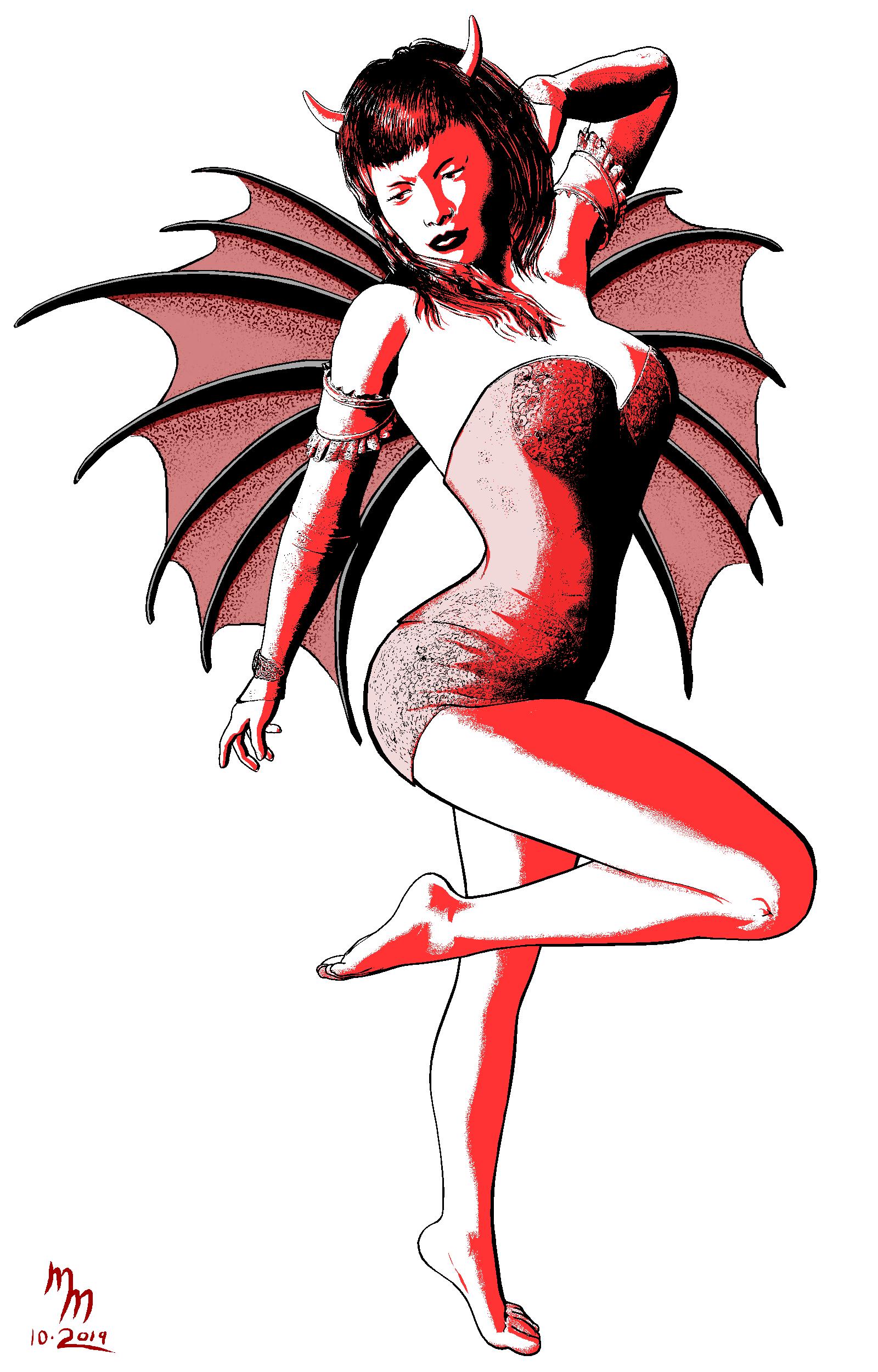
More Non-photorealisitic Renders (NPR II)Here's the update of my pin-up. I wound up playing around with the colors (a lot) and finally settled on this combo of red and a "dusty rose" color. Significant fixes to the hair (I also edited out her earring from the earlier one because I didn't think you could "read it" through all the hair). As before, this is Victoria 4 rendered in Poser Pro 11 and cleaned-up in Clip Studio Paint. Honestly, I spent WAY too long on this considering it's just a character sketch. I've got to add her to the illustration I'm working on and try to get it done in time.
If anyone is interested in contrasting this to my earlier draft, I'd love to hear your thoughts.
 [Released] RSSY Clothing Converter from Victoria 4 to Genesis 8 Female [Commercial]
HI all,
Just bought this product and i want to try and convert this one: https://www.daz3d.com/trinity-leather-jacket
But when i wanna load files / whole directory from people/victoria4/trinity...... it doesnt find or load any files.
Any idea on what wrong?
Sounds like a metadata problem. When you try to add files, what does the log say?
You can get around this problem by UNCHECKING "Check Content Type" and then using "Add Files" to add the files you want to convert.
That's an Optitex dynamic product - see my comments on Page 10 of this thread: https://www.daz3d.com/forums/discussion/304091/released-rssy-clothing-converter-from-victoria-4-to-genesis-8-female-commercial/p10
Celebrity Look-a-Likes for 3D figures Part 2https://www.daz3d.com/gallery/#images/867631/
Any marilyn monroe models please?
Not exactly a likeness but definitely inspired by her I think: https://www.daz3d.com/marion-for-victoria-8
Mod edited to correct the quote
Celebrity Look-a-Likes for 3D figures Part 2https://www.daz3d.com/gallery/#images/867631/
"marilyn monroe models"
The only one that I am aware of is SAV Marina for G2F from Rendo. Nothing more recent.
There are three listed on my Celebrity Drectory, but the other two are for Victoria 4, and one of those is a freebie.
http://www.beammeup.net/blog/3d-celebrities/poser-celebrities.php?keywords=marilyn+monroe&active=1
Mod Edited to correct the quote
Daz Studio 4.12 Pro, General Release! (*UPDATED*)Had to rollback to 4.10 as a few older Poser models seem to crash 4.12 upon trying to load them. In particular, the Rooster for Poser available at Rendo and a couple freebie outfits for Victoria 4. All the items that crashed 4.12 load just fine in 4.10.
[Released] RSSY Hair Converter from Victoria 4 to Genesis 8 Female [Commercial]I can't read the whole thread to see if my questions have already been answered. Too hard on my eyes if I try.
I am considering buy this, since it is on sale right now, and wondered if this works on hair fits. There are hairs that are made for the opposite sex or a different version model and over time there have been many fits for V4 (also A4 and M4 etc) and wondered about these fits and this converter? Also I saw a post where someone used it on V3 hairs and it worked...is this correct?
It converts the older Generation 4 Victoria Hairs and coverts them to fit Genesis8 Females ,and puts them in your Smart Content ,you will have to manually convert the texture files though ,it's a great product
Power Pose QuestionNever been a huge Power Pose user, but getting into it a bit more. Recently upgraded to Studio 4.11.0.383 Pro X64. My Power Pose tab does not look like the power pose tab I've seen in some YouTube videos. Especially the head--it's missing all the expression controls--it still looks like the old PP tab. I'm assuming there may be PowerPose templates that I have not downloaded at some point (since I never used PP before, I never cared). Where do I get just the PowerPose templates for Victoria 8 (I think those may be what I am missing)?
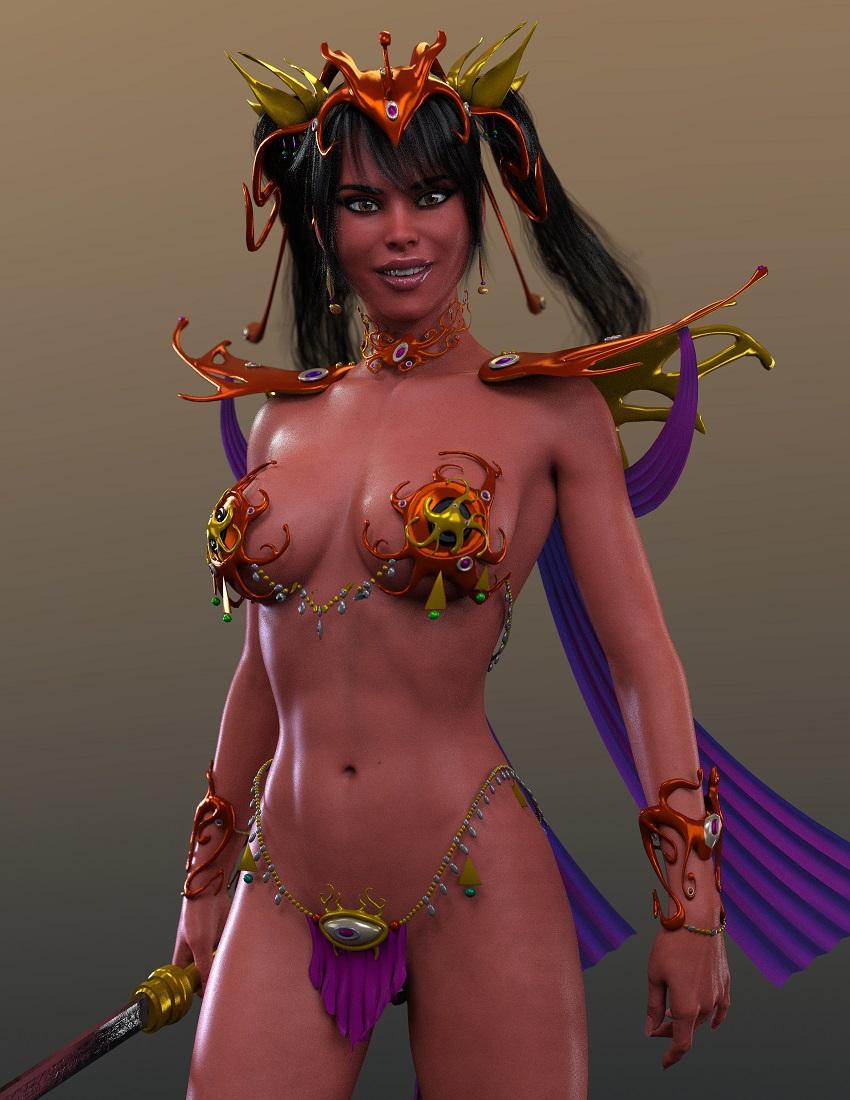
MimicMolly's Renders & WIPsA while back, someone was asking about the Martian Princess Base by Gareee. (And the Accessory Set.) I did this render with the base autofitted to G8F and the accessories parented because they got warped. I had to use a fabric shader with my own colors because I did not like how the original materials looked. As for the character, this is 100% Pretty3D's Pretty Base character, with the Kanade Hair, which actually looks like it's part of the outfit. I used Tara 2 HD's demon/evil skin with adjustments.
 ZDG random Daz Studio discoveries and questions.
despite some stuff in the works, I felt it was important to at least let others know that if you intend to use Matilda hair outside of Iray, don't, don't even bother getting it. It is a flaming landfill fire at best outside of Iray, and I have no clue if it renders at all on an 8GB graphics card or less with Iray (the scene without the hair is only 2.7GB in size, and 12GB with).
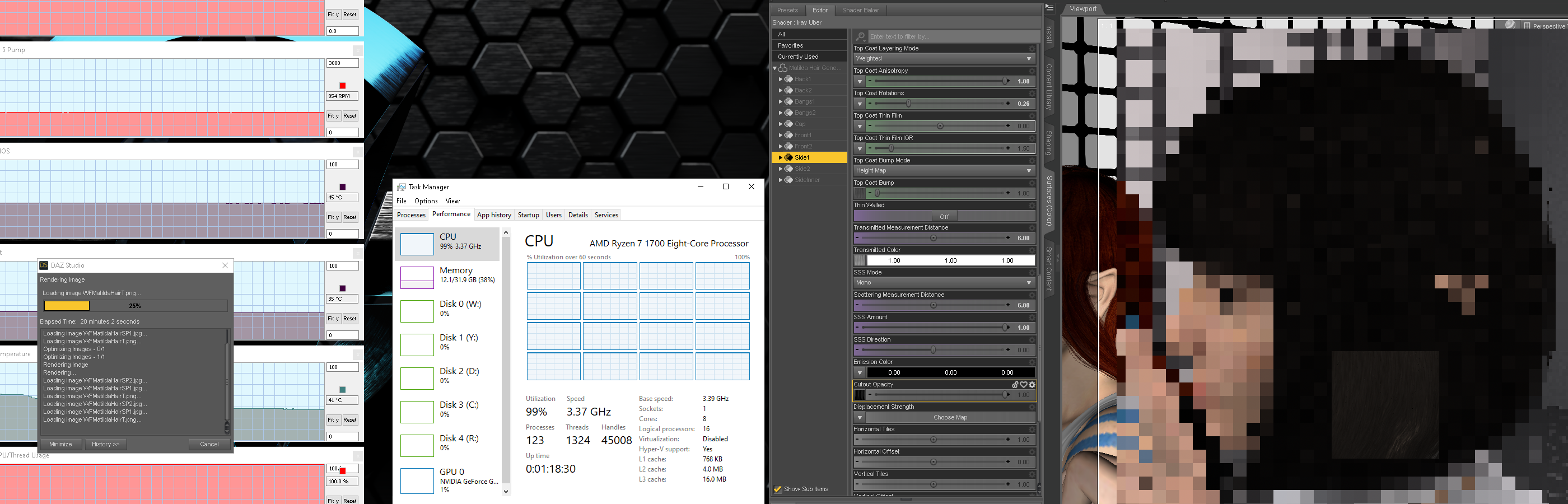
The only way to not have the hair crash Daz Studio that I have found so far is to remove ALL of the opacity maps and convert what's left on the hair to the "daz default shader". that is about as bad as it gets. To add injury to insult, I can't even offer an error, crash report, or anything, because, after about 20 minutes of the render showing atari pixels extremely slowly, daz studio just vanishes, no crash screen, no error window, nothing, just poof gone (back to empty desktop). That in combination with the stupendous wasteful excessive mesh layers in each surface zone of the hair raising the polycount to the point fiber mesh would be cheaper on memory usage, it just isn't worth the hassle.
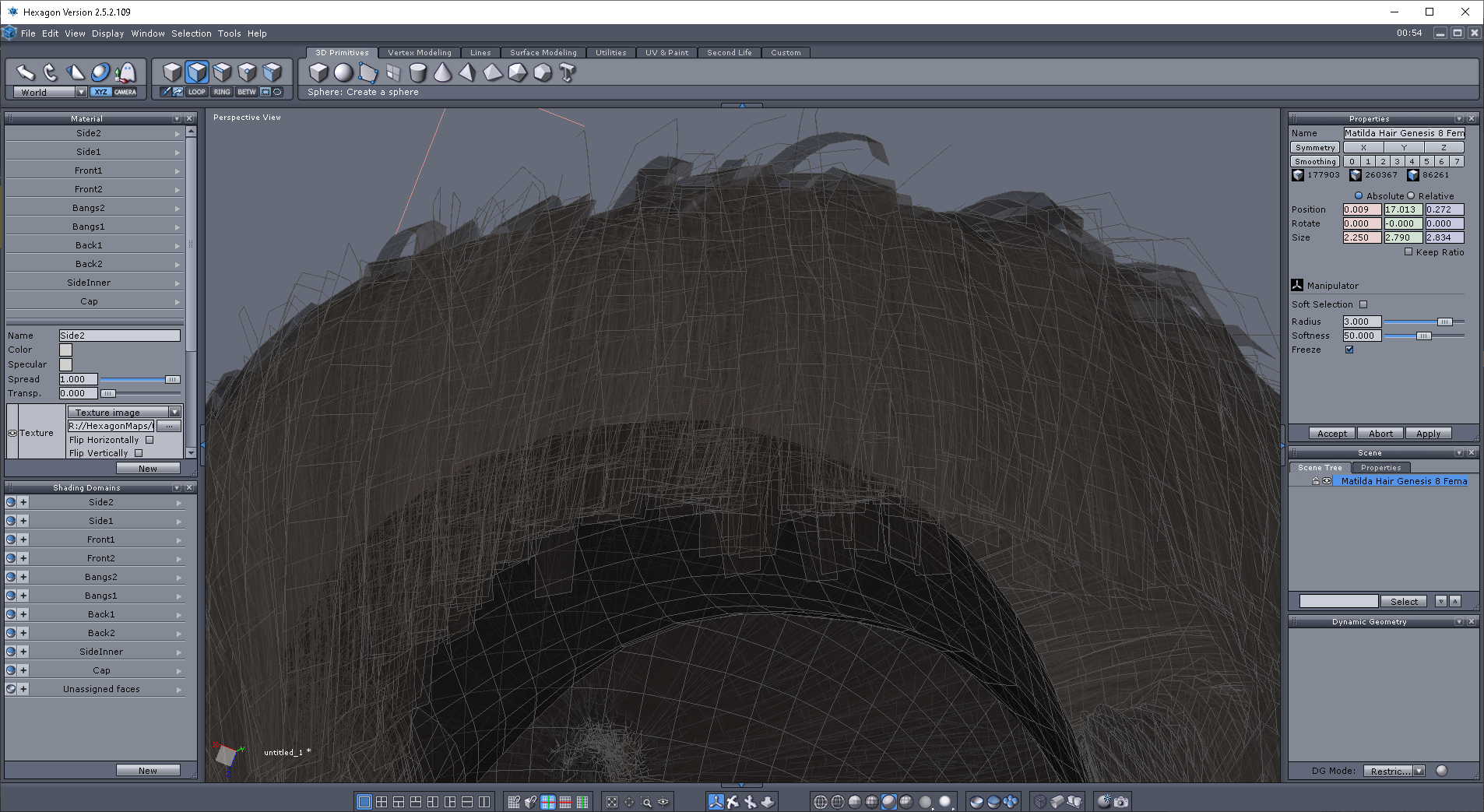
after a tad more digging, I'm not seeing any 5+ sided quads that will cause DS to just insta-disappear, so it isn't that. Looking at this, (
 damn that's a lot of mesh no one will ever see. there is a max number of ray Reflections/Refractions the render engine will bother doing for each ray before giving up to prevent an "infinite loop") ...
I can see what the PA was trying to do, it's just a tad pointless for a bob style that 4 layers plus a skullcap are all that's needed to look good. maybe a 5th for the outer most strays. a good example is Phoebe hair. As for Matilda hair crashing DS, I don't see anything 'technically' wrong with the mesh in Hexagon, so maybe this is just exceding some internal thing in DS that flakes out after something exceeds some limit of something. I do have doubts about how much of this mesh, is actually doing anything for renders.
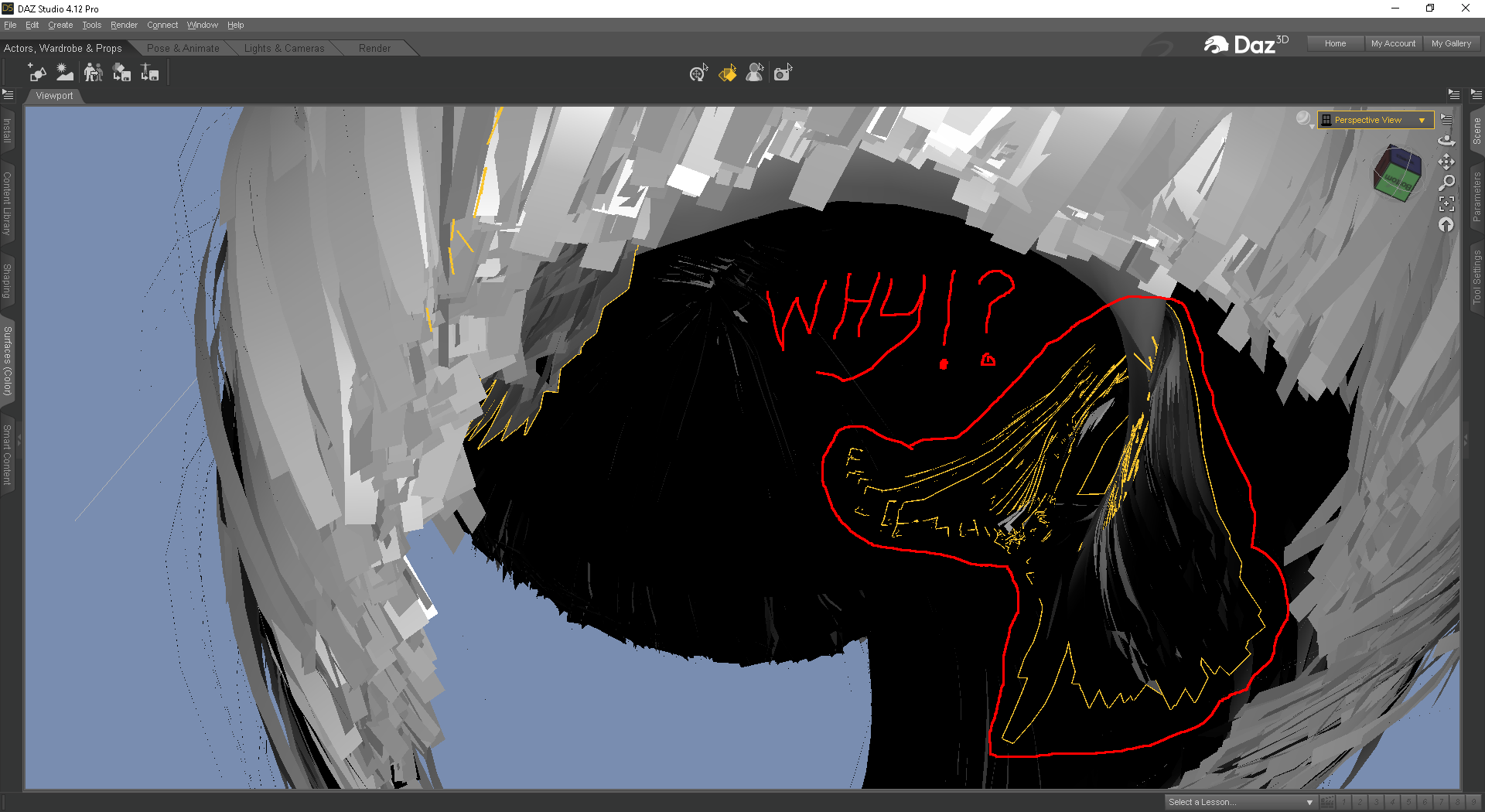
Much of this is beyond pointless, it's like an exercise in wasting GPU memory for absurd amounts of mesh that will never be seen in a render. I know the practice is shunned in some circles, however, after seeing this, for once, I can totally understand how 'Muntzing' became a thing and how it was actually a good thing in some circumstances, like this hair.

What if I try making my own opacity maps that are not practical not their maps, oh, nope, can't even get a UV map for it. (what the hell is a non-manifold edge I asked after seeing that, lol)

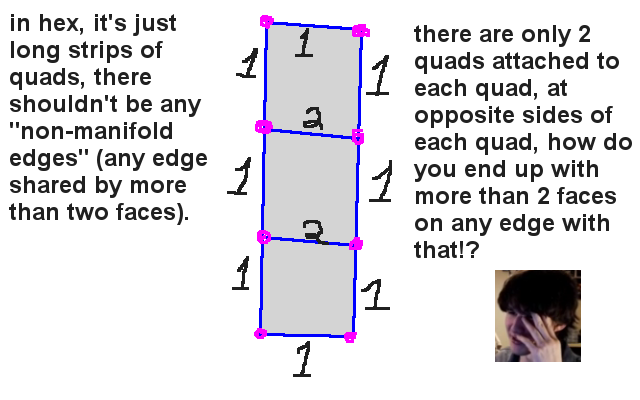
The combo of the 2 errors (non-manifold edges, and Too many shells), hints that maybe there are multiple duplicates of faces on each quad-fiber, maybe a face for each side of the quad-fiber or duplicates of the entire mesh occupying the same XYZ space. I can't fix that not knowing and lacking the experience in how to re-rig and save a wearable asset, and the PC 'only' has 32GB of memory. ok, done, moving on, Matilda hair is a flaming landfill fire. At least Headus kicked an error code, unlike DS, lol. There are plenty of good geometry hair examples that DON'T crash programs, for example, to name a few.
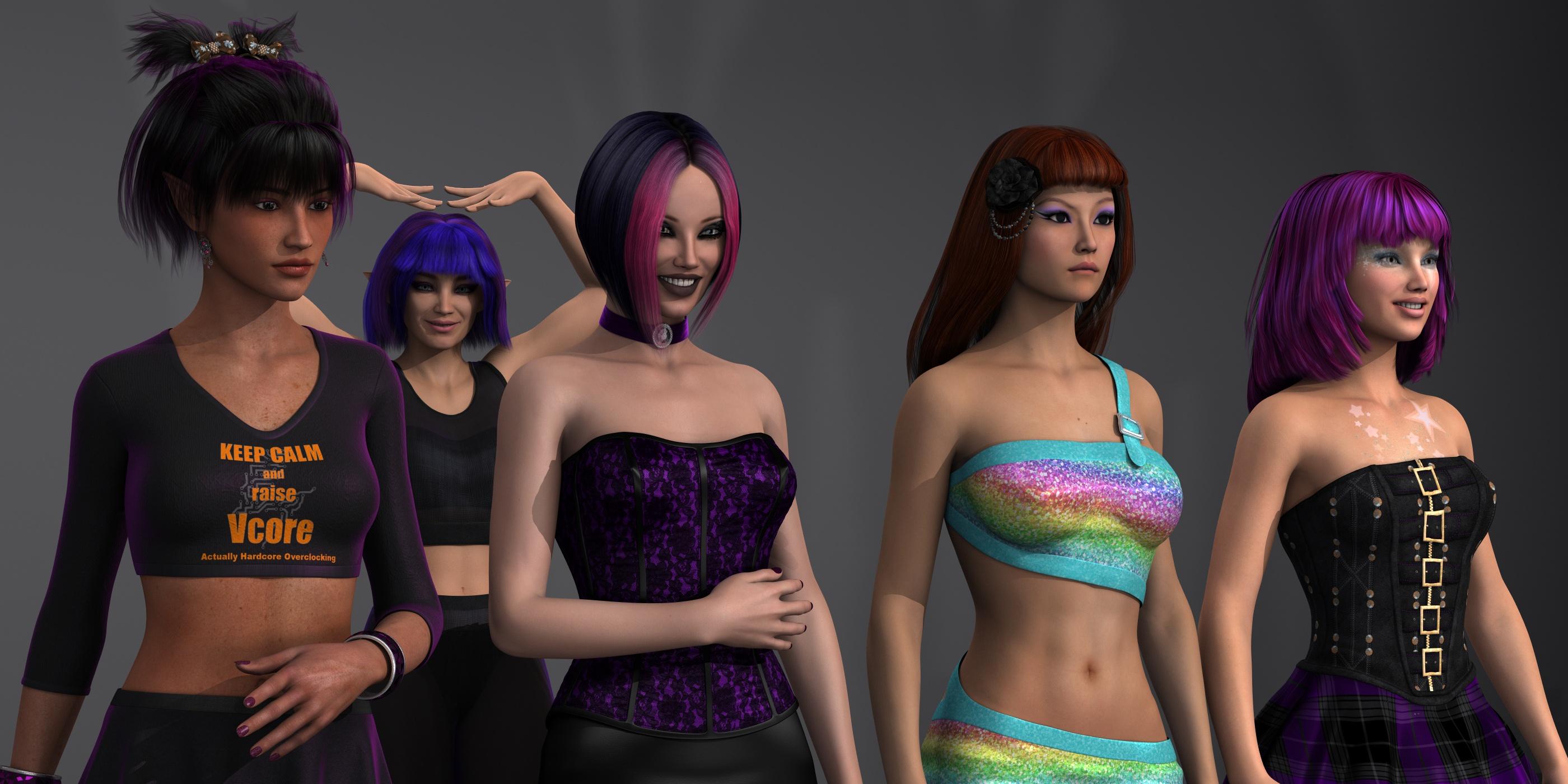
Left to right. gen6 Filippa hair on FW Eve (costume ZDG trance settings, AKA purple velvet and gloss), gen6 Phoebe hair on Phoebe (using the Vibrant color set for Phoebe hair), gen6 Wanda Hair (yes, goth black flower mats included) on CS (CJ now) Yumi, gen6 Janna hair on RS (RJ now) Clair, and in the background, gen6 Lala hair on gen8 Rs (RJ now) Salem.
I have thought about this for a few days now, and I have decided I am removing this from my computer. It isn't worth my time trying to figure out what problems with this hair is crashing DS. I originally set out to get a simple UV map to use to make my own opacity map to try to solve the render issues. however the rathole of issues I discover just trying to get a UV map revealed the problems are far worse than bad opacity maps. And to be clear, this is nothing against the PA, I was a n00b at one time and still am on so many aspects of 3D, it's just that, "that hair" is a hot steaming pile of mistakes and errors. I want it out of my life, and I am moving on.
Carrara Challenge #49 - THE FORBIDDEN ZONE WIP (sponsored by DAZ :) Entries closedSuper renders. Love the liquid top to the copy machine.
Here is a render of another forbidden zone, the classic "lover's lane." But what was forbidden? A young lady's desire? Her date's advances? Parking in the lane itself? This is the raw render. I also rendered out various passes. And, I can always drop this render back in Carrara's scene tab and apply some GMIC. I'm sure you think that this is Vicky in a Prom Dress with a Date. Well, this is Stephanie 6, not Victoria. Like to mix it up. In this case, mixing Stephanie 5 curvy with Stephanie 6.
 Teen Raven thoughts...
my image before showed Summer with Raven dialed out to 0 as well. She was definitely made to enhance Raven.Did we need a Summer (minus Raven) image?
Here's a quick one with Raven dialed out.
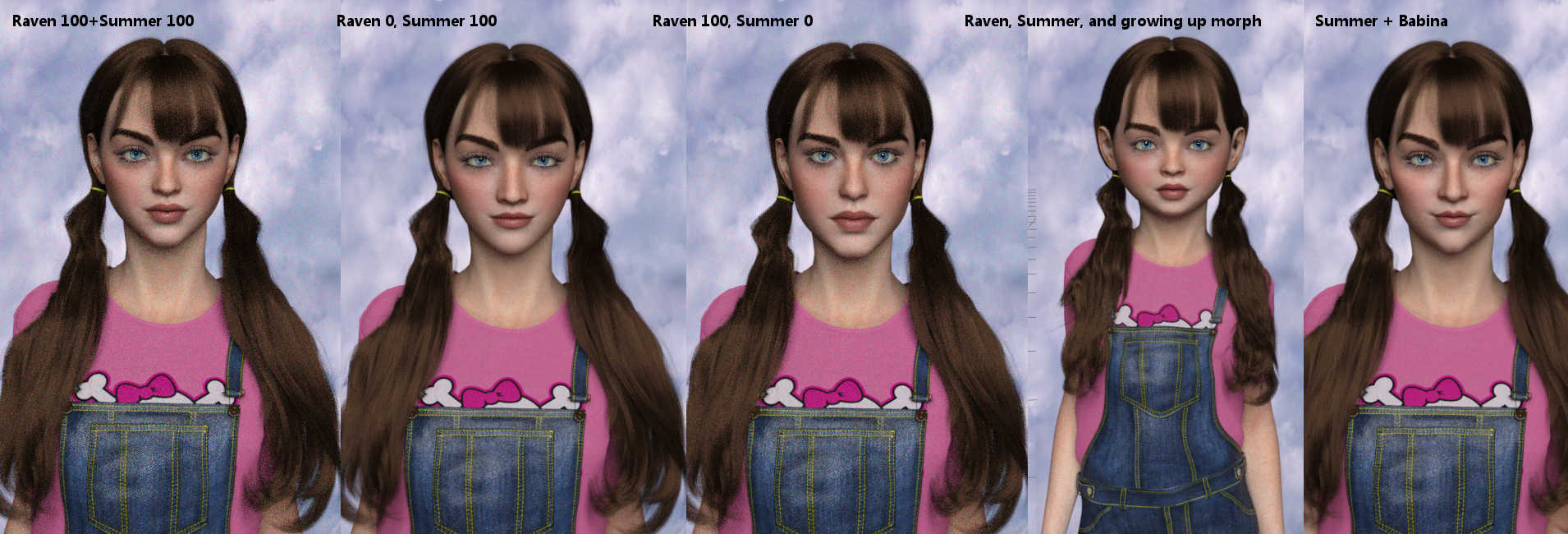
Summer is made with 100 % percent Raven's head dialed in, not 50%- because I love Raven's head shape. :)
It seems a lot of discussion around her is more or less about terminology?
In response to the "at least she doesn't have 'slutty' clothes, I try not to use that term because it carries the connotation that revealing clothing is somehow bad and that people who wear such are bad- and I can't wait for the day when people aren't judged for the curves of their body and the clothes (or lack of) that they can choose to comfortably wear or not wear. Growing up I had to wear skirts and dresses because "proper" girls did so and only 'bad girls' wore pants and makeup. Ug. Of course, my last job REQUIRED makeup for ladies.... times change. do they ever. LOL.
Anyway, regardless of the "teen" terminology or not, I do think she looks younger, shape wise, than say, Victoria or Eva or a lot of others. I think names are simply inspirational, like "this is what she COULD be per our vision while making her." A starting point. And if she looks 40 to some of you... well, I'm just going to say that if I look that bright-eyed and cute and a bit punky when I hit my 40s (nearer than I'd like!) I will be absolutely THRILLED. :P Bring on the age-defying Daz character dials, stat! I need some elixer of youth. I could use a good bit of Raven dialed in... (don't I wish!!!!)I was curious about 0% Raven and 100% Sunny, because I don't want to buy the Raven figure base. It doesn't appeal to me at all, and I don't want miss out on Sunny because of it.
Sunny at 0% is a slightly more youthful character and enhances Raven that's a given. The plus for Sunny: she has great skin, makeup and nails plus a no makeup option. Even though I can try to spin a few dials with base G8F, it won't be Sunny, but she's still a great character.lost contentVictoria 4 itself would be in Poser Formats, in the folder isntalled to the Figures>Daz People (and Poser>Daz' Victoria 4 for the poses, morph injections, and materials)
"Duplicate Formulas Found" is KILLING me!And here's a sample of what happens when I load in any other Genesis 8 female figure (like Victoria 8). By the way this is still coming up even after I uninstalled the "VYK - Sad Sue" product via DIM.
2019-10-04 08:37:57.090 WARNING: ..\..\..\..\..\src\sdksource\fileinput\dzassetdaz.cpp(5995): Duplicate formula found linking xOrigin & Mouth Width Alt in /data/DAZ 3D/Genesis 8/Female/Morphs/vyktohria/VYK_Sad Sue for Genesis 3 Female/Mouth Width Alt.dsf.
2019-10-04 08:37:57.090 WARNING: ..\..\..\..\..\src\sdksource\fileinput\dzassetdaz.cpp(5996): owner: Genesis8Female
2019-10-04 08:37:57.091 WARNING: ..\..\..\..\..\src\sdksource\fileinput\dzassetdaz.cpp(5997): output: lNasolabialLower:/data/DAZ%203D/Genesis%208/Female/Genesis8Female.dsf#lNasolabialLower?center_point/x
2019-10-04 08:37:57.097 WARNING: ..\..\..\..\..\src\sdksource\fileinput\dzassetdaz.cpp(5998): input: Genesis8Female:/data/DAZ%203D/Genesis%208/Female/Morphs/vyktohria/VYK_Sad%20Sue%20for%20Genesis%203%20Female/Mouth%20Width%20Alt.dsf#Mouth%20Width%20Alt?value
2019-10-04 08:37:57.145 WARNING: ..\..\..\..\..\src\sdksource\fileinput\dzassetdaz.cpp(5995): Duplicate formula found linking yOrigin & Mouth Width Alt in /data/DAZ 3D/Genesis 8/Female/Morphs/vyktohria/VYK_Sad Sue for Genesis 3 Female/Mouth Width Alt.dsf.
2019-10-04 08:37:57.151 WARNING: ..\..\..\..\..\src\sdksource\fileinput\dzassetdaz.cpp(5996): owner: Genesis8Female
2019-10-04 08:37:57.151 WARNING: ..\..\..\..\..\src\sdksource\fileinput\dzassetdaz.cpp(5997): output: lNasolabialLower:/data/DAZ%203D/Genesis%208/Female/Genesis8Female.dsf#lNasolabialLower?center_point/y
2019-10-04 08:37:57.151 WARNING: ..\..\..\..\..\src\sdksource\fileinput\dzassetdaz.cpp(5998): input: Genesis8Female:/data/DAZ%203D/Genesis%208/Female/Morphs/vyktohria/VYK_Sad%20Sue%20for%20Genesis%203%20Female/Mouth%20Width%20Alt.dsf#Mouth%20Width%20Alt?value
2019-10-04 08:37:57.206 WARNING: ..\..\..\..\..\src\sdksource\fileinput\dzassetdaz.cpp(5995): Duplicate formula found linking zOrigin & Mouth Width Alt in /data/DAZ 3D/Genesis 8/Female/Morphs/vyktohria/VYK_Sad Sue for Genesis 3 Female/Mouth Width Alt.dsf.
2019-10-04 08:37:57.206 WARNING: ..\..\..\..\..\src\sdksource\fileinput\dzassetdaz.cpp(5996): owner: Genesis8Female
2019-10-04 08:37:57.206 WARNING: ..\..\..\..\..\src\sdksource\fileinput\dzassetdaz.cpp(5997): output: lNasolabialLower:/data/DAZ%203D/Genesis%208/Female/Genesis8Female.dsf#lNasolabialLower?center_point/z
2019-10-04 08:37:57.212 WARNING: ..\..\..\..\..\src\sdksource\fileinput\dzassetdaz.cpp(5998): input: Genesis8Female:/data/DAZ%203D/Genesis%208/Female/Morphs/vyktohria/VYK_Sad%20Sue%20for%20Genesis%203%20Female/Mouth%20Width%20Alt.dsf#Mouth%20Width%20Alt?value
2019-10-04 08:37:57.260 WARNING: ..\..\..\..\..\src\sdksource\fileinput\dzassetdaz.cpp(5995): Duplicate formula found linking xEnd & Mouth Width Alt in /data/DAZ 3D/Genesis 8/Female/Morphs/vyktohria/VYK_Sad Sue for Genesis 3 Female/Mouth Width Alt.dsf.
2019-10-04 08:37:57.267 WARNING: ..\..\..\..\..\src\sdksource\fileinput\dzassetdaz.cpp(5996): owner: Genesis8Female
2019-10-04 08:37:57.267 WARNING: ..\..\..\..\..\src\sdksource\fileinput\dzassetdaz.cpp(5997): output: lNasolabialLower:/data/DAZ%203D/Genesis%208/Female/Genesis8Female.dsf#lNasolabialLower?end_point/x
2019-10-04 08:37:57.267 WARNING: ..\..\..\..\..\src\sdksource\fileinput\dzassetdaz.cpp(5998): input: Genesis8Female:/data/DAZ%203D/Genesis%208/Female/Morphs/vyktohria/VYK_Sad%20Sue%20for%20Genesis%203%20Female/Mouth%20Width%20Alt.dsf#Mouth%20Width%20Alt?value
2019-10-04 08:37:57.321 WARNING: ..\..\..\..\..\src\sdksource\fileinput\dzassetdaz.cpp(5995): Duplicate formula found linking yEnd & Mouth Width Alt in /data/DAZ 3D/Genesis 8/Female/Morphs/vyktohria/VYK_Sad Sue for Genesis 3 Female/Mouth Width Alt.dsf.
2019-10-04 08:37:57.321 WARNING: ..\..\..\..\..\src\sdksource\fileinput\dzassetdaz.cpp(5996): owner: Genesis8Female
2019-10-04 08:37:57.321 WARNING: ..\..\..\..\..\src\sdksource\fileinput\dzassetdaz.cpp(5997): output: lNasolabialLower:/data/DAZ%203D/Genesis%208/Female/Genesis8Female.dsf#lNasolabialLower?end_point/y
2019-10-04 08:37:57.327 WARNING: ..\..\..\..\..\src\sdksource\fileinput\dzassetdaz.cpp(5998): input: Genesis8Female:/data/DAZ%203D/Genesis%208/Female/Morphs/vyktohria/VYK_Sad%20Sue%20for%20Genesis%203%20Female/Mouth%20Width%20Alt.dsf#Mouth%20Width%20Alt?value
2019-10-04 08:37:57.376 WARNING: ..\..\..\..\..\src\sdksource\fileinput\dzassetdaz.cpp(5995): Duplicate formula found linking zEnd & Mouth Width Alt in /data/DAZ 3D/Genesis 8/Female/Morphs/vyktohria/VYK_Sad Sue for Genesis 3 Female/Mouth Width Alt.dsf.
2019-10-04 08:37:57.383 WARNING: ..\..\..\..\..\src\sdksource\fileinput\dzassetdaz.cpp(5996): owner: Genesis8Female
2019-10-04 08:37:57.383 WARNING: ..\..\..\..\..\src\sdksource\fileinput\dzassetdaz.cpp(5997): output: lNasolabialLower:/data/DAZ%203D/Genesis%208/Female/Genesis8Female.dsf#lNasolabialLower?end_point/z
2019-10-04 08:37:57.383 WARNING: ..\..\..\..\..\src\sdksource\fileinput\dzassetdaz.cpp(5998): input: Genesis8Female:/data/DAZ%203D/Genesis%208/Female/Morphs/vyktohria/VYK_Sad%20Sue%20for%20Genesis%203%20Female/Mouth%20Width%20Alt.dsf#Mouth%20Width%20Alt?valuelost contentThat helped, I think I needed to look in categories. in daz studio formats something is still screwy. I don't have Victoria 4 and Victoria 8doesn't even have a folder.
Genesis 9 delayed until at least 2020. Will you be buying it?if you want to realase Genesis 9 make her morphs built in with her base figure , There is no need to make morph separate files zip .
Who buy the genesis 9 without her Morphs .
nobody, that's why the bases are free
but I honestly think Victoria and Micheal pro should include the main morph packages instead of the other bundled crap they do

most only buy them for the anatomical elements
barely anyone buys them for the usually hideous outfits and silly poses that get tossed in
Teen Raven thoughts...
my image before showed Summer with Raven dialed out to 0 as well. She was definitely made to enhance Raven.Did we need a Summer (minus Raven) image?
Here's a quick one with Raven dialed out.
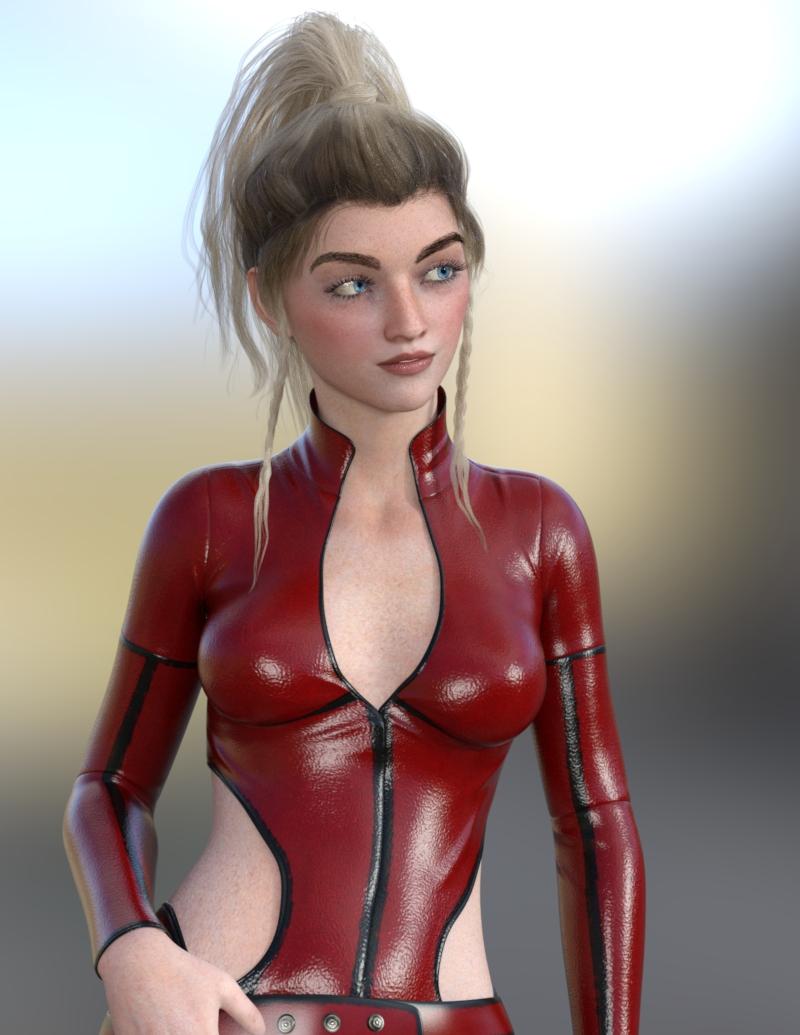
Summer is made with 100 % percent Raven's head dialed in, not 50%- because I love Raven's head shape. :)
It seems a lot of discussion around her is more or less about terminology?
In response to the "at least she doesn't have 'slutty' clothes, I try not to use that term because it carries the connotation that revealing clothing is somehow bad and that people who wear such are bad- and I can't wait for the day when people aren't judged for the curves of their body and the clothes (or lack of) that they can choose to comfortably wear or not wear. Growing up I had to wear skirts and dresses because "proper" girls did so and only 'bad girls' wore pants and makeup. Ug. Of course, my last job REQUIRED makeup for ladies.... times change. do they ever. LOL.
Anyway, regardless of the "teen" terminology or not, I do think she looks younger, shape wise, than say, Victoria or Eva or a lot of others. I think names are simply inspirational, like "this is what she COULD be per our vision while making her." A starting point. And if she looks 40 to some of you... well, I'm just going to say that if I look that bright-eyed and cute and a bit punky when I hit my 40s (nearer than I'd like!) I will be absolutely THRILLED. :P Bring on the age-defying Daz character dials, stat! I need some elixer of youth. I could use a good bit of Raven dialed in... (don't I wish!!!!)Teen Raven thoughts...I think Teen Raven and the others in this bundle are very pretty. I like that these new characters, adult or teen, have stopped looking all like slight variations of the 29 year old super model Victoria look or for teens, 10 - 14 year old children like Teen Josie 8. The look most people are calling all-encompassing teen is pre-teen to early teen. Yes, early teen is teen too but so is mid to late teen. Teen Raven looks like an average 15 - 29 year old female person, well if you exclude they are thinner and look taller (she's 5'6" so maybe it's the thinness then average look making an optical illusion) than average female 15 - 29 in the USA.
They remind me of the teen singer genre when I was at university in the mid-to-late 80s & early 90s like Debby Gibson (17 with 1st big hit) & Tiffany (16 with 1st big hit) for example.
What hair used on Analia product page images?Hi. What hair is used on Analia product page images?
DAZ women are too tallGenesis 8 Female by height :
- Mrs Chow 8 - 5' 0" (152.7 cm)
- Karyssa 8 - 5' 2" (158 cm)
- Mika 8 - 5' 3.5" (161.29 cm)
- Teen Jane 8 - 5' 4" (162.7 cm)
- Mei Lin 8 - 5' 4" (163 cm)
- Teen Josie 8 - 5' 5" (165 cm)
- Gabriela 8 - 5' 5" (165.2 cm)
- Sakura 8 - 5' 5" (166 cm)
- Teen Raven 8 - 5' 6" (167.8 cm)
- Stephanie 8 - 5' 6" (168 cm)
- Teen Kaylee 8 - 5' 6" (168 cm)
- Mabel 8 - 5' 6" (168 cm)
- Edie 8 - 5' 6" (168 cm)
- Bridget 8 - 5' 6" (168.1 cm)
- Charlotte 8 - 5' 7" (170 cm)
- Sydney 8 - 5' 7" (170.3 cm)
- Aiko 8 - 5' 7" (171 cm)
- Babina 8 - 5' 8" (173.0 cm)
- Alexandra 8 - 5' 8" (173 cm)
- The Girl 8 - 5' 8" (173 cm)
- Olympia 8 - 5' 9" (175 cm)
- Eva 8 - 5' 8" (175.3 cm)
- Tika 8 - 5' 9" (175.6 cm)
- Penny 8 - 5' 9" (176 cm)
- Kala 8 - 5' 9" (177.1 cm)
- Monique 8 - 5' 10" (178 cm)
- Latonya 8 - 5' 10" (178 cm)
- Ellithia 8 - 5' 10" (178.3 cm)
- Kanade 8 - 5' 11" (179.9 cm)
- Zelara 8 - 5' 11" (180 cm)
- Gia 8 - 5' 11" (180 cm)
- Victoria 8 - 6' 0" (183 cm)
- Tasha 8 - 6' 0" (183.1 cm)
Daz 3D is part of

Connect
DAZ Productions, Inc.
7533 S Center View Ct #4664
West Jordan, UT 84084Licensing Agreement | Terms of Service | Privacy Policy | EULA
© 2026 Daz Productions Inc. All Rights Reserved.