-
PLEASE HELP: HeadShop 11 - Loader Error: 'Unable to export .obj file'
Thanks - but unfortunately there is nothing in your manual about this error. The only 'non-standard' element of my Daz installation is that the content library is on a separate network drive (the application is in the default location and Headshop is installed in that default location - i.e. the files mentioned in your manual are in the right place).
Does your Headshop software not work unless the content library is on the same drive as the application?
Headshop 11 Questions... and one more on G3F
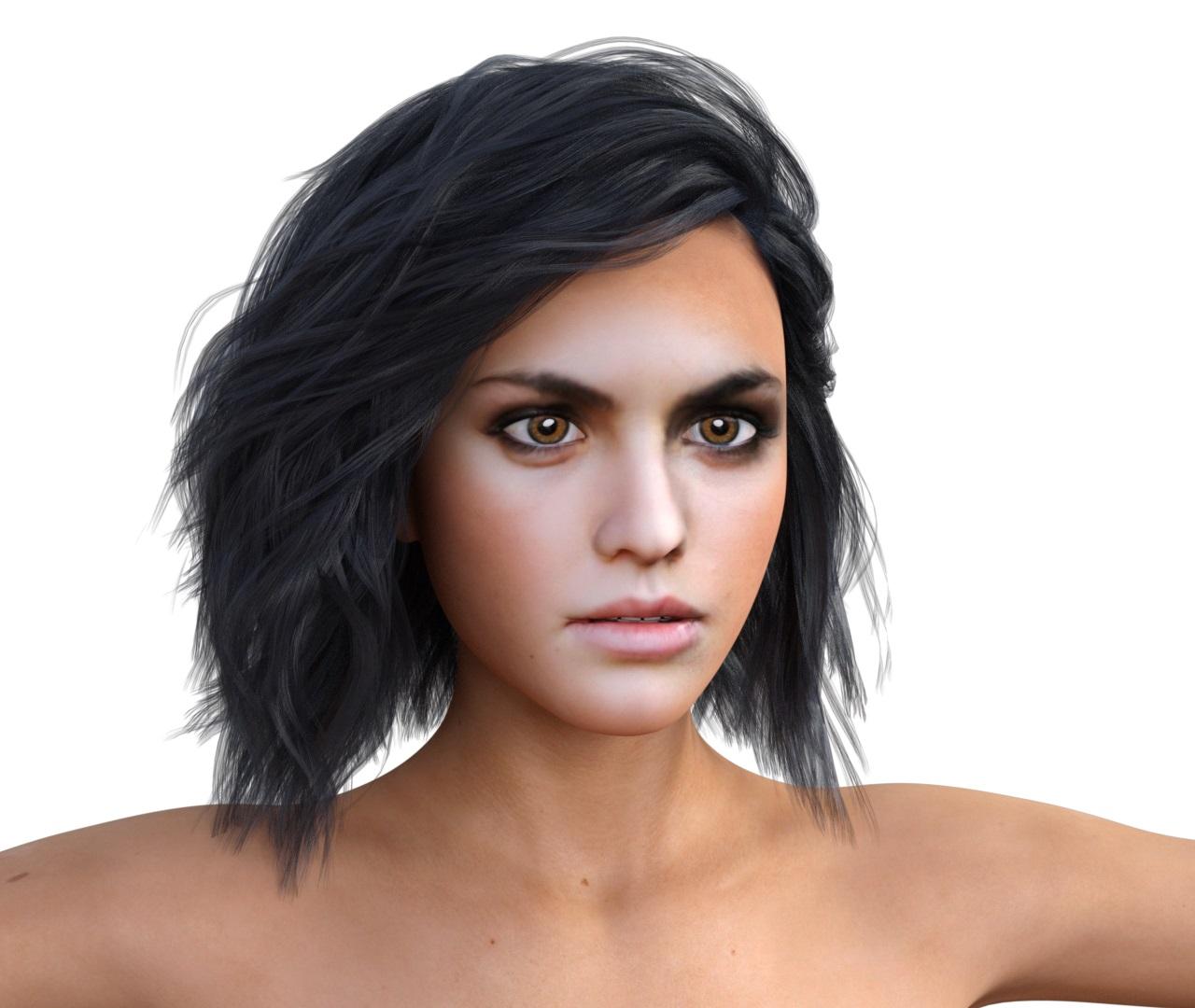
This is pretty awesome!
This is the 1st one with the smile removed via DAZ Studio morph slider for Smile expression correct? How does that work?
Sorry, I have not started to customize pose or expression of HeadShop 11 produced characters, yet.
This was just a render of the character as exported from HeadShop 11 and I only have added the hair.
I have a large pile of different images, that I want to test first in HeadShop 11, before I even think about something else.
HeadShop HelpSDev, I have to agree that for those who have installed DAZ Studio in non-standard places the installation is a pain (this, however, does not take away from the other virtues of the new version). I also agree that that I should provide a better installer for non-standard users. I am working on it right now, hopefully will have it ready/tested by EOBD.
PS: Keep the pitchfork out of this. pls.
Will do so :P
Aside this, I've tried to install the files regular, first Headshop 10, then 10.2 and finally 11 to have all x64 files files in "c:\programme\Daz3D" (german program files substitute), which was, of course not available.
Now I've found two directories inside, Daz3D and DazStudio4, created and placed by the installer. Will try to copy these files to the right structures. If you need a Peter tester (instead of a ßeta tester) do not hesitate to contact me via [email protected]
cheers,
Peter
Peter, I uploaded the new installer to you in Dropbox to test. It eliminates the "pitchfork" problem, as it can intelligently install to non-standard Studio folders. Of course I realized that you are in Germany and sound asleep (9 hr difference). Pls. check when you get this!
Headshop 11 QuestionsI really like, how well HeadShop 11 capture the smile.
This feature alone is worth a lot for me - great work.
Below is an example render of HeadShop 11 produced character, based on Genesis 3 Female.
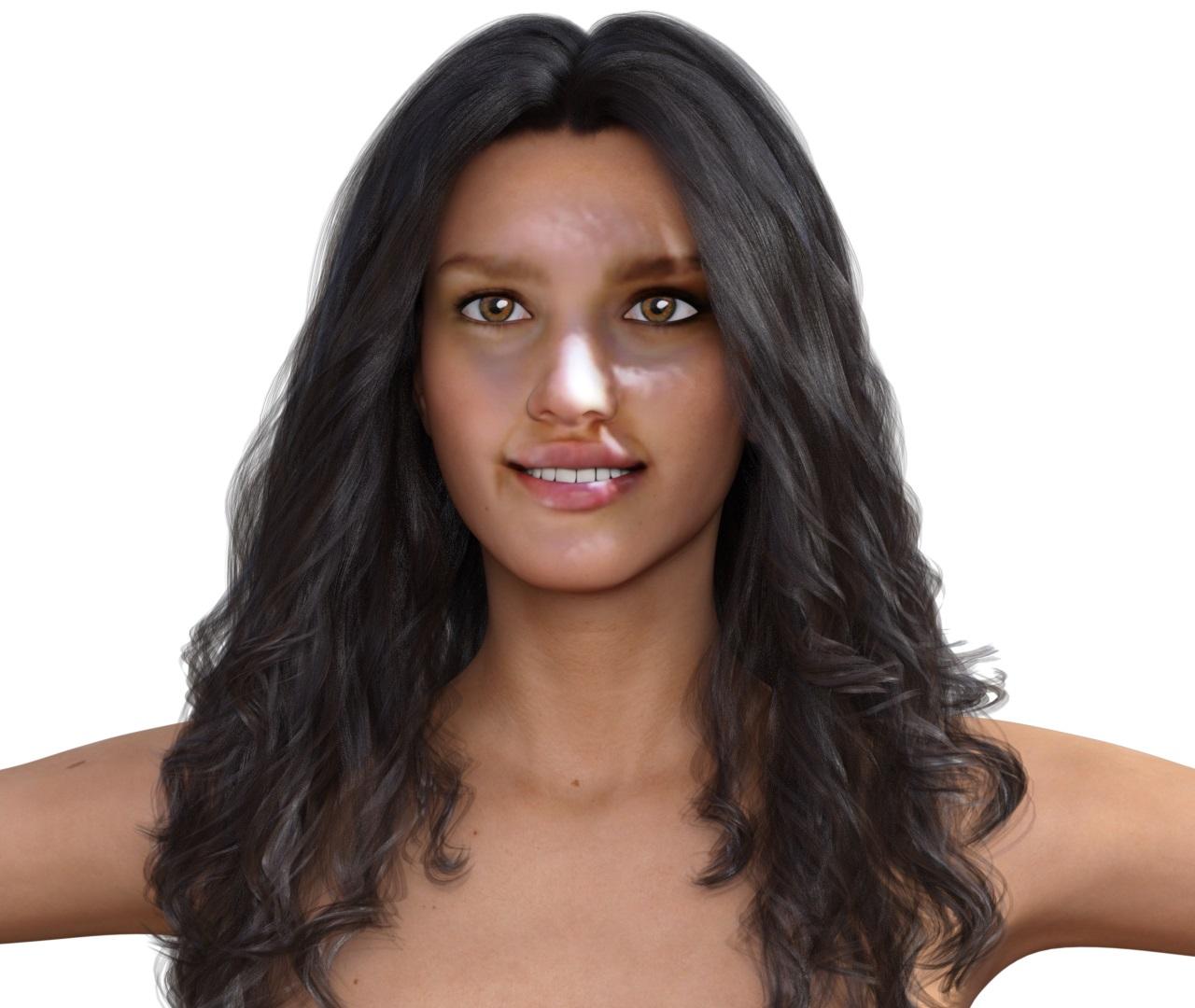
Be nice to see the same character but with the smile expression remove with the morph slider. Is that possible?
Maybe. You get better results if you do the smile removing DAZ Studio/Parameters/Posing :-)
Headshop 11 QuestionsI really like, how well HeadShop 11 capture the smile.
This feature alone is worth a lot for me - great work.
Below is an example render of HeadShop 11 produced character, based on Genesis 3 Female.
Be nice to see the same character but with the smile expression remove with the morph slider. Is that possible?
Headshop 11 QuestionsI really like, how well HeadShop 11 capture the smile.
This feature alone is worth a lot for me - great work.
Below is an example render of HeadShop 11 produced character, based on Genesis 3 Female.
HeadShop HelpStudio Beta will not work. It has different naming conventions from the Shipping software.
Yes, I have tried and HeadShop 11 does not work with Daz Studio 4.10 beta.
The interface pop up, but the reference image does not show up and only some error appear.
Well, I am not ready yet to remove Daz Studio 4.9 from my computer,
so I will be using HeadShop 11 with 4.9 version instead.
HeadShop HelpArtini,
you'll need HeadShop 10 installed before, maybe HS9 as well. In this package, you'll find "abaloneHeadShopLoader.dll" included. An existing installation was mentioned at the shop page for the upgrade version.Just install HeadShop 10 before 11, to gain access to these files.
You'll find your download of HeadShop 10 under 'https://www.daz3d.com/downloader/customer/files', your serial number is located under 'https://www.daz3d.com/downloader/customer/serialnumbers';
Hth and cheers,
Peter
HeadShop HelpIs there any possibility to install HeadShop 11 to Daz Studio 4.10 beta?
I have installed HeadShop 11 normal way, so the program works only in Daz Studio 4.9
because I still keep that version for some compatibility problems.
I have tried the sugesstions in previous posts, but the HeadShop 11 does not appear in "Edit" menu in 4.10 beta.
I could not find "abaloneHeadShopLoader.dll", though.
I have installed Headshop 11 as an upgrade to Headshop 10.
HeadShop 10 was an upgrade from HeadShop 9.
Really appreciate help with it, if possible.
info_b3470fa520 wrote:
These 3 files will be still installed at "C:\Program Files\DAZ 3D\DAZStudio4" on your C: drive. The files are: "FaceShop" (inside the "C:\Program Files\DAZ 3D\DAZStudio4\bin" folder), "abaloneHeadShopLoader.dll" (inside the "C:\Program Files\DAZ 3D\DAZStudio4\plugins" folder) and "fsconfig" (inside the "C:\Program Files\DAZ 3D\DAZStudio4\bresources/FaceShop" folder)
HeadShop HelpSDev, I have to agree that for those who have installed DAZ Studio in non-standard places the installation is a pain (this, however, does not take away from the other virtues of the new version). I also agree that that I should provide a better installer for non-standard users. I am working on it right now, hopefully will have it ready/tested by EOBD.
PS: Keep the pitchfork out of this. pls.
Will do so :P
Aside this, I've tried to install the files regular, first Headshop 10, then 10.2 and finally 11 to have all x64 files files in "c:\programme\Daz3D" (german program files substitute), which was, of course not available.
Now I've found two directories inside, Daz3D and DazStudio4, created and placed by the installer. Will try to copy these files to the right structures. If you need a Peter tester (instead of a ßeta tester) do not hesitate to contact me via [email protected]
cheers,
Peter
HeadShop HelpHeadShop does not come with a standard DIM (DAZ installer). It has its own installer. When installing, please choose the DAZ 3D folder as the destination folder. (For instance: "C:\Program Files\DAZ 3D\HeadShop plugin") What happens if you have have the DAZ Studio application folder (DAZ 3D folder) on another drive, for example on D. You can select that designation as "D:\Applications\DAZ 3D\Headshop plugin". Caveat: in these non-standard installations you will have to manually replace 3 files inside the DAZStudio4 folder.
These 3 files will be still installed at "C:\Program Files\DAZ 3D\DAZStudio4" on your C: drive. The files are: "FaceShop" (inside the "C:\Program Files\DAZ 3D\DAZStudio4\bin" folder), "abaloneHeadShopLoader.dll" (inside the "C:\Program Files\DAZ 3D\DAZStudio4\plugins" folder) and "fsconfig" (inside the "C:\Program Files\DAZ 3D\DAZStudio4\bresources/FaceShop" folder),
Hope this helps with non-conforming installation issues. See more in manual at https://printahead.net/wp-content/uploads/2018/09/HeadShop11manual.pdf
WARNING: Because of the different naming conventions, HeadShop 11 won't work with DAZ Studio 4.11 Beta!
Your should consider changing your installer system. It has really messed up my system again. Can't you just let the user choose a file like "DAZStudio.exe", which is, im my case, found in <D:\00 - 3D Programme\Daz3D\x64\DAZ 3D\DAZStudio4\> and setup the correct paths for your files? You would make your and our life much easier, now I have to clean up all files by hand again. this sucks. aaargh!
If I would do this to my customers, they would take out their pitchforks and hunt me down the road :P
Headshop 11 QuestionsI bought Headshop 11 directly from the vendor when it was first mentioned on here, and I can confirm that Laslo does try to resolve bugs where found, and releases updates.
If your source photograph is a three quarter view, or the person is smiling, ( which the vast majority of available portrait photos are ) then it's the only game in town really.
I find the results, while not 'perfect' are a big improvement over previous versions.
That was exactly, why I have bought it. During the years, I have bought all of its previous versions, as well,
because I want to support the development of such an interesting program.
Thanks!! It means a lot to us to appreciate the two year's worth of development we put into HeadShop 11.
 Headshop 11 Questions
I bought Headshop 11 directly from the vendor when it was first mentioned on here, and I can confirm that Laslo does try to resolve bugs where found, and releases updates.
If your source photograph is a three quarter view, or the person is smiling, ( which the vast majority of available portrait photos are ) then it's the only game in town really.
I find the results, while not 'perfect' are a big improvement over previous versions.
That was exactly, why I have bought it. During the years, I have bought all of its previous versions, as well,
because I want to support the development of such an interesting program.
Headshop 11 QuestionsI bought Headshop 11 directly from the vendor when it was first mentioned on here, and I can confirm that Laslo does try to resolve bugs where found, and releases updates.
If your source photograph is a three quarter view, or the person is smiling, ( which the vast majority of available portrait photos are ) then it's the only game in town really.
I find the results, while not 'perfect' are a big improvement over previous versions.
Headshop 11 QuestionsBy the way, has anybody tried using black and white pictures as a reference in Headshop?
HeadShop HelpHeadShop does not come with a standard DIM (DAZ installer). It has its own installer. When installing, please choose the DAZ 3D folder as the destination folder. (For instance: "C:\Program Files\DAZ 3D\HeadShop plugin") What happens if you have have the DAZ Studio application folder (DAZ 3D folder) on another drive, for example on D. You can select that designation as "D:\Applications\DAZ 3D\Headshop plugin". Caveat: in these non-standard installations you will have to manually replace 3 files inside the DAZStudio4 folder.
These 3 files will be still installed at "C:\Program Files\DAZ 3D\DAZStudio4" on your C: drive. The files are: "FaceShop" (inside the "C:\Program Files\DAZ 3D\DAZStudio4\bin" folder), "abaloneHeadShopLoader.dll" (inside the "C:\Program Files\DAZ 3D\DAZStudio4\plugins" folder) and "fsconfig" (inside the "C:\Program Files\DAZ 3D\DAZStudio4\bresources/FaceShop" folder),
Hope this helps with non-conforming installation issues. See more in manual at https://printahead.net/wp-content/uploads/2018/09/HeadShop11manual.pdf
WARNING: Because of the different naming conventions, HeadShop 11 won't work with DAZ Studio 4.11 Beta!
HeadShop HelpHanako Hime said:
My copy isn't working, either. My support ticket at DAZ has been very slow to be addressed, so I emailed the PA last night.The address is info AT abalonellc.com but be aware that to get tech support, they're going to ask you to call a not-toll-free number or skype with them.
As a convenience, I might add. It is easier to give a live tech support than via email, but if that's how you like, no problem.
(Actually, Skype is super for tech support, as we can share screens and usually solve problems in minutes, instead a lenghty back-and-forth via emails. Both of you probably have unusual DAZ Studio installation (maybe not on c drive, etc), and that is what needs to be established.)
Please let tech support at abalone know exactly your DAZ Studio version (warning, 4.8 beta won't work), and we can take it from there.
Laslo (Abalone Tech Support)
Ps: HeadShop was tested and passed by DAZ QA for 3 months and they built a DAZ installer as well.If your program can't handle Studio being installed into a different location than default, that NEEDS to be put in the description. That was a major issue with OneClick, and will be with this one. Too many people can't install to defaults because their library is too big for their primary drives. Like, anyone that uses an SSD for C:.
HeadShop HelpI am running in 64 bit and used the 64 bit manual installer. I installed it on my e drive where my daz program is. It is installing and everything in the folder looks like it hs installed. when I run DAZ 4.10, there is no plugin on the plugin list or an option to activate headshop in the edit menu as it specifies in the product description. Am I missing something about where headshop is located? Any help would be appreciated. BTW, the DAZ install manager file fails every time. It would be nice if that worked. Saves alot of headache.
Headshop 11 QuestionsI've bought and installed the full verion of Headshop 11 but I think I may have a conflict with an older version. I did buy OneClick, I'm not sure if it is installed on this computer but I can't find any way to de-install it. I've tried following the quickstart tutorial but the window I get when starting Headshop is nothing like the one shown in the tutorial. It says Headshop 6, is this OneClick or even older? When I go past this point the next part does look like the tutorial. Here is a screenshot of what I get on launching Headshop
This looks normal HeadShop 11. (Disregard the HeadShop 6 in the header - it is an error). In regard to the tutorial: find it under Help menu in HeadShop. It is linked to this pdf file: https://printahead.net/wp-content/uploads/2018/09/HeadShop11manual.pdf
Sorry, now I look at it more closely I understand. I didn't see why I had a much smaller window without so many options. Now I see that in the tutorial you ticked the View/Change Figure Settings box. That came up as unselected when I did it. When I tick that box it does look like the tutorial.
Headshop 11 QuestionsI've bought and installed the full verion of Headshop 11 but I think I may have a conflict with an older version. I did buy OneClick, I'm not sure if it is installed on this computer but I can't find any way to de-install it. I've tried following the quickstart tutorial but the window I get when starting Headshop is nothing like the one shown in the tutorial. It says Headshop 6, is this OneClick or even older? When I go past this point the next part does look like the tutorial. Here is a screenshot of what I get on launching Headshop
This looks normal HeadShop 11. (Disregard the HeadShop 6 in the header - it is an error). In regard to the tutorial: find it under Help menu in HeadShop. It is linked to this pdf file: https://printahead.net/wp-content/uploads/2018/09/HeadShop11manual.pdf
Daz 3D is part of

Connect
DAZ Productions, Inc.
7533 S Center View Ct #4664
West Jordan, UT 84084Licensing Agreement | Terms of Service | Privacy Policy | EULA
© 2026 Daz Productions Inc. All Rights Reserved.