-
Fitting older wardrobe versions to Victoria & Michael 8
Victoria 8 and Michael 8 are morphs for the bases Genesis 8 Female and Genesis 8 Male so you would convert wardrode to fit the bases.
Artwork from SpaceVagabondWalk like an Egyptian
Content used:
Millennium Cat (doesn't showed in the content search)
Postwork in Photoshop
 Looking for a pale female Genesis 8 texture, asking for suggestions.
I went through my listing of characters and picked out the ones I have marked with pale skin that I made a judgement call when I first bought her. Some might not appear that from the initial image, but on my screen, the skin was pale, as opposed to tanned. Others are designed to be elvish pale. And you can see, they come from a variety of PAs who all make quality work. Hope some of these help. Mary
https://www.daz3d.com/aq-freya-for-genesis-3-8-femalehttps://www.daz3d.com/cc-reagan-for-rune-7 While a Gen 3 character, her skin can work on Gen 8, and is lovely.
https://www.daz3d.com/emma-for-genesis-3--8-female
https://www.daz3d.com/eryn-for-genesis-8-female
https://www.daz3d.com/fwsa-erynn-hd-for-victoria-8-and-lf-erynn-lingerie
https://www.daz3d.com/fwsa-lavana-hd-for-stephanie-8
https://www.daz3d.com/hp-zelie-for-teen-kaylee-8
https://www.daz3d.com/leenda-for-genesis-3-and-8-female
https://www.daz3d.com/lyra-hd-for-genesis-8-female
https://www.daz3d.com/maria-for-victoria-8
https://www.daz3d.com/sara-for-teen-jane-8
https://www.daz3d.com/sc-imrae-for-genesis-8-female
https://www.daz3d.com/shawna-hd-for-victoria-8
https://www.daz3d.com/sylph-for-genesis-8-females
https://www.daz3d.com/sylph-for-genesis-8-females
https://www.daz3d.com/vivienne-for-genesis-3-8-female-s
https://www.daz3d.com/vyk-caitlin-for-genesis-8-female
https://www.daz3d.com/vyk-banshee-for-genesis-8-female
https://www.daz3d.com/vyk-raine-for-genesis-8-female
https://www.daz3d.com/wynnter-elf-for-genesis-8-female-s
List of all Daz Original figures G1-G3Is there a simple list of charactor names with the Genisis version? Seems it would be in this sites FAQ section right?
When looking for assets I find Daz naming structure to give no clue to the Genesis figure it was built upon.
There are four sets now that I know of.
- Genesis (1)
- Genesis 2
- Genesis 3
- Genisis 8 ( skipped 4, 5,6,7 )
It appears DAZ finally got the hint with "8" and name those charactors with the digit 8 in them but the rest have numbers in charactor names that do not relate to which set they belong. Victoria 4 for instance...there are no Genisis 4 charactors. Why "4"
Which belong together?
---------------------------------------------
Simple answer is the 1st to 4th generation DAZ figures are just that from Vicky 1 up to Victoria/Michael/Freak/Aiko/Hiro/Stephanie 4. Genesis became the standard figure (with built in morphs for Male/Female) and use a much more advanced system than prior generations. However, since DAZ kept the numbering representations for individual morphs that match up to the prior generations (thus Genesis 1 has the 5 series i.e. V5/M5/F5/A5/H5/S5). This has continued up until Genesis 3 (consequently adopting the 7 identifier for the morphs i.e. V7/M7 and so on). Genesis 8 is technically "Genesis 4", but to simplify things, the numbering convention for the generations as a whole has been adopted.
Fitting older wardrobe versions to Victoria & Michael 8My apologies if I'm beating on a dead horse, but after spending lots of cash on various bundles and a new Graphics card, most freebies currently available plain won't fit the version 8 figures. For instance, I have a pair of Wonder Woman boots that would be perfect for my current project, but are impossible to parent to my Victoria 8 figure. I've found more recent freebies that "fit to Victoria 8" only seems to pair the darned boots close to the legs but between the feet rather than on them.
Oh yeah, the Iray Super Shaders Patriotic Patterns is a bit fickle, sometimes it works right away, sometimes it won't work at all. Sometimes I need to restart my computer, open the item of clothing or prop first and then it seems to work...load the figure and then parent them.
I might be skipping a simple step leading to my frustration, but I purchased the Victoria and Michael V8 figures and I want to make good use of them. If there's a way to properly fit older versions of clothing/footwear/props, what is it?
[Released] Ultimate Clothing Fixer Genesis 3 [Commercial]Sorry to ask an OT question, but I was trying to find a thread for the Hair Converter from V4 to G8F where I could ask a question - is there one or perhaps a main thread for Riversoft Art's hair converters?
Here you go!
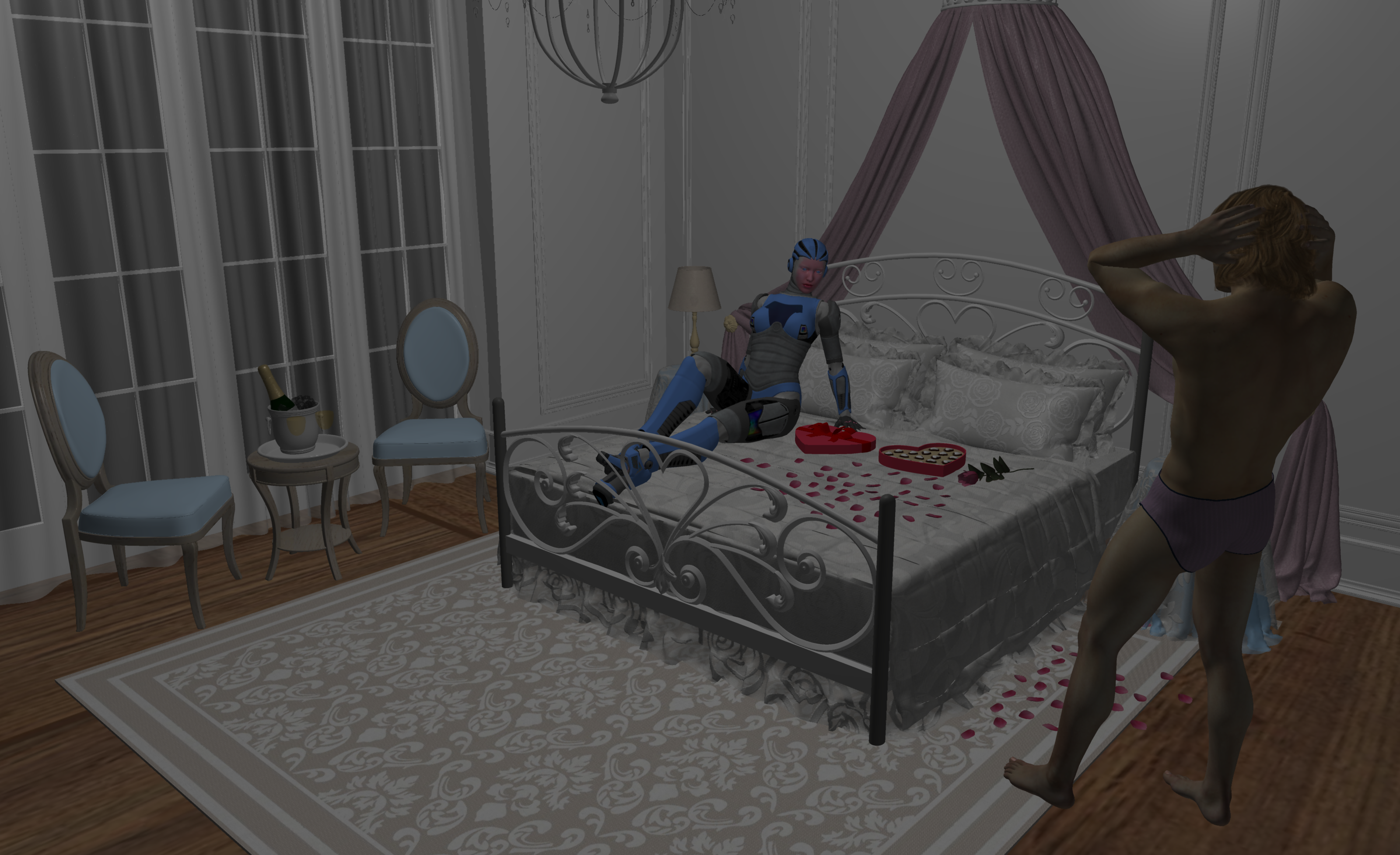
Carrara Challenge #49 - THE FORBIDDEN ZONE - results are postedEntry # 4
Title: AI explores Love
Artist: Bunyip02
WIP link: https://www.daz3d.com/forums/discussion/comment/4938226/#Comment_4938226
Credits/Comments: Victoria 4.2 Base - https://www.daz3d.com/victoria-4-2-base
Feeloo - doc000 - https://sharecg.com/v/39582/related/11/Poser/Feeloo-for-V4
Aikobot 2 - https://www.daz3d.com/aikobot-2
Michael 4 - https://www.daz3d.com/michael-4-base-male-3d-model
Michael 4 Skin Maps (High Res) - https://www.daz3d.com/michael-4-skin-maps-high-res
Alex Hair for Genesis 2 Male(s), Genesis 3 Male(s) and Michael 4 - https://www.daz3d.com/alex-hair-for-genesis-2-male-s-genesis-3-male-s-and-michael-4
Briefs M4 - PoserWorld - No longer available
Romantic Bedroom - GrayCloudDesign for RPublishing - Renderosity (Poser Pro 11.2 Update)The technology advances rapidly, the debate on morality & ethics lags far behind.........
 [Released] Ultimate Clothing Fixer Genesis 3 [Commercial]
Sorry to ask an OT question, but I was trying to find a thread for the Hair Converter from V4 to G8F where I could ask a question - is there one or perhaps a main thread for Riversoft Art's hair converters?
Carrara Challenge #49 - THE FORBIDDEN ZONE WIP (sponsored by DAZ :) Entries closedSuper renders. Love the liquid top to the copy machine.
Here is a render of another forbidden zone, the classic "lover's lane." But what was forbidden? A young lady's desire? Her date's advances? Parking in the lane itself? This is the raw render. I also rendered out various passes. And, I can always drop this render back in Carrara's scene tab and apply some GMIC. I'm sure you think that this is Vicky in a Prom Dress with a Date. Well, this is Stephanie 6, not Victoria. Like to mix it up. In this case, mixing Stephanie 5 curvy with Stephanie 6.

too cute with that halo and wonderfully metaphorical
DAZ 3D Human Figures - A HistoryI think some of the confusion is that with Genesis they split the name of the figure from the name of the platform (mesh)
Genesis came along and replaced Generation 4 (v4, m4, k4). So now you have just one mesh and for that mesh you got the version 5 series of the figure shapes - V5, M5 etc etc and they were all mixy matchy regardless of gender
Then came Genesis 2 Female and Genesis 2 Male got the version 6 figure names - V6, M6, etc These got split back out to male and female versions so you can mix girls with girls and boys with boys.
Genesis 3M and Genesis 3F therefor got the version 7 series of the shapes - V7, M7, etc etc Still split to male and female versions so you can mix girls with girls and boys with boys.
At this point DAZ realised it was confusing *lol*
So the next figure brought the base mesh number up to be Genesis 8 Male and Genesis 8 Female, with the version 8 shape names Michael 8, Victoria 8 and all of their 50? brothers and sisters
Presumably going forward they will keep the platofrm version number and the shape version number matched up.
.... My second DAZ store product was for Hiro 3 and came out at his launch. Some days I feel very very old.
LM
Poses for old figures questionsCan poses for Victoria 1 &2 be converted to use on various Genesis generations or maybe even converted to V4? I'm particularly interested in these poses:
Well they all will work on v4
then do the same as I said before to get them to the genesis people
DAZ 3D Human Figures - A HistoryI prefer to say Millennium for the generations before Genesis.
- Millennium Woman Victoria / Millennium Man Michael
- Millennium Woman Victoria 2 / Millennium Man Michael 2
- Millennuim Woman Victoria 3 / Millennium Man Michael 3
- Millennium Woman Victoria 4.2 / Millennium Man Michael 4
- Genesis
- Genesis 2
- Genesis 3
- Genesis 8
I can definitely see a logic to that. But I don't do it because they kind of dropped the "Millennium Man" terminology with Michael 2.
DAZ 3D Human Figures - A HistoryI prefer to say Millennium for the generations before Genesis.
- Millennium Woman Victoria / Millennium Man Michael
- Millennium Woman Victoria 2 / Millennium Man Michael 2
- Millennuim Woman Victoria 3 / Millennium Man Michael 3
- Millennium Woman Victoria 4.2 / Millennium Man Michael 4
- Genesis
- Genesis 2
- Genesis 3
- Genesis 8
MacOS Catalina & Daz StudioQuote: "My Questions (Although, really One Big Question): Does Catalina contain Open GL and Open CL? Or, is there only Metal? Can present users of Catalina and DAZ Studio pose and render scenes in DAZ Studio. Does iRay run via the CPU, as it does in, for example, Sierra?"
Catalina is not supposed to support Open CL or GL - only Metal. At this point, I do not believe that DAZ supports Metal.
FYI: I was able to open DAZ in Catalina, load Victoria 4 and render it on my Mac. I believe it is working off the CPU NOT the GPU. So far I only notice a problem opening OBJ's (as I mentioned in the previous post).
Ars notes Open CL and GL are stuck at ancient versions and are not being updated .. but they're there and work
https://arstechnica.com/gadgets/2019/10/macos-10-15-catalina-the-ars-technica-review/3/
MacOS Catalina & Daz StudioQuote: "My Questions (Although, really One Big Question): Does Catalina contain Open GL and Open CL? Or, is there only Metal? Can present users of Catalina and DAZ Studio pose and render scenes in DAZ Studio. Does iRay run via the CPU, as it does in, for example, Sierra?"
Catalina is not supposed to support Open CL or GL - only Metal. At this point, I do not believe that DAZ supports Metal.
FYI: I was able to open DAZ in Catalina, load Victoria 4 and render it on my Mac. I believe it is working off the CPU NOT the GPU. So far I only notice a problem opening OBJ's (as I mentioned in the previous post).
Poses for old figures questionsCan poses for Victoria 1 &2 be converted to use on various Genesis generations or maybe even converted to V4? I'm particularly interested in these poses:
Comparing the New and Old Animation Timeline(I still intend to use the ancient Mimic Pro for lip sync, and export to Cinema 4D uses the possibly-defunct Riptide Pro), but so far so good. I attach an animation test (below) using my new workflow with an iClone motion retargeted to Victoria 4. I'm looking forward to further explore Daz
Hi Tim, the clip looks great!!
Obviously We use whatever generation of figures we prefer, however being on the Windows OS
does open more modern 64 bit options for audio based lipsync in Daz studio.In fact Daz studio has more (&certainly cheaper ),
lipsync options than Iclone at this point.
Right now there are technically four such options for Daz Studio however three of them are for the Genesis figures only.I have reviewed three of them in this video linked below
https://drive.google.com/file/d/1xOSyocgvpRfrYw821IxxdYVLuQI5rALm/view
Something to consider going foward with your new Win64 based pipeline ,as the lipsync options for good old mike& vicky4 will continue to become less and less viable
 .GenX2 and V4 foot pose
Thanks. I've managed to export the V4 cr2 with the flat foot pose, but GenX2 still uses the original Victoria 4.2 source which has the tippy toe pose. How do I replace the Victoria 4.2 morph that GenX2 moprh with the new flat foot V4.2 I created?
DAZ 3D Human Figures - A HistoryThis list is wrong. There were no Genesis 4, 5, 6 or 7, Daz moved from G3 to G8. And V4.2 was just the latest update of V4, she shouldn’t be listed on her own.
The actual “Generation list” is this:
- Victoria / Michael (1), also known as “millenium woman” and “millenium man”
- Victoria / Michael 2: basically V1 and M1 with more morphs. There were also kids figures (the first millenium boys and girls) and the first Stephanie in generation 2, they were separate figures.
- Victoria / Michael 3, and their friends Stephanie Petite 3, David 3, Aiko 3 and Hiro 3, the Freak, the Girl, and for kids the Young Teens (Luke and Laura), Preschoolers (Matt and Maddie) and Millenium Baby. Once again, all separate figures.
- Victoria / Michael 4, and Kids 4 were the base figures. Other generation 4 named base characters were shapes for those base figures.
- First version of Genesis (unisex), with Victoria 5, Michael 5 and the other “Name 5” base characters as shapes for Genesis.
- Genesis 2 Female and Male base figures, with Victoria 6, Michael 6 and other generation 6 named base characters
- Genesis 3 Female and Male base figures, with Victoria 7, Michael 7 and the other “7” named base characters
- Genesis 8 Female and Male base figures, with Victoria 8, Michael 8 and all the “8” characters.
Daz switched to labeling Genesis with the generation number for the fourth Genesis figures because it was too confusing to have different numbers, especially since V4 content is still widely used (while generation 1, 2 and 3 are pretty much retired)
Wow. You were fast. I only had the incorrect list online for about three or four minutes before correcting it.
DAZ 3D Human Figures - A HistoryI continue to find this a confusing naming structure when seeking assets, clothing etc.
When they refer to a "generation" of charactor it does not equate to one of the charactor sets like G2, G3 or G8. From above a Generation 6 is for Genisis 2 not "Genisis 6" which does not exist and so on. Many times an asset description may say for Victoria 4 but not mention the genesis version at all and I have to either try to recall (not doing well on that! ) or revert to some seach to find out what charactor Victoria 4 belongs to which is NOT G4F which, again, does not exist.
Why the ppl at DAZ did not name things to include both the "Generation" and the "Charator" for instance Victoria 4.2 to indicate Gen 4 for Genisis 2. Would make searching for clothing, hair etc. much easier to filter.
It is not nearly as confusing as it seems. Michael and Victoria came first, then they were followed by the various Genesis models. This shakes down to this chronological order:
- Victoria / Michael
- Victoria 2 / Michael 2
- Victoria 3 / Michael 3
- Victoria 4 / Michael 4
- Victoria 4.2
- Genesis Female / Genesis Male
- Genesis 2
- Genesis 3
- Genesis 4
- Genesis 5
- Genesis 7
- Genesis 8
(You are correct, they skipped Genesis 6).
This list is wrong. There were no Genesis 4, 5, 6 or 7, Daz moved from G3 to G8. And V4.2 was just the latest update of V4, she shouldn’t be listed on her own.
The actual “Generation list” is this:
- Victoria / Michael (1), also known as “millenium woman” and “millenium man”
- Victoria / Michael 2: basically V1 and M1 with more morphs. There were also kids figures (the first millenium boys and girls) and the first Stephanie in generation 2, they were separate figures.
- Victoria / Michael 3, and their friends Stephanie Petite 3, David 3, Aiko 3 and Hiro 3, the Freak, the Girl, and for kids the Young Teens (Luke and Laura), Preschoolers (Matt and Maddie) and Millenium Baby. Once again, all separate figures.
- Victoria / Michael 4, and Kids 4 were the base figures. Other generation 4 named base characters were shapes for those base figures.
- First version of Genesis (unisex), with Victoria 5, Michael 5 and the other “Name 5” base characters as shapes for Genesis.
- Genesis 2 Female and Male base figures, with Victoria 6, Michael 6 and other generation 6 named base characters
- Genesis 3 Female and Male base figures, with Victoria 7, Michael 7 and the other “7” named base characters
- Genesis 8 Female and Male base figures, with Victoria 8, Michael 8 and all the “8” characters.
Daz switched to labeling Genesis with the generation number for the fourth Genesis figures because it was too confusing to have different numbers, especially since V4 content is still widely used (while generation 1, 2 and 3 are pretty much retired)
Daz 3D is part of

Connect
DAZ Productions, Inc.
7533 S Center View Ct #4664
West Jordan, UT 84084Licensing Agreement | Terms of Service | Privacy Policy | EULA
© 2026 Daz Productions Inc. All Rights Reserved.