-
Exporting OBJs with materials from Blender into Daz?
So when I create an obj in blender, give in mats in the shading tab, UV map it in a UV tab and everything looks great in Blender.Than I export it(selection only) assign materials, assign uv- all checked.But when I import it into Daz the surface looks [jolly poor]. The funny thing is when I get an obj with mats from a source like Turbo squid and import it into Daz, everything looks OK, when I export from Daz into Blender and that Back into Daz surfaces look ok. But when I create my own OBJ in Blender, give it materials I and export it with appropriate options checked I still can't get those textures in Daz. I mean I do transfer surfaces as properties and I see them in Daz Surfaces but the textures of those surfaces nor there even if I mess around with tiles. Any idea what I could be doing wrong?
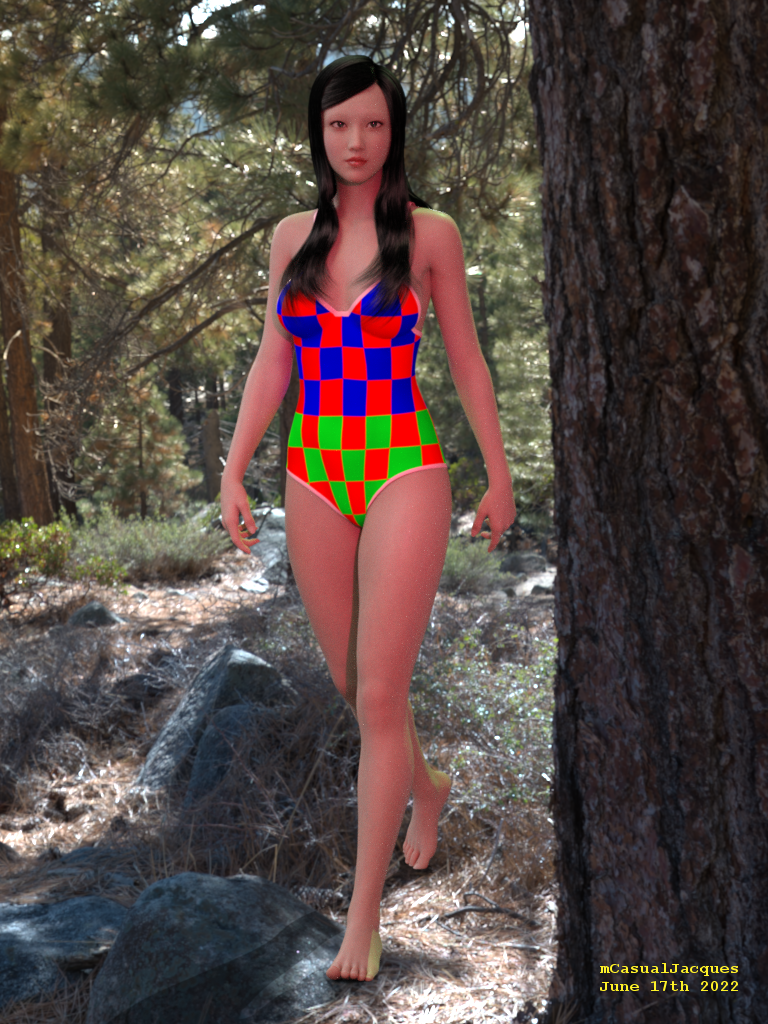
mcjCylindricalUV: Script exports geometry with Cylindrical-Projected UV mapi think it may have to do with genesis things that dont name their surfaces the way old V3/V4 figures did
i'll announce it in this thread when it's fixed
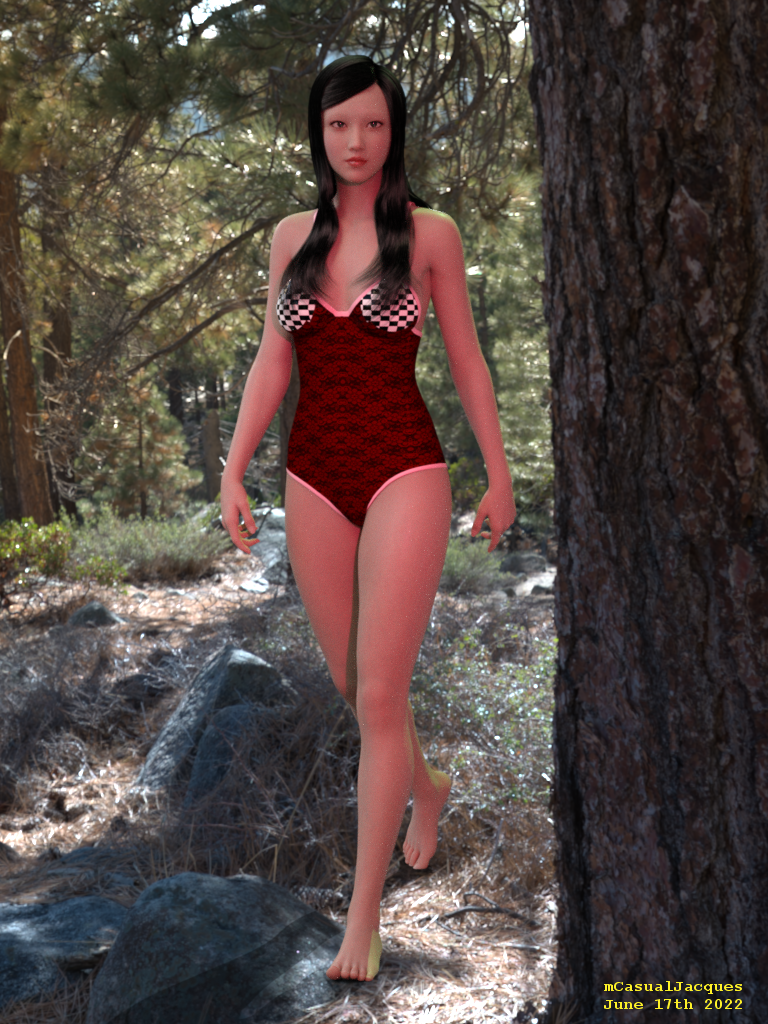
in this test today, mcjCylindricalUVs only found the pectorals surfaces ( chessboard texture )
note that a workaround that could work goes like this
-pose the figure wearing the skirt
-use mcjHideAllBut script to hide everything except the skirt
- export the scene as an obj with the "Ignore invisible nodes" option ON
- use mcjHideAllBut to make everything visible again
- delete or hide the real skirt
- import the obj that was exported to disk (it will fall exactly where the skirt was)
- use mcjCylindricalUVs on the imported .obj
the second big picture is the result of using t hat method
 Daemonessa help ... SOLVED : Poser Only ...
WendyLuvsCatz said:
they have readmes just that DAZ has no link to them even using DAZ-Deals
I use Everything a lot to search for stuff because it's just all over the place even some recent stuff
No more searching content for me! Spent too much time over the last few years doing that. If the product doesn't pop up on the screen in full splendor or export and import in one easy click then it's bye-bye. If it wasn't for your help, I would have gone on to something else. But I really wanted this witch. I got the hat, hair, cloak and large black pot bubbling with gruesome stuff already lined up. Can't wait to do a scene with her. Thanks again. You're the best!
Carrara Challenge #62 "Clowns and Other Circus Stuff" -WendyLuvsCatz said:
UnifiedBrain said:
WendyLuvsCatz said:
I use image series
Do you mean the "sequenced jpeg" under the windows AVI tab?
And, once I output in that format, my video editor of choice will then know how to use it?
I'm wondering if Phil covered this and I just missed it. It is so crucial to understand.
I use sequenced png and have never seen any of Phil's tutorials, I am sure they are awesome but I just cannot watch video tutes easily
yes, Hitfilm imports image series, Blender video editor image import I select the first one and hit "a" to select them all
I read what is documented in the manual and elswhere or just use trial and error
much error
so much
an error has occured

I have somehow managed to avoid resuming work on the house project.
 Animation was calling.
After much trial and error... it worked! I did a 2 second animation with Mimic, selected render to sequence png, and 48 images appeared. Kind of boggeling. My video editor was able to use them, but only after I found a video tutorial.
I'm not sure how to ask this question. What is the frame rate that Mimic Lite uses for the Pz2 files? I had to do a bunch of gyrations in the video editor to get the video to match the audio.
Sorry, not able to post animations yet.
How do I turn a .obj dress into usable clothing for Daz3d?How do I turn a .obj dress into usable clothing for Daz3d? I've found several tutorials that looked promising, only to find out they are outdated and no longer work. The dress also has a ZPRJ file, which I guess is from Marvelous Designer. I can import the dress, but it's just a prop then, not a wearable item.
Introducing the Daz to Blender Bridge & native Blender File FormatsThe main issue now s that it's onmy the same and old charachter that is imported to Blender. My new characters doesn't import.
If you have your windows Documents folder on a different drive, in OneDrive or in a custom path, then this update may help you: https://github.com/daz3d/DazToBlender/releases
You need to manually install that fix for now, but we will try to get that posted to Daz Central as soon as we can. Thank you for your patience.
How viable is it to switch from DAZ to Blender?Its depend on what kind elements you want to brought in Blender and what you want to do with those elements ( end results )
DAZ actually offering easier features when dealling with material assignment especially if you want working with product./item which have lots of sub materials meanwhile Blender offering much more "hack" and possibilities to use lighter resources ( CPU-GPU) with procedural materials route .
Posing g8 Character in Blender not as easy as in Studio, although the IK setup which provided by DAZ to Blender Bridge or Diffeo should be good enough to start learning about creating pose from scratch in Blender . If you into Stylized type , buy/invest in ready to use Blender Rigged character give you more fun experiences than frustation . And since Blender can import almost any model from another 3D software package , you should not worry about limited option in here . The exception will be if you can not live without ready to use JCM /MCM which the real value why we use DAZ Characters
Cycles can use CPU with less render time although getting IRAY quality (which already setup by product vendor ) need proper knowledge about how shader and lighting in Blender work
EEVEE render is fast and better than any open gl solution from DAZ right now
DAZ complex props cheaper than ready to use Blender props ,although if you ok doing procedural without uV map there are nice products with cheap price in Artstation or another market place
In term of Procedural modelling and Easy rapid scene creation , Blender have more advanced features with their GeoNode - Modifier and gazillion of add on
Unless you make comic, Blender provide chance to get more freelance gigs than DAZ studio
[Released] Turbo Loader Booster Utilities [Commercial]Hi!
Somewhat I am not able to load the scene with Turbo Loader Open File. What am I doing wrong?
Cheers!
2022-06-16 14:55:22.711 [INFO] :: Loading Layout: C:/Users/USER/AppData/Roaming/DAZ 3D/Studio4/layout.dsx
2022-06-16 14:55:22.937 [WARNING] :: ..\..\..\..\..\src\sdksource\cloud\dzcloudtasknotifier.cpp(660): sync completed successfully, 1 items succeeded, 0 items failed.
2022-06-16 14:55:22.937 [INFO] :: Metadata update succeeded.
2022-06-16 14:55:41.731 [DEBUG] :: Turbo Loader Open File START D:/Users/Public/Documents/My DAZ 3D Library/Scripts/RiverSoft Art/Turbo Loader/Turbo Loader Open File.dse
2022-06-16 14:55:41.736 [DEBUG] :: Enabling morphs for asset, W4D2 4 CA 31: D:/Users/USER/Documents/DAZ 3D/Studio/My Library/Scenes/37 CAFE 2/W4D2 4 CA 31.duf
2022-06-16 14:55:41.736 [INFO] :: Loading D:/Users/USER/Documents/DAZ 3D/Studio/My Library/Scenes/37 CAFE 2/W4D2 4 CA 31.duf
2022-06-16 14:55:47.512 [INFO] :: Enabling Morphs...
2022-06-16 14:55:47.513 [INFO] :: Enabling data/sugatak/Yamachan Ramen 1961/YR Hashi 1zen/Morphs/sugatak/Base/On Ramen Donburi.dsf
2022-06-16 14:55:47.513 [INFO] :: data/sugatak/Yamachan Ramen 1961/YR Hashi 1zen/Morphs/sugatak/Base/On Ramen Donburi.tlOff NOT FOUND.
2022-06-16 14:55:47.514 [INFO] :: Loading D:/Users/Public/Documents/My DAZ 3D Library/data/sugatak/Yamachan Ramen 1961/YR Hashi 1zen/Morphs/sugatak/Base/On Ramen Donburi.dsf
2022-06-16 14:55:47.514 [INFO] :: Enabling Morphs...
2022-06-16 14:55:47.514 [INFO] ::
2022-06-16 14:55:47.515 [INFO] :: Enabling data/maclean/Everyday Drinks/glassTall3/Morphs/maclean/Base/tilt.dsf
2022-06-16 14:55:47.515 [INFO] :: data/maclean/Everyday Drinks/glassTall3/Morphs/maclean/Base/tilt.tlOff NOT FOUND.
2022-06-16 14:55:47.515 [INFO] :: Loading D:/Users/Public/Documents/My DAZ 3D Library/data/maclean/Everyday Drinks/glassTall3/Morphs/maclean/Base/tilt.dsf
2022-06-16 14:55:47.516 [INFO] :: Enabling Morphs...
2022-06-16 14:55:47.517 [INFO] ::
2022-06-16 14:55:47.517 [INFO] :: Enabling data/maclean/Everyday Drinks/glassTall3/Morphs/maclean/Base/level.dsf
2022-06-16 14:55:47.518 [INFO] :: data/maclean/Everyday Drinks/glassTall3/Morphs/maclean/Base/level.tlOff NOT FOUND.
2022-06-16 14:55:47.518 [INFO] :: Loading D:/Users/Public/Documents/My DAZ 3D Library/data/maclean/Everyday Drinks/glassTall3/Morphs/maclean/Base/level.dsf
2022-06-16 14:55:47.519 [INFO] :: Enabling Morphs...
2022-06-16 14:55:47.519 [INFO] ::
2022-06-16 14:55:47.519 [INFO] :: Enabling data/maclean/Everyday Drinks/glassTall1/Morphs/maclean/Base/level.dsf
2022-06-16 14:55:47.520 [INFO] :: data/maclean/Everyday Drinks/glassTall1/Morphs/maclean/Base/level.tlOff NOT FOUND.
2022-06-16 14:55:47.520 [INFO] :: Loading D:/Users/Public/Documents/My DAZ 3D Library/data/maclean/Everyday Drinks/glassTall1/Morphs/maclean/Base/level.dsf
2022-06-16 14:55:47.521 [INFO] :: Enabling Morphs...
2022-06-16 14:55:47.521 [INFO] ::
2022-06-16 14:55:47.521 [INFO] :: Enabling data/maclean/Everyday Drinks/glassTall1/Morphs/maclean/Base/tilt.dsf
2022-06-16 14:55:47.522 [INFO] :: data/maclean/Everyday Drinks/glassTall1/Morphs/maclean/Base/tilt.tlOff NOT FOUND.
2022-06-16 14:55:47.522 [INFO] :: Loading D:/Users/Public/Documents/My DAZ 3D Library/data/maclean/Everyday Drinks/glassTall1/Morphs/maclean/Base/tilt.dsf
2022-06-16 14:55:47.522 [INFO] :: Enabling Morphs...
2022-06-16 14:55:47.523 [INFO] ::
2022-06-16 14:55:47.523 [INFO] :: Enabling data/sugatak/Yamachan Ramen 1961/YR Hashi 1zen/Morphs/sugatak/Base/On Ramen Donburi.dsf
2022-06-16 14:55:47.523 [INFO] :: data/sugatak/Yamachan Ramen 1961/YR Hashi 1zen/Morphs/sugatak/Base/On Ramen Donburi.tlOff NOT FOUND.
2022-06-16 14:55:47.524 [INFO] :: Loading D:/Users/Public/Documents/My DAZ 3D Library/data/sugatak/Yamachan Ramen 1961/YR Hashi 1zen/Morphs/sugatak/Base/On Ramen Donburi.dsf
2022-06-16 14:55:47.524 [INFO] :: Enabling Morphs...
2022-06-16 14:55:47.524 [INFO] ::
2022-06-16 14:55:47.524 [INFO] :: Enabling data/maclean/Everyday Drinks/glassTall3/Morphs/maclean/Base/tilt.dsf
2022-06-16 14:55:47.525 [INFO] :: data/maclean/Everyday Drinks/glassTall3/Morphs/maclean/Base/tilt.tlOff NOT FOUND.
2022-06-16 14:55:47.525 [INFO] :: Loading D:/Users/Public/Documents/My DAZ 3D Library/data/maclean/Everyday Drinks/glassTall3/Morphs/maclean/Base/tilt.dsf
2022-06-16 14:55:47.526 [INFO] :: Enabling Morphs...
2022-06-16 14:55:47.526 [INFO] ::
2022-06-16 14:55:47.526 [INFO] :: Enabling data/maclean/Everyday Drinks/glassTall3/Morphs/maclean/Base/level.dsf
2022-06-16 14:55:47.527 [INFO] :: data/maclean/Everyday Drinks/glassTall3/Morphs/maclean/Base/level.tlOff NOT FOUND.
2022-06-16 14:55:47.527 [INFO] :: Loading D:/Users/Public/Documents/My DAZ 3D Library/data/maclean/Everyday Drinks/glassTall3/Morphs/maclean/Base/level.dsf
2022-06-16 14:55:47.528 [INFO] :: Enabling Morphs...
2022-06-16 14:55:47.528 [INFO] ::
2022-06-16 14:55:47.528 [INFO] :: Enabling data/maclean/Everyday Drinks/glassTall1/Morphs/maclean/Base/level.dsf
2022-06-16 14:55:47.529 [INFO] :: data/maclean/Everyday Drinks/glassTall1/Morphs/maclean/Base/level.tlOff NOT FOUND.
2022-06-16 14:55:47.529 [INFO] :: Loading D:/Users/Public/Documents/My DAZ 3D Library/data/maclean/Everyday Drinks/glassTall1/Morphs/maclean/Base/level.dsf
2022-06-16 14:55:47.530 [INFO] :: Enabling Morphs...
2022-06-16 14:55:47.530 [INFO] ::
2022-06-16 14:55:47.530 [INFO] :: Enabling data/maclean/Everyday Drinks/glassTall1/Morphs/maclean/Base/tilt.dsf
2022-06-16 14:55:47.531 [INFO] :: data/maclean/Everyday Drinks/glassTall1/Morphs/maclean/Base/tilt.tlOff NOT FOUND.
2022-06-16 14:55:47.531 [INFO] :: Loading D:/Users/Public/Documents/My DAZ 3D Library/data/maclean/Everyday Drinks/glassTall1/Morphs/maclean/Base/tilt.dsf
2022-06-16 14:55:47.531 [INFO] :: Enabling Morphs...
2022-06-16 14:55:47.531 [INFO] ::
2022-06-16 14:55:47.531 [INFO] :: Enabling data/sugatak/Yamachan Ramen 1961/YR Hashi 1zen/Morphs/sugatak/Base/On Ramen Donburi.dsf
2022-06-16 14:55:47.532 [INFO] :: data/sugatak/Yamachan Ramen 1961/YR Hashi 1zen/Morphs/sugatak/Base/On Ramen Donburi.tlOff NOT FOUND.
2022-06-16 14:55:47.533 [INFO] :: Loading D:/Users/Public/Documents/My DAZ 3D Library/data/sugatak/Yamachan Ramen 1961/YR Hashi 1zen/Morphs/sugatak/Base/On Ramen Donburi.dsf
2022-06-16 14:55:47.533 [INFO] :: Enabling Morphs...
2022-06-16 14:55:47.533 [INFO] ::
2022-06-16 14:55:47.533 [INFO] :: Enabling data/maclean/Everyday Drinks/glassTall3/Morphs/maclean/Base/tilt.dsf
2022-06-16 14:55:47.534 [INFO] :: data/maclean/Everyday Drinks/glassTall3/Morphs/maclean/Base/tilt.tlOff NOT FOUND.
2022-06-16 14:55:47.534 [INFO] :: Loading D:/Users/Public/Documents/My DAZ 3D Library/data/maclean/Everyday Drinks/glassTall3/Morphs/maclean/Base/tilt.dsf
2022-06-16 14:55:47.535 [INFO] :: Enabling Morphs...
2022-06-16 14:55:47.535 [INFO] ::
2022-06-16 14:55:47.535 [INFO] :: Enabling data/maclean/Everyday Drinks/glassTall3/Morphs/maclean/Base/level.dsf
2022-06-16 14:55:47.535 [INFO] :: data/maclean/Everyday Drinks/glassTall3/Morphs/maclean/Base/level.tlOff NOT FOUND.
2022-06-16 14:55:47.536 [INFO] :: Loading D:/Users/Public/Documents/My DAZ 3D Library/data/maclean/Everyday Drinks/glassTall3/Morphs/maclean/Base/level.dsf
2022-06-16 14:55:47.537 [INFO] :: Enabling Morphs...
2022-06-16 14:55:47.537 [INFO] ::
2022-06-16 14:55:47.537 [INFO] :: Enabling data/maclean/Everyday Drinks/glassTall1/Morphs/maclean/Base/level.dsf
2022-06-16 14:55:47.538 [INFO] :: data/maclean/Everyday Drinks/glassTall1/Morphs/maclean/Base/level.tlOff NOT FOUND.
2022-06-16 14:55:47.538 [INFO] :: Loading D:/Users/Public/Documents/My DAZ 3D Library/data/maclean/Everyday Drinks/glassTall1/Morphs/maclean/Base/level.dsf
2022-06-16 14:55:47.539 [INFO] :: Enabling Morphs...
2022-06-16 14:55:47.539 [INFO] ::
2022-06-16 14:55:47.539 [INFO] :: Enabling data/maclean/Everyday Drinks/glassTall1/Morphs/maclean/Base/tilt.dsf
2022-06-16 14:55:47.539 [INFO] :: data/maclean/Everyday Drinks/glassTall1/Morphs/maclean/Base/tilt.tlOff NOT FOUND.
2022-06-16 14:55:47.540 [INFO] :: Loading D:/Users/Public/Documents/My DAZ 3D Library/data/maclean/Everyday Drinks/glassTall1/Morphs/maclean/Base/tilt.dsf
2022-06-16 14:55:47.540 [INFO] :: Enabling Morphs...
2022-06-16 14:55:47.540 [INFO] ::
2022-06-16 14:55:47.540 [INFO] :: Enabling data/DAZ 3D/Genesis 3/Female/Morphs/Lyoness/LY_EveryGirl/FBM_EveryGirl02.dsf
2022-06-16 14:55:47.541 [DEBUG] :: 0 morphs were searched for
0 Enabled (0 failed to enable)
0 Disabled (0 failed to disable)
0 unchanged
0 skipped
in 5 secs 809 msecs
Note: Multiple files may exist for a morph if you use Daz Connect
2022-06-16 14:55:47.542 [WARNING] :: Script Error: Line 407
2022-06-16 14:55:47.542 [WARNING] :: TypeError: Result of expression 'dir.exists' [undefined] is not a function.
2022-06-16 14:55:47.542 [WARNING] :: Stack Trace:
<anonymous>()@D:/Users/Public/Documents/My DAZ 3D Library/data/RiverSoft Art/Common/RSTurboLoaderFunctions.dse:407
[Released] Turbo Loader Booster Utilities [Commercial]Hi!
Somewhat I am not able to load the scene with Turbo Loader Open File. What am I doing wrong?
Cheers!
2022-06-16 14:55:22.711 [INFO] :: Loading Layout: C:/Users/USER/AppData/Roaming/DAZ 3D/Studio4/layout.dsx
2022-06-16 14:55:22.937 [WARNING] :: ..\..\..\..\..\src\sdksource\cloud\dzcloudtasknotifier.cpp(660): sync completed successfully, 1 items succeeded, 0 items failed.
2022-06-16 14:55:22.937 [INFO] :: Metadata update succeeded.
2022-06-16 14:55:41.731 [DEBUG] :: Turbo Loader Open File START D:/Users/Public/Documents/My DAZ 3D Library/Scripts/RiverSoft Art/Turbo Loader/Turbo Loader Open File.dse
2022-06-16 14:55:41.736 [DEBUG] :: Enabling morphs for asset, W4D2 4 CA 31: D:/Users/USER/Documents/DAZ 3D/Studio/My Library/Scenes/37 CAFE 2/W4D2 4 CA 31.duf
2022-06-16 14:55:41.736 [INFO] :: Loading D:/Users/USER/Documents/DAZ 3D/Studio/My Library/Scenes/37 CAFE 2/W4D2 4 CA 31.duf
2022-06-16 14:55:47.512 [INFO] :: Enabling Morphs...
2022-06-16 14:55:47.513 [INFO] :: Enabling data/sugatak/Yamachan Ramen 1961/YR Hashi 1zen/Morphs/sugatak/Base/On Ramen Donburi.dsf
2022-06-16 14:55:47.513 [INFO] :: data/sugatak/Yamachan Ramen 1961/YR Hashi 1zen/Morphs/sugatak/Base/On Ramen Donburi.tlOff NOT FOUND.
2022-06-16 14:55:47.514 [INFO] :: Loading D:/Users/Public/Documents/My DAZ 3D Library/data/sugatak/Yamachan Ramen 1961/YR Hashi 1zen/Morphs/sugatak/Base/On Ramen Donburi.dsf
2022-06-16 14:55:47.514 [INFO] :: Enabling Morphs...
2022-06-16 14:55:47.514 [INFO] ::
2022-06-16 14:55:47.515 [INFO] :: Enabling data/maclean/Everyday Drinks/glassTall3/Morphs/maclean/Base/tilt.dsf
2022-06-16 14:55:47.515 [INFO] :: data/maclean/Everyday Drinks/glassTall3/Morphs/maclean/Base/tilt.tlOff NOT FOUND.
2022-06-16 14:55:47.515 [INFO] :: Loading D:/Users/Public/Documents/My DAZ 3D Library/data/maclean/Everyday Drinks/glassTall3/Morphs/maclean/Base/tilt.dsf
2022-06-16 14:55:47.516 [INFO] :: Enabling Morphs...
2022-06-16 14:55:47.517 [INFO] ::
2022-06-16 14:55:47.517 [INFO] :: Enabling data/maclean/Everyday Drinks/glassTall3/Morphs/maclean/Base/level.dsf
2022-06-16 14:55:47.518 [INFO] :: data/maclean/Everyday Drinks/glassTall3/Morphs/maclean/Base/level.tlOff NOT FOUND.
2022-06-16 14:55:47.518 [INFO] :: Loading D:/Users/Public/Documents/My DAZ 3D Library/data/maclean/Everyday Drinks/glassTall3/Morphs/maclean/Base/level.dsf
2022-06-16 14:55:47.519 [INFO] :: Enabling Morphs...
2022-06-16 14:55:47.519 [INFO] ::
2022-06-16 14:55:47.519 [INFO] :: Enabling data/maclean/Everyday Drinks/glassTall1/Morphs/maclean/Base/level.dsf
2022-06-16 14:55:47.520 [INFO] :: data/maclean/Everyday Drinks/glassTall1/Morphs/maclean/Base/level.tlOff NOT FOUND.
2022-06-16 14:55:47.520 [INFO] :: Loading D:/Users/Public/Documents/My DAZ 3D Library/data/maclean/Everyday Drinks/glassTall1/Morphs/maclean/Base/level.dsf
2022-06-16 14:55:47.521 [INFO] :: Enabling Morphs...
2022-06-16 14:55:47.521 [INFO] ::
2022-06-16 14:55:47.521 [INFO] :: Enabling data/maclean/Everyday Drinks/glassTall1/Morphs/maclean/Base/tilt.dsf
2022-06-16 14:55:47.522 [INFO] :: data/maclean/Everyday Drinks/glassTall1/Morphs/maclean/Base/tilt.tlOff NOT FOUND.
2022-06-16 14:55:47.522 [INFO] :: Loading D:/Users/Public/Documents/My DAZ 3D Library/data/maclean/Everyday Drinks/glassTall1/Morphs/maclean/Base/tilt.dsf
2022-06-16 14:55:47.522 [INFO] :: Enabling Morphs...
2022-06-16 14:55:47.523 [INFO] ::
2022-06-16 14:55:47.523 [INFO] :: Enabling data/sugatak/Yamachan Ramen 1961/YR Hashi 1zen/Morphs/sugatak/Base/On Ramen Donburi.dsf
2022-06-16 14:55:47.523 [INFO] :: data/sugatak/Yamachan Ramen 1961/YR Hashi 1zen/Morphs/sugatak/Base/On Ramen Donburi.tlOff NOT FOUND.
2022-06-16 14:55:47.524 [INFO] :: Loading D:/Users/Public/Documents/My DAZ 3D Library/data/sugatak/Yamachan Ramen 1961/YR Hashi 1zen/Morphs/sugatak/Base/On Ramen Donburi.dsf
2022-06-16 14:55:47.524 [INFO] :: Enabling Morphs...
2022-06-16 14:55:47.524 [INFO] ::
2022-06-16 14:55:47.524 [INFO] :: Enabling data/maclean/Everyday Drinks/glassTall3/Morphs/maclean/Base/tilt.dsf
2022-06-16 14:55:47.525 [INFO] :: data/maclean/Everyday Drinks/glassTall3/Morphs/maclean/Base/tilt.tlOff NOT FOUND.
2022-06-16 14:55:47.525 [INFO] :: Loading D:/Users/Public/Documents/My DAZ 3D Library/data/maclean/Everyday Drinks/glassTall3/Morphs/maclean/Base/tilt.dsf
2022-06-16 14:55:47.526 [INFO] :: Enabling Morphs...
2022-06-16 14:55:47.526 [INFO] ::
2022-06-16 14:55:47.526 [INFO] :: Enabling data/maclean/Everyday Drinks/glassTall3/Morphs/maclean/Base/level.dsf
2022-06-16 14:55:47.527 [INFO] :: data/maclean/Everyday Drinks/glassTall3/Morphs/maclean/Base/level.tlOff NOT FOUND.
2022-06-16 14:55:47.527 [INFO] :: Loading D:/Users/Public/Documents/My DAZ 3D Library/data/maclean/Everyday Drinks/glassTall3/Morphs/maclean/Base/level.dsf
2022-06-16 14:55:47.528 [INFO] :: Enabling Morphs...
2022-06-16 14:55:47.528 [INFO] ::
2022-06-16 14:55:47.528 [INFO] :: Enabling data/maclean/Everyday Drinks/glassTall1/Morphs/maclean/Base/level.dsf
2022-06-16 14:55:47.529 [INFO] :: data/maclean/Everyday Drinks/glassTall1/Morphs/maclean/Base/level.tlOff NOT FOUND.
2022-06-16 14:55:47.529 [INFO] :: Loading D:/Users/Public/Documents/My DAZ 3D Library/data/maclean/Everyday Drinks/glassTall1/Morphs/maclean/Base/level.dsf
2022-06-16 14:55:47.530 [INFO] :: Enabling Morphs...
2022-06-16 14:55:47.530 [INFO] ::
2022-06-16 14:55:47.530 [INFO] :: Enabling data/maclean/Everyday Drinks/glassTall1/Morphs/maclean/Base/tilt.dsf
2022-06-16 14:55:47.531 [INFO] :: data/maclean/Everyday Drinks/glassTall1/Morphs/maclean/Base/tilt.tlOff NOT FOUND.
2022-06-16 14:55:47.531 [INFO] :: Loading D:/Users/Public/Documents/My DAZ 3D Library/data/maclean/Everyday Drinks/glassTall1/Morphs/maclean/Base/tilt.dsf
2022-06-16 14:55:47.531 [INFO] :: Enabling Morphs...
2022-06-16 14:55:47.531 [INFO] ::
2022-06-16 14:55:47.531 [INFO] :: Enabling data/sugatak/Yamachan Ramen 1961/YR Hashi 1zen/Morphs/sugatak/Base/On Ramen Donburi.dsf
2022-06-16 14:55:47.532 [INFO] :: data/sugatak/Yamachan Ramen 1961/YR Hashi 1zen/Morphs/sugatak/Base/On Ramen Donburi.tlOff NOT FOUND.
2022-06-16 14:55:47.533 [INFO] :: Loading D:/Users/Public/Documents/My DAZ 3D Library/data/sugatak/Yamachan Ramen 1961/YR Hashi 1zen/Morphs/sugatak/Base/On Ramen Donburi.dsf
2022-06-16 14:55:47.533 [INFO] :: Enabling Morphs...
2022-06-16 14:55:47.533 [INFO] ::
2022-06-16 14:55:47.533 [INFO] :: Enabling data/maclean/Everyday Drinks/glassTall3/Morphs/maclean/Base/tilt.dsf
2022-06-16 14:55:47.534 [INFO] :: data/maclean/Everyday Drinks/glassTall3/Morphs/maclean/Base/tilt.tlOff NOT FOUND.
2022-06-16 14:55:47.534 [INFO] :: Loading D:/Users/Public/Documents/My DAZ 3D Library/data/maclean/Everyday Drinks/glassTall3/Morphs/maclean/Base/tilt.dsf
2022-06-16 14:55:47.535 [INFO] :: Enabling Morphs...
2022-06-16 14:55:47.535 [INFO] ::
2022-06-16 14:55:47.535 [INFO] :: Enabling data/maclean/Everyday Drinks/glassTall3/Morphs/maclean/Base/level.dsf
2022-06-16 14:55:47.535 [INFO] :: data/maclean/Everyday Drinks/glassTall3/Morphs/maclean/Base/level.tlOff NOT FOUND.
2022-06-16 14:55:47.536 [INFO] :: Loading D:/Users/Public/Documents/My DAZ 3D Library/data/maclean/Everyday Drinks/glassTall3/Morphs/maclean/Base/level.dsf
2022-06-16 14:55:47.537 [INFO] :: Enabling Morphs...
2022-06-16 14:55:47.537 [INFO] ::
2022-06-16 14:55:47.537 [INFO] :: Enabling data/maclean/Everyday Drinks/glassTall1/Morphs/maclean/Base/level.dsf
2022-06-16 14:55:47.538 [INFO] :: data/maclean/Everyday Drinks/glassTall1/Morphs/maclean/Base/level.tlOff NOT FOUND.
2022-06-16 14:55:47.538 [INFO] :: Loading D:/Users/Public/Documents/My DAZ 3D Library/data/maclean/Everyday Drinks/glassTall1/Morphs/maclean/Base/level.dsf
2022-06-16 14:55:47.539 [INFO] :: Enabling Morphs...
2022-06-16 14:55:47.539 [INFO] ::
2022-06-16 14:55:47.539 [INFO] :: Enabling data/maclean/Everyday Drinks/glassTall1/Morphs/maclean/Base/tilt.dsf
2022-06-16 14:55:47.539 [INFO] :: data/maclean/Everyday Drinks/glassTall1/Morphs/maclean/Base/tilt.tlOff NOT FOUND.
2022-06-16 14:55:47.540 [INFO] :: Loading D:/Users/Public/Documents/My DAZ 3D Library/data/maclean/Everyday Drinks/glassTall1/Morphs/maclean/Base/tilt.dsf
2022-06-16 14:55:47.540 [INFO] :: Enabling Morphs...
2022-06-16 14:55:47.540 [INFO] ::
2022-06-16 14:55:47.540 [INFO] :: Enabling data/DAZ 3D/Genesis 3/Female/Morphs/Lyoness/LY_EveryGirl/FBM_EveryGirl02.dsf
2022-06-16 14:55:47.541 [DEBUG] :: 0 morphs were searched for
0 Enabled (0 failed to enable)
0 Disabled (0 failed to disable)
0 unchanged
0 skipped
in 5 secs 809 msecs
Note: Multiple files may exist for a morph if you use Daz Connect
2022-06-16 14:55:47.542 [WARNING] :: Script Error: Line 407
2022-06-16 14:55:47.542 [WARNING] :: TypeError: Result of expression 'dir.exists' [undefined] is not a function.
2022-06-16 14:55:47.542 [WARNING] :: Stack Trace:
<anonymous>()@D:/Users/Public/Documents/My DAZ 3D Library/data/RiverSoft Art/Common/RSTurboLoaderFunctions.dse:407
How to transfer completed scenes to BlenderHey I've been working at this for a few days, because I have some older machines, (like Sandy bridge i3 to i7 laptops with no GPU at all beyond intel HD graphics.) that are running Linux that crash when I try to render them, but Blender works just fine & can render without issue. The problem is, not many pre-made assets for blender & don't have the time & skill to make all the assets from scratch.
So, since I can load DAZ on those systems & build the scenes, just can't render them, I found a way to use both programs to make a final scene. Now, I won't get into the weeds on how to use Blender, with areas such as setting lighting, the camera & such, There's loads of turtorials out there for that, I will say this, learn the hotkeys. The camera alone was a nightmare until I learned to use the hotkeys.
I'll instead focus on the issues more specific to how to get the scene from DAZ to blender, & how to fix it so it's usable there. First, Don't waste time with the Daz to Blender Bridge or diffeomorphic importer. they are totally useless. If you just want to import 1 single character or model to blender, they are fine for that. otherwise, they are trash. & Before anyone says "Nu uh, you can import whole scenes with dem", I spent weeks scouring the internet looking for ANYTHING on how to do it with those tools & it was nowhere to be found. So even if the ability to is techincally there, Where's the directions? Nowhere? or at least nowhere that's clearly articulated? Yeah. Point proven. Like I said. Completely useless.
So if you're like me, where you want to just take your saved scene & move it to blender to render there, This is what you do.
Step 1, Build the scene in DAZ. Basically get the scene in DAZ all put together exactly how you want it when you're raeady to render. Don't worry about setting lighting though because it doesn't transfer over, so unless you're able to render in DAZ, save the wasted time & energy. Then select EVERYTHING in the scene, (click the item at the top of the list, then scroll to the bottom, shift + click the last item, should select everything in the scene). then go to file, export, save it as an .obj. When you're exporting it, 2 things to be aware of. In DAZ, the Y axis is up, but in Blender, the Z axis is up. So make sure when in the export settings, you set the Z axis as vertical, (you can select this in Blender's import settings too), & make sure you tick the boxes for write surfaces, write material library & quote paths containing spaces. Otherwise, you'll end up with blank, white statues of everything with no textures. Now to see them in blender, there's 4 circle icons in the upper right of blender. The 3rd & 4th ones are going to be the ones where all your textures will be visible, the 4th one being the rendering view.
Step 2: Import the .obj file of the scene into blender, (file, import, route to where the file is in blender), Now if everything went well, you should be seeing a all white, backwards version version of your scene. Like I said, click on the third of the 4 balls in the top right of blender, now it should just look like your scene, only backwards & no eyes.
Step 3. Ok so from here, first to resolve the eyes. You need to select each character one at a time & go under material properties. It looks like a red Globe. on the right hand menu options. That's the one, (At least for blender 3.1, which is what I'm using. you might have to google fu if you're using a different version). once under there, you'll have to select eye moisture, cornea, possibly iris & pupil, & with each one, set alpha to 0, & under viewport display, set blend mode to alpha hashed. Go down the list of those 4 items until their eyes look normal.
Step 4. Ok so the eyes are fixed, but the scene is still backwards. Well, if you're rendering the whole thing in blender, Just build the scene backwards in DAZ, otherwise, in Blender, just hit tab to go into edit mode, then select meshes at the top, mirror & mirror along X axis. Now all the pieces should be where they belong.
Step 5. Now, the next issue is lighting. This part took me 2 days to figure out. As it is, if you try to add in lights, it will be a mess because all the normals are inverted & I couldn't figure out how to correct it. If you put a light in the top left, it will behave like it's coming from bottom right, & it will leave black marks on anything it reflects off of rather than light spots. In short, it will turn your render into a deep fried meme. Here's how to fix that. On the options on the right, there's the Object data properties. It looks like an upside down triangle with dots on the points. You might have to hit tab & go into edit mode to see it. You need to select the first item in your scene, then go under the object data properties & scroll down to the option of clear custom split normals. Then repeat that process for every item in the scene one at a time. I tried doing it for all of them, no luck. So you have to do it individually for every listed item in the scene.
Step 5. Once all that is done, you should be left with essentially a mirror of your DAZ scene, minus camera & lighting. There's tons of turtorials that should work fine now on how to do cameras & lighting in Blender, So I'll leave that to them, I will say this though, get familliar with the hot keys. for example, if you have a floor lamp in the scene like I do, shift & right click on the lampshade to set the 3d curser there, then shift a to get the menu to add a light. Puts it almost right where you want it to go, so you don't have to do a lot of moving. With the camera, when it's selected, G selectis it to move just by moving the mouse curser & left click sets it, g then z adjusts the vert axis, g & then z 2 times ajsusts the linear, etc.. There's also a hotkey for making the camera view the full viewport, somthing with the home button, but I can't remember.
Following these steps though, you should be able to fairly quickly & easily build your scenes in DAZ, then move them to Blender & render them, even on a potato computer. Here's a iray render I did of a scene I made, then the same scene in 2 renders in blender, an eevee engine render & a cycles engine render.
I hope this helps some of you out there. I did the days of suffering, frustration & work & then left this here so that you don't have to go through the same nightmare.
Carrara Challenge #62 "Clowns and Other Circus Stuff" -UnifiedBrain said:
WendyLuvsCatz said:
I use image series
Do you mean the "sequenced jpeg" under the windows AVI tab?
And, once I output in that format, my video editor of choice will then know how to use it?
I'm wondering if Phil covered this and I just missed it. It is so crucial to understand.
I use sequenced png and have never seen any of Phil's tutorials, I am sure they are awesome but I just cannot watch video tutes easily
yes, Hitfilm imports image series, Blender video editor image import I select the first one and hit "a" to select them all
I read what is documented in the manual and elswhere or just use trial and error
much error
so much
an error has occured
Introducing the Daz to Blender Bridge & native Blender File Formatsdanielbui78 said:
sandrine.ns said:
Hi everyone!
This bridge is making me really crazy now! No Scripts menu in Daz Studio. But "sent to..." from file available. But not importing my new charachter in Blende (3.2.0) keep importing an old character... Please Team make this happen again...
Sorry you're having trouble! I'm trying to make this information as visible and as easy to follow as possible, but maybe I'm not understanding how people use the Daz Forums, hehe.
Daz To Blender has been updated and is now accessed from the File->Send To menu.
You can find more information, instructions and tutorials to install and use the new bridge in the following places:
- the FAQ page,
- the main Github page,
- the Github Release download page,
- or watch the installation video on the release thread:
- https://www.daz3d.com/forums/discussion/572806/official-daztoblender-bridge-2022-what-s-new-and-how-to-use-it
The main issue now s that it's onmy the same and old charachter that is imported to Blender. My new characters doesn't import.
How to edit smart content (I want to add several assets to it)Yes, right-click on ithe product>Edit Metadata
Strand-based Hair Editor Not Working (sometimes)felis said:
I imagine you have it as an obj-file.
Have you tried to import a new and just try to add SBH - not that it should be any different, but one never knows.
I am not aware of any settings that should prevent you from painting SBH.
If nothing works, then maybe try to attach the obj, then I can look at it.
Thanks Felis,
I got the effect I was wanting by replacing the tail prop with some primatives to be in the shape and position I wanted and they took the SBHs okay. At least for the scene I was aiming for. I just got the finished render last night.
The prop I was trying to paint was a posable tail figure I had built using Blender and DAZ following a tutorial, so it may have been something caused by it not being made correctly. For futurer scenes with the characters in different poses, I'll have to come up with a different articulate figure or something.
How to Update Content Library Paths After Moving to Another Folder?Do you mean in smart content? You would need to edit the metadata for those items then.
Nightmare! All files in my Content Library Categories have disappeared. HALP!You just point to the folder. You had metadata before, so you had a working CMS installation previously. Not sure what installing it again will do to the data.
Nightmare! All files in my Content Library Categories have disappeared. HALP!When you say you updated CMS, what do you mean, exactly? You mentioned updating metadata for a few items, was that it?
--
Heartbeat resuming...
I tried stopping and then starting CMS, but it did not come back. All metadata missing, no categories, no products. Restart Studio, no change. "Invalid CMS Connection..." Sound familiar? I have been using 4.20.0.17 beta for a while, no problems. Luckily, I guess, I still had General Release 4.12.1.118 installed, and it picked up right away. Back to 4.20.0.17 beta, and CMS worked. So, that begs the question, why would it not resume by itself? As a rule, I don't think I have ever stopped the CMS, and it worked from the start when I installed the Studio beta version the first time.
ETA: Then DIM dropped the CMS connection when I tried to use it. Maybe both need to be stopped before restarting?
G8.1 Expressions - Where Do We Stand Now?Richard Haseltine said:
kyoto kid said:
Richard Haseltine said:
kyoto kid said:
...so much for "backwards compaitbility".
The expressions were clearly stated to be an exception.
...still it seems to be reliant on the 8.1 mesh itself. As I understand unless a product mentions both G8 and G8.1, content and characters specified as compatible for just for 8.1 only work with 8.1.
Aside from the surface groups the meshes are the same. They are, however, separate items - daz has added metadata so that * items will work on 8.1, and possibly tweaked the loading code to cover morphs, but not vice versa - 8 would not be able to handle 8.1 content using the new UVs, for example - so using 8.1 content on 8 may require some - generally minor - workarounds.
...which I take would pretty much mean no dice using the G8 to G3 conversion scripts on an 8.1 character or content.
Nightmare! All files in my Content Library Categories have disappeared. HALP!
How do I find out? I tried starting it several times.NorthOf45 said:
Okay, let's not overlook the obvious. Is CMS running? Sounds like there is no metadata.
Nightmare! All files in my Content Library Categories have disappeared. HALP!Okay, let's not overlook the obvious. Is CMS running? Sounds like there is no metadata.
Daz 3D is part of

Connect
DAZ Productions, Inc.
7533 S Center View Ct #4664
West Jordan, UT 84084Licensing Agreement | Terms of Service | Privacy Policy | EULA
© 2026 Daz Productions Inc. All Rights Reserved.