-
DazToUnity 2022 Bridge (SEPTEMBER UPDATE): What's New and How to Use It
Ok i knew i wasn't going crazy. It's Unofficial Daz to Unity Bridge Version 1.1. Sending Full Environments works and all the Mats for every object in the scene is created and then the prefab is created. Yeah i guess you forgot to add this in UDTU v1.2 . And Official DTU 2.x doesn't have it at all unfortunately.
So i'm gonnna send all my environments with UDTU v1.1, i wonder if i can then move the envieonments to another folder and delete that daz3d folder so i can install UDTU v1.2
By the way , while it's true Official DTUD newest is a bit good, it lacks some things for example the Height map value you're limited so little the slider just goes to from like 0 to 2 or 3, same for the Roughness..There's a Glossy ROughness slider and it's so limited so you can't reach appearanes of extra moist skin, like you can in UDTU. Here's a pic easy import FG Boxying Gym with UDTU V1.1, all materialls for all objects inside the gym Plus a prefab for all the environment.
I think I just lost WEEKS of work. Did I? [Nope. Just a couple of hours.]john_antkowiak said:
Just a thought, any chance you may have saved any work with your modeler?
Looks like quite the project. Think I'd go with making the entire sheath one piece though.
Well... Daz Studio IS the modeler. After several years of trying to get to get the hang of it (and also GIMP which I'd never heard of before this, and also a GIS mapping platform for an entirely separte project at the same time) and I'm realizing that I know enough now just to make some of the simple items I can't buy because they're not on the market, I decided I didn't want to start learning yet another platform. One day I'm sure I will. What you see in the screenshot, except for the weapon, is just a few planes, cubes, spheres, and cylinders, which is another reason why it's not just one solid piece. The farther along I get on this and also the spurs I'm making, the more impressed I am with Studio. For me the question isn't whether there's a better modeler, but whether Studio CAN do this at all. I won't really know if they'll be manageable for sharing as freebies until I experiment with the Decimator after they're done. The poly count is entirely too high but I'm figuring that out as I go too.
For me, this is fun. I'm weird like that. I've been a scale modeler my whole life, mostly working in plastic kits, and this project is an extension of that.Okay. If you want all the pieces to be one object, there is a way to do that using Hexagon - without loosing the uvmaps.
In a nutshell, have all parented to one item and send that item over the bridge to Hexagon. In Hexagon give each piece exactly the same name, select all and export out. Then import them back into Hexagon. Send that one item over the bridge back to D/S. Save it as a Prop/Figure file.
Diffeomorphic DAZ Importer version 1.6.0 releasedAlso another quick question, I saw one can also important face mocap data with FaceCap or Live Link, but both of them need an Apple device, right? Is there maybe also a way to import normal webcam video data or from an Android phone?
As far as I understand things, the reason the iPhone is able to give the mocap data is because it utilizes the facial recognition software in the iPhone itself and there is no equivelent in an Android phone. So unless something has come out in the last six months that I'm not aware of, you need an iPhone or iPad to access the app that's used to give the FBX keys.
Diffeomorphic DAZ Importer version 1.6.0 releasedPadone said:
Yes you paint your map over the daz template and plug it in the translucent node. There are also a number of nodes that can be useful to tune the map, as bright/contrast for example. You can do the same for any channel you wish to control.
As for bsdf vs principled. In general you go for bsdf to get the best iray fidelity with cycles. You go for principled when you work with eevee where matching iray would not be possible anyway because of the eevee limitations. Or you go for principled when you're not interested too much in matching iray and you want to edit your own materials instead.
Great, thanks for your reply.
Just a quick follow up question, what map do I need to take to paint over? I guess it needs to be a black and white map (where full white would be a fac of 1 with full SSS and black 0 with no SSS). Just not sure which map I have to take to edit since there is of course no map plugged into the fac.
Also another quick question, I saw one can also important face mocap data with FaceCap or Live Link, but both of them need an Apple device, right? Is there maybe also a way to import normal webcam video data or from an Android phone? :)Do I need this Library?Catherine3678ab said:
Yes you can manually download most items from your Product Library in your Account. May have to twig the CMS to reread all the metadata to have them seen in Smart Content.
I have no Idea where to finde the default rescources in my Product Library, I looked and not Idea how to tweak the CMS thing and I do not use Smart Content.
Do I need this Library?Yes you can manually download most items from your Product Library in your Account. May have to twig the CMS to reread all the metadata to have them seen in Smart Content.
What are the steps to send animations that use morphs to UE5?kaotkbliss said:
I've been fighting with this for a while now but can't seem to get animations that use morphs sent over to UE5 (such as breathing morphs or expression morphs)
I've used the fbx 2014 ascii and binary options (maybe I need to use an earlier fbx option?) included all morphs as well as tried just the appropriate moprhs in both the skeletal mesh export as well as the animation export but no matter what I try, only bone movements are sent over.
I'm on the latest DS (4.20.0.17)
the latest DS to UE Bridge (2.0.15.2)
The latest UE5 (5.0.2)
Any help would be wonderful!
Sorry you are having problems. Try enabling the Fbx Options checkbox in the Advanced Settings Section, and then double-checking that both Animations and Morphs are checked and that all your desired morphs are appearing in the Fbx Options Window during the export process. The version of DazToUnreal that you are using should correctly transfer both animations and morphs in the Fbx that is generated, but it's possible that there may be an issue in the Unreal plugin that's preventing both things from being imported together.
Please let me know this information so I can try to reproduce your issues and find where the bugs are:
- Daz Figure being used
- Exact Animations and Morphs being used
- Screenshots of DazToUnreal window
- Screenshots of Morph Selection window
- Screenshots of Fbx Options window
- Screenshots of Unreal windows that are not showing morphs
Also, this may not help in your case, but the latest bugfixes for DazToUnreal are posted here: https://github.com/daz3d/DazToUnreal/releases and can be installed manually.
EDIT:
Here is a workaround that may work for you:
- Load your Figure with desired animations and animated morphs
- Import "Skeletal Mesh" with morphs enabled using Send To Unreal
- Import "Animation" with morphs enabled using Send To Unreal
- In Unreal, create an empty folder in the Content Browser
- Open File Explorer to your "Documents\DazToUnreal\<asset name>" folder
- Drag the <asset name>.fbx file into the Unreal Content Browser
- The FbxImport window should open: select the same Skeleton that is being used for the asset from step 2
- Make sure Import Animations and Import Morph Targets are checked
- Click Import, then click Yes whenever it asks to regenerate skeleton
- You should now have a new animation that displays the morph target animation curves in the animation editor
Moving library to second hard driveKlaudM said:
Hi guys,
I've many custom material presets and also many custom figures that now use textures located in C, what happens to them if I move DAZ to another hard disk?
I work with DAZ since 2016 and I'm terrified of losing all my work
As long as Daz Studio knows where your content is located, it can access it and load it. This is done via the Content Directory Manager.
- Go to your Content Library tab.
- Click on the menu (“hamburger) icon located at the uppermost right corner of the Content Library.
- In the pop-up menu, click on Content Directory Manager.
- In the Content Directory Manager window, you will see your Current Directories. I believe that the three Formats directories (Daz Studio, Poser, and Other Import) are present when you install Daz Studio.
- Click on the plus symbol next to any Formats directory to expand it. Click on the Formats directory name and the Add button becomes active so that you can add content directories to a Formats directory.
- Click on any content location directory to either Edit it or Remove it.
The WP Guru explains the process briefly in at least two of his YouTube videos:
- Installing Content in a Second Directory (starting at time 4:20) - https://www.youtube.com/watch?v=t8eiIhiSAcs
- Content and Smart Content explained (starting at time 26:40) - https://www.youtube.com/watch?v=6MX3v5LfxcU
Daz to Photoshop bridge does not update after first im-/exportcant find any work around that doesnt require to import a new file each time, only thing I was able to do was import all the textures and save them as PSD and manully attached them to each material input but that not work the time and effort.
Nothing showing up in Smart ContentFixmypcmike said:
On the Content Library tab, click on the Options menu (the rectangle with horizontal lines in the upper corner) and choose "Content DB Maintenance" > "Re-Import Metadata".
If that doesn't fix it:
Make sure you Stop the CMS before uninstalling it, and either delete the databases or install them to a different location when you reinstall DS4. When you start up DS4, if you are not prompted to import the metadata, do the Re-Import described above.
Also want to say thank you for this. I spent an hour scouring forums trying to find an answer. Worked for me!
FLUIDOS II for Daz Studio - update 2.2 [commercial]Jovanni said:
Alberto said:
Copy the renamed vdb files to a subfolder named "bakefiles". In the mesher, set the Baked files folder to the parent folder (for example, select "MySimulation" if the path of "bakefiles" is "/MySimulation/bakefiles").
About the ply files, in Blender, you have to export them manually. Be sure the Add-on "Export-import: Standford PLY format" is enabled.
Thank you for your explanations. I tried to do everything according to the instructions but unfortunately it did not help.
After renaming the files I got a dialog box saying that the .vdb files were not found. With the old name format it was not a problem and Fluidos found the .vdb files, but after all the dialogs nothing happened.
I chose a different folder for Domain. After executing all dialogs, typical folders were created in his folder, but they were all empty. I also tried making the same folders for Mesher and Domain.
All in all, I haven't made any progress yet.You don't need a Fluidos Domain to see your files (Moreover, if you run a simulation on the folder with your files, Fluidos will overwrite them).
Only create a Fluidos Mesher, then:
- Set the proper Baked files folder.
- Set Completion to 100 % at the last frame and 0 % at the first frame.
- Apply a VDB shader (there are some included in Fluidos II) to the Mesher.
- Enable the Mesher.
PostgreSQL Errordruc said:
Situation sorted, a very large thank you to both Richard and Fishtales. Between the two of you and your input I was able to diagnose the issue. I am no tech guy so I have no hair left
 and I have no idea why my computer file structure is as it is, but I have C:\Users\me\AppData\Roaming and also C:\Users\me.000\AppData\Roaming.
I opened cmscfg.json in C:\Users\me.000\AppData\Roaming and it was the right port but pointing at C:\Users\me\AppData\Roaming etc. so I added ".000" after my computer name and saved and open Daz and it asked for my username\email and password and is now loading metadata.
Just want to say, in 2022 this is EXACTLY the issue I was having and I had been troubleshooting on/off trying to resolve this for months. Thank you thank you thank you!
Transferring installed models and created scenes to a different computer.The content directories will have all the actual content, and daz Studio stores only relative locations within the content directories so they should work on a new machien even in a new location or with new names.
The database lives in the folder specified in Edit>Preferences (Daz Studio>Preferences for a Mac) - it should be backed up only when Daz Studio, Carrara, and the Daz installers are all closed. Alternativels, categories and so on (but ot groups, such as the New marker) can be backed up to the content directory (the forst Daz Studio content directory) via the Content Library option menu - the lined/hamburger button in tbe top corner, or right-click the tab) > Content DB Maintenance, check export userdata, and metadata from installed products (except those isntalled through Daz Studio) and from same dialogue Import Metadata can then be used to recover the data from the exported files - but you do have to remember to do this, it isn't automated.
Install Manager and daz Central keep a separate list of what they have isntalled, as they do need the absolute location rather than just the relative location within the content directory. This is done via the .dsx files in the Manifests folder - you can transfer that to a new system, but if the names or locations of the content directories do not match they will not be able to uninstall existing files 9which may sometimes be an issue for updates) unless you manually edit the paths in the .dsx files.
Diffeomorphic DAZ Importer version 1.6.0 releasedPadone said:
@julian 1) to mix bsdf and principled you can import two versions then swap materials in blender 2) yes
Okay great, will try that out.
1) May I ask what you would recommend for the SSS Method? I heard Christensen-Burley would be the most accurate?
2) And for Refractive what would you recommend? Will there also be a big difference between BSDF and the Principled option?
3) The same question for hair - are the big difference between the three options (Hair BSDF, Principled Hair, Principled?
4) With all of the import methods, the eyes of the characters are always quite glossy and too reflective - is that normal? With the Principled method I found out that I had to turn down the clearcoat / subruface paramteres of eye moisture / pupils - but no idea how to do that in the BSDF shader setup, is there a way to fix that too?
5) When I use the BSDF method the SSS looks pretty great and balanced, I just noticed that especially the nose is often "brighter" with more SSS happening. I turned down the DAZ Translucent Fac in the shader editor for the face group but that is of course applying to the whole face. When I turn it down so the face so the face group has less SSS the face gets brighter and does not look as good as before with the more SSS (but the nose looks better :)). I guess it makes sense that the nose is impacted most because the skin is a lot thinner there - but is there another way to control just the nose? With the ears that have a dedicated material group it is no problem.
Thanks so much for your help!
FLUIDOS II for Daz Studio - update 2.2 [commercial]Alberto said:
Copy the renamed vdb files to a subfolder named "bakefiles". In the mesher, set the Baked files folder to the parent folder (for example, select "MySimulation" if the path of "bakefiles" is "/MySimulation/bakefiles").
About the ply files, in Blender, you have to export them manually. Be sure the Add-on "Export-import: Standford PLY format" is enabled.
Thank you for your explanations. I tried to do everything according to the instructions but unfortunately it did not help.
After renaming the files I got a dialog box saying that the .vdb files were not found. With the old name format it was not a problem and Fluidos found the .vdb files, but after all the dialogs nothing happened.
I chose a different folder for Domain. After executing all dialogs, typical folders were created in his folder, but they were all empty. I also tried making the same folders for Mesher and Domain.
All in all, I haven't made any progress yet.Diffeomorphic DAZ Importer version 1.6.0 released@julian 1) to mix bsdf and principled you can import two versions then swap materials in blender 2) yes
@astroyelemagicien that's usually due to random walk sss, try burley instead
FLUIDOS II for Daz Studio - update 2.2 [commercial]Jovanni said:
Alberto said:
Jovanni said:
I tried importing vdb files from blender. Unfortunately, it didn't work. I have 2 sequences.
They are OBJ files and VDB files. I moved it all to the "bakefiles" folder but it didn't work.We have the ABAS plugin. It knows how to animate the texture sequence. Is it also possible to animate a sequence of OBJ files?
The grid has a unique topology in each frame, so the Animorph plugin won't work. I'm just trying to find any way to move the simulation from blender to daz3dTranslated with www.DeepL.com/Translator (free version)
ABAS cannot animate sequenced OBJ files but can animate VDB files because the Simple OpenVDB MDL Volume shader read VDB files.
Fluidos II can read and animate VDB files also; maybe you need to rename the files. Could you take a snapshot of the sequence's filenames you want to animate?
Fluidos doesn't read OBJ files but can read .ply files of triangulated meshes.
Yes, of course. I attached a screenshot of the file names. There are only .vdb files in this folder
I checked the other folders and I can't find any .ply files. Blender doesn't seem to generate them
OK, for ABAS, you can use the list of vdb files as is.
For Fluidos II, you need to rename the files. I recommend Rename Master utility http://www.joejoesoft.com/vcms/108/. It's free.
The files should be renamed to fogfluid000000.vdb, fogfluid000001.vdb, fogfluid000002.vdb and so on.
This is an example:
Locate the files:
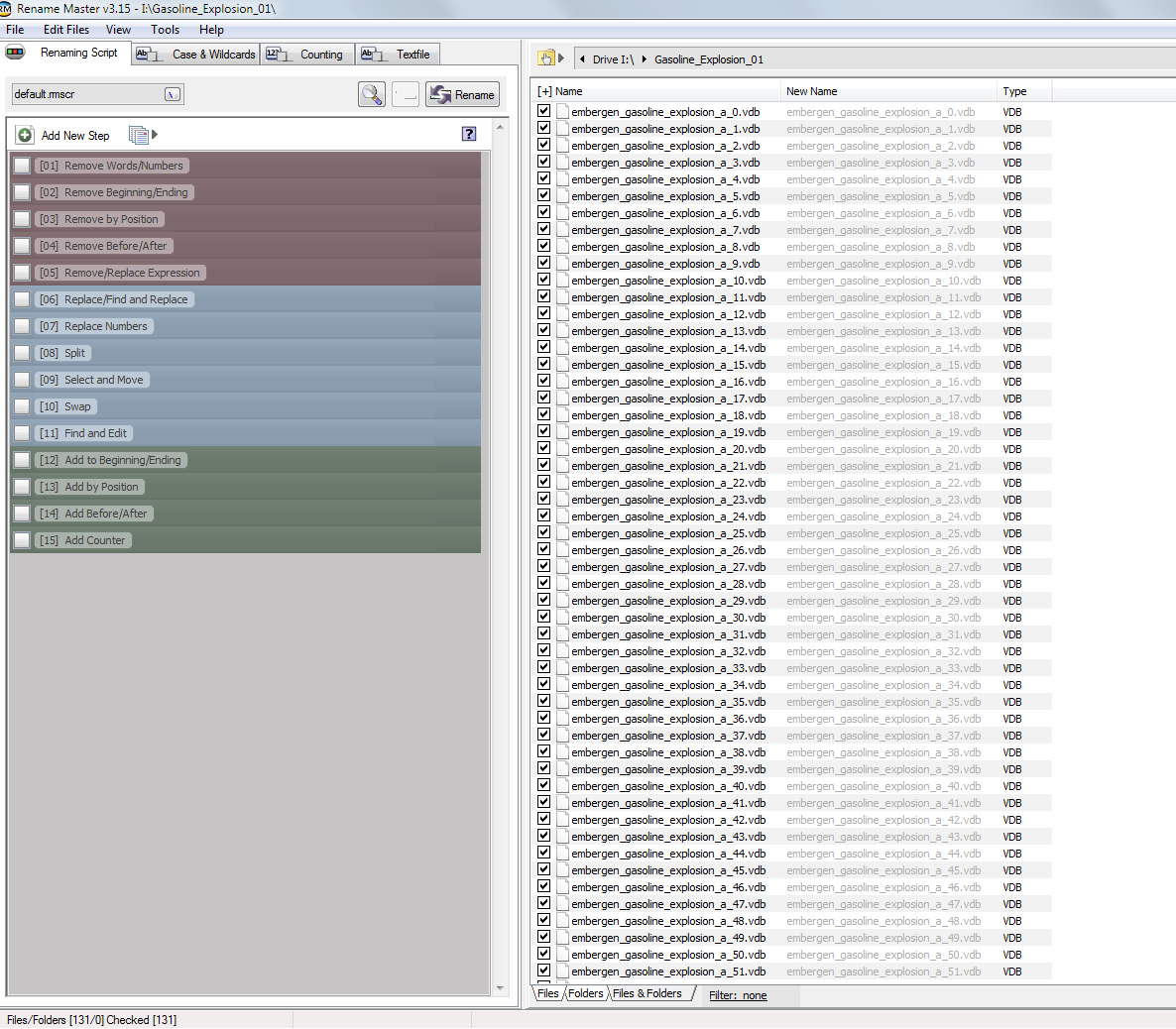
Click on Find and Replace and check it.
In the first box set the prefix of the series. In this case the filenames are "embergen_gasoline_explosion_a_0.vdb", "embergen_gasoline_explosion_a_1.vdb", thus the prefix is "embergen_gasoline_explosion_a_" (In your case the prefix is "fluid_data_").
In the second box set "fogfluid".
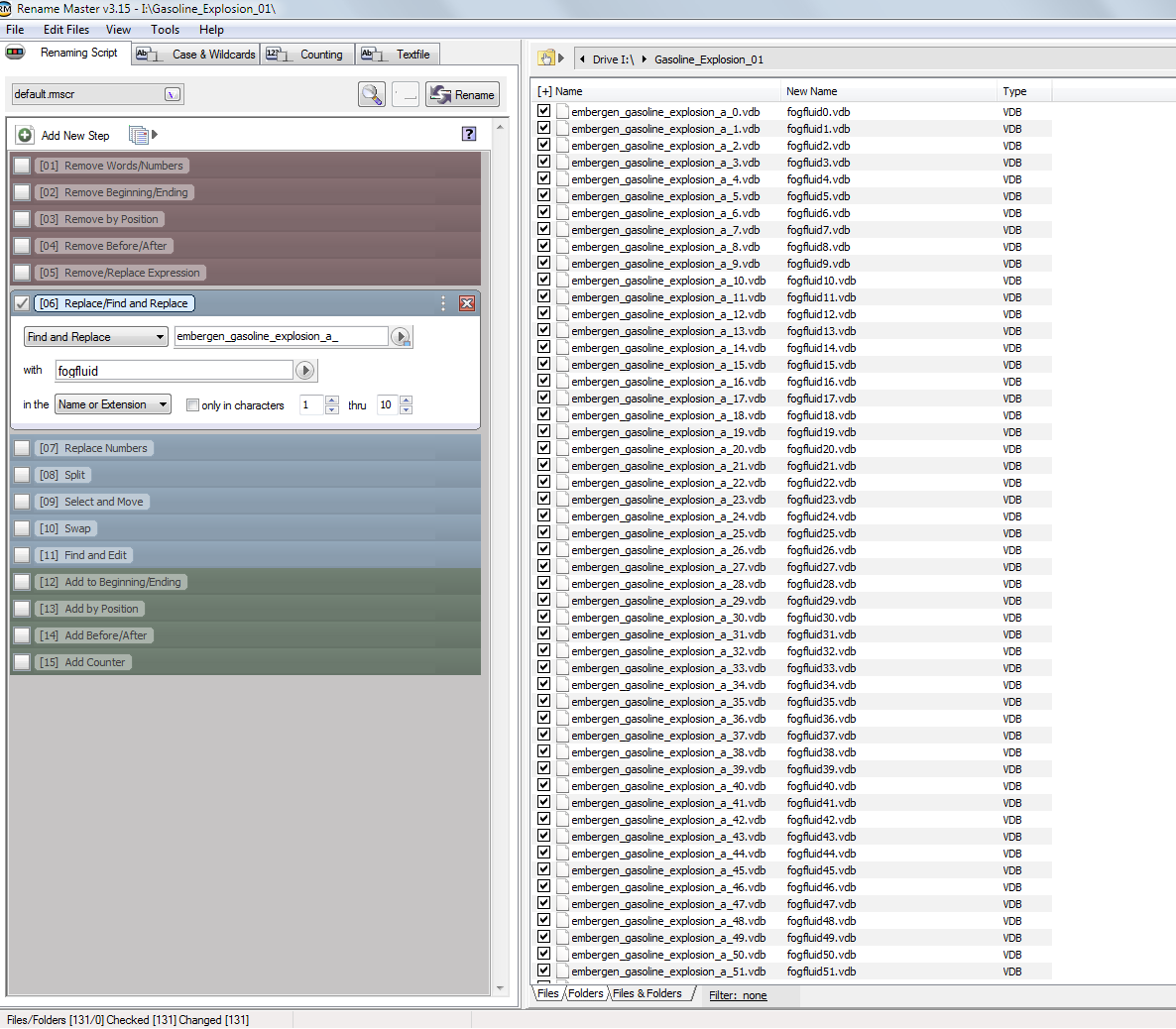
Click on Replace Numbers and check it. Left-click on the Count word and select Add Padding.
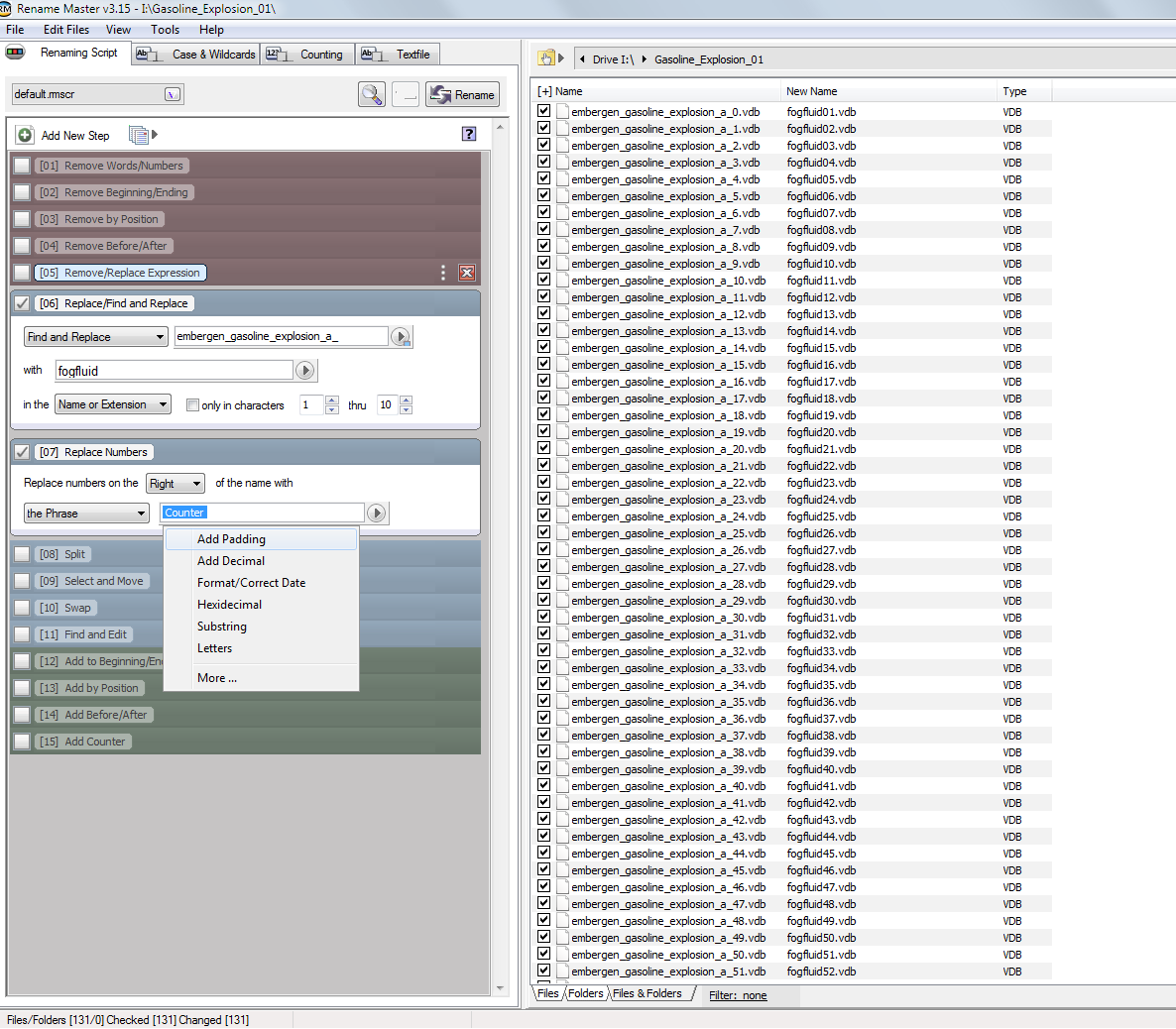
The padding for the Fluidos II vdb files must be of six "0" characters:
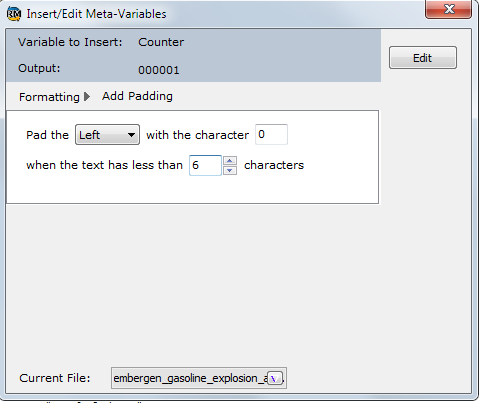
Click Rename to get the results.
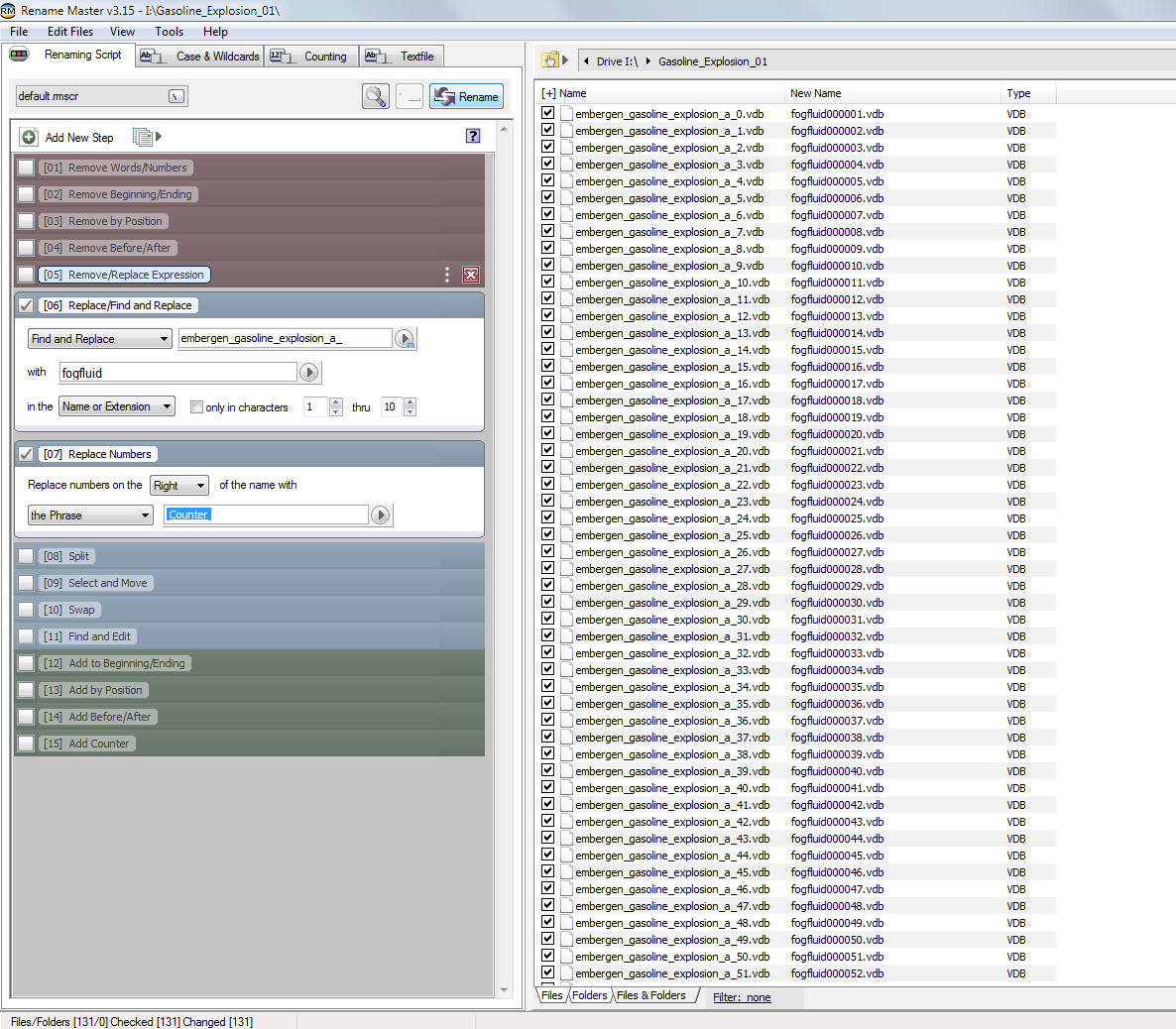
If your series starts with a number different from zero, select the Counting tab and fix the value at start counting at. It must be "0" (In your case, this isn't necessary).

Copy the renamed vdb files to a subfolder named "bakefiles". In the mesher, set the Baked files folder to the parent folder (for example, select "MySimulation" if the path of "bakefiles" is "/MySimulation/bakefiles").
About the ply files, in Blender, you have to export them manually. Be sure the Add-on "Export-import: Standford PLY format" is enabled.
My model when imported it become original black male model.danielbui78 said:
kylepham214 said:
I'm stuck at this step after export from daz to cinema4d , after I clicked to imported model from daz it only show original male model in black . I have try it several times to install and uninstall the plug in but it didn't work.
Before that I was worry because my daz studio don't have script to use ( daz to cinema4d bridge ) then I saw your very new post , I follow exactly the video but it still didn't work.
Hope you can help me with this. Thank you
Hi Kyle,
I posted a new bugfix that is not yet on Daz Central yet, so you will have to manually download and install it: https://github.com/daz3d/DazToC4D/releases/tag/2022.1.8
It should fix problems for people with custom Documents folders, as long as you are using Cinem4D R23 and above. (Currently working on adding support for older versions that use Python 2.)
Thank you so much for your help . I think I have try this with manually install ( throuhgt your tutorials on youtube ) but it still have them same problem when import from c4d. Is it possible if you can update full step by step from insallation daz studio to importing model in cinema4d , I have follow the step carefully and I have try multiple ways but it doesn't work .
Diffeomorphic DAZ Importer version 1.6.0 releasedPadone said:
1) Yes the bsdf option is for maximum fidelity with iray so materials look better. This is a complex setup though and not intended to be easily edited by the user. For easy edit there's the principled option, but this has limits because the principled shader can't mimic all the iray features, so it's not as good as bsdf.
2) The development version is linked in the main page. https://diffeomorphic.blogspot.com/p/daz-importer-version-16.html
3) Decals have a influence channel that you can use. See the picture.
Okay perfect, thanks for the quick reply.
1) So the BSDF option is best option to get good looking skin in Cycles, since it is closest to Iray (for which probably most creators made the model and textures)?
Would it make sense to import both material options and mix them, so I have the body/skin as the BSDF shader, and for example cloth that I want to edit more as the Principled option? What would be the best way to do that? Import the same model twice with the two different material options, after that delete one model but keep the materials? Or might there be an option to just import the materials with the other option?
2) The development version is also running stable on Blender 3.1 / 3.2?
How do I make my products visible in my Smart Content?If these are Daz store-based items that used to appear, you might try to re-import the metadata.
In the event you haven't done that before, here are the steps.
Right-click the "Smart Content" tab
Select "Content DB Maintenance"
Check "Re-import Metadata"
If you have a lot of products, this will take some time to do, even though the progress bar indicates 100% complete very early. I've had it take an hour or more when I recently re-imported data on a new install on a secondary machine. I did not re-download any items, simply pointed the new machine at the library on a network drive, so the DB had no metadata in it even though I could access the products through the content library.
Daz 3D is part of

Connect
DAZ Productions, Inc.
7533 S Center View Ct #4664
West Jordan, UT 84084Licensing Agreement | Terms of Service | Privacy Policy | EULA
© 2026 Daz Productions Inc. All Rights Reserved.