-
Children Characters for Daz Studio
Here's a sample of Growing Up Morph applied to Victoria 8.
The character on the left is the normal Victoria 8. She is wearing G8F clothes and hair.
The character on the right is the same Victoria 8 with the "AGE 9-10" preset from "Growing Up for Genesis 8 Female(s)" applied.
The clothes and hair automatically follow the character's morphs.
The rig also follows correctly, so poses can be applied as is.In addition to presets, you can also fine-tune the body shape using each morph slider.
Even in that case, clothes, hair, and rigs will follow the morph correctly.How do I make this defective skimpwear conform to G9 shapes?Yea, but I'm afraid rigging it with tight bodysuit template doesn't really work in this case... but you may give it a try.
1) Zero character's pose beforehand. Select the chain, set Resolution Level to Base, set Fit to Mode to Auto Follow Transforms, tweak its Y Axis to a proper positon. Then export / import OBJ. Delete original chain figure.
2) Rig the chain prop to G9 by using Transfer Utility with the settings in SS1.Traditional way is to fix its FBM, I use Victoria 9 as the example:
1) Zero V9 pose. Select the chain, set Resolution Level to Base. In hidden property, you may find FBM's name, copy it. (SS2)
2) Ctrl + Select V9 + Chain, export them to OBJ file with the settings in SS3.
3) Import OBJ into Blender or other modeling software, tweak the chain to well fit on the body by using Draw + Grab brushes with Symmetry turned on. Then export the chain to OBJ with the above copied FBM Name (SS4)
4) Import OBJ file onto the chain in DS by using Morph Loader Pro with the settings in SS5.Done. (SS6). (If your character is a fully customized one rather than by using any character product, you can just create a Fix morph in Step 4).. instead of updating hidden property of FBM)
But be noted that Step 4) takes pretty long time because this chain is really heavy in terms of Base geometry (870K faces...). I think that was why the vendor didn't fix FBMs on it.... too time-consuming.

Edit: You can also fix it in DS by using Mesh Grabber / Geometry Sculptor if you own them and then create morphs on the chain... but that process will be cumbersome. Geometry Sculptor has Symmetry option but it has bug with undo even may bring you DS crash.... Good luck !
How to Install Old Productsfrank0314 said:
If you use DIM you "may" be able to download some of the products in current format to install properly. I don't know if V1 stuff was ever converted for use in DIM or not but you "may" be able to find "some" stuff. I'm betting most of it isn't on the site anymore but you can look and see in your product library if there's an updated file or in DIM which would be the easiest. I not sure if the old installers they use to use will work or not. All of mine are barried away on a dinasour HD sitting on a shelf, so wouldn't even be able to test. If you happen to have zip files then you can move the files by hand to where they need to be in the runtime structure.
Yes they were converted for DIM - for example I have 'Millennium Woman' Victoria 1 here: https://www.daz3d.com/downloader/customer/files#prod_85
MMX Fancy Hair Color Shaders for Iray - Card or Strand?I tried it on dForce FE Edgy Short Hair which is a strand hair and you have to go the bottom of the files in Smart Content where the 'Apply First' is located, then select your hair color choice and it seems to work. I then tried it on an older non-strand hair, Ardamir Hair for G9 and repeated the steps and it worked on it too, maybe better. I went for an older G3F hair, Selena Hair which easily auto-fit on Victoria 9 and it worked quite nicely.
I am certainly no expert, but this shader was released after Omni and curves were and MattyMax doesn't appear to give a restriction.
Mary
Edit to add: I just tried dForce Kunoichi Hair and it did not work on it. The default hair stayed pink. So might not be curve/strand compatible. Not sure what I did on the first hair vs this one different.
How to Install Old ProductsJust found an old hard drive with all my models going back to Victoria 1 and the old Poser formats. The ones that came with their own installers.
Memories, eh?
Problem is I can't figure out how to install them. I've tried several times to install SleighDashingSnow.exe ("Dashing Through the Snow"). I've used "My Daz 3D Library" and other existing folders in the current Daz hierarchy and got nowhere.
Does the old stuff even work in the latest Studio? (That product's not even in the store.) If not, I can deal with that. But if there's a way I still use the models I spent so much time collecting back in the day, that'd be even greater.
Anyone have any ideas?
Thanx in advance.
kmw
There's Always Another Sale Thread -- Discussions Only Pt 3joanna said:
Well, today is the first day when the advent calendar served me a free item that wasn't on my wishlist. Not only that, it's an ancient product for Victoria 4, Aiko 4, and other "4" crowd. And since the $2.99 item is a set of textures for the outfit I don't own yet (though both textures and the outfit are on my wishlist), I'm not getting it either.
That aside, it's feeling more and more expensive here. With the prices taking into account tokens and punches, if you have neither, the offers don't feel good enough. Even Daz+ items feel more expensive. In the past, you could get them for $2.5-3.5. Now, they're $4.9 each. Sure, you can get them cheaper, if you buy both, but that's the luck of the draw. While I could consider getting Dasher Outfit, those expressions feel to me like they don't bring anything new to the table and many look so subtle that I don't see the point in using them as dials to mix and match. So, as a result, I won't be buying either.
I did have punches in the beginning, but when I forgot to check out once, I lost all of them, which definitely disincentivized building them up again and keeping up with them again (especially when the Holidaz Deal or the $2.99 calendar happen to be unappealing, and everything else doesn't seem like a deal good enough to keep buying daily). I have a few tokens that I'll likely let expire again, because with the higher prices for everything, they only have value when stacked.
I guess what I'm trying to say is that while I understand that everything's getting more expensive, I can't help but wonder whether Daz will price itself out of business by discouraging people without big budgets to keep buying. Those who can afford an expensive (more and more expensive) hobby and those who can transfer their expenses to their clients will, of course, stay and keep buying. I just wonder if there's enough of them to offset the departure of those who spent $50-100 monthly (or less). One $1000-a-month spender is not going to offset 100 people who stopped spending their $50-100 a month.
Even with Premier and 8 tokens for the last month and a half, the store has felt more expensive. I'm still getting the best prices, but I've not seen best prices like the previous best prices on Daz+ before Premier was a thing. It's a creeping inflation - almost imperceptible - but I'm sensing it. I won't be taking Premier up when my 'free' (and, from my perspective, stingy) trade-in ends. I'm getting ever-so-slightly less for what would be a massively increased buy-in. My switch to Premier was strategic - pragmatic. With the caveat that I'm one data point only, I'm on my exit strategy from the Daz store. I agree with you that Daz are pricing themselves out.
I feel quality is slipping too. Don't get me wrong - most of the best artists are here. Or artists who're creating specifically for Daz. But when I look at what the store offers and size it up to elsewhere - yes, things are more expensive elsewhere, but I'm going to put my neck out and say that the best Genesis character artists aren't on the Daz store - people who are creating distinctive, varied characters without access toproprietary sub-division tools that artists here have. Maybe it's because they don't have sub-division and an HD label to rely on? Maybe it's because Daz is simply one string to their bow?
Character diversity is an issue here too. I recently went on a store crawl to bulk up my library of men after a realisation that, of the hundreds in my library, 95% of them have the same set eyes, chin and chiselled cheeks. I was trying to put together a cast of a few dozen distinctive men from my library and I... struggled. Now that I can see where the limitations of variance in the my library are, I can spot the lack of diversity in the store too. Ouch, is all I can say. I don't have the time to make dozens of non-main character men, so I've been looking elsewhere. It'll cost me more, but I've already so many characters that I no longer believe will be useful next to one another in the same project, so maybe I should've spent that money on less products of higher utility?
Then there's the packaging of products. I'm really fond of some the artists who recently moved stuff here, but I'm plain sick of the amount of time I have to take to package up products so they're discoverable in my library. If I'm having to do that here anyway, then elsewhere suddenly doesn't look so unattractive.Finally, broken sales or items in the store. I've noticed many errors that weren't raised in the thread, but because I wasn't interested in buying the affected products, I didn't bother reporting here or via a ticket. And nobody else reported them either (at least publicly). Another ouch. I'll leave the speculation to others.
I'm certain I'll still buy from the Daz store after my exit, but it'll be on the same terms that I buy elsewhere.
There's Always Another Sale Thread -- Discussions Only Pt 3Well, today is the first day when the advent calendar served me a free item that wasn't on my wishlist. Not only that, it's an ancient product for Victoria 4, Aiko 4, and other "4" crowd. And since the $2.99 item is a set of textures for the outfit I don't own yet (though both textures and the outfit are on my wishlist), I'm not getting it either.
That aside, it's feeling more and more expensive here. With the prices taking into account tokens and punches, if you have neither, the offers don't feel good enough. Even Daz+ items feel more expensive. In the past, you could get them for $2.5-3.5. Now, they're $4.9 each. Sure, you can get them cheaper, if you buy both, but that's the luck of the draw. While I could consider getting Dasher Outfit, those expressions feel to me like they don't bring anything new to the table and many look so subtle that I don't see the point in using them as dials to mix and match. So, as a result, I won't be buying either.
I did have punches in the beginning, but when I forgot to check out once, I lost all of them, which definitely disincentivized building them up again and keeping up with them again (especially when the Holidaz Deal or the $2.99 calendar happen to be unappealing, and everything else doesn't seem like a deal good enough to keep buying daily). I have a few tokens that I'll likely let expire again, because with the higher prices for everything, they only have value when stacked.
I guess what I'm trying to say is that while I understand that everything's getting more expensive, I can't help but wonder whether Daz will price itself out of business by discouraging people without big budgets to keep buying. Those who can afford an expensive (more and more expensive) hobby and those who can transfer their expenses to their clients will, of course, stay and keep buying. I just wonder if there's enough of them to offset the departure of those who spent $50-100 monthly (or less). One $1000-a-month spender is not going to offset 100 people who stopped spending their $50-100 a month.
Off Topic Thread #2Stezza said:
what a PITA that is!
the lights went out twice during the day night cricket the other day in Adelaide... you guys seem to cop it in the power stakes all the time..

doesn't your power mainly come from Victoria?
yep
we do have windfarms and a power station on Torrens island but rely on the interconnecter too
this was just my street though as it was named in the text message so probably local line work, I saw a dead pigeon on the ground under the transformer where the street line joins the high voltage one on the main road when I went on my walk so maybe it caused it
it didn't look cooked though unlike the corella that took out the whole suburb a few years ago with a big bang chewing on the other transformer the other end of the street
Off Topic Thread #2what a PITA that is!
the lights went out twice during the day night cricket the other day in Adelaide... you guys seem to cop it in the power stakes all the time..
doesn't your power mainly come from Victoria?
The "Animators Assemble!" thread for Daz animation WIPs, clips, and tipsThis is a 360 animation of Starship R01 being piloted by Victoria 7 to the asteroid based Ensk Station.
 Is there a Stephanie 9?
Apart from Michael and Victoria, there's no guarantee that a new generation of figures will include a new version of any of the classic characters. I think the only other one we've gotten so far is Dain.
Evolution of DAZ AI over time as shown through the same prompt.Not long after DAZ AI became available, I thought it might be interesting to track the evolution of DAZ AI by using the same prompt and seed to see how the images generated change over time. I thought I'd try an unlikely prompt and a pretty random number for the seed. The one I ended up with was:
Prompt: "Woman piloting a spacecraft crash lands and is savaged by a house cat."
Seed: 1964012014
Whenever possible I have selected the Victoria 9 character, image dimensions 1024 x 1024. Prompt strictness default. Quality: Balanced. Number of Images: 4, taking the first as the image.
So, let's see the evolution.
13 April 2024
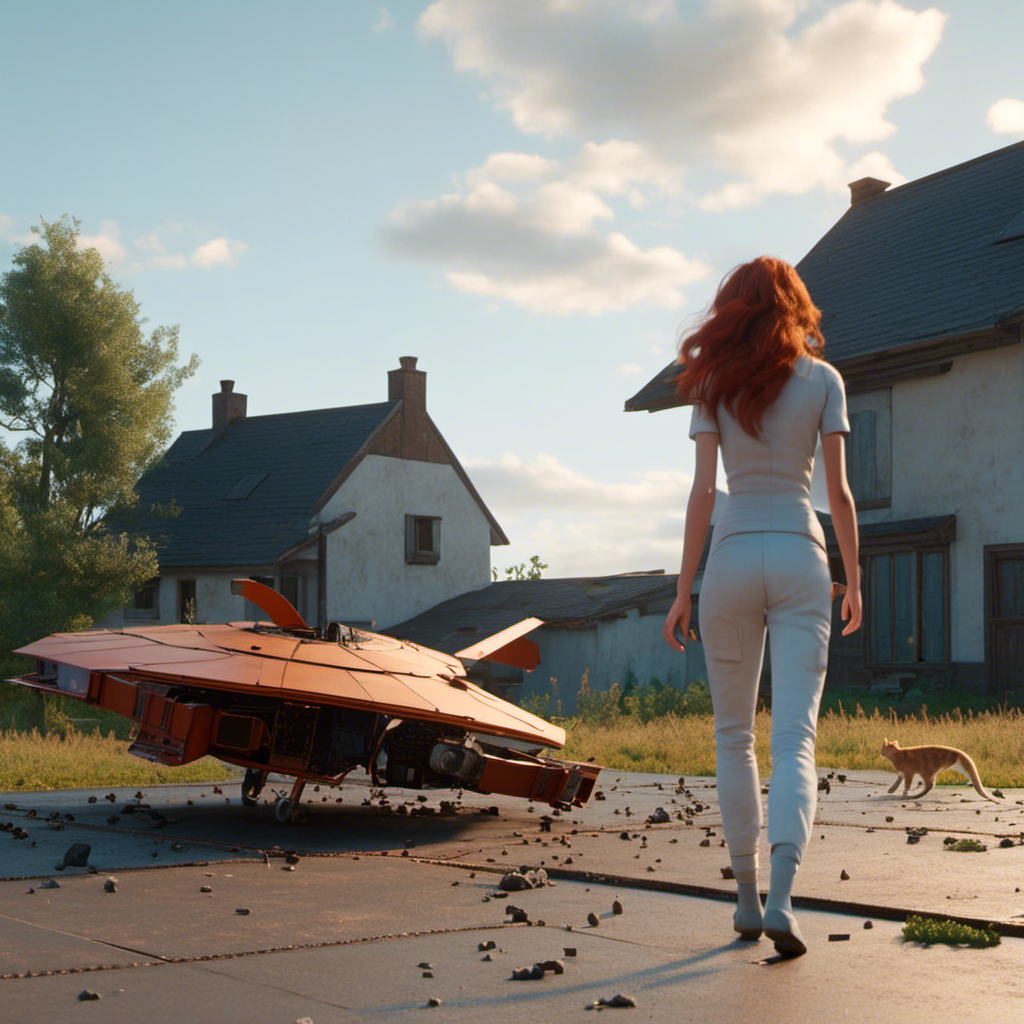
17 April 2024
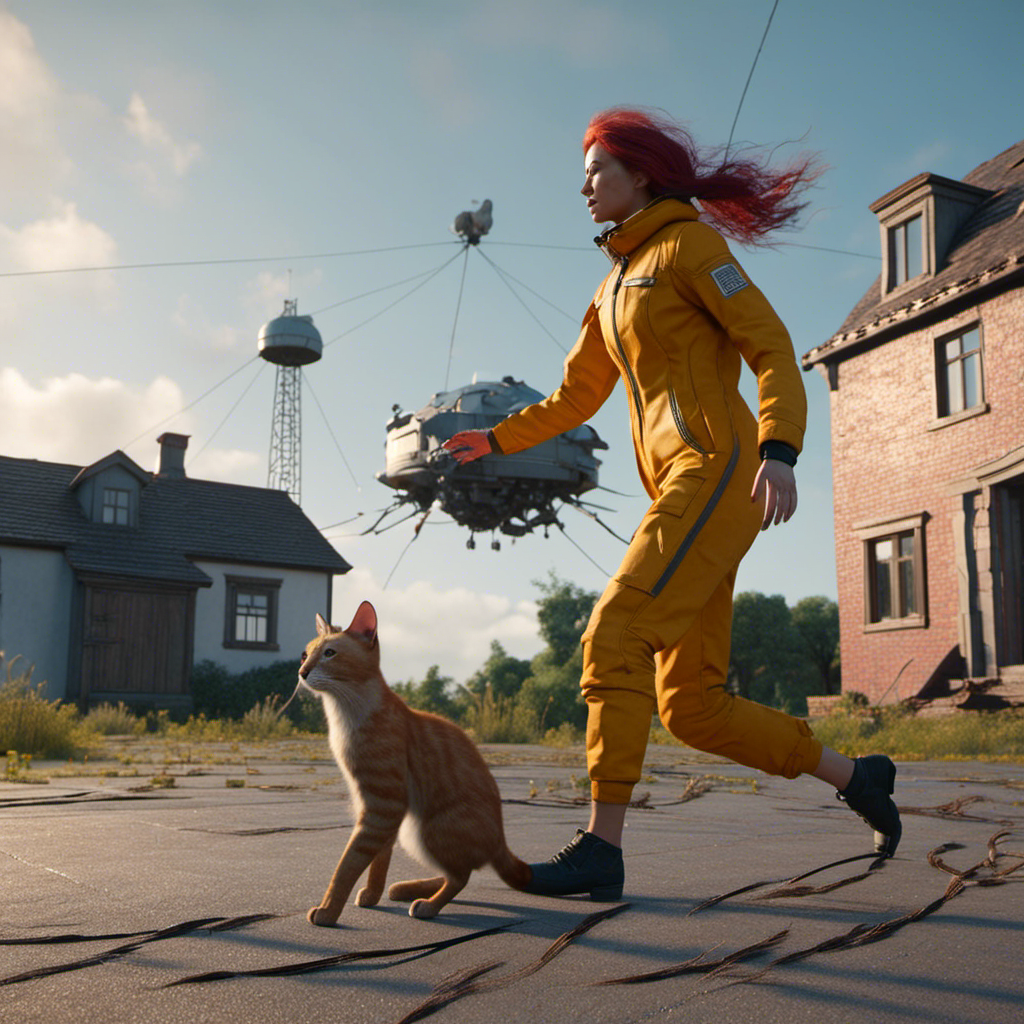
8 May 2024 (No V9 - I forgot)
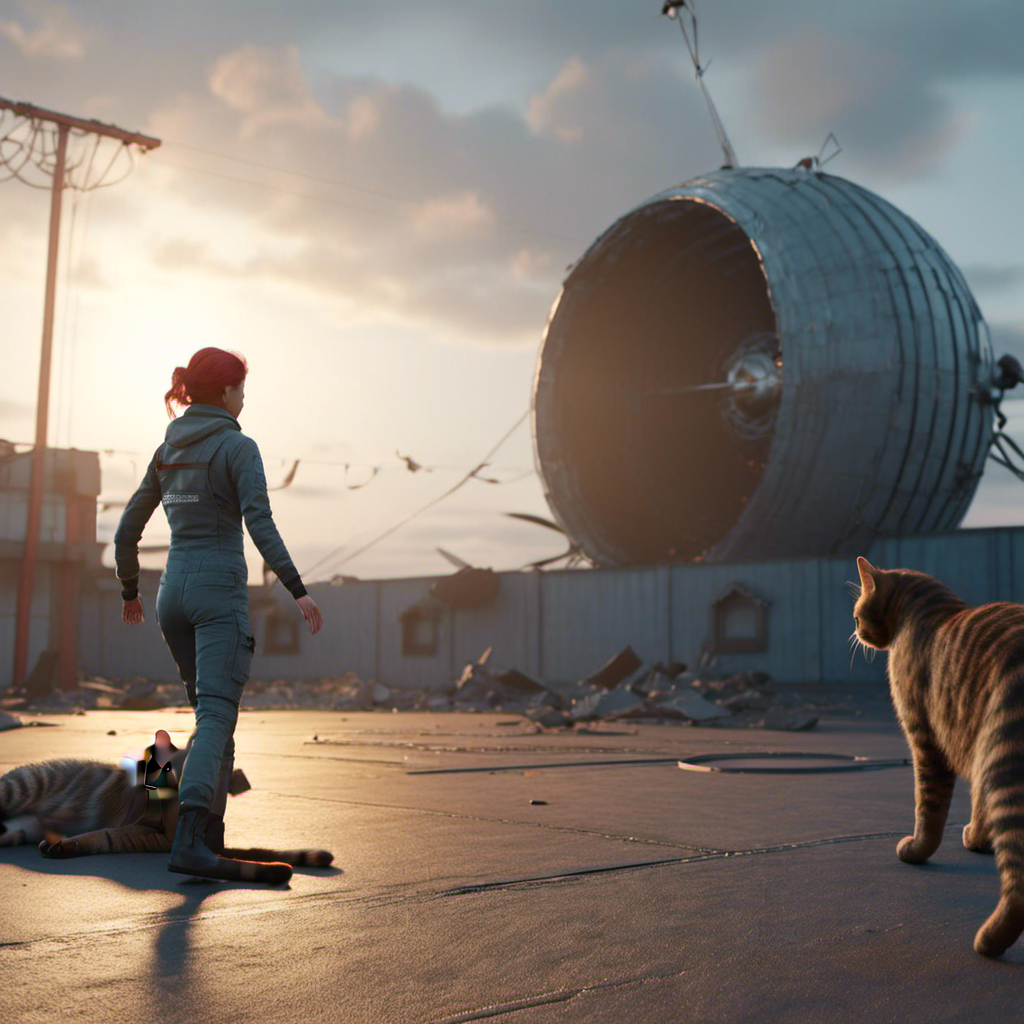
9 May 2024:
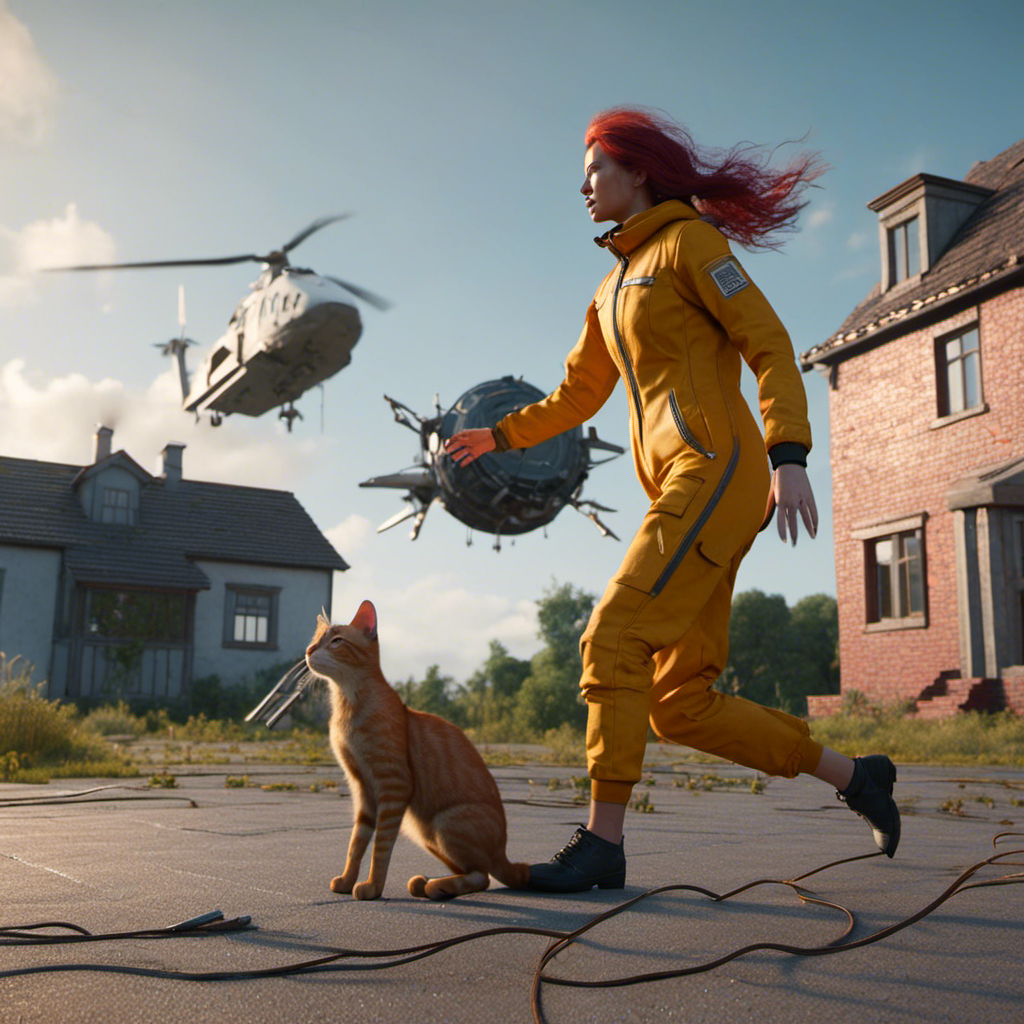
29 July 2024
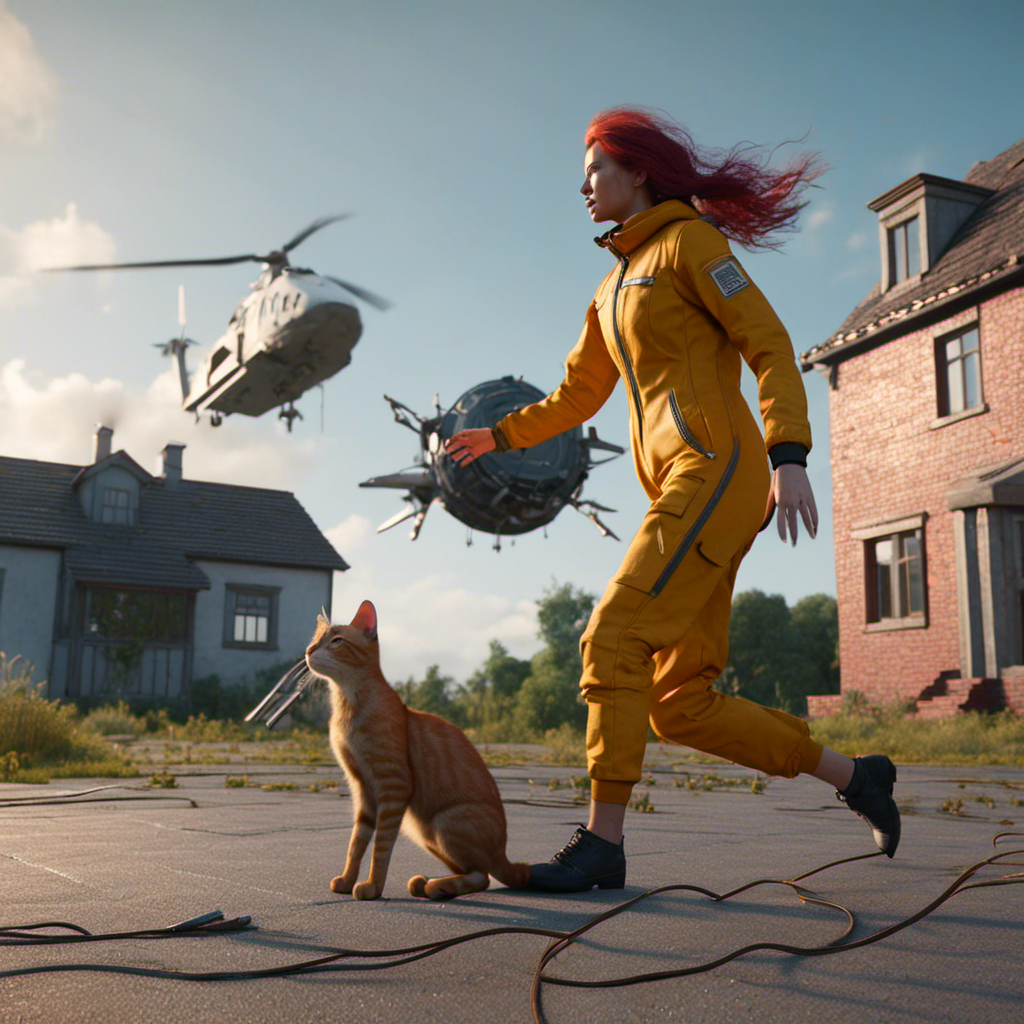
8 October 2024:
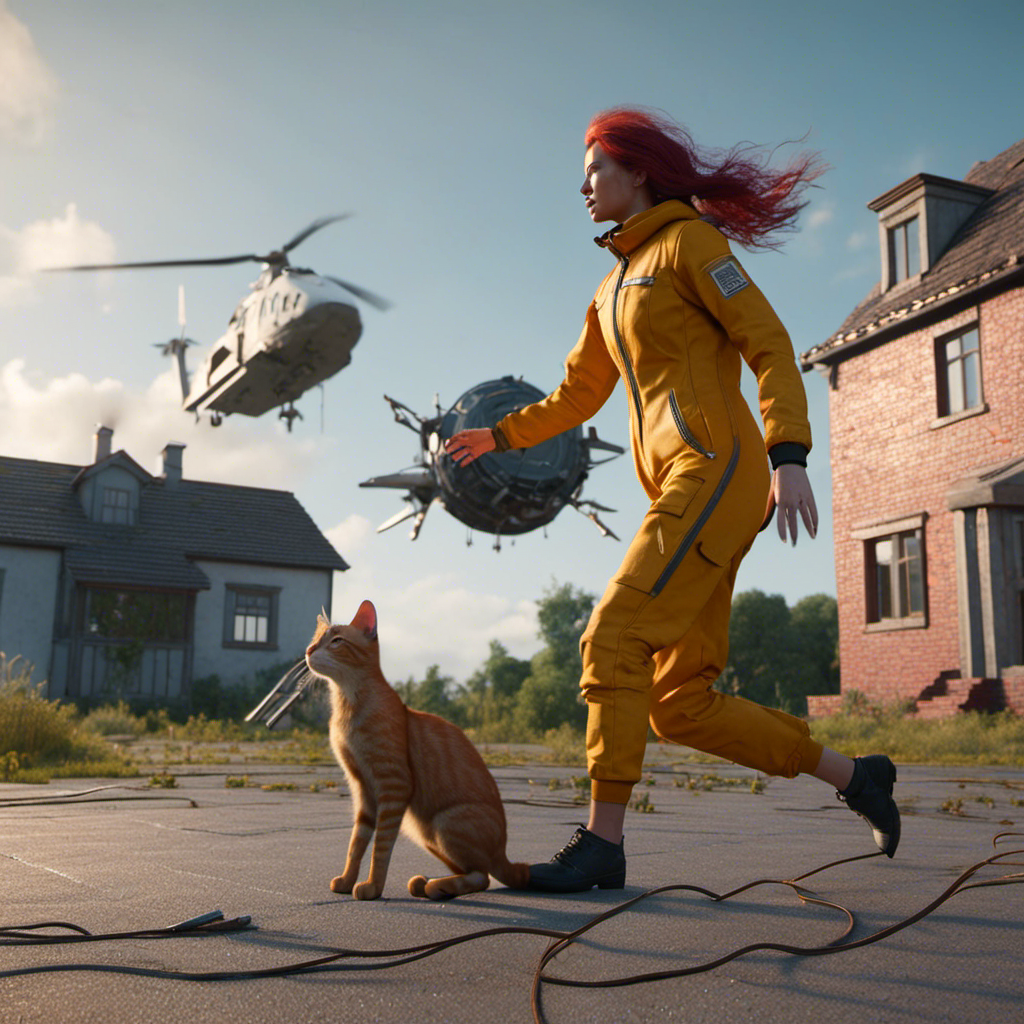
Regards,
Richard
G9F/G8F Size DifferenceElor said:
DarkElf said:
Richard Haseltine said:
How huge? The default height has certainly been reduced for Genesis 9.
Thanks Richard. Is there a specific ration difference?
G8F is around 10cm taller than G9.
It can vary from character to character (most PAs will simply use G9 default height, letting users change the height of a character to their taste with the Proportion Height morph) and can vary between core figures in the same line:
- Olympia 9 is taller than G9, almost as tall as G8F while Olympia 8 is smaller than G8F and Olympia 9.
- Victoria 9 is the smallest Victoria, smaller than G9 and a couple of centimeters smaller than Victoria 8.1.
- Michael 9 is taller than G9, he is the same height than Michael 8.1 and both are shorter than Michael 8.
A couple of things to keep in mind:
- G9 core figures who are smaller or taller than G9 usually have a specific proportion morph to get to the advertised height, a morph active if you're loading the character preset, but you'll have to activate it yourself if you start from Genesis 9 Base, because dialing, as an example, Victoria 9 character morph will not activate her proportion morph, only her head and body morphs.
- Don't trust the height advertised on Daz Store, at least not without checking with people who bought the core figure your interested with: Daz had publisher wrong advertised heights a couple of time already (no idea if other measurements can also be wrong, height is the simplest to check by comparing two characters and discovering than the one supposedly 10 cm shorter than the other is actually a couple of centimeters taller
 ).
).
Thanks so much for the explanation about the character morphs and how they work in comparison to starting with the G9 Base. I'm going to pay more attention to this so I can at least start with what the PA intended.
G9F/G8F Size DifferenceElor said:
DarkElf said:
Richard Haseltine said:
How huge? The default height has certainly been reduced for Genesis 9.
Thanks Richard. Is there a specific ration difference?
G8F is around 10cm taller than G9.
It can vary from character to character (most PAs will simply use G9 default height, letting users change the height of a character to their taste with the Proportion Height morph) and can vary between core figures in the same line:
- Olympia 9 is taller than G9, almost as tall as G8F while Olympia 8 is smaller than G8F and Olympia 9.
- Victoria 9 is the smallest Victoria, smaller than G9 and a couple of centimeters smaller than Victoria 8.1.
- Michael 9 is taller than G9, he is the same height than Michael 8.1 and both are shorter than Michael 8.
A couple of things to keep in mind:
- G9 core figures who are smaller or taller than G9 usually have a specific proportion morph to get to the advertised height, a morph active if you're loading the character preset, but you'll have to activate it yourself if you start from Genesis 9 Base, because dialing, as an example, Victoria 9 character morph will not activate her proportion morph, only her head and body morphs.
- Don't trust the height advertised on Daz Store, at least not without checking with people who bought the core figure your interested with: Daz had publisher wrong advertised heights a couple of time already (no idea if other measurements can also be wrong, height is the simplest to check by comparing two characters and discovering than the one supposedly 10 cm shorter than the other is actually a couple of centimeters taller ).
This is so true and happens way too often. Sometimes they're quite accurate while at times we have the Ashley 9 Petite form situation. It would be nice if the Daz Original products listed accurate heights as they're typically perceived as higher quality and should be presented as such.
With that said, it's really a superficial thing when you have height sliders, alternate forms, specific body part morphs, to make any model the size you really want.
G9F/G8F Size DifferenceDarkElf said:
Richard Haseltine said:
How huge? The default height has certainly been reduced for Genesis 9.
Thanks Richard. Is there a specific ration difference?
G8F is around 10cm taller than G9.
It can vary from character to character (most PAs will simply use G9 default height, letting users change the height of a character to their taste with the Proportion Height morph) and can vary between core figures in the same line:
- Olympia 9 is taller than G9, almost as tall as G8F while Olympia 8 is smaller than G8F and Olympia 9.
- Victoria 9 is the smallest Victoria, smaller than G9 and a couple of centimeters smaller than Victoria 8.1.
- Michael 9 is taller than G9, he is the same height than Michael 8.1 and both are shorter than Michael 8.
A couple of things to keep in mind:
- G9 core figures who are smaller or taller than G9 usually have a specific proportion morph to get to the advertised height, a morph active if you're loading the character preset, but you'll have to activate it yourself if you start from Genesis 9 Base, because dialing, as an example, Victoria 9 character morph will not activate her proportion morph, only her head and body morphs.
- Don't trust the height advertised on Daz Store, at least not without checking with people who bought the core figure your interested with: Daz had publisher wrong advertised heights a couple of time already (no idea if other measurements can also be wrong, height is the simplest to check by comparing two characters and discovering than the one supposedly 10 cm shorter than the other is actually a couple of centimeters taller ).
Hair 3D printI also think it depends on the hair and printer being used. I don't know anything about printing strand based hair. I suspect it's either very difficult or needs additional software. The printing I have done is with polygonal hair. SLA printers using the Chitu Box slicer tend to produce solid layers even if the hair is actually open sheets of polygons. If the hair forms a closed 2D shape on a slice, it's made solid. This can work with clothing too, and sometimes altering the figure's printing angle can solidify parts that would need modelling to otherwise correct. The most success I had was with old Victoria 3 hairs that were made from tubes - rather like a toon/anime hair. Regards, Richard.Native American clothing.If you mean V4 and M4, no they're not included with DS, only the figures from the Genesis line are.
Generation 4 bases are here: https://www.daz3d.com/victoria-4-2-base and https://www.daz3d.com/michael-4-base-male-3d-model
Some of the bundles they're included in have been offered for free from time to time.
For the record, Genesis 1 includes autofit clones to use clothes made for M4 and V4, and there are also clones available for sale to autofit them to G2, 3 and 8 directly.
FilaToon / Cell shaded rendering with FilamentCES3D said:
Wonderland said:
CES3D said:
Wonderland said:
Just playing...
 BTW, is there a clone for V4 to G9 for auto fit? I only have Genesis and up.
With this script, you can create V4 clone for Genesis 9.
This script uses Victoria 4, Michael 4, and The Kids 4 clones included in Genesis (the first) as templates to create V4, M4, and K4 clones for Genesis 9.
I already have clones for G1 up for G9. That product seems to do the same and I don't want conflicts with what I already have. I also have all the Gen 3 and Gen 4 clones for Genesis 1 but is there a way to make them usable for G9 (or even G8/G3)? Is there a way to duplicate them and put them in a different folder so they show up under G9? This may be the wrong thread for this question though.
While this might be a tangent from the main topic, I'd like to clear up a misunderstanding you might have.
The script I provided is designed to create clones of V4, M4, and K4 characters for Genesis 9.
By running this script once, you'll have clones of V4, M4, and K4 characters within your Genesis 9.
After that, you can directly Auto-Fit V4, M4, and K4 clothing onto your Genesis 9 without needing to use this script again.Ah, OK, thanks. Just downloaded it.
Getting on the 9 train, or notG9 reminds me a lot of Victoria 4.
It is a "face-only" figure. Great for portaits, but don't pose him/her/it, for the joint bending is just horrible.
Like V4, G9 might also be ruling the DAZ universe for a long time.
V4 and G9 are love-it or hate-it fugures.I never had any use for Victoria 4 and I have no use for Genesis 9 either.
I'm not into Manga or Anime, but this would make G9 somehow useful, since accuracy doesn't really matter on it, and cell shading is easy to fix in post work.Getting on the 9 train, or notMatt_Castle said:
Gator said:
Keep in mind that line is out of context, after I listed many cons to the single multi-gendered mesh.
I may come from an older era of forums, but I do not like the increasingly common approach to quote an entire post AND all of its nested quotes in order to respond to it.
It's particularly frustrating when reading the forum on the frankly very-poor mobile implementation, where after a couple of levels of nesting, the innermost posts are reduced to a one letter wide column that goes on for hundreds and hundreds of rows.
Hence, usually, I will reduce posts I'm quoting to key points.
~~~~~
But, if we're taking that argument...
Gator said:
What are the long list of benefits exactly?
To understand my perspective, I'm a Daz user that significantly customizes their things.
And I'm pretty sure I'm in the upper percentiles for doing things the vendors didn't plan for.
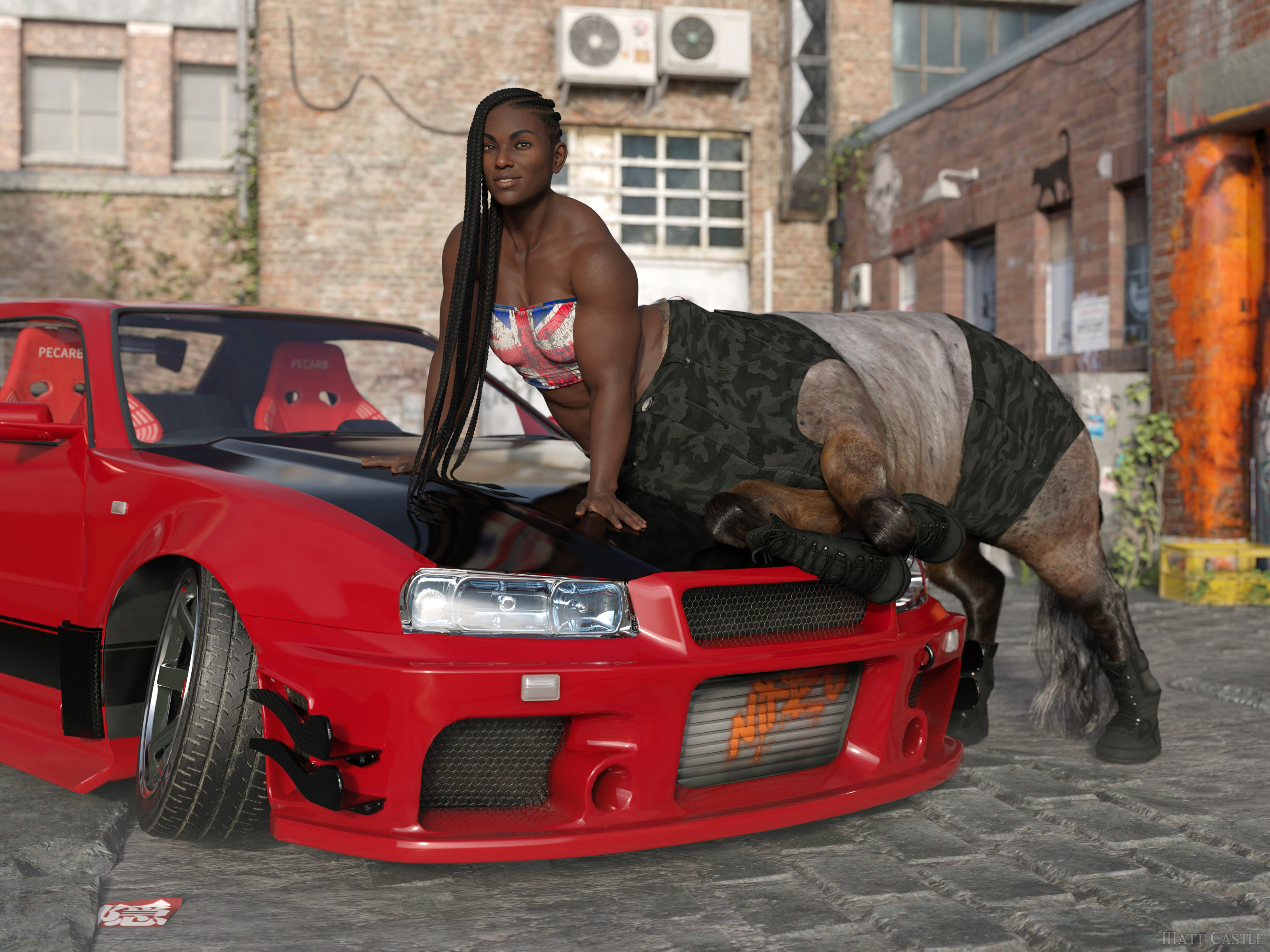
(Well, I say that, but by this point Lyoness absolutely anticipates me doing stupid stuff with her products. She certainly didn't plan that originally though).
The single mesh has some significant drawbacks. Big one that immediately comes to mind is that you have texture compression and stretching issues. It's most apparent in the chest.
True on every generation, if textures are not actually painted onto the morph they're being used on. I've had enough cases where both large and small breasted G8F characters had problems with stretched textures in the chest area.
I'm far from an expert in content creation, but for someone who doesn't care about cross gender clothing it seems like more work. From what I recall, it's recommeded to model to the gender neutral base figure, and then morph to your intended gender. I forget the details, but in any event the times I did it meant modeling/modifying the clothing for two figures (gender neutral and female) instead of one.
Making any clothing item to a good standard already needed manually fitting to major morphs.
Even if you completely disregard any idea of making the clothing work for cross-gender, there's functionally no difference between having to make your clothing fit G9 base, G9 Feminine, Victoria 9, Olympia 9, etc as it was was with G8 base, Victoria 8, Olympia 8, Monique 8, etc. Either way, you already had to make the clothes fit a base shape and then a load of morphs. But on this one, you can be assured that everyone already has G9 Feminine, and a lot of characters sold on the store therefore use it as a shape to sculpt over.
Also, if you're genuinely planning on making the clothing only for one base, then while I hold it's best practice to start on the base shape, the transfer utility *does* have the Reverse Source Shape from Target option, so you can actually model on G9 Feminine, then have Transfer Utility fit to that morphed shape rather than the base shape.
It also means modeling on this totally non-natural genderless figure with fires off my uncanny valley response to 11.
Whether the base figure triggers your uncanny valley response is irrelevant; lots of what we do in the process of developing an asset will look like a distorted version of the final result we're aiming for.
If you don't like the base G9 shape, don't put the base G9 shape in your renders. What shape the figure starts at is not what's important, it's what shape it ends up as - and, indeed, the exact base shape you start from has little limitation on what shape the character can be.
I mean, here's the same character on Genesis 2, Genesis 8 and Genesis 9, despite all of those bases having a different initial shape.
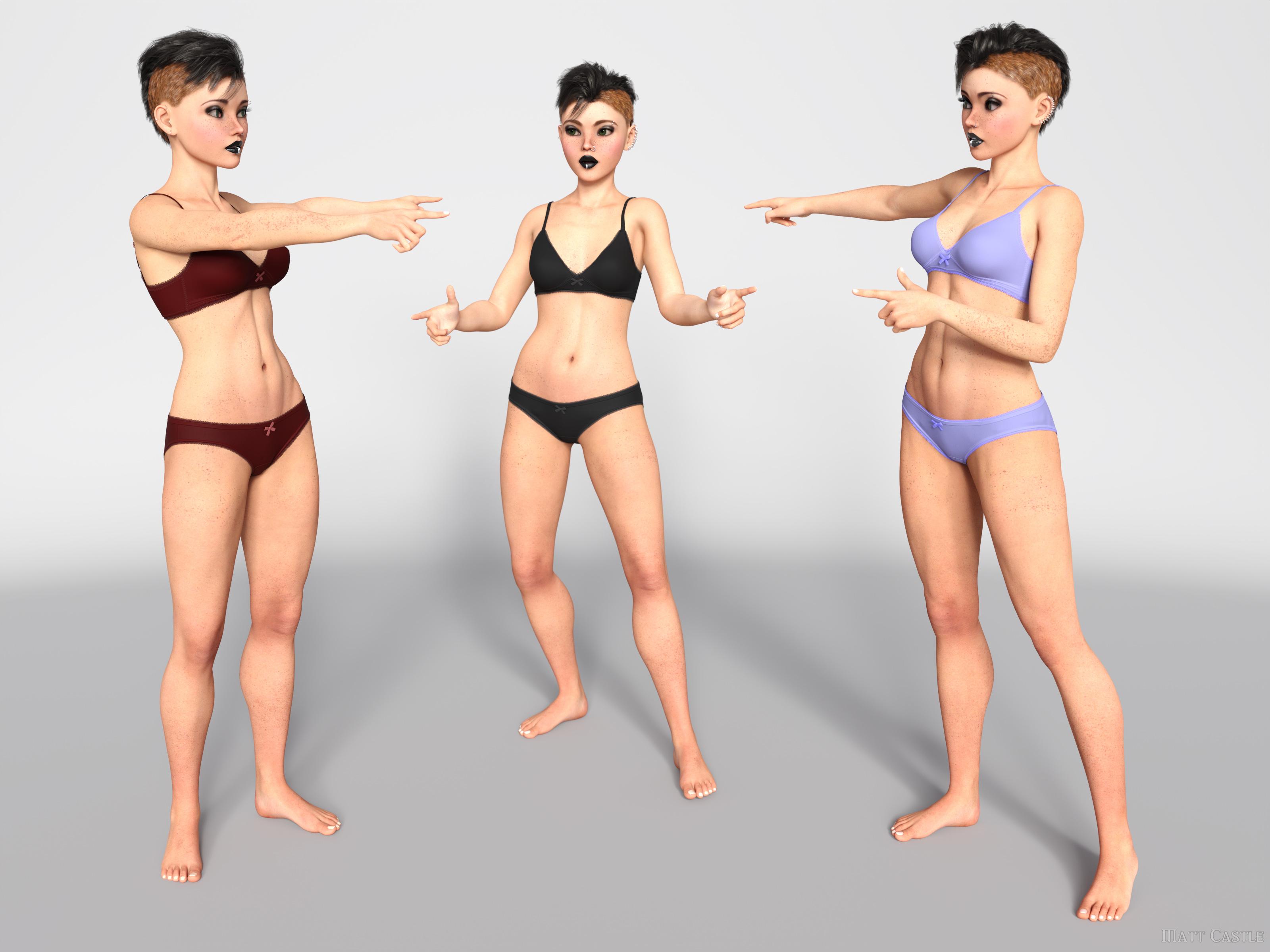
I'd challenge people who think the base figure shape leaves an indelible fingerprint on the characters to put their skills to the test and make a correct call on which base each of these is using.
(And I promise, they are genuinely on Genesis 2, Genesis 8 and Genesis 9; I've not used the same base three times).
Another potential - has there been an improvement with handling a large number of morphs when loading a figure? With G9 now it has to parse through two genders of morphs in your library. I've tried, but I don't really use G9 so I don't have that much.
Yes, significantly so. Daz have brought down loading times massively from where they were, and we know that when we (finally) get DS 5, one of the main things they're trying to resolve is being able to multi-thread processes that DS4 currently can only handle single threaded. As mid-range modern CPUs tend to have about 8 cores, and higher end ones can have 16 or more, that's going to be around an order of magnitude of speed increase.
As for cross-gender clothing, I simply don't have any use for it. Never have in over 10 years of rendering and probably never will.
Already addressed this one, but moving on to your reply...
For the cross-gender clothing support you also need to keep in mind at least today, there really aren't that many unisex outfits in the real world. Even in 2024, our children go to a school that requires uniforms and they are different for the sexes. Even something basic like a polo shirt, they are cut significantly different and fit differently between the sexes. Sure, you can morph it, but you generally morph the crap out of it and wind up compression/stretching issues I mentioned in that post. Same for the US military ACU, while similar the differences are beyond morphs.
Aside from the fact that having *a* matching polo shirt but perhaps not with a perfectly feminine cut is obviously better than having *no* matching polo shirt, if we're talking about singling out points from a post without addressing the entire thing, I address several other points where native cross-compatibility is a boon - anthros don't need the vendor to make two different sets of body fur, aliens don't need two different sets of geografts and HD morphs, male and female members of a family can actually share morphs to get resemblance, etc.
I'll even go so far to say my lack of need for unisex or cross gender is probably the norm - granted, feeds get tailored for what we all click on now but at the art rags I look at there simply isn't much unisex or cross dressing going on out there.
Possibly...
... but I would say that the greatest strength and the entire ethos of the Genesis lines are their flexibilty and compatibility. Victoria, Olympia and Josie aren't all stand-alone figures - we can share the same hairs between them, we can share the same clothes, the same skins, the same poses.
If you say "well, we'll take away a function because not everyone's using it", then suddenly you have no functions. (Hell, on the basis of sales figures, we'd probably have no male bases at all).
But that as an example strongly illustrates a point. Options have exponential potential; even if you don't use rock monsters very often, the fact that you *can* use a rock monster when a scene calls for it massively increases what you can do. Taking away men might be much more obvious in its drawbacks, but the number of scenes I've had to put to one side because I don't have a specific and niche-seeming item to complete them is considerable. (On that note, I have to fanatically promote GCJellyfish's Dirty Dishes sets, because the number of scenes where I've thought "there's no way I can finish this, I won't possibly have a posable banana peel in my library... holy mackerel, I do." Actually, GCJellyfish's sets are like this in general, and I *still* underestimate their feature sets)
Even if few scenes may use cross-gender clothes, I'm willing to guess that many people have done (or had to abandon) scenes that required a seemingly niche function. Taking away functions because they're not useful to you eventually gets to the point where the DS feature set is below the kind of critical mass it needs to be useful.
~~~~~
Sure, things could be done better about G9, but I think the things that G9 has tried to do are good ideas in principle.
Whew... there's a lot there. You acknowledge that it's best practice to work on the base shape, but then go on to say you can use the transfer utility to skip that step.
Aren't best practices given to us to avoid issues down the road? It's N+1 amount of work. Maybe not a big time investment, but the industry generally moves toward less work not more.
So it's less work for rigging things between sexes - how many care? I think a lot more care about having a better base to work on for male and female renders (the texturing issues you acknowledge) vs. a bit less of a one-size fits all. To be sure I wasn't taking crazy pills, I went to a virtual machine that I don't use to browse the internet with on a VPN for a totally clean session - I briefly scanned through a few dozen or so pages of art (well over 100) and didn't see a single instance of an art subject dressed in a unisex style, or opposite of traditional gender norms, or different sex siblings - so less than 1%.
By the same token of using the Transfer Utility to skip a step rigging as you mentioned, you can use the transfer utility on your female article of clothing and transfer the male rigging to it or vice versa. Was it easy for you to do the image of the three separate look alike figures?
True on every generation, if textures are not actually painted onto the morph they're being used on. I've had enough cases where both large and small breasted G8F characters had problems with stretched textures in the chest area.
THAT is why many of us are complaining, we'd rather have a separate female and male mesh to mitigate those issues as much as possible without diving into extra work. Personally, I'd rather optimize for the 95-99% use case than the 1-5%. (Throwing in a few percent to err on the side of caution).

Daz 3D is part of

Connect
DAZ Productions, Inc.
7533 S Center View Ct #4664
West Jordan, UT 84084Licensing Agreement | Terms of Service | Privacy Policy | EULA
© 2026 Daz Productions Inc. All Rights Reserved.