-
Walk Designer for Genesis 9
Oh, and because of the earlier thing:
I'd just like to make it clear that I do like the Daz Studio TCB interpolation! I really do! Coming from Carrara, it's a bit different working with so few tweener options, but when it comes to character animation, these are just fine. If I had the clamped interpolation, yes. I'd be using it more than anything else for nearly everything. Other things, however, truly call for the overshoot.
Tennis Courts neededpopulating stadiums would be a lot easier if iray had a simple wind foliage shader like iClone, Unreal Engine, Twinmotion, Unity, Godot (keep finding more searching)
I have no idea how hard that would be to create (I have had no luck even in Carrara let alone DAZ Shadermixer)
basically it sways so images on planes appear to move a bit, adjusting the normals, pixel space from what I can ascertain
more....Wacky Modelling ~ In Carrara ~numbers cubed in Carrara

 Walk Designer for Genesis 9
At the beginning of my "Evolution of Rosie" video, we can see a glimpse of how I animate Rosie's facial musculature Today - a process whose current identifier is "Rosie 8.25".
Rosie 8.24 and 8.25 are actually the same in visual appearance, and loading a Rosie 8.24 character will be the same as loading a Rosie 8.25 character, but loading a Rosie 8.24 (2024 process technology) saved animated file will be very different from a Rosie 8.25 save.
In 2024 I began implementing my own custom dials to Genesis 8 around the procedures that a Hollywood studio might use for implementing the FACS workflow for a specific, performance captured actor/character.
FACS (Facial Action Coding System - by Dr. Paul Ekman) was not actually intended to be used as a means for the government to be able to identify specific individuals from one another simply by facial motions - but it was discovered that it can help in such regards because of how unique each person's individual facial muscles "Fire: throughout their everyday life.
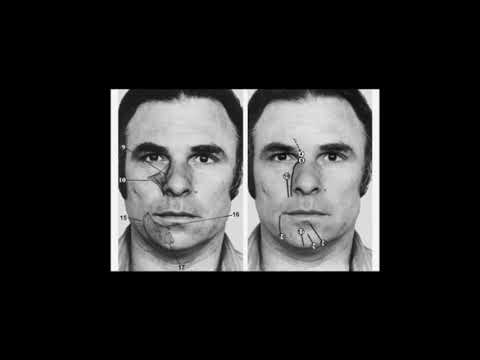
Yes, it's taught as a means of properly conveying Expressions upon a face, but as Richie Banham (WETA Digital) and his team utilize the system, we can animate how each person has their own true identity through their unique use of their facial musculature on a subconscious level, to develop cohesive actors that begin to remove the un-believe-ability of them due to their 3D model, stagnant and often too static (unused) facial control dials.
What I'm referring to at the end of that sentence is very evident in the base results from things like Mimic, Anilip, etc., that auto-generate lip sync. Performance capture is different in that it can automate a lot more of the actor's portrayal of the character. But it's still highly beneficial to edit these automated results to help finalize what we see on screen.
While automation tools can be a real blessing of an advantage as a starting point, it's also quite common for a "Home Animator", like myself, to stop there and call it a day. The result is an obvious 3D figure with generic, even if excellent, lip sync applied.

In his "Animation in Carrara" video course my dear friend and mentor, Mr. Phil Wilkes, demonstrates how much fun it can be to animate lip sync by hand key frame methods. At the time of release and upon first viewing (same day! LOL) I thought he was Nuts for saying that. I mean... we both (as well as many others) have an extraordinarily powerful version of Mimic Lip Sync - Mimic Pro for Carrara, which allows us the opportunity to create custom, individualized Mimic sessions for individual characters - which is really cool!
Well, nowadays, I can Completely see where he was coming from. Animating speech by hand key framing can be incredibly rewarding and personal for each individual character. Then there are people like Wolf359 who can personalize characteristics of the face using Puppeteer and other methods - it's all a real treat that we can find so many different workflows to accomplish these goals of Humanizing our digital actors!
I use things like this to help drive my inspiration for pushing myself forward.
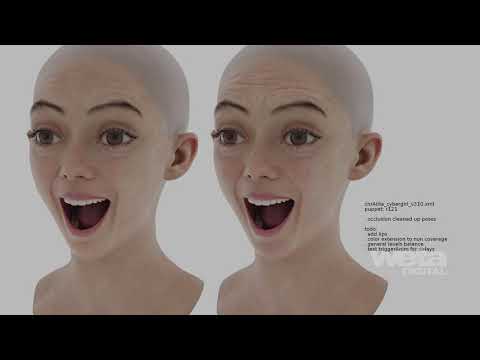
Of course, these techniques and technologies are done with teams of people. My main Team is the evolution of Daz Studio software and the content creators making cool tools that help, like this Walk Designer. So... Daz 3D is my team!
As for the character of Rosie, I push that development further on my own, using my own videos and animations to help guide where to go next. Everything I learn while moving forward with her increases my skills for everyone else in the cast along the way. Since I work so hard to push Rosie's development for better animation forward, many of the techniques I train myself to use get more fluid and second-nature the more I perform the tasks - and the whole thing just keeps getting more fun - even if the results meant for a bit of a lapse in quality... I get to 'see' that on screen in my videos, pick myself up off the embarrassment floor, and move on, without removing these catastrophes from my channel. It's all just part of the whole experience.
Gallery > Inspiration is a place on my website that I use to collect and display videos like that, which is located in Gallery > Inspiration > Alita Battle Angel, and there are many more, and more will be added in time down the road.
I originally made that spot as a place for myself to go and relax and learn and get more and more inspired. Tutorials are great for learning the software and specific techniques, but these are excellent demonstrations that guide how I will use my growing knowledge to further my animation techniques, how I render them, how I portray them on screen, etc., So I find this Inspiration sections to be, to me, one of the most important - and I'm grateful that these top-of-the-class professionals are so willing and eager to share!

Like my Evolution of Rosie movie explains at the beginning, Rosie 8.25 is a brand new push forward for me and it's starting to take my animation skills to a whole new level of quality.
Most of the time when I mention the Rosie 8.25 advancements, I'm referring to my facial musculature system, which is still just pushing what I teach in my Dynamic Character Animation for Daz Studio course into deeper philosophies of how these custom controls make Daz Studio such a blast to animate in.
However, she's also seeing completely redesigned outfit changes and/or alterations and additions, newly sculpted shaping of her incredible dForce-simulated hair, by Linday, new makeup options and other detail enhancements that can be changed on the fly - specifically now because I'm also creating a whole new Content Library area specifically for the Rosie character - both 8.25 (and beyond) as well as Rosie 9, who still hasn't even found her way to an Alpha version yet.
No hurry on that front since, working with Rosie 8 is such a privilege. She's fun and exciting to animate and has access to a really good variety of tools that just are not available yet to Genesis 9 - at least not with as predictable results or ease of use. One day I'll get there, but until then, Rosie 8 Rocks!!!
 Buy Something That Doesn't Work in Carrara? Post your Questions and Workarounds here. (please)
WendyLuvsCatz said:
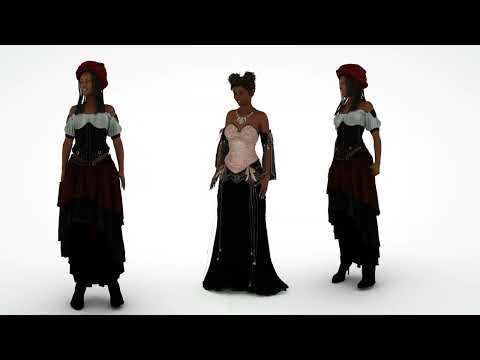
just a quick look at some of the VWD simulations
(all done on Win7 rendered on Win10 using Octane)
Fantastic. I may need to find an old Win7 machine just for Carrara purposes. Hmmm... like getting back into that whole HP Z802 craze!!! :)
Sagan: A DAZ Studio to Blender Alembic Exporteryeah, I understand it's a vertex order change and this is reflected in what happens fitting a geografted part in Carrara, it destroys the UV mapping, it doesn't if the figure is imported in any way (FBX or obj) but it happens loading a duf file.
So something using the way Carrara reads duf files which DAZ added to the program and apparently not in the SDK.
There are 2-3 different solutions we use, my favourite is fitting a second geograft to the first one and hiding the first one, another option is fitting it to something else conformed to the base figure or editing it in DAZ studio to make it into a conforming item instead of a geograft
I obviously cannot do coding solutions but can work with geometry solutions and was hoping you were doing the latter since Blender imports it.
Sagan: A DAZ Studio to Blender Alembic ExporterWendyLuvsCatz said:
we have a geograft UV issue in Carrara, I wonder if how you solve it could be applied there too
Hi Wendy,
I sincerely hope not; in retrospect I think the bug can be placed firmly in the "stupid mistake" area...With both Alembic and USD, you encode faces by defining the vertices of its corners by an index into a long tables of all the vertices in the mesh. That's efficient because unless a vertex is a UV seam, it only needs to be in the table once, even if more than one face refers to it.
UVs are different. They're not indexed because there should not be any dupes and the same optimization for vertices would not save you anything. So, you just encode the actual U and V values in the same order as you're encoding the faces that make up the mesh.
Now, when there is a geograft or geoshell which can remove faces, that creates unused vertices that have to be removed or else you end up with loose vertices in Edit Mode in Blender. So you encode only the faces that are still used in the mesh, and create new indices that refer to a shorter list of vertices that are actually referenced by a face. It is not necessary to do this for UVs because, as I said above, UVs are not indexed.
The bug was that I was redoing the UVs as well, in a way analogous to what I had to do for the vertices, which creates a UV array of a shorter length than it should be because it is removing the "duplicates" that it falsely believed existed when the corresponding face's vertex was a duplicate. Blender's Alembic importer doesn't report the error, it just silently discards the bad UV map. I found it when I used the same code for Hitchens, which uses USD, and the Blender USD importer gave a meaningful error message saying the length of the UV map was off. At that point it was just a matter of staring at that section of the code long enough until the error jumped out at me.
So the problem was Alembic and USD specific (they both encode geometry is pretty much exactly the same way), and I must assume that the Carara guys are better at this than me, or at least they should be :)
Buy Something That Doesn't Work in Carrara? Post your Questions and Workarounds here. (please)RuudL said:
Have you tried copy and paste from one scene to the other?
you can have more than one scene file open in Carrara
no, not copy/paste I admit,
I have tried import, load from browser, drag into scene from browser to scene not anything selected, drag onto head etc
right now am rendering her with a DAZ polygon hair as gave up
can try later
Buy Something That Doesn't Work in Carrara? Post your Questions and Workarounds here. (please)Have you tried copy and paste from one scene to the other?
you can have more than one scene file open in Carrara
Sagan: A DAZ Studio to Blender Alembic Exporterwe have a geograft UV issue in Carrara, I wonder if how you solve it could be applied there too
Buy Something That Doesn't Work in Carrara? Post your Questions and Workarounds here. (please)the thing is it used to work on Win10 but Microsoft updates ended that years ago
I wish I knew how to fix it
UPDATE
I can load the Carrara Beta with it added to extensions and am running it but will see if it crashes sending to Carrara
well it didn't, it just never loaded after importing and VWD closed
so it might be an extension clash, didn't show that error though, a quite different one
or it could be python 2.7
I updated that
am frustrated
it stops responding or simulating so no closer other than the Carrara beta opening and loading it
Buy Something That Doesn't Work in Carrara? Post your Questions and Workarounds here. (please)I was in the middle of making a fun new video working in Carrara, but no VWD kind of puts a horrible twist on how I work in Carrara, unfortunately. So I had to put the video on hold for now while I create a whole new workflow
A Reminder of Why I Don't Just Use Blender for EverythingWendyLuvsCatz said:
Bunyip02 said:
WendyLuvsCatz said:
I only use it when forced to for things like Shrinkwrapping and as an intermediatry importing certain models prior to Carrara
I do however use it daily as my video editor
does 8K or more mp4 videos and loads exr etc no other free options for that
exr - Picturenaut ?
oh lots of things open exr but not many render exr image series into mp4
Ah-ha talking about vids !!!
A Reminder of Why I Don't Just Use Blender for EverythingBunyip02 said:
WendyLuvsCatz said:
I only use it when forced to for things like Shrinkwrapping and as an intermediatry importing certain models prior to Carrara
I do however use it daily as my video editor
does 8K or more mp4 videos and loads exr etc no other free options for that
exr - Picturenaut ?
oh lots of things open exr but not many render exr image series into mp4
A Reminder of Why I Don't Just Use Blender for EverythingWendyLuvsCatz said:
I only use it when forced to for things like Shrinkwrapping and as an intermediatry importing certain models prior to Carrara
I do however use it daily as my video editor
does 8K or more mp4 videos and loads exr etc no other free options for that
exr - Picturenaut ?
Buy Something That Doesn't Work in Carrara? Post your Questions and Workarounds here. (please)Headwax said:
Vwd still works?
only on my Win7 PC
Carrara throws an error if I add the bridge extension to it on Win10
I believe VWD itself works
Philemo is MIA so cannot solve it sadly
 A Reminder of Why I Don't Just Use Blender for Everything
I use it for sculpting exported objs from carrara to add more detail, and fir adding displacement on a mesh. Meshmixer is good for sculpting but crashes . Cloth sim in blender after one play seems worth exploring eventually as carrara cloth sim plugin no longer works
Thanks for shrink-wrapped heads up Wendy.
Buy Something That Doesn't Work in Carrara? Post your Questions and Workarounds here. (please)hell, I even got VWD on my Win7 with only 8GB RAM to work on the skirt
(not the braids sadly but that was pushing it
 )
)and my wifi network let me send it back to my Win10 for rendering which is fortunate as cannot use Google Drive anymore as my Browsers won't work on Win7
Opera does but was too lazy to sign into Google on it
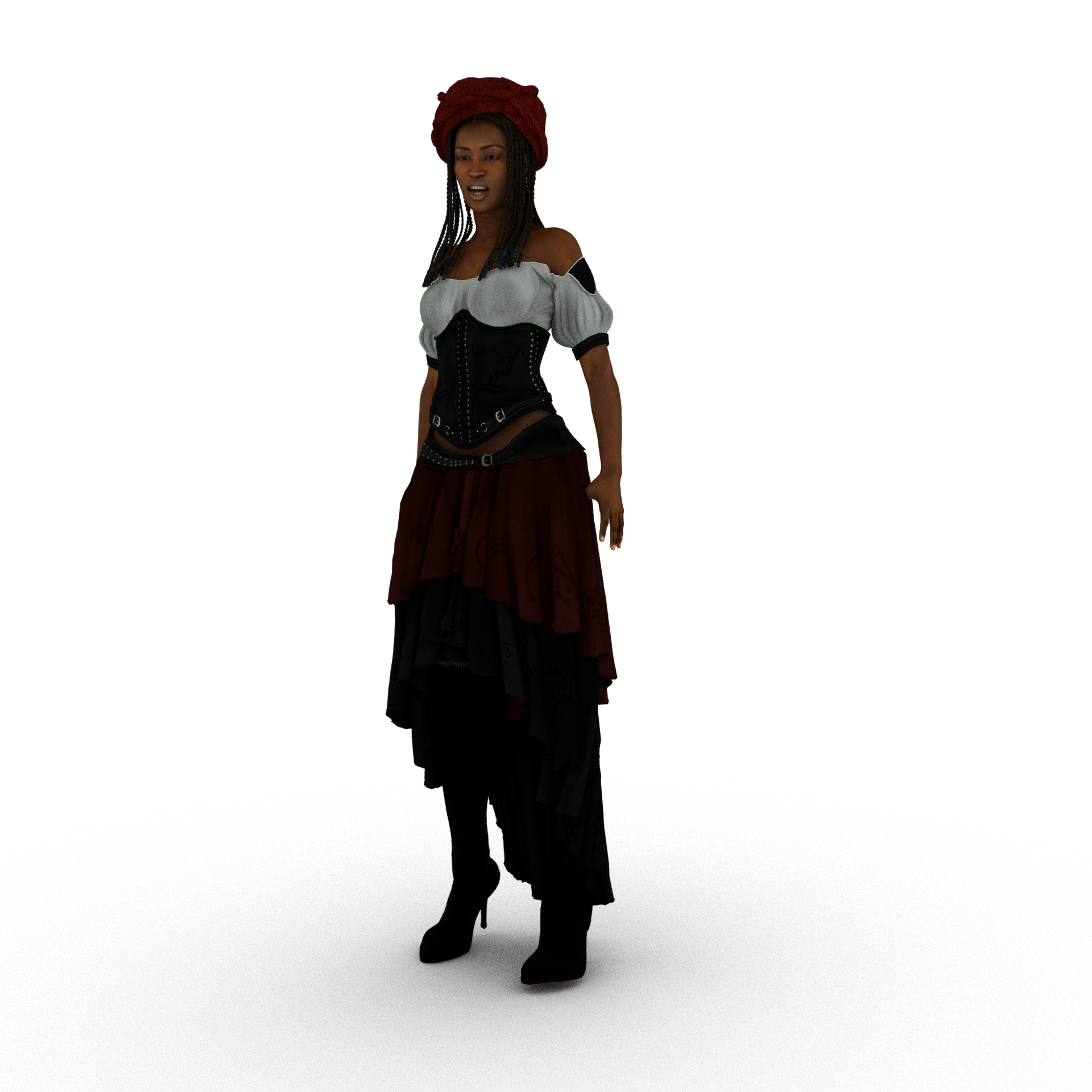
one of a series, I mostly render png series of people even if I add them as planes to Carrara scenes later
A Reminder of Why I Don't Just Use Blender for EverythingI only use it when forced to for things like Shrinkwrapping and as an intermediatry importing certain models prior to Carrara
I do however use it daily as my video editor
does 8K or more mp4 videos and loads exr etc no other free options for that
A Reminder of Why I Don't Just Use Blender for EverythingYep, some things in Blender are just more wacky then Carrara, probably why Carrara is still my number one program !!!
I actually had two serious tries at learning Blender before I finally clicked with it on my third attempt. Still using 4.2 and 4.3 on the desktop and 2.93 on the laptop.
Daz 3D is part of

Connect
DAZ Productions, Inc.
7533 S Center View Ct #4664
West Jordan, UT 84084Licensing Agreement | Terms of Service | Privacy Policy | EULA
© 2026 Daz Productions Inc. All Rights Reserved.