-
Harwood House: Have you seen the props?
Incoming argument between Victoria and Michael about the fact he's left the toilet seat up...
ZDG random Daz Studio discoveries and questions.Yeah, it's been too long, and I'm trying to cobble together many pages into a shorter single post, so sorry if this is a bit, well, random, lol. I looked at the above dress, and I will say 'ok' for the moment. I discovered a minor glitch as you may notice in my renders and while I could make it go away with a previous T-post test, in the following renders it persisted even after dialing the offending dial back to zero. I also had considerable fun with a gen7 to gen 8 converter by RiverSoftArt. FWSA Sandi left, and FWSA Vanessa right (converted to gen8). I had a paragraph somewhere about various elf ears, in short, I do find the close to the head ear shaps tend to clash more with hair, than the more distant types that give room for hats and hair (why I have used Vanessa's ears on Sandi so much).

as for the other project, I am going to be relying on some Clark tech to assume it is feasible at all, considering that nothing shy of a star is efficient at fusion. to paraphrase Britannica, atom sizes can only be described in ratios due to quantum behavior rather than a specific size, so distances between atoms can only be described in ratios as much as some despise not having an exact number, lol. I am dealing with something that has a similar issue that makes the hydrogen scoop engine impractical. The amount of compressing and energy needed to collect the mater to fuse is drastically larger than the energy you get out of the reaction. a 1.67x10^3 scale (1,600x) to go from gas to liquid for water is bad enough without considering the heat and pressure needed to convince air collected and compressed into a plasma willing to fuse. The scoop needed would be so large to collect hydrogen in space, that the thrust from the fusion would not be able to provide any reasonable amount of delta-V given the weight of the scoop, let alone provide enough energy from the fusion reactor to sustain the reaction. I will simply assume some Clark tech has made sustaining the reaction feasible for a slightly more dense atmosphere intake for the fusion candle thruster.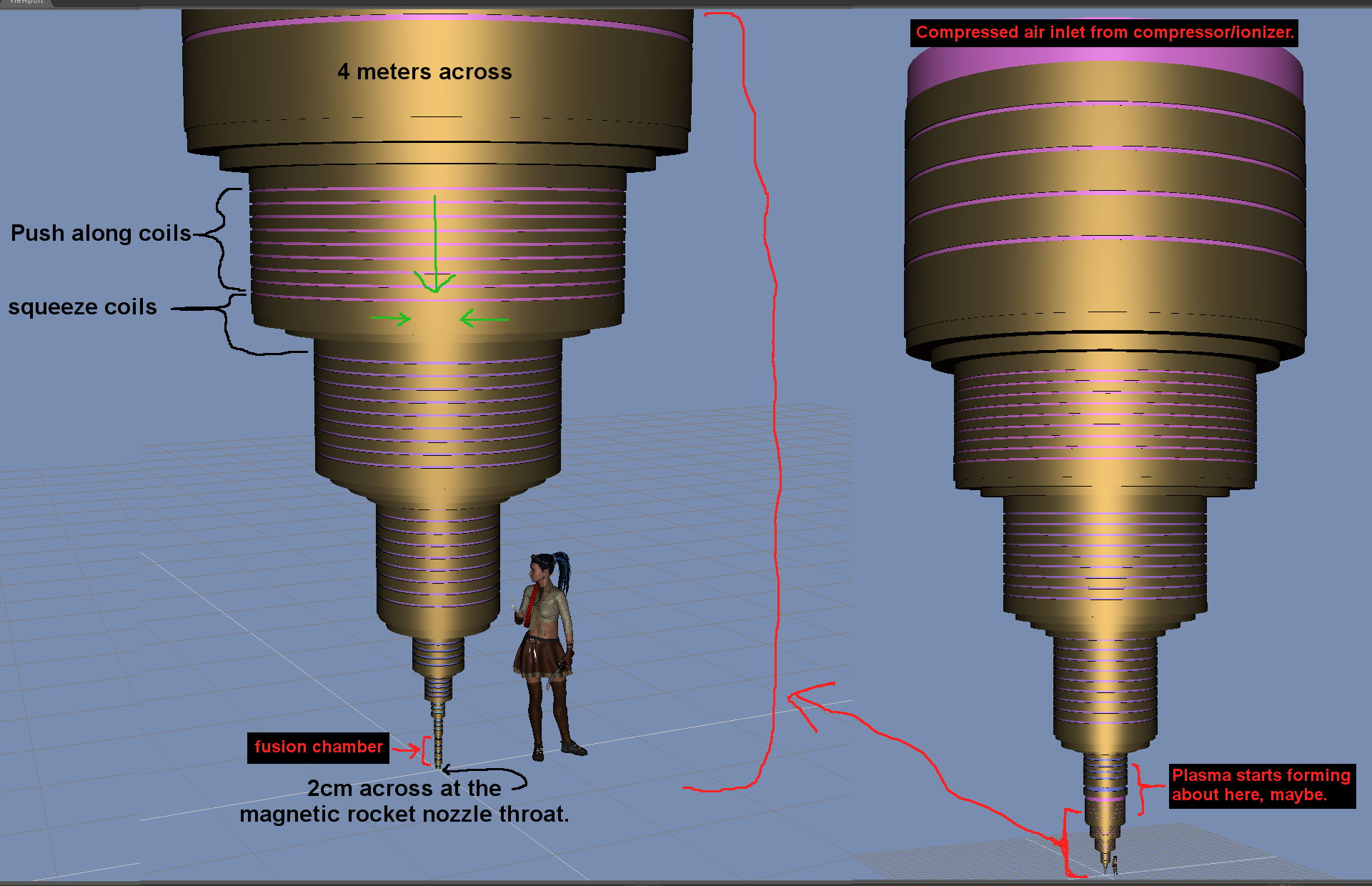
(screeching halt) I am rewriting this as the above and former numbers are way off, way way way off. the concept will remain the same, it's just way bigger. - I couldn't find a quick answer online searching for a ratio of air to plasma, so I assumed a 2000 reduction from intake through to fusion cell diameter. (Then a chat happened over on SFIA, Hence the rewrite) I may be off by an order of magnitude or a few on how much air needs to be compressed to start forming plasma, however, the gist is, it's not a small amount of compressing air. It is a gargantuan volume of air being compressed into an infinitesimally small size, to get it to the point of fusing. it's not easy, but when you start to get fusion, you're on your way. Yeah, that's a lot of Clark tech to make that happen, lol. Yeah, I was off, lol.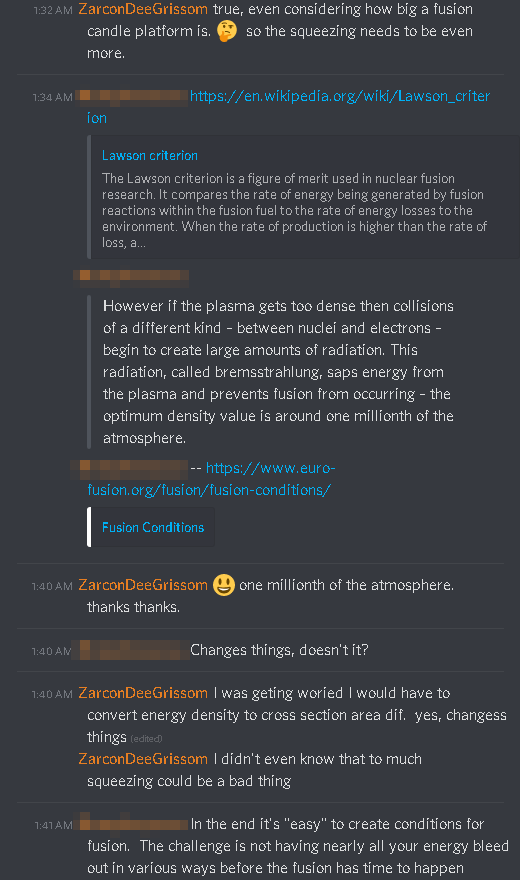
Edit during typing this. "the optimum density value is around one-millionth of the atmosphere." - EUROfusion (thanks to Rhamphoryncus on SFIA for the link and info). Many thanks, I guess my example is way off, lol. and due to some other things chatted about, due to the rate of fusion, the bottom-most 5 coils, would need to be extended to about a kilometer or so long, depending on how much air we want to fuse before it exits the rocket nozzle. Also, from another angle, going beyond a million to 1 inlet to chamber cross aria (at earth sea level), would result in a loss in reaction energy due to the reaction changing to something else that I don't totally understand. I suspect throttling the amount of intake could allow control of that, however to much intake would be detrimental for more than just losing energy in the reaction chamber. So napkin maths, assuming a rocket nozzle throat of 1cm, the inlet of the compressor on the side of the fusion candle would need to be about a million cm (10000 meters) across. Hmmm. a 1km long fusion chamber doesn't sound so bad now, lol. 10km intake, plus a tad more as it would be in the upper atmosphere not further down. (back to fixing the 3D sketch, again, thanks)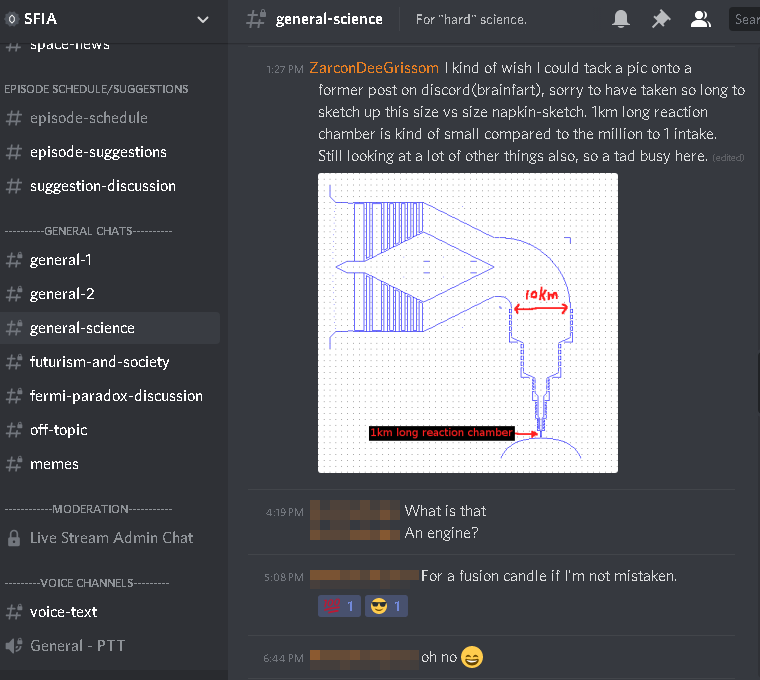
I settled on a dual reactor setup. one reactor powering the platform, intake fans, and compression coils. The other reactor providing purely thrust, all of its net gains being dumped into thrust. This thing is moving planets after all, so why not get all the bang for the buck out of the thrust reactor.
It was when I was doing that napkin math, I noticed how long it had been, so I decided to toss together a makeshift replica of the original idea from SFIA (Jeremy Jozwik from Artstation).
I still have a few things to clean up on the coils inside the thing that got mangled when copying them around the radius of the fusion candle platform.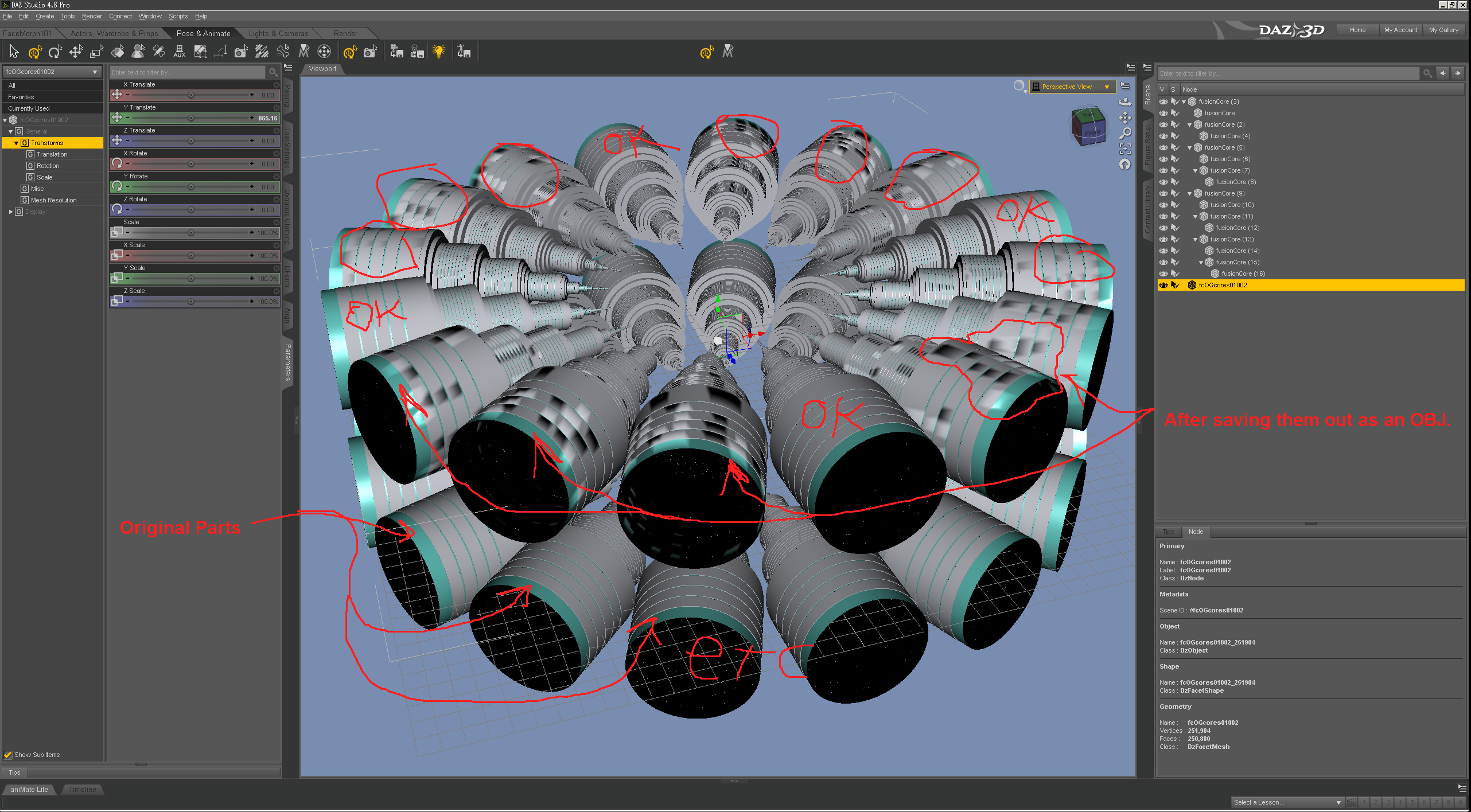
there is an easy workaround in daz for now, for just the single surface zone. Smoothing can remain on for the rest, it will be fine.
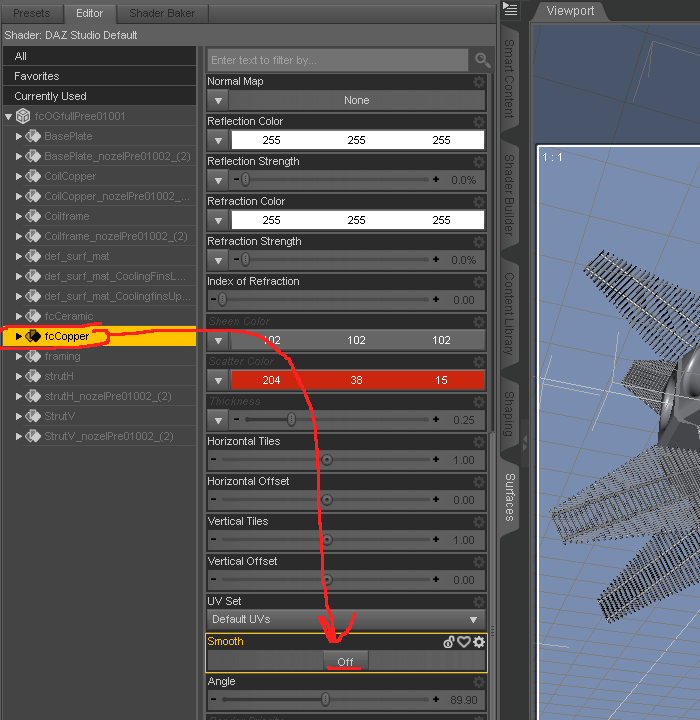
despite having a few ideas on how it may look a tad different, that thing is just cool as all hell. I want to see more than just the one clip of it (I also want to see more of SFIA Unity as well).

https://www.dropbox.com/s/nslqwd1ge3ybsgz/ZdgFusionCandleWIP01LimitedUseCredit_01001.zip?dl=0
the obj is about 109MB in size, no UV mapping, just procedural shader zones, and mesh. 720288 faces (polys) is not a small model, I will also say I have seen larger (ignoring SGA even, lol). And then the web page crashes when adding links, ugh.Edit 25nov2019. as I watch the many AMD and intel CPU launch vids, I am working on smoothing over the inner coils some, and refining the edges of the outer ring of air-intake box things. I hope to have something conled togeather within the day or so, I will make it a new post, this one otherwise works well enough for many things.

Things are moving along rather well.
aniMate Video examplesHow about this one https://www.daz3d.com/animate-martial-arts-boxing-for-victoria-8 ? If not it may be your browser or security settings blocking them.
*closed* RRRR - "Build it and they will come" Render Contesttag: luci45 #5
Pleistocene Park
Featuring animals, plants and people of the Pleistocene epoch, Pleistocene Park was a favorite destination for the ladies of Harpywood, who felt it their duty to offer more attractive attire to the native Homo Erectus ladies.Used:
Useful Fabric Iray Shaders
Japanese Style Dining Sets - Lotus replaced with Harpywood's Dahlia Summer (and friends)
Gabriella for V5
UltraHD IRAY HDRI With DOF - Parks and Creation
From Russia for Rune 7
Homo Erectus V4Also used:
Extinct Animals (Smith Micro)
Cotylorhynchus
Gamebirds 2 (Hivewire)
Shoe Boxes and Store Props
Spartan Warrior Spear
Georgina Hair for Genesis
Heath Hair for Genesis 3 Male(s) & Female(s)
Char Hair for Genesis 2 Female(s)
Bernedette Hair for Genesis 8 Female(s)
Bardot Outfit
Neanderthal clothing (Mec4D)
Summer Dress for Genesis
Possibilities 2PC Dress for Genesis 2 Female and Victoria 6
Wave Sandals
Surgical Beauty
Various morphs
Agnes
Laundry Day Mega Set
Colorful Jewelry for Genesis 8 Female(s)
Dresses ad shoes
Plastic Surgery Why does one have to be rocket scientict to make this work? Morphs on Gen 1 and Gen 2
Repeat - Not a Smart Content Issue
.
The parameters tab remains empty, no matter where innthevhierarchy I click!
This leads me to believe that your problem is not Smart Content. This sounds like a problem installing or locating the morph dsf/DSON files. The base morphs should be installed with the Genesis Starter Essentials installation package. Genesis 2 figures also have starter essentials install files. I believe they get installed in the "data" file folder, which should be in the same file directory as your default Studio content. Victoria 6. etc. full body morphs are installed in folders within this data file. Morph packages also get installed in the data file.
My guess is either that the morph dsf/DSON files are not installed in the correct directory, or that for some reason the whole data file tree is not in the same content location as your people file tree.
Fitting Reby Sky hair to Genesis 3I'm trying to get Reby Sky hair (for Victoria 4) to fit correctly to Genesis 3 female.
For some reason though, the forehead is really big when i fit to the new TG3 character.
You can see what I mean on the image below. I've added a G2F character to the middle as well so you can see the difference. The forehead gets bigger the newer the base model is.
Can anyone suggest a way I could get it to fit properly (or at least have a smaller forehead/lower hairline)?
Playing with the scale size of the hair doesn't seem to help. I've also tried using the transfer utliity with no luck, unless anyone can suggest some really specific setting I haven't tried yet.
Who's Next to Join the G8 Family?Jenni 8 is the 36th female character and 57th core figure.
2017 2018 2019 2020 January 01/09/18 - #11 Owen 8
01/23/18 - #12 Karyssa 801/02/19 - #34 Christian 8
01/15/19 - #35 Sydney 801/22/20 - #62 CJ 8 February 02/13/18 - #13 Alexandra 8
02/22/18 - #14 Edward 802/05/19 - #36 Tasha 8
02/19/19 - #37 Landon 8March 03/13/18 - #15 Aiko 8
03/27/18 - #16 Ollie 803/05/19 - #38 Bridget 8
03/19/19 - #39 Mrs. Chow 8April 04/11/18 - #17 Penny 8
04/24/18 - #18 Edie 804/04/19 - #40 Mr. Woo 8
04/25/19 - #41 Tika 8May 05/09/18 - #19 Mika 8
05/22/18 - #20 Floyd 805/09/19 - #42 Sanjay 8
05/23/19 - #43 Kala 8June
06/15/17 - #01 Victoria 806/05/18 - #21 The Girl 8
06/19/18 - DAZ Dog 806/06/19 - #44 Elios 8
06/20/19 - #45 Ellithia 8July
07/25/17 - #02 Olympia 807/03/18 - #22 Teen Kaylee 8
07/17/18 - #23 Mabel 807/04/19 - #46 Teen Jane 8
07/17/19 - #47 Kanade 8August
08/22/17 - #03 Michael 808/10/18 - #24 Zelara 8
08/21/18 - #25 Toon Dwayne 808/08/19 - #48 Gabriela 8
08/22/19 - #49 Diego 8
08/29/19 - Centaur 8
(#50 Female and #51 Male)September
09/19/17 - #04 Teen Josie 809/04/18 - #26 Latonya 8
09/18/18 - #27 The Brute 809/05/19 - #52 Babina 8
09/19/19 - #53 Silas 8October 10/03/17 - #05 Stephanie 8
10/17/17 - #06 Lucas 810/02/18 - #28 Gia 8
10/18/18 - #29 Vladimir 810/03/19 - #54 Teen Raven 8
10/19/19 - #55 Yuzuru 8November 11/14/17 - #07 Monique 8
11/28/17 - #08 Darius 811/06/18 - #30 Mei Lin 8
11/22/18 - #31 Lee 811/05/19 - #56 Leisa 8
11/22/19 - #57 Jenni 8
11/28/19 - #58 Robyn 8December 12/12/17 - #09 Charlotte 8
12/26/17 - #10 Sakura 812/04/18 - #32 Eva 8
12/18/18 - #33 Nix 812/05/19 - #59 Darcy 8
12/17/19 - #60 Rynne 8
12/25/19 - #61 Tristan 8Why does one have to be rocket scientict to make this work? Morphs on Gen 1 and Gen 2More on GenX2 - I just put some links on this post in case you're interested in checking it out. I have loved Genesis 1 without any of this help for a long time, so I'm not trying to push in any way - just trying to be helpful.
There are also Generation 3 addons as well.
It's really easy to use. In Daz Studio, I just docked it with aniMate and the Timeline, so I can just open it up across the entire main working view of DS! LOL By default, Genesis 1 is the Target figure, so any morphs added will go into the folder structure I was just talking about. With the G2 add-on, I have Genesis 2M and Genesis 2F as drop-down selections in the Source tab. Now that I've used V4 and M4 to add morphs to Genesis, they're in that list now too. Pretty slick.
If I select a Genesis 2 actor, all I have to do is pick which morphs (any morph available to the selected Actor!) I want to give to Genesis 1. If I select or load Generation 4 figure, I need to use the Load button and browse to INJ morph files and load those onto that figure before I can select them to send to Genesis. If that sounds complicated, it's just my wording. So I have V4 as a Source, I browse to Daz's Victoria 4 in the Pose folder, Morph Injections, and then use those mass load files to just put everything onto V4. But I can also add custom morphs too, like the lovely faces by Thorne, Morris and others, horrific or warrior faces of MortemVetus, etc., if I have a morph available, I can load it and send it to Genesis.
Whichever I select as the Source, I just put a check into any morph I want Genesis to have and click the button. It's fast and it works very, very, very well! Then I can load another figure or actor and add more morphs.
Genesis Generation X2 | GenX2 Genesis 2 Addon | GenX2 Genesis 3 Addon
Loading Model QuestionWhich Victoria? In general loading the Victoria # character preset gives the shape and base materials, but not the make ups and so on - they get added with additional presets.
Its Victoria 8 Pro Bundle. But its more of a general question :)
What exactly are the base materials? Also, how can i remove makeup like eye shadow and lip gloss? I cant seem to find them in the scene tab.Thank you
Victoria 4 ?Victoria 4 base figure is here: https://www.daz3d.com/victoria-4-2-base
But even that says "
Compatible Figures:
Victoria 4"
So it say... there is another vic4?... or why do they say its compatible with it, if that is not the Vic4 model O_o....?
No, Victoria 4 went through several service packs (updates) but in geenral anything fro "Victoria 4" will work with Victoria 4.2 - at worst you might need to inject the morphs before applying a shaping pose, and if you use DS and have the PowerLoader run that should be taken care of for you anyway.
You should be able to autofit most stuff for her to Genesis 1
and from there to the later figures
sometimes her bundle ends up in free stuff if you really want her
Yeah I just try to grab some stuff to play with daz... happy about everything :D the basic clothes from the Genesis 8 starter are... just underwear not really the best thing :D
And the most freebies this time, was only for excisting other products :(
Loading Model QuestionWhich Victoria? In general loading the Victoria # character preset gives the shape and base materials, but not the make ups and so on - they get added with additional presets.
Loading Model QuestionHello everyone
so, i bought the Victoria Pro Bundle and i have a question. When i load the Victoria character into the scene, are the skin, eyes, makeup etc. also automatically applied? Or is it the genesis default skin untill i apply it
manually? And how can i tell what eyes, makeup, skin etc. are currently applied to my model?
Thank you
AIUTO...CHI CONOSCE L’ITALIANO? PARTE DODICIChe avete contro Vittorio 4 non lo so, io l'ho comprato e mi piaceva più di Micheal 4, e poi usavo i vestiti fatti dal suo creatore. Che la DAZ l'ha pure levato dallo shop, ma mica so cose ecco.....
Io niente, solo che Victoria mi piace di più quando è femmina.

Salve a tutti , sapete se anche Daz festeggia il Black Friday con supermega sconti ?
Fossi in te conserverei i mortaretti. Viste le ultime promozioni dubito che ci saranno degli affaroni degni di questo nome.
 Spingeranno l'ennesimo personaggio anonimo e non molto altro... Spero, tuttavia, di venire smentito.
in gran parte da soli 4 PA: RiverSoftArt, Syckleyield, Zev0 e MansFriday!
Di quei PA non ho moltissimo, la maggior parte dei plugin e script che uso li ho avuti da MCasual, sul suo sito. Trovo assurdo che la DAZ non abbia ancora deciso di rapirlo per aggiungere tutte quelle cose fantastiche a DAZ Studio!

Gli ho già fatto un paio di donazioni perchè non smetta di sviluppare nuovi plugin.
Imago, se ti stampo un bacio in fronte grosso come una casa si offende qualcuno? No, perché non conoscevo il sito di MCasual! Grazie per colmato questa lacuna!
 Victoria 4 ?
Victoria 4 base figure is here: https://www.daz3d.com/victoria-4-2-base
But even that says "
Compatible Figures:
Victoria 4"
So it say... there is another vic4?... or why do they say its compatible with it, if that is not the Vic4 model O_o....?
You should be able to autofit most stuff for her to Genesis 1
and from there to the later figures
sometimes her bundle ends up in free stuff if you really want her
Yeah I just try to grab some stuff to play with daz... happy about everything :D the basic clothes from the Genesis 8 starter are... just underwear not really the best thing :D
And the most freebies this time, was only for excisting other products :(
Why does one have to be rocket scientict to make this work? Morphs on Gen 1 and Gen 2The parameters tab remains empty, no matter where innthevhierarchy I click!
This leads me to believe that your problem is not Smart Content. This sounds like a problem installing or locating the morph dsf/DSON files. The base morphs should be installed with the Genesis Starter Essentials installation package. Genesis 2 figures also have starter essentials install files. I believe they get installed in the "data" file folder, which should be in the same file directory as your default Studio content. Victoria 6. etc. full body morphs are installed in folders within this data file. Morph packages also get installed in the data file.
My guess is either that the morph dsf/DSON files are not installed in the correct directory, or that for some reason the whole data file tree is not in the same content location as your people file tree.
Victoria 4 ?Victoria 4 base figure is here: https://www.daz3d.com/victoria-4-2-base
Victoria 4 ?Hi, I saw this:
https://www.daz3d.com/fashion-v4
and many more, but... WHERE is victoria 4? :D I always see its for V4, but where is the model? or do I missunderstand something?
I feel so stupid Q_Q
Remakes of Old Victoria & Michael Clothing
I think you're missing the point of his comment, namely that if a product doesn't sell well enough, the person that made it probably won't be willing to make the same thing for a different base figure. Doesn't matter how popular you think it might be with buyers.maybe it didn't sell well to warrant a remake. I know I would have no interest in it
This is the link to the dress: https://www.daz3d.com/blue-moods
Firstly, there are thousands of products that I and all other Daz customers have no interest in, but that doesn't mean that any one won't be exactly what other customers are looking for. I'm currently planning some period compositions, some of which will be 30s and art deco based, so I've been collecting suitable items re which the above dress and headpiece are perfect. But these latter could be given variant shapes and a series of materials which would make the costumes great for sci-fi nobles and priestesses, and also for fantasy nobles and sorceresses. Having always loved art deco this costume is ideal for some of my planned compositions despite that there's only the one colour, but being for Victoria 3 I can't use it. There are also other old costumes for V4 & M4 or earlier re which at least to me are nicer designs than current parallels for G2-G8 characters, so I can't see remakes not being popular, or in some cases even more popular than current parallels. There also seem to be more period pieces for the earlier models than for the later, and I've often seen requests for such in this forum.
Carrara Sale Email Message Alert threadthe byo ?!!?? yayy
was just perusin the animation sale
thinkin to get the belly dancing for V8, some of it looks painful
the snake hips looks kewl, but i really want to see michael 8 doin the moves

https://www.daz3d.com/animate-belly-dancing-for-victoria-8
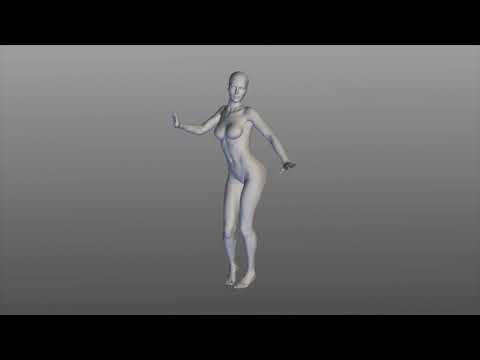
No pain, no gain!
It would be very funny to see M8 doing those moves though...
Carrara Sale Email Message Alert threadthe byo ?!!?? yayy
was just perusin the animation sale
thinkin to get the belly dancing for V8, some of it looks painful
the snake hips looks kewl, but i really want to see michael 8 doin the moveshttps://www.daz3d.com/animate-belly-dancing-for-victoria-8
Daz 3D is part of

Connect
DAZ Productions, Inc.
7533 S Center View Ct #4664
West Jordan, UT 84084Licensing Agreement | Terms of Service | Privacy Policy | EULA
© 2026 Daz Productions Inc. All Rights Reserved.