-
Hope This is an Easy Question About Content Installation
Reset database and re-import metadata/
Hope This is an Easy Question About Content InstallationHi, all. Okay, so I've just gotten a new computer, so I had to move all my Daz stuff over. DIM install went fine (I really don't like Daz Central) and Daz Studio install went fine. I directed Daz to find all my content in the external drive where I keep it, and let DIM know to install content to that drive, as well. All the content is showing up in Smart Content and the Content Library, but all of it is grayed-out. Obviously I don't want to have to go back to DIM and re-install 8500 or so items of content, so I'm asking if there's another way. I almost want to say that I remember someone suggesting something like reloading the metadata or...something. Is there an easy method, or am I looking at a very long content re-installation? Thanks for any advice and/or wisdom!
Adobe Substance 3D Stager - Just a general set of questionsI have been using DAZ for a couple of years now and love the render quality. I recently discovered Substance Stager at a conference and have started to test it out. I was able to import my DAZ avatar into Stager. The body skin maps came in pretty well, but there are issues with hair/eyes. I am researching to see if there are solves, but this might be the issue with the different render options. I am only 1 day into playing with it, so hopefully I can solve some of these issues.
What excited me about substance was the AI lighting capabilities and perspective. This is outside of HRDIs as I sometimes combine a figure with a flat photograph background. The way Stager adjusted the coloring of the 3D object to match the photograph was pretty amazing.
Blender OBJ export - Please helpNow it is not failing with the Blender export either. I could tear my hair out! I have no clue what changed between me going to bed and getting up just now but it seems to be working. I just exported the dress again to try @PerttiA 's suggestion (which imported fine) and then used the same export to import into Blender which I sent back to DAZ Studio unmodified and lo and behold no error.
My guess is that while I was sure I remember setting the dress to base resolution yesterday, perhaps I didn't on one occasion and that was the version I was using to test my exports. I can't think of another explanation.
I wish there was a GoZ equivalent for Blender as I can't afford ZBrush.
 Blender OBJ export - Please help
PerttiA said:
You can test your DS export/import settings by exporting the OBJ and importing it as a morph right after - It will eliminate problems with Blender settings and ensure that your DS settings match.
Good thinking. It failed with the same error. No Blender involved. Sorry, I imported the wrong version. No it does not fail if I just export and import without going to Blender.
I'll pick a few other items of clothing and try them.
Blender OBJ export - Please helpYou can test your DS export/import settings by exporting the OBJ and importing it as a morph right after - It will eliminate problems with Blender settings and ensure that your DS settings match.
Blender OBJ export - Please helpThanks for the replies. It is just waking up time here in NZ so I will have a look at these suggestions after breakfast. I can say that the G8F I used was the Development model so no brows of lashes. The dress was a maid's outfit but I will check which one later [EDIT: Nikisatez product]. I also tried on a swimsuit (the High Cut one in the sale these last few days) same results.
I tried to just export back from Blender without making any modifications. Same error. I was also careful to export only the selected object (clothing) so the G8F should not be an influence on the import back to DAZ Studio.
Blender OBJ export - Please helpNumber of vertices must be different.
Try to select the dress in the scene tab and see number of vertices&faces.
Then try to import your morphed dress and compare with number of vertices&faces.
Blender OBJ export - Please helpIt will probably take some 4 hours before I get home to check, but a few things...
- Ignore invisible nodes, maybe not a good idea if the clothing does have some => Vertex count would not match when importing back
- Write separate objects... If this meant the exported item is not one object in Blender, there is not one time I had been able to re-import it back to DS (as a morph)
- If making morphs, no need to include textures, normal maps, UV's etc...diffeomorphic not whole sceneYour choice, but if you're like me and don't use HDRIs, or you don't object to leaving linking to it later so as not to overburden the export import process- well, ya know. I have tried to import a daz scene into a procedurally generated night sky- absolute disaster. I'm hoping turning that control off will help.
is this possible?TheMysteryIsThePoint said:
Use a combination of Diffeo for materials and Sagan for pixel-perfect meshes. There's an option in Sagan to utilize Diffeo's materials.
Import using Diffeo first, and then delete it. It will leave the materials. Then import the Alembic created with Sagan. Then run the "fix normal maps" script or something liket that, that Sagan also creates. Done.
I'm VERY interested- where are the installation instructions? I'm not sure which zip to use nor which of the ten forum pages to read. Sorry.
Blender OBJ export - Please helpThis is something I have been doing for years but now I can't get it to work.
I'm exporting clothing from DAZ Studio to Blender to make morphs. It is a while and several updates of both applications since I have exported anything but I have not seen any reports that it has stopped working.
DAZ Studio 4.20.1.43 and Blender 3.2.0.
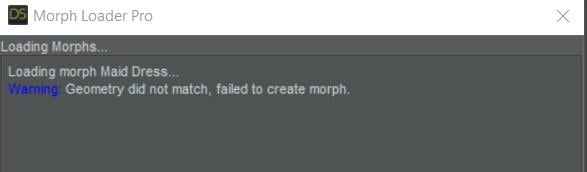
I used to have screen shots of my export/import setting but I lost them and that is probably why I am not getting it right now. Every morph is reported as a geometry mismatch. Please could someone check my settings as shown in the attached screen shots?
 Diffeomorphic dforce Soft Curls Base not rendering
Thanks for getting back to me @Padone
Sorry, that I have taken so long to reply.
OK, so I installed diffeomorphic 1.6 (Daz and Blender), along with Blender 3.2
I did a "Import Daz" rather than my usual "Easy Import Daz" - is that what you mean by "It's a straight import"
When I try to "Make Hair" - the button is greyed out - see screenshot 1
When I look under "Shading" there is a Hiar BDSF and Diffuse BDSF - see two screenshots
Are you saying that I have to change one of those to Principle BDSF?
I do see the skull cap though but the hair is invisible since I was unable to click on the "Make Hair" button - see attached screen shot (last)
Once again, thanks in advance
How to replace a dress mesh with a new mesh and keep the texture settings?@felis
Thank you.
@Richard Haseltine
It works.
The process takes quite a lot of time.
I wish daz have real time simulation like MD.
For anyone who maybe going through the same thing.
1. After retracing on MD, you need to assign each pattern to related fabric.
If the original cloth has 4 surface groups, than on MD there should be 4 assigned fabrics.
Look on DAZ which area for each surface group is.
2. Export it as OBJ
3. Import it on Blender
4. Fix the uv, because the uv is messed up - size and position.5. Export is as OBJ
6. Import it on DAZ
7. Now you can copy paste each surface groups from the orginal to the copy.
If the surface name is the same, you can do it all at once, but if different you need to copy paste one by one.
diffeomorphic not whole sceneDiffeo imports everything on the scene. So you have to save your figure separately if you only want to import the figure.
The world option imports the hdri and the backdrop that's useful to get the scene environment. I have it to "always".
My export from daz to blender are so weird and also gives some errorWhen i try a genesis 8 female export with cloth acc. and hair. It just gives the error that is in the attatchments on this post and just removes all the pose that i added to it and also scales all the things that is exportet from daz. I already find out that the hair makes this happen but i dont know how to fix it. I find out it while deleting only hair and using daz to blender bridge. It works pretty well. Also i looked for error and it says something about material. And also when i try to export character in fbx format withput using any tool it just makes character really weird shaped or posed. So i dont know what to do and how to export this model with hair succesfully.
1. Photo is daz to blender export settings
2. Photo daz to blender - Blender's phyton error while trying to import
3. Model's size and resetted pose
4. Daz fbx format export settings
5. The model with all the poses that i gave her and hair and all the stuff
6. Blender fbx import settings
7. Model when imported to blender
importing pre-posed clothed daz figures into c4d r18 HELP!!!!everytime i import a preposed (with clothes hair etc) character into cinema 4d it is still in default pose AND warped! How do i fix this????? I DO NOT want to pose add clothing add har add etc etc etc AFTER importing into cinema 4d just to let you know.
Wanted: low poly human FACE modelI would like to have a low-poly face model - .HXN or .OBJ that I could import into Hexagon and/or Daz Studio. Not too much detail is required at the outset. For further work in Studio I suppose I have "Mesh Grabber".
Here's my first try at a nose and one "eye". Am I on the right track... it seems to look good with a bit of smoothing?
I started with only a flat grid which I proceeded to tessellate. Do you usually start with a cylinder or an "egg" shape, to get a bit of camber going?
is this possible?Use a combination of Diffeo for materials and Sagan for pixel-perfect meshes. There's an option in Sagan to utilize Diffeo's materials.
Import using Diffeo first, and then delete it. It will leave the materials. Then import the Alembic created with Sagan. Then run the "fix normal maps" script or something liket that, that Sagan also creates. Done.
*Public Build Iray not workingRichard Haseltine said:
qgj26703 said:
Leana said:
The settings for general release and beta are separate, so them not sharing content would be normal if you didn't set the preferences so that they use the same directories and cms.
For the record, it's 4.20 (as in "minor version 20 of major version 4") not 4.2. Version numbers are not decimals
Regarding render, have you tried updating your graphic card drivers?
How would you change the directories that either build uses?
Edit>Preferences, Daz Studio>Preferences for a mac, go to the Content tab, and click the Content Directory Manager button.
Thanks, that solves one problem. Currently Daz 4.20 will let me Iray Preview, but not render. The Beta can't even Iray Preview. Here's my log file
2022-06-30 03:25:01.310 Iray [INFO] - IRAY:RENDER :: 1.0 IRAY rend info : Updating geometry.
2022-06-30 03:25:01.312 Iray [INFO] - IRAY:RENDER :: 1.0 IRAY rend info : Updating motion transforms.
2022-06-30 03:25:01.312 Iray [INFO] - IRAY:RENDER :: 1.0 IRAY rend info : Importing scene graph.
2022-06-30 03:25:01.313 Iray [INFO] - IRAY:RENDER :: 1.0 IRAY rend info : Importing geometry for motion time 0
2022-06-30 03:25:40.513 Iray [INFO] - IRAY:RENDER :: 1.0 IRAY rend info : Geometry import (1 triangle object with 186 M triangles, 0 fiber objects with 0 fibers (0 segments), 1 triangle instance yielding 186 M triangles, 0 fiber instances yielding 0 segments) took 39.194 s
2022-06-30 03:25:40.515 Iray [INFO] - IRAY:RENDER :: 1.0 IRAY rend info : Updating section objects.
2022-06-30 03:25:40.526 Iray [INFO] - IRAY:RENDER :: 1.0 IRAY rend info : Updating materials.
2022-06-30 03:25:43.796 Iray [INFO] - MATCNV:RENDER :: 1.0 MATCNV rend info : Material instance 'DS_CB Sabah EyeBrows__Brows_1837_753' uses MDL JIT compilation.
2022-06-30 03:25:43.800 Iray [INFO] - MATCNV:RENDER :: 1.0 MATCNV rend info : Material instance 'DS_Ayaan Hair__Hair_1a81_1232' uses MDL JIT compilation.
2022-06-30 03:25:43.801 Iray [INFO] - MATCNV:RENDER :: 1.0 MATCNV rend info : Material instance 'DS_Ayaan Hair__Hair2_1ac9_1326' uses MDL JIT compilation.
2022-06-30 03:25:43.875 Iray [INFO] - MATCNV:RENDER :: 1.0 MATCNV rend info : found 680 textures, 15 lambdas (12 unique)
2022-06-30 03:25:43.898 Iray [INFO] - IRAY:RENDER :: 1.0 IRAY rend info : Computing 5 flux compensation factors took 0.001 s
2022-06-30 03:25:43.898 Iray [INFO] - IRAY:RENDER :: 1.0 IRAY rend info : Emitter geometry import (18 light sources with 5518 triangles, 1 instance) took 0.002 s
2022-06-30 03:25:43.902 Iray [INFO] - IRAY:RENDER :: 1.0 IRAY rend info : Updating volumes.
2022-06-30 03:25:43.902 Iray [INFO] - IRAY:RENDER :: 1.0 IRAY rend info : Updating environment.
2022-06-30 03:25:43.902 Iray [INFO] - IRAY:RENDER :: 1.0 IRAY rend info : Updating lens.
2022-06-30 03:25:43.903 Iray [INFO] - IRAY:RENDER :: 1.0 IRAY rend info : Updating lights.
2022-06-30 03:25:43.903 Iray [INFO] - IRAY:RENDER :: 1.0 IRAY rend info : Updating object flags.
2022-06-30 03:25:43.904 Iray [INFO] - IRAY:RENDER :: 1.0 IRAY rend info : Updating backplate.
2022-06-30 03:25:43.924 Iray [INFO] - IRAY:RENDER :: 1.0 IRAY rend info : Updating caustic portals.
2022-06-30 03:25:43.924 Iray [INFO] - IRAY:RENDER :: 1.0 IRAY rend info : Updating decals.
2022-06-30 03:25:43.952 Iray [INFO] - IRAY:RENDER :: 1.0 IRAY rend info : Using iray core convergence estimate.
2022-06-30 03:25:43.956 Iray [INFO] - IRAY:RENDER :: 1.0 IRAY rend info : Allocating 1-layer frame buffer
2022-06-30 03:25:43.981 Iray [INFO] - IRAY:RENDER :: 1.0 IRAY rend info : Using batch scheduling, caustic sampler disabled
2022-06-30 03:25:43.982 Iray [INFO] - IRAY:RENDER :: 1.0 IRAY rend info : Initializing local rendering.
2022-06-30 03:25:44.008 Iray [INFO] - IRAY:RENDER :: 1.0 IRAY rend info : Using OptiX version 7.3.0
2022-06-30 03:25:44.047 Iray [INFO] - IRAY:RENDER :: 1.0 IRAY rend info : Initializing OptiX for CUDA device 0
2022-06-30 03:25:44.943 Iray [INFO] - IRAY:RENDER :: 1.0 IRAY rend info : Rendering with 1 device(s):
2022-06-30 03:25:44.943 Iray [INFO] - IRAY:RENDER :: 1.0 IRAY rend info : CUDA device 0 (NVIDIA GeForce RTX 3080 Ti)
2022-06-30 03:25:44.943 Iray [INFO] - IRAY:RENDER :: 1.0 IRAY rend info : Rendering...
2022-06-30 03:25:44.946 Iray [INFO] - IRAY:RENDER :: 1.12 IRAY rend progr: CUDA device 0 (NVIDIA GeForce RTX 3080 Ti): Processing scene...
2022-06-30 03:25:47.643 [WARNING] :: ..\..\..\..\..\src\pluginsource\DzIrayRender\dzneuraymgr.cpp(367): Iray [ERROR] - IRAY:RENDER :: 1.13 IRAY rend error: Unable to allocate 9.710 GiB from 3.091 GiB of available device memory
2022-06-30 03:25:47.660 [WARNING] :: ..\..\..\..\..\src\pluginsource\DzIrayRender\dzneuraymgr.cpp(367): Iray [ERROR] - IRAY:RENDER :: 1.12 IRAY rend error: CUDA device 0 (NVIDIA GeForce RTX 3080 Ti): Scene setup failed
2022-06-30 03:25:47.672 [WARNING] :: ..\..\..\..\..\src\pluginsource\DzIrayRender\dzneuraymgr.cpp(367): Iray [ERROR] - IRAY:RENDER :: 1.12 IRAY rend error: CUDA device 0 (NVIDIA GeForce RTX 3080 Ti): Device failed while rendering
2022-06-30 03:25:47.807 [WARNING] :: ..\..\..\..\..\src\pluginsource\DzIrayRender\dzneuraymgr.cpp(367): Iray [WARNING] - IRAY:RENDER :: 1.12 IRAY rend warn : CUDA device 0 (NVIDIA GeForce RTX 3080 Ti) ran out of memory and is temporarily unavailable for rendering.
2022-06-30 03:25:47.870 [WARNING] :: ..\..\..\..\..\src\pluginsource\DzIrayRender\dzneuraymgr.cpp(367): Iray [WARNING] - IRAY:RENDER :: 1.12 IRAY rend warn : All available GPUs failed.
2022-06-30 03:25:47.870 [WARNING] :: ..\..\..\..\..\src\pluginsource\DzIrayRender\dzneuraymgr.cpp(367): Iray [ERROR] - IRAY:RENDER :: 1.12 IRAY rend error: Fallback to CPU not allowed.
2022-06-30 03:25:47.871 [WARNING] :: ..\..\..\..\..\src\pluginsource\DzIrayRender\dzneuraymgr.cpp(367): Iray [ERROR] - IRAY:RENDER :: 1.12 IRAY rend error: All workers failed: aborting render
2022-06-30 03:25:47.883 [ERROR] Iray :: Internal rendering error.
2022-06-30 03:25:48.501 [INFO] :: Saved image: C:\Users\trevc\AppData\Roaming\DAZ 3D\Studio4\temp\render\r.png
2022-06-30 03:25:48.539 [INFO] :: Finished Rendering
2022-06-30 03:25:49.402 [INFO] :: Total Rendering Time: 2 minutes 37.12 seconds
2022-06-30 03:27:37.307 Iray [INFO] - IRAY:RENDER :: 1.0 IRAY rend info : Device statistics:
2022-06-30 03:27:37.307 Iray [INFO] - IRAY:RENDER :: 1.0 IRAY rend info : CUDA device 0 (NVIDIA GeForce RTX 3080 Ti): 0 iterations, 3.666s init, 0.207s render
Is this a memory issue? I have 64 GB RAM and I believe 8-12 GB of VRAM
Daz 3D is part of

Connect
DAZ Productions, Inc.
7533 S Center View Ct #4664
West Jordan, UT 84084Licensing Agreement | Terms of Service | Privacy Policy | EULA
© 2026 Daz Productions Inc. All Rights Reserved.