-
Where is Face Transfer 2
I have Daz Studio 4.22.0.1 installed on my computer and I thought that the trial version of Face Transfer 2 was included in this build. When I go to "Help about installed plugins" only the original Face Transfer shows up and it works perfectly but shouldn't Face Transfer 2 be there? I updated to this version using Dim when it showed up as a product update.
Any suggestions?
Snow Queen 9all the strange imp-like children you could possibly want.
This is cracking me up. I went ahead and bought the bundle now because I just like the older morph so much, but now I'm stoked to Get Weird with strange little fairy children.
The best 3rd party software to create animations for Daz?TheMysteryIsThePoint said:
Dartanbeck said:
You know, reading that (above post) made me think of a workflow that might help a whole lot.
Instead of using G3, 8 or 9 in Blender, use Genesis 1 or 2 to create your animations. Back in Daz Studio, use the appropriate Bone Minion, which does an Amazing job for me with my Genesis 2 Mixamo downloads.
Also, if it turns out to be easier for you to transform (translate/rotate/scale) the main figure using the base figure instead of the hip, go ahead and do so. Then back in DS use 3DU's Body2Hip script before creating a new aniBlock.
Bone Minion already transfers all of the additional rotational values for you - and it works well across any length of animation.
While they might seem like an investment I have to say - a short time with them transferring animations and the cost disappears from your mind. Plus, you only really need to get the one you need at the time. For me, that was a couple of bundles and I'm going to collect them all, because all of the generations are valuable to me - and my library is so full of great stuff for each of them - why not put their actors to use?!!!
Thanks DB for feeling my pain, but being an Open Source Software proponent, I don't want to depend on anything I can't get the source code for; been burned by that one too many times.
But just as with Sagan, sooner or later stumbling around blindly because nothing is documented, will result in something that works. It's just a matter of time.
Gotcha. I was actually meaning for someone wanting to get animations from Blender (or wherever) into DS.
If they'd do so using a pre-Genesis 3 Daz Figure, the BVH would transfer straight to the base figure used. Then just Bone Minion it to the target figure, save as Pose or Create aniBlock or both, sell it or use it.
And if they used the base of the figure to move it instead of the hip (which can often be a lot easier if the hip is rotating around like it should), then just use Body2Hip before saving the pose and/or aniBlock - Bam.
I'm only saying all of this because in the few short years I've been in DS, I've been finding more and more that the rumors about not being able to animate in DS are as false as can be. I'm really having a blast here!
Did you know that aniMate 2 (at least the paid version - never used DS without it) has a lovely cubic interpolation tweener - and that we can use aniMate 2 for making key frame animations from scratch, using that tweener? It's like a bezier, but it will not exceed the highest value or go below the lowest, yet it smoothly curves into the key from the other end!
Being able to go back and forth between DS Timeline and aniMate 2 is as easy as putting soft butter on toast, and aniMate 2 has some incredible little tools that make animation a Blast!
Now, since the most recent update to DS, we actually have nice keys in the timeline. We can select them while collapsed and drag them around - even multiples - which is one of the big issues that I've had animating in DS in the first place - with the ability to make our own tools (my own fun animation method), use the new timeline, switch to aniMate 2, use those tools and blend other stuff in, etc., I wouldn't know why anyone wanting to have animations in Daz Studio would prefer going through all of the <edited - Think of the Children!!!> it takes to go back and fourth to/from Blender or something else - unless they alreay have a solid workflow for animation in that software?
Check this out!
(second half has the character animations - 2 minute video)
 Snow Queen 9
Barubary said:
sid said:
Barubary said:
It would be really helpful if there were any significant promo pictures of the alternate body shapes. If you insist on using your fomo tactics at least show us what we're buying.
From what little I can see of the child shape, it sure does look like a cartoon elf, but I am, as of yet, unsure.
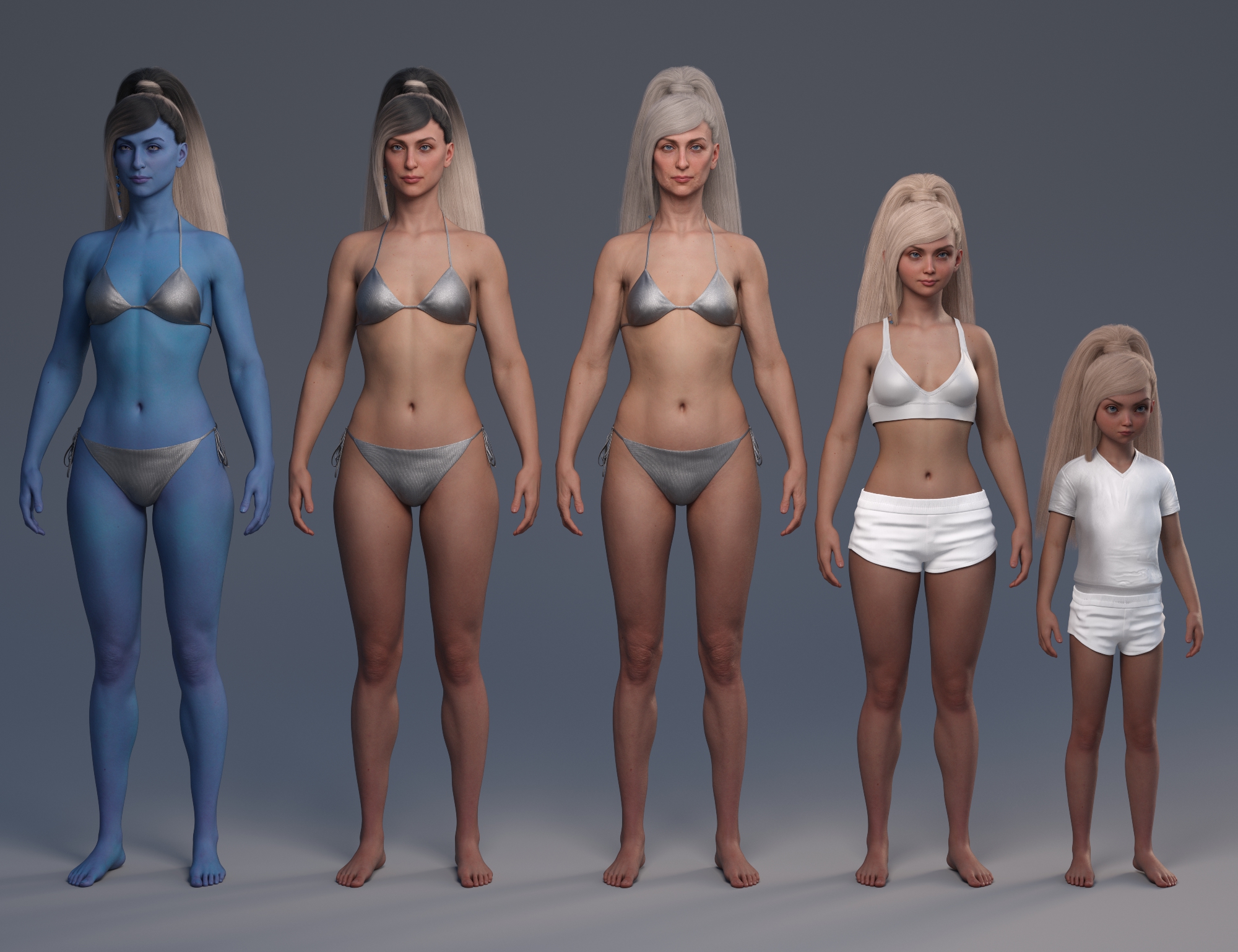 Not as good as a real promo, but here is a quick line up
 (Each figure comes with a blue version)
That's actually really helpful, thanks for posting this picture! And also thanks for the information regarding the blue versions.
A picture like this really ought to have been on the product page.
The Teen and Child shape really look a bit too cartoony for me, but I gotta say I do like the character overall.
The eyebrows look really weird on the child morph. Can anyone think of a child character that comes with separate child brows to replace them?Perfectly mirrored symmetry morphWrite Idea said:
crosswind said:
Actually you don't have to make it in Blender, just quickly fix it with Morph Loader Pro in DS... like this G8F example down below -
- Export you G8M with that asymmetrical morph dialed to OBJ file with the morph name (set Resolution Level to Base beforehand)
- Import the OBJ file back with Morph Mirroring option to update the asymmetrical morph
- Then save the morph asset.@crosswind and @ninefold, thank you for your help! This was a wonderful bit of information. So simple and exactly what I needed! Worked perfectly!
Merry Christmas to you both!
That's nice ! Merry Christmas and happy holidays !
Face Transfer 2RAMWolff said:
What a wonderful face in your latest offering Artini! WOW!
Thanks for the comments.
I also like this creation.
I think the latest version of Daz Studio beta creates better characters with Face Transfer 2.
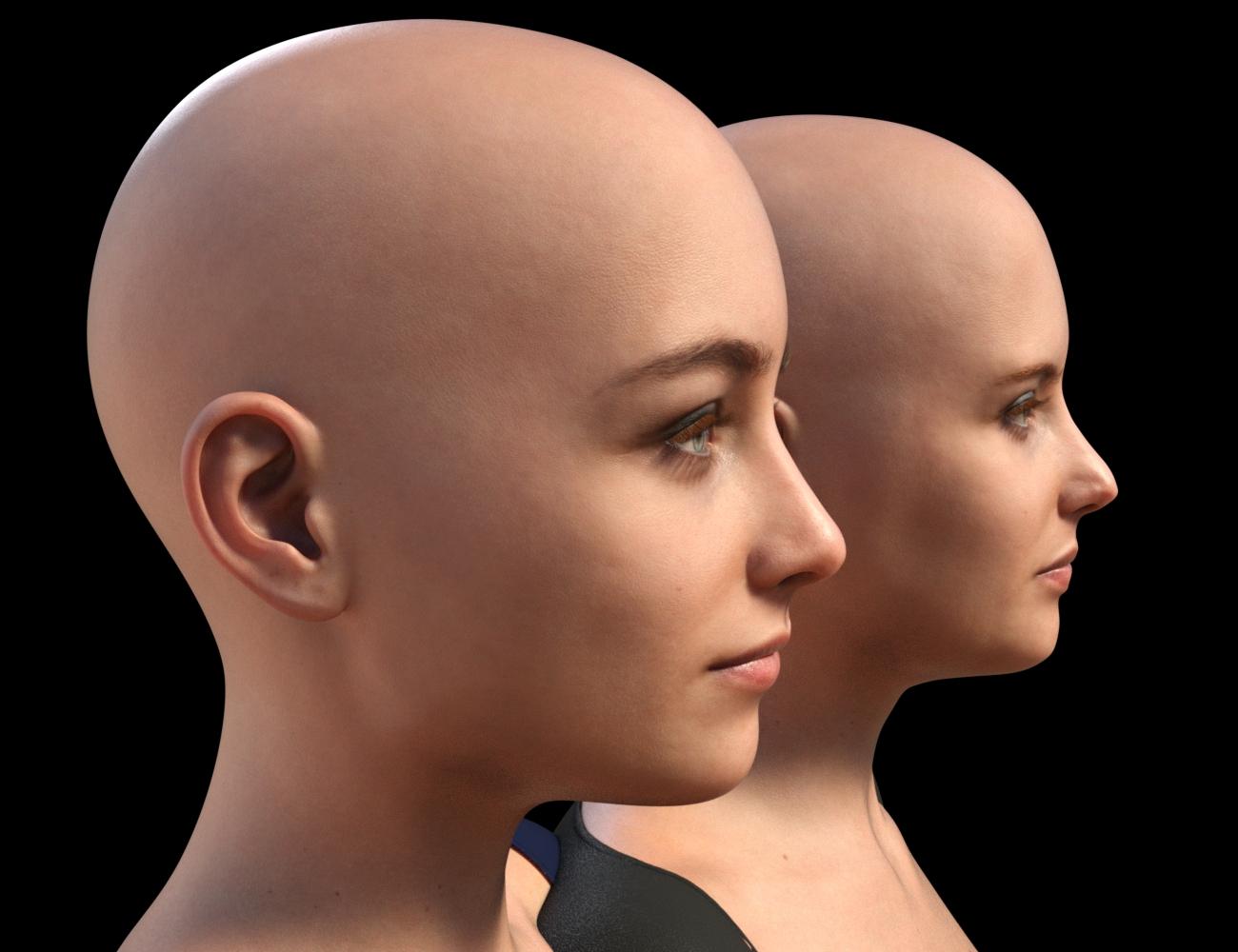
Face Transfer 2I figured that it was worth sharing this experiment. This is a comparison of the shape created by original Face Transfer to that created by Face Transfer 2, on G9s with the texture created by FT2. The shape created by FT1 was created on a G8.1 Female, to which I applied Face Transfer Shapes at about 70%, and also fixed the head and neck to more closely approximate a stock G8.1 figure. (FT1 makes heads that are too small - I would create the FT shape, then load a second stock G8.1 figure and twiddle neck length and head propagation scale until the FT figure was approximately correct compared to the stock figure.) I then used ManFriday's converter to convert that shape to G9 and create a dial for it. The FT2 shape is just FT2 + Base Feminine as you get when doing a FT2 with "Feminine" selected. The one with blue eyes is the one that came from G8.
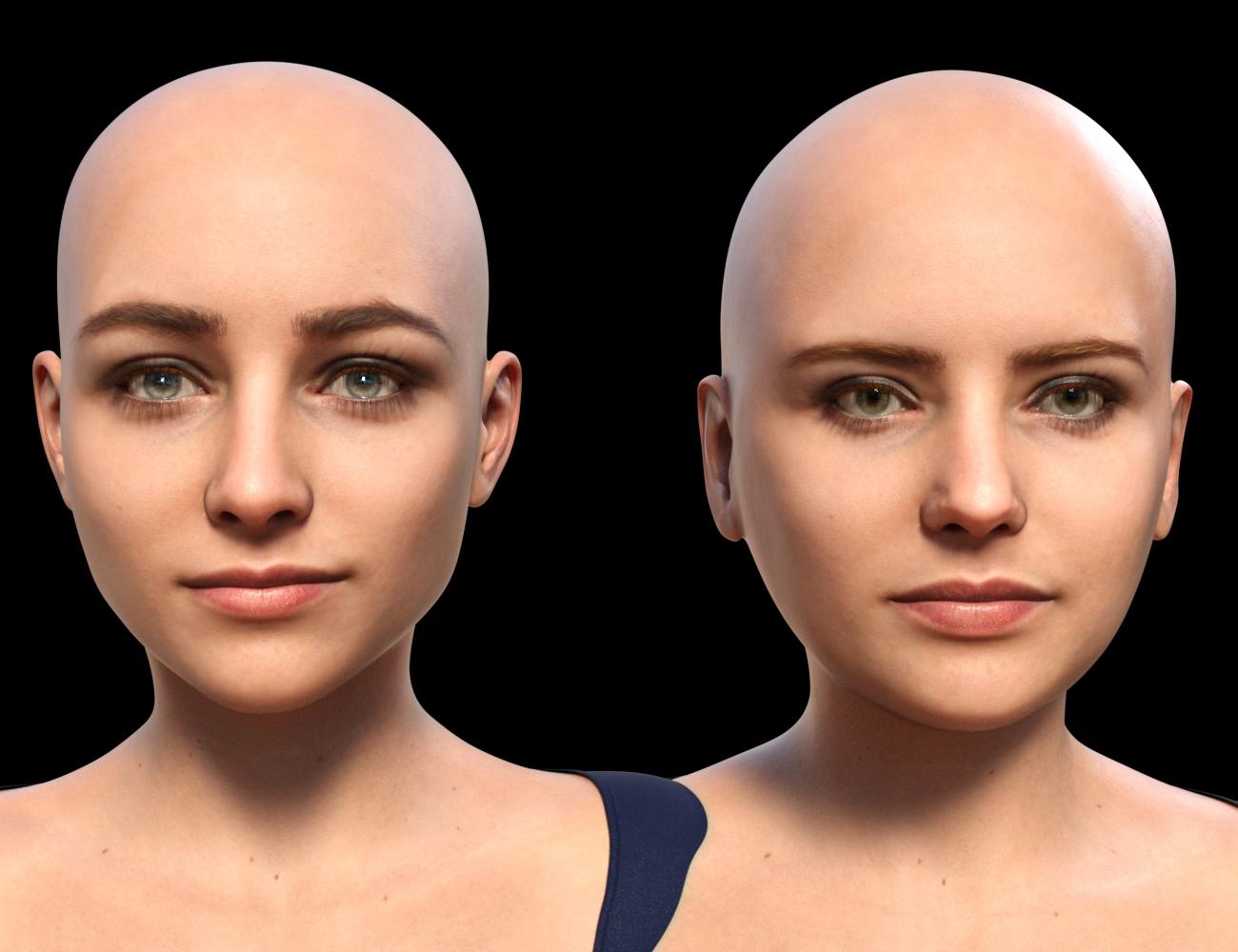
Seeing them side by side makes me suspect that while I am still testing all options - which include more than just Face Transfer - FT2 may end up being my choice. It gets rid of that oval android head shape that I have never liked in G8. However, it would be nice to have a bit better lip and chin definition and as others have noted on this thread, there is a problem with FT2 ears. Some are better than others, but the best are not great and sometimes they are downright deformed and unusable.
 Some Questions About 'Duplicate Formulas Found' - Solved
Firstly, uninstalling and re-installing such products is not a fix at all since nothing will change. This is because the cause for this is two products that each have a component that uses the same "unique ID" - so this is why uninstalling one of the products IS a fix - but then reinstalling (so you still have both again) is NOT a fix as you are putting the exact same problem back again.
As a user you cannot really prevent them as such - ideally if you exclusively buy things from the same store then these should have been caught by that store's QA process. If you do encounter duplicates from products in the same store tho you can and should raise a support ticket since in this scenario whichever is the later-released product is technically "broken" and should be fixed (unless that store has a highly visible warning that the two products are incompatible).
However, if it is two products from two different stores then you are somewhat on your own since niether product is technically wrong or broken. You can try to contact support for either product but I imagine you would have less luck convincing them it needs to be changed.
For a more detailed example, imagine that you bought a charater called "Bob" from one store and then saw another character in a different store that you liked who also happened to be called "Bob". In most instances this is not a problem since it is common for PAs to use their Vendor names in the paths to the relevant files and so you do not get a conflict or files being overwritten there. However, they do not always use the same care when naming their "unique IDs" and so both of these products may contain an expression which has the "unique ID" of "Bob_Smile_01" - so that value can easily have been good enough for testing and is reasonably specific so as to assume it would be fine. However, unfortunately, you are the only person who bought both Bobs and so you now find yourself in a situation where only you have this issue. Then, there are some situations where the chosen "Unique ID" has been far less specific which ends up being an issue for more people.
This will start to become a non-issue with newer products as Daz has put a fix into a later version of Studio that generates a proper unique ID when needed. However, that is not something that can be retro-actively applied to older products.
For how much of an issue this is: if you have not upated Daz Studio in a while it will slow down the loading of affected figures a LOT. If you have updated recently (or are using the public beta) then they have less of an issue speed wise. However, as the highlander's say: "there can be only one!" and so if you have two morphs trying to use the same unique ID then they both cannot work. Therefore, you will have one product that has a component that cannot function correctly (while the conflicting product is installed).
There are a few options if you need one of these to work and are either waiting for an update to a bug ticket or they are from different stores and so are unlikely to be changed:
- Uninstall the one you do not need to currently use while you use the other
- Use Turbo Loader to temporarily disable the conflicting morph that you are not using
- Fix it yourself by hand-editing the morph file to change the ID to something else*
*Note, the last option is only if you are reasonably confident editing JSON files and is not a perfect solution since there may be other files that use the morph that you edit which use the Unique ID as part of their function and so will now be broken after you change that to something else.
The best 3rd party software to create animations for Daz?As for Hitchens, the TL;DR is that I thought I understood Twist bones, but I didn't.
The long version is that that stalled progress, but in playing around with G9's twist bones, now I think I do. If you've ever noticed that the twist bones's twist is always the same a the parent bone's, this made me think that you just don't set the twist and there's some sort of driver that makes the twist bone follow the parent. That seemed to work, but it's wrong sometimes. Then I thought you set it to the same value as the parent's twist, and that seemed to work, but not quite. But then looking at how G9's two twist bones is seems like the twist of say, G9's arm is distributed across the three bones in some constant proportion. So a lightbulb came on for G8... it's not that the twist is copied from one bone to the other, as it looked (because the twist values for both were always the same), I think G8s work the same as G9s... the total twist of the arm is distributed across the parent bone and the two values are the same not because one is copied to the other, but because it's a 50% split. So I tried it in Blender, and sure enough, if you set up a driver to put 50% of the source armature's twist on each of the G8 bones, the deformation looks perfect. It is extremely frustrating when something like this !@#$ is not written down anywhere.
OK, so that was a long explanation, but no the unfortunate wrinkle is that Hitchens worked so well because dealt with Quaternions exclusively. But Quaternions don't work like Euler Angles (actually, Tait-Bryan angles) and you can't just separate out the twist angle and divide it by two to distribute it equally across two bones. That means that I have to essentially re-write the whole thing, and somehow deal with all the crap that Quaternions allowed me to avoid.
But I've made a lot of progress in other way, like the new hair system and orther things that were meant to speed up development including a standalone program that can load scenes and doesn't require you to open DAZ Studio at all. But even there I've encountered a lot of DSBS: something that a spent A LOT of time on, a content gatherer that decreased figure load time from over 3 minutes down to 15 seconds and stored the entire scene in a single zip file that Hitchens could load, "almost worked" in that it would not be able to find three or four random morphs that I knew were there. Then I noticed that the order of loading morphs was different every time and though "Oh lord help us, they threaded morph loading" and that's why it has recently gotten faster. But it broke my content gatherer and I doubt anyone at DAZ is going to help me understand how this opaque process works. So I gave up and have recently gotten back to the original task of round-trip animation.
So it's still coming, it's just that the lack of documentation on anything is killing me.
How can I achieve this particular look for my characters?It looks like an older character (or rendered with something like Filament instead if iray)
If you wanted to stay with G8 and iray, possibly helpful might be:
https://www.daz3d.com/digital-touch
https://www.daz3d.com/surgical-beauty- (If you can't find a character like that you can also buy more general morph sets for the generation you're working with)
You can make the skin surfaces glossy in the surfaces tab in Daz or get a wet-look geoshell from the store
Alternatively https://www.daz3d.com/wet-body-filament-for-genesis-8-and-81 (if you want to go with Filament)
Lots of options if you go older generations too
Cannot update to face transfer 2EvieS said:
A friend has had this issue and asked me to assist in his install. I show FACE TRANSFER 1.5.05 available in his plugins (same as my own DS). I tried putting his key for 2.0 in and I get same result he did - no accept option. Has he bought something that doesn't work? I see the item for sell in the store and he's clearly purchased himself a key but 2.0 is not installed in the 4.21 version of DAZ Studio and putting the serial into the 1.5.05 version of FT does nothing. Could someone with DAZ address this issue. It's affecting a lot of folks clearly. This seems like a very odd manner to release something.
It will not be available in 4.21 ,it has to be upgraded to the latest public build for the serial number to work . Which is 4.22 ...the Face Transfer 2 is included in that build and the serial number opens unlimited on it .
Cannot update to face transfer 2A friend has had this issue and asked me to assist in his install. I show FACE TRANSFER 1.5.05 available in his plugins (same as my own DS). I tried putting his key for 2.0 in and I get same result he did - no accept option. Has he bought something that doesn't work? I see the item for sell in the store and he's clearly purchased himself a key but 2.0 is not installed in the 4.21 version of DAZ Studio and putting the serial into the 1.5.05 version of FT does nothing. Could someone with DAZ address this issue. It's affecting a lot of folks clearly. This seems like a very odd manner to release something.
Perfectly mirrored symmetry morphcrosswind said:
Actually you don't have to make it in Blender, just quickly fix it with Morph Loader Pro in DS... like this G8F example down below -
- Export you G8M with that asymmetrical morph dialed to OBJ file with the morph name (set Resolution Level to Base beforehand)
- Import the OBJ file back with Morph Mirroring option to update the asymmetrical morph
- Then save the morph asset.@crosswind and @ninefold, thank you for your help! This was a wonderful bit of information. So simple and exactly what I needed! Worked perfectly!
Merry Christmas to you both!
*CLOSED* RRRR "That went well" Render ContestTag:luci45#5
The Violinist
On a dare Grigori spent the night at the old bus stop on Christmas Eve and learned that the legend was true - a little man appeared at midnight and played a violin all night, attracting animals from the woods and barnyards.
Used:
2843 Holiday Nook
3180 Jw Standing Mega Collection Poses For Genesis 9
2168 Fantasy Creature Creator HD Morph Pack for Genesis 3 Male
5423 Soviet Bus Stop
2691 Gryffnnzcube - Billboards Music StandAlso used:
Soviet Bus Stop Forlorn
UnionSuit for Genesis 9
M3D Versatile Short Hair for Genesis 9, 8, and 8.1 Males
M3D Uther Human HD
Christmas Foot Stool
HD Violin and Poses for Genesis 3 and 8
Mathius Hair for Genesis 3 Male(s)
Victorian Santa for Genesis 3 Male(s)
Moose (Poser)
Warthog by AM
DAZ Pig
Lynn's chickens and Bovines
Daz House Cat with dForce Hair
House Mouse
DAZ Sheep 2
MountainScapes Backdrops Volume 2: Snow Edition
Skies of Twilight - 20 Night Themed 8k HDRI Skies
Christmas Tree
Iain for Michael 7 textureThe best 3rd party software to create animations for Daz?lilweep said:
mysteryisthepoint was developing something for Daz->Blender->Daz pipeline with the stated purpose
Transfer a G8 armature to Blender for animating, and send the baked animation back to DS. No BVH, or FBX, no foot sliding or other slight errors. You just press a button and it transfers the animation to DS
But it's not out yet
https://www.daz3d.com/forums/discussion/612756/hitchens-a-daz-studio-to-blender-live-link/p1
Yeah ~ I've been waiting for mysteryisthepoint to pack the package
 Face Transfer 2
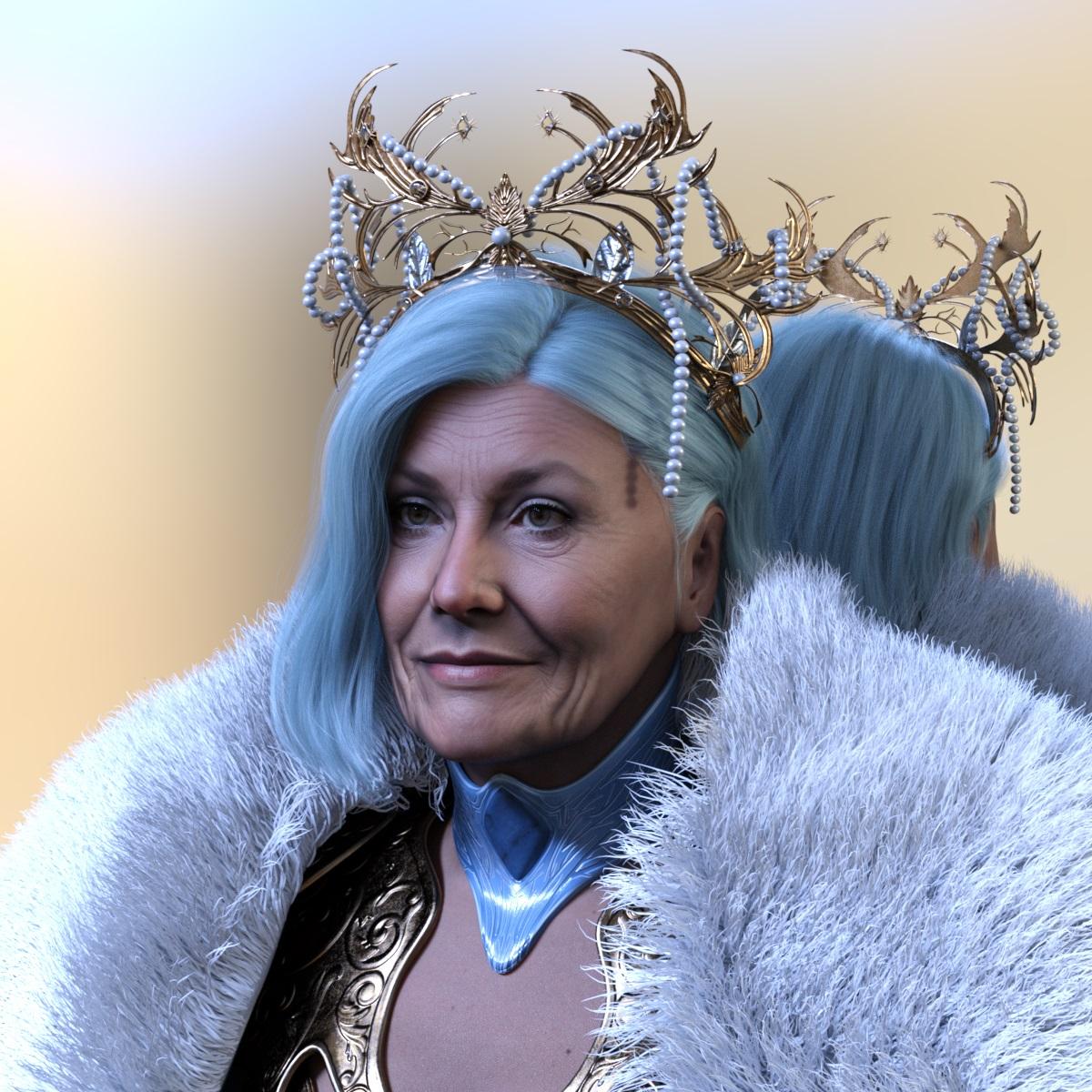
My latest creation done with Face Transfer 2 and Genesis 9.
 Recalibrate Transfer Tool?
Occasionally the red-green-and-blue icon for the Transfer Tool gets ,miles away from the object I want to move around.
Is there a way of recalibrating it so my character (for instance) is in the same place as the icon?
The best 3rd party software to create animations for Daz?mysteryisthepoint was developing something for Daz->Blender->Daz pipeline with the stated purpose
Transfer a G8 armature to Blender for animating, and send the baked animation back to DS. No BVH, or FBX, no foot sliding or other slight errors. You just press a button and it transfers the animation to DS
But it's not out yet
https://www.daz3d.com/forums/discussion/612756/hitchens-a-daz-studio-to-blender-live-link/p1
Perfectly mirrored symmetry morphActually you don't have to make it in Blender, just quickly fix it with Morph Loader Pro in DS... like this G8F example down below -
- Export you G8M with that asymmetrical morph dialed to OBJ file with the morph name (set Resolution Level to Base beforehand)
- Import the OBJ file back with Morph Mirroring option to update the asymmetrical morph
- Then save the morph asset.Face Transfer 2 Mats and Shapes to G8?Nope...I'm afraid... The new features as well as limitations are clearly stated in this thread - https://www.daz3d.com/forums/discussion/662091/face-transfer-2#latest
Daz 3D is part of

Connect
DAZ Productions, Inc.
7533 S Center View Ct #4664
West Jordan, UT 84084Licensing Agreement | Terms of Service | Privacy Policy | EULA
© 2026 Daz Productions Inc. All Rights Reserved.