-
Daz Studio slowing down when animating
I can see what's happening here, as I have keymate installed
I was animating the Genesis 9 figure over 500 frames when it was taking some 5 to 10 seconds to copy and paste a sequence in the time line?
I could see 2 issues
1. For some reason Daz Studio is adding a keyframe to the timeline that you arn't actually adding yourself.
2. This one is the killer, I looked into the animation time line using keymate and found out it was adding every morph setting to the time line not just the ones you have used hence the issue
I did go through hundreds of keys and removed all the ones I hadn't actually used to make it workable
PAs: Thank You (& renders) for the Wonderful Christmas GiftsSo many fun and creative renders!
This started out as a test of Snow Queen child morph mix but then added the sweater and socks...

And the same character brought into Facetune. I think the combo is a game changer! And the sweater of course stays the same. [Released] RSSY Character And Material Conversion Bundle Genesis 8 to Genesis 9 [Commercial]
RiverSoftArt said:
Your Daz directory should not be your first directory. If you do, you will possibly overwrite morphs in your Daz directory. Your "My Directory" (which I guess is your Daz Originals one?) that contains all of your generated content, including from converters, should be first.
That makes sense. I dug into my file structure and noticed a few other things that were getting muddled up, so ended up pulling my custom things out into a separate folder and uninstalling and reinstalling the program and all my Daz core characters and essentials. From there, everything worked great! Definitely my setup that was causing the error. The first test with the new install ended up with a distorted body and a head morph not matching the intended shape, but that was also an error on my part. When the dialogue asking whether you wish to restore or zero the figure came up, I chose Restore. That gave odd results. When I tried again and chose Zero instead, the conversion came out looking great. The figure Mrs. Chow 8, and while the Genesis 9 version ended up shorter and slightly smaller that the Genesis 8 one, the shape itself looked just right. I fiddled with the proportion sliders on G9 to fix the height difference and then resaved it. Perfect! Thanks very much for the help as I stumbled through it. Now that everything is ironed out on my end, I'm loving the converter. Great work!
[Released] RSSY Clothing Converter from Genesis 2 Male to Genesis 8 Male [Commercial]hERE IS ONE OF THE ATTEMPTS TO CONVERT THE CLOTHING:
2023-12-27 10:37:03.339 [INFO] :: Prepare asset load (merge): /data/SickleYield2018/RSSYG2ToG8Converter/Conformers/RSSY Genesis 2 to Genesis 8 Converter/Converter Bodysuit.duf
2023-12-27 10:37:03.339 [INFO] :: Locking viewport redraw...
2023-12-27 10:37:03.339 [INFO] :: Viewport redraw locked.
2023-12-27 10:37:03.347 [VERBOSE] :: Native format content directories: 2
2023-12-27 10:37:03.347 [VERBOSE] :: Poser format content directories: 2
2023-12-27 10:37:03.347 [VERBOSE] :: Other import format content directories: 1
2023-12-27 10:37:03.348 [INFO] :: Begin asset load (merge): /data/SickleYield2018/RSSYG2ToG8Converter/Conformers/RSSY Genesis 2 to Genesis 8 Converter/Converter Bodysuit.duf
2023-12-27 10:37:03.355 [INFO] :: Determining missing assets...
2023-12-27 10:37:03.411 [INFO] :: Setting textures...
2023-12-27 10:37:03.477 [INFO] :: Scanning for addons...
2023-12-27 10:37:03.478 [INFO] :: Creating node geometry...
2023-12-27 10:37:03.479 [INFO] :: Creating materials...
2023-12-27 10:37:03.481 [INFO] :: Resolving legacy figures...
2023-12-27 10:37:03.482 [INFO] :: Preparing modifiers...
2023-12-27 10:37:03.482 [INFO] :: Creating modifiers...
2023-12-27 10:37:03.509 [INFO] :: Finalizing modifiers...
2023-12-27 10:37:03.509 [INFO] :: Sorting property groups...
2023-12-27 10:37:03.511 [INFO] :: Setting up follow targets...
2023-12-27 10:37:03.511 [INFO] :: Finished asset load (merge): 0m 0.165s - /data/SickleYield2018/RSSYG2ToG8Converter/Conformers/RSSY Genesis 2 to Genesis 8 Converter/Converter Bodysuit.duf
2023-12-27 10:37:03.526 [INFO] :: Unlocking viewport redraw...
2023-12-27 10:37:03.527 [INFO] :: Viewport redraw unlocked.
2023-12-27 10:37:03.531 [DEBUG] :: Convert Item is Converter Morph_9579
2023-12-27 10:37:03.532 [DEBUG] :: Item's Compatibility Base Path for Node
2023-12-27 10:37:03.532 [DEBUG] :: Presentation
2023-12-27 10:37:03.532 [DEBUG] :: autoFitBase /Lady of War/Pants
2023-12-27 10:37:03.532 [DEBUG] :: colorA [object Object]
2023-12-27 10:37:03.532 [DEBUG] :: colorB [object Object]
2023-12-27 10:37:03.532 [DEBUG] :: description
2023-12-27 10:37:03.532 [DEBUG] :: iconLarge
2023-12-27 10:37:03.533 [DEBUG] :: iconSmall
2023-12-27 10:37:03.533 [DEBUG] :: label
2023-12-27 10:37:03.533 [DEBUG] :: Preferred Base /Genesis 2/Female
2023-12-27 10:37:03.533 [DEBUG] :: type Follower/Wardrobe/Pant
2023-12-27 10:37:03.533 [DEBUG] :: Transfer Morphs, Source is RSSY Genesis 2 to Genesis 8 Converter BodySuit, Target is valLadyWarPants
2023-12-27 10:37:03.533 [DEBUG] :: Transfer
2023-12-27 10:37:03.533 [DEBUG] :: Adaptive Tolerance 0
2023-12-27 10:37:03.533 [DEBUG] :: AddSmoothModifier false
2023-12-27 10:37:03.535 [DEBUG] :: AdjustTargetBase false
2023-12-27 10:37:03.535 [DEBUG] :: ContentType
2023-12-27 10:37:03.535 [DEBUG] :: DistanceSquaredTolerance 0.0010000000474974513
2023-12-27 10:37:03.535 [DEBUG] :: FitToFigure false
2023-12-27 10:37:03.535 [DEBUG] :: LockViewOnTransfer false
2023-12-27 10:37:03.535 [DEBUG] :: MergeHierarchies false
2023-12-27 10:37:03.535 [DEBUG] :: MorphTransferList
2023-12-27 10:37:03.535 [DEBUG] :: Nearness 1.5
2023-12-27 10:37:03.535 [DEBUG] :: OverrideExistingMorphs true
2023-12-27 10:37:03.536 [DEBUG] :: ParentToFigure false
2023-12-27 10:37:03.536 [DEBUG] :: ProjectionTemplatePath
2023-12-27 10:37:03.536 [DEBUG] :: RemoveUnusedTargetBones true
2023-12-27 10:37:03.536 [DEBUG] :: RespectHiddenFacets false
2023-12-27 10:37:03.536 [DEBUG] :: SmartLeftRightHandling true
2023-12-27 10:37:03.536 [DEBUG] :: SourceBase 0
2023-12-27 10:37:03.536 [DEBUG] :: SourceNode [object Object]
2023-12-27 10:37:03.536 [DEBUG] :: SourceType 2
2023-12-27 10:37:03.536 [DEBUG] :: TargetBase 0
2023-12-27 10:37:03.537 [DEBUG] :: TargetNode [object Object]
2023-12-27 10:37:03.537 [DEBUG] :: TargetOutputFigure null
2023-12-27 10:37:03.537 [DEBUG] :: TargetReplacesSource false
2023-12-27 10:37:03.537 [DEBUG] :: TargetType 2
2023-12-27 10:37:03.537 [DEBUG] :: TransferBinding true
2023-12-27 10:37:03.537 [DEBUG] :: TransferFaceGroups true
2023-12-27 10:37:03.538 [DEBUG] :: TransferMaterialGroups false
2023-12-27 10:37:03.538 [DEBUG] :: TransferMorphs true
2023-12-27 10:37:03.538 [DEBUG] :: TransferRegionGroups true
2023-12-27 10:37:03.538 [DEBUG] :: TransferSelectionMap true
2023-12-27 10:37:03.539 [DEBUG] :: TransferSourceMorphs 5
2023-12-27 10:37:03.539 [DEBUG] :: TransferTemplateMorphs true
2023-12-27 10:37:03.539 [DEBUG] :: TransferUVs false
2023-12-27 10:37:03.539 [DEBUG] :: UseNearness true
2023-12-27 10:37:03.539 [DEBUG] :: UseSpecifiedContentType false
2023-12-27 10:37:03.539 [DEBUG] :: UVSpaceProjection false
2023-12-27 10:37:03.539 [DEBUG] :: VertexFirstProjection false
2023-12-27 10:37:03.539 [DEBUG] :: isSourceBaseMorphClone false
2023-12-27 10:37:07.195 [DEBUG] :: Could not set modifier "Converter Morph" to 1
2023-12-27 10:37:07.195 [DEBUG] :: Could not set conversion morph
2023-12-27 10:37:07.195 [DEBUG] :: END Conversion of E:/Daz 3D/Applications/Data/DAZ 3D/My DAZ 3D Library/People/Genesis 2 Female/Clothing/Lady Of War/LoW_Pants.duf
2023-12-27 10:37:10.756 [DEBUG] :: Selecting Preset: E:/Daz 3D/Applications/Data/DAZ 3D/My DAZ 3D Library/People/Genesis 2 Female/Clothing/Lady Of War/LoW_Pauldrons.duf
2023-12-27 10:37:10.776 [DEBUG] :: Conformer is data/SickleYield2018/RSSYG2ToG8Converter/Conformers/RSSY Genesis 2 to Genesis 8 Converter/Converter Bodysuit.duf
2023-12-27 10:37:10.779 [DEBUG] :: START Conversion of E:/Daz 3D/Applications/Data/DAZ 3D/My DAZ 3D Library/People/Genesis 2 Female/Clothing/Lady Of War/LoW_Pauldrons.duf
2023-12-27 10:37:10.779 [DEBUG] :: USING conformer C:/Users/Public/Documents/My DAZ 3D Library/data/SickleYield2018/RSSYG2ToG8Converter/Conformers/RSSY Genesis 2 to Genesis 8 Converter/Converter Bodysuit.duf
2023-12-27 10:37:10.780 [DEBUG] :: Converting clothing from E:/Daz 3D/Applications/Data/DAZ 3D/My DAZ 3D Library/People/Genesis 2 Female/Clothing/Lady Of War/LoW_Pauldrons.duf to E:/Daz 3D/Applications/Data/DAZ 3D/My DAZ 3D Library/People/Genesis 8/Female/Clothing/Lady Of War/Lady Of War/LoW_Pauldrons.duf
2023-12-27 10:37:10.782 [DEBUG] :: Apply Preset E:/Daz 3D/Applications/Data/DAZ 3D/My DAZ 3D Library/People/Genesis 2 Female/Clothing/Lady Of War/LoW_Pauldrons.duf
2023-12-27 10:37:10.783 [INFO] :: Prepare asset load (merge): /People/Genesis 2 Female/Clothing/Lady Of War/LoW_Pauldrons.duf
2023-12-27 10:37:10.783 [INFO] :: Locking viewport redraw...
2023-12-27 10:37:10.783 [INFO] :: Viewport redraw locked.
2023-12-27 10:37:10.788 [VERBOSE] :: Native format content directories: 2
2023-12-27 10:37:10.788 [VERBOSE] :: Poser format content directories: 2
2023-12-27 10:37:10.789 [VERBOSE] :: Other import format content directories: 1
2023-12-27 10:37:10.789 [INFO] :: Begin asset load (merge): /People/Genesis 2 Female/Clothing/Lady Of War/LoW_Pauldrons.duf
2023-12-27 10:37:10.791 [INFO] :: Determining missing assets...
2023-12-27 10:37:10.858 [INFO] :: Setting textures...
2023-12-27 10:37:10.858 [WARNING] :: D:\DAZDevel\Hudson\HUDSON_HOME\jobs\NB_Studio_Trunk\workspace\src\sdksource\fileinput\dzassetdaz.cpp(6473): Node parent not found.
2023-12-27 10:37:10.865 [INFO] :: Scanning for addons...
2023-12-27 10:37:10.870 [INFO] :: Creating node geometry...
2023-12-27 10:37:10.871 [INFO] :: Creating UV sets...
2023-12-27 10:37:10.871 [INFO] :: Creating materials...
2023-12-27 10:37:10.872 [INFO] :: Resolving legacy figures...
2023-12-27 10:37:10.872 [INFO] :: Preparing modifiers...
2023-12-27 10:37:10.872 [INFO] :: Creating modifiers...
2023-12-27 10:37:10.900 [INFO] :: Resolving 2 formulas...
2023-12-27 10:37:10.900 [INFO] :: Finding formula properties...
2023-12-27 10:37:10.900 [INFO] :: Sorting formula properties...
2023-12-27 10:37:10.902 [INFO] :: Creating ERC Links...
2023-12-27 10:37:10.902 [INFO] :: Finished resolving formulas.
2023-12-27 10:37:10.902 [INFO] :: Finalizing modifiers...
2023-12-27 10:37:10.902 [INFO] :: Sorting property groups...
2023-12-27 10:37:10.902 [INFO] :: Setting up follow targets...
2023-12-27 10:37:10.902 [WARNING] :: D:\DAZDevel\Hudson\HUDSON_HOME\jobs\NB_Studio_Trunk\workspace\src\sdksource\fileinput\dzassetdaz.cpp(2912): Failed to follow node.
2023-12-27 10:37:10.903 [INFO] :: Finished asset load (merge): 0m 0.114s - /People/Genesis 2 Female/Clothing/Lady Of War/LoW_Pauldrons.duf
2023-12-27 10:37:10.911 [INFO] :: Unlocking viewport redraw...
2023-12-27 10:37:10.911 [INFO] :: Viewport redraw unlocked.
2023-12-27 10:37:10.919 [DEBUG] :: ValLadyWarPauldrons ( Follower/Accessory/Arms/Upper ) is Clothing Follower/Wardrobe,Follower/Accessory? true
2023-12-27 10:37:10.919 [DEBUG] :: Is Generation and Gender of ValLadyWarPauldrons Clothing item correct for Genesis 2 Female? true
2023-12-27 10:37:10.920 [DEBUG] :: Clothing is ValLadyWarPauldrons
2023-12-27 10:37:10.920 [DEBUG] :: /data/Valandar/LadyOfWar/LoW_Pauldrons/ValLadyWarPauldrons.dsf
2023-12-27 10:37:10.921 [DEBUG] :: Vendor Name: Valandar
2023-12-27 10:37:10.921 [DEBUG] :: Product Name: LadyOfWar
2023-12-27 10:37:10.921 [DEBUG] :: Item Name: LoW_Pauldrons
2023-12-27 10:37:10.921 [DEBUG] :: Apply Preset C:/Users/Public/Documents/My DAZ 3D Library/data/SickleYield2018/RSSYG2ToG8Converter/Conformers/RSSY Genesis 2 to Genesis 8 Converter/Converter Bodysuit.duf
2023-12-27 10:37:10.922 [INFO] :: Prepare asset load (merge): /data/SickleYield2018/RSSYG2ToG8Converter/Conformers/RSSY Genesis 2 to Genesis 8 Converter/Converter Bodysuit.duf
2023-12-27 10:37:10.923 [INFO] :: Locking viewport redraw...
2023-12-27 10:37:10.923 [INFO] :: Viewport redraw locked.
2023-12-27 10:37:10.932 [VERBOSE] :: Native format content directories: 2
2023-12-27 10:37:10.932 [VERBOSE] :: Poser format content directories: 2
2023-12-27 10:37:10.932 [VERBOSE] :: Other import format content directories: 1
2023-12-27 10:37:10.932 [INFO] :: Begin asset load (merge): /data/SickleYield2018/RSSYG2ToG8Converter/Conformers/RSSY Genesis 2 to Genesis 8 Converter/Converter Bodysuit.duf
2023-12-27 10:37:10.941 [INFO] :: Determining missing assets...
2023-12-27 10:37:10.998 [INFO] :: Setting textures...
2023-12-27 10:37:11.067 [INFO] :: Scanning for addons...
2023-12-27 10:37:11.068 [INFO] :: Creating node geometry...
2023-12-27 10:37:11.069 [INFO] :: Creating materials...
2023-12-27 10:37:11.071 [INFO] :: Resolving legacy figures...
2023-12-27 10:37:11.071 [INFO] :: Preparing modifiers...
2023-12-27 10:37:11.071 [INFO] :: Creating modifiers...
2023-12-27 10:37:11.095 [INFO] :: Finalizing modifiers...
2023-12-27 10:37:11.096 [INFO] :: Sorting property groups...
2023-12-27 10:37:11.098 [INFO] :: Setting up follow targets...
2023-12-27 10:37:11.098 [INFO] :: Finished asset load (merge): 0m 0.166s - /data/SickleYield2018/RSSYG2ToG8Converter/Conformers/RSSY Genesis 2 to Genesis 8 Converter/Converter Bodysuit.duf
2023-12-27 10:37:11.113 [INFO] :: Unlocking viewport redraw...
2023-12-27 10:37:11.113 [INFO] :: Viewport redraw unlocked.
2023-12-27 10:37:11.116 [DEBUG] :: Convert Item is Converter Morph_9579
2023-12-27 10:37:11.117 [DEBUG] :: Item's Compatibility Base Path for Node
2023-12-27 10:37:11.119 [DEBUG] :: Presentation
2023-12-27 10:37:11.119 [DEBUG] :: autoFitBase /Lady of War/Pauldrons
2023-12-27 10:37:11.119 [DEBUG] :: colorA [object Object]
2023-12-27 10:37:11.119 [DEBUG] :: colorB [object Object]
2023-12-27 10:37:11.119 [DEBUG] :: description
2023-12-27 10:37:11.119 [DEBUG] :: iconLarge
2023-12-27 10:37:11.119 [DEBUG] :: iconSmall
2023-12-27 10:37:11.119 [DEBUG] :: label
2023-12-27 10:37:11.119 [DEBUG] :: Preferred Base /Genesis 2/Female
2023-12-27 10:37:11.119 [DEBUG] :: type Follower/Accessory/Arms/Upper
2023-12-27 10:37:11.120 [DEBUG] :: Transfer Morphs, Source is RSSY Genesis 2 to Genesis 8 Converter BodySuit, Target is ValLadyWarPauldrons
2023-12-27 10:37:11.120 [DEBUG] :: Transfer
2023-12-27 10:37:11.120 [DEBUG] :: Adaptive Tolerance 0
2023-12-27 10:37:11.120 [DEBUG] :: AddSmoothModifier false
2023-12-27 10:37:11.120 [DEBUG] :: AdjustTargetBase false
2023-12-27 10:37:11.120 [DEBUG] :: ContentType
2023-12-27 10:37:11.120 [DEBUG] :: DistanceSquaredTolerance 0.0010000000474974513
2023-12-27 10:37:11.120 [DEBUG] :: FitToFigure false
2023-12-27 10:37:11.121 [DEBUG] :: LockViewOnTransfer false
2023-12-27 10:37:11.121 [DEBUG] :: MergeHierarchies false
2023-12-27 10:37:11.121 [DEBUG] :: MorphTransferList
2023-12-27 10:37:11.121 [DEBUG] :: Nearness 1.5
2023-12-27 10:37:11.121 [DEBUG] :: OverrideExistingMorphs true
2023-12-27 10:37:11.121 [DEBUG] :: ParentToFigure false
2023-12-27 10:37:11.121 [DEBUG] :: ProjectionTemplatePath
2023-12-27 10:37:11.121 [DEBUG] :: RemoveUnusedTargetBones true
2023-12-27 10:37:11.121 [DEBUG] :: RespectHiddenFacets false
2023-12-27 10:37:11.122 [DEBUG] :: SmartLeftRightHandling true
2023-12-27 10:37:11.122 [DEBUG] :: SourceBase 0
2023-12-27 10:37:11.122 [DEBUG] :: SourceNode [object Object]
2023-12-27 10:37:11.122 [DEBUG] :: SourceType 2
2023-12-27 10:37:11.122 [DEBUG] :: TargetBase 0
2023-12-27 10:37:11.123 [DEBUG] :: TargetNode [object Object]
2023-12-27 10:37:11.123 [DEBUG] :: TargetOutputFigure null
2023-12-27 10:37:11.123 [DEBUG] :: TargetReplacesSource false
2023-12-27 10:37:11.123 [DEBUG] :: TargetType 2
2023-12-27 10:37:11.123 [DEBUG] :: TransferBinding true
2023-12-27 10:37:11.123 [DEBUG] :: TransferFaceGroups true
2023-12-27 10:37:11.123 [DEBUG] :: TransferMaterialGroups false
2023-12-27 10:37:11.123 [DEBUG] :: TransferMorphs true
2023-12-27 10:37:11.123 [DEBUG] :: TransferRegionGroups true
2023-12-27 10:37:11.123 [DEBUG] :: TransferSelectionMap true
2023-12-27 10:37:11.123 [DEBUG] :: TransferSourceMorphs 5
2023-12-27 10:37:11.123 [DEBUG] :: TransferTemplateMorphs true
2023-12-27 10:37:11.123 [DEBUG] :: TransferUVs false
2023-12-27 10:37:11.124 [DEBUG] :: UseNearness true
2023-12-27 10:37:11.124 [DEBUG] :: UseSpecifiedContentType false
2023-12-27 10:37:11.124 [DEBUG] :: UVSpaceProjection false
2023-12-27 10:37:11.124 [DEBUG] :: VertexFirstProjection false
2023-12-27 10:37:11.124 [DEBUG] :: isSourceBaseMorphClone false
2023-12-27 10:37:14.583 [DEBUG] :: Could not set modifier "Converter Morph" to 1
2023-12-27 10:37:14.583 [DEBUG] :: Could not set conversion morph
2023-12-27 10:37:14.583 [DEBUG] :: END Conversion of E:/Daz 3D/Applications/Data/DAZ 3D/My DAZ 3D Library/People/Genesis 2 Female/Clothing/Lady Of War/LoW_Pauldrons.duf
2023-12-27 10:37:18.409 [DEBUG] :: Execution Complete.
2023-12-27 10:37:21.838 [DEBUG] :: SaveFilesToSettings
2023-12-27 10:37:21.843 [DEBUG] :: SaveFilesToSettings 8
2023-12-27 10:37:45.184 [DEBUG] :: SaveConversionsToXML( filename, listView )
2023-12-27 10:37:45.184 [DEBUG] :: C:/Users/Public/Documents/My DAZ 3D Library/data/RiverSoft Art/data/RSSY G2F to G8F Clothing Conversion.xml [object Object]
2023-12-27 10:37:45.184 [DEBUG] :: SaveConversionsToSettings( mainSettings, listView, prefix )
2023-12-27 10:37:45.184 [DEBUG] :: <Settings/>
[object Object] Conversion
2023-12-27 10:37:45.207 [INFO] :: Script executed successfully: E:/Daz 3D/Applications/Data/DAZ 3D/My DAZ 3D Library/Scripts/RiverSoft Art/Clothing Converter/RSSY Clothing Converter G2F to G8F.dse
2023-12-27 10:38:27.620 [INFO] :: Loading script: E:/Daz 3D/Applications/Data/DAZ 3D/My DAZ 3D Library/Scripts/RiverSoft Art/Clothing Converter/RSSY Clothing Converter G2F to G8F.dse
2023-12-27 10:38:27.627 [DEBUG] :: Found: E:/Daz 3D/Applications/Data/DAZ 3D/My DAZ 3D Library/data/RiverSoft Art/Common/RSConstants.dsa
2023-12-27 10:38:27.629 [DEBUG] :: Found: E:/Daz 3D/Applications/Data/DAZ 3D/My DAZ 3D Library/data/RiverSoft Art/Common/RSCCConstants.dsa
2023-12-27 10:38:27.630 [DEBUG] :: Found: E:/Daz 3D/Applications/Data/DAZ 3D/My DAZ 3D Library/data/RiverSoft Art/Common/RSBuildPanels.dsa
2023-12-27 10:38:27.633 [DEBUG] :: Found: E:/Daz 3D/Applications/Data/DAZ 3D/My DAZ 3D Library/data/RiverSoft Art/Common/RSHelperFunctions.dse
2023-12-27 10:38:27.637 [DEBUG] :: Found: E:/Daz 3D/Applications/Data/DAZ 3D/My DAZ 3D Library/data/RiverSoft Art/Common/RSAssemblyLineFunctions.dse
2023-12-27 10:38:27.642 [DEBUG] :: Found: E:/Daz 3D/Applications/Data/DAZ 3D/My DAZ 3D Library/data/RiverSoft Art/Common/RSConversionFunctions.dse
2023-12-27 10:38:27.645 [DEBUG] :: Found: E:/Daz 3D/Applications/Data/DAZ 3D/My DAZ 3D Library/data/RiverSoft Art/Common/RSLegacyClothingConversionFunctions.dse
2023-12-27 10:38:29.676 [INFO] :: Script executed successfully: E:/Daz 3D/Applications/Data/DAZ 3D/My DAZ 3D Library/Scripts/RiverSoft Art/Clothing Converter/RSSY Clothing Converter G2F to G8F.dseFace Transfer 2 Not keeping face shapeSorry, if you are saving a scene or preset then that isn't actually saving - only the save option in the Face Transfer pane will write the files for shape and maps, otherwise theya re just temporary (and not finalised) placeholders so you will have to redo the preview transfer on reloading. As I said in my first reply, with the trial you get only three saves for each version of Face Transfer.
[Released] ManFriday’s Figure Converter for Genesis 9 [Commercial]barbult said:
ragamuffin57 said:
barbult said:
I can't find any Daz3D character named Karla 8 HD. Is she from some other store? Or did you mean Kala 8?
The converter can't convert HD morphs. Did you try converting without the HD morphs dialed in? I don't own the HD add on for Kala 8, so I'm not sure what happens if you try to convert with HD morphs dialed in.This is my result of converting Kala 8 to G9 with ManFirday's Figure Converter - no giraffe neck.
Thanks for the reply barbult Did not think about HD and non-HD. So I tried again with one of my favourite G8 Characters Alawa G8. I dialled out the mouth HD. Then tried again to convert Alawa to G9 Dev The results are as you can see not quite what I was expecting
@ragamuffin57 thanks for trying the HD experiment. HD doesn't seem to be the problem, though, because you are still getting the distortions, and my HD character conversion test today looked fine. The HD in the G8 character seemed to just be ignored and cause no problem for me.
I think there must be some discrepancy in the height of your characters. Could there be any rogue morph active in your system that is causing a height adjustment to your G8 or G9 characters?
I am going to attach a bunch of screenshots (smooth shaded draw style to avoid nudity of Alawa textures) of me going through the process of converting Alawa 8 to G9 with ManFriday's converter. Compare the size of the characters in my screenshots with the size of your characters, if you can. Also compare the converter options I am using with the options you are using. Do you see any differences? I'd really like to help you resolve this problem.
Thanks barbult. I much appreciate your assistance. Sometimes it is the simple things that get overlooked when frustrated, and then someone else comes along with a fresh look and can point out the problem . But not in this case I had converted a couple of G8 characters before I updated Studio and they turned out ok apart from the eyes. But since I updated studio my results as you can see are not ideal.
As you posted I do not think it is a bug as you and others have successfully converted characters.
So I converted Alawa again following your instructions. The body turned out as it should but the head is still mishappened with the nose and forehead the problem as per the image I posted previously.
I can dial up my G8 characters from the default G8 female and male respectively no problem .G9 is the same.
I think I will try a couple more and see if the log file picks anything up
How do i get parameters(value,min,max) of morphs , And set morphs parametersRichard Haseltine said:
Please do put the question in the body of the post
Once you have the morph use morph.getValueChannel() to get its DzFloatProperty numeric controller, and then get the value, limits and so on from that.
Thanks.
[Released] ManFriday’s Figure Converter for Genesis 9 [Commercial]ragamuffin57 said:
barbult said:
I can't find any Daz3D character named Karla 8 HD. Is she from some other store? Or did you mean Kala 8?
The converter can't convert HD morphs. Did you try converting without the HD morphs dialed in? I don't own the HD add on for Kala 8, so I'm not sure what happens if you try to convert with HD morphs dialed in.This is my result of converting Kala 8 to G9 with ManFirday's Figure Converter - no giraffe neck.
Thanks for the reply barbult Did not think about HD and non-HD. So I tried again with one of my favourite G8 Characters Alawa G8. I dialled out the mouth HD. Then tried again to convert Alawa to G9 Dev The results are as you can see not quite what I was expecting
@ragamuffin57 thanks for trying the HD experiment. HD doesn't seem to be the problem, though, because you are still getting the distortions, and my HD character conversion test today looked fine. The HD in the G8 character seemed to just be ignored and cause no problem for me.
I think there must be some discrepancy in the height of your characters. Could there be any rogue morph active in your system that is causing a height adjustment to your G8 or G9 characters?
I am going to attach a bunch of screenshots (smooth shaded draw style to avoid nudity of Alawa textures) of me going through the process of converting Alawa 8 to G9 with ManFriday's converter. Compare the size of the characters in my screenshots with the size of your characters, if you can. Also compare the converter options I am using with the options you are using. Do you see any differences? I'd really like to help you resolve this problem.
Face Transfer 2 Not keeping face shapeI tried using Face Transfer 2, the trail version, and when I try to save the character presets in "my library" it does not save any of the face morphs that I applyied. I used character preset and it does save the face transger, I also tired using pose preset, shape preset, properties preset and hierarchical Pose preset, but none of them keeps the shape of the face. The face transfer is still there, just can't keep the shape of the face.
What am I doing wrong?
Thanks
Do you need to install Face Transfer 2?1. Public Build is the beta version of DS, which includes latest new features and the fix of bugs.
2. For any plugin that you bought has a serial number, you need to go for the procedure of "registration".
3. As for the yellow icon, you have to retry a restart of DS. Wait for a while before you relaunch DS. Then the icon should turn to green.
4. There's no separate Face Transfer 2 menu item under Windows - Panes... it's still labeled as Face Transfer in which FT1 and FT2 are embedded together.
Do you need to install Face Transfer 2?crosswind said:
FT2 plug-in is provided in DS 4.22.0.15 General Release and Public Build 4.22.1.41. Pls make sure you've updated DS application first.
Then launch DS, go to menu : Help - About Installed Plugin, you'll find FT2. Enter the serial number, restart DS.
All I know is I have 4.22 version. I don't know how to find the number after 22. But since there's no update waiting in DIM, I assume I have the lastest version. I don't know what the Public Build is. Never heard of it before.
As for your second sentence, I have never seen that proceedure before. But I did it. Nothing happened. I restarted Daz, checked that list again and the little plug next to the name is yellow. Don't know what that means (see image). Face Transfer 2 isn't listed under windows>panes. What's missing? Did I miss a proceedure?
Do you need to install Face Transfer 2?I just bought Face Transfer 2 and it didn't show up on my DIM. Does it install another way or is there a glitch with DIM. I did check my account and saw it was purchased. Any ideas?
Face Transfer 2Artini said:
Thanks for testing the character from my reference image, Paulawp.
I am still unsure about how to improve FT2 resulting characters,
by editing source images or editing the maps after the conversion.
Both - cleaning up the source image and the resulting material file - are arguably necessary. Cleaning up eyelids has to be be done to the mat file after the face transfer. Gendragon3d's most excellent tip on preventing deformed ears is an alteration that has to be done to the source file before the face transfer. (And I am totally trying that out with the next characters I do, so thanks for that!)
As for the rest of the cleanup work, I suppose it's personal preference whether to fix it before or after the transfer process. I did a lot more work on fixing source images in the past, when I was using the original FT. This far into testing FT2, I'm increasingly inclined to clean up the resulting mat file, because FT2 is so much better than FT1 was at producing a cleaned-up and usable mat file from a typical source image that one might as well run it and fix what doesn't get handled. My library of source images includes bunches of various "fixed" versions of original source images, in which I tried various tactics I learned over all this time to clean up the shadows, highlights and - since mine are sourced entirely from AI images - AI glitches. But FT2 is good enough at it that in almost every case, I've been able to get usable characters from original source images - shadows, glitches and all.
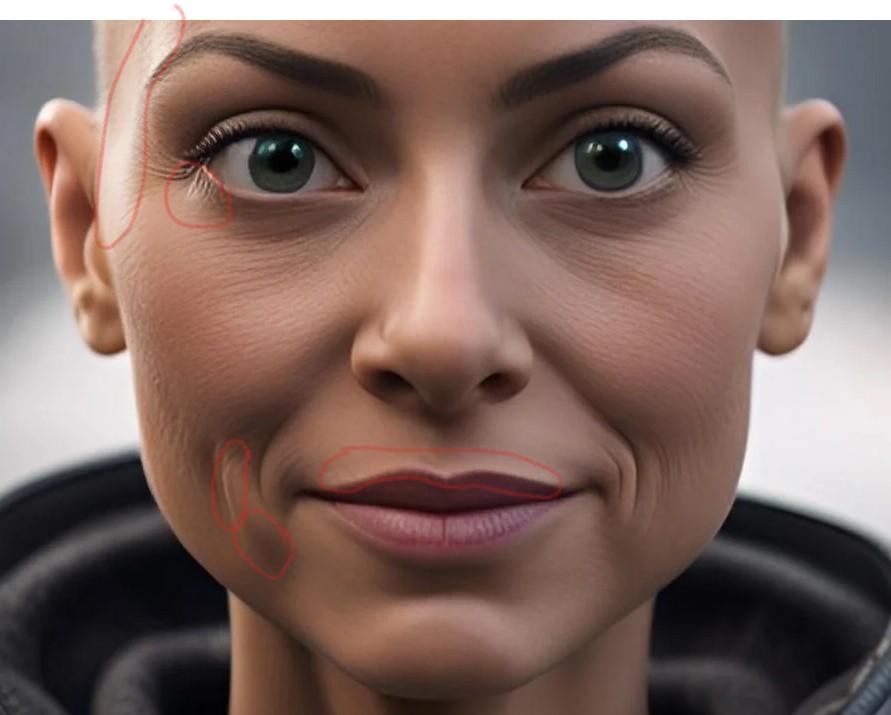
Here's an example of trouble spots, noted in red, from your example. In this case, I created the character without altering the source, then did some quick cleanup in the mat file. I also removed the eyebrows and did a quick fix of the eyelids.
Before: Future trouble spots
After: Spots I did a quick touch-up on
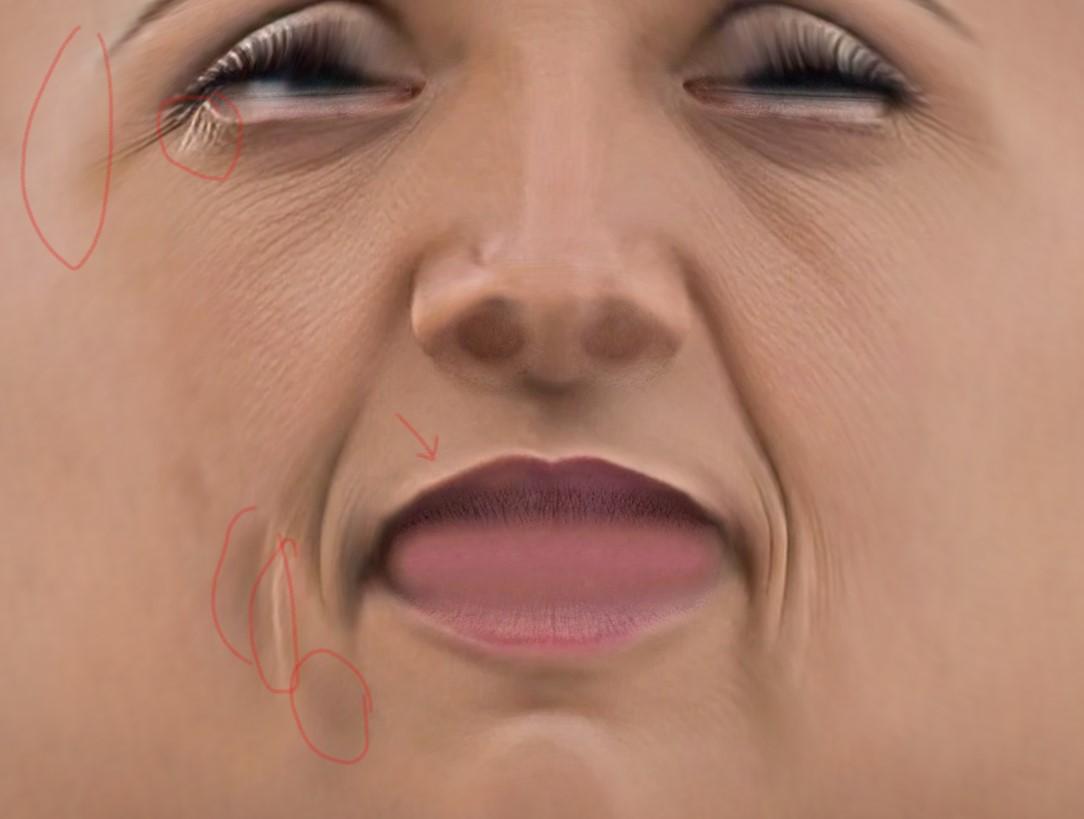
ETA: I suppose I should clarify that by "After" I mean that this was the original mat file created by FT2 from the "Before" image. There was a subsequent version of the mat file in which I did some tidying of the spots marked in red - so technically, there is an "After the After" image not seen here.
How do i get parameters(value,min,max) of morphs , And set morphs parametersPlease do put the question in the body of the post
Once you have the morph use morph.getValueChannel() to get its DzFloatProperty numeric controller, and then get the value, limits and so on from that.
Original Face Transfer and Genesis 9Just wanted to pass this on to those who have the original Face Transfer add-on. With Daz now selling Face Transfer 2 that includes the Genesis 9 figure, I decided to check something in my copy of the original. When you choose a picture to use, there is an option to use the Genesis 9 male/female. I don't own FT2 so I don't know what bells and whistles it includes, but I currently happy with FT1. Plus, there's a bonus. As you know, when doing a face transfer for a Genesis 8 figure you have to find a picture of the person with their long hair tied back. But if you are like me, all the pics I have are with the hair styled naturally. Meaning you end up with bangs plastered on the forehead or/and hair shadow or the hair itself painted on the cheeks. But when you choose the Genesis 9 figure for the face transfer, the hair disappears. The face is all one tone.
I wonder why the same program does one thing with Genesis 8 figure, but does a better job with Genesis 9?
Anyway, I just wanted to pass this along to my fellow artists.
This character like ?If this is a photo you could use face transfer utility available on DAZ.
Did anyone do a Clothing Converter from V3,V4,M3,M4 to Genesis 3,8,9 M&FCan I ask what you want to do with the Gen 3 & 4 clothing? It's frequently not as good as G3-G9 clothing in the way it's made, but sometimes has more imagination. Is it that making you want to use it on the later generations?
I'm curious, as I have gone to some efforts to take clothing from Genesis 3/8 to V3 so I can use my V3 characters (which I haven't been able to transfer to G8 satisfactorily, so taking clothing the other way was more practical). In the end I got to use new clothing on V3 and V3 characters, and I'm delighted.
Regards,
Richard.
Reset animation timeline at a certain frameAs per your case, technically, the commonly-used trick is
1. Select all keyframes at frame 18 (drag LMB to frame select...), copy / paste to frame 1.
2. Go back to frame 18, select the clothing item, set its Resolution Level to Base in Parameters pane, export it to OBJ file.
3. Go to frame 1, clear simulation result, import the OBJ file into the clothing item with Morph Loader Pro, with options: Reverse Dformations - Yes, Overwrite Existing - Delta Only. Then dial the morph.Face Transfer 2Thank you for sharing your experiments! So the one created by FT1 is the one one the left hand side, looking straight at the pictures - am I getting this right? Weird, would have thought it the other way round! Also, are you not getting the 'eyeballs wrong size and wrong position'-problem when converting the figure with Manfriday's converter to G9? Or how did you handle that here?
Thanks again, I wish you would publish something like a tutorial on FT and also on how you create these amazing source figures in AI.
The one from FT1/G8.x -> ManFriday -> G9 is the one on the left in the head-on shot. The one created in G8 has the narrower head shape. In the profile shot, you can see she has the more sharply defined lips and chin, which is the result of the Face Transfer Shapes that I applied before converting the shape. (FT2 is better out of the box in that regard but could still use a nudge. And yes, I did some rudimentary testing of applying the FT1/ManFriday head shape to the FT2 shape, with mixed and inconclusive results which I'm still pondering.)
There are definitely issues in G9 converted figures with fit and tracking of the eye. I'll revisit that and see if - on further testing - I have any nuggets of wisdom to share.
Thanks for clarifying! I now bought FT2 as I got it down to something like 18 bucks, which I thought was very reasonable. Will hopefully find time to play with it on the week-end. I think I will also try the AI sites you mentioned for some source material.
If any nuggets are forthcoming in your own testing, please do share! Let's appreciate/discuss today's new releases - ongoing thread
I really love the looks of the "Dragonhide PCS for Genesis 9 Bundle". And the same is true for the previous iteration.
I had these things in my cart at least a dozen times, but they never lasted until checkout.
And here is why:
I can`t wrap my head around the question, how a pilot would fit and/or act in its inside.
In my mind it does only work as a robotic iteration or if one would scale it up several times and place a full size cockpit in its head.
The only types of humanoids i could imagine, who would fit in such an armor, would look like these:
(EDIT: or could be the arch-enemy from that Tank Girl movie )
And this just doesn`t work for me. It would be sth. that i buy and most likely never make use of.
If anyone who owns the products could provide some renders with a human in front of the armor to get a more precise impression on how it would translate
it would be very much appreciated.EDIT 2: this picture is not meant to violate the owners copyright, but to explain the situation (educational purpose if one may say so)
and i DO LIKE the bundles a lot! I just wish there would be an option to morph them towards a more realistic(?)/reasonable(?) shape
Daz 3D is part of

Connect
DAZ Productions, Inc.
7533 S Center View Ct #4664
West Jordan, UT 84084Licensing Agreement | Terms of Service | Privacy Policy | EULA
© 2026 Daz Productions Inc. All Rights Reserved.