-
Question Mark Necklace
Very nice set of a pendant, necklace, and pendant with a necklace combo.
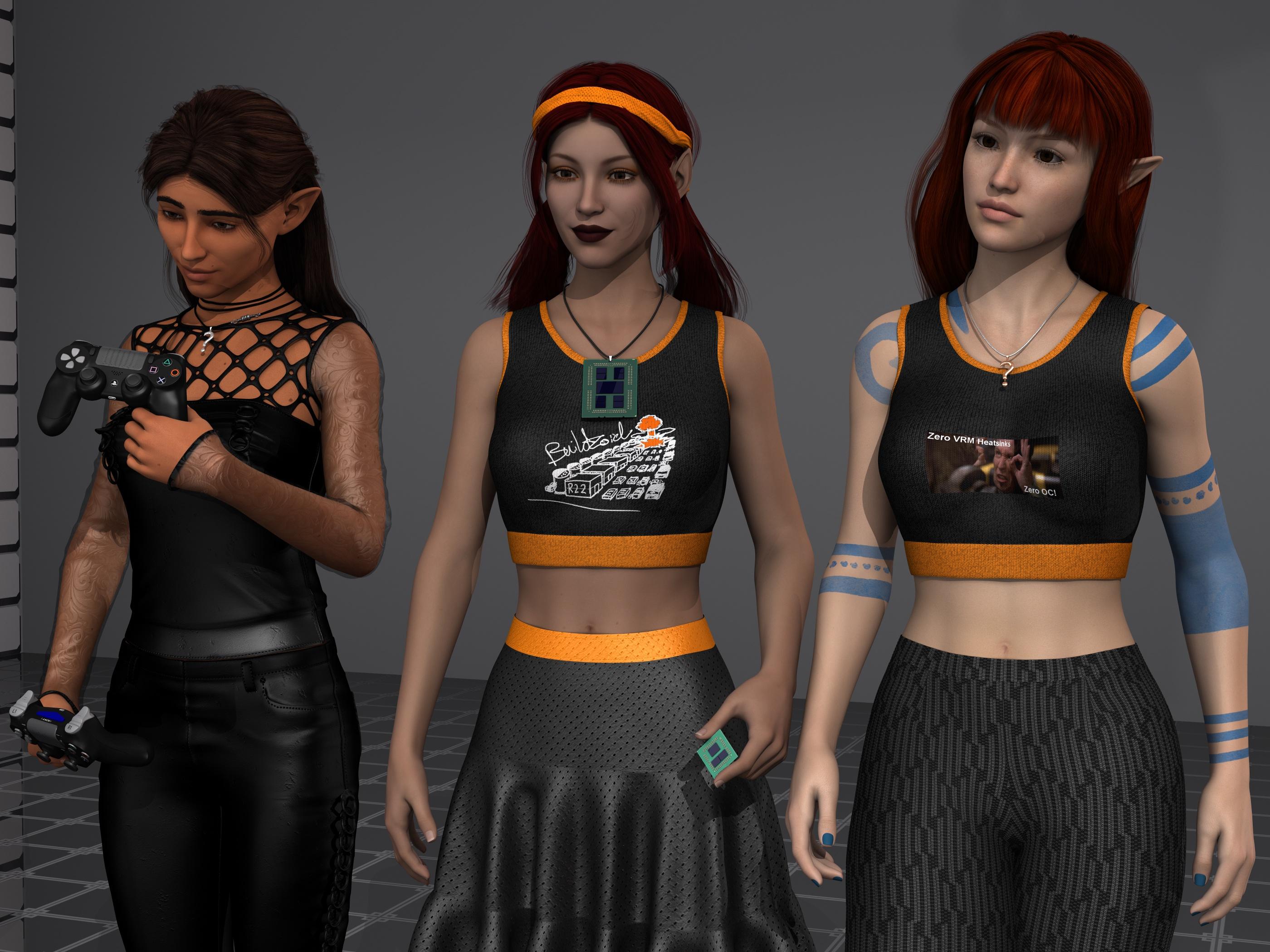
Left is my failed attempt of converting Aiyana from gen6 to gen8 (it failed at the gen6-7 boundary), she still hasn't figured out where her gothic pendant wandered off to. The middle is FWSA Sandi converted to Gen8 using RiverSoftArt's gen7-to-8 converter (probably to Buildzoids complete and utter dismay, sorry, I just like Sandi, cute elf), the necklace works very well with her Naked EPYC pendant. And right is AS Kellyn, cuz we can never have too many cute elves this time of year, with the full pendant and necklace combo. dForce Sweet Summer dress with custom meme textures, and dForce Eastern Elegance pants also with custom textures. Rowana Hair (left), Saffron Hair (middle, custom AHOC colors), and Shena Hair (right).
Edit: the former render was bugging the hell out of me with the pose combined with the camera angle making it look like Kellyn's left arm was almost twice as big as the right. I also didn't notice that the pose had her hovering a foot above the floor for some odd reason, guess it was for some really tall high heels, lol.
Rynne 8 New non-negative threadI made a render of Rynne 8 with a Victoria 4 outfit https://www.daz3d.com/pixiedust-outfit which I was able to pick-up for free today. I didn't convert it properly and the wings crimped up badley during the autofit, so I deleted them. I loved the dress and the autumn colors. I used one of her makeups, but substituted a lipstick from another add-on character as it fit the dress's colors. She looks older than my first render.
I find her fascinating. There are layers to discover.
Don't autofit the wings just load them and parent them to the chest.
Rynne 8 New non-negative threadI made a render of Rynne 8 with a Victoria 4 outfit https://www.daz3d.com/pixiedust-outfit which I was able to pick-up for free today. I didn't convert it properly and the wings crimped up badley during the autofit, so I deleted them. I loved the dress and the autumn colors. I used one of her makeups, but substituted a lipstick from another add-on character as it fit the dress's colors. She looks older than my first render.
I find her fascinating. There are layers to discover.
Missing Shapes - Need HelpHi, I'm new to Daz 3d Studio and have been trying to figure things out. I have a lot to learn.
I bought the Victoria 4.2 Base, Shapes++ and Muscle Morphs recently. I installed them using the installer. I was playing around with the body shapes in the shaping panel, but when I looked for the head shapes they are missing from the shaping and parameters panels. It appears the Base is missing. Morphs++ and Mucsle appear along with one called Male, I assume is default. Under Morphs++ everything appears but the head.
Under the left side panel under Poser Formats/MyDaz3D Library/Pose/Daz's Victoria 4/Morph Injections/Base is listed with images next to them showing the face expressions. None of the shapes related to the expression images appear in the shaping panel. When I install Shapes++, face expressions and body shaping images appear in the left panel. Only those shapes related to the body appear in the shaping panel. Any related to the head do not appear.
When I hover my mouse over a shape image in the left side panel, it shows the location they are installed, which is the same as the rest of the installs for victoria 4.2.
I have tried to find information about the missing shapes with no success. If anyone could can help to get the head shapes to show, it would be greatly appreciated.
ZZ
XTransfer Module 1- Genesis 3 to Genesis 8 Morph Converter (Commercial)Hi. Is your default content path set? Do you have one content library or many? If you load G3M again and open script and go Browse to Saved XTransfer Morphs you should see where it was saved.
Hi there - I have it set to reference the main "Daz" content library. I've attached a screenshot of where the saved morphs are located...I'm just not sure why my converted Darius 7 isn't called "XT Darius 7" as your guide shows the "XT Victoria 7". I've also attached a screenshot of my converted Darius 7. Please note the broken egg yolk-shaped irises. I bought your script in hopes of transferring this character as your store page shows a converted Darius without these wonky irises. However, my results are so far exactly the same as the ones I got with RiverSoft's converter script. This is the one character I've had problems with...I've already successfully transferred Victoria 7, Michael 7, Ophelia 7, Olympia 7, and a whole slew of other custom characters successfully, but Darius eludes me. Did you do something specific to get your results on him that have perfectly round irises?
XTransfer Module 1- Genesis 3 to Genesis 8 Morph Converter (Commercial)Hi there - I purchased this on release but am just getting around now to trying it. The one character I've been trying to convert is Darius 7, and I noticed that you featured him on the product page. It seems to complete his transfer in about 2min, but when I load in the G8 base figure afterwards, I'm not finding anything under "XTransfer" on the parameters tab and the transferred character name doesn't have "XT" in front of it like the tutorial has (you showed us "XT Victoria 7" so I was expecting "XT Darius 7" but I'm not finding anything by that name). If I do a search for "Darius", he comes up, but when I load in the slider, his irises are distorted. I specifically bought this tool because your featured converted Darius didn't have wonky irises (I tried converting him with RiverSoft's tool in the past, which had resulted in the same wonky irises and I was so exited to try this one in hopes of finally being able to transfer this specific character). I'm not sure what I could be doing wrong. I tried deleting the morphs and re-converting but no change. I'm not sure if it's because I previously tried converting him with RiverSoft's tool? I had deleted those morphs though so I'm not sure why that would matter.
Are there any Gen 8 females that closely resemble Marilyn Monroe?None I'm aware of for g8, Sav has one for g3 and v4 over at renderosity (marina is the name iirc).
Closest I've seen for g8 would be probably Marion for G8 at https://www.daz3d.com/marion-for-victoria-8
Can't buy Frida CharacterI was able to get to the product page by a line on the bundle page. Here is the link for her. https://www.daz3d.com/ry-frida-for-victoria-8
brings me to ooops page
thanks tho
ooops page quite popular today :-( {still goes there}
Going 'round through the store:
https://www.daz3d.com/ry-frida-for-victoria--8
- the non-working link has 1 "-" while the working link has 2 "--"
Help Identify CrownI was browsing the forum when by chance I saw your thread
That crown is not longer available. It was sold at Renderosity under the name EMW PheonixCrown for Victoria and P4 woman by CarolineG and royloo.
Can't buy Frida CharacterI was able to get to the product page by a line on the bundle page. Here is the link for her. https://www.daz3d.com/ry-frida-for-victoria-8
brings me to ooops page
thanks tho
Fibermesh Eyebrows, how to remove the "paint"?@smaker1, thank you for replying. However, I am using the "no eyebrows" mat, with the Jenni 8 eyebrow "attachment".
@Richard Hasetine, thank you for replying. Since the eyebrows I've tried came with Jenni 8 (no eyebrow mat), Victoria 8 and a separate product, Luxe Eyelashes and Eyebrows, they are a separate 'prop' to accept the materials from each product, Jenni 8, Victoria 8 and the Luxe.
The preview looks great with the individual hairs showing against the skin, but in render, it's the solid shape with no skin showing through the hairs. I also tried Victoria 8 eyebrow attachment, and Luxe eyebrows. Since they all render without distinct hairs, I guessed that's something to do with the surface settings. Thank you for the post render suggestions. It may come to that.
Can't buy Frida CharacterI was able to get to the product page by a line on the bundle page. Here is the link for her. https://www.daz3d.com/ry-frida-for-victoria-8
Weird. Even that link just took me to the front page, but then I tried it again, and it worked.
Can't buy Frida CharacterI was able to get to the product page by a line on the bundle page. Here is the link for her. https://www.daz3d.com/ry-frida-for-victoria-8
XTransfer Module 1- Genesis 3 to Genesis 8 Morph Converter (Commercial)Can I see this bone rigging? As well as the dialed morph causing it. Thanks
I used different morphs this time for comparison. i.e: Victoria 8, Mei Lin 7, Gia 6. The problem comes from any GenX2 (right figure) morphs. When posed, the shoulders start to move into the body, while the bones for the base of the feet gets pulled almost all the way out. Olympia 6 on Gen 8, in the OP, is the most extreme case I've tested so far, showing the hands are also affected as well but not as noticable. The rest of the bones have very minimal to no loss.
Report sales errors here. "There's Always Another Sale™"Today's sale page is live for me, but two of the links are wonky. I thought I'd share the correct links for anyone having the same problem:
- Christmas Cake, (a Holiday FREE Item.)
- RY Frida for Victoria 8, a Debut New Release.
I didn't notice any other links that didn't work.
I have the second RY Frida link not wroking either, though you can put them in the cart and the discounts are applying. We will report them but do not expect changes till Daz gets into the office. Thank you for reporting.
Report sales errors here. "There's Always Another Sale™"Today's sale page is live for me, but two of the links are wonky. I thought I'd share the correct links for anyone having the same problem:
- Christmas Cake, (a Holiday FREE Item.)
- RY Frida for Victoria 8, a Debut New Release.
I didn't notice any other links that didn't work.
Buy Something That Doesn't Work in Carrara? Post your Questions and Workarounds here. (please)Right, I know. But the product comes with one already: My Daz3d Library > People > Genesis 2 Female > Materials > Victoria 4
There's one file in there to add the UVs to G2F
so you said it's not working for you?
No. That part works great. Auto-fit in Carrara for G2F doesn't work properly even with the V4 clone. It doesn't work for Genesis clothes on G2F either, because Carrara doesn't recognize that it's for a different generation of figure, so we never see the dialog for select what the product is and who it was made for.
Natural Eyes for Genesis 8 [Commercial]The eyes definitely render slow unfortunately. There is sss on both the cornea and the eye surface which may be over kill for most people but I liked the result so I kept it :)
Having a more accurate iris definitely helps. I dont know why the genesis eyes dont already come physically accurate.
Yeah I don't quite understand that either. They go so far to make Victoria with her beautiful sculpting, detailed texture and normal maps and then cheap out on the eyes. *shrug*
Buy Something That Doesn't Work in Carrara? Post your Questions and Workarounds here. (please)Right, I know. But the product comes with one already: My Daz3d Library > People > Genesis 2 Female > Materials > Victoria 4
There's one file in there to add the UVs to G2F
so you said it's not working for you?
Buy Something That Doesn't Work in Carrara? Post your Questions and Workarounds here. (please)Just FYI: V4 for Genesis 2 Female does work for applying V4 UV mapping to G2F in Carrara.
It comes with V4 clones, which brings up V4 in the Auto-fit dialog in Carrara, but I haven't been gettiung proper fitting that way. I haven't tried fitting first in Daz Studio since I don't have a version of my character in DS form. But that might work as an option.
there is another product for V4 UV https://www.daz3d.com/victoria-4-for-genesis-2-female you need to manually do maps in Carrara after loading it
I fit clothes in DAZ studio and save as support asset
Yup. That's what I bought. Just double-click the Material preset file to get V4 UVs on G2F. It comes with fitting clones too.
Thanks for the know-how. I'll try that. I tried fitting G2F clothes to Genesis in DS (which worked well) and saved as separate support assets, but they don't fit to Genesis in Carrara afterward. Maybe I saved them wrong(?).
they need to be a figure asset not a scene subset
also do the UV and materials in DS and save as a character preset
I thought that too, but I read somewhere (Carrara store page?) recently that applying a character preset to another in Carrara will transfer the proper UV mapping as well - so I tried it and it works!!!
So I could load Victoria 6 and apply Aiko 6 to get Aiko's maps, for example. Right in Carrara!!!
yes those are character presets, what I meant is you save your V4 UV ones as well in DS to do the same thing
Right, I know. But the product comes with one already: My Daz3d Library > People > Genesis 2 Female > Materials > Victoria 4
There's one file in there to add the UVs to G2F
Daz 3D is part of

Connect
DAZ Productions, Inc.
7533 S Center View Ct #4664
West Jordan, UT 84084Licensing Agreement | Terms of Service | Privacy Policy | EULA
© 2026 Daz Productions Inc. All Rights Reserved.