-
AOBB's Classic Hollywood Stars G9 mega bundle. 19 head morphs. No materials nor textures.
AOBB said:
@perlk - My pleasure. I'm happy to hear you are checking out G9. Have you seen the new Babyface G9 (Jean Harlow) head morph? I made it especially for you.

You're the best - thank you.
Gen 9 body problemsGo to Parameters pane, Show Hidden Properties..., then select Currently Used, check if there's any unexpected morph(s) dialed with values. Better post a screenshot.
Genesis 8 High Heeled Morph on Genesis 3Yes, as Elor mentioned, better name the product that you're using so that we can well understand the queston / issue you posted...
And pls clarify if you mean the feet morph on G8 coming from the high heels product or the morph of high heel shoes themself...or in other words, converting high heel shoes from G8 to G3.
How to use some cloth model from Turbosquid or similar platforms for a Genesis figure?Dissendior said:
Thank you all for your answers. What I mean with "...fail to adjust the form correctly" is that I lack the skill to use sculpting well at the moment. Technically I know how to use these tools in Blender but when I try to use it the result looks usually bad
 For example I loose the form, the proportion or details... I will need practice but it's good to know that this actually is the way to go.
What do you mean with "unwelded" vs. "welded" cloth? These are terms I still struggle with a little bit when it comes to 3d cloth. When I export from MD I can choose welded / unwelded. As I got it so far this means that the resulting object either consists of one big mesh (= welded) where all parts are connected to each others or of multiple single meshes for each pattern (= unwelded). Is this correct?
That is correct. Patterns in MD are sewn together as a garment, while the vertices of the sewn patterns have to be connected by checking "Welded" when exporting to a single OBJ. for the purpose of use in DS.
The jacket I currently try to adjust for a daz character is a model consistig of multiple single meshes / objects. They share one UV but they are not connected. Here actually it happened that when I managed to import the jacket into MD and started the simluation all parts fell apart.. So just to clarify it for me: when I have such an cloth object and I'd like to use it in MD (or in Daz) I'd need to connect the single parts to avoid this effect? I'd need to go into Blender for example and there I'd need to connect these meshes by hand in edit mode by connecting the vertices?
OK. It's commonly seen that lots of non-Daz native format "clothing object" from those 3rd-party sites are with unwelded geometry. But there're some options you may consider and try:
- Since you know Blender, just simply make the jacket welded by using Weld modifier. You'll lose the original UV in this way but vertex groups are kept, so you still can use Shader products in DS to texturize the jacket. There're lots of high quality fabric shader products of Daz. (Or you unwarp UV youself in Blender to make a new UV layout, then texturize it in DS, Blender or in other software like Adobe Pt.)
- As for the way of welding vertices plus keeping original UV layout, AFAIK, there's a nearly perfect workflow in Maya by using Transfer Attributes plus some necessary fixing. You may search it on youtube. But to me, it may not necesssary for this case...I think when this is the case the jacket might not be very useful as it consists of 14 single objects with a very "organic" form and more than 175.000 vertices. I think to find the correct vertices which need to be connected to each others would be a very tedious task... or is this the kind of work you just need to do?? For me it's still so difficult to evaluate which of all this hand-work is really just necessary to do and which of it I would just do because I don't know a super-cool tool or technique
 Or when it comes to 3d models like this jacket I'm not confident it estimating the quality and work I need to invest to use it for my purposes... like this jacket: can I use it for a daz character as it is or how much work I need to invest to get it right? Or is it useless and it would be better to do it from scratch in MD?
As above-mentioned, I think you still have chance to make it work in DS with this "jacket object", by using the 1st simple option. After it's being welded, you may import it into MD for simulation if you'd like to. There should be no fall apart. And you may even try converting the object to patterns...
Pls be noted that if there're some physical objects on the jacket like buttons or sth., you may cut them out beforehand, then import as OBJ and attach them to the jacket body by using Rigid Follow Node in DS.
Anyway, there're quite a few ways of manipulation... no harm to try. Genesis 8 High Heeled Morph on Genesis 3Is possible to convert that morph from genesis 8 to genesis 3? Or is possible to get a similar morph for genesis 3 directly?
Let's appreciate/discuss today's new releases - ongoing threadLike Barbult, I too thought Vick looked very feminine in many of the promos, like Victoria playing dress up. So I felt that if one really needed a family resemblance, it makes sense to just use her morphs to get there.
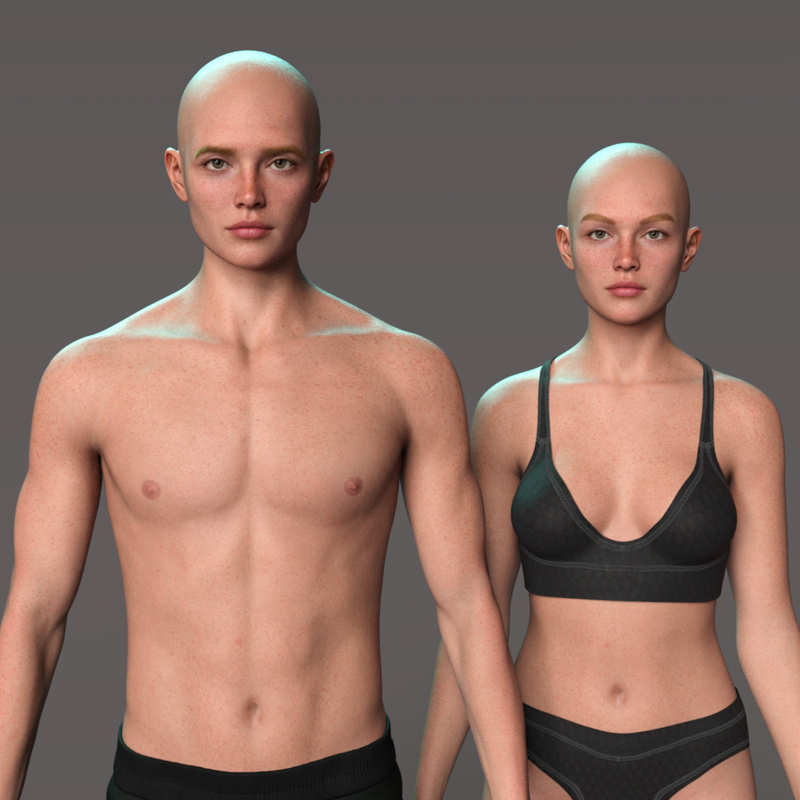
As for the chest issue, what's stopping us using a G9 male body and her head morph? I decided to create a quick version of V9's twin brother, after seeing Columbine's test render. This was just very quick: I used Thalius's body morph here with V9's head morph and tweaked the head/neck just a tad for the test, made "Victor" a bit taller, changed the brows and used V9's male mats.Victor and Victoria
 [Released! HD Face Burns for G8F + Add-On] FenixPhoenix's Commercial Products
I answered on your other thread. Basically the current faceless is not intended to be used that way. But we are working on a second faceless which we will tie with our toon textures so you can get faceless or semi faceless (no eyes only or no mouth only) flesh colored figures.i53570k said:I posted on the Commons before realized this a dedicated PA thred and not just for the Face Burns product. I hope double posting is not a forum violation.
Does the FPE Faceless product include a script to copy character materials into the face geograft? Similar script is a feature that has been standard of Daz anatomical element products on other sites. I don't see it on the product description.
If not then the product is interesting but not as useful as it could be. More often than not I and many others I presumed want a featureless face that is flesh. There have been free morphs generously provided by forum members in the past but they all have shortcomings. Removing just the eyes and nose does not make the face featureless and there are always residual morph that looks obvious that we were squeezing vertices. There is also the noface morph but unfortuntely it changes the entire head and does not remove the facial features. But the biggest problem of using morph is that the user still needs to manually replace the facial features in the character's texture files.
Shadowy characters with LIE expressions are nice but G8 or G9 characters without their faces would be scarrier. I would buy that faceless product with scary featurelees face morphs using the characters' own materials.
How to use some cloth model from Turbosquid or similar platforms for a Genesis figure?felis said:
I think your best option is to take it into a modeller and adjust the clothing so it fit a base character in A-pose, so you can use the default transfer utility.
You might be able to do that in MD. I don't have MD, so I don't know.
Yes use morph target or a pose-transition animation to simulate to the new pose.
MD simulation only works on welded clothing. If mesh pieces are unwelded, then they will fall apart during simulation
[Released! HD Face Burns for G8F + Add-On] FenixPhoenix's Commercial ProductsI posted on the Commons before realized this a dedicated PA thred and not just for the Face Burns product. I hope double posting is not a forum violation.
Does the FPE Faceless product include a script to copy character materials into the face geograft? Similar script is a feature that has been standard of Daz anatomical element products on other sites. I don't see it on the product description.
If not then the product is interesting but not as useful as it could be. More often than not I and many others I presumed want a featureless face that is flesh. There have been free morphs generously provided by forum members in the past but they all have shortcomings. Removing just the eyes and nose does not make the face featureless and there are always residual morph that looks obvious that we were squeezing vertices. There is also the noface morph but unfortuntely it changes the entire head and does not remove the facial features. But the biggest problem of using morph is that the user still needs to manually replace the facial features in the character's texture files.
Shadowy characters with LIE expressions are nice but G8 or G9 characters without their faces would be scarrier. I would buy that faceless product with scary featurelees face morphs using the characters' own materials.
How to use some cloth model from Turbosquid or similar platforms for a Genesis figure?As for the 1st part, it should work but you missed one step... after tweaking both of clothing and figure pose, you need to export clothing to OBJ and import it back to "bake Transforms", before rigging it with Transfer Utility. There's no problem with the settings you set in Transfer Utility (though it's not a perfect way...).
As for the modeling / sculpting with Blender, I also recommend this way. Always export a Genesis Base figure to Blender as the basis to tweak clothing object only. Sculpting works well in most of the cases. But I'm not sure if that was a solid issue as you mentioned "...fail to adjust the form correctly". Maybe you better post a screenshot.... Besides, another key factor is that you have to assure the geomtery of the clothing object is welded... otherwise there'll be other problems after you bringing it back to DS for further manipulation...(rigging, creating / tweaking morphs, add dForce modifier, etc...)
Btw, there're quite a lot of free tutorials on youtube related to editing / sculpting object geometry in Blender.... You may easily search and get some good ones....
Question and suggestion about the FPE Faceless productshttps://www.daz3d.com/fpe-faceless-for-genesis-8-and-81 as well as https://www.daz3d.com/fpe-faceless-for-genesis-9
Does the product include a script to copy character materials into the face geograft? Similar script is a feature that has been standard of Daz anatomical element products on other sites. I don't see it on the product description.
If not then the product is interesting but not as useful as it could be. More often than not I and many others I presumed want a featureless face that is flesh. There have been free morphs generously provided by forum members in the past but they all have shortcomings. Removing just the eyes and nose does not make the face featureless and there are always residual morph that looks obvious that we were squeezing vertices. There is also the noface morph but unfortuntely it changes the entire head and does not remove the facial features. But the biggest problem of using morph is that the user still needs to manually replace the facial features in the character's texture files.
Shadowy characters with LIE features are nice but G8 or G9 characters without their faces would be scarrier.
Changing "morph Limit"Is there a way to change the maximum value of a morph? I.e. an "Expand All" morph on a clothing asset is 100%, is there a way to push it forward or edit it to go to 150%? Even using a plugin, I need to increase a slider value over 100%.
AOBB's Classic Hollywood Stars G9 mega bundle. 19 head morphs. No materials nor textures.@perlk - My pleasure. I'm happy to hear you are checking out G9. Have you seen the new Babyface G9 (Jean Harlow) head morph? I made it especially for you.
How to use some cloth model from Turbosquid or similar platforms for a Genesis figure?I think your best option is to take it into a modeller and adjust the clothing so it fit a base character in A-pose, so you can use the default transfer utility.
You might be able to do that in MD. I don't have MD, so I don't know.
How to use some cloth model from Turbosquid or similar platforms for a Genesis figure?I run into this issue from time to time: I find some cloth that I'd like to use in a Daz scene, let's say a shirt or a jacket, and the model of the cloth is not defined in the default A pose. How can I import this cloth into daz and make it follow the character?
I tried it that way:
- import the obj of the cloth and adjust the scale and position (maybe here lies the problem?)
- pose the character so that the arms fit (closely) into the sleeves
- Transfer utility:
- Item shape for source (character model): Current
- Item shape for target (cloth model): Current (and I've tried default)
- tried checked and unchecked "Reverse Source Shape from Target"
Nothing works: either the cloth does not get the rig or it is misplaced. I managed to use the Transfer utility for cloth I've created in Marvelous Designer sucessfully but I fail all the time for models I get from somewhere else.
Another question: I thought maybe it would be better to export the Daz character and adjust the model in Blender but when I start to edit the cloth model (in edit mode or sculpt mode) I fail to adjust the form correctly. I think I miss some basic skills in modelling / scultping so I would be grateful for any tip for a good course or tutorial how tasks like these can be done in Blender.
Let's appreciate/discuss today's new releases - ongoing threadzombietaggerung said:
I am a little confused by this Vick. Isn't the entire point of G9 to be able to swap genders of any character at any time? Shouldn't anyone who owns Victoria 9 be able to dial out the feminine and dial in the masculine and get this character without having to buy it? I am very confused by this. Or am I just missing something here?
As far as I can tell (I didn't check with all the ones I own), no Genesis 9 Core Figure will dial in either the Base Masculine or the Base Feminine morph with their own morph and if you dial out Victoria 9's morphs, you get a base gender neutral Genesis 9, not a masculine Victoria 9. If you dial the Base Masculine morph, the resulting character will still retain Victoria's breasts and you'll have to find a way to remove them (the Breasts Gone morph is a start but there is still a bit of breasts left, even dialing it in at 100%).
What you can do is using Victoria 9's masculine skin, which is provided since the beginning, on a masculine morph. Here, with Michael 9 with the Masculine Chest texture from Victoria 9 (the nipples are in a difference place when using the Feminine Chest textures).
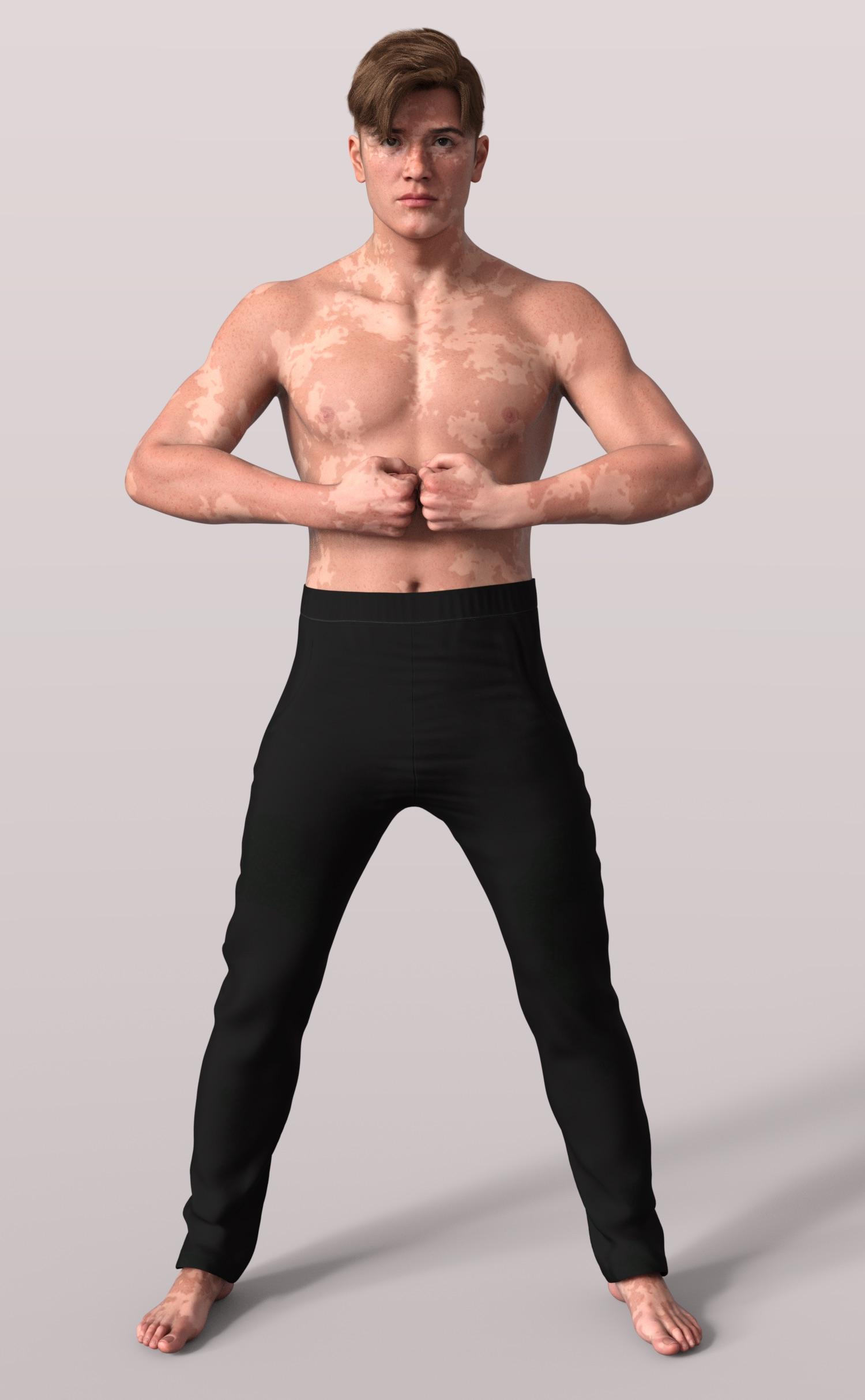
But not all Genesis 9 characters are provided with an opposite gender skin: all G9 Core Figures are (as far as I know), but only some PAs will include textures for the opposite genders (@ChangelingChick is the one that come to mind, but other do too): you can still use them on any Genesis 9 morph, but if you want to do a topless or fully nude render, nipples will be placed were they usually are on the gender the textures were designed for and there would be no Anatomical Elements textures for the opposite gender.
This new product is a new morph for Genesis 9, modelled to make Vick looks like Victoria's brother / father / son with a couple of textures. I suppose the dependency to Victoria 9 HD is because Vick needs other textures from Victoria 9 HD.
Daz Studio 4.22[.0.x] Pro, General Release!crosswind said:
...That's interesting... Can this be the reason why the file is saved correctly but it does not sync with the program? Before this update it used to let me... maybe it was a fluke. I'll try re-doing the morph without baking the feet rotations, let's see what happens.
"Bake Rotations" just bakes the joint rotations of you figure as a new geometry base...but it will not reset any Pose Controls... so I'm not sure if you really meant "Bake Rotations", or "Bake Transforms"... You probably should've used Bake Transforms....
Anyway, it should not be the reason that you could not find the saved morph property in Parameters pane or Shaping pane.. unless the morph DSF file was wrongly defined or not saved successfully.
After saving morph assets, reload Genesis figure, you can at least find the saved morph in Parameters pane. If you could not find it in Shaping pane, check the Type field in Params Settings... only properties with Type - "Modifier/Shape" can be shown in Shaping pane.
Yes, I used "Bake Rotations" on the previos versions of Daz Studios prior to saving my custom morphs and it used to work, but Last night I did a final test leaving out this step and not only did it work, but i also noticed that the saving process is a hell of alot faster too.
Face Transfer 2I played with it last night using the cutting plane and it worked pretty well. I also saw that there was a weight map option. I think I might play with that and see if it takes less steps. There was an example on the product page about using weight maps to isolate a nose morph.
Darwins' Schtuff Pt DeuxThanks! I'll have another render of the next morph set soon. ;)
[Released] RSSY Character And Material Conversion Bundle Genesis 8 to Genesis 9 [Commercial]844d1cc615 said:
RiverSoftArt said:
844d1cc615 said:
I watched a couple videos. 1st thing I noticed was a Add Preset prompt that appeared when I initiated the regular character script offline (see attached images). The prompt went away after running the script online. It re-appeared only once today while I tried to convert DeviousDolls Apryl, DeviousDolls Alyx, Girl 8 offline, each seperately. One guy live-streamed himself trying to use the product prior to reading the manual. Took forever. My entire G8F library only took a second to load. The deselect all was a nice addition. I only selected the one I was testing at the time. When I tried Girl 8 I had a subdirectory named "G8_to_G9." Re-reading the manual I deleted that & set the output to the default G9 directory. I had some Girl 8 morphs in the G9 subdirectory I found tucked away after running the script & deleted them as well. Glad I did a thorough search otherwise those would have just been lurking waiting to cause proplems down the road. Not sure if they were created because when I tried Girl 8 I had that subdirectory of if it's because it is an official DAZ product. I purchased RSSY Character and Material Conversion Bundle after breaking G9 trying to create a custom version of Girl8 for G9 (see images). I had too much going on in the background and accidentally created dups. Had to scrap the project. There were no errors in the Character Converter log. If you want DS log.txt DM me. Bad Imagery posted a workflow video 16 days ago as of viewing last night that is probably more suited to my requirements though I don't like to have a lot of Blender plugins: hXXps://youtu.be/Ch2aF9eFIJ8
I think to do the GC Heroine project morphs I'd have to save each morph as a character, run the script, then delete the FHM but first I have to get the regular script working.
- The Add Preset prompt is when you have something selected in Smart Content pane or Content Library Pane and start the script. The script is asking if you want to add that character preset to the list of presets
- I don't know what you mean by running the script online.
- The output should not be "output to the default G9 directory" (i.e., My DAZ 3D Library\People\Genesis 9\Characters or where DIM installs characters). It should be your own library, usually a My Library\People\Genesis 9\Characters
- The My Library should also the first directory listed in the Daz Studio Formats section of the Content Directory Manager. Otherwise, the newly created morphs get mixed into the installed directories.
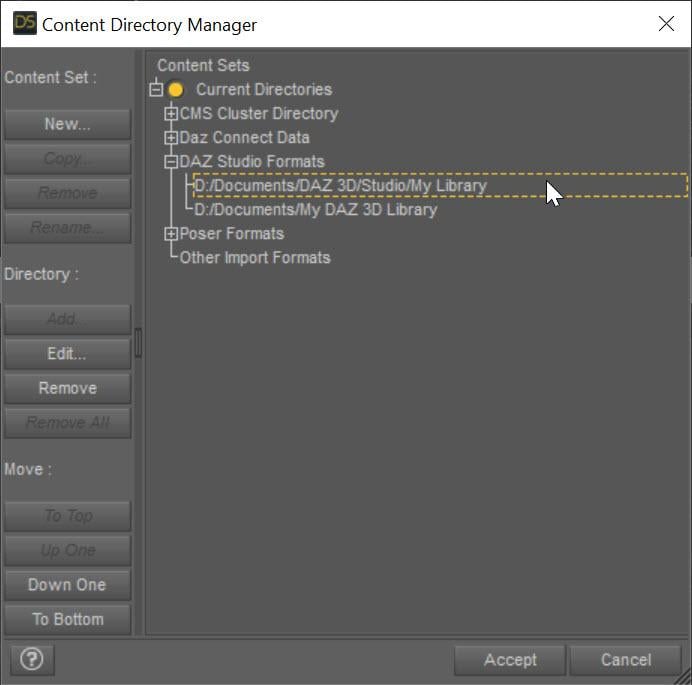
Migraine days have just begun again. Would explain why I previously missed my custom directory being on top, not below in the Content Directory Manager. Ironically I can see a little better now. Thanks for the help. Lol oh man this must have been one big headache for you & SY. Hang in there. We appreciate you.
You got it working? Oh thank goodness!
Daz 3D is part of

Connect
DAZ Productions, Inc.
7533 S Center View Ct #4664
West Jordan, UT 84084Licensing Agreement | Terms of Service | Privacy Policy | EULA
© 2026 Daz Productions Inc. All Rights Reserved.