-
Import Morphs?
So, I found a guy on DeviantArt doing Celebrity Morphs for DAZ. I downloaded a few and drag-and-dropped them into the DAZ Library. They seem to go to Data>Daz 3D>Genesis 8>Male>Morphs>Magnus1781
However, when loading a G8M Base or any other G8M, the morph is nowhere to be found. Is there some sort of import process I need to follow? I cannot see it in the Content Library, I can't see it in any of the morph dials under heads, Body, All, etc. I am stumped. I have used user-created content before without issue, but I can't seem to figure this one out.Is there a tutorial on changing the face by sculpting?And remember to "Keep vertex order" on both import and also export. The option is in slightly different places for import/export.
How to make large sea plane with waves (animated)under edit object morphloader, you import as many objects with the same vertex count as you wish to create morphsliders, make sure you choose Carrara scale
Puppeteer is under windows, you set a dot for each slider slid to 100 (same as puppeteer in Carrara) then record
animated normals or any textures harder
need a DAZ script
free https://sites.google.com/site/mcasualsdazscripts/texanimfords3
sadly I deleted my video, it was 2014
https://www.daz3d.com/forums/discussion/comment/678894/#Comment_678894
there is this, I don't own it but I think he created it the same way using Cinema 4D
Python: Traceback (most recent call last): error when importing with diffeomorphicWorks fine here, tried both manual import and easy import with merge geografts. No errors. Test scene included golden.duf it's G8F with golden palace.
blender 3.2.1, diffeomorphic 1.6.2.1068
daz is changing percentages (again)?I just started using the heck out of 20 and since it's been a long time since I saw that happen that' why I thought it might have been related to the update to 420.
As for the ones that change may have to save? and reload...maybe if they're in a group? amd a parameter is changed on the group? I'll try to spot more details.
it's not when exported to an object because that sets all to 100
when I'm in a modeling session I may load 40 cubes and bend fold mutilate and spitdle them export, import, duplicate, subseting to move from one place to another.
---
Loading a backdrop/background imageBrand new DS user here, just by a few days. I've done a little searching of the forum and come up with a blank on this....
How do I import or load a background image, say or photo or bryce image. When I load up the backgrounds in DS they change the lighting.
Is there a tutorial on changing the face by sculpting?Select just the base figure (you don't want any additional geometry) and in the parameters pane set the Mesh Resolution to Base. File>Export, seelct OBJ as the format and enter the name. In the options dialogue pick a preset that suits your destination application, or just use the Daz Studio preset, and make sure the option to export selected only is checked.
Import the OBJ into your modeller, making sure you keep the vertex order unchanged if that is an option and not scaling or transforming 9this is where picking a suitable export preset helps). Adjust the shape of the face without adding or removing any geometry. Export as OBJ, giving it the name you want for your morph, and again no transforms and preserving vertex order.
In Daz Studio seelct the base figure again, Edit>Figure>Morph Loader Pro. Select the same preset as you used for exporting the OBJ, so DS can reverse any changes, then use the button to select the OBJ. For a simple morph you shouldn't need to change options, as long as the mesh was in its base state (if you had morphs alreadya pplied then you want to enable Reverse deformations, and you want the same morph applied to the figure). You may well also want to change the path, which controls where the morph appears in the parameters pane..
That should be it.
Introducing the Daz to Blender Bridge & native Blender File Formatsedwinhaan1974 said:
Hello
I have a problem with Daz to Blender
When i click on import new genesis figure do i get this message
Please let us know the following information:
- Version of Daz Studio
- Version of Blender
- Version of Daz Studio Plugin for DazToBlender (Click "Help -> About Installed Plugins...", then Daz To Blender Bridge.)
- Version of Blender Plugin for DazToBlender (Click Window -> Toggle System Console, then send a screenshot of that window.)
If you have not done so, please make sure you have watched the videos and fully followed the directions for completing the installation of the Blender Plugin: https://www.daz3d.com/forums/discussion/572806/official-daztoblender-bridge-2022-july-update-what-s-new-and-how-to-use-it/p1
Introducing the Daz to Blender Bridge & native Blender File FormatsHello
I have a problem with Daz to Blender
When i click on import new genesis figure do i get this message
[Pended] Does Animate2 work in DS4.12 or DS4.20? Results May VaryRichard and "3141592654"
From wishlist I can access the product page you suggest. The movie part reads "Private" and clicking on it goes to a YouTube Premium page. A turn off to be sure but for DS, Animate2 is how I'm going to add clips or "aniblocks" and have more control over the timeline? Tried rendering "Make an AVI Movie" and the result wasn't the expected 30 seconds in Timeline pane. A one second clip with a gap. : /
So...
If I understand correctly, I'm going to get a slight 'jog' or gap if I attempt "Car Ranger" parented to cylinder rotating 360 degrees. I made a key every 5 degrees. (Render as make an .AVI movie.) Size 1080. Render time was several hours using both cards. All I got was a one second movie that I looped in Windows Media Player. Noticable skip at around 350 degrees. Then it starts from zero degrees again.
1.) More stable and safe to render the frames and skip the .AVI part? Import the .png frames into Express version of Hitfilm to make movie in file type of my choice?
2.) While the store sells aniblocks for most anything G3 and G8, I'm going to run into problems with that noticable skip or jump if want a slow loop to showcase a car or aircraft. (M8 varient was the driver in the Car Ranger test)
3.) Specific forum area for animation questions? Animation will be a learning curve. For full 3840 x 2160 Possible to make the frames in steps while I sleep? Would take far too long and stress system with heat issues unless I use a "Quadro" card that draws less power and operates at lower temp. than GTX series.
Again, I hope all that makes sense. Question 3 might be most important! Specific topic area or forum area for "new user" animation?Is there a way to export only the toon outline in Poser?Yes, there are several ways to do this.
Search Google for the freebies "Poser - a toon outlines render preset for Firefly", and "Simple Python script to disconnect all bump maps". The first is just a Firefly preset to do exactly what you want. The second is an optimised Firefly preset to do the same thing (but much faster) together with a Python script that first disconnects all bump maps. Bump maps are what causes 95% of unwanted dots and specks on such line-art only renders. This will only work on characters that do actually have bump maps connected, and may not work in Poser 12.
Once you have the lines as a render, they can be made more artistic in various ways. 1) Layer and blend with a b&w real-time Comic Book render made with lines only (search for the video: "3 minute tutorial: comic-book basics in Poser 11". 2) Run the lines through the free G'MIC's "Engrave" filter, suitably adjusted by you and saved as a custom preset. 3) Vectorise the lines in Studio Artist 5.5, and then transform them. 4) Import to graphics software and manually ink over the lines, using them as guides.
Daz to maya not exporting environments and props?@davegv Krys Kryngle is correct: the options are currently greyed out because that functionallity has not been fully implemented in the Maya plugin side yet.
@videoninja719 Although environments are not seamlessly supported yet, you can still import most props and environments by selecting their sub-components. Here is an example with the Hacienda Kitchen environment:
1. Load the "Hacienda Kitchen With Accessories and Lights" Set
2. In the Scene panel, open the "Hacienda Kitchen With Accessories" node to show the child nodes. Notice that this node's icon is a cube with missing sides/edges. This is a Group Node which is not yet supported by the DazToMaya bridge.
3. Select "Hacienda Kitchen".
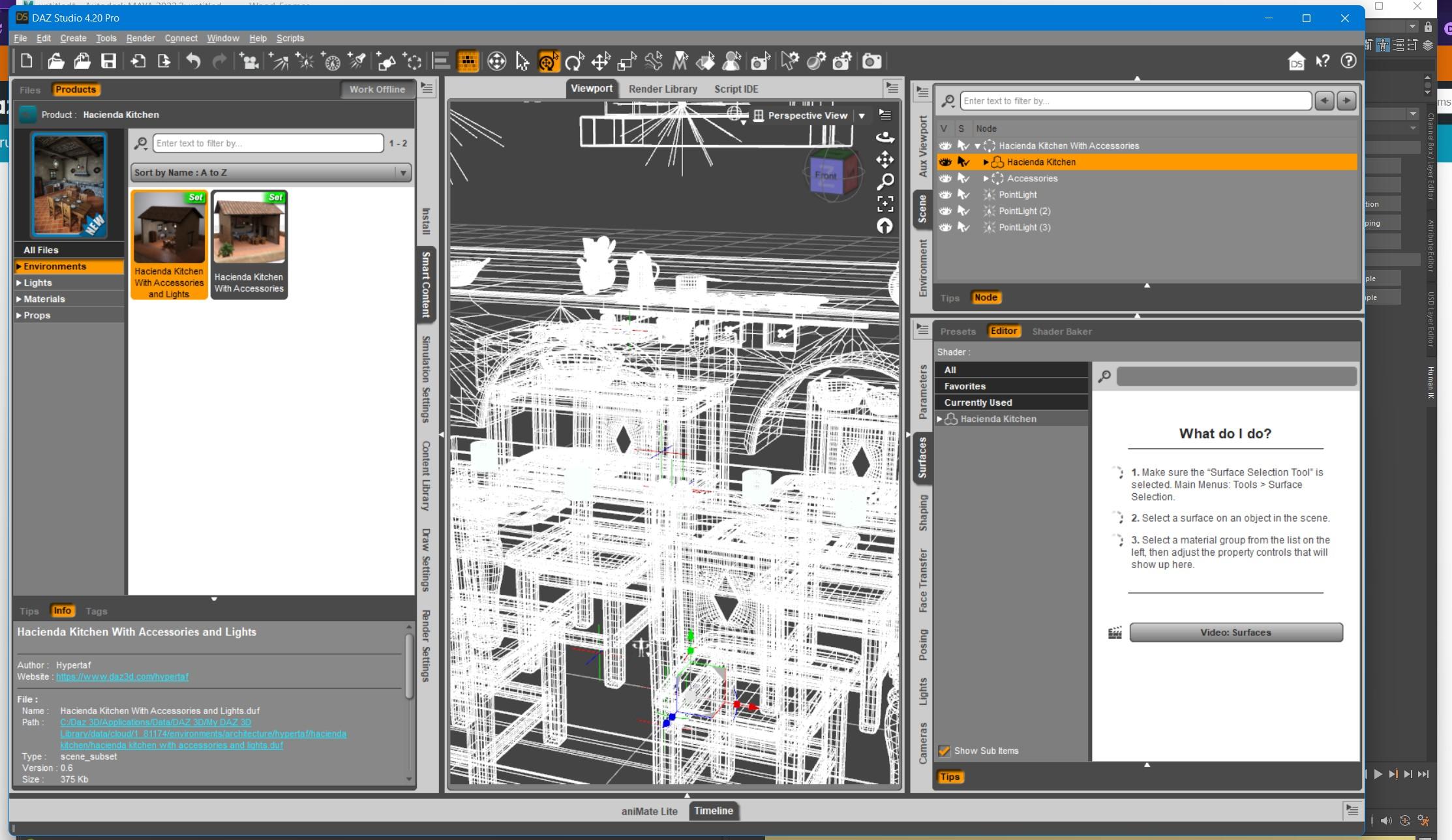
4. Click File -> Send To -> Daz to Maya. Click Accept.
5. Open Maya. Click the "DAZ IMPORT" icon in the DazToMaya shelf tab. Click "Auto-Import" in the DazToMaya dialog.
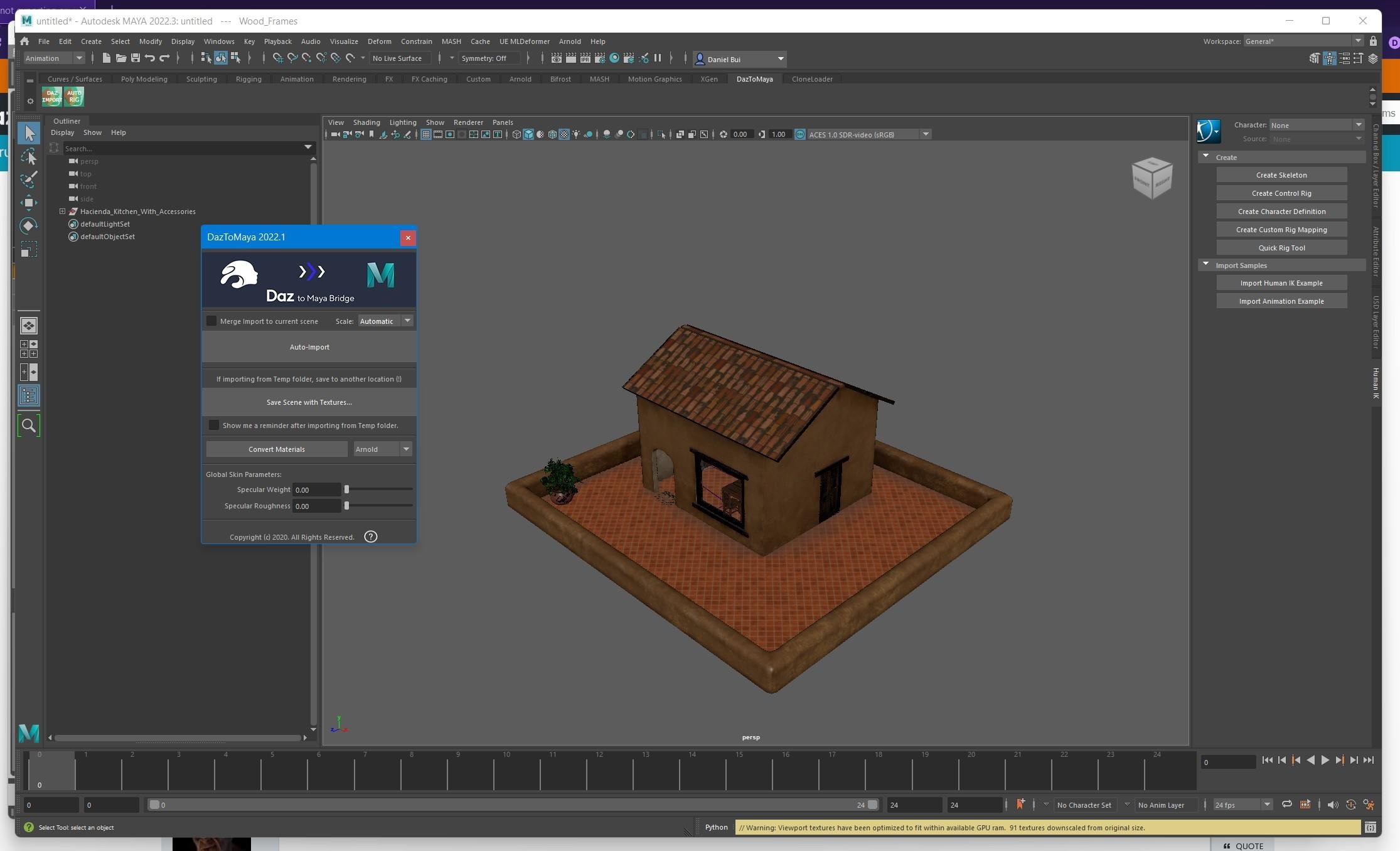
Repeat the above steps for other child nodes with props that you wish to export that are nested inside Group Nodes.
maya Maya is waiting for an error to install the plug-in. Click the icon to report an errorimport sys
sys.dont_write_bytecode = True # don't write PYCs
import maya.cmds as cmds
import DazToMaya
if int(cmds.about(v=True)) > 2020:
import importlib
importlib.reload(DazToMaya)
else:
reload(DazToMaya)
DazToMaya.run()
# Error: AttributeError: file C:\Users\PC\Documents\maya\modules\DazToMaya\scripts\morphs.py line 13: 'module' object has no attribute 'reload' #
The Eiffel TowerRichard Haseltine said:
memcneil70 said:
I just found that it is no longer named 'The Eiffel Tower' SKU 85819, but has been renamed 'Paris City Center'. I only found that out because I had 'The Eiffel Tower' with empty thumbnails.
I looked it up by way of the bundle, then found the newly named file already installed in my DIM with files installed. But it is not showing up in my Content Library, nor Smart Content.
So, you may have to uninstall in DIM, then reinstall the renamed file. That worked to get it into my Smart Content.
Do you work with Daz Studio online? If not the metadata wouldn't update unless you did a reinstall, and if you install through DIM you don't need to be online.
Hi Richard, no I keep D|S is kept offline after the absolute mess the online updates made of my files. I am still in the process of reinstalling files on two Win 10 computers, one due to mixed DIM/Daz Connect, the other due to when an external hard drive loss connection. Installing new files on MacBookPro M1.
I have noticed that on DIM, when opening it, that a large number of .dsx files appear along with any updated and new products. I have wondered why it takes so long for DIM to open, and it seems that may be what is happening. Are those necessary to replace the existing .dsx files in DIM's Download's folder?
(I happend to have File Manager open after recovery of my 8Tb external hard drive for my MBP M1 when an unexpected lightning strike hit near my home and blew out our electricity. Took some time to recover, then started re-installing, and downloading the files I had been working on in DIM, so I was watching item by item as I worked. The MBP M1 is 'sensitive' and doesn't like DIM & D|S, so I have to do it one item at a time, and be very careful to not crash either program.)
Mary
Daz to maya not exporting environments and props?There used to be a option to select either the character+Props or just the character - I don't know why this has been removed or no longer functioning perhaps somebody from the daz team can answer that question?
Most props will go into Maya as a fbx export without using the bridge with no major issues... the original daztomaya Ver 1.0 from 3dToAll ( the original developer of the plugin ) still will import both the character and the prop as I recently tested it but only in a older version of maya ( 2019 - 2020 )
if you update the original version here : https://www.3dtoall.com/daztomaya-update/
I use Maya 2022 so it isn't part of my workflow, but i'd sure like to see that function back in the plugin.
////////// edit//////// I thought i should add that if you have a enviroment in Maya ( Via FBX ) you can then use DaztoMaya to merge your character into the scene. There is even a option on the DaztoMaya dialog to do so.
i further noticed that in the DaztoMaya dialog where you select Static mesh or skeleton you can see that enviroment and pose are greyed out for some reason which is unknown to me and the entire subject of WHY? are they greyed out???
CARRARA CHALLENGE #63: There be Dragons..... WIPSteve K said:
WendyLuvsCatz said:
CMS Content Management service installs with DS AFAIK, or at least DIM I really don't know but Carrara uses it for duf, D|S doesn't need to be open but I do always open it first on a new install and import all the metadata to populate the smart content and that seems to help in Carrara even if I don't use smart content there.
I consider DAZ studio a useful Carrara plugin and it really doesn't take up much space.
OK, many thanks. For the price, its worth a try.

If it does not work out you can return it and ask for a refund !!!
Is there something else I can do to fix the metadata?To be clear, the Manifest Archive .dsx files are created on installation (and have no metadata for Smart Content). DIM uses them to keep track of what was installed by whom, where and when.
The metadata files (.dsa, .dsx, .jpg/.png, if they exist in the product package) are copied into the Runtime/Support folder, or, for those with no metadata, a default metadata .dsx file is created that contains all assets, but not content type or compatibilities, and creates a Product entry in the database. All metadata files must be in a library's Runtime/Support folder to be able to re-import it. The Product icon comes from the metadata graphics file, if it exists and is properly named, otherwise you get the empty picture frame.
There is no option for where the metadata goes, other than which library to use, but you can have more than one Library, each with a Runtime/Support folder. As long as the Libraries are included in the Content Directory Manager, they will be found.
About the Arr Pirate Hats, the package initlally used different base folders. It was updated to move the assets to Clothing, but the metadata is mostly invalid. A big mess. Yes, you can edit the .dsx file to correct the metadata, save it back into the Runtime/Support folder, then re-import it from DIM. I suggest adding it to the product zip so that if you re-install it, you won't have to do it all again, or else keep a copy somewhere safe that you can copy back and re-import after.
The empty asset thumbnails and yellow borders are orphaned references, meaning that the files are not where they were originally installed. The database is displaying them because they were not uninstalled, and can't find them. Once the proper path is established (either by moving the files into place, or changing the library path), the icons should show up again. You might need to refresh the view to see the change.
Is there something else I can do to fix the metadata?I did as suggested and downloaded Notepad++. It was easy to figure out how to make it find the UserInstallPath line and replace it with the proper drive letter in all the files at once. Thanks for that tip. Unfortunately, it hasn't helped DS find the files it needs for the metadata.
I've been studying the errors in the log and noticed a lot of the products with issues are ones with no metadata checkmark in DIM. For others, the program is looking in the right directory but in a different folder than where the manifest says it's installed.
One of the products looking in the wrong folders is "Arrr Pirate Hats Genesis 8 Male & Female", and the only metadata files working for it are the G8M versions of the hats, which were the only parts that looked in the proper folder for it. It can't find the files it needs for the G8F versions and the non parented versions. When I check the log, DS is looking for some of the files, for example, in "People/Genesis 8 Female/Pirate Hats/" but the manifest says those files are installed in "People/Genesis 8 Female/Clothing/Pirate Hats/" (I checked the directory also).
If I edit the support .dsx files for these products and enter with the correct paths, will that update the metadata?
Another issue I'm having is DS showing a lot of the products I own with empty thumbnails and a yellow boarder around them. The thumbnails are even missing in the content library tab under "products" with nothing inside their folders even if their installed. Does anybody know what could be causing that? Could there be an issue with the PostgreSQL CMS? Maybe I should try reinstalling it?`
CARRARA CHALLENGE #63: There be Dragons..... WIPWendyLuvsCatz said:
CMS Content Management service installs with DS AFAIK, or at least DIM I really don't know but Carrara uses it for duf, D|S doesn't need to be open but I do always open it first on a new install and import all the metadata to populate the smart content and that seems to help in Carrara even if I don't use smart content there.
I consider DAZ studio a useful Carrara plugin and it really doesn't take up much space.
OK, many thanks. For the price, its worth a try.
Diffeomorphic DAZ Importer version 1.6.0 releasedSDev said:
benniewoodell said:
Oh, I see. Okay, that clears it up pretty good. Maybe to make things easier then, I'll just re-import the characters and just have the FACS option checked. And you're right, that controller is totally not what I'm using, I was using the MHX gaze control...where is the button to get the FACS controller in your photo? I've never seen anything like that before in my blender imports. I'll totally use that instead if that's an opton! Again, thank you so much :)
Hi Bennie, you have to load them in Daz before exporting your model. You'll find them in the developer section, face control for 8.1 or so (using my mobile now, not a pc) However you can use them for G8 as well. (You won't see them in Iray). Load them, export your character and under easy import in blender select facs and convert to widgets plus make bones poseable. After importing they're assigned to a separate slot in the bones/rig tab. If you convert the daz rig to rigify, the widgets got replaced, but you can reassign them by hand.
Info: In Blender, you can assign any shape to a bone, these get shown in any modes instead of the bones, except in edit mode :) where you can assign them.
Hth!
Thank you so much SDev!! I'm going to give this a try later tonight :)
Daz 3D is part of

Connect
DAZ Productions, Inc.
7533 S Center View Ct #4664
West Jordan, UT 84084Licensing Agreement | Terms of Service | Privacy Policy | EULA
© 2026 Daz Productions Inc. All Rights Reserved.