-
Headshop 11 Questions
OK, I bought it, and now I'm getting back an error message after I load the picture: "DAZ model not found." I followed the directions for non-C drive installation, but I feel I should point out that my runtime (and with it all of my models) are on their own separate partition.
I got the error "DAZ model not found" too. I have the DAZ Studio main program folder in C: drive, but all supporting folders are in different drive.
Please advise.
Thanks.
Just had a skype support call with ableundercity. In a record 3 minutes we solved the problem of "DAZ model not found". The DAZ Studio Prefernces dialog was set to non-deafult condition. Resetting to Deafult solved the problem (see also in HeadShop 11 manual Chapter 4 -Troubleshooting).
Headshop 11 QuestionsWell, I went ahead and bought this. It has made strides, and in some situations it has real perks over Facegen, but it also has maddening issues at the same time.
Pros:
1- Very fast software. The autodots populate instantly, and the export back to Daz is quick. The autodots also go where they need to 99% of the time, which I find pretty impressive. You rarely need to adjust them.
2- It really is capable of using photos with smiles in them. Facegen cannot handle this task at all. So if you want to be able to create faces with the most possible photos, HS wins this feature easily.
3- Morphs made do not warp eyes in horrible ways like Facegen, and the head is not as fat. In FG the eyes shift upwards and the iris can warp.
4- The texture that Headshop creates is VASTLY improved over previous versions. Not only is the texture 4096 by 4096, it is a high quality bmp file. This file can be over 40MB in size. In a direct compare with the same photo used in Facegen, I could see more fine detail in the texture HS created. The better the source picture, the better the detail can be. This is really dramatic. I can always edit a texture and correct problems. But it is very hard to add fine detail. You either have it or you don't.
5- The developer actually visits the forums. The developers of Facegen have not once posted on the Daz forums. Facegen for the most part has remained largely unchanged since its beginnings many years ago. I feel like they really need to update the software at the core level.
Cons:
1- While HS does not warp the eyes like FG can, it currently has a bad issue with photos that do not use smiles. When dialing the morph in, the head moves down the neck, and this creates a very bad crease in the area the head shape meets the neck. Not only that, but this also effects the TEETH. The teeth do a very strange thing, they shrink and make the character look like they never have been to a dentist in their life. Hillbilly teeth, if you will. It is very bad. This issue is not present with the source photo is smiling. This makes no sense, and it is a glaring issue. And yet another issue with all of this "non smiling photo" is that hair does not quite fit this morph. When dialing the morph in, basically the hair does not react to the morph at all. These are all things that need to be corrected ASAP.
2- While the textures have improved a lot, they still don't blend in that well with the texture HS applies it to. I have also noticed a bad line around the face UV. After digging, I found that the texture that HS creates is trimmed about 1 or 2 mm too small around the face UV. So you get this nasty line where the face UV meets the torso UV. At least this issue is easy to fix, simply pop the texture in your favorite editor, add the original face texture as a layer, and copy/paste/clone the missing area of the UV to the texture HS creates. Also the smiling face textures leave a bit to be desired. Again, this can be fixed in editing. But this is something that should have been caught in testing.
3- Headshop still only creates one texture for the face. Though this is somewhat blended in with the texture you apply it to. It makes no attempt at creating eye textures for G3 or G8. Actually it seems like HS11 is more geared towards Genesis 2 in general. My G2 results were better than my G3 ones, except for the males. G8M faired better than the other males.
Both of these cons should have been caught in testing. I literally caught them the very first time I used Headshop 11, so this is a bit baffling.
Conclusion:
It is very tough to call. I actually would recommend using both of these as they can compliment each other's weaknesses well. In fact, I have tried using both HS11 and FG head morphs dialed in a different values on the same character, and I very much liked this result.
If you want to play Highlander and scream that "THERE CAN ONLY BE ONE" well that is a tough call. I might give an edge to the incumbent Facegen, but I actually do like what Headshop 11 is doing here. If HS11 can fix the glaring issues of the non smiling photo and the UV texture, it might in fact surpass Facegen.
Other improvements to think about for the future:
1- You can only use one photo now. It should be possible to use multiple photos, as this will create a more accurate shape. While some people are using photos found online, there are others that can take their own photos and provide all the angles needed to make a better geometry shape. This would be a big improvement.
2- Still better blending. What I don't like is that HS11 only maps a narrow portion of the cheeks. I'd like to see this area expanded.
3- An eye color matching texture system. Instead of trying to capture the eyes, which is near impossible, the app should instead try to use what it can see and copy that onto a base eye texture. For example if someone has gray-green eyes then HS11 takes a generic eye texture and color matches the iris.
Great review. Do you think after the head/neck shift bug is fixed one could take multiple pictures using a camera & as input to different iterations of Headshop 11 create a series of morph expressions?
So take frown, laugh, angry, afraid, smiles and so of of different sorts and combine them into a base character of different expressions.
It's be nice if that if it was somehow possible to calculate how to move the face rig such that the face geometry would very closely match the Headshop expression geometry after a morph was created from a photo. @info_b3470fa520 can you do such a complicate algorithm to match the facerig pose to create the same geometry as an expression? You'd need to have a neutral face geometry for the same person already to move the face rig on imported I think or no can you not do that?
Headshop 11 ProblemsIn addition to the crease, I am seeing that on Genesis 8 figures, the eyes are not aligned. This results in eyelashes attaching with the base around mid eye line. I don't see this with Genesis 3. However, I don't use Gen3. I bought Headshop as it looked like it was a more complete solution that FaceGen Pro. Sa far, I'm less than pleased and I am hoping that it is something that can be fixed. The installer was probelmatic as well since even though it allows you to specify a custom (as in not C:/) drive for installation, it still installed a critical dll on the c:/ drive instead of the specified installation directory. While moving the dll is possible, it isnt soemthing that the average user is going to know or understand how to accomplish.
We have provided a new installer that overcomes to dll installation problem. https://www.dropbox.com/s/4heo62r8ly6zzgh/HSFull3.zip?dl=0
Use your previous key.
Headshop 11 ProblemsIn addition to the crease, I am seeing that on Genesis 8 figures, the eyes are not aligned. This results in eyelashes attaching with the base around mid eye line. I don't see this with Genesis 3. However, I don't use Gen3. I bought Headshop as it looked like it was a more complete solution that FaceGen Pro. Sa far, I'm less than pleased and I am hoping that it is something that can be fixed. The installer was probelmatic as well since even though it allows you to specify a custom (as in not C:/) drive for installation, it still installed a critical dll on the c:/ drive instead of the specified installation directory. While moving the dll is possible, it isnt soemthing that the average user is going to know or understand how to accomplish.
Headshop 11 QuestionsWell, I went ahead and bought this. It has made strides, and in some situations it has real perks over Facegen, but it also has maddening issues at the same time.
Pros:
1- Very fast software. The autodots populate instantly, and the export back to Daz is quick. The autodots also go where they need to 99% of the time, which I find pretty impressive. You rarely need to adjust them.
2- It really is capable of using photos with smiles in them. Facegen cannot handle this task at all. So if you want to be able to create faces with the most possible photos, HS wins this feature easily.
3- Morphs made do not warp eyes in horrible ways like Facegen, and the head is not as fat. In FG the eyes shift upwards and the iris can warp.
4- The texture that Headshop creates is VASTLY improved over previous versions. Not only is the texture 4096 by 4096, it is a high quality bmp file. This file can be over 40MB in size. In a direct compare with the same photo used in Facegen, I could see more fine detail in the texture HS created. The better the source picture, the better the detail can be. This is really dramatic. I can always edit a texture and correct problems. But it is very hard to add fine detail. You either have it or you don't.
5- The developer actually visits the forums. The developers of Facegen have not once posted on the Daz forums. Facegen for the most part has remained largely unchanged since its beginnings many years ago. I feel like they really need to update the software at the core level.
Cons:
1- While HS does not warp the eyes like FG can, it currently has a bad issue with photos that do not use smiles. When dialing the morph in, the head moves down the neck, and this creates a very bad crease in the area the head shape meets the neck. Not only that, but this also effects the TEETH. The teeth do a very strange thing, they shrink and make the character look like they never have been to a dentist in their life. Hillbilly teeth, if you will. It is very bad. This issue is not present with the source photo is smiling. This makes no sense, and it is a glaring issue. And yet another issue with all of this "non smiling photo" is that hair does not quite fit this morph. When dialing the morph in, basically the hair does not react to the morph at all. These are all things that need to be corrected ASAP.
2- While the textures have improved a lot, they still don't blend in that well with the texture HS applies it to. I have also noticed a bad line around the face UV. After digging, I found that the texture that HS creates is trimmed about 1 or 2 mm too small around the face UV. So you get this nasty line where the face UV meets the torso UV. At least this issue is easy to fix, simply pop the texture in your favorite editor, add the original face texture as a layer, and copy/paste/clone the missing area of the UV to the texture HS creates. Also the smiling face textures leave a bit to be desired. Again, this can be fixed in editing. But this is something that should have been caught in testing.
3- Headshop still only creates one texture for the face. Though this is somewhat blended in with the texture you apply it to. It makes no attempt at creating eye textures for G3 or G8. Actually it seems like HS11 is more geared towards Genesis 2 in general. My G2 results were better than my G3 ones, except for the males. G8M faired better than the other males.
Both of these cons should have been caught in testing. I literally caught them the very first time I used Headshop 11, so this is a bit baffling.
Conclusion:
It is very tough to call. I actually would recommend using both of these as they can compliment each other's weaknesses well. In fact, I have tried using both HS11 and FG head morphs dialed in a different values on the same character, and I very much liked this result.
If you want to play Highlander and scream that "THERE CAN ONLY BE ONE" well that is a tough call. I might give an edge to the incumbent Facegen, but I actually do like what Headshop 11 is doing here. If HS11 can fix the glaring issues of the non smiling photo and the UV texture, it might in fact surpass Facegen.
Other improvements to think about for the future:
1- You can only use one photo now. It should be possible to use multiple photos, as this will create a more accurate shape. While some people are using photos found online, there are others that can take their own photos and provide all the angles needed to make a better geometry shape. This would be a big improvement.
2- Still better blending. What I don't like is that HS11 only maps a narrow portion of the cheeks. I'd like to see this area expanded.
3- An eye color matching texture system. Instead of trying to capture the eyes, which is near impossible, the app should instead try to use what it can see and copy that onto a base eye texture. For example if someone has gray-green eyes then HS11 takes a generic eye texture and color matches the iris.
Very thoughtful review. Here's what we can say:
1. The neck issue that affects non-smile photos is being looked at. It is a bug we will fix and post a free update.
2. Blending. Maybe the same time we add improvement to blending, Problem is that if you capture wider area, you pick up a lot of artifacts.
3. Great idea. Maybe HS12?
All in all, very helpful, Outrider! We need positive suggestions like yours. AS you noted, we are working very hard to improve our products.
Headshop 11 QuestionsWell, I went ahead and bought this. It has made strides, and in some situations it has real perks over Facegen, but it also has maddening issues at the same time.
Pros:
1- Very fast software. The autodots populate instantly, and the export back to Daz is quick. The autodots also go where they need to 99% of the time, which I find pretty impressive. You rarely need to adjust them.
2- It really is capable of using photos with smiles in them. Facegen cannot handle this task at all. So if you want to be able to create faces with the most possible photos, HS wins this feature easily.
3- Morphs made do not warp eyes in horrible ways like Facegen, and the head is not as fat. In FG the eyes shift upwards and the iris can warp.
4- The texture that Headshop creates is VASTLY improved over previous versions. Not only is the texture 4096 by 4096, it is a high quality bmp file. This file can be over 40MB in size. In a direct compare with the same photo used in Facegen, I could see more fine detail in the texture HS created. The better the source picture, the better the detail can be. This is really dramatic. I can always edit a texture and correct problems. But it is very hard to add fine detail. You either have it or you don't.
5- The developer actually visits the forums. The developers of Facegen have not once posted on the Daz forums. Facegen for the most part has remained largely unchanged since its beginnings many years ago. I feel like they really need to update the software at the core level.
Cons:
1- While HS does not warp the eyes like FG can, it currently has a bad issue with photos that do not use smiles. When dialing the morph in, the head moves down the neck, and this creates a very bad crease in the area the head shape meets the neck. Not only that, but this also effects the TEETH. The teeth do a very strange thing, they shrink and make the character look like they never have been to a dentist in their life. Hillbilly teeth, if you will. It is very bad. This issue is not present with the source photo is smiling. This makes no sense, and it is a glaring issue. And yet another issue with all of this "non smiling photo" is that hair does not quite fit this morph. When dialing the morph in, basically the hair does not react to the morph at all. These are all things that need to be corrected ASAP.
2- While the textures have improved a lot, they still don't blend in that well with the texture HS applies it to. I have also noticed a bad line around the face UV. After digging, I found that the texture that HS creates is trimmed about 1 or 2 mm too small around the face UV. So you get this nasty line where the face UV meets the torso UV. At least this issue is easy to fix, simply pop the texture in your favorite editor, add the original face texture as a layer, and copy/paste/clone the missing area of the UV to the texture HS creates. Also the smiling face textures leave a bit to be desired. Again, this can be fixed in editing. But this is something that should have been caught in testing.
3- Headshop still only creates one texture for the face. Though this is somewhat blended in with the texture you apply it to. It makes no attempt at creating eye textures for G3 or G8. Actually it seems like HS11 is more geared towards Genesis 2 in general. My G2 results were better than my G3 ones, except for the males. G8M faired better than the other males.
Both of these cons should have been caught in testing. I literally caught them the very first time I used Headshop 11, so this is a bit baffling.
Conclusion:
It is very tough to call. I actually would recommend using both of these as they can compliment each other's weaknesses well. In fact, I have tried using both HS11 and FG head morphs dialed in a different values on the same character, and I very much liked this result.
If you want to play Highlander and scream that "THERE CAN ONLY BE ONE" well that is a tough call. I might give an edge to the incumbent Facegen, but I actually do like what Headshop 11 is doing here. If HS11 can fix the glaring issues of the non smiling photo and the UV texture, it might in fact surpass Facegen.
Other improvements to think about for the future:
1- You can only use one photo now. It should be possible to use multiple photos, as this will create a more accurate shape. While some people are using photos found online, there are others that can take their own photos and provide all the angles needed to make a better geometry shape. This would be a big improvement.
2- Still better blending. What I don't like is that HS11 only maps a narrow portion of the cheeks. I'd like to see this area expanded.
3- An eye color matching texture system. Instead of trying to capture the eyes, which is near impossible, the app should instead try to use what it can see and copy that onto a base eye texture. For example if someone has gray-green eyes then HS11 takes a generic eye texture and color matches the iris.
Headshop 11 QuestionsAnother HeadShop 11 produced, G8F character, based on the reference image:
https://gratisography.com/photo/college-girl/
with Miranda hair added - https://www.daz3d.com/miranda-hair-for-genesis-3-8-female-s
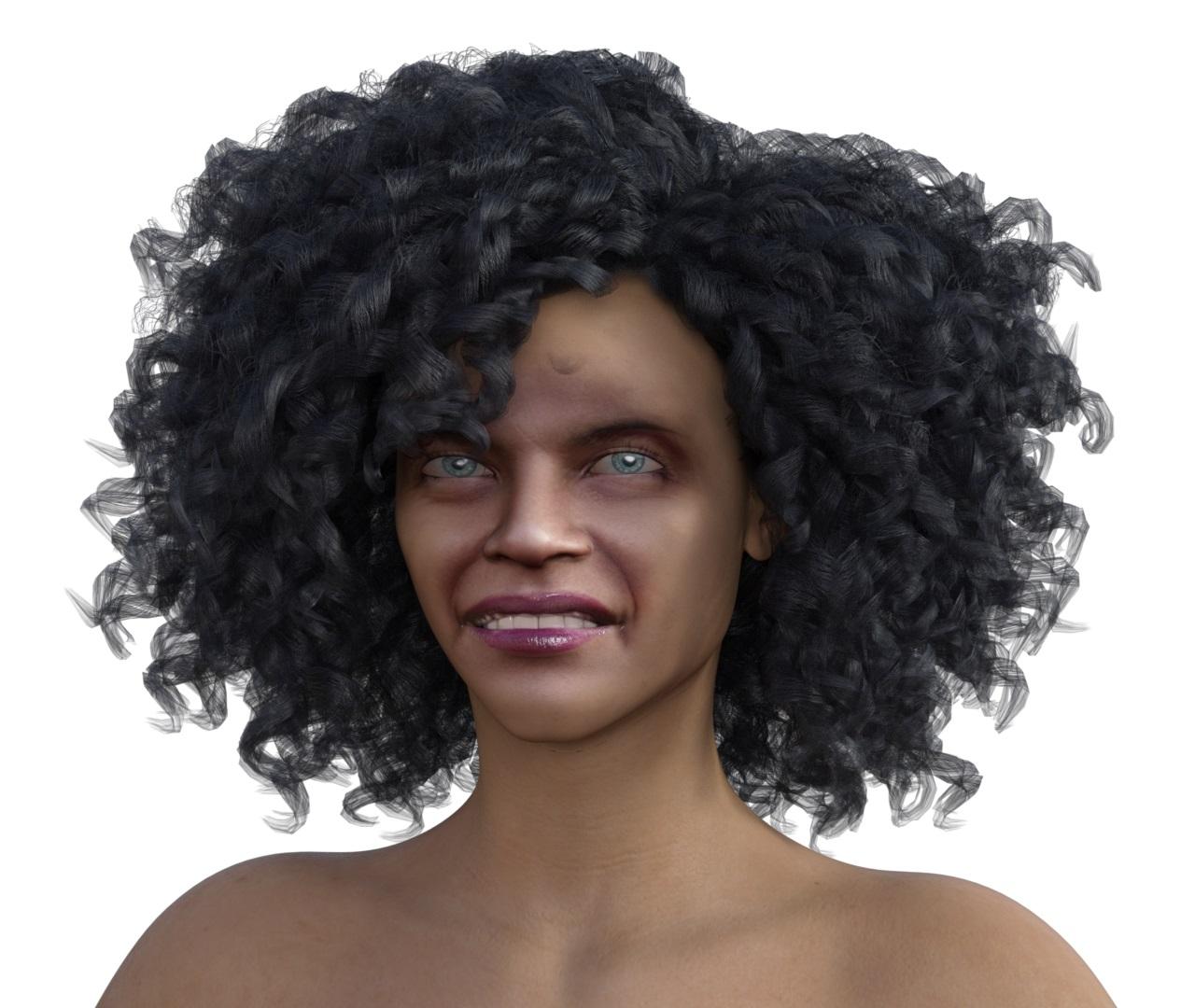
I think it looks good with one of the DO or PA texture sets applied. Could you do that?
HeadShop 11 Out of Memory issue.Just bought the plugin and cannot seem to load a photo once the rpogram opens. I get an Out of Memory error. MSINFO is showing I have over 10gigs available. This is the log file:
See the end of this message for details on invoking
just-in-time (JIT) debugging instead of this dialog box.************** Exception Text **************
System.OutOfMemoryException: Out of memory.
at System.Drawing.Bitmap.Clone(Rectangle rect, PixelFormat format)
at RH.Core.Render.Helpers.ImageEx.Crop(Bitmap img, Rectangle cropArea) in D:\Develop\Freelance\Laslo\LLC\RH.Core\Render\Helpers\ImageEx.cs:line 13
at RH.Core.Helpers.LuxandFaceRecognition.Recognize(String& path, Boolean needCrop) in D:\Develop\Freelance\Laslo\LLC\RH.Core\Helpers\FaceRecognition.cs:line 253
at RH.Core.Controls.frmNewProject4PrintAhead.ApplyNewImage(String fileName) in D:\Develop\Freelance\Laslo\LLC\RH.Core\Controls\frmNewProject4PrintAhead.cs:line 164
at RH.Core.Controls.frmNewProject4PrintAhead.pictureTemplate_Click(Object sender, EventArgs e) in D:\Develop\Freelance\Laslo\LLC\RH.Core\Controls\frmNewProject4PrintAhead.cs:line 369
at System.Windows.Forms.Control.OnClick(EventArgs e)
at System.Windows.Forms.Control.WmMouseUp(Message& m, MouseButtons button, Int32 clicks)
at System.Windows.Forms.Control.WndProc(Message& m)
at System.Windows.Forms.Label.WndProc(Message& m)
at System.Windows.Forms.Control.ControlNativeWindow.OnMessage(Message& m)
at System.Windows.Forms.Control.ControlNativeWindow.WndProc(Message& m)
at System.Windows.Forms.NativeWindow.Callback(IntPtr hWnd, Int32 msg, IntPtr wparam, IntPtr lparam)
************** Loaded Assemblies **************
mscorlib
Assembly Version: 4.0.0.0
Win32 Version: 4.7.3221.0 built by: NET472REL1LAST_C
CodeBase: file:///C:/Windows/Microsoft.NET/Framework/v4.0.30319/mscorlib.dll
----------------------------------------
Rh.HeadShop
Assembly Version: 1.0.0.0
Win32 Version: 1.0.0.0
CodeBase: file:///C:/Program%20Files/DAZ%203D/HeadShop%20plugin/Rh.HeadShop.exe
----------------------------------------
System.Windows.Forms
Assembly Version: 4.0.0.0
Win32 Version: 4.7.3221.0 built by: NET472REL1LAST_C
CodeBase: file:///C:/WINDOWS/Microsoft.Net/assembly/GAC_MSIL/System.Windows.Forms/v4.0_4.0.0.0__b77a5c561934e089/System.Windows.Forms.dll
----------------------------------------
System
Assembly Version: 4.0.0.0
Win32 Version: 4.7.3190.0 built by: NET472REL1LAST_C
CodeBase: file:///C:/WINDOWS/Microsoft.Net/assembly/GAC_MSIL/System/v4.0_4.0.0.0__b77a5c561934e089/System.dll
----------------------------------------
System.Drawing
Assembly Version: 4.0.0.0
Win32 Version: 4.7.3056.0 built by: NET472REL1
CodeBase: file:///C:/WINDOWS/Microsoft.Net/assembly/GAC_MSIL/System.Drawing/v4.0_4.0.0.0__b03f5f7f11d50a3a/System.Drawing.dll
----------------------------------------
RH.Core
Assembly Version: 1.0.0.0
Win32 Version: 1.0.0.0
CodeBase: file:///C:/Program%20Files/DAZ%203D/HeadShop%20plugin/RH.Core.DLL
----------------------------------------
System.Configuration
Assembly Version: 4.0.0.0
Win32 Version: 4.7.3056.0 built by: NET472REL1
CodeBase: file:///C:/WINDOWS/Microsoft.Net/assembly/GAC_MSIL/System.Configuration/v4.0_4.0.0.0__b03f5f7f11d50a3a/System.Configuration.dll
----------------------------------------
System.Core
Assembly Version: 4.0.0.0
Win32 Version: 4.7.3221.0 built by: NET472REL1LAST_C
CodeBase: file:///C:/WINDOWS/Microsoft.Net/assembly/GAC_MSIL/System.Core/v4.0_4.0.0.0__b77a5c561934e089/System.Core.dll
----------------------------------------
System.Xml
Assembly Version: 4.0.0.0
Win32 Version: 4.7.3056.0 built by: NET472REL1
CodeBase: file:///C:/WINDOWS/Microsoft.Net/assembly/GAC_MSIL/System.Xml/v4.0_4.0.0.0__b77a5c561934e089/System.Xml.dll
----------------------------------------
FaceSDK.NET
Assembly Version: 6.2.0.0
Win32 Version: 6, 2, 0, 0
CodeBase: file:///C:/Program%20Files/DAZ%203D/HeadShop%20plugin/FaceSDK.NET.DLL
----------------------------------------
msvcm90
Assembly Version: 9.0.30729.9415
Win32 Version: 9.00.30729.9415
CodeBase: file:///C:/WINDOWS/WinSxS/x86_microsoft.vc90.crt_1fc8b3b9a1e18e3b_9.0.30729.9415_none_508df7e2bcbccb90/msvcm90.dll
----------------------------------------
OpenTK
Assembly Version: 1.1.0.0
Win32 Version: 1.1.1536.5788
CodeBase: file:///C:/Program%20Files/DAZ%203D/HeadShop%20plugin/OpenTK.DLL
----------------------------------------
RH.MeshUtils
Assembly Version: 1.0.0.0
Win32 Version: 1.0.0.0
CodeBase: file:///C:/Program%20Files/DAZ%203D/HeadShop%20plugin/RH.MeshUtils.DLL
----------------------------------------
RH.AssimpNet
Assembly Version: 3.2.0.0
Win32 Version: 3.2
CodeBase: file:///C:/Program%20Files/DAZ%203D/HeadShop%20plugin/RH.AssimpNet.DLL
----------------------------------------
OpenTK.GLControl
Assembly Version: 1.1.0.0
Win32 Version: 1.1.1536.5788
CodeBase: file:///C:/Program%20Files/DAZ%203D/HeadShop%20plugin/OpenTK.GLControl.DLL
----------------------------------------
PresentationCore
Assembly Version: 4.0.0.0
Win32 Version: 4.7.3221.0 built by: NET472REL1LAST_C
CodeBase: file:///C:/WINDOWS/Microsoft.Net/assembly/GAC_32/PresentationCore/v4.0_4.0.0.0__31bf3856ad364e35/PresentationCore.dll
----------------------------------------
WindowsBase
Assembly Version: 4.0.0.0
Win32 Version: 4.7.3221.0 built by: NET472REL1LAST_C
CodeBase: file:///C:/WINDOWS/Microsoft.Net/assembly/GAC_MSIL/WindowsBase/v4.0_4.0.0.0__31bf3856ad364e35/WindowsBase.dll
----------------------------------------************** JIT Debugging **************
To enable just-in-time (JIT) debugging, the .config file for this
application or computer (machine.config) must have the
jitDebugging value set in the system.windows.forms section.
The application must also be compiled with debugging
enabled.For example:
<configuration>
<system.windows.forms jitDebugging="true" />
</configuration>When JIT debugging is enabled, any unhandled exception
will be sent to the JIT debugger registered on the computer
rather than be handled by this dialog box.HeadShop 11 ProblemsI bought HeadShop 11. There is a major bug with the program. When you generate a new face it loads projected in front of the position of the original face and slightly down. This causes the face to not fit properly at the neck below the jaw. It also makes it impossible for mesh eyebrows to fit the head. They are imbedded inside the face. This is all caused by the face not fitting properly on the head. If there is a fix for this I would like to know what it is.
Headshop 11 QuestionsAnother HeadShop 11 produced, G8F character, based on the reference image:
https://gratisography.com/photo/college-girl/
with Miranda hair added - https://www.daz3d.com/miranda-hair-for-genesis-3-8-female-s
Headshop 11 Questions
What is happening is that the entire head is moving down as the morph is dialed up. So there is a bone that is being effected by the morph that should not be. This effect also impacts hair. The hair will not fit properly over the ears, it is far too high above the ear. If you apply any hair, and the dial the headshop morph up and down, you can watch the head move up and down the neck, while the rest of the body and even the hair remain in the same location. This is a major bug that must be addressed.We discovered this issue with the non-smiling heads. It is a bug but hard to find. The models made from open-smile photos don't have this problem.
Headshop 11 QuestionsWell the Headshop 11 version of the guy you can see that the face is made too skinny, not enough fat on the jaws or maybe the jaws are made too small bone-wise? The female looks pretty close but it's hard to tell with the chin & jaw because of her expression in the photo.
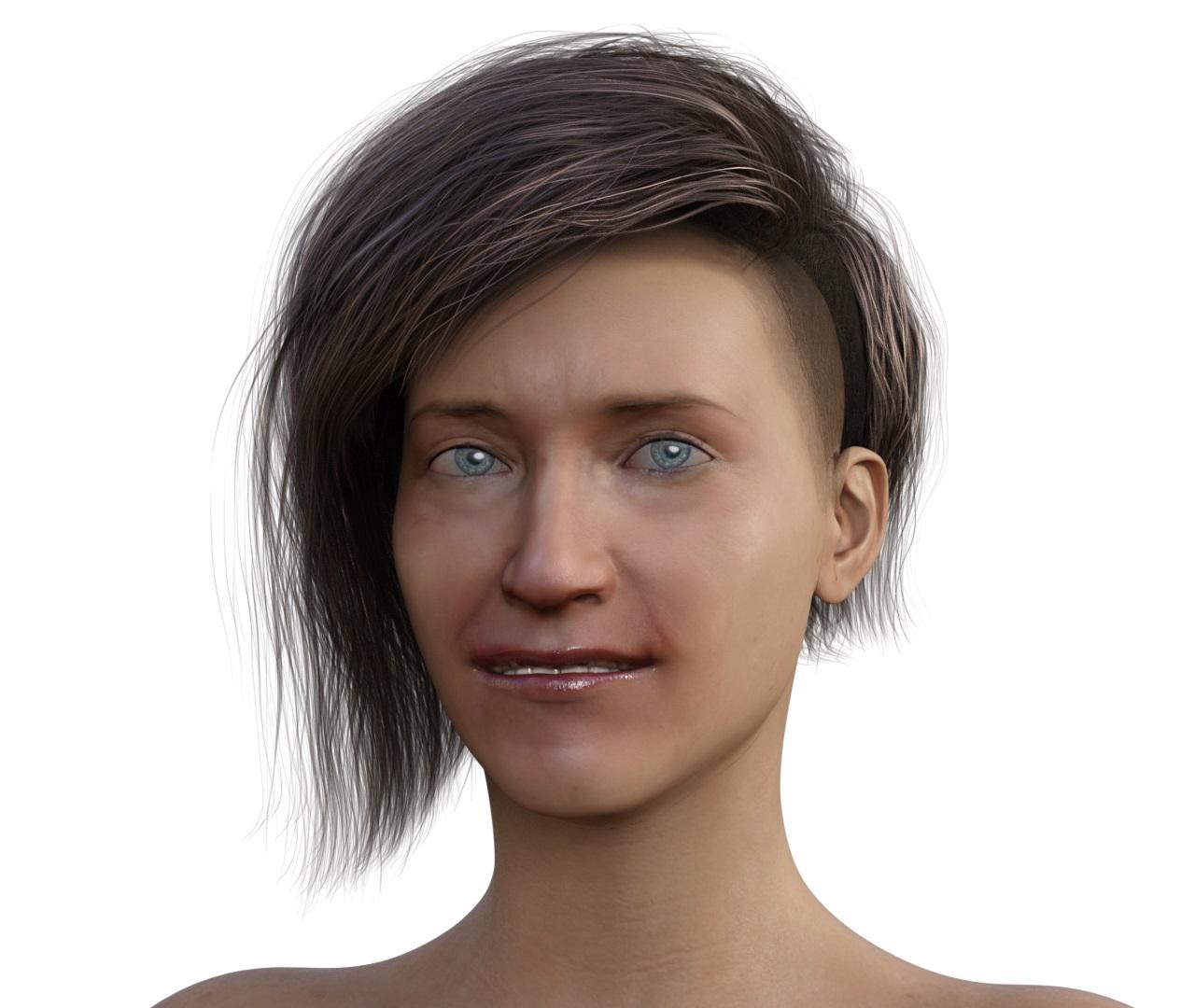
Headshop 11 QuestionsAnother reference picture:
Below are the iray renders of HeadShop 11 characters created for Genesis 8 Female
without any changes:
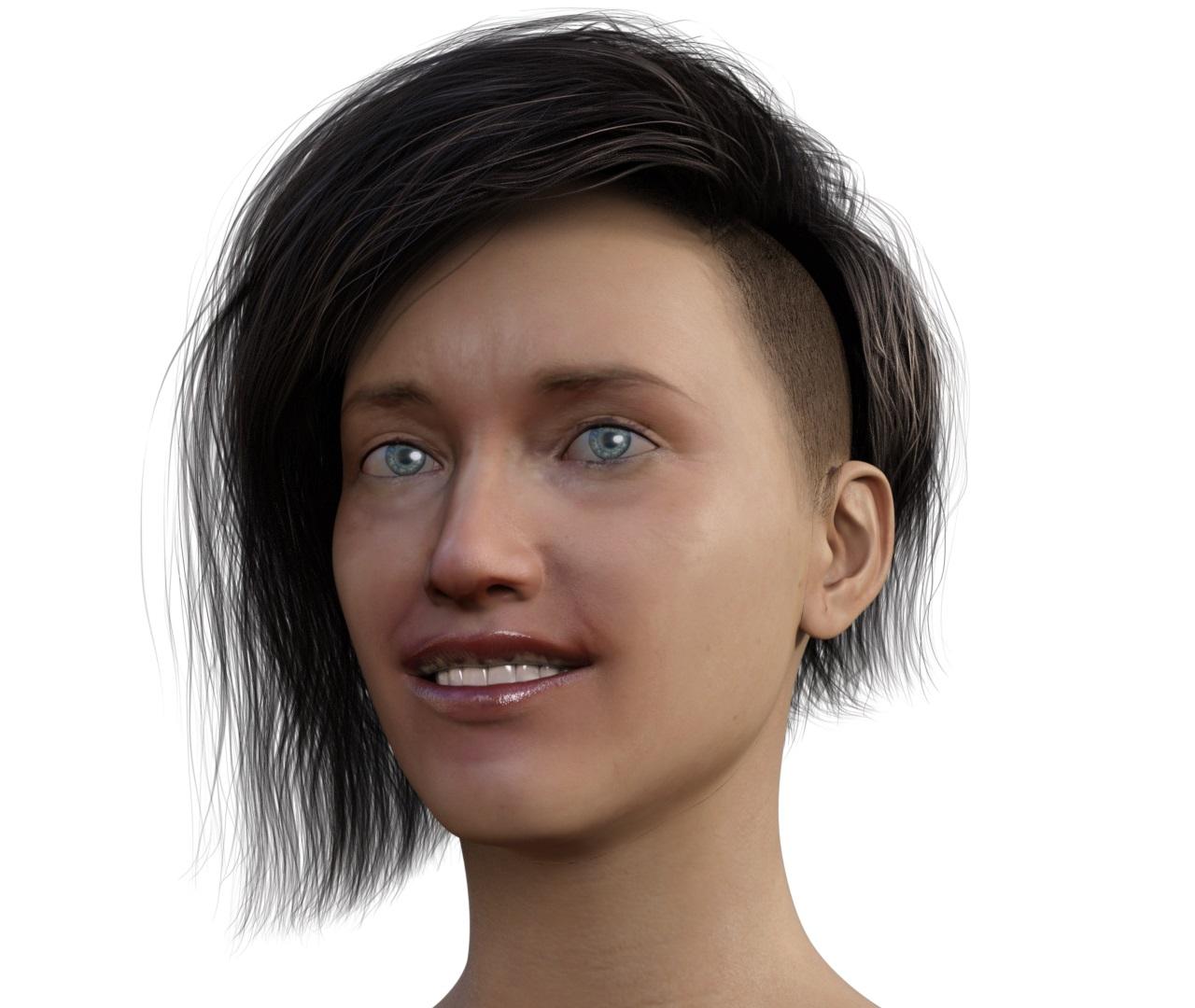
with smile removed and aged to 50 years:
 Headshop 11 Questions
Ok, here is the link to the reference picture:
https://pixabay.com/en/young-man-portrait-beard-young-man-1281282/
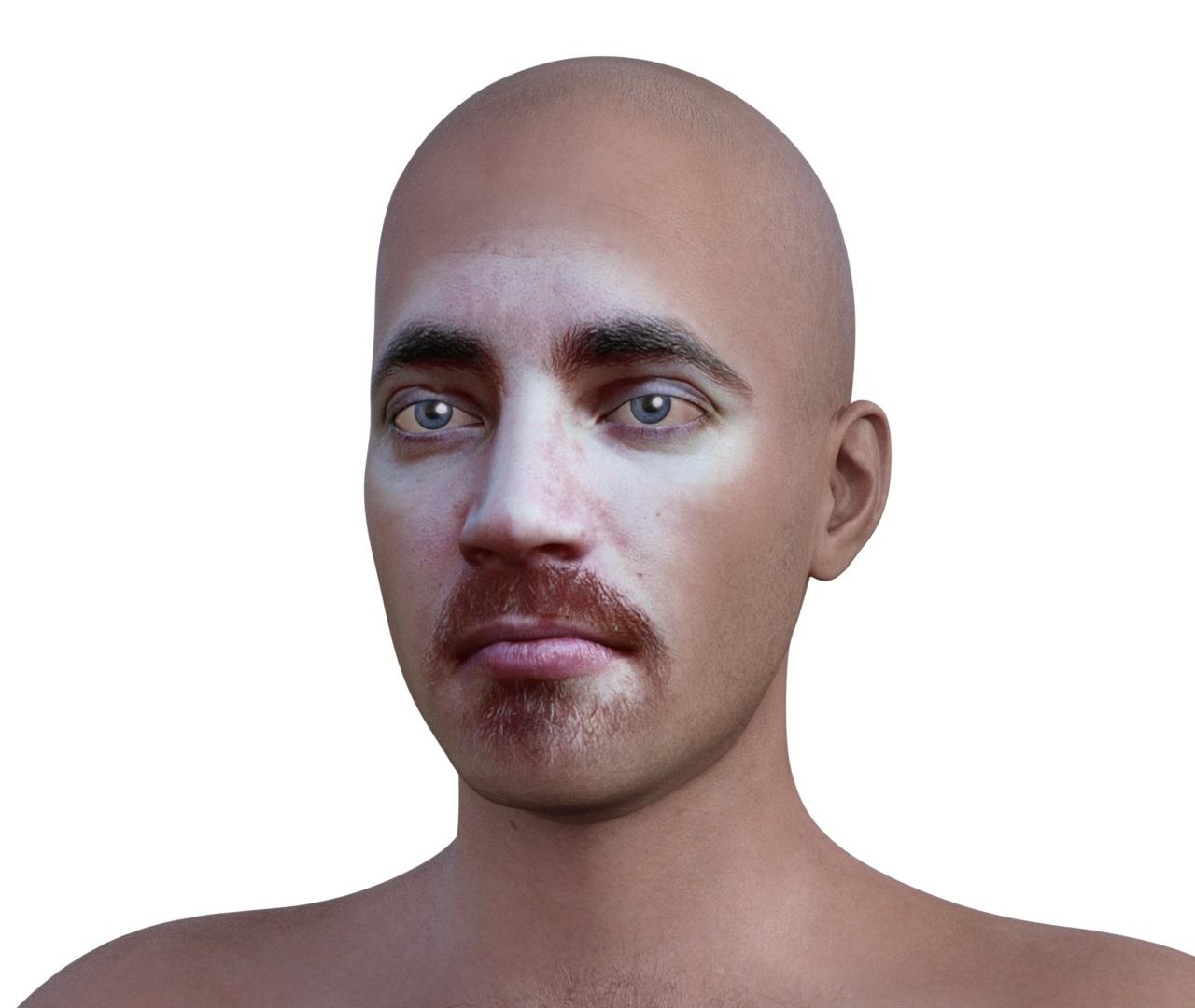
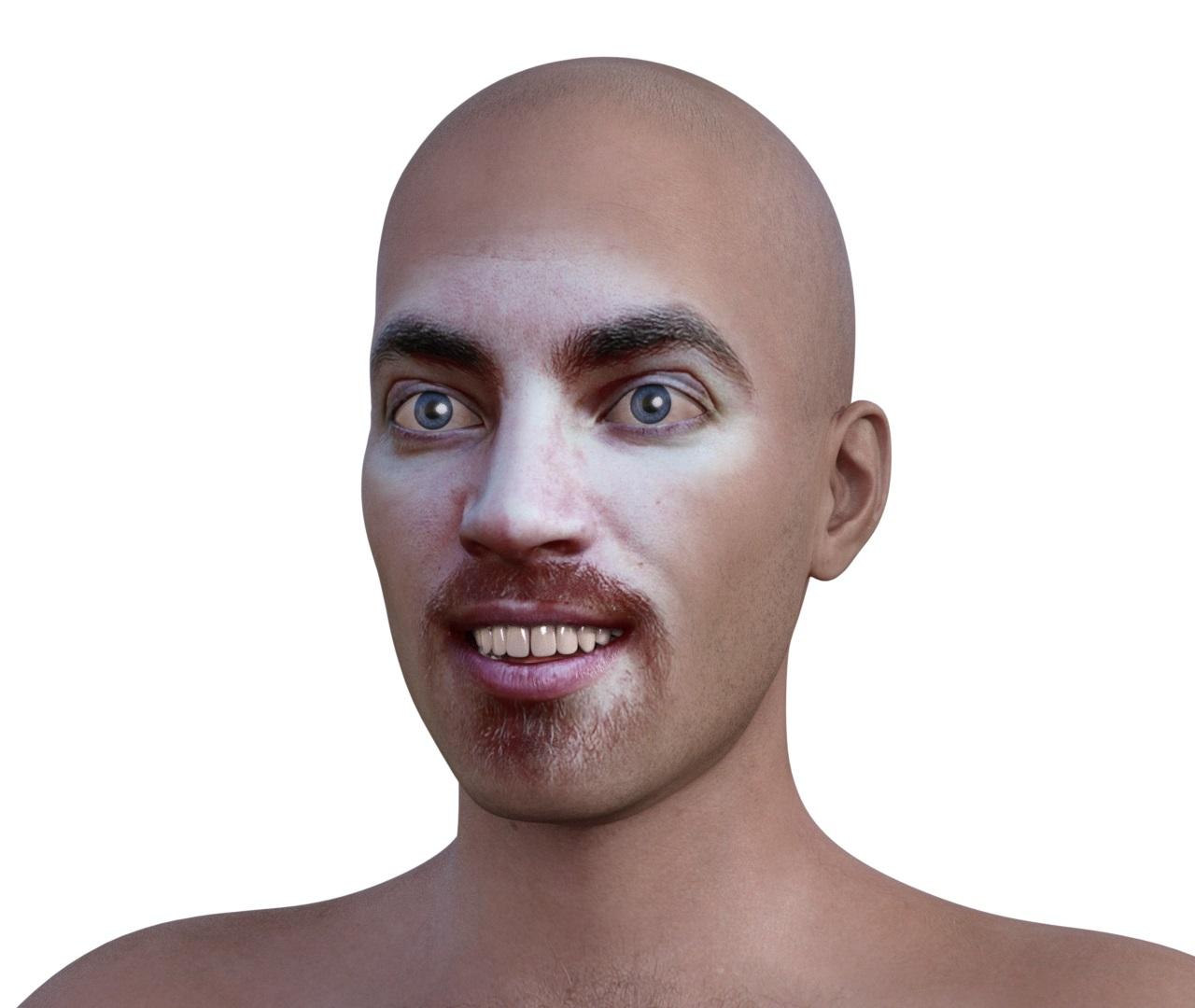
Below is an iray render of the Genesis 8 Male character created by HeadShop 11 using that reference image.
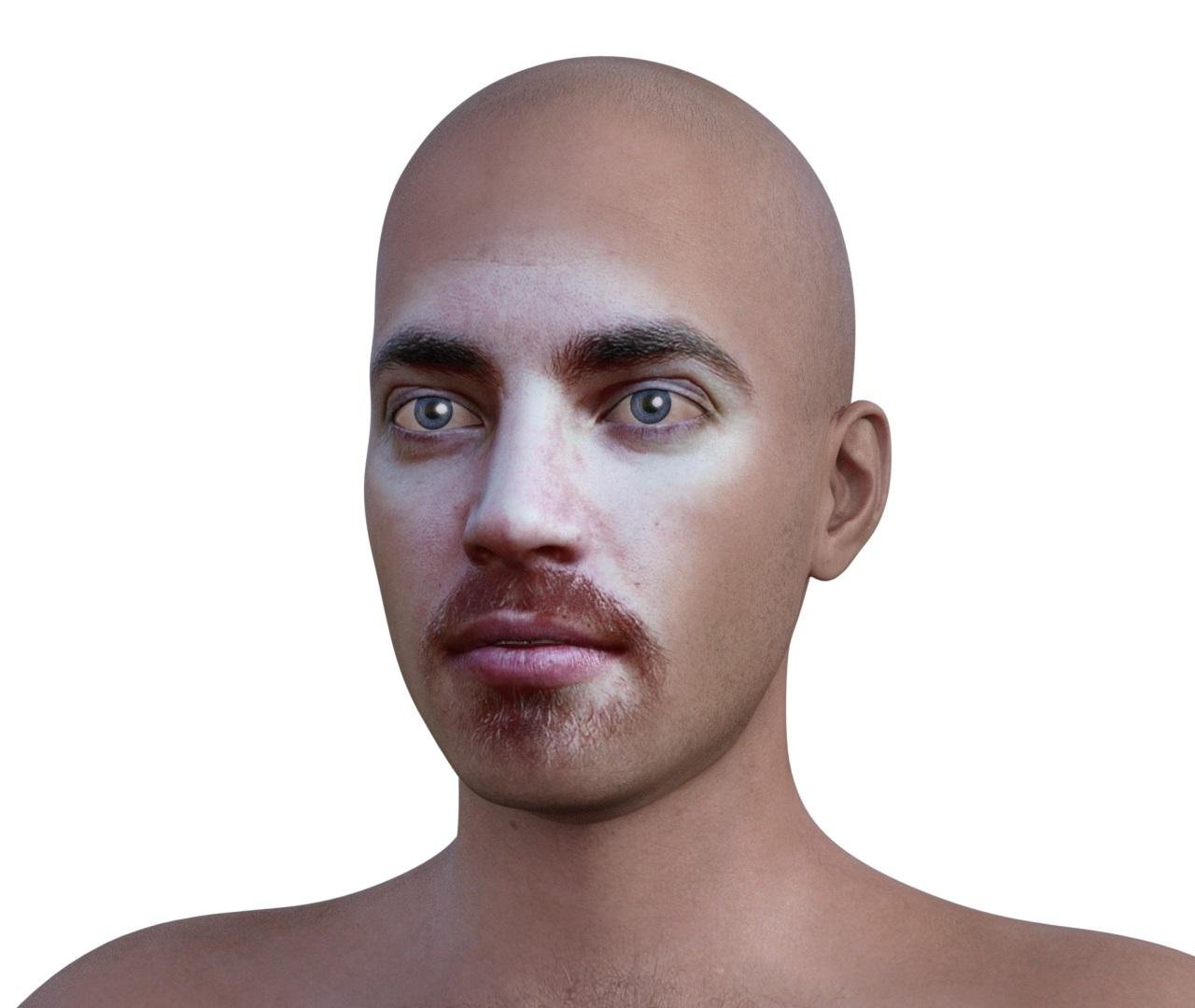
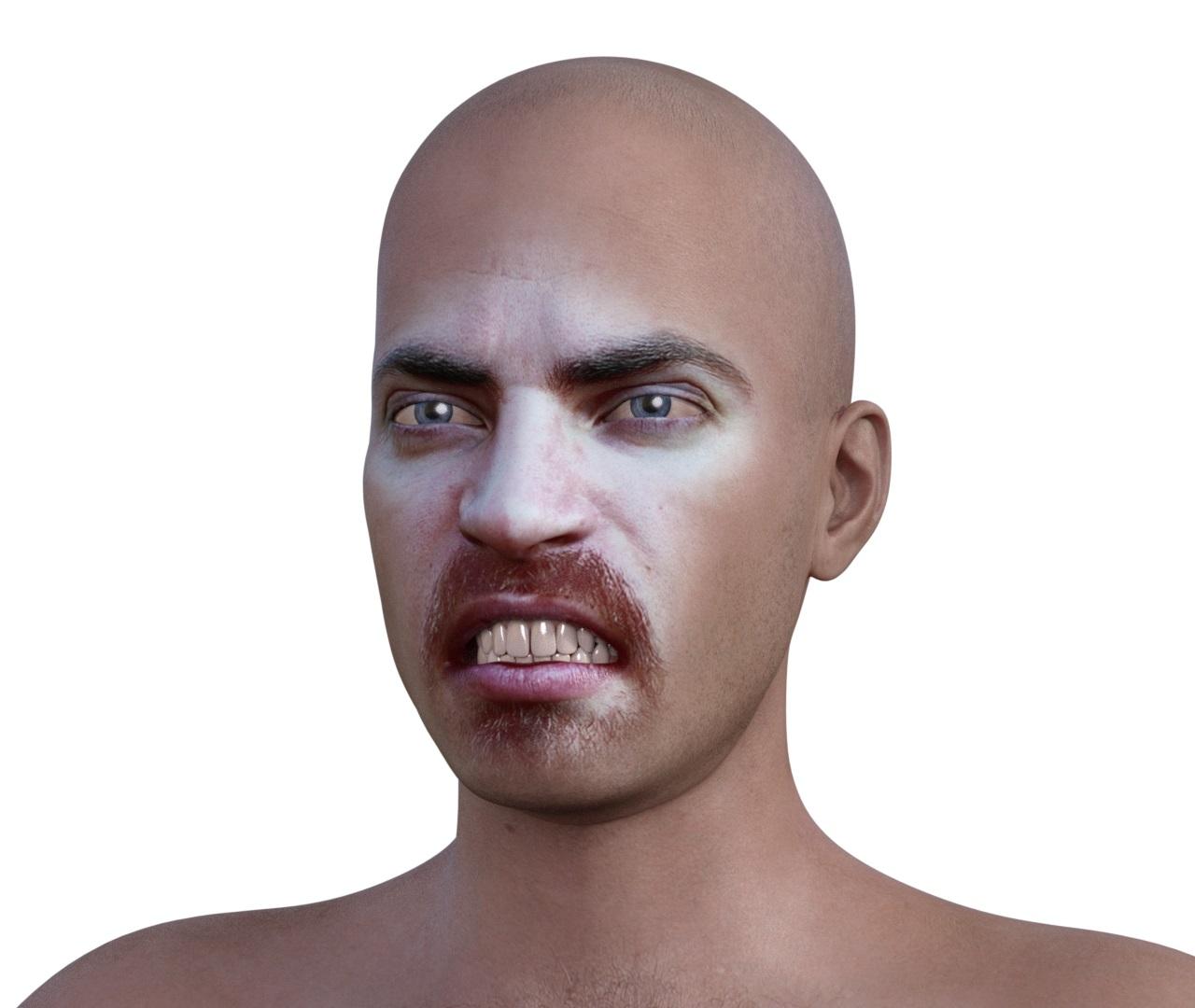
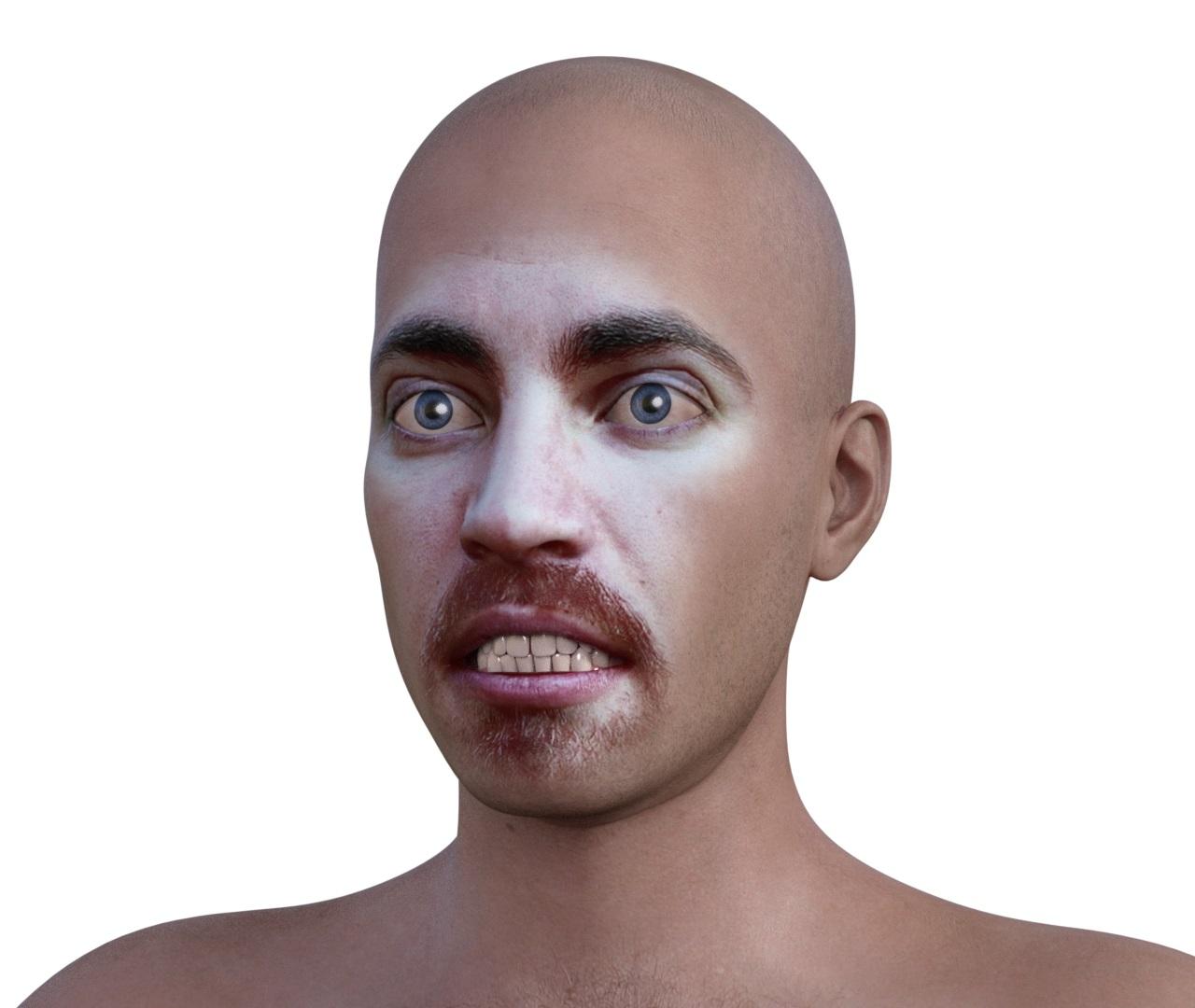
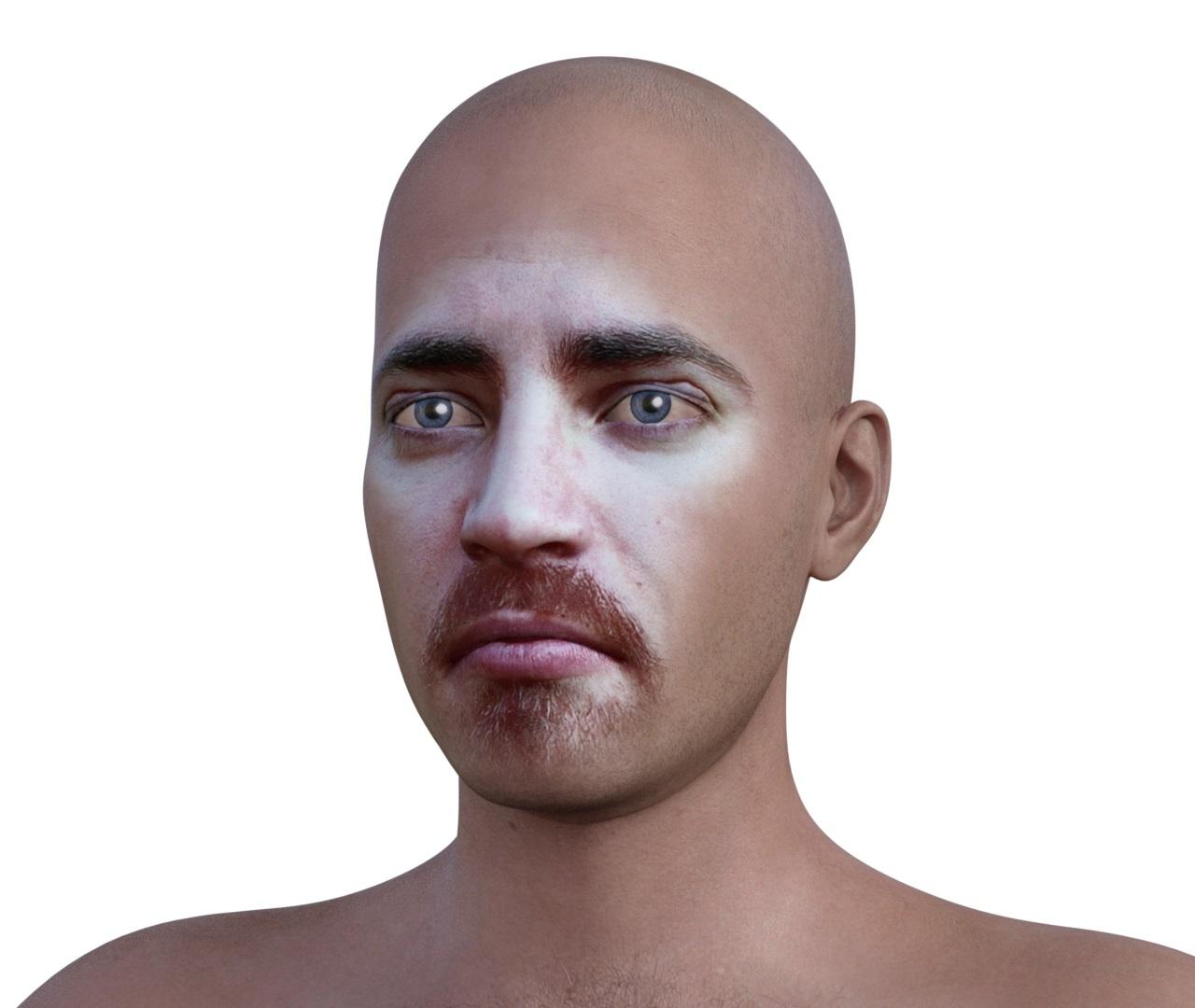
Below are the iray renders of the same character with different expressions aplied from https://www.daz3d.com/genesis-8-male-expressions
 Cannot get Headshop OneClick Plugin to work once installed manually.
Hello guys!
I've got similar problem with HEADSHOP 11.
I just read full toturial about Troubleshooting (I put all 3 files to right positions in Daz3 folder on disk C and I made this same actions for Headshop folder on another disk K) and I can't load Headshop plugin into DAZStudio 4.10. Everytime when I want to use HEADSHOP LOADER (from edit menu)I get that same message:
Can't find faceshop plugin...(so I bought standalone software or just a DAZ plugin??).
From abalonellc.com (support) I got the message that someone will contact with me by SKYPE... So I think, that they don't know really how to help me...
 Headshop 11 Questions
Hello, got a problem after exporting the fs-Morphb to DS 4. There is a Morph-artifact from chin to neck. I tried this on G3 and G8 with many setting in Headshop - the effect is the same on each portrait I tried. In this case the Morph is unusable. What´s the problem and how can I solve it?
It is quite common and I have not found the solution for it, either, besides dialing the fs morph down, until artifact dissapear
(around 25% in my trials).
hi headshop 11 is not showing up unde edit in daz studio 4.11I have used the new installer and gave it the correct path. The install was successful with all of the files in the appropriate locations. Still no item under the edit menu.
I had a previous version of Headshop installed. Are there files that need to be removed?
Headshop 11 QuestionsHello, got a problem after exporting the fs-Morphb to DS 4. There is a Morph-artifact from chin to neck. I tried this on G3 and G8 with many setting in Headshop - the effect is the same on each portrait I tried. In this case the Morph is unusable. What´s the problem and how can I solve it?
Headshop 11 QuestionsYou need to have a DAZ genesis 2,3, or 8 figure loaded in Studio before you start headshop
Yes, I did that. Still got the error message.
Headshop 11 QuestionsYou need to have a DAZ genesis 2,3, or 8 figure loaded in Studio before you start headshop
Daz 3D is part of

Connect
DAZ Productions, Inc.
7533 S Center View Ct #4664
West Jordan, UT 84084Licensing Agreement | Terms of Service | Privacy Policy | EULA
© 2026 Daz Productions Inc. All Rights Reserved.