-
Daz Library Content Export (maybe into Excel?)
Metadata is stored in PostgreSQL (connection details here). DIM updates the information in the database, and that is what shows up in Studio, but the information you see in DIM is directly from the product XML files (.dsx) in the package archive (%PUBLIC%\Documents\DAZ 3D\InstallManager\Downloads by default on Windows).
Daz Library Content Export (maybe into Excel?)As far as I know, DIM can only export the fields on the list it provides. The tags are metadata. I bet someone could write a script to export data base metadata, but I don't know. I think usar Taoz has created some content management tools, but I am not sure if they can do it.UltraScenery - new territory [Commercial]barbult said:
dawnblade said:
I just noticed an UltraScenery product update in DIM. Is this for your upcoming add-on @HowieFarkes?
The readme file says "2022-08-15 - Updated metadata to set compatibility base for the terrain". I suppose that is to allow the upcoming Martin J Frost dirt track textures to be compatible with the terrain in Smart Content.
Not 100 percent sure , but yes I think that QA wanted to make it more smart content friendly. It was certainly mentioned when QA had the product for testing.
Happiness is...I'm not sure what you mean, didn't notice you made a script to import a obj sequence. Of course this doesn't replace sagan since alembic is far superior.
Are the Daz body morphs merchant mesources?
You can't use other people's morphs to bake into your morph to sell. Other people's morphs that aren't listed as merchant resources aren't to be used to bake into morphs for selling.hansolocambo said:Mellone said:
Have you any tips for character creation
It would take 5 pages to answer that in depth. But basically, you can :
Do that in ZBrush with Layers, in Blender with Shape Keys, or in any other 3D modeling app that manages morphs. Basically you import the deafult Genesis 8 (no SubD) in one of those apps. You define a first morph for that Genesis 8 base. Then you make your morphs/modifications on different layers (ZBrush) or Shape Keys (Blender). Being sure that you don't modify in ANY way the polycount and vertices position of the base Genesis mesh.
When done, you import back your custom Genesis in DAZ with morph Loader Pro. Dissociate head and body with D-Former. Create FHM and FBM sliders (head and body) and a third slider (CTRL) that controls them both. Tons of tutorials on the subject.
Mellone said:
Can I use the basic morphes in Daz for G8 and these products as Merchant Resources?
Yes indeed you can. That's the easy way (but way less precise control that you'd get doing it by hand in a 3D modeling/sculpting app).
Use your installed bundles, Merchant Resource or not. With DAZ sliders, put 30% of this head, 25% of that other head, 60% of that body, etc. Also use body and head morphs bundles to modify nose, chin, ribs, muscles, breast, feet, etc. This way you create a morph made out of multiple other characters and/or morphs bundles. When you're happy with the result, all vertices being in a position that doesn't exist anywhere else : this morph becomes your own creation.
Mellone said:
Do you know any videos, tutorials or have tips [...]
Best one (in my humble opinion) being :

Many written tutorials around. Hard part being to find the rare good ones :
https://www.laylo3d.com/creating-characters-and-morphs-for-daz-3d-figures-using-zbrush-goz/
DAZ being an app used by tons of amateurs, there are sadly tons of inaccurate statements in forums, videos, etc. This makes it hard and time consuming to skim through junk info and extract only what's correct and necessary.
Personal advice : open a Word document. Take notes, make tests. And patiently write down your own workflow. It takes time to get used to the "right" and clean way of doing things in DAZ, especially on the content creation side. But it's strongly advised as, by doing so, you understand DAZ under the hood and suddenly see things so much more clearly.
display jpgs etc in content library?Richard Haseltine said:
If you view the folder in the Content Library under Other Import Formats then the files will show and any PNG thumbnail named to match the OBJ file will be used in the file panel.
thank you, very good info to know...
---
I'll probably stick with the system I just worked out because these are generally not imported objects but objects I create and save (partially to defeat the best efforts of the geo-editor as noted if I export a cube it becomes a new entry and I can bend fold and mutilate it without effecting other cubes. (and the objects are saved into the project folder)
What I have gained is shown in the picture. I'm building models of the buildings in the Thurmond WV national park
And now I not only can see the scene subsets in the thrumond folder but can see the objects I used to build them: on the rare (don't I wish) occasion I need to modify something in the base build I can see which object I need to import.
---
so basically I can now gather the objects in a directory into a work folder run the PS script Batch Multi Save. jsxbin (the default script "image Processor" doesn't do pngs ... so you have to google for it -- in addition when you want to use it by clicking the browse command under the script menu .. the default setting is for jsx not jsxbin so you have to change another drop down menu
---
but it takes a couple minutes maybe to have it auto scan 50 object files and output pngs for them
copy your object folder and then use Bulk Extension Changer 1.3 to change the extensions in your copy folder from obj to duf and then dump the pngs and the object dufs into the object folder and you'll be able to see all the objects with big previews.
yes, it probaby takes 5 minutes or so but loading 50 objects one at a time and saving them as a scene subset would be a lot longer.
---
What I am attempting to accomplish is I probably have several thousand objects (looking at the properties for a couple of the folders, I may have underestimated the number of obj files) done over the years and they need to be in the directory/folder with the final product.
---
Whether or not I ever get these buildings to publishable status .. I can't just take doors and building parts out of daz products ... so I've made my own.
Now I have a visible catalog intergrated into my work folders that lets me pick windowsA, curtain, shades, doors etc and add them to a base framework.
Happiness is......realizing that your silly script is no longer necessary because someone more enterprising than you actually implemented it :)
Import/Export
- OBJ: support importing multiple files at once (commit ) (Aras Pranckevicius)
UltraScenery - new territory [Commercial]dawnblade said:
I just noticed an UltraScenery product update in DIM. Is this for your upcoming add-on @HowieFarkes?
The readme file says "2022-08-15 - Updated metadata to set compatibility base for the terrain". I suppose that is to allow the upcoming Martin J Frost dirt track textures to be compatible with the terrain in Smart Content.
display jpgs etc in content library?You can create a Product of any item in a mapped folder. The Product will then show in Smart Content but without a thumbnail image. A thumnail image (jpg format) to use can be created, named exactly according to the base name in the Support section of the metadata window, and then moved to the Runtime/Support folder.
display jpgs etc in content library?If you view the folder in the Content Library under Other Import Formats then the files will show and any PNG thumbnail named to match the OBJ file will be used in the file panel.
Metadata problems - (Reason found)Well, hopefully you'll get a response back on your ticket that will help.
If you don't want to wait then you *MIGHT* be able to fix it yourself. If you right-click on one of the products in the Smart Content tab and select "Edit Metadata" there is a button next to the GUID to "Generate". I have never clicked that button but presumably it would generate a new unique GUID for that product. Then when you click Accept it will write the relevant files which could fix your issue. I have used this dialog before - although not to change the GUID.
Important Note: for some odd reason this saves the updated dsx & dsa in the first listed base directory you have configured instead of updating the files that already exist. This will not be an issue if you have only one base directory assigned but if you have more than one this may make the situation worse by creating more duplicates. This has reminded me I should submit a ticket about that because it seems like a bug to me.
display jpgs etc in content library?well look at that... bulk extension changer will not let you append a second extension BUT the content libary doesn't really need the .duf.png ext all it needs is a file named duf with a png with a matching name and it will display them
---
I have all my building creation work in a folder named buildings and add that folder as a directory in the content libary directory manager.
I still have to go to the folder and import the obj file but the previews let me see what objects are in the folder.
---
thanks for your questions.. they made me think.
daz apparently adds that double extension within the program because explorer won't let you do it in the window.
It does make sense for daz to do that so the png is associated more closely with the daz duf file
---
as a side bonus when you run the script in PS that reads the obj files and creates the png file it create them as 1024.x 1024 and when you cursor over the item in the content library you get a large image.Metadata problems - (Reason found)SofaCitizen said:
If it's the Global ID not the token/SKU then I think that is an auto-generated ID. Technically there is a chance of two products being assigned the same ID - an incredibly infinitesimally tiny remote chance but a chance none-the-less. However, if you used a "combination of different installation tools" then that may have increased the chance of that happening. I believe you'll find that most people agree that you should pick one method that works for you and stick with it.
True, I found out that the hard way. Since I don't know how and when those id's are generated it might be due to my use of different tools or a very rare occasion. I decided for myself now to use DAZ Install manager only. Then I am able to seperate download from installation in the content library, which safes bandwith should I mangle the database again.
However, since the collision appears every time now, it appears to be already in the downloaded data, at least the manifest file contains a field MetadataGlobalID with the offending value, which is different from the ProductFileID. The latter might be used in the product library so I can see both products there, but that's only my guess. However, since the metadata GUID is part of the downloaded dsx-file I can't install both packages now independent of any installation method I am using. Without help from technical support I don't see a chance to get rid of the problem.
Metadata problems - (Reason found)Reason for the collision found!
What I did was to export all metadata stored in the content database, which provided me with a bunch of dsx-files. I scanned them for the offending key and found another product with the same GUID for the metadata. Product sku 84805 "dForce Night Dress Outfit for Genesis 8.1 Females" and 85331 "Black Long Dress Outfit dForce Dress for Genesis 8.1 Females" do have the same GUID for their metadata.
I would have expected DAZ to have a quality procedure in place which prevents such conflicts. That would have spared me much work where I encountered many pitfalls in using the combination of their different installation tools. I guess now I will raise a ticket and see how they do respond.
Import Genesis and other Models from DAZ3d into Poser 12 DemoIt's probable that you can't import what you want - likely a Daz G8 female - from Daz to Poser 12 early access. Poser 12 now uses Python 3 for scripting, and thus the DSON importer for Daz Genesis figures is broken in P12. It still works in Poser 11, still available, but only imports easily for older G1 and G2 figures.
If you're advanced enough to use Cinema 4D then you will likely have access to walk / talk options there. Cinema 4D forums will be able to tell you more about the ways to get a G8 Daz figure into C4D and make them walk and talk.
Import Genesis and other Models from DAZ3d into Poser 12 DemoI run the Demo of Poser 12.
I am intererssted in the Talk and Walkdesigner.
I am not familiar with Poser, but is it possible to render a walk in Poser and export it into Cinema or DAZStudio ?
I try to import my Models from DAZ3d into Poser 12, but it seems not to work. How do i have to do it ?
Is the talkdesigner from r12 working with custom Models ? There was a Plugin for DAZStudio, where a Audio File was writing the Lipsmovement.
I cannot remember where it was posted on the Shop. I need the Link.
Can i export the Lipsmovement into a FBX or do i have to use a BHV ? And can Cinema use the BHV Files ?
If i render a walk in Studio and import it into Cinema i have to keep the Joints Original. But i use a whole different IK Setup. So i am restricted to the animations of Studio. If the Lipsdesigner works fine with all Models and i can export the Morphssettings of the Audiofile i could use it in Cinema.
What Files does the Designer use and export ?
Daz to maya not exporting environments and props?danielbui78 said:
@davegv Krys Kryngle is correct: the options are currently greyed out because that functionallity has not been fully implemented in the Maya plugin side yet.
@videoninja719 Although environments are not seamlessly supported yet, you can still import most props and environments by selecting their sub-components. Here is an example with the Hacienda Kitchen environment:
1. Load the "Hacienda Kitchen With Accessories and Lights" Set
2. In the Scene panel, open the "Hacienda Kitchen With Accessories" node to show the child nodes. Notice that this node's icon is a cube with missing sides/edges. This is a Group Node which is not yet supported by the DazToMaya bridge.
3. Select "Hacienda Kitchen".
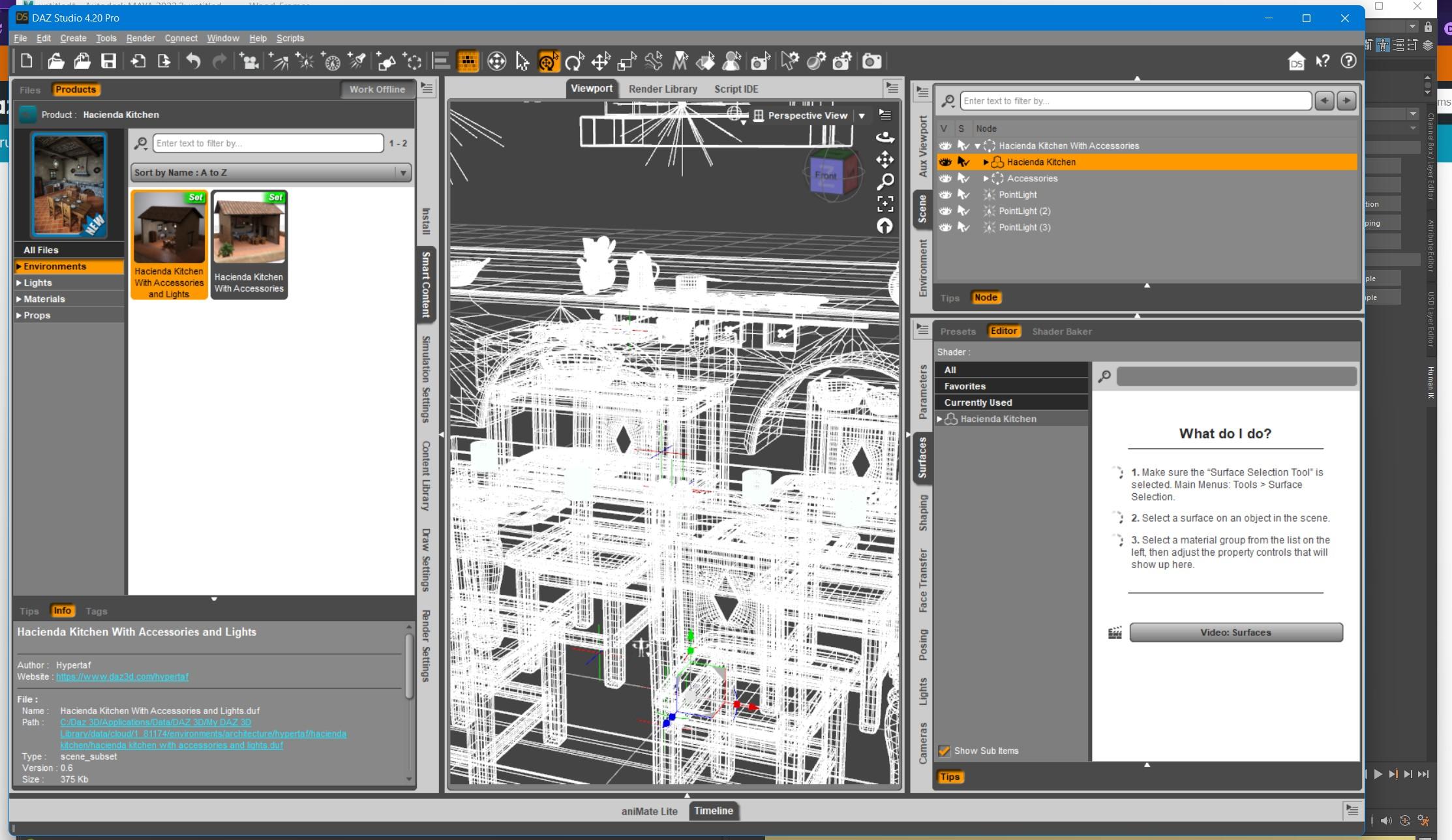
4. Click File -> Send To -> Daz to Maya. Click Accept.
5. Open Maya. Click the "DAZ IMPORT" icon in the DazToMaya shelf tab. Click "Auto-Import" in the DazToMaya dialog.
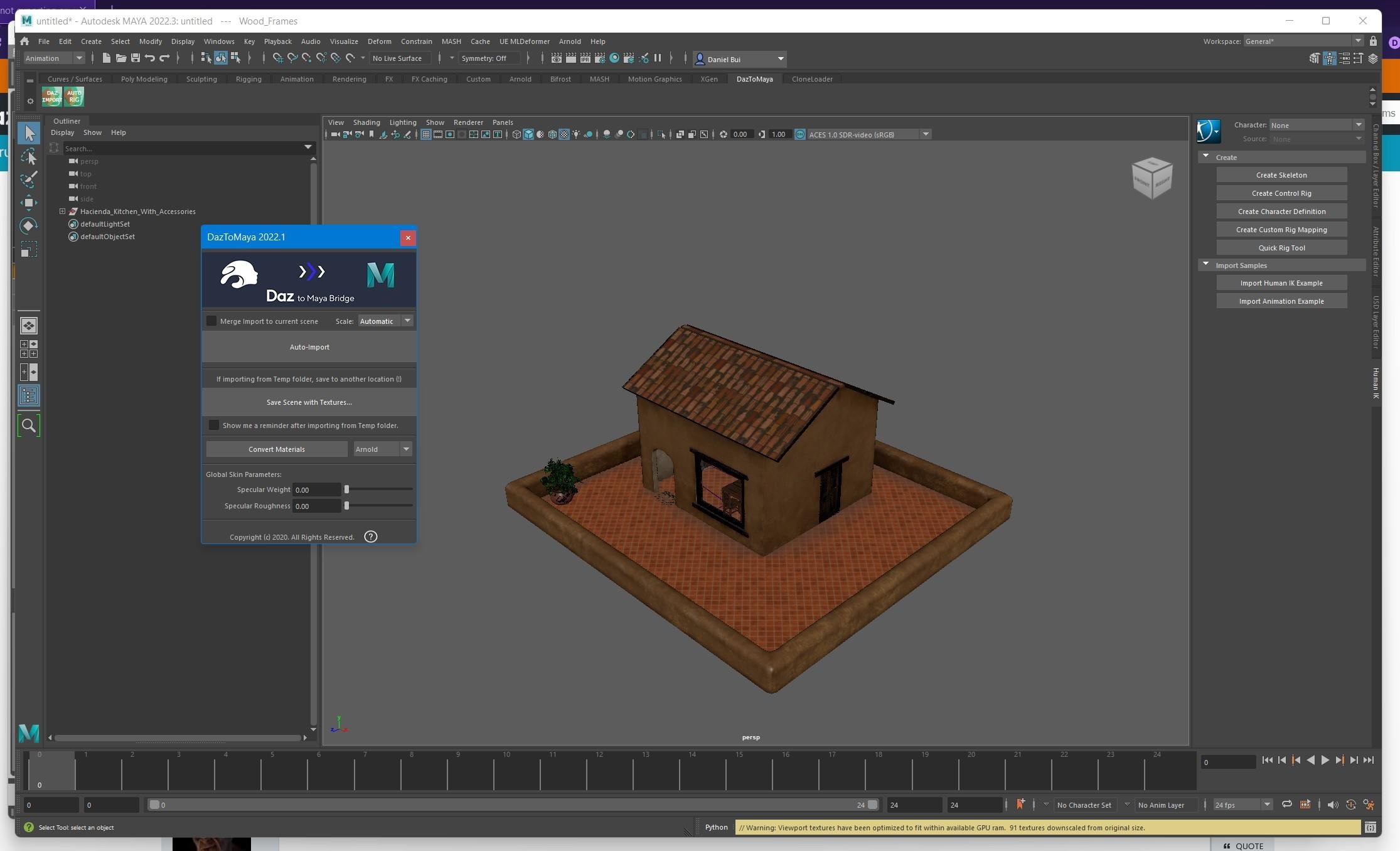
Repeat the above steps for other child nodes with props that you wish to export that are nested inside Group Nodes.
thank you @danielbui78 this really helps
Is there a way to add my Shaders and Shader Presets to the toolbar?Note that in the Content Library pane under Daz Studio Formats you are looking at files on disc, in their actual folders. In the various Presets tabs (and Samrt Content, and Categories and Products in the Content Library) you are looking at databse entries. Only the one preset in the Content Library pane has obvious metadata from the database (the Shader content-type tag at top-right of the thumbnail) and so it is probably to bee xpected that the others will not appear in the database-driven views. Are all the files from the same product installation?
Scene Identification -> No Compatability bases availableIt's probably a CMS or metadata issue. Are the database driven views (Smart Content, the Presets tabs in proeprty panes, Categories and Products in the Content Library pane) working correctly?
Morph Loader Pro does not work@Yleisha :
Try what felis said in his post above to also remove the tear along with the eyelashes (thank you, felis -- not using 8.1 yet, so that is good to know for the future).
Barring that, Only one more check for you, Yleisha; It appears from your post that you might be using Blender for your morph work. If so, your stated work-flow "- I have unchecked the "split by Object and Group" options." requires one more step at this import junction.
You need to change from the 'Split' toggle button over to the 'Keep Vert Order' toggle button. Also, if you want to work with the default G8.1F vertex groups (provided you set the flag to export them from Studio), you need to check the box for 'Poly Groups' that shows up when you select the KVO toggle button.
Last thing to confirm is that you also have set the 'Keep Vertex Order' flag in the Blender OBJ export as well. I also recommend to check 'Selection Only' (G8.1F should be only object selected), and if you are using the Shape Keys morphing technique (non-destructive), check the 'Apply Modifiers' box (for single shape key -- make sure all modifiers are OFF or that there are none attached to the object).
If you have saved your morph work file (blend file [if using Blender]), you have the tear attatched to your G8.1F object, and you don't want to lose your morph or start over, you can still salvage your work with some fixing in Blender (separate objects > restore vertex order work-flow).
* OBJ import settings (with vertex groups) :

* OBJ shape key morph export settings :

* OBJ morph (destructive work-flow) export settings :

Daz 3D is part of

Connect
DAZ Productions, Inc.
7533 S Center View Ct #4664
West Jordan, UT 84084Licensing Agreement | Terms of Service | Privacy Policy | EULA
© 2026 Daz Productions Inc. All Rights Reserved.