-
Dumb iRay Artifact Question
For the person who messaged asking about the character? It was something I'd whipped up shape-wise, but the skin itself is sadly no longer available (it's the "Kabuki" skin from the original "Momiji" character for Victoria 3 at Renderosity, for the morbidly curious...) I had to use an ancient (and also discontinued) texture conversion utility from Dark Whisper err, 3D Universe, to get it converted to the Victoria 4 UV Maps, and then further rinse the textures through Texture Transformer to get it up to Genesis 3, which fits just fine on Genesis 8. The pupils I just didn't bother with migrating, instead making a blank blue iRay glass-like shader to match the original character. I also wedged in the subsurface, normals and etc maps from another character I have... forgot which character offhand though for those bits of it... but I do like the more natural effect now (over the original Vicky 3 character). All in all, it was a fun bit of a challenge, and I now have something that is shaping up to be amazingly cute to boot.
Darn! You're right: she is cute. If you ever decide to sell her (with or without texture maps), I'll buy it!
XTransfer Module 1- Genesis 3 to Genesis 8 Morph Converter (Commercial)Hello Zev0,
I have a problem similar to a previous user on this post, that couldn't start running the script with a custom morph he made. Then you asked him to send you his custom morph in PM and your particular discussion became private, unfortunately for me and people with a similar issue.
Basically, I've created a custom G3 female character from here and there, exported her as obj and imported that obj into Morph Loader pro, making it an actual morph in Actor/Full Body/Real People that works fine on loaded Genesis 3 Female.
So, I was enthusiastic with your XTransfer product because it seemed that I could transfer that particular character morph to a G8 figure now.
But when I favorite (heart) that morph, G3 female selected, and click the script, DAZ thinks for a few seconds and nothing happens.
Now, the script opens and works on many other morphs like Victoria 7, but not on my custom morph.
Here's the log part of when I run the script, and it doesn't open:
2019-12-19 23:07:19.966 DEBUG: User cancelled.
2019-12-19 23:07:19.967 DEBUG: Cleanup
2019-12-19 23:07:20.010 Script executed successfully: F:/DAZ 3D/Studio/My Library/Scripts/XTransfer/XTransfer G3 to G8.dse
2019-12-19 23:07:38.871 Loading script: F:/DAZ 3D/Studio/My Library/Scripts/XTransfer/XTransfer G3 to G8.dse
2019-12-19 23:07:47.402 WARNING: ..\..\..\..\..\src\sdksource\general\dzscript.cpp(1178): Unhandled error while executing script.
2019-12-19 23:07:47.402 WARNING: QScriptEngine::popContext() doesn't match with pushContext()
2019-12-19 23:07:47.442 Script executed successfully: F:/DAZ 3D/Studio/My Library/Scripts/XTransfer/XTransfer G3 to G8.dseI hope you could help me out.
Cheers.
Genesis 8 Female example and improvement discussionThis is Benita for Victoria 8
See the full resolution on DA: http://fav.me/ddmm2l7
Dumb iRay Artifact QuestionNo geoshell (yet), since that was among my first thoughts as well.
I did discover that yes, it is in the render settings somewhere, but no, I haven't found the specific setting yet. I pulled up and merged in a saved scene using its render settings that I remembered had worked real well overall, and the artifacts disappeared.
For the person who messaged asking about the character? It was something I'd whipped up shape-wise, but the skin itself is sadly no longer available (it's the "Kabuki" skin from the original "Momiji" character for Victoria 3 at Renderosity, for the morbidly curious...) I had to use an ancient (and also discontinued) texture conversion utility from Dark Whisper err, 3D Universe, to get it converted to the Victoria 4 UV Maps, and then further rinse the textures through Texture Transformer to get it up to Genesis 3, which fits just fine on Genesis 8. The pupils I just didn't bother with migrating, instead making a blank blue iRay glass-like shader to match the original character. I also wedged in the subsurface, normals and etc maps from another character I have... forgot which character offhand though for those bits of it... but I do like the more natural effect now (over the original Vicky 3 character). All in all, it was a fun bit of a challenge, and I now have something that is shaping up to be amazingly cute to boot.
Dumb iRay Artifact QuestionI know this likely has to do with texture rez misinterpretation somewhere, but instead of blowing a zillion hours to trace the exact cause, I thought I'd ask first in case someone already knows...
On occasion, I see these pixellated oval artifacts pop up on the limbs. It really does not matter what skin I use (in this case, I've adapted an *ancient* skin from the Victoria 3(!) Momiji character, and before anyone says it, I've rendered it just fine in iRay w/o these artifacts before...)
Question, is there a setting I'm missing in iRay, or one that under certain conditions causes this? Default lighting, default Render settings (though in testing I did turn on denoiser just in case it might have been that, etc.)
Question Mark NecklaceVery nice set of a pendant, necklace, and pendant with a necklace combo.
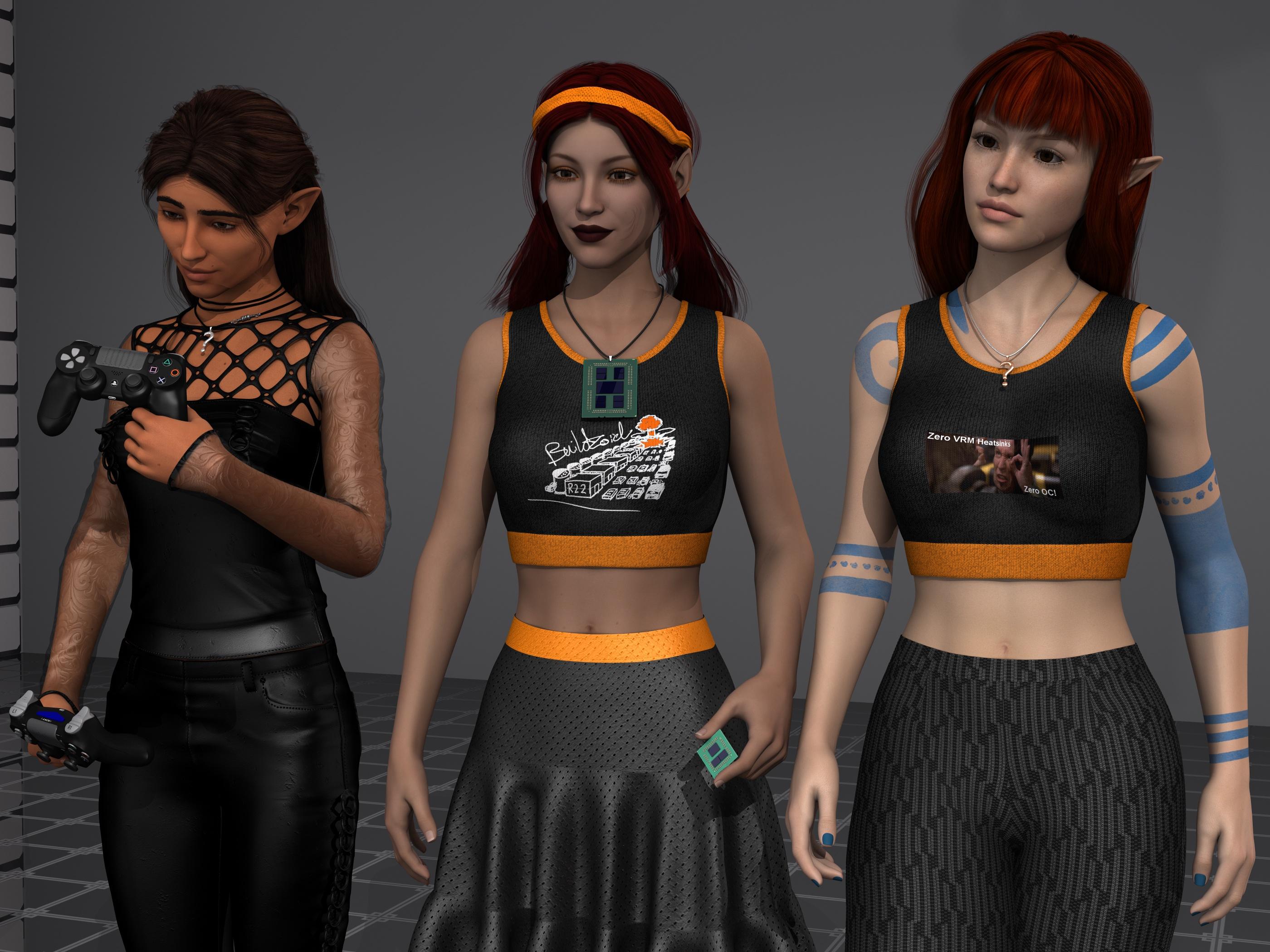
Left is my failed attempt of converting Aiyana from gen6 to gen8 (it failed at the gen6-7 boundary), she still hasn't figured out where her gothic pendant wandered off to. The middle is FWSA Sandi converted to Gen8 using RiverSoftArt's gen7-to-8 converter (probably to Buildzoids complete and utter dismay, sorry, I just like Sandi, cute elf), the necklace works very well with her Naked EPYC pendant. And right is AS Kellyn, cuz we can never have too many cute elves this time of year, with the full pendant and necklace combo. dForce Sweet Summer dress with custom meme textures, and dForce Eastern Elegance pants also with custom textures. Rowana Hair (left), Saffron Hair (middle, custom AHOC colors), and Shena Hair (right).
Edit: the former render was bugging the hell out of me with the pose combined with the camera angle making it look like Kellyn's left arm was almost twice as big as the right. I also didn't notice that the pose had her hovering a foot above the floor for some odd reason, guess it was for some really tall high heels, lol.
Rynne 8 New non-negative threadI made a render of Rynne 8 with a Victoria 4 outfit https://www.daz3d.com/pixiedust-outfit which I was able to pick-up for free today. I didn't convert it properly and the wings crimped up badley during the autofit, so I deleted them. I loved the dress and the autumn colors. I used one of her makeups, but substituted a lipstick from another add-on character as it fit the dress's colors. She looks older than my first render.
I find her fascinating. There are layers to discover.
Don't autofit the wings just load them and parent them to the chest.
Rynne 8 New non-negative threadI made a render of Rynne 8 with a Victoria 4 outfit https://www.daz3d.com/pixiedust-outfit which I was able to pick-up for free today. I didn't convert it properly and the wings crimped up badley during the autofit, so I deleted them. I loved the dress and the autumn colors. I used one of her makeups, but substituted a lipstick from another add-on character as it fit the dress's colors. She looks older than my first render.
I find her fascinating. There are layers to discover.
Missing Shapes - Need HelpHi, I'm new to Daz 3d Studio and have been trying to figure things out. I have a lot to learn.
I bought the Victoria 4.2 Base, Shapes++ and Muscle Morphs recently. I installed them using the installer. I was playing around with the body shapes in the shaping panel, but when I looked for the head shapes they are missing from the shaping and parameters panels. It appears the Base is missing. Morphs++ and Mucsle appear along with one called Male, I assume is default. Under Morphs++ everything appears but the head.
Under the left side panel under Poser Formats/MyDaz3D Library/Pose/Daz's Victoria 4/Morph Injections/Base is listed with images next to them showing the face expressions. None of the shapes related to the expression images appear in the shaping panel. When I install Shapes++, face expressions and body shaping images appear in the left panel. Only those shapes related to the body appear in the shaping panel. Any related to the head do not appear.
When I hover my mouse over a shape image in the left side panel, it shows the location they are installed, which is the same as the rest of the installs for victoria 4.2.
I have tried to find information about the missing shapes with no success. If anyone could can help to get the head shapes to show, it would be greatly appreciated.
ZZ
XTransfer Module 1- Genesis 3 to Genesis 8 Morph Converter (Commercial)Hi. Is your default content path set? Do you have one content library or many? If you load G3M again and open script and go Browse to Saved XTransfer Morphs you should see where it was saved.
Hi there - I have it set to reference the main "Daz" content library. I've attached a screenshot of where the saved morphs are located...I'm just not sure why my converted Darius 7 isn't called "XT Darius 7" as your guide shows the "XT Victoria 7". I've also attached a screenshot of my converted Darius 7. Please note the broken egg yolk-shaped irises. I bought your script in hopes of transferring this character as your store page shows a converted Darius without these wonky irises. However, my results are so far exactly the same as the ones I got with RiverSoft's converter script. This is the one character I've had problems with...I've already successfully transferred Victoria 7, Michael 7, Ophelia 7, Olympia 7, and a whole slew of other custom characters successfully, but Darius eludes me. Did you do something specific to get your results on him that have perfectly round irises?
XTransfer Module 1- Genesis 3 to Genesis 8 Morph Converter (Commercial)Hi there - I purchased this on release but am just getting around now to trying it. The one character I've been trying to convert is Darius 7, and I noticed that you featured him on the product page. It seems to complete his transfer in about 2min, but when I load in the G8 base figure afterwards, I'm not finding anything under "XTransfer" on the parameters tab and the transferred character name doesn't have "XT" in front of it like the tutorial has (you showed us "XT Victoria 7" so I was expecting "XT Darius 7" but I'm not finding anything by that name). If I do a search for "Darius", he comes up, but when I load in the slider, his irises are distorted. I specifically bought this tool because your featured converted Darius didn't have wonky irises (I tried converting him with RiverSoft's tool in the past, which had resulted in the same wonky irises and I was so exited to try this one in hopes of finally being able to transfer this specific character). I'm not sure what I could be doing wrong. I tried deleting the morphs and re-converting but no change. I'm not sure if it's because I previously tried converting him with RiverSoft's tool? I had deleted those morphs though so I'm not sure why that would matter.
Are there any Gen 8 females that closely resemble Marilyn Monroe?None I'm aware of for g8, Sav has one for g3 and v4 over at renderosity (marina is the name iirc).
Closest I've seen for g8 would be probably Marion for G8 at https://www.daz3d.com/marion-for-victoria-8
Can't buy Frida CharacterI was able to get to the product page by a line on the bundle page. Here is the link for her. https://www.daz3d.com/ry-frida-for-victoria-8
brings me to ooops page
thanks tho
ooops page quite popular today :-( {still goes there}
Going 'round through the store:
https://www.daz3d.com/ry-frida-for-victoria--8
- the non-working link has 1 "-" while the working link has 2 "--"
Help Identify CrownI was browsing the forum when by chance I saw your thread
That crown is not longer available. It was sold at Renderosity under the name EMW PheonixCrown for Victoria and P4 woman by CarolineG and royloo.
Can't buy Frida CharacterI was able to get to the product page by a line on the bundle page. Here is the link for her. https://www.daz3d.com/ry-frida-for-victoria-8
brings me to ooops page
thanks tho
Fibermesh Eyebrows, how to remove the "paint"?@smaker1, thank you for replying. However, I am using the "no eyebrows" mat, with the Jenni 8 eyebrow "attachment".
@Richard Hasetine, thank you for replying. Since the eyebrows I've tried came with Jenni 8 (no eyebrow mat), Victoria 8 and a separate product, Luxe Eyelashes and Eyebrows, they are a separate 'prop' to accept the materials from each product, Jenni 8, Victoria 8 and the Luxe.
The preview looks great with the individual hairs showing against the skin, but in render, it's the solid shape with no skin showing through the hairs. I also tried Victoria 8 eyebrow attachment, and Luxe eyebrows. Since they all render without distinct hairs, I guessed that's something to do with the surface settings. Thank you for the post render suggestions. It may come to that.
Can't buy Frida CharacterI was able to get to the product page by a line on the bundle page. Here is the link for her. https://www.daz3d.com/ry-frida-for-victoria-8
Weird. Even that link just took me to the front page, but then I tried it again, and it worked.
Can't buy Frida CharacterI was able to get to the product page by a line on the bundle page. Here is the link for her. https://www.daz3d.com/ry-frida-for-victoria-8
XTransfer Module 1- Genesis 3 to Genesis 8 Morph Converter (Commercial)Can I see this bone rigging? As well as the dialed morph causing it. Thanks
I used different morphs this time for comparison. i.e: Victoria 8, Mei Lin 7, Gia 6. The problem comes from any GenX2 (right figure) morphs. When posed, the shoulders start to move into the body, while the bones for the base of the feet gets pulled almost all the way out. Olympia 6 on Gen 8, in the OP, is the most extreme case I've tested so far, showing the hands are also affected as well but not as noticable. The rest of the bones have very minimal to no loss.
Report sales errors here. "There's Always Another Sale™"Today's sale page is live for me, but two of the links are wonky. I thought I'd share the correct links for anyone having the same problem:
- Christmas Cake, (a Holiday FREE Item.)
- RY Frida for Victoria 8, a Debut New Release.
I didn't notice any other links that didn't work.
I have the second RY Frida link not wroking either, though you can put them in the cart and the discounts are applying. We will report them but do not expect changes till Daz gets into the office. Thank you for reporting.
Daz 3D is part of

Connect
DAZ Productions, Inc.
7533 S Center View Ct #4664
West Jordan, UT 84084Licensing Agreement | Terms of Service | Privacy Policy | EULA
© 2026 Daz Productions Inc. All Rights Reserved.