-
AIUTO...CHI CONOSCE L’ITALIANO? PARTE QUATTORDICI
@Muscleman
Tipo ? Ci sono diversi stile anime (quasi realistici, chibi, alla Toryama) e diciamo che le figure anime rendono bene se usi toon shader o similari... Se usi rese fotorealistiche hai effetti stranianti.
Comunque il problema di queste figure non sono le body shapes (che ci vuole poco a fare dei morph).. ma gli occhi e i capelli. Renderizzare una pettinatura alla Goku non è sempre credibile.
Creare un morph per gli occhi è complicato a causa del numero di joint che ci sono sulla faccia. Volevo farne uno ma poi ho dovuto lasciare per problemi di posa...@Imago
Ora molti vanno di Metahuman... bello, ma i personaggi sono pesantissimi (soprattutto i capelli) e non ci sono guardaroba come quelli di DAZ@Crios
G1 è compatibile solo per i materiali della pelle con V4. Se gli applichi un materiale M4 ci sono problemi.
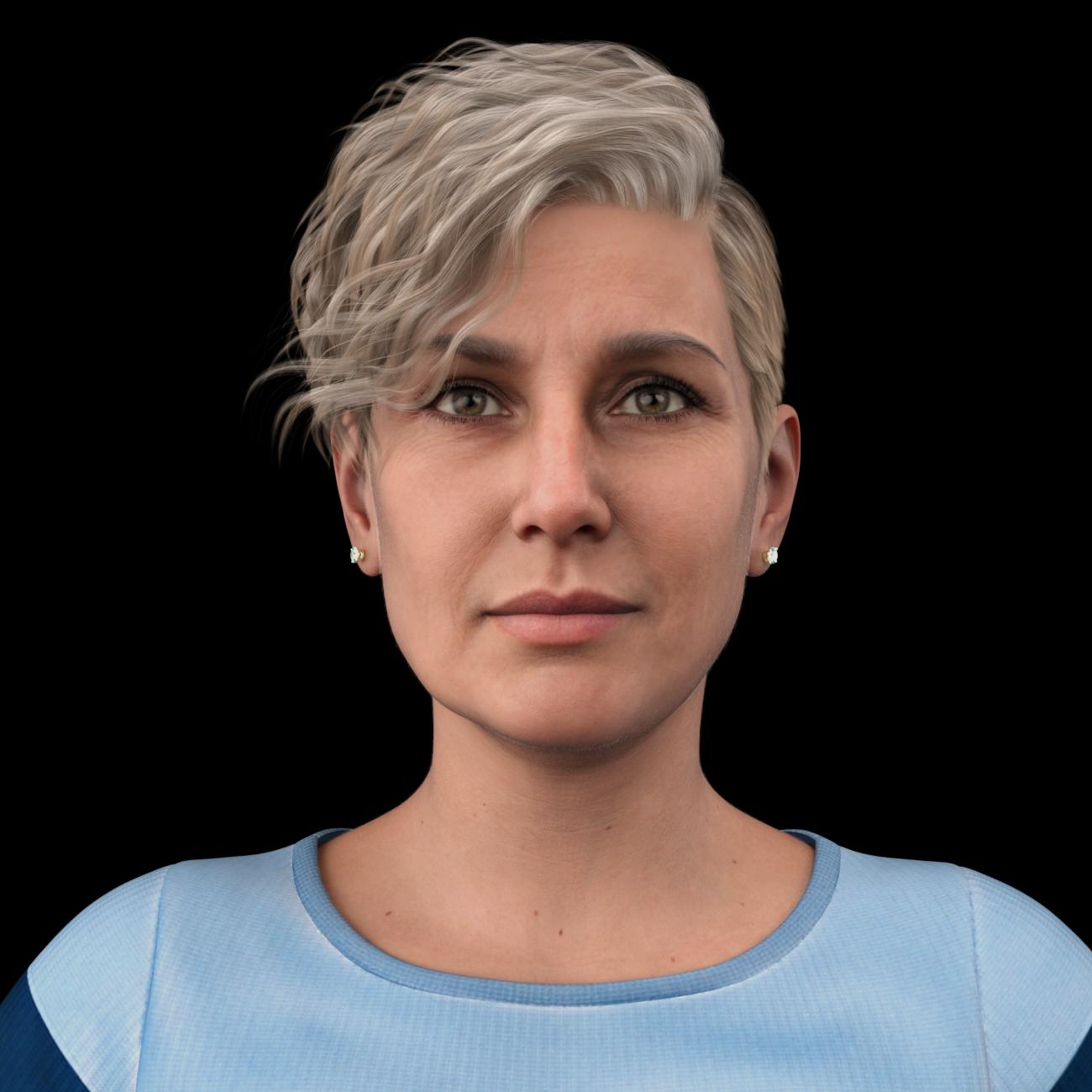
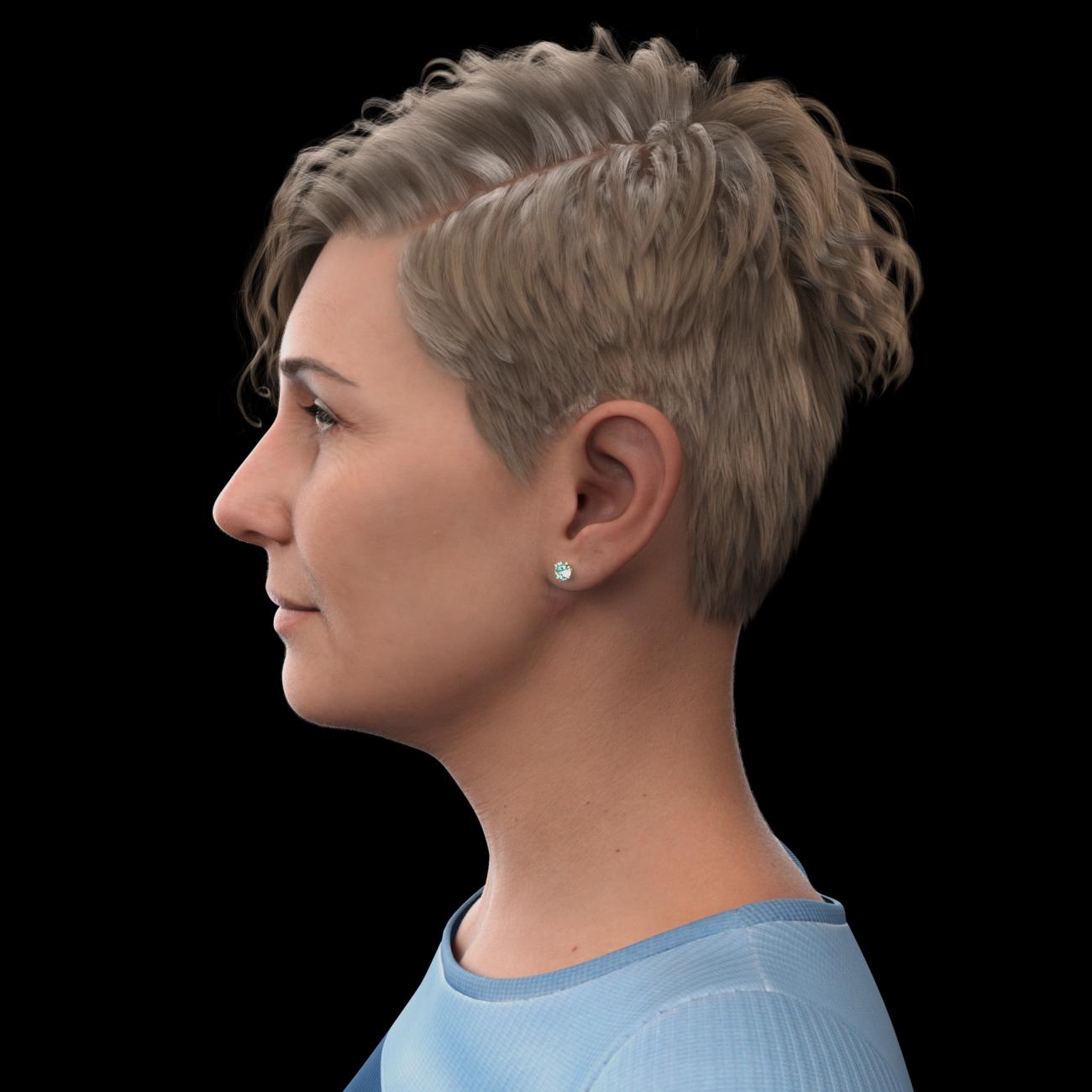
Inoltre i vestiti vengono riadattati con Autofit che spesso (se non sono bodysuit o magliette/pantaloni attillati) crea problemiFace Transfer 2Here's my first go at trying out Face Transfer 2 Shapes. I find that in addition to the base female/male corrections, FT2 Shapes offers some age, ethnicity and face shape options. As in the original FT1 version of FTS, you have one-click options or dials. This is "NPC81", shown how base FT2 creates her and then with a few FT2 Shapes applied. As one would expect, the difference is more dramatic on the profile than in head-on, at least with somewhat subtle levels of enhancement as I've gone with here for this example.
Original character, with just the shapes from FT2:
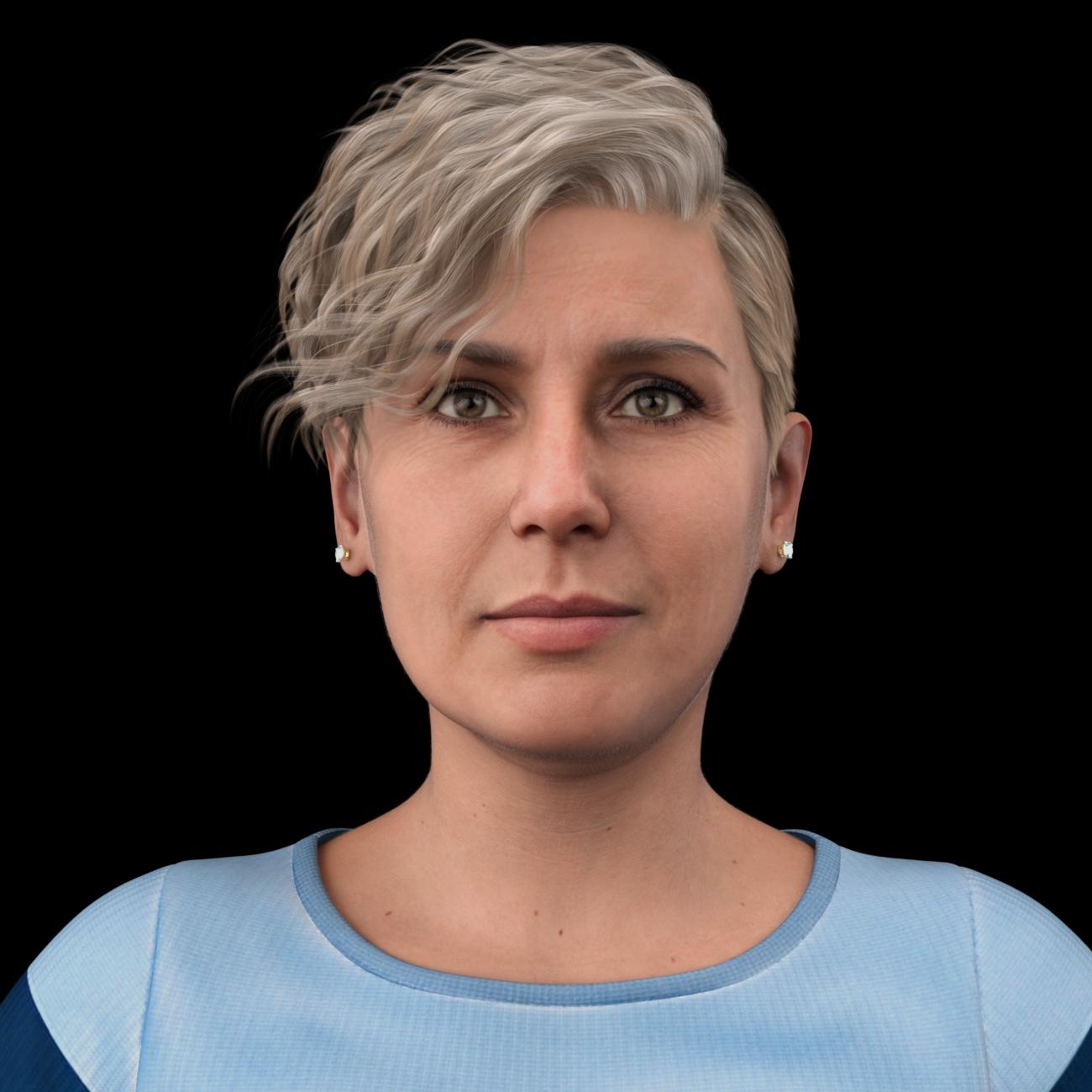
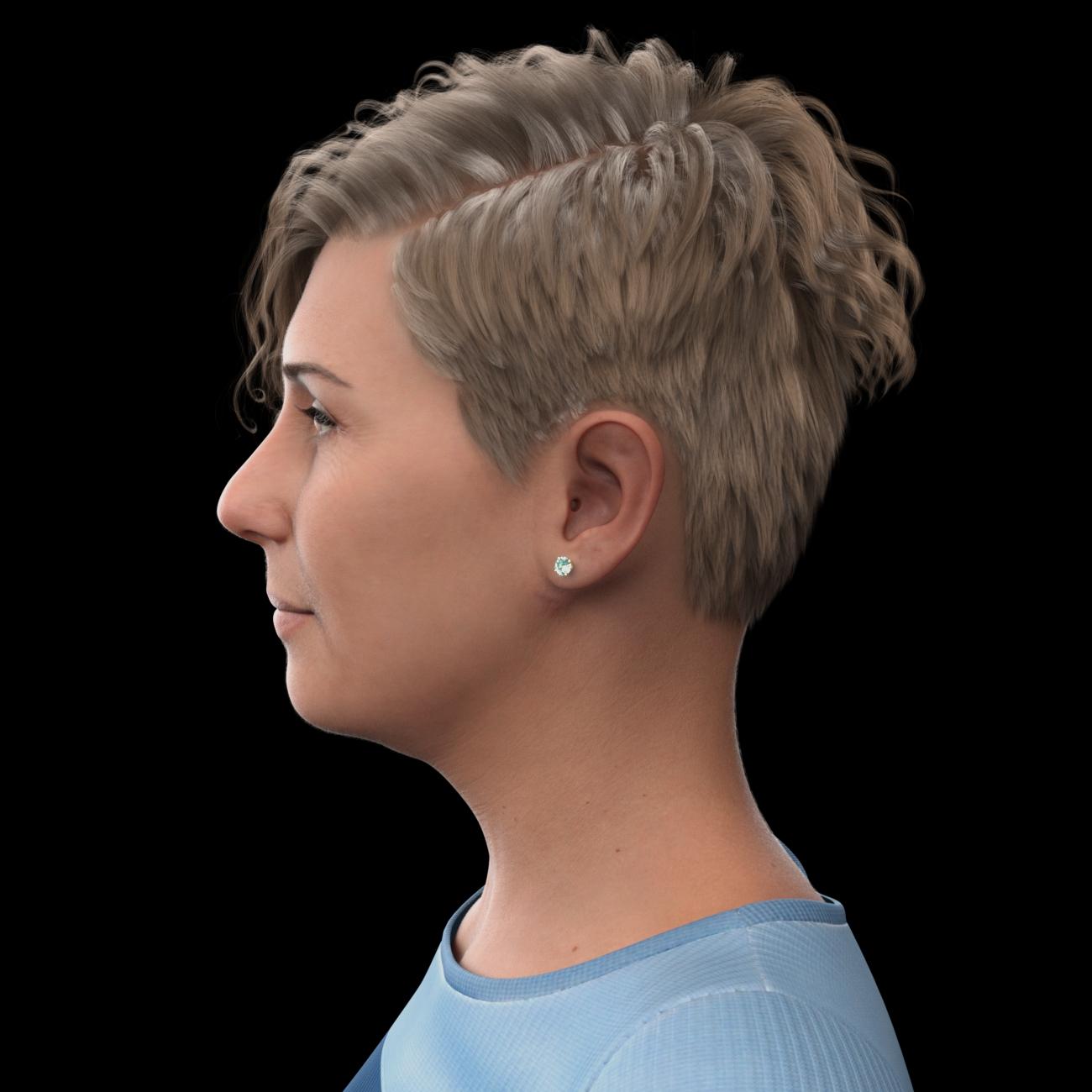
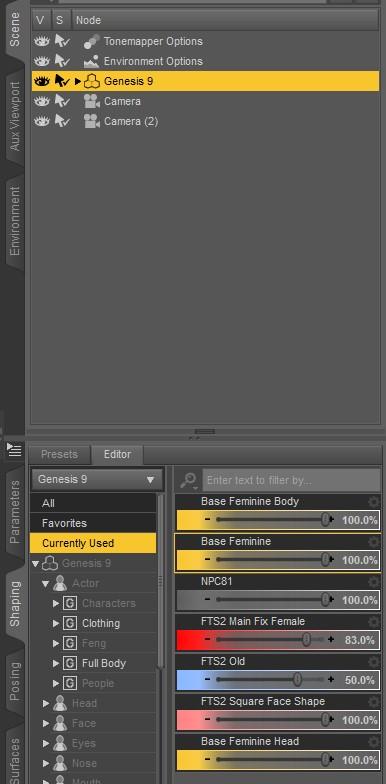
Here are all the Shaping settings for the Face Transfer 2 Shapes modified version. You can see that the FTS2 options are dialable. (They're also available as one-click options.) These are just a few - there are several more.
The modified version, with those shapes:
 There's Always Another Sale Thread -- Discussions Only Pt 2
XiousDs said:
barbult said:
XiousDs said:
barbult said:
daveso said:
i'm not participating to stay in the token game this time.
No, I didn't last time, and even I'm less incentivized this time. I don't like all the games. The store sale pages are becoming impossible for me to navigate and understand. I look at what is new and then leave if nothing is compelling.
I stopped buying last year because of the tokens for about 4 months or so. I did not start buying again until the tokens went away. Lol. On items specific note, anyone use squishy human for gen 8 or 9, the shape rigger plus tools, or the foliage maker? I am considering picking those up as part of a 3 for 60% off thing, but not certain how well they work to warrant spending the money.I don't have squishy human, but I wasn't impressed with the promos or user feedback. Shape Rigger Plus is very valuable if you create character morphs and need to adjust the rigging. Be sure you buy the version for the generation of character you are using. There is a new one for Genesis 9. Foliage Maker is a lot of fun, but sometimes frustrating to control. There is a long thread where users share their experiences and creations.
Thanks for the feedback. I have started doing my own figures with blender based off the g9 shape, but auto adjust rigging to shape works really well, so was not certain how useful shaperiger plus was. The demo images compares not using adjust rigging to shape to shape rigging plus which is a bad comparison. Decided I would start moving over to g9 since I like the uniform shape since it is great for mixing creature morphs with out worrying about one morph was based off one gender shape and the other morph is based off the other gender shape, and I love creature/hybrid stuff.There is a video about Shape Rigger Plus G9 Edition that explains some of the advantages over Adjust Rigging to Shape. Adjusting eye rigging for G9 is a little tricky and Shape Rigger takes care of it. I like it, but if you are satisfied with your current method, save the money.
There's Always Another Sale Thread -- Discussions Only Pt 2
Thanks for the feedback. I have started doing my own figures with blender based off the g9 shape, but auto adjust rigging to shape works really well, so was not certain how useful shaperiger plus was. The demo images compares not using adjust rigging to shape to shape rigging plus which is a bad comparison. Decided I would start moving over to g9 since I like the uniform shape since it is great for mixing creature morphs with out worrying about one morph was based off one gender shape and the other morph is based off the other gender shape, and I love creature/hybrid stuff. I had a bunch of creature textures that I liked from gen 8 that was a hold up for me messing with gen 9. Recently got the gen 9 geograft supporting legacy gen 3-8.1 uvs and it has worked really well for me so far.barbult said:XiousDs said:
barbult said:
daveso said:
i'm not participating to stay in the token game this time.
No, I didn't last time, and even I'm less incentivized this time. I don't like all the games. The store sale pages are becoming impossible for me to navigate and understand. I look at what is new and then leave if nothing is compelling.
I stopped buying last year because of the tokens for about 4 months or so. I did not start buying again until the tokens went away. Lol. On items specific note, anyone use squishy human for gen 8 or 9, the shape rigger plus tools, or the foliage maker? I am considering picking those up as part of a 3 for 60% off thing, but not certain how well they work to warrant spending the money.I don't have squishy human, but I wasn't impressed with the promos or user feedback. Shape Rigger Plus is very valuable if you create character morphs and need to adjust the rigging. Be sure you buy the version for the generation of character you are using. There is a new one for Genesis 9. Foliage Maker is a lot of fun, but sometimes frustrating to control. There is a long thread where users share their experiences and creations.
There's Always Another Sale Thread -- Discussions Only Pt 2I was fortunate today that a lot of the utilites I'd had my eye on were on a good discount with the Face Transfer 2 fixer included, so I wound up getting a bunch of stuff at a little short of 10 PM CST. Countdown timer said 3 (and change) hours (so, to Daz midnight) plus 5 days. We'll see if there's anything in that 5 days that's worth it for me; most of my wishlisted stuff now is in the "oooh shiny" category instead of the "its lack holds me back" category
Third party content morphs + Parameters paneI every so often unintall third party content like original characters from popular games and other popculture stuff. I uninstall by deletign all the folders within data, people, runtime but sometimes when I have Daz open I can still see there morphs in the parameters pane. I went in to edit mode to delete the morph but shouldn't it just disappear automatically? Just wondering.
Face Transfer 2I also bought it right away, great help. Now, if only someone could sort the annoying eye problem with G9 so that we don't have to adapt them by hand every time we create a morph, that would be SO great ...
AIUTO...CHI CONOSCE L’ITALIANO? PARTE QUATTORDICIImago said:
Silvhe said:
quando uscì la prima generazione di Genesis avevo tanta di quella roba per V4 che la continuai a usareEcco cosa succede a non leggere le istruzioni...

Tutta la roba per V4 funziona alla perfezione su G1. C'è perfino il morph per avere la forma di V4 su G1.
Però con G1 hai MOLTA più libertà di azione.
Ma no, no, le istruzioni le avevo lette e avevo anche acquistato qualche tool per convertire mi pare le pose. Con l'autofit mi pare che i vestiti potessero essere adattati senza conversioni ma le scarpe, specie se con i tacchi alti, venivano malissimo. Se non ricordo male c'erano anche dei cloni per i characters in modo che si potessero usare le textures perché le UV maps erano diverse. Alla fine dei conti troppo sbattimento, restai su V4 anche se qualche render con G1 lo feci, mi sa che ho anche qualcosa pubblicato su DA.
AIUTO...CHI CONOSCE L’ITALIANO? PARTE QUATTORDICISilvhe said:
quando uscì la prima generazione di Genesis avevo tanta di quella roba per V4 che la continuai a usareEcco cosa succede a non leggere le istruzioni...
Tutta la roba per V4 funziona alla perfezione su G1. C'è perfino il morph per avere la forma di V4 su G1.
Però con G1 hai MOLTA più libertà di azione.
Face Transfer 2PhilW said:
Face Transfer Shapes 2 launched today! I actually made it before Christmas but the testing was delayed because of the holiday season but hey, it's here now. I hope that it will address a lot of the things that people have been seeing with FT2, even though it is a huge improvement on the original Face Transfer. I'd love to see what people are doing with it.
In my cart now! Hopefully I'll have some time to play with it this evening.
Face Transfer 2Face Transfer Shapes 2 launched today! I actually made it before Christmas but the testing was delayed because of the holiday season but hey, it's here now. I hope that it will address a lot of the things that people have been seeing with FT2, even though it is a huge improvement on the original Face Transfer. I'd love to see what people are doing with it.
Let's appreciate/discuss today's new releases - ongoing threadGordig said:
I really like MB Yoya's head sculpt and textures, but can't see myself ever using her body morph.
Her 'full bust and a perfect waist-to-hip ratio' are not 'fullfilling your dreams' ?

 Freebie Challenge December 2023 - January 2024 - "Driving home for ..." - Main Thread
JackyBrown said:
3D Art Freebie Challenge December 2023 - January 2024 "Driving home for..."
[Best watched at full size for details.]
"Some warmth"
Starring: Alysha and WaltherThe tale: (Not entirely fictional)
It has been exactly ten years since Walther was diagnosed with Asperger's syndrome. He is doing well, but every now and then he leaves the house without saying anything about where he is going and for how long. Today Alysha is a bit worried, the temperature is expected to drop considerably and she thinks Walther is not wearing a coat, so she decides to go look for him by car. As if guided by something she found him almost immediately. Walther didn't notice her arrival, he was too mesmerized with the beautiful colors of the autumn forest...
Non-motion Picture Soundtrack:
José Feliciano - California Dreamin' (© 1963) https://www.youtube.com/watch?v=9YicQtP-xyg
The Who - Behind Blue Eyes (© 1971) https://www.youtube.com/watch?v=KmbCOMM8peo
COUNTABLE FREEBIES: (Alphabetic order)#01! Alysha for Genesis 8 Female by emotionaldreams
https://www.renderosity.com/freestuff/items/83613/alysha-for-genesis-8-female **#02! Autumn Hockey HDRI by Greg Zaal
https://polyhaven.com/a/autumn_hockey#03! Cargo Short G8M - FREE by SdeB
https://www.sdebstore.com/collections/free-stuff/products/cargo-short-g8m_free **#04! Chameleon ROse2 for Genesis 8 Female by zoro_d
https://www.renderosity.com/freestuff/items/85859/chameleon-rose2-for-genesis-8-female **
[Lashes morph used]#05! Dante DMC5 Free Eyebrows for Genesis 8 Male by InTheFlesh
https://sharecg.com/v/94753/gallery/21/DAZ-Studio/Dante-DMC5-Free-Eyebrows-for-Genesis-8-Male **#06! Dante DMC5 Free Stubble for Genesis 8 Male by InTheFlesh
https://sharecg.com/v/94752/gallery/21/DAZ-Studio/Dante-DMC5-Free-Stubble-for-Genesis-8-Male **#07! Delsin Beanie and Hair for G8M by InTheFlesh
https://sharecg.com/v/92677/browse/21/DAZ-Studio/FINAL-Delsin-Beanie-and-Hair-for-G8M **#08! DOA 6 Marie Rose - Head and Body Morphs for G8F by TritiumCG
https://www.deviantart.com/tritiumcg/art/DOA-6-Marie-Rose-Head-and-Body-Morphs-for-G8F-825236730 **
[Head and Body morph 50%]#09! G8M Knitted Sweater by Wilmap's Digital Creations
https://www.wilmapsdigitalcreations.co.uk/view_product.php?id=477 **#10! Iray car related shader presets 'megapack' by Tom2099
https://www.deviantart.com/tom2099/art/Iray-car-related-shader-presets-megapack-539622361 **#11! Iray Jewelry Shaders by AllenArt
https://sharecg.com/v/95893/gallery/21/DAZ-Studio/Iray-Jewelry-Shaders **#12! LouderPhones by insane_machine
https://www.renderosity.com/mod/freestuff/louderphones/64153 **#13! Maddy for GF8 Charakter Shape by MysticArtDesign
https://sharecg.com/v/98461/browse/21/DAZ-Studio/Maddy-for-GF8-Charakter-Shape **
[LIE Blush Make up & freckles, customized, used on G8M]#14! Muscle Car by Anders Lejczak
https://www.colacola.se/expo_musclecar.htm#15! New Walther 2.0 tanned skin + hair system by Ruslanomar
https://sharecg.com/v/98463/browse/21/DAZ-Studio/New-Walther-2.0-tanned-skin-%2B-hair-system **#16! OnFleek for Genesis 3 & 8 Female(s) by AprilYSH
https://aprilsvanity.com/shop/onfleek-for-genesis-3-8-female-s.html#17! Pd-Soft Leather Daz Studio Shaders for Iray by Parrotdolphin (Janet)
https://sharecg.com/v/80223/gallery/7/Material-and-Shader/Pd-Soft-Leather-Daz-Studio-Shaders-for-Iray **#18! RE5 Sheva Alomar Head Morph for G8F by TritiumCG
https://www.deviantart.com/tritiumcg/art/RE5-Sheva-Alomar-Head-Morph-for-G8F-822643742 **
[Head morph 25%]#19! Rihanna - Head and Body Morphs for G8F by TritiumCG
https://www.deviantart.com/tritiumcg/art/Rihanna-Head-and-Body-Morphs-for-G8F-838891936 **
[Head and Body morph 25%]#20! SoulTrain Pants G8F_FREE by SdeB
https://www.sdebstore.com/collections/free-stuff/products/soultrain-pants-g8f_free **#21! "STRONG" for G8M Character Morph & Pose by Mar3D
https://www.renderosity.com/mod/freestuff/strong-for-g8m-character-morph-amp-pose/82833 **#22! SY 200 Morphs for Genesis 8 Head and Body by SickleYield
https://sharecg.com/v/91888/view/21/DAZ-Studio/SY-200-Morphs-for-Genesis-8-Head-and-Body **#23! Valerie Harmon Outfit for Genesis 8 Female by INNModels
https://www.deviantart.com/innmodels/art/Freebie-Valerie-Harmon-Outfit-for-Genesis-8-Female-876967153#24! Walther for Genesis 8 Male by Ruslanomar
https://sharecg.com/v/92848/gallery/21/DAZ-Studio/G8M-Walther **
NO-COUNT ITEMS:--- 33 Eyes Materials for the Genesis 8 + 8.1 people by LevKornowska
--- Beanie with hair for G3F and G8F by EichhornArt
--- Cool Weather Booties for Genesis 8 and 8.1 Females by esha (The Holiday Loyalty Sale 2021 Free Item)
--- Nose Ring 01 for G2F, G3F and/or G8F by AllenArt
--- Scene Lights for Iray by Lali Kamala (Holiday Loyalty Sale 2021 Free Item)PURCHASED/PAID FOR ITEMS: None 100% Freebies
*1 E-mail address required
** Registration required
#x! Countable Items (Bold ones are used by me for the first time I think.)
--- No longer available freebies
++ Free with DAZ Studio (or the Essentials)
$x. Purchased/Paid For Item
Rendered with DAZ Studio 4.10.0.123 (nVidia Iray®)Other free software used: GIMP v2.10.36 and Irfanview 4.66
Postwork: Used the AltaLux Image Enhancement Filter (Effect) by Stefano Tommesani that comes with Irfanview and some filters that come with GIMP. Also used mcjDenoise https://sites.google.com/site/mcasualsdazscripts9/mcjdenoise and mcjLut by mcasual https://sites.google.com/site/mcasualsdazscripts9/mcjlut with the free FilterGrade Cinematic LUTs Pack https://filtergrade.com/free-cinematic-luts-video-editing/ and the Vintage-Look Photoshop Effects Pack/Light Leaks Effect Pack by Michael Jarrott.
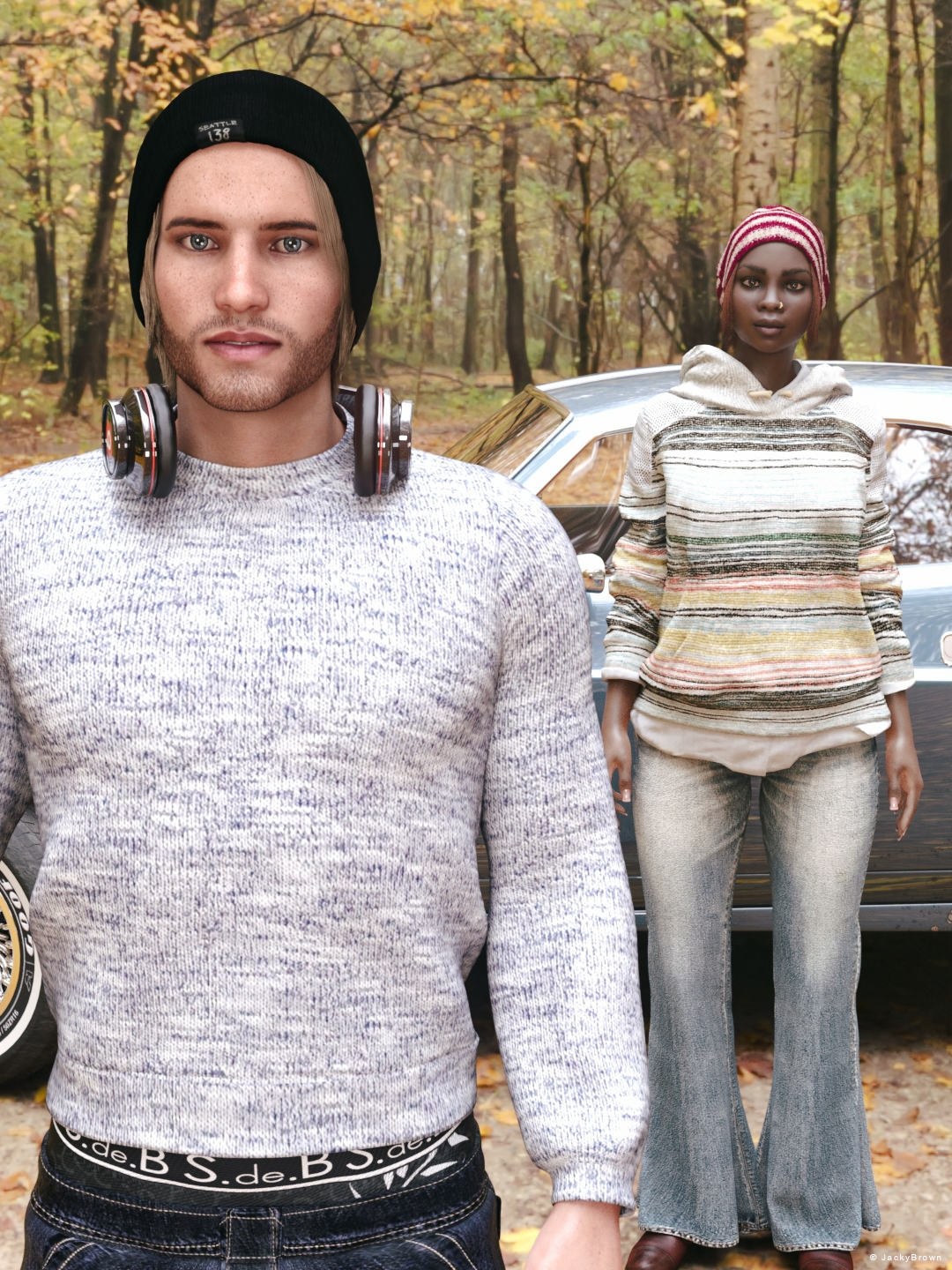
"Some warmth"
all Freebies approved, please move to Entries
Face Transfer 2PhilW created https://www.daz3d.com/face-transfer-shapes-2-for-genesis-9
They looks very nice and useful for me.
Let's appreciate/discuss today's new releases - ongoing threadGordig said:
I really like MB Yoya's head sculpt and textures, but can't see myself ever using her body morph.
The body is far too grown-up and stylised for the almost childlike face. I don't know... Yoya's face is certainly very well done, but to me she's just another character in the almost endless line of pale, sickly and slightly sub-depressed looking East Asian (pre-)teens. A strange genre...
Let's appreciate/discuss today's new releases - ongoing threadI really like MB Yoya's head sculpt and textures, but can't see myself ever using her body morph.
Coming attractions (WIP) - Top 90s Supermodels - 5 freebie G9 head morphs. No materials.@Halcon Bluesky - Thank you so much! I tried to show the supermodels personalities, not only their beauty, and I must have succeeded because you have noticed that!

I am waiting now for the lifecast of Claudia Schiffer to arrive which I will scan and use as a template for shaping the morph. I don't know why but in close up she looks very good to me but from afar she looks more like Robin Wright. Weird. I hope the lifecast will help me understand where I am going wrong. The lifecast isn't ready yet and it also has to travel to me, so it will take a little while before I release this mini bundle.
It is fun to sculpt such iconic beauties that defined the 1990's era. I needed a change before I go back to Bette Davis and Joan Crawford and I've been thinking about sculpting the Big Five for a while. I am having a great time working on them. It is a much different experience than working on classic movie stars, because there is so much more material available online of such better quality that I can use as reference.
Thank you again for taking the time to write some heartfelt words.
Cheers,
AOBB
Can I order a custom G8F hair to anyone?chris-2599934 said:
Kitbashing multiple hairs together is probably still the way to do it.
I'd really like to avoid it. As I mentioned above, I'm doing animations, and there's going to be quite many of them. And I have big doubts about a braid "by itself" going through dForce properly.
I know you think "classic Lara Croft hair with the long braid and that "slightly messy" front" describes what you want fully and perfectly, but google images gives me too many possible Lara Croft hairstyles to pick exactly what you're after. Actual pictures of what you want would reall help - you'll need them anyway if you ever find this person to build the hair for you.You're probably right. Well, there are some pics that show what I want decently. This one has a 90%-perfect hair shown from the front. Hair, not the character herself. The only two "buts" I'd mention here is that the braid has to be a little longer (for which a length morph would've been nice to have) and a little thinner (again, a morph for that would've been great to have):

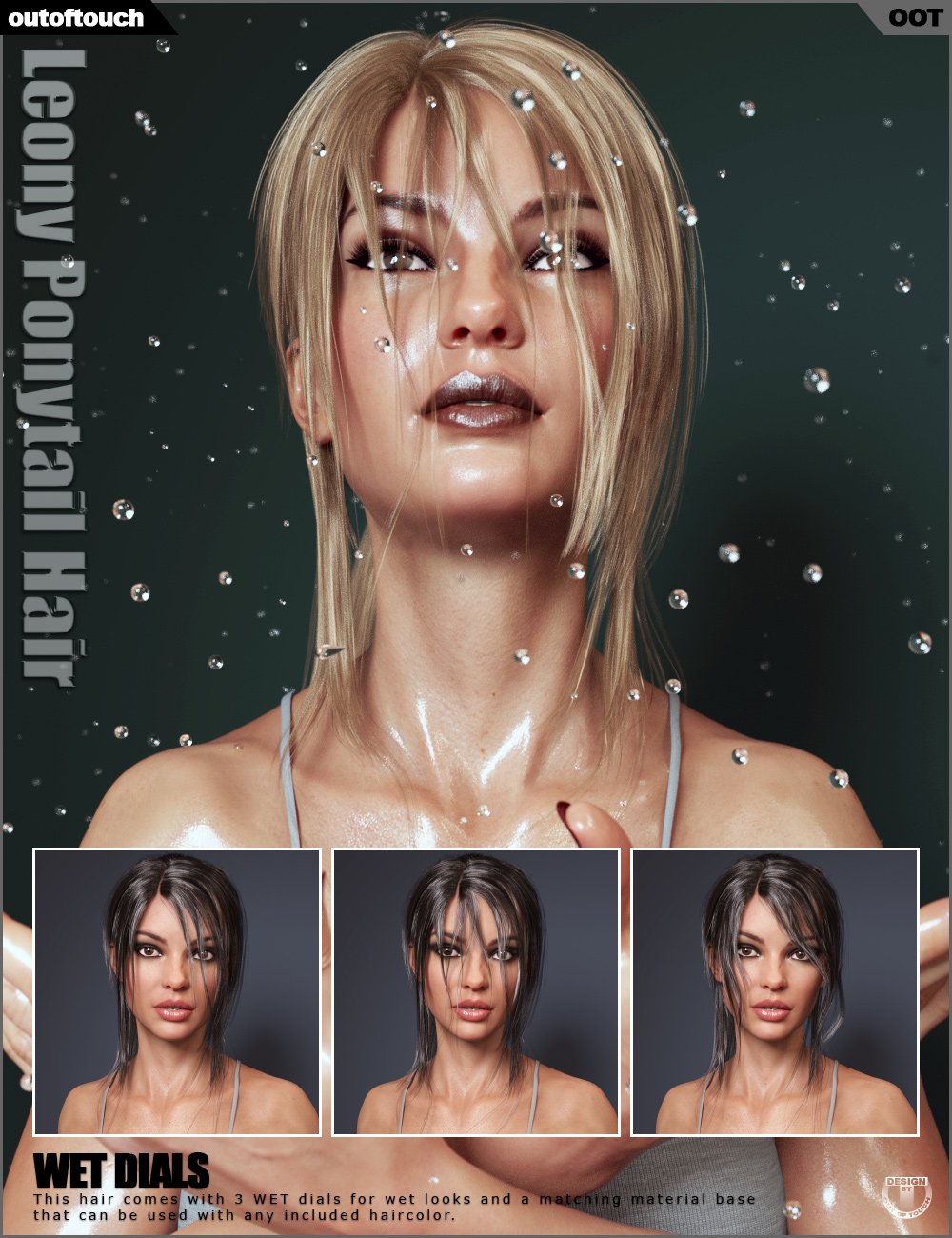
Then there's the Leony Hair product readily available at the DAZ Store. As I said before, I think its front is perfect (with a partial wet setting set to it, not in its dry state), and I would use it as the primary reference for "my" hair's front/head part:
And then there's the classic. This pic shows clearly how long the braid has to be. Probably "Make it like this but less 1997 and more 2024" can be said about it:

Oh, that's great to know! I'll get that. Thanks for the heads-up!If you're able to find two (or more) hair meshes that match your requirements, be aware that Outoftouch has a hair shader product on sale at Rendo that you can apply to any hair - so you can use that to pull the look together. I'm not sure whether I'm allowed to link to it, but it's called "OOT IrayPair Hair Shaders"
tutorial for fitting body armourYou have the option to save these armors as either a confroming figure, using the transfer utility, or as parented props placed on the character.
If you already know which character figure you are putting the armor on and don't plan to use it on any other character, then the parent prop route is the quickest option. The static prop attaches to the body part it is covering and retains its shape. For example bracers on the forearms. In simple terms place the armor where you want it, and in the scene hierarchy, parent the armor prop to the respective bone of the character figure.
The other option is to use the transfer utility to make that same armor a conforming piece of clothing. The advantage of that is, the armor will generally conform to any character figure for that generation. The downside is it is no longer static like the prop, it will be affected by all the morphs and bends of the figure. Those bracers mentioned above, may now deform because of the muscle morphs in the forearm, or the bends at the elbows and wrists. Clothing in the store have corrective morphs that adjust for these deformations. It is a methodical step process to address, the bends and twists in the bone rigging. Then come weight maps. If you go this route, that may be something you will have to address yourself.
Freebie Challenge December 2023 - January 2024 - "Driving home for ..." - Main Thread3D Art Freebie Challenge December 2023 - January 2024 "Driving home for..."
[Best watched at full size for details.]
"Some warmth"
Starring: Alysha and WaltherThe tale: (Not entirely fictional)
It has been exactly ten years since Walther was diagnosed with Asperger's syndrome. He is doing well, but every now and then he leaves the house without saying anything about where he is going and for how long. Today Alysha is a bit worried, the temperature is expected to drop considerably and she thinks Walther is not wearing a coat, so she decides to go look for him by car. As if guided by something she found him almost immediately. Walther didn't notice her arrival, he was too mesmerized with the beautiful colors of the autumn forest...
Non-motion Picture Soundtrack:
José Feliciano - California Dreamin' (© 1963) https://www.youtube.com/watch?v=9YicQtP-xyg
The Who - Behind Blue Eyes (© 1971) https://www.youtube.com/watch?v=KmbCOMM8peo
COUNTABLE FREEBIES: (Alphabetic order)#01! Alysha for Genesis 8 Female by emotionaldreams
https://www.renderosity.com/freestuff/items/83613/alysha-for-genesis-8-female **#02! Autumn Hockey HDRI by Greg Zaal
https://polyhaven.com/a/autumn_hockey#03! Cargo Short G8M - FREE by SdeB
https://www.sdebstore.com/collections/free-stuff/products/cargo-short-g8m_free **#04! Chameleon ROse2 for Genesis 8 Female by zoro_d
https://www.renderosity.com/freestuff/items/85859/chameleon-rose2-for-genesis-8-female **
[Lashes morph used]#05! Dante DMC5 Free Eyebrows for Genesis 8 Male by InTheFlesh
https://sharecg.com/v/94753/gallery/21/DAZ-Studio/Dante-DMC5-Free-Eyebrows-for-Genesis-8-Male **#06! Dante DMC5 Free Stubble for Genesis 8 Male by InTheFlesh
https://sharecg.com/v/94752/gallery/21/DAZ-Studio/Dante-DMC5-Free-Stubble-for-Genesis-8-Male **#07! Delsin Beanie and Hair for G8M by InTheFlesh
https://sharecg.com/v/92677/browse/21/DAZ-Studio/FINAL-Delsin-Beanie-and-Hair-for-G8M **#08! DOA 6 Marie Rose - Head and Body Morphs for G8F by TritiumCG
https://www.deviantart.com/tritiumcg/art/DOA-6-Marie-Rose-Head-and-Body-Morphs-for-G8F-825236730 **
[Head and Body morph 50%]#09! G8M Knitted Sweater by Wilmap's Digital Creations
https://www.wilmapsdigitalcreations.co.uk/view_product.php?id=477 **#10! Iray car related shader presets 'megapack' by Tom2099
https://www.deviantart.com/tom2099/art/Iray-car-related-shader-presets-megapack-539622361 **#11! Iray Jewelry Shaders by AllenArt
https://sharecg.com/v/95893/gallery/21/DAZ-Studio/Iray-Jewelry-Shaders **#12! LouderPhones by insane_machine
https://www.renderosity.com/mod/freestuff/louderphones/64153 **#13! Maddy for GF8 Charakter Shape by MysticArtDesign
https://sharecg.com/v/98461/browse/21/DAZ-Studio/Maddy-for-GF8-Charakter-Shape **
[LIE Blush Make up & freckles, customized, used on G8M]#14! Muscle Car by Anders Lejczak
https://www.colacola.se/expo_musclecar.htm#15! New Walther 2.0 tanned skin + hair system by Ruslanomar
https://sharecg.com/v/98463/browse/21/DAZ-Studio/New-Walther-2.0-tanned-skin-%2B-hair-system **#16! OnFleek for Genesis 3 & 8 Female(s) by AprilYSH
https://aprilsvanity.com/shop/onfleek-for-genesis-3-8-female-s.html#17! Pd-Soft Leather Daz Studio Shaders for Iray by Parrotdolphin (Janet)
https://sharecg.com/v/80223/gallery/7/Material-and-Shader/Pd-Soft-Leather-Daz-Studio-Shaders-for-Iray **#18! RE5 Sheva Alomar Head Morph for G8F by TritiumCG
https://www.deviantart.com/tritiumcg/art/RE5-Sheva-Alomar-Head-Morph-for-G8F-822643742 **
[Head morph 25%]#19! Rihanna - Head and Body Morphs for G8F by TritiumCG
https://www.deviantart.com/tritiumcg/art/Rihanna-Head-and-Body-Morphs-for-G8F-838891936 **
[Head and Body morph 25%]#20! SoulTrain Pants G8F_FREE by SdeB
https://www.sdebstore.com/collections/free-stuff/products/soultrain-pants-g8f_free **#21! "STRONG" for G8M Character Morph & Pose by Mar3D
https://www.renderosity.com/mod/freestuff/strong-for-g8m-character-morph-amp-pose/82833 **#22! SY 200 Morphs for Genesis 8 Head and Body by SickleYield
https://sharecg.com/v/91888/view/21/DAZ-Studio/SY-200-Morphs-for-Genesis-8-Head-and-Body **#23! Valerie Harmon Outfit for Genesis 8 Female by INNModels
https://www.deviantart.com/innmodels/art/Freebie-Valerie-Harmon-Outfit-for-Genesis-8-Female-876967153#24! Walther for Genesis 8 Male by Ruslanomar
https://sharecg.com/v/92848/gallery/21/DAZ-Studio/G8M-Walther **
NO-COUNT ITEMS:--- 33 Eyes Materials for the Genesis 8 + 8.1 people by LevKornowska
--- Beanie with hair for G3F and G8F by EichhornArt
--- Cool Weather Booties for Genesis 8 and 8.1 Females by esha (The Holiday Loyalty Sale 2021 Free Item)
--- Nose Ring 01 for G2F, G3F and/or G8F by AllenArt
--- Scene Lights for Iray by Lali Kamala (Holiday Loyalty Sale 2021 Free Item)PURCHASED/PAID FOR ITEMS: None 100% Freebies
*1 E-mail address required
** Registration required
#x! Countable Items (Bold ones are used by me for the first time I think.)
--- No longer available freebies
++ Free with DAZ Studio (or the Essentials)
$x. Purchased/Paid For Item
Rendered with DAZ Studio 4.10.0.123 (nVidia Iray®)Other free software used: GIMP v2.10.36 and Irfanview 4.66
Postwork: Used the AltaLux Image Enhancement Filter (Effect) by Stefano Tommesani that comes with Irfanview and some filters that come with GIMP. Also used mcjDenoise https://sites.google.com/site/mcasualsdazscripts9/mcjdenoise and mcjLut by mcasual https://sites.google.com/site/mcasualsdazscripts9/mcjlut with the free FilterGrade Cinematic LUTs Pack https://filtergrade.com/free-cinematic-luts-video-editing/ and the Vintage-Look Photoshop Effects Pack/Light Leaks Effect Pack by Michael Jarrott.
"Some warmth"
Daz 3D is part of

Connect
DAZ Productions, Inc.
7533 S Center View Ct #4664
West Jordan, UT 84084Licensing Agreement | Terms of Service | Privacy Policy | EULA
© 2026 Daz Productions Inc. All Rights Reserved.