-
NEVER MIND! FIXED - Need a clean install, can't do it -
Hi, tonight I updated Sketchup and what a mistake. It came up with a list of programs that were still running that it said needed to be closed and I closed what I could, then it said some were still running and began installing anyway. Well I had killed studio but I suspect some part of the CMS / PostgreSQL was still running somewhere. Anyway long and short of it, Studio won't start anymore. You can load it, it shows as running in the task manager, but it never loads a UI.
In the installed directory, the DAZStudioe.exe file is just 91KB. When I run it, it does absolutely nothing. So I unistalled everything, all plugins, Studio iteslf, the PostgreSQL CMS package too. I also deleted the install download files before I uninstalled to force a clean installation. Using DIM I installed Studio without the CMS package and it runs but does nothing. So i killed it and looked and indeed, the CMS folder was not there anymore in the program files directory so I thought "well it isn't automatically installed so maybe I need to manually install the PostgreSQL CMS now" so I did. Tried to run Studio again, it runs (verified in task manager) but nothing visibly happens.
I've unsinstalled over and over, trying different combinations. CMS first, then studio.... NOTHING. Studio first, then CMS.... NOTHING. Changed from the D (solid state) drive to the C drive for install .... NOTHING. I uninstalled Sketchup / PostreSQL CMS, Studio, All Plugins and then re-installed Studio and PostgresSQL CMS... Nothing. Every time I've done this with a complete re-download of all files (i.e. first deleted the local copy in the DIM folder using the option in DIM to delete it, then redownloaded and re-installed).
After all that, when I run Studio you can see with the attached screenshots that the EXE is running as well as multimple PostgreSQL (there were none running before I started Studio, by the way). And yet, nothing does anything.
I am out of ideas. I may be forced to run the beta as my only installation but that's missing some plugins.
So I ask, is there some permutation of installation that I missed that would resolve my situation magically? Some file I need to manually delete that got corrupted or something? Please, any advice is appreciated.
Can you fold a plane?3D modeling is not scary or hard, try Wings 3D or even Google Sketchup,
there are so many free apps for simple stuff like this
Moving On From HexagonSo the title is a bit dramatic. I do however feel that even though Hexagon is convenient, I am really at the limits of what I can make in it. I've felt this way for some time, but its been very difficult finding something else as easy to use. There's a lot of things I want to do that Hexagon makes exceedingly difficult, or doesn't let me do at all. I'm making this thread to help point people to programs that might be a good painless segway from Hexagon. Sure there's plenty of Options out there, like Sketchup and Blender....but neither ever felt quite right to me. I think that's partly because of the specific work flow Hexagon delivers. So I think that's a crucial part, at least for me, in what one move on to, because different programs may be more appealing at different times than others, depending on the work flow you came from.
Recently I tried out Autodesk's Fusion 360.....and I'm actually finding it quite intuitive, and the UI is clean and uncluttered. I'm sure I will probably run into things I can't do or that are difficult to do in the way I want to in this program as well, but for now it seems to be going well. It does have a sketch based modeling side to it like Sketchup, but it also has all the typical features you would find in Hexagon and more, all easily accessible. Kind of more importantly, it looks good all around and is pretty stable at that. Hexagon while still useful for specific tasks, feels more like a hurdle that I have to constantly work around and appease, rather than an extension of my imagination.
The image I included is not really anything special, but it does immediately show that there is more potential in it, as I couldn't easily make this in Hexagon without either ending up with a crash or bad geometry or some kind of other artifacts like pinching that I would have to correct. That's kind of the problem, I feel I'm spending a lot of time cleaning up after Hexagon. There's also much greater control in the starting shapes you use to mold into final objects.
Posing Tip: Turn off figure limits... How?I use this so often, I'd like a button that turns off limit for the entire figure with just one click. Also, when I right click, I don't get the "select children" menu. I only get stuff like parenting, fit, delete and such. I have to go into the pane's menu.
I have already provided the one click option mcjunlockallbones a few posts earlier!
If you're like me, love to customize your workspace, you can also make those one click buttons yourself!
It's easy and fun once you get the hang of it!
F3, Base Layout, Parameter, Limits on/off, right click to get options to set your own button icon, drag them both to the right pane > Tool Bars. Put it anywhere in any one of the tool bar groups.
Apply, Accept. You should have your own one click buttons right where you want them!
Don't forget to save your layout using F4.
My Daz Studio UI looks like SketchUp addons galore full of one click buttons lol. Almost as busy with buttons as my ZBrush!
Your Select children is missing? That one is weird. Even my Daz Horse 2 has multiple Select options!
Did you right click on figure ROOT inside SCENE manager or viewport?
What modeling software has been used to create most products in the store?Just as I know/use many programming languages, I know/use many modeling packages. In both cases, I tend to use the one that is best suited for the job at hand. Just as I avoid using BASIC for programming, I avoid Blender for modeling -- both of them encourage bad behavior.
I am a bit of an OSS fanatic, I tend to want to use OSS whenever I possibly can, and Blender was no exception. However, I found that the methodologies and workflow that the Blender UI encourages (this goes all the way back to the first OSS release of Blender) leads to extremely messy meshes. For personal work, a messy mesh is OK, but when one is creating the mesh for a paid project, messy meshes become a problem very quickly. At first I thought it was just Blender's UI and my own methods that led to problems, but as I looked around I saw that the meshes from other Blender users tended to be just as messy. Then I started comparing the meshes I made using Blender with meshes that I made using other products. What I saw was that the meshes that I created in Max, Maya, Hexagon, Shade, and others were not nearly so messy. They weren't perfect by any means, but they weren't the mess that I created with Blender. About the only other software that I found that encouraged me to make bad meshes was SketchUp -- which I very rarely use any more. I also purchased/tried Silo for Linux, but there are some MAJOR bugs there and Silo is back to "unsupported mode" again.
Something that I want to put out there is what really made me clean up my meshes was doing meshes for 3D printing. Having to deliver a physical object to clients makes one re-evaluate how the mesh looks.

But back to the subject at hand: When I need something really quickly I'll usually find myself executing Hexagon under Wine. Then I'll load the object into any of a number of packages to do more advanced operations depending on the limitations of the software. There is the exception of "really large" things I have to create, which usually require me to use RevIT and export from there.
As a final note, I usually do "engineering" type modeling. Things to exact scales and dimensions. I don't do clothing, or humans.
Kendall
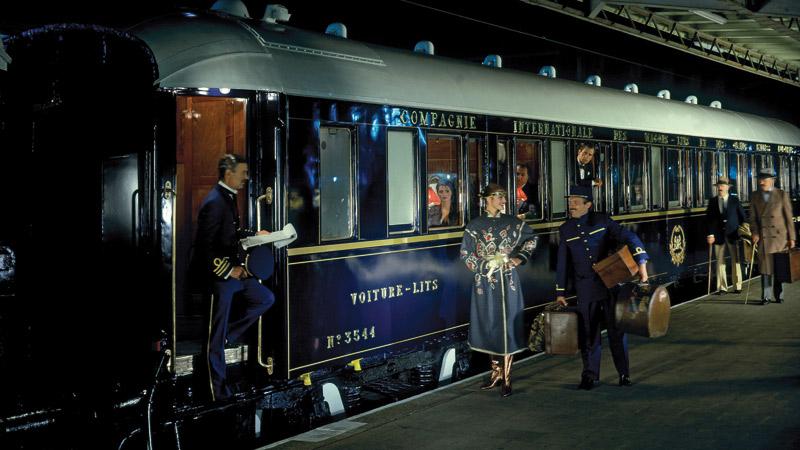
What is this train station?The Sketchup model is pretty good once pulled into DAZ. As stated, a bit of work on the windows and it looks qutie nice. If you do have the MkI Carriage, with a bit of judicious scaling and hiding of surfaces, you can, with some instancing, make a decent interior, given that the Mk1 corridor and compartment setup is pretty close to the OE arrangement...
Its funny, but after looking at the pic posted (And I wonder if its not a render as wel), I can;t help be see Suchet's Poirot as the porter, Albert Finney's Poirot looking out the window, Jeremy Brett as Holmes with his head out, and Japp and Watson following behind, with eprhaps Miss Lemon near the porter...
SO. yes, there i a render in progress, stay tuned..
Cheers
Harold
Oh, this is exactly what I was looking for, but I think it's an actual model, not 3D, confused by the site. It's the outside of the Orient express, they've done the inside here, why not the outside? PAs??? Yes, this is a physical model, someone please create a 3D version :)
An alternative?
https://www.renderosity.com/mod/bcs/gwr-toplight-passenger-coach/114374/
What is this train station?collada can be a bit dodgey
I use an obj exporter I got for Sketchup 7 but Sketchucation has a free one for later versions
otherwise grab the trial version of the pro version an earlier sketchup and save it to that version (I have 6 for this with still 400+ hours left on trial)
You can just get the free Sketchup Make. You get the 30 days free trial of Sketchup Pro with it anyway. Then when the 30 days are up just get one of the free obj exporters such as the Lipid OBJ exporter to use with it
Edit to add: @Sad that is a nice Sketchup find. I had seen a couple of the Orient Express models on Sketchup but they weren't nearly as nice as the one you found.
What is this train station?
I made the windows a new surface called Window using the geometry editor and used iray uber shaders
collada can be a bit dodgey
I use an obj exporter I got for Sketchup 7 but Sketchucation has a free one for later versions
otherwise grab the trial version of the pro version an earlier sketchup and save it to that version (I have 6 for this with still 400+ hours left on trial)
What is this train station?Oh, this is exactly what I was looking for, but I think it's an actual model, not 3D, confused by the site. It's the outside of the Orient express, they've done the inside here, why not the outside? PAs??? Yes, this is a physical model, someone please create a 3D version :)
sketchup? https://3dwarehouse.sketchup.com/model.html?id=a80f502967826c13cfe1c372eac58591
actually one of the better sketchup models I have seen, the obj export in DAZ studio wireframe and textured (you need to delete the billboard)
Your Favorite Cinematic RendererSo how is Octane's shader builder set up? Is it similar to Carrara's system.
It is flexible in a way that you can "group" nodes together to reduce complexitiy to the level you feel comfortable with.
But at any time you also can break down nodes further into sub nodes for most parameters.
- - -
OctaneRender standalone has a full scene based Node Graph Editor (NGE) that shows nodes for geometry, materials, environments, kernel and imager settings.
The OctaneRender for DAZ Studio plugin has a Node Graph Editor for creating materials.
- - -
You can find the manual for the Node Graph Editor here:
https://docs.otoy.com/#60The%20Graph%20Editor
- - -
Octane does work with Carrara as well. So can you get some kind of bundle deal for the SE version that includes both the Daz and Carrara plugins?
-> Afaik such a combo bundle does not exist yet.
Certainly might be worth contacting Otoy support to ask.
- - -
To add to what linvanchini said, With the DS plugin, basic shaders are typically edited via a setup similar to DS and Carrara, but you can also use the NGE (Node Graph Editor) somewhat like Shader Builder nodes in DS and the shaders nodes in Poser) to create more complex shaders or change shader types (the NGE for shaders in the DS plugin is a lot like NGE in Octane Stand Alone). With the Carrara pligin, you use Carrara's material room to edit Octane shaders, so for Carrara users the learning curve isn't as steep as with the DS plugin because it's virtually the same, only with additional properties (though I found both quite easy to learn). The plugin for Carrara also feels more integrated directly into Carrara than the DS plugin.
What I really like about Octane (and the plugins) is that the Octane Render view port is much faster/responsive than Iray in DS. I like Iray a lot, and use it a lot, but as linvanchini noted in his most excellent post above, it simply does not have the advanced feature set that Octane does. Otoy's business is building professional rendering tools, and as someone who works for one of the big studios once said to me, Nvidia is a business built on making graphics cards and Iray is just a minor side business used to show off the utility of their graphics cards.
I should also note that during the development of the DS plugin for version 2, Otoy changed developers. The negative issues associated with the previous developer(s) have gone away, and the plugin is now very stable and being actively developed. Paul (face-off) is the new developer for the DS plugin, he is also the developer for the Poser plugin, and IIRC the Sketchup plugin, and is very responsive to the users. The developer for the Carrara plugin is outstanding as well providing fast support on the forums and quick fixes for any issues found. The manuals provided for both the plugins and the standalone are very good, with either plugin the standalone manual serves as a great addition to understanding and using Octane shaders.
3D Art Freebie Challenge ---May: From This Hill I Can See... MAIN Threadcross scene made by me on sketchup morphed g2 male with skin surfaces i did on gimp
freebie
pants
https://www.wilmapsdigitalcreations.co.uk/view_product.php?id=401
morphs
http://www.sharecg.com/v/73186/gallery/21/DAZ-Studio/DieTryings-182-Morphs-for-Genesis-2-Male
DAZ Studio CloudBloomunit is only sketchUp supported currently, although I spoke with the CEO there and he said that if DAZ offers a bridge or VCA to open support then there's the potential for using their service in the future.
CAR AND BIKE LOVERS THREAD - MARK IVCheck this out while you are there, lots of cool models in this collection....https://3dwarehouse.sketchup.com/collection.html?id=uc37756db-91fa-4720-a9cf-e4898cde6217
CAR AND BIKE LOVERS THREAD - MARK IVHere is the url to it....https://3dwarehouse.sketchup.com/model.html?id=88f3c19a2c8862c3151d8b24e1d3939
CAR AND BIKE LOVERS THREAD - MARK IVIt is at the warehouse I found it. It is full of detail and as a convertable, the top can be removed. Door open, hood and trunk are seperate too. Tires are seperate. It has seperate windows even in case you do want to remove the top. It's like it was made from a real nice model. Here is the sketchup file of it. It could be one of Lowriders or Cayotes. I have converted all the parts to .3ds but not into .obj yet. So many parts...lol. It's gonna rock when I finally finish it!
Spherical CameraI would love this type of output also. Not a difficult output to code, but may be difficult to setup as a one-shot render. (More like a method for rendering, like video is.)
I use an external program for this stuff, setting a camera to "no perspective", and doing a 360 rotation of a thin slice, with the best results. I can get a nice hemisphere 180/360 or full spherical 360/360.
I would list all of the possible programs, but I use a lot of them, for various reasons. Search for "panoramic image stitcher".
Google would once do this for you, as a tool option, if you loaded a series of "stitchable images" into one folder. It still will, possibly, but only when it has time to get to it. (You can no-longer tell it to do that. It just does it, when it looks at your photo-albums, whenever it creeps on you. Creepy that it does that, even in private albums. It is indexing "faces" and "places", in comparison with images from social-media sites and compared to google-maps "street-views".)
I have had the best luck with this program, but it is a bit tough to work with... http://research.microsoft.com/en-us/um/redmond/projects/ice/
You can output many forms, when you have the images all lined-up. For projection in VRML or display as 2D, etc... Not to mention post-editing to desired taste, once you pick one format.
Here is a sample of one I made recently.
This was made with 180 images, each 1-deg rotated for a total of 180-deg. Each one was about 60-pixels wide and 1080-pixels tall. (Just random old stuff I made, ages ago, with sketchup. They are sitting at a 4-way street intersection, you see left to right, 180-deg. Full 360 would be the other half. However, there is an option to do full spherical or cylindrical.)
Rotate the camera, and then output the renderings as individual images. They are sequential and all setup for this type of work. However, many programs don't need sequential images, they auto-detect alignment of each image. Just remember, "No perspective", as that adds fake distortion that is hard to "reform/correct" into a linear output for comparison. Never use video-output, it will chew it up and spit-out garbage.
CAR AND BIKE LOVERS THREAD - MARK IVI like it too. Here are a few I have been working on. It gets hard to find any new cars with all we have here. I found the 69 Nova SS and The 52 Hudson Hornet on a GTA site..the UK one. I found the 48 Packard and a 48 Cadillac Deville at the 3d Warehouse. The Sketchup files are getting much better for holding textures and colors. However, the files are real big now...like from 3 or 4 megs before, up to 25 megs now. Worth it though. The outcome can't be compaired with earlier versions. The Nova I colored exactly like the one I had back in 1969. 350 SS. The trunk lid on the Hudson and the back fenders, would not smooth for some reason. I tried everything and even Poseray did not smooth the outcome. It shows up as smoothed in the program, but the render it is not...weird! Never had that happen before. Look closely at the 3rd pic here of the Hudson. The trunk is rough.
military and custom patches or decalsOK I am not quite catching what you are wanting with the first part of this, but Sketchup's 3D warehouse has several models of newer russian tanks including the T72, T80, T82, T90 and several versions of each as well as several APC's. You would need a copy of Sketchup to convert the items to obj files to use in Studio and Poser. I have several props that started out this way.
Edited to correct Tank names.
well I'm looking for some thing like a patch creator or decal creator where i could design some sort of insegnia say like the soviet symbol you know what i mean now?
That sounds like something that would be better done in photoshop or GIMP ... if you have either one of them. If not I would suggest the Everyday Labels and signs that Serene Night suggested.
military and custom patches or decalsOK I am not quite catching what you are wanting with the first part of this, but Sketchup's 3D warehouse has several models of newer russian tanks including the T72, T80, T82, T90 and several versions of each as well as several APC's. You would need a copy of Sketchup to convert the items to obj files to use in Studio and Poser. I have several props that started out this way.
Edited to correct Tank names.
well I'm looking for some thing like a patch creator or decal creator where i could design some sort of insegnia say like the soviet symbol you know what i mean now?
military and custom patches or decalsOK I am not quite catching what you are wanting with the first part of this, but Sketchup's 3D warehouse has several models of newer russian tanks including the T72, T80, T82, T90 and several versions of each as well as several APC's. You would need a copy of Sketchup to convert the items to obj files to use in Studio and Poser. I have several props that started out this way.
Edited to correct Tank names.
Daz 3D is part of

Connect
DAZ Productions, Inc.
7533 S Center View Ct #4664
West Jordan, UT 84084Licensing Agreement | Terms of Service | Privacy Policy | EULA
© 2026 Daz Productions Inc. All Rights Reserved.