-
Genesis 10
Matt_Castle said:
Timbales said:
Okay. The point you are trying to make doesn't seem to have anything to do with the one you quoted. I was confused by that.
They said that they thought there needed to be three base figures, on the premise a unisex base was not capable of being shaped accurately enough to do the things that the previous generation's split figures did.
I was demonstrating that the unisex base was capable of being shaped very closely to the previous generation of figures.
Cybersox said:
No, in this example what I'm talking about is the lack of specific pectoral bones for the positioning of female breasts. [...] Maybe some people like that look, but with G8.1 and the previous figure generations this could be adjusted quickly on the fly simply by adjusting the bones [...]
G9's pectoral bones still exist, and the weights are pretty similar to the ones that existed on G8F, so I'm really not sure what you're saying here.
This has nothing to do with weitght maps and everything that is relevant to "physically" posing those parts of the figure with the mouse, not sliders. It's buried somewhere in the documentation but I really don't feel like diging though that, so here's a google search result that reveals:
[1]
- The "Previous Generations" Rigging: In Genesis 3, 8, and 8.1, the default skeleton included dedicated pectoral (pec) bones. Users and animators could physically select and rotate these bones to simulate breast movement, gravity, or chest flexing.
- The Genesis 9 Shift: With Genesis 9, Daz 3D transitioned to a unified, unisex base mesh and completely overhauled the rigging system. To optimize performance and streamline the base skeleton, they removed the individual movable pectoral/breast bones from the default rig. [1, 2, 3]
- The Solution: Because the default skeleton omits these bones, chest and breast movement in Genesis 9 is primarily handled through morph shapes (sliders) rather than bone rotation. To get that bone-like pose control back, users have to rely on third-party scripts or official add-on utilities like the Breast Control for Genesis 9 package, which explicitly notes that it "does not rely on pectoral bones for movement". [1, 2]
Genesis 10I don't hate G9 per se, but there are some design decisions that have made my workflow more difficult, with one of the major ones being G9's overreliance on morphs or geogrphs to do everything. As a prime example, take the breasts... and no, I'm not talking about how the male breasts look less masculine or even the fact that the nipple of the base figure feels like an after thought. No, in this example what I'm talking about is the lack of specific pectoral bones for the positioning of female breasts. As anyone who's studied anatomy or spent a lot of time observing people knows, breasts are not solid fixed objects with a rigid shape, but rather add-ons to the torso that can take on wildly different positioning and shapes depending on the effects motion, gravity, age, breast size and relative firmness, and the angle of the torso's inclination. As a result, the shape of the breasts of a woman lying on her back or bending over look entirely different from the same woman standing up and that, in turn, affects the shape of the clothing on top of them. Get it wrong and your character looks like she just came from the plastic surgeon with brand new implants. Maybe some people like that look, but with G8.1 and the previous figure generations this could be adjusted quickly on the fly simply by adjusting the bones, and I even have utility that does it most of it automatically. WIth G9, however, you first have to have a set of seperate morphs for the left and right breasts (not included with the base packs,) then spend a bunch of time trying out different morphs to try to find ones that work with the exact positioning in your general image, and then hope that the end result doesn't eviate too much from the basic standing up shape if you're working with sequential images. The weirdest part of all of this is DAZ had spent the last two figure generations going in the exact opposite direction of develkopment with adding new expression bones each gen to get around the limitations of the morph-driven expressions of G3.
EZFinder - Advanced Content Manager for Daz Studio [Commercial]skybluerob said:
Also, is it worth me setting up all my personal folders and libraries now, or wait for the update as I don't know if they'll transfer in the update? Thanks. Rob.
Go ahead and start now, Rob. Your virtual folders, libraries and tabs live in your own EZFinder user folder, outside the program, and the update never touches that folder. DIM only replaces the program files it installed in the first place, so installing the update over the top leaves your organizing exactly as you left it. I've been careful about that from the start, and the update's own testing was done on a library full of existing virtual folders.
The update also reads every folder file through a heal step when it loads, which is what fixes the doubled-path issue some of you reported, so existing folders come through cleaner, not just intact.
If you want belt and braces, EZFinder can export your work at any level: a single folder, a panel, a tab, or all tabs in one file. Exporting all tabs before an update is a good habit anyway.
Genesis 10WendyLuvsCatz said:
cannot find any way to fix it, have searched but if it's been addressed anywhere Google or other seach queries are not showing me
I don't know if it's exactly the problem you have, but Jay Versluis has a video on G9 eyes after importing a G8 morph:
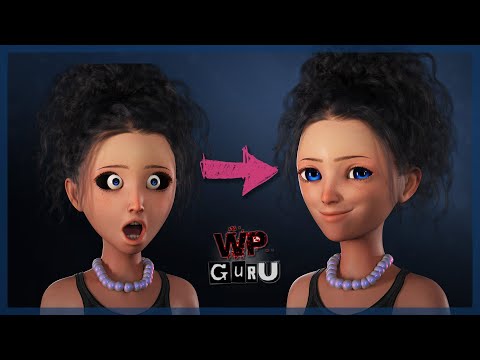 EZFinder - Advanced Content Manager for Daz Studio [Commercial]Also, is it worth me setting up all my personal folders and libraries now, or wait for the update as I don't know if they'll transfer in the update? Thanks. Rob.EZFinder - Advanced Content Manager for Daz Studio [Commercial]
Hi. Sounds absolutely perfect, makes a great program even better. I look forward to the update and will let you know if it works ok with Poser. Thanks. Rob.EZ3DTV said:skybluerob said:
EZ3DTV said:
Hi Rob, since August 31, every drag out of the EZFinder gallery (update coming soon) carries a standard Windows file drop, the same format Explorer uses, alongside its own internal data. That is how items drop onto the Daz Studio viewport. Any application that accepts files dragged from Explorer will accept the same drag from EZFinder. Poser has accepted dropped scene and library files onto its window for years, so the gesture should just work.
EZFinder also already indexes the Poser formats. The scanner's extension list includes .cr2, .pp2, .pz2, .hr2, .fc2, .hd2, .lt2, .cm2, .mc6, .mt5, .pz3, and .obj, because Daz libraries carry Poser runtimes. So a Poser user's content would show up in the gallery with thumbnails, and dragging a .cr2 or .pz3 to Poser would hand Poser the file path.
Two caveats that only a test settles: (I do not currently have Poser installed.)
- What Poser does with the drop. Poser treats a dropped .pz3 as a scene to open and a dropped .cr2 or .pp2 as a library item to load. Exactly which extensions it accepts on drop, and whether it merges or replaces, is Poser's rule, not ours, and it has varied between versions.
- Poser has to be able to find the referenced textures and geometry through its own runtime search, which it normally does if the file lives inside a runtime it knows.EZ3DTV
Thanks for the info. Do you mean that I should be able to drag it directlty from Easy Finder into the Poser window in the current version. I tried and it just gives a no cursor (circle with a line through it). That's why I was going to open the content folder and drag it from trhere directly into Poser.
I also have Kens DUF prop, morph and pose converter scripts installed, so I can just drag DUF files into Poser as well and it converts them on the fly into Poser objects.
To be able to drag directly from Easy Finder would be even more of a time saver.Rob.
Hi Rob. Not in the version you have yet, which is why you get the no-entry cursor. Right now EZFinder's drag speaks only its own internal format, which Daz Studio's own tools and the Shader Isolator understand but Poser can't read, so opening the content folder and dragging from there is the right workaround for the moment.
The update that's about to go out changes that. The drag also carries a standard Windows file drop, the same thing Explorer sends, so an item will drop straight onto the Poser window exactly as it does from a folder, and with Ken's converter scripts the DUF should convert on the fly the same way. It's the same change that lets items drop directly onto the Daz Studio viewport.
I haven't tested against Poser myself, only Daz Studio, so once you have the update, tell me how it behaves and I'll chase anything it doesn't like. Dragging straight from EZFinder into Poser is exactly the kind of time saver it's for.
EZ3DTV
EZFinder - Advanced Content Manager for Daz Studio [Commercial]skybluerob said:
EZ3DTV said:
Hi Rob, since August 31, every drag out of the EZFinder gallery (update coming soon) carries a standard Windows file drop, the same format Explorer uses, alongside its own internal data. That is how items drop onto the Daz Studio viewport. Any application that accepts files dragged from Explorer will accept the same drag from EZFinder. Poser has accepted dropped scene and library files onto its window for years, so the gesture should just work.
EZFinder also already indexes the Poser formats. The scanner's extension list includes .cr2, .pp2, .pz2, .hr2, .fc2, .hd2, .lt2, .cm2, .mc6, .mt5, .pz3, and .obj, because Daz libraries carry Poser runtimes. So a Poser user's content would show up in the gallery with thumbnails, and dragging a .cr2 or .pz3 to Poser would hand Poser the file path.
Two caveats that only a test settles: (I do not currently have Poser installed.)
- What Poser does with the drop. Poser treats a dropped .pz3 as a scene to open and a dropped .cr2 or .pp2 as a library item to load. Exactly which extensions it accepts on drop, and whether it merges or replaces, is Poser's rule, not ours, and it has varied between versions.
- Poser has to be able to find the referenced textures and geometry through its own runtime search, which it normally does if the file lives inside a runtime it knows.EZ3DTV
Thanks for the info. Do you mean that I should be able to drag it directlty from Easy Finder into the Poser window in the current version. I tried and it just gives a no cursor (circle with a line through it). That's why I was going to open the content folder and drag it from trhere directly into Poser.
I also have Kens DUF prop, morph and pose converter scripts installed, so I can just drag DUF files into Poser as well and it converts them on the fly into Poser objects.
To be able to drag directly from Easy Finder would be even more of a time saver.Rob.
Hi Rob. Not in the version you have yet, which is why you get the no-entry cursor. Right now EZFinder's drag speaks only its own internal format, which Daz Studio's own tools and the Shader Isolator understand but Poser can't read, so opening the content folder and dragging from there is the right workaround for the moment.
The update that's about to go out changes that. The drag also carries a standard Windows file drop, the same thing Explorer sends, so an item will drop straight onto the Poser window exactly as it does from a folder, and with Ken's converter scripts the DUF should convert on the fly the same way. It's the same change that lets items drop directly onto the Daz Studio viewport.
I haven't tested against Poser myself, only Daz Studio, so once you have the update, tell me how it behaves and I'll chase anything it doesn't like. Dragging straight from EZFinder into Poser is exactly the kind of time saver it's for.
EZ3DTV
EZFinder - Advanced Content Manager for Daz Studio [Commercial]EZ3DTV said:
Hi Rob, since August 31, every drag out of the EZFinder gallery (update coming soon) carries a standard Windows file drop, the same format Explorer uses, alongside its own internal data. That is how items drop onto the Daz Studio viewport. Any application that accepts files dragged from Explorer will accept the same drag from EZFinder. Poser has accepted dropped scene and library files onto its window for years, so the gesture should just work.
EZFinder also already indexes the Poser formats. The scanner's extension list includes .cr2, .pp2, .pz2, .hr2, .fc2, .hd2, .lt2, .cm2, .mc6, .mt5, .pz3, and .obj, because Daz libraries carry Poser runtimes. So a Poser user's content would show up in the gallery with thumbnails, and dragging a .cr2 or .pz3 to Poser would hand Poser the file path.
Two caveats that only a test settles: (I do not currently have Poser installed.)
- What Poser does with the drop. Poser treats a dropped .pz3 as a scene to open and a dropped .cr2 or .pp2 as a library item to load. Exactly which extensions it accepts on drop, and whether it merges or replaces, is Poser's rule, not ours, and it has varied between versions.
- Poser has to be able to find the referenced textures and geometry through its own runtime search, which it normally does if the file lives inside a runtime it knows.EZ3DTV
Thanks for the info. Do you mean that I should be able to drag it directlty from Easy Finder into the Poser window in the current version. I tried and it just gives a no cursor (circle with a line through it). That's why I was going to open the content folder and drag it from trhere directly into Poser.
I also have Kens DUF prop, morph and pose converter scripts installed, so I can just drag DUF files into Poser as well and it converts them on the fly into Poser objects.
To be able to drag directly from Easy Finder would be even more of a time saver.Rob.
Weird Blink Error?hi!
I've been trying to make a baby morph for genesis 9, but for some reason it keeps corrupting the eyelids when using the blink pose. i've attached an example.
What could be causing this error and any idea how to fix it?
Thank you in advance.Genesis 10yeah, that's the problem I have with it
I can transfer morphs between generations or sculpt them myself but the eye and mouth bits don't fit
cannot find any way to fix it, have searched but if it's been addressed anywhere Google or other seach queries are not showing me
I actually use Genesis 1 a lot for this reason besides the fact it works well in Carrara and Poser if I ever get a second computer I can reinstall it on
thats a whole other issue
There's Always Another Sale Thread -- Discussions Only Pt 6y3kman said:
Honestly, what's the point of removing the DUFs from the MB Daniella character when it only acts like a shortcut to the nipple morph?
I checked some Magic Brush teen characters and it's inconsistent. Either you're missing the navel, nipple or both DUFs.It's not like you can't apply nipples and navels from the basic anatomy.I just checked today what they did with MB Danniella. The nipple preset is definitely gone. They also removed the nipples from the body/skin texture material.
If the PA or Daz is going to go this route, do it for all the kid/teen characters available in the store.MB Danniella HD for Genesis 9 Feminine updateFrom readme:
-
2026-09-21 updated product to remove age-inappropriate materials and morph shapign preset
Prae-Trix Hair's Character...Who is she?mrpenguin76 said:
I believe Hina for Genesis 9 | Daz 3D is who you are looking for.
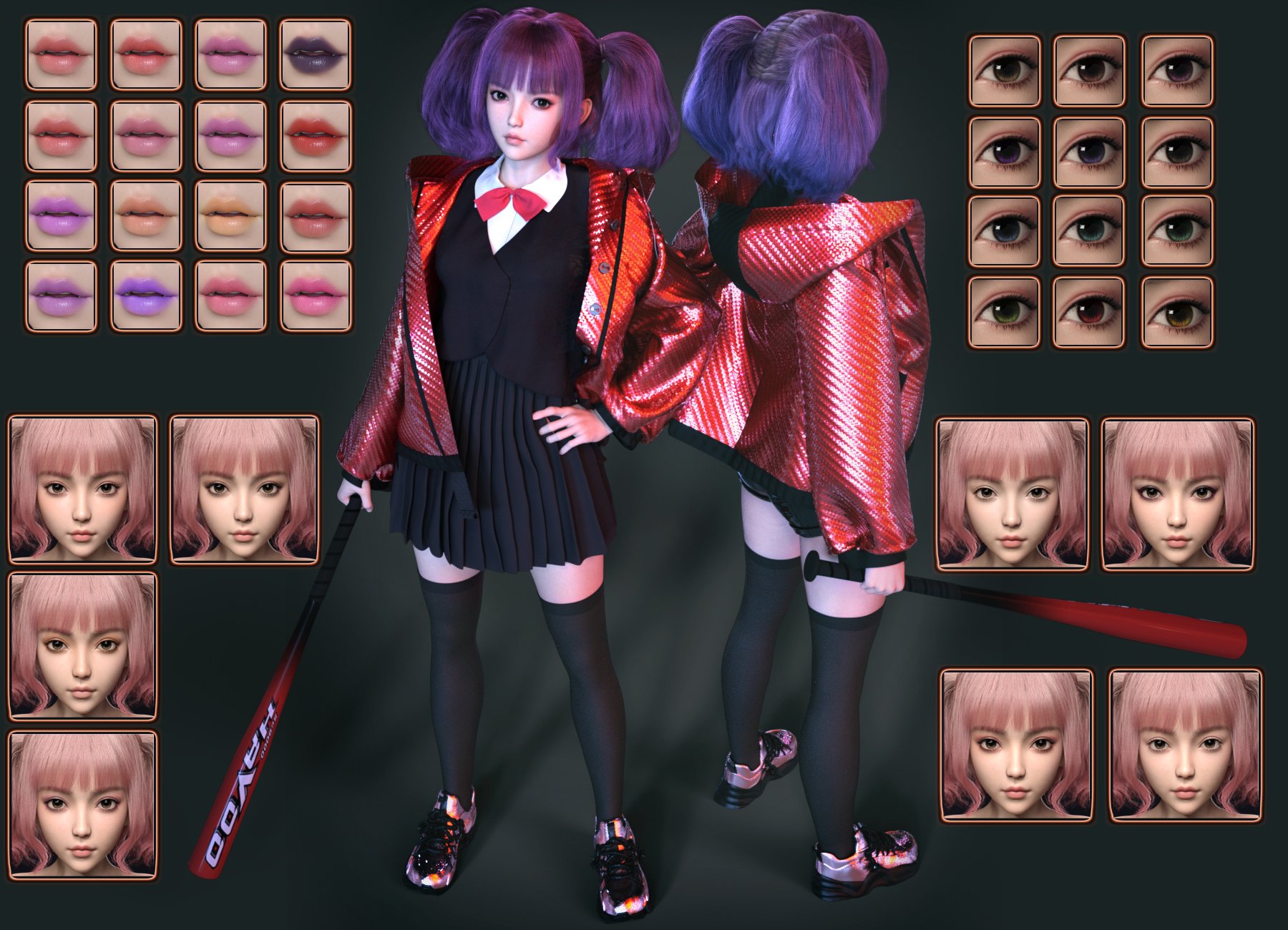
Now Look at the lips, 2nd Row, 4th Column, and there is the lip stick
Now Look at the Eyes, 3rd Row,3rth Column (or could even be 4th row, 3rd Column depending on the lighting used in the scene) and The Eyes are there (100% Certain is one of those two)
She also has the correct lip shape (or very close pre-additional head morph), though it is clear the Chin and Nose shape do not match 100% which means that it is likely blended with another character head, or just morphed with Chin and Nose morphs. Either way, if you have the right packages you should be able to make Hina Look just like that. (or VERY close)
Obviously the Brows do not match at all, but with G9's there are so many availabe variations of Fiber (or Card) Brows, that using them to ID a character is almost useless.
**Edit**(forgot to mention this) The Eyeshadow doesn't match up either. But I would say it is likely one of Hina's With an Eyeliner LIE applied, which could be from a number different PA's that have a "Cat Swoosh" type LIE.
****I take it back, No LIE is needed I loaded her up and that eye shadow is Definitely in there, Hina MU 01,02 or 04, would do it... though MU 05 has the best "Cat Shoosh" so it is probably that one(Need to Magnify your promo and zoom in to see the "Shoosh" better)****
IDing Characters that literally have NO blemishes is also difficult, but I do Feel that this is Hina, with about 99% certaintly. (espcially after finiding the eyeshadow in her Mats)
Also if you like this type of Porcelain skin, I'd have a look at some of These Characters By Noki Saki | Daz 3D .
Thank you so much for your thoughtful reply!!! Your recommendation is excellent as well!
LOOKING FOR PRODUCTgrafix225 said:
Hi all. I went into Daz a couple of weeks ago and one of the products showed a male face. Half of it was intact but the other half was a skeleton, where you could see all the skeletel features of the face. I was wondering if anyone knows which product this is since I can't seem to find it in the store. Much appreciated!! Thank you!!
Split vertically or horizontally? There have been a couple where the top half of the face was a skull, though it's usually some kind of painted-skin effect or a helmet add-on, but split vertically? ONly thing I can think of that's even remotely close is some of the promos I've seen for Shape SHifter, which IS technically capaple of creating that effect if you already have a skull-head morph like Grimmskull.
There's Always Another Sale Thread -- Discussions Only Pt 6jmucchiello said:
joanna said:
For those who passed on the MB Daniella bundle because of age-related concerns (and are willing to pay more in a potential Golden Ticket catch-up), there was an update to the character part of it:
2026-09-21 updated product to remove age-inappropriate materials and morph shapign presetWhere did the bold text come from? It looks like something you pasted from somewhere else. I'm curious where.
Product's Readme page. Clicking (i) icon in DIM brings you to the product's Readme page on Daz. When there's an update, sometimes they list changes with the date (sometimes they don't).
Today, two other products (Lights Manager and Scene Optimizer got updates, and they were for Daz 6 compatibility). I'm guessing there's more, I just don't own them.There's Always Another Sale Thread -- Discussions Only Pt 6jmucchiello said:
y3kman said:
Honestly, what's the point of removing the DUFs from the MB Daniella character when it only acts like a shortcut to the nipple morph?
I checked some Magic Brush teen characters and it's inconsistent. Either you're missing the navel, nipple or both DUFs.It's not like you can't apply nipples and navels from the basic anatomy.If the shop pulled textures or gen morphs from the product I'd assume it's more for liability reasons. If end users add their own, that's on the end users, but if they're officially sold together it's probably hazier. Magic Brush has some cool characters and great clothing designs, but many dubiously youthful faces - curators probably made the right call to err on the side of caution. Though the bundled clothing has reveal morphs so whoknows.
Edits: when there's a double quote, I can't break out of the quote formatting for the life of me, haha.
There's Always Another Sale Thread -- Discussions Only Pt 6barbult said:
jmucchiello said:
barbult said:
I chose to just not install the DIM update after reading the note about feature removal in the readme.
Where was this note? I didn't know there was a place to read notes. I saw it in DIM and downloaded it without thinking it might remove something. (Not that I care about stock nipple apply/remove dufs.)
The note is in the product's online readme file. You can access it easily from DIM by clicking on the little circled i on the product update line in DIM. Daz often doesn't bother to update the readme to show what changed. In this case, they did.I thought you were talking about some announcement source. I didn't even think to look at the readme when I saw there was an update.
It's not like you can't apply nipples and navels from the basic anatomy.y3kman said:
Honestly, what's the point of removing the DUFs from the MB Daniella character when it only acts like a shortcut to the nipple morph?
I checked some Magic Brush teen characters and it's inconsistent. Either you're missing the navel, nipple or both DUFs.There's Always Another Sale Thread -- Discussions Only Pt 6Honestly, what's the point of removing the DUFs from the MB Daniella character when it only acts like a shortcut to the nipple morph?
I checked some Magic Brush teen characters and it's inconsistent. Either you're missing the navel, nipple or both DUFs.There's Always Another Sale Thread -- Discussions Only Pt 6joanna said:
For those who passed on the MB Daniella bundle because of age-related concerns (and are willing to pay more in a potential Golden Ticket catch-up), there was an update to the character part of it:
2026-09-21 updated product to remove age-inappropriate materials and morph shapign presetWhere did the bold text come from? It looks like something you pasted from somewhere else. I'm curious where.
Issue with HD Essentials Micro Bend for Genesis 9The ad says:"This set includes a series of automatic corrective morphs that refine joint bending and articulation, ensuring smoother transitions and more lifelike deformations."
So, can anyone tell me where the automatic corrective controller is hiding?
Otherwise, I would be forced to use the library's hundreds of minute, morphs for every joint bend, which can be extremely tedious to scour the library for the suitable morph, then click on each seperate item to match up with my pose.
I say would be, if I wanted to bother with that tediousness instead of actually getting to enjoy creating...
Any help would be very much appreciated, thanks in advance.
Daz 3D is part of

Connect
DAZ Productions, Inc.
7533 S Center View Ct #4664
West Jordan, UT 84084Licensing Agreement | Terms of Service | Privacy Policy | EULA
© 2026 Daz Productions Inc. All Rights Reserved.












