-
EZFinder - Advanced Content Manager for Daz Studio [Commercial]
Hi. Sounds absolutely perfect, makes a great program even better. I look forward to the update and will let you know if it works ok with Poser. Thanks. Rob.EZ3DTV said:skybluerob said:
EZ3DTV said:
Hi Rob, since August 31, every drag out of the EZFinder gallery (update coming soon) carries a standard Windows file drop, the same format Explorer uses, alongside its own internal data. That is how items drop onto the Daz Studio viewport. Any application that accepts files dragged from Explorer will accept the same drag from EZFinder. Poser has accepted dropped scene and library files onto its window for years, so the gesture should just work.
EZFinder also already indexes the Poser formats. The scanner's extension list includes .cr2, .pp2, .pz2, .hr2, .fc2, .hd2, .lt2, .cm2, .mc6, .mt5, .pz3, and .obj, because Daz libraries carry Poser runtimes. So a Poser user's content would show up in the gallery with thumbnails, and dragging a .cr2 or .pz3 to Poser would hand Poser the file path.
Two caveats that only a test settles: (I do not currently have Poser installed.)
- What Poser does with the drop. Poser treats a dropped .pz3 as a scene to open and a dropped .cr2 or .pp2 as a library item to load. Exactly which extensions it accepts on drop, and whether it merges or replaces, is Poser's rule, not ours, and it has varied between versions.
- Poser has to be able to find the referenced textures and geometry through its own runtime search, which it normally does if the file lives inside a runtime it knows.EZ3DTV
Thanks for the info. Do you mean that I should be able to drag it directlty from Easy Finder into the Poser window in the current version. I tried and it just gives a no cursor (circle with a line through it). That's why I was going to open the content folder and drag it from trhere directly into Poser.
I also have Kens DUF prop, morph and pose converter scripts installed, so I can just drag DUF files into Poser as well and it converts them on the fly into Poser objects.
To be able to drag directly from Easy Finder would be even more of a time saver.Rob.
Hi Rob. Not in the version you have yet, which is why you get the no-entry cursor. Right now EZFinder's drag speaks only its own internal format, which Daz Studio's own tools and the Shader Isolator understand but Poser can't read, so opening the content folder and dragging from there is the right workaround for the moment.
The update that's about to go out changes that. The drag also carries a standard Windows file drop, the same thing Explorer sends, so an item will drop straight onto the Poser window exactly as it does from a folder, and with Ken's converter scripts the DUF should convert on the fly the same way. It's the same change that lets items drop directly onto the Daz Studio viewport.
I haven't tested against Poser myself, only Daz Studio, so once you have the update, tell me how it behaves and I'll chase anything it doesn't like. Dragging straight from EZFinder into Poser is exactly the kind of time saver it's for.
EZ3DTV
There's Always Another Sale Thread -- Discussions Only Pt 6donniekeidic said:
frankthetank is right though, there is no definitive way to browse all the male clothing for G9 the way there is for G8, G3, G2. Thats a pretty big deal for me because lots of times I just want to browse all the male content to get ideas. Also with your examples you're just seeing a subset of items that happen to have the words male suit, or male pants, etc. but you have no way to know whether that search is even picking up all the relevant content for your searches because maybe the PA didn't call them pants, maybe he called them slacks, jeans, loungewear, corduroys, sweats, etc. Maybe he didn't even use the term male, but instead used the term masculine or mens etc.
I was posting about counts, too. Search on the Daz store is awful. Be nice if they added a user maintained tagging system. We have the store perfectly searchable in a week or two.
EZFinder - Advanced Content Manager for Daz Studio [Commercial]skybluerob said:
EZ3DTV said:
Hi Rob, since August 31, every drag out of the EZFinder gallery (update coming soon) carries a standard Windows file drop, the same format Explorer uses, alongside its own internal data. That is how items drop onto the Daz Studio viewport. Any application that accepts files dragged from Explorer will accept the same drag from EZFinder. Poser has accepted dropped scene and library files onto its window for years, so the gesture should just work.
EZFinder also already indexes the Poser formats. The scanner's extension list includes .cr2, .pp2, .pz2, .hr2, .fc2, .hd2, .lt2, .cm2, .mc6, .mt5, .pz3, and .obj, because Daz libraries carry Poser runtimes. So a Poser user's content would show up in the gallery with thumbnails, and dragging a .cr2 or .pz3 to Poser would hand Poser the file path.
Two caveats that only a test settles: (I do not currently have Poser installed.)
- What Poser does with the drop. Poser treats a dropped .pz3 as a scene to open and a dropped .cr2 or .pp2 as a library item to load. Exactly which extensions it accepts on drop, and whether it merges or replaces, is Poser's rule, not ours, and it has varied between versions.
- Poser has to be able to find the referenced textures and geometry through its own runtime search, which it normally does if the file lives inside a runtime it knows.EZ3DTV
Thanks for the info. Do you mean that I should be able to drag it directlty from Easy Finder into the Poser window in the current version. I tried and it just gives a no cursor (circle with a line through it). That's why I was going to open the content folder and drag it from trhere directly into Poser.
I also have Kens DUF prop, morph and pose converter scripts installed, so I can just drag DUF files into Poser as well and it converts them on the fly into Poser objects.
To be able to drag directly from Easy Finder would be even more of a time saver.Rob.
Hi Rob. Not in the version you have yet, which is why you get the no-entry cursor. Right now EZFinder's drag speaks only its own internal format, which Daz Studio's own tools and the Shader Isolator understand but Poser can't read, so opening the content folder and dragging from there is the right workaround for the moment.
The update that's about to go out changes that. The drag also carries a standard Windows file drop, the same thing Explorer sends, so an item will drop straight onto the Poser window exactly as it does from a folder, and with Ken's converter scripts the DUF should convert on the fly the same way. It's the same change that lets items drop directly onto the Daz Studio viewport.
I haven't tested against Poser myself, only Daz Studio, so once you have the update, tell me how it behaves and I'll chase anything it doesn't like. Dragging straight from EZFinder into Poser is exactly the kind of time saver it's for.
EZ3DTV
There's Always Another Sale Thread -- Discussions Only Pt 6frankthetank is right though, there is no definitive way to browse all the male clothing for G9 the way there is for G8, G3, G2. Thats a pretty big deal for me because lots of times I just want to browse all the male content to get ideas. Also with your examples you're just seeing a subset of items that happen to have the words male suit, or male pants, etc. but you have no way to know whether that search is even picking up all the relevant content for your searches because maybe the PA didn't call them pants, maybe he called them slacks, jeans, loungewear, corduroys, sweats, etc. Maybe he didn't even use the term male, but instead used the term masculine or mens etc.
EZFinder - Advanced Content Manager for Daz Studio [Commercial]EZ3DTV said:
Hi Rob, since August 31, every drag out of the EZFinder gallery (update coming soon) carries a standard Windows file drop, the same format Explorer uses, alongside its own internal data. That is how items drop onto the Daz Studio viewport. Any application that accepts files dragged from Explorer will accept the same drag from EZFinder. Poser has accepted dropped scene and library files onto its window for years, so the gesture should just work.
EZFinder also already indexes the Poser formats. The scanner's extension list includes .cr2, .pp2, .pz2, .hr2, .fc2, .hd2, .lt2, .cm2, .mc6, .mt5, .pz3, and .obj, because Daz libraries carry Poser runtimes. So a Poser user's content would show up in the gallery with thumbnails, and dragging a .cr2 or .pz3 to Poser would hand Poser the file path.
Two caveats that only a test settles: (I do not currently have Poser installed.)
- What Poser does with the drop. Poser treats a dropped .pz3 as a scene to open and a dropped .cr2 or .pp2 as a library item to load. Exactly which extensions it accepts on drop, and whether it merges or replaces, is Poser's rule, not ours, and it has varied between versions.
- Poser has to be able to find the referenced textures and geometry through its own runtime search, which it normally does if the file lives inside a runtime it knows.EZ3DTV
Thanks for the info. Do you mean that I should be able to drag it directlty from Easy Finder into the Poser window in the current version. I tried and it just gives a no cursor (circle with a line through it). That's why I was going to open the content folder and drag it from trhere directly into Poser.
I also have Kens DUF prop, morph and pose converter scripts installed, so I can just drag DUF files into Poser as well and it converts them on the fly into Poser objects.
To be able to drag directly from Easy Finder would be even more of a time saver.Rob.
There's Always Another Sale Thread -- Discussions Only Pt 6FrankTheTank said:
I imagine selling clothing for G9 for males was made especially more difficult because someone couldn't even search to find the products easily unless you knew to search for a specific vendor, there is not even a way to search for G9 masculine clothes. There's just a single checkbox for G9. For G8 at least you can search for G8M, and see all the male clothes easily, and the few good PAs that catered to that niche probably did ok because of that. Then G9 comes around and its like why even bother. I'm not surprised a PA would leave after that. No one can even find the male clothes without scrolling forever unless they know exactly what they are looking for. And I don't think Daz has ever once even had a special male clothing day, not even on fathers day. Its really just ladies first every day.
Type "male suit" into the store search bar and limit it to G9 and you get 46 hits. 4 of them are decidedly feminine. The rest are male clothing.
Type "male pants" and you get 45 hits. 2 of them are feminine, only a handful are the same as the male suit search.
"Male shirt" is 61 hits and 3 are feminine.
"Male outfit" is 193 for G9. 8-10 aren't particularly masculine.
They really aren't hard to find. There just aren't a lot of them.
Switching to G8/8.1, the numbers in each category are 2-4 times greater.
There's Always Another Sale Thread -- Discussions Only Pt 6I imagine selling clothing for G9 for males was made especially more difficult because someone couldn't even search to find the products easily unless you knew to search for a specific vendor, there is not even a way to search for G9 masculine clothes. There's just a single checkbox for G9. For G8 at least you can search for G8M, and see all the male clothes easily, and the few good PAs that catered to that niche probably did ok because of that. Then G9 comes around and its like why even bother. I'm not surprised a PA would leave after that. No one can even find the male clothes without scrolling forever unless they know exactly what they are looking for. And I don't think Daz has ever once even had a special male clothing day, not even on fathers day. Its really just ladies first every day.
Nice touch -- AI use or not, making a choicejmucchiello said:
Frankly, the issue will become important based on copyright law. Currently, AI generated art is not protected by copyright law. (in the US at a minimum) And if someone loses a lawsuit over that, it will be interesting.
Have looked into this in a few places. General consensus is that if the work is transformative (not purely created by AI) then it's defensible in most countries. The bar for transformative, especially with AI as the original author, is incredibly low. Especially since most areas need a plaintiff.
On AI tools being confused for AI: AI detectors currently are using patterns in pixels or words to identify AI generated works, or using reverse image search within their own set (I have my own concerns with that honestly). If you're using the remove tool in Photoshop (which can use AI) it doesn't currently insert this pattern AFAIK. That does leave it to the AI developer to waterwork their work, and it can absolutely be overcome. Even though the signal is quite resilient by signal standards, it's not that resilient if a user is dedicated to removing the waterwark. It then becomes the task of "proving" your work either by showing the creative process which a lot of freelancer places are now doing. I personally don't love it. I don't like showing my creative processes. A lot of what I do, people wouldn't hire me because of how much time something takes me... they hire me because I've learned how to do it all. Oh well.
In game devleopment and other areas the line is kind of falling into: if the AI use is visible to the user, and is replacing talent you should disclose it. For example, generated text or images. If the AI is automation, tool use, or back end then no one cares.
Genesis 10Timbales said:
You quoted someone making a comment about male G9 bodies and female characters in what seems like a rebuttal? Am I missing something?
Yes, because the fact the example is female has no bearing on my point.
Differences in G8 and G9's expressions aside, this is a clone of G8F I set up on G9, and I made it close enough as to make the two figures very difficult to tell apart. Not just in shape, but in how they bend as well.
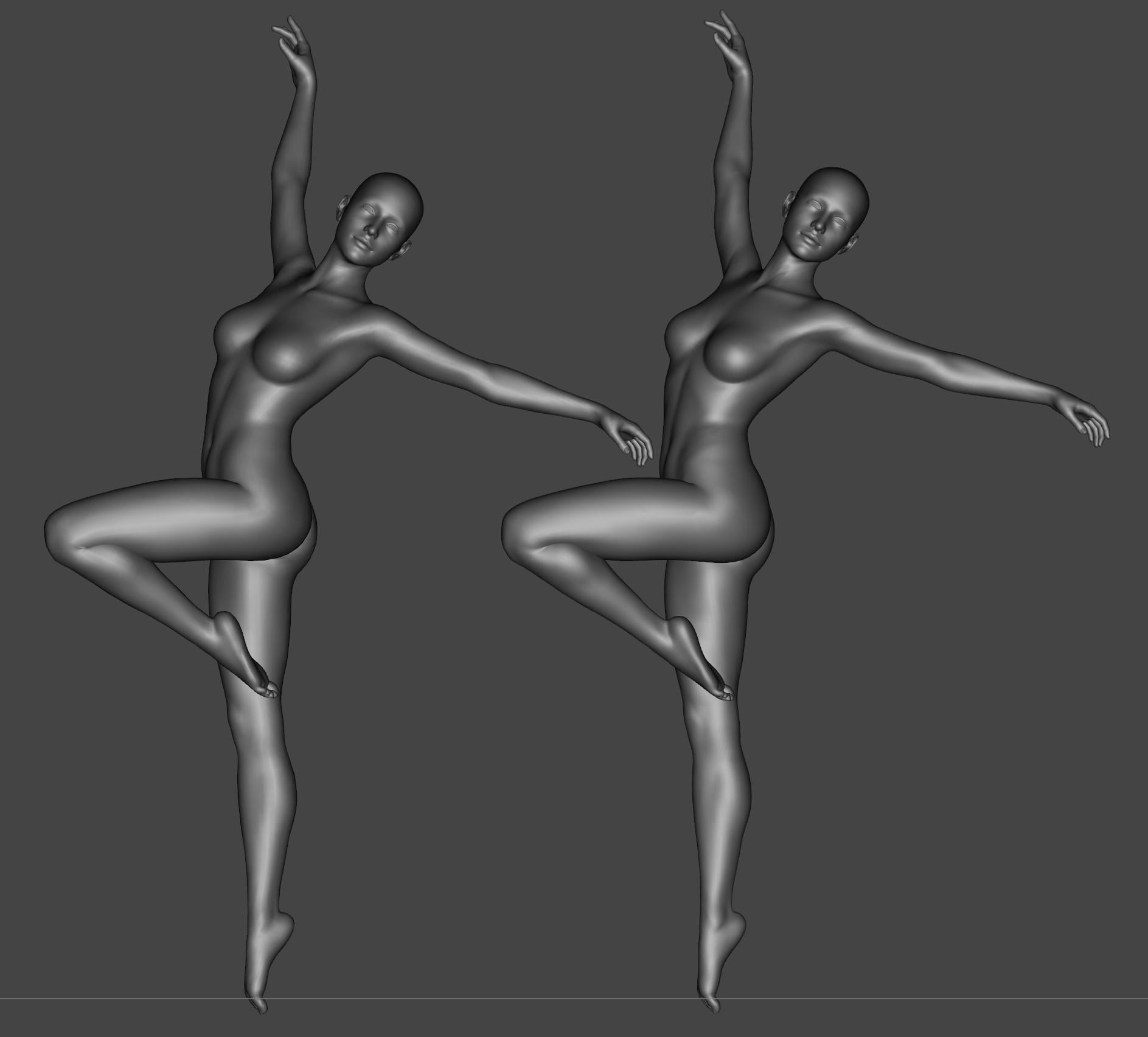
People can try and play spot the difference with a magnifying glass if they really want, but it does still show that the G9 mesh can be shaped to a considerable degree of precision. And I assure you, there is nothing specific about the G8F vs G8M figures that means this couldn't be replicated with G8M. (Indeed, it is on my to-do list). A unified mesh is absolutely capable of being the same shapes as G8 was, because here it is being G8.
As it happens, G3 and G8 are the exception in the Daz line-up; Despite many of the other generations nominally having two figure bases, they do actually have exactly the same topology. You can for example load shapes directly between M4 and V4, or G2M and G2F.
There's arguments for changing the way that a unisex base was handled, but going back to split figures with their own topology is not actually necessary to address the issues people are bringing up.
(And the proposal of a three-way split figure would just be its own massive can of problems).
csaa said:
Back in those days the Forum was abuzz with positive energy. Lots of people were sharing their renders; groups actively hosted thematic contests; people discussed tips and tutorials. There was a community vibe on the upswing. That's how I remembered things.
Yeah, I remember product threads being full of people enthusiastically posting renders with the product, rather than complaining about the price or whatever.
There are a few threads that manage some enthusiasm, but they're quite thin on the ground.
Issue with HD Essentials Micro Bend for Genesis 9Elor said:
I don't have it, and the name of the file may not help you all that much, but according to the readme, this file is a likely candidate:
/data/Daz 3D/Genesis 9/Base/Morphs/Luthbellina/Micro Bend/CTRL_MicroBend.dsf
If you open that file (easiest way would be to download the package from daz3D.com, then extract it and search for the file), look for the name field and it should give you which name to search for in the list of G9 parameters.
Usually, Daz doesn't compress dsf or duf files, so you should be able to open it without any text editor capable of opening basic text files.
Thanks a lot for the info, my mistake is that I was looking for that in the parameter settings, so thanks for pointing this out, as it will make future searches much easier!
luthbellina said:
Hi,
The automatic corrective morphs are hidden properties and activate automatically based on the joint bend angle, so you do not need to apply them manually.
If you'd like to see or adjust them, you can find them in the Hidden Properties section. Alternatively, the active corrective morphs will appear under Currently Used, which is often the easiest way to locate them.
The visible morphs included in the product are optional enhancements designed to accentuate specific details and refine the deformation further when needed. You can also access many of these adjustments through the included Properties Presets, which provide a quicker workflow.
The set also includes a MicroBend control under Actor > HD Essentials, which allows you to disable all auto-apply corrective morphs at once.
I hope this helps clarify things. Thanks!
Indeed it's of magnificent help for me, especially since I'm on a crap laptop as I have my character's mesh resolution at the base level so I did not see the morphs themselves!
The microbend control location is key as I have a multitude of correction and enhancement morphs, andas such I have to know which ones to switch off, or on depending on the character, that, and it allows me to make my own corrective morphs, FOR the corrective morphs! :^D
Thanks a lot for your response and info, it is very much appreciated!
EDIT: It looks like the morphs are not firing off properly, as I checked and there are no morphs being activated, so it must be a conflict with some other of my corrective morphs, I'll have to uninstall them to find out which one is the culprit...
EDIT:I got them working, I apparently did not have the full G9 essentials installed! :^P
New Year, New Sales Thread: Report Issues Here 4 "Reporting Only"kpr said:
D+ Discounts (+ for having both) shown on this page: https://www.daz3d.com/daz-plus#discounted-member-savings
(as per @jmucchiello is the 'Members' forum)
Ah, OK.
New Year, New Sales Thread: Report Issues Here 4 "Reporting Only"D+ Discounts (+ for having both) shown on this page: https://www.daz3d.com/daz-plus#discounted-member-savings
(as per @jmucchiello is the 'Members' forum)
Genesis 10SnowSultan said:
Back in those days the Forum was abuzz with positive energy. Lots of people were sharing their renders; groups actively hosted thematic contests; people discussed tips and tutorials. There was a community vibe on the upswing. That's how I remembered things.
These days ... I don't doubt that the larger community is just as active, perhaps even more so. But my sense is that all of that positive energy has migrated elsewhere. What we're left here in the Forum, particularly the Commons, is scholeric and cantankerous. Sure there's always been snark and sarcasm here, but the ones I see now are backed by conviction, the sort that takes a no-retreat-no-surrender, take-no-prisoners-alive ethos.
I feel like this describes the entire world right now.
Also, I've been around so long that half the stuff in the store these days look like things that people used to give away in Rendo's Free Stuff. I'm glad that we have better figures and renderers now, but the community as a whole certainly isn't as enjoyable as it was back then.
If one ignores the entire V4 Vs. Genesis, Poser Vs. DS acrimony that literally split the userbase in half and caused an exodus of then long-time vendors and users from these climes, perhaps. I became really active around that time and the things going on these days seem pretty tame compared to some of the sniping and diatribes that went on back then.
EZFinder - Advanced Content Manager for Daz Studio [Commercial]skybluerob said:
EZ3DTV said:
skybluerob said:
Hi. I'm really enjoying EZfinder, it's a great product. It does everything it says it does and works properly, apart from if I right click on an item and select "Open Source Folder" It just takes me to my desktop rather than the folder the item is installed in. Do you have any ideas why this may be happeneing and how I can fix it. It injects them into Daz Studio ok.
Thanks.Rob.
Hi Rob, thanks, glad it is working well for you.
"Open Source Folder" going to the Desktop is a known one. Windows Explorer is being handed the file path in a form it rejects, so it falls back to opening its default location. Injecting is unaffected because Daz Studio reads the same path without complaint.
It is already corrected in the next EZFinder update, which opens Explorer directly on the item's folder with the file selected. The update comes through Install Manager, and I will post here when it is available. In the meantime, the folder path shown in the item's info panel can be pasted into Explorer's address bar as a workaround.
EZ3DTV
Thanks for the prompt reply. Glad it's been fixed in the next update, being able to open the folder will mean I can drag items into the Poser window when I'm using that as well. Yes, it's a great product, very useful.
Rob.
Hi Rob, since August 31, every drag out of the EZFinder gallery (update coming soon) carries a standard Windows file drop, the same format Explorer uses, alongside its own internal data. That is how items drop onto the Daz Studio viewport. Any application that accepts files dragged from Explorer will accept the same drag from EZFinder. Poser has accepted dropped scene and library files onto its window for years, so the gesture should just work.
EZFinder also already indexes the Poser formats. The scanner's extension list includes .cr2, .pp2, .pz2, .hr2, .fc2, .hd2, .lt2, .cm2, .mc6, .mt5, .pz3, and .obj, because Daz libraries carry Poser runtimes. So a Poser user's content would show up in the gallery with thumbnails, and dragging a .cr2 or .pz3 to Poser would hand Poser the file path.
Two caveats that only a test settles: (I do not currently have Poser installed.)
- What Poser does with the drop. Poser treats a dropped .pz3 as a scene to open and a dropped .cr2 or .pp2 as a library item to load. Exactly which extensions it accepts on drop, and whether it merges or replaces, is Poser's rule, not ours, and it has varied between versions.
- Poser has to be able to find the referenced textures and geometry through its own runtime search, which it normally does if the file lives inside a runtime it knows.EZ3DTV
Issue with HD Essentials Micro Bend for Genesis 9I don't have it, and the name of the file may not help you all that much, but according to the readme, this file is a likely candidate:
/data/Daz 3D/Genesis 9/Base/Morphs/Luthbellina/Micro Bend/CTRL_MicroBend.dsf
If you open that file (easiest way would be to download the package from daz3D.com, then extract it and search for the file), look for the name field and it should give you which name to search for in the list of G9 parameters.
Usually, Daz doesn't compress dsf or duf files, so you should be able to open it without any text editor capable of opening basic text files.
Genesis 10Back in those days the Forum was abuzz with positive energy. Lots of people were sharing their renders; groups actively hosted thematic contests; people discussed tips and tutorials. There was a community vibe on the upswing. That's how I remembered things.
These days ... I don't doubt that the larger community is just as active, perhaps even more so. But my sense is that all of that positive energy has migrated elsewhere. What we're left here in the Forum, particularly the Commons, is scholeric and cantankerous. Sure there's always been snark and sarcasm here, but the ones I see now are backed by conviction, the sort that takes a no-retreat-no-surrender, take-no-prisoners-alive ethos.
I feel like this describes the entire world right now.
Also, I've been around so long that half the stuff in the store these days look like things that people used to give away in Rendo's Free Stuff. I'm glad that we have better figures and renderers now, but the community as a whole certainly isn't as enjoyable as it was back then.
Genesis 10Gordig said:
SnowSultan said:
Why do you assume G9 is hated?
Because a handful of loud, chronic complainers can easily be mistaken for a consensus.
Just wanted to let you know that your wry remark above didn't go unnoticed. I wholeheartedly agree.
I joined Daz before the pandemic and over the years I've seen the highs and lows here in the Daz Forum. Yes, I've been around a while, not as long as the veterans. My post tally is relatively low because I've kept the principle that Silence is Golden. Or at least I try.
Back in those days the Forum was abuzz with positive energy. Lots of people were sharing their renders; groups actively hosted thematic contests; people discussed tips and tutorials. There was a community vibe on the upswing. That's how I remembered things.
These days ... I don't doubt that the larger community is just as active, perhaps even more so. But my sense is that all of that positive energy has migrated elsewhere. What we're left here in the Forum, particularly the Commons, is scholeric and cantankerous. Sure there's always been snark and sarcasm here, but the ones I see now are backed by conviction, the sort that takes a no-retreat-no-surrender, take-no-prisoners-alive ethos.
Before I picked up Daz I wasn't at all creative in the 3D arts. Photography was my hobby. What I've learned is how negative energy can be such a big drag on creativity. It kills curiosity. It dampens collaboration -- save for peak moments of frenzy when the curmedgeons swarm and "pile on". It enforces a blinkered world view that excludes any possibility that one could be wrong, that there are alternate POVs. At the end of the day, it's pretty exhausting.
I haven't given up hope altogether. There are still parts of the larger Daz Forum that I really enjoy, not just for the knowledge-sharing but also for the excitement and creativity people bring. It's also heartening to see folks I respect, who've stayed off of the Commons, starting to chime in. Going forward, we just need more positive voices to drown out the negative ones.
Cheers!
Is there a way to convert genesis 8 textures to genesis 9?kaincypher84 said:
I woke up today to work on this for a game project I am making in Unity and conveniently had looked it up to see what solutions there were and saw this thread and can't believe someone posted same day about it when I was planning on trying to find a quick solution.
I used an old template, and lining it up perfectly wasn't right...
So, I decided to start from scratch, so anyone can do it in a matter of minutes.
This took about 5 minutes from opening Daz to taking the video showing the results.
I used Blender 2.79, I can't get it to bake properly on newer Blenders.
Daz steps:
1. Load Genesis 9 dev load into scene, set to base, change to show hidden in parameter preferences, search Genesis 8 Female, dial it up to 100
2. Load Genesis 8 Female, set to base
3. Move left thigh -7 and right thigh 7 on side to side on Genesis 9 to line the thighs
Your Genesis 9 will now match your Genesis 8 perfectly and you are done with Daz after export.
Export your two Genesis 8 and Genesis 9 FBX together to Blender with Collect textures
Blender steps:
1. Import FBX with pre/post rotation set to off
2. Select Genesis9.Shape, go to UV editor, deselect all, under materials click Select so it is the only thing selected in blender, you should see the UV editor is blank with the arms to the right of the UV map.
3. Press A in the UV editor and drag the arms, body, head, or legs (whatever currently you need) with G and hold CTRL to snap it into place
4. Click NEW texture in the uv/editor still, set a texture as 4096x4096 name it G9_Arms. "Save as" and save the image <- This is very important! (or you will get circular dependency errors and your texture will not complete)
5. Repeat this for the legs, head, torso.
6. You should have template files now on your HD called G9_Arms, G9_Head, G9_Body, G9_Legs
7. Check your Genesis 8 has materials assigned, you DO NOT NEED UV EDITOR for the Genesis 8.
8. Shift Click the Genesis 8 first and then the Genesis 9 as your active object.
9. Go to the Render settings (The camera icon). Make sure you are in Cycles or you will not see the bake settings. Go to the bake settings. Change it to "Texture" (and not Full Render) Click Bake.
You now have any Genesis 8 texture on Genesis 9 and as long as you can line up any generation this process is the same.
Here is a video of the texture baking from a Genesis 8 to a Genesis 9. I am working on scripts to automate this process in Blender since right now swapping textures to make roughness, specular, normal maps is a lot of clicking and re-saving the template files etc.
NSFW for nudity texture:https://streamable.com/jrmcdf
I'll post more screenshots or a video of the whole process if needed.Hi, I can't seem to get it to work. Could you upload a video showing the entire process, please?
cowdog said:
kaincypher84 said:
I used Blender 2.79, I can't get it to bake properly on newer Blenders.
I managed to get this working in Blender 4.4.3, which,I believe, is the latest version (as of this post). Also, I exported/imported Wavefront (.obj) meshes into Blender.
I did manage to bake the skin textures, i.e. Head, Body, Arms and Legs. Basic workflow involved setting up the UV maps under UV Editing, then moving to Shading and creating a new image texture for G9. After that, baking the selected G8 textures into the newly created G9 texture image. There were a lot of steps in this process, and each texture image variant required creating the diffuse, bump, normal, specular and SSS maps.
In a nutshell, it was a tedious process.
crosswind said:
I could also get it done with Blender 4.4.0 though I usually do it with FaceForm Wrap, which is more accurate. With Blender, I recommend using Simple Bake which can make your conversion process faster.
I also tried newer versions of Blender, but I still couldn't get it to work. How did you guys do it?
Nvidia shelves 2026 new card releasesnote for me copied from Google AI
To switch from BF16 to FP16 in pre-compiled applications without touching code, you will primarily rely on environment variables, command-line arguments (flags), or configuration files.
Because you cannot change the underlying code, your success depends entirely on whether the app's developers built in a toggle for precision formats.
Here is how you can check for and apply these changes across different types of applications:
1. Command-Line Arguments (Flags)
Many pre-compiled AI tools, loaders, and command-line apps accept flags when you launch them.
- How to use them: Open your terminal or command prompt, type the app executable name, and append the flag.
- Common examples:
- --precision fp16
- --dtype fp16
- --float16
- --no-bf16
2. Environment Variables
Some frameworks (like PyTorch or Hugging Face utilities running inside compiled packages) check your system's environment variables before launching.
- Windows (Command Prompt): Run set ACCELERATE_MIXED_PRECISION=fp16 before running your app.
- Windows (PowerShell): Run $env:ACCELERATE_MIXED_PRECISION="fp16" before running your app.
- Linux / macOS: Run export ACCELERATE_MIXED_PRECISION=fp16 before running your app.
3. Configuration Files (.json, .yaml, .ini, .toml)
Look inside the application's installation folder for configuration files.
- Search for files named config.json, settings.yaml, or ui_config.json.
- Open them with a standard text editor (like Notepad).
- Look for lines like "precision": "bf16" or "dtype": "bfloat16" and manually change them to "fp16".
4. Graphic User Interfaces (GUIs)
If the app has a visual interface (like WebUIs for Stable Diffusion or LLM runners):
- Look for a Settings, Advanced, or Generation tab.
- Look for dropdown menus labeled Dtype, Computation Precision, or Mixed Precision.
- Switch the selection from BF16 to FP16.
⚠️ Important Compatibility Warning
If you are changing this because your hardware does not support BF16 (e.g., older NVIDIA GTX 10-series or 16-series cards), be aware that some older GPUs suffer from a "black image" or "NaN" error when running certain tasks in FP16. If your app crashes or produces corrupted outputs after switching to FP16, you may need to drop down to full FP32 precision instead.
Nvidia shelves 2026 new card releasesMy question is why doesn't DAZ 3D look into recoding DS to use other video cards then? I realize that iRAY is NVIDIA but man I guess DAZ would once again have to go out and find a replacement for that and then there's that learning curve all over again but there ARE options out there. Poser would work with just about any modern card but not DS without it falling back to CPU rendering, which we all know is like slogging through mud. Here's Claude AI once again addressing things for my concerns about my own video card:
"The budget worry is a real concern, and after the RAM saga I'd be gun-shy too. Here's the practical side, which is less grim than it might feel.Your card is on the safe side of the divide. A 40-series card like your 4060 Ti runs Iray fine in DS 4.x, and GPUs fail far less often than RAM does. Nothing about this news puts it at risk.
If it ever did die, you'd have a ladder of fallbacks, cheapest first:
- Warranty: check your card's purchase date and the manufacturer's coverage. Many brands give around three years, but confirm yours, and see whether the purchase had an extended warranty.
- Integrated graphics: your i7-13700K (the "K", not "KF") has built-in graphics, so the PC would still boot and run DAZ Studio. Iray would fall back to CPU rendering, which is slow, but you could keep working, test, and do lighter renders while you sort out a replacement. That's a real safety net.
- A used card, not a new one: a used RTX 30-series card with plenty of VRAM works fine in DS 4.x. Forum regulars have long recommended the RTX 3060 12GB for Iray on a budget. I haven't checked current used prices, and the shortage has probably pushed them up, so verify before counting on that.
- Stretch what you have: the Scene Optimizer and lower-res textures on background items help scenes fit in less VRAM, so a smaller card goes further.
- Blender as the escape hatch: it renders on AMD and Intel cards too, which broadens your options if Nvidia pricing is out of reach.
To catch problems early, keep an eye on GPU temperatures under render load in HWiNFO64. Sustained high temps are the early warning worth watching for.
If you want, I can look up current used-market pricing on 12GB-class Nvidia cards so you know what a worst-case replacement would actually cost."
Daz 3D is part of

Connect
DAZ Productions, Inc.
7533 S Center View Ct #4664
West Jordan, UT 84084Licensing Agreement | Terms of Service | Privacy Policy | EULA
© 2026 Daz Productions Inc. All Rights Reserved.