-
DELETEMaybe I need to render some erotica. Would that be thrilling?Maybe I need to render some erotica. Would that be thrilling?
LOL, if you're not Ace, I guess.
Pinup work is always fun for me. It's a shame one cannot share it here, although I don't disagree with the reasons.
Maybe I need to render some erotica. Would that be thrilling?You don't? Wait... what else is there to render? o.O
Actually, almost all of my work is Pinup/Erotica and the thrill is gone for now. Now of someone came out with a new dForce Bettie Page style hair with options (please Biscuits?) and someone maybe came out with some 20s era lingere and/or clothing with undress morphs, the thrill woudl be back in a big way and I would start working on my black and white images again. Unfortunately 99% of my work can not be shared here.
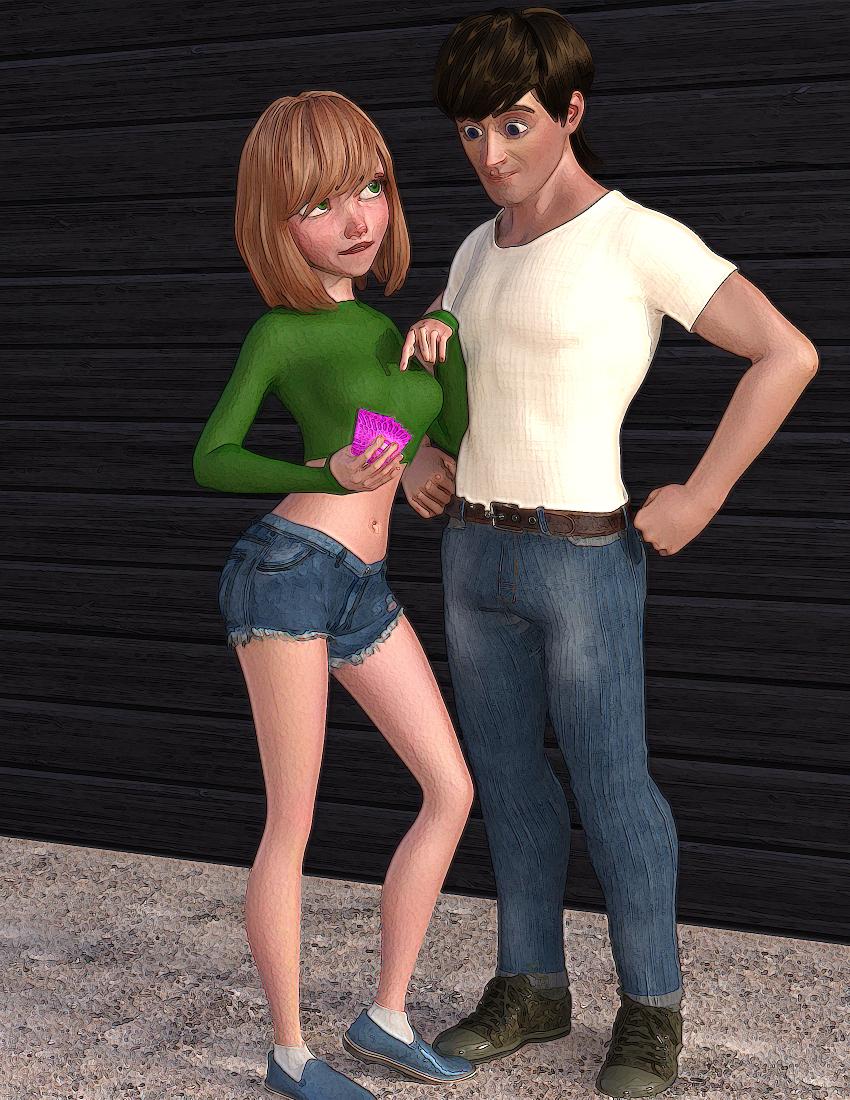
JoeQuick appreciation - simply the best.Trying to impress the new transfer student. Joe's Toon Princess mixed with a little 3DU Paige, posing with a mix of Joe's Toon Dad and Toon Hero.
 [Released] Character Converter from Genesis 2 Female to Genesis 8 Female [Commercial]
Trying out the tool with Paige: https://www.daz3d.com/paige and just can't seem to get the eyes become anything I would consider even close to circular. Tried 2020 several times and got probably the best result, attached, with 2019 and really low tolerance. Ideas? I
've just been removing "sc_paige/RSG2FPaige" from the morphs, am I missing a file and staring at the same conversion with imagined changes? :D
How low was the tolerance? Pushing it down to as low as it can go and not go to zero helps (for the 2019 method). The 2020 method gives the best results usually, but if you have tried it?
You need to be removing the FHM (H is for head) file to see a change (unless overwrite morphs is checked, not that I recommend that as it is so slow).
Well, I tried a bunch of settings down to 0.0005 on 2019, the one that gave the best result (posted above). I did have overwrite on, so it wasn't all in my head :D
I also understand now my confusion re: the FHM. Paige is a victoria 6 based character that has no custom body. It applies 30 % victoria 6 and then adds body morphs from the gen 2 morph pack to it. No FBM being created.
The head, otoh, applies 30 % vicky 6 and the "sc_paige" morph at 100. Sc_paige morph is not being recognized as an FHM.
The character also applies pupil and iris size morphs which are getting ported over (not sure if there are no corresponding ones or if the naming has been changed).
I was ecstatic when I discovered this, since I assumed that the eye morphs would be the culprits. Unfortunately, they weren't, the results were identical from a character preset saved without them.
Now I'm wondering it the issue is the sc_paige headmorph and the fact that it isn't getting recognized as an FHM one? Any further ideas? I did port over vicky 6, which worked just fine.
Late edit: I verified everything else ports over fine and its indeed SC_Paige, the non-FHM head morph, that causes the distortion.
There is a field in the options where you can specify the string to look for (that the morph name starts with). You could try changing that to get the script to recognize it.
Unfortunately, that didn't help, the results were identical (but thanks for pointing out what I had gloriously missed!).
FWIW, I took a stab at taking Paige to genesis 3 with genx2, and that worked fine AFTER I removed the separate eye morphs that didn't seem to have an impact on the g8 conversion (I also use sloshwerks's clone instead of the default one, but that's one of the reason I'm trying to get rid of the damn thing).
Can you post the log? I want to ensure the "head" morph was identified.
Pm'd you, as it was a mile long. Thanks for taking the time to look at this, I always feel comfortably buying your tools since I know you're going to go out of your way to help your customers.
Thank you for the kind words.

Ok, it looks like this conversion did the exact opposite of what you wanted
 . Because you had overwrite morphs ON, it removed the existing morphs, including the victoria head morph (which hopefully was fantastic). Then, it could not find the Paige morph to make it a head morph. (Unfortunately, the one debug option I seem to NOT have output is what string you input, but it should have been "Paige" I think. If you search for the string "Head Morphs", you can find the morphs it is converting, and which ones the script thinks are head morphs:
2020-07-24 14:46:33.068 Converting Morphs: FBMVictoria6Body,FHMVictoria6Head,PHMEyelashesLength,Paige
2020-07-24 14:46:33.068 DEBUG: Head Morphs:
2020-07-24 14:46:33.068 DEBUG: Other Morphs: FBMVictoria6Body,FHMVictoria6Head,PHMEyelashesLength,Paige
As you can see, Head Morphs is blank and the FHMVictoria6Head is going to use the 2019 conversion method (all the morphs in "Other Morphs" use that, only the Head Morphs are converted using the 2020 method).
My recommendation is
- Delete the morphs in data/DAZ 3D/Genesis 8/Female/Morphs under the FIRST directory for Daz Studio Formats specified in the Content Directory Manager (F2->"Content" tab->"Content Directory Manager..." button)
- Change the head morph prefix back to FHM
- UNCHECK Overwrite morphs so it won't keep reconverting morphs later
- Convert Paige
- Delete ONLY the Paige morph from data/DAZ 3D/Genesis 8/Female/Morphs
- Change the prefix to Paige
- Convert Paige. Because you have overwrite Morphs unchecked, if you check the log, you should see something like this:
-
2020-07-24 14:46:33.068 Converting Morphs: Paige
2020-07-24 14:46:33.068 DEBUG: Head Morphs: Paige
2020-07-24 14:46:33.068 DEBUG: Other Morphs:
-
That was it! I completely missed that "SC_Paige" was a dial that just pretty much applied "Paige", and couldn't imagine it worked like that... next time will be sure to compare the file sized to see which one is the morph!
Thanks again for both your help and your amazing product(s) - the attached quick render also uses v4 to g8 hair converter. :)
Awesome! I am glad you got it working. And thank you for posting the image; it looks great!
[Released] Character Converter from Genesis 2 Female to Genesis 8 Female [Commercial]Trying out the tool with Paige: https://www.daz3d.com/paige and just can't seem to get the eyes become anything I would consider even close to circular. Tried 2020 several times and got probably the best result, attached, with 2019 and really low tolerance. Ideas? I
've just been removing "sc_paige/RSG2FPaige" from the morphs, am I missing a file and staring at the same conversion with imagined changes? :D
How low was the tolerance? Pushing it down to as low as it can go and not go to zero helps (for the 2019 method). The 2020 method gives the best results usually, but if you have tried it?
You need to be removing the FHM (H is for head) file to see a change (unless overwrite morphs is checked, not that I recommend that as it is so slow).
Well, I tried a bunch of settings down to 0.0005 on 2019, the one that gave the best result (posted above). I did have overwrite on, so it wasn't all in my head :D
I also understand now my confusion re: the FHM. Paige is a victoria 6 based character that has no custom body. It applies 30 % victoria 6 and then adds body morphs from the gen 2 morph pack to it. No FBM being created.
The head, otoh, applies 30 % vicky 6 and the "sc_paige" morph at 100. Sc_paige morph is not being recognized as an FHM.
The character also applies pupil and iris size morphs which are getting ported over (not sure if there are no corresponding ones or if the naming has been changed).
I was ecstatic when I discovered this, since I assumed that the eye morphs would be the culprits. Unfortunately, they weren't, the results were identical from a character preset saved without them.
Now I'm wondering it the issue is the sc_paige headmorph and the fact that it isn't getting recognized as an FHM one? Any further ideas? I did port over vicky 6, which worked just fine.
Late edit: I verified everything else ports over fine and its indeed SC_Paige, the non-FHM head morph, that causes the distortion.
There is a field in the options where you can specify the string to look for (that the morph name starts with). You could try changing that to get the script to recognize it.
Unfortunately, that didn't help, the results were identical (but thanks for pointing out what I had gloriously missed!).
FWIW, I took a stab at taking Paige to genesis 3 with genx2, and that worked fine AFTER I removed the separate eye morphs that didn't seem to have an impact on the g8 conversion (I also use sloshwerks's clone instead of the default one, but that's one of the reason I'm trying to get rid of the damn thing).
Can you post the log? I want to ensure the "head" morph was identified.
Pm'd you, as it was a mile long. Thanks for taking the time to look at this, I always feel comfortably buying your tools since I know you're going to go out of your way to help your customers.
Thank you for the kind words.
Ok, it looks like this conversion did the exact opposite of what you wanted
. Because you had overwrite morphs ON, it removed the existing morphs, including the victoria head morph (which hopefully was fantastic). Then, it could not find the Paige morph to make it a head morph. (Unfortunately, the one debug option I seem to NOT have output is what string you input, but it should have been "Paige" I think. If you search for the string "Head Morphs", you can find the morphs it is converting, and which ones the script thinks are head morphs:2020-07-24 14:46:33.068 Converting Morphs: FBMVictoria6Body,FHMVictoria6Head,PHMEyelashesLength,Paige
2020-07-24 14:46:33.068 DEBUG: Head Morphs:
2020-07-24 14:46:33.068 DEBUG: Other Morphs: FBMVictoria6Body,FHMVictoria6Head,PHMEyelashesLength,Paige
As you can see, Head Morphs is blank and the FHMVictoria6Head is going to use the 2019 conversion method (all the morphs in "Other Morphs" use that, only the Head Morphs are converted using the 2020 method).
My recommendation is
- Delete the morphs in data/DAZ 3D/Genesis 8/Female/Morphs under the FIRST directory for Daz Studio Formats specified in the Content Directory Manager (F2->"Content" tab->"Content Directory Manager..." button)
- Change the head morph prefix back to FHM
- UNCHECK Overwrite morphs so it won't keep reconverting morphs later
- Convert Paige
- Delete ONLY the Paige morph from data/DAZ 3D/Genesis 8/Female/Morphs
- Change the prefix to Paige
- Convert Paige. Because you have overwrite Morphs unchecked, if you check the log, you should see something like this:
-
2020-07-24 14:46:33.068 Converting Morphs: Paige
2020-07-24 14:46:33.068 DEBUG: Head Morphs: Paige
2020-07-24 14:46:33.068 DEBUG: Other Morphs:
-
That was it! I completely missed that "SC_Paige" was a dial that just pretty much applied "Paige", and couldn't imagine it worked like that... next time will be sure to compare the file sized to see which one is the morph!
Thanks again for both your help and your amazing product(s) - the attached quick render also uses v4 to g8 hair converter. :)
[Released] Character Converter from Genesis 2 Female to Genesis 8 Female [Commercial]Trying out the tool with Paige: https://www.daz3d.com/paige and just can't seem to get the eyes become anything I would consider even close to circular. Tried 2020 several times and got probably the best result, attached, with 2019 and really low tolerance. Ideas? I
've just been removing "sc_paige/RSG2FPaige" from the morphs, am I missing a file and staring at the same conversion with imagined changes? :D
How low was the tolerance? Pushing it down to as low as it can go and not go to zero helps (for the 2019 method). The 2020 method gives the best results usually, but if you have tried it?
You need to be removing the FHM (H is for head) file to see a change (unless overwrite morphs is checked, not that I recommend that as it is so slow).
Well, I tried a bunch of settings down to 0.0005 on 2019, the one that gave the best result (posted above). I did have overwrite on, so it wasn't all in my head :D
I also understand now my confusion re: the FHM. Paige is a victoria 6 based character that has no custom body. It applies 30 % victoria 6 and then adds body morphs from the gen 2 morph pack to it. No FBM being created.
The head, otoh, applies 30 % vicky 6 and the "sc_paige" morph at 100. Sc_paige morph is not being recognized as an FHM.
The character also applies pupil and iris size morphs which are getting ported over (not sure if there are no corresponding ones or if the naming has been changed).
I was ecstatic when I discovered this, since I assumed that the eye morphs would be the culprits. Unfortunately, they weren't, the results were identical from a character preset saved without them.
Now I'm wondering it the issue is the sc_paige headmorph and the fact that it isn't getting recognized as an FHM one? Any further ideas? I did port over vicky 6, which worked just fine.
Late edit: I verified everything else ports over fine and its indeed SC_Paige, the non-FHM head morph, that causes the distortion.
There is a field in the options where you can specify the string to look for (that the morph name starts with). You could try changing that to get the script to recognize it.
Unfortunately, that didn't help, the results were identical (but thanks for pointing out what I had gloriously missed!).
FWIW, I took a stab at taking Paige to genesis 3 with genx2, and that worked fine AFTER I removed the separate eye morphs that didn't seem to have an impact on the g8 conversion (I also use sloshwerks's clone instead of the default one, but that's one of the reason I'm trying to get rid of the damn thing).
Can you post the log? I want to ensure the "head" morph was identified.
Pm'd you, as it was a mile long. Thanks for taking the time to look at this, I always feel comfortably buying your tools since I know you're going to go out of your way to help your customers.
Thank you for the kind words.
Ok, it looks like this conversion did the exact opposite of what you wanted
. Because you had overwrite morphs ON, it removed the existing morphs, including the victoria head morph (which hopefully was fantastic). Then, it could not find the Paige morph to make it a head morph. (Unfortunately, the one debug option I seem to NOT have output is what string you input, but it should have been "Paige" I think. If you search for the string "Head Morphs", you can find the morphs it is converting, and which ones the script thinks are head morphs:2020-07-24 14:46:33.068 Converting Morphs: FBMVictoria6Body,FHMVictoria6Head,PHMEyelashesLength,Paige
2020-07-24 14:46:33.068 DEBUG: Head Morphs:
2020-07-24 14:46:33.068 DEBUG: Other Morphs: FBMVictoria6Body,FHMVictoria6Head,PHMEyelashesLength,Paige
As you can see, Head Morphs is blank and the FHMVictoria6Head is going to use the 2019 conversion method (all the morphs in "Other Morphs" use that, only the Head Morphs are converted using the 2020 method).
My recommendation is
- Delete the morphs in data/DAZ 3D/Genesis 8/Female/Morphs under the FIRST directory for Daz Studio Formats specified in the Content Directory Manager (F2->"Content" tab->"Content Directory Manager..." button)
- Change the head morph prefix back to FHM
- UNCHECK Overwrite morphs so it won't keep reconverting morphs later
- Convert Paige
- Delete ONLY the Paige morph from data/DAZ 3D/Genesis 8/Female/Morphs
- Change the prefix to Paige
- Convert Paige. Because you have overwrite Morphs unchecked, if you check the log, you should see something like this:
-
2020-07-24 14:46:33.068 Converting Morphs: Paige
2020-07-24 14:46:33.068 DEBUG: Head Morphs: Paige
2020-07-24 14:46:33.068 DEBUG: Other Morphs:
-
[Released] Character Converter from Genesis 2 Female to Genesis 8 Female [Commercial]Trying out the tool with Paige: https://www.daz3d.com/paige and just can't seem to get the eyes become anything I would consider even close to circular. Tried 2020 several times and got probably the best result, attached, with 2019 and really low tolerance. Ideas? I
've just been removing "sc_paige/RSG2FPaige" from the morphs, am I missing a file and staring at the same conversion with imagined changes? :D
How low was the tolerance? Pushing it down to as low as it can go and not go to zero helps (for the 2019 method). The 2020 method gives the best results usually, but if you have tried it?
You need to be removing the FHM (H is for head) file to see a change (unless overwrite morphs is checked, not that I recommend that as it is so slow).
Well, I tried a bunch of settings down to 0.0005 on 2019, the one that gave the best result (posted above). I did have overwrite on, so it wasn't all in my head :D
I also understand now my confusion re: the FHM. Paige is a victoria 6 based character that has no custom body. It applies 30 % victoria 6 and then adds body morphs from the gen 2 morph pack to it. No FBM being created.
The head, otoh, applies 30 % vicky 6 and the "sc_paige" morph at 100. Sc_paige morph is not being recognized as an FHM.
The character also applies pupil and iris size morphs which are getting ported over (not sure if there are no corresponding ones or if the naming has been changed).
I was ecstatic when I discovered this, since I assumed that the eye morphs would be the culprits. Unfortunately, they weren't, the results were identical from a character preset saved without them.
Now I'm wondering it the issue is the sc_paige headmorph and the fact that it isn't getting recognized as an FHM one? Any further ideas? I did port over vicky 6, which worked just fine.
Late edit: I verified everything else ports over fine and its indeed SC_Paige, the non-FHM head morph, that causes the distortion.
There is a field in the options where you can specify the string to look for (that the morph name starts with). You could try changing that to get the script to recognize it.
Unfortunately, that didn't help, the results were identical (but thanks for pointing out what I had gloriously missed!).
FWIW, I took a stab at taking Paige to genesis 3 with genx2, and that worked fine AFTER I removed the separate eye morphs that didn't seem to have an impact on the g8 conversion (I also use sloshwerks's clone instead of the default one, but that's one of the reason I'm trying to get rid of the damn thing).
Can you post the log? I want to ensure the "head" morph was identified.
Pm'd you, as it was a mile long. Thanks for taking the time to look at this, I always feel comfortably buying your tools since I know you're going to go out of your way to help your customers.
[Released] Character Converter from Genesis 2 Female to Genesis 8 Female [Commercial]Trying out the tool with Paige: https://www.daz3d.com/paige and just can't seem to get the eyes become anything I would consider even close to circular. Tried 2020 several times and got probably the best result, attached, with 2019 and really low tolerance. Ideas? I
've just been removing "sc_paige/RSG2FPaige" from the morphs, am I missing a file and staring at the same conversion with imagined changes? :D
How low was the tolerance? Pushing it down to as low as it can go and not go to zero helps (for the 2019 method). The 2020 method gives the best results usually, but if you have tried it?
You need to be removing the FHM (H is for head) file to see a change (unless overwrite morphs is checked, not that I recommend that as it is so slow).
Well, I tried a bunch of settings down to 0.0005 on 2019, the one that gave the best result (posted above). I did have overwrite on, so it wasn't all in my head :D
I also understand now my confusion re: the FHM. Paige is a victoria 6 based character that has no custom body. It applies 30 % victoria 6 and then adds body morphs from the gen 2 morph pack to it. No FBM being created.
The head, otoh, applies 30 % vicky 6 and the "sc_paige" morph at 100. Sc_paige morph is not being recognized as an FHM.
The character also applies pupil and iris size morphs which are getting ported over (not sure if there are no corresponding ones or if the naming has been changed).
I was ecstatic when I discovered this, since I assumed that the eye morphs would be the culprits. Unfortunately, they weren't, the results were identical from a character preset saved without them.
Now I'm wondering it the issue is the sc_paige headmorph and the fact that it isn't getting recognized as an FHM one? Any further ideas? I did port over vicky 6, which worked just fine.
Late edit: I verified everything else ports over fine and its indeed SC_Paige, the non-FHM head morph, that causes the distortion.
There is a field in the options where you can specify the string to look for (that the morph name starts with). You could try changing that to get the script to recognize it.
Unfortunately, that didn't help, the results were identical (but thanks for pointing out what I had gloriously missed!).
FWIW, I took a stab at taking Paige to genesis 3 with genx2, and that worked fine AFTER I removed the separate eye morphs that didn't seem to have an impact on the g8 conversion (I also use sloshwerks's clone instead of the default one, but that's one of the reason I'm trying to get rid of the damn thing).
Can you post the log? I want to ensure the "head" morph was identified.
[Released] Character Converter from Genesis 2 Female to Genesis 8 Female [Commercial]Trying out the tool with Paige: https://www.daz3d.com/paige and just can't seem to get the eyes become anything I would consider even close to circular. Tried 2020 several times and got probably the best result, attached, with 2019 and really low tolerance. Ideas? I
've just been removing "sc_paige/RSG2FPaige" from the morphs, am I missing a file and staring at the same conversion with imagined changes? :D
How low was the tolerance? Pushing it down to as low as it can go and not go to zero helps (for the 2019 method). The 2020 method gives the best results usually, but if you have tried it?
You need to be removing the FHM (H is for head) file to see a change (unless overwrite morphs is checked, not that I recommend that as it is so slow).
Well, I tried a bunch of settings down to 0.0005 on 2019, the one that gave the best result (posted above). I did have overwrite on, so it wasn't all in my head :D
I also understand now my confusion re: the FHM. Paige is a victoria 6 based character that has no custom body. It applies 30 % victoria 6 and then adds body morphs from the gen 2 morph pack to it. No FBM being created.
The head, otoh, applies 30 % vicky 6 and the "sc_paige" morph at 100. Sc_paige morph is not being recognized as an FHM.
The character also applies pupil and iris size morphs which are getting ported over (not sure if there are no corresponding ones or if the naming has been changed).
I was ecstatic when I discovered this, since I assumed that the eye morphs would be the culprits. Unfortunately, they weren't, the results were identical from a character preset saved without them.
Now I'm wondering it the issue is the sc_paige headmorph and the fact that it isn't getting recognized as an FHM one? Any further ideas? I did port over vicky 6, which worked just fine.
Late edit: I verified everything else ports over fine and its indeed SC_Paige, the non-FHM head morph, that causes the distortion.
There is a field in the options where you can specify the string to look for (that the morph name starts with). You could try changing that to get the script to recognize it.
Unfortunately, that didn't help, the results were identical (but thanks for pointing out what I had gloriously missed!).
FWIW, I took a stab at taking Paige to genesis 3 with genx2, and that worked fine AFTER I removed the separate eye morphs that didn't seem to have an impact on the g8 conversion (I also use sloshwerks's clone instead of the default one, but that's one of the reason I'm trying to get rid of the damn thing).
[Released] Character Converter from Genesis 2 Female to Genesis 8 Female [Commercial]Trying out the tool with Paige: https://www.daz3d.com/paige and just can't seem to get the eyes become anything I would consider even close to circular. Tried 2020 several times and got probably the best result, attached, with 2019 and really low tolerance. Ideas? I
've just been removing "sc_paige/RSG2FPaige" from the morphs, am I missing a file and staring at the same conversion with imagined changes? :D
How low was the tolerance? Pushing it down to as low as it can go and not go to zero helps (for the 2019 method). The 2020 method gives the best results usually, but if you have tried it?
You need to be removing the FHM (H is for head) file to see a change (unless overwrite morphs is checked, not that I recommend that as it is so slow).
Well, I tried a bunch of settings down to 0.0005 on 2019, the one that gave the best result (posted above). I did have overwrite on, so it wasn't all in my head :D
I also understand now my confusion re: the FHM. Paige is a victoria 6 based character that has no custom body. It applies 30 % victoria 6 and then adds body morphs from the gen 2 morph pack to it. No FBM being created.
The head, otoh, applies 30 % vicky 6 and the "sc_paige" morph at 100. Sc_paige morph is not being recognized as an FHM.
The character also applies pupil and iris size morphs which are getting ported over (not sure if there are no corresponding ones or if the naming has been changed).
I was ecstatic when I discovered this, since I assumed that the eye morphs would be the culprits. Unfortunately, they weren't, the results were identical from a character preset saved without them.
Now I'm wondering it the issue is the sc_paige headmorph and the fact that it isn't getting recognized as an FHM one? Any further ideas? I did port over vicky 6, which worked just fine.
Late edit: I verified everything else ports over fine and its indeed SC_Paige, the non-FHM head morph, that causes the distortion.
There is a field in the options where you can specify the string to look for (that the morph name starts with). You could try changing that to get the script to recognize it.
[Released] Character Converter from Genesis 2 Female to Genesis 8 Female [Commercial]Trying out the tool with Paige: https://www.daz3d.com/paige and just can't seem to get the eyes become anything I would consider even close to circular. Tried 2020 several times and got probably the best result, attached, with 2019 and really low tolerance. Ideas? I
've just been removing "sc_paige/RSG2FPaige" from the morphs, am I missing a file and staring at the same conversion with imagined changes? :D
How low was the tolerance? Pushing it down to as low as it can go and not go to zero helps (for the 2019 method). The 2020 method gives the best results usually, but if you have tried it?
You need to be removing the FHM (H is for head) file to see a change (unless overwrite morphs is checked, not that I recommend that as it is so slow).
Well, I tried a bunch of settings down to 0.0005 on 2019, the one that gave the best result (posted above). I did have overwrite on, so it wasn't all in my head :D
I also understand now my confusion re: the FHM. Paige is a victoria 6 based character that has no custom body. It applies 30 % victoria 6 and then adds body morphs from the gen 2 morph pack to it. No FBM being created.
The head, otoh, applies 30 % vicky 6 and the "sc_paige" morph at 100. Sc_paige morph is not being recognized as an FHM.
The character also applies pupil and iris size morphs which are getting ported over (not sure if there are no corresponding ones or if the naming has been changed).
I was ecstatic when I discovered this, since I assumed that the eye morphs would be the culprits. Unfortunately, they weren't, the results were identical from a character preset saved without them.
Now I'm wondering it the issue is the sc_paige headmorph and the fact that it isn't getting recognized as an FHM one? Any further ideas? I did port over vicky 6, which worked just fine.
Late edit: I verified everything else ports over fine and its indeed SC_Paige, the non-FHM head morph, that causes the distortion.
[Released] Character Converter from Genesis 2 Female to Genesis 8 Female [Commercial]Trying out the tool with Paige: https://www.daz3d.com/paige and just can't seem to get the eyes become anything I would consider even close to circular. Tried 2020 several times and got probably the best result, attached, with 2019 and really low tolerance. Ideas? I
've just been removing "sc_paige/RSG2FPaige" from the morphs, am I missing a file and staring at the same conversion with imagined changes? :D
How low was the tolerance? Pushing it down to as low as it can go and not go to zero helps (for the 2019 method). The 2020 method gives the best results usually, but if you have tried it?
You need to be removing the FHM (H is for head) file to see a change (unless overwrite morphs is checked, not that I recommend that as it is so slow).
[Released] Character Converter from Genesis 2 Female to Genesis 8 Female [Commercial]Trying out the tool with Paige: https://www.daz3d.com/paige and just can't seem to get the eyes become anything I would consider even close to circular. Tried 2020 several times and got probably the best result, attached, with 2019 and really low tolerance. Ideas? I
've just been removing "sc_paige/RSG2FPaige" from the morphs, am I missing a file and staring at the same conversion with imagined changes? :D
Purchased Stephanie 4 Elite - Not appearing in FiguresOkay, I've reviewed the Stephanie 4 Elite details (https://www.daz3d.com/downloader/customer/files/prod/9357/) and see there are 9 character morphs (head and body separate) in total:
- Stephanie
- Caitlyn
- Grace
- Isabelle
- Ella
- Lily
- Madeline
- Natalie
- Paige
In trying to add Stephanie 4, I've found that you have to add Victoria 4.2, which then will popup a dialog for selecting Stephanie. This, though, will not load Stephanie, it will load Victoria 4.2. In order to make her Stephanie, you have to then needle down through the Shaping tab morphs looking for Full Body, then slide it to 100%. This only changes her body, so then you have to click her head and then slide to 100%.
Body that is just a body morph, but it also shows different skin textures in the product shots, so I'm not even sure if there is a Stephanie 4 texture that should be applied instead of the base Victoria 4.2 textures.
Ultimately, I want to be able to just have Stephanie 4 appear as a figure in smart content area. Right now, it's a pain in the butt, and worse is that it's easy to overlook all the characters that are available. I want all 9 to appear in my figure area.
I've tried Save As -> Support Asset/Prop, which forced me to first do Edit -> Figure -> Rigging -> Convert Figure to Weight Mapping
I also tried Save As -> Character Preset.
Neither of these did anything that I can tell. I search through the Content Library, but didn't find these presets/assets anywhere.
On top of this, I have a bunch of other morphs for Victoria, Stephanie, and a host of others which do not appear as "Actors".
Help?
Celebrity Look-a-Likes for 3D figures Part 2Just found these. bucyjoe has shared some celebrity morphs. For older Genesis figures but might be useful to someone
Sophia Loren - G2F
Marilyn Monroe - G2F
Elizabeth Taylor - G2F
Bettie Page - G3F
https://www.renderosity.com/mod/freestuff/contributor/bucyjoe
Welcome Biscuits to Daz!New hair product, I'm in luv. Biscuits Noa Hair. Instabuy. Now if we can just get some hair with Bettie Page bangs.

oooh I am a fan of vintage hairstyles and fashion.......
Yup, I'm a big fan of Bettie Page, Bunny Yeager, Tempest Storm, Rita Hayworth, etc. and I love the art of Irving Klaw & Paula Klaw Kramer and the pinup art of Bunny Yeager (not only a gorgeous pinpup model but also a great pinup photographer) Irving's stuff is a little too risque for most people though as he filled a niche market (Bettie Page made his art famous including some of the edgier stuff she did). One thing. Most of the art mentioned IS NOT safe for work so I would not be doing any searches at work. Here is something I did right quick this morning with your Noa hair that I titled "The Cougar".
Welcome Biscuits to Daz!New hair product, I'm in luv. Biscuits Noa Hair. Instabuy. Now if we can just get some hair with Bettie Page bangs.
oooh I am a fan of vintage hairstyles and fashion.......
Welcome Biscuits to Daz!New hair product, I'm in luv. Biscuits Noa Hair. Instabuy. Now if we can just get some hair with Bettie Page bangs.
More Non-photorealisitic Renders (NPR II)We started an image in the class I taught yesterday. After it ended, I completed my post work and this is what I came up with. Figure is V4 with the Bettie Page morph and hair. Can't recall where I got the devil wings and horns, though.
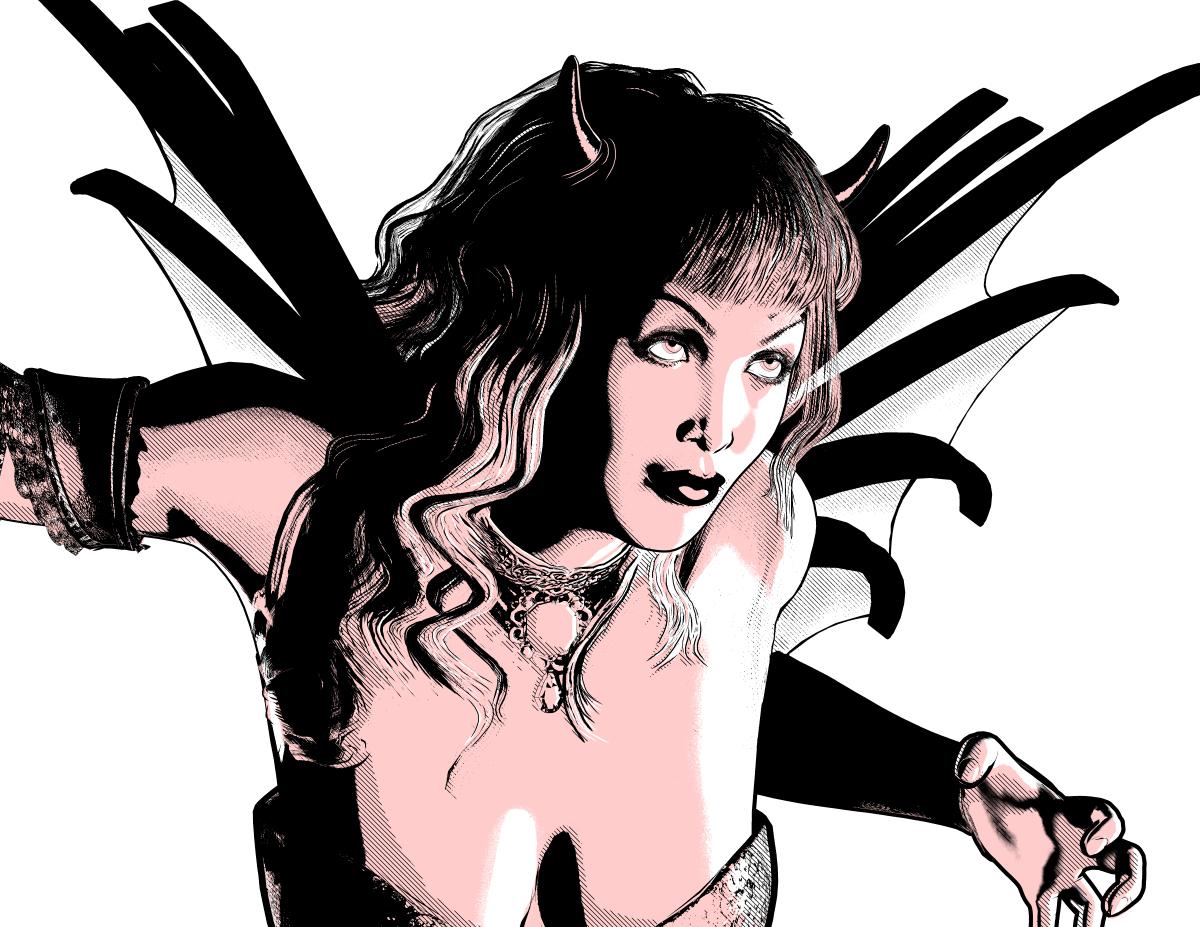
Love Bettie Page and your image is a fine tribute to her...
Hey, kenmo! It's good to see you around here again! Any chance we get to see some new renders from you? :) Or are you busy these days?
More Non-photorealisitic Renders (NPR II)We started an image in the class I taught yesterday. After it ended, I completed my post work and this is what I came up with. Figure is V4 with the Bettie Page morph and hair. Can't recall where I got the devil wings and horns, though.
Love Bettie Page and your image is a fine tribute to her...
Toon Generation 4: request to 3DUniverseHi 3DUniverse,
Having lots of fun with your Toon Generation 4 characters, however I have a request:
Can you please provide Head neutralisation/removal morphs so that I can mix the heads with other characters (Paige,Amber, Tamara etc). This will allow variation in the characters without the need to morph the faces with individual feature morphs. Normally, characters are sold with separate head and body morphs already, or in the case of Zev0's Growing Up characters, a Head neutralisation dial.
Looking forward to a reply and ... keep up the good work.
Daz 3D is part of

Connect
DAZ Productions, Inc.
7533 S Center View Ct #4664
West Jordan, UT 84084Licensing Agreement | Terms of Service | Privacy Policy | EULA
© 2026 Daz Productions Inc. All Rights Reserved.