-
Let's appreciate/discuss today's new releases - ongoing thread
Timbales said:
I'm wishlisting in case anyone ever creates a fix for G9's male chest.
I have not used it so I don't know if it'll be provide the fix you're looking for, but HevieState3D included a 'bonus morph for adjusting the masculine version of the figure's pectoral position to look less boobish' in her 'Sonsy Hip and Shoulder Helpers for Genesis 9' free product available at Renderhub.
Need help with Small Breasts Morphs (vol 1-4) for G8F by Anagordkyoto kid said:
Wish I could also figure out how to keep textures form distorting as well as most female clothing (save that intended for younger figures like 3DU's kids) is made for the default G3/G8 breast size. Anything with stripes or other detailed patterns (like gingham or plaid) often looks terrible. Zev0's Projection Morph Master script helps to an extent, but doesn't fully solve the issue..
Except for making ones own UV's for the torso, I don't know a way to prevent such distortion.
The UV-map specifies, where each of the vertices are located on the texture maps and there will be distortion if one blows up the area or shrinks it down from default.Need help with Small Breasts Morphs (vol 1-4) for G8F by AnagordPerttiA said:
kyoto kid said:
...I have several breast boy shaping resources like Breast control Breast Utilities, Natural Breast Morphs, Girls for G8F, and others but I always seem to run into mesh distortion trying to reduce size and circumference which can affect clothing fits. The Small Breasts Morphs for G8F resources appear to get around this..
Getting the breasts smaller when just about every character and body changing morph makes some changes to them, is quite a task. I have often given up and fixed the problems in Blender
....I finally bought and installed one of the seta that looked like it would work the best for my purposes pml;y yo discvoer that yes, they don't work very well when other things like custom morphs or sculpting alter the breast's base shape. They work fine on the base G8F figure but the model I am using as the base for one of my own characters already has a slightly altered breast shape, So when using any of the Small Breasts sliders, the breasts droop and "pancake" rather than producing the results I saw in the promos. Fortunately I only paid 5.50$ so not a terrible loss (not sure how Rendo's return policy works or if they even have one).
So it's back to a lot of painstaking adjustments using several utilities as deformations in the base mesh can affect the appearance of clothing fits.
ON another front.
Wish I could also figure out how to keep textures form distorting as well as most female clothing (save that intended for younger figures like 3DU's kids) is made for the default G3/G8 breast size. Anything with stripes or other detailed patterns (like gingham or plaid) often looks terrible. Zev0's Projection Morph Master script helps to an extent, but doesn't fully solve the issue..
Piece of Mesh not moving with rest of figureYou made the belt as well as those garments? You may firstly try re-rigging the belt to the figure with Transfer Utility, or transferring the weight from the Pants to the Belt...
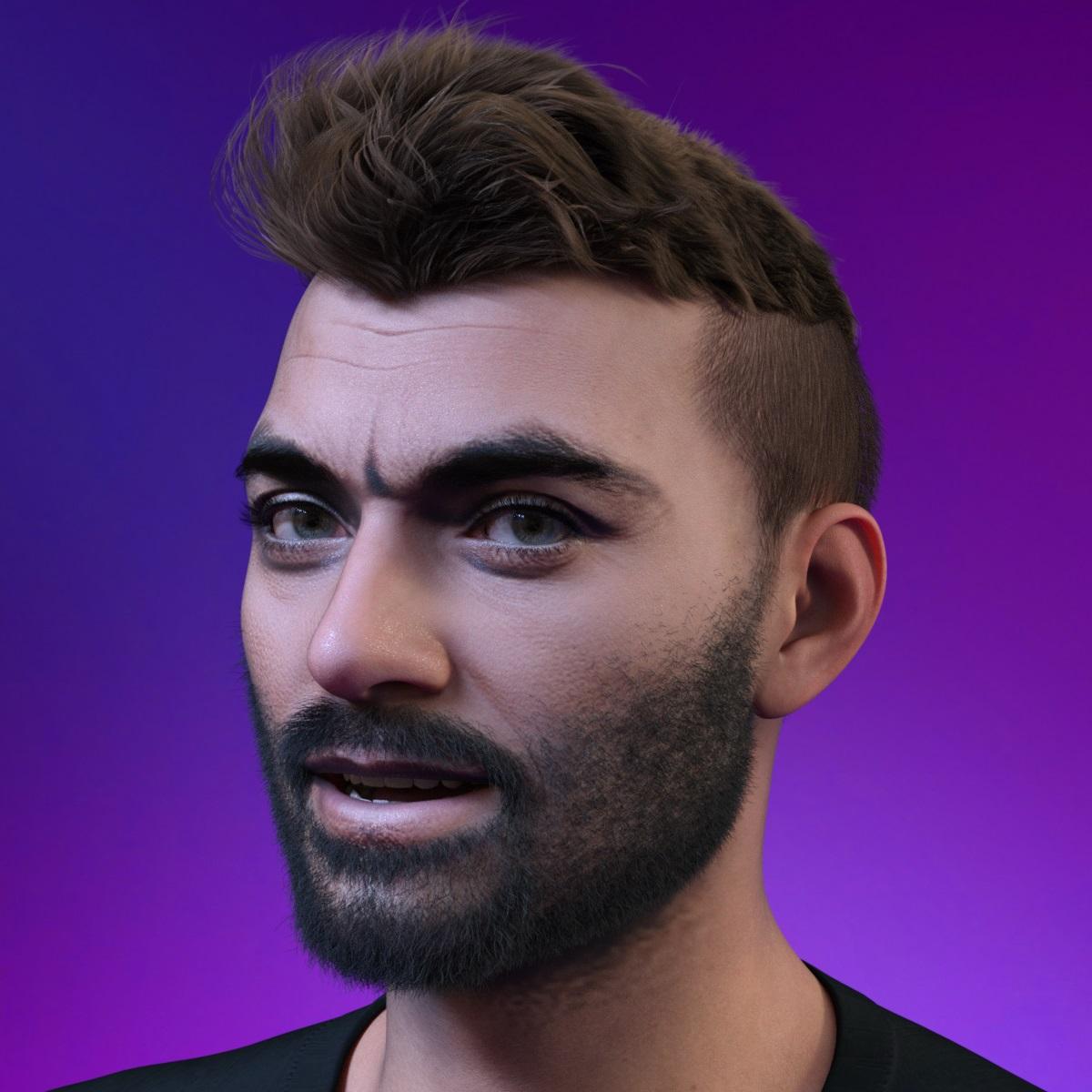
Face Transfer 2One more example render of FT2 Genesis 9 face shape created with Face Transfer Shapes 2 for Genesis 9.
 Dartanbeck's Journey - CG Filmmaking
I also Love how it comes with shaping morphs that can take it all the way from a baby Shetland (not just a Shetland pony, but a baby one!) all the way through to a massive workhorse with just a few flicks of some dials!
Even a sleek Arabian or, if you need a starving, poor creature... emaciated really thins it up to unhealthy proportions. And then there's a sleek, thin morph too, for added adjustability.
Really Really nice, well made product that renders incredibly!!!
Those promos you see... yeah... that's how it looks! It even comes with HD morphs and you can take it even lower rez if needed! I think it's perfect right out of the box!
Face Transfer 2Thanks a lot, PhilW.
I have used yours https://www.daz3d.com/face-transfer-shapes-2-for-genesis-9
and it is my go to item to use with Face Transfer 2.
[SOLVED] Morph loader - partial morpharthenics said:
To be fair, since all my characters start from a "slider-adjusted" genesis (G9), it's faster for me to just export a genesis with only the body modified and another with only the head modified and I join the two morphs sliders in a third one when I reload everything from Blender.
(for combined morphs : see https://www.daz3d.com/forums/discussion/495356/combine-morphs)
If you are using standard morphs, rather than your own custom morphs, then that kind of baking has several drawbacks:
- you cannot distribute the morph, which may or may not matter for you
- you lose all joint adjustments, though those are fairly simple to redo
- you lose all corrective morphs (improving joint bends, or making sure that things like eyes closed or mouth closed work without gaps or intersection), rebuilding those will be a pain.
Character SplitterVersion 3 available

Changelog:
- excluding head bones for body morph and body bones for head morphs
- addded tutorials for D-Former creation and 'Reference Vertex' use
- added checks for mandatory plugins on startup
- added checks for D-Former number of vertices matching base figure
- 'normalized' becomes the default mode (previously 'WYSIWYG')
- updated user manual (added plugins page)Where is the 64 bit Beta version of Hexagon? [Solved] (an internal error has occurred)RexRed said:
Okay, I found the 64 bit beta in the 64 bit Windows Program Files folder. I am testing it out to see if if has the same error.
This thread is "solved" until I encounter the "an internal error has occurred" message.
I will get back to you all.
So far the error message has not occured so fingers crossed.
Also when I imported the morph for my pants, I needed to turn smooting off on my figure or it distorted the new morph.
Any suggestions on why smoothing does this?
How to transfer several products to a custom category at once ?Hi, i'm currently building my daz library from scratch and there's this annoying issue i'm having. I'm trying to place several assets in smart content to a custom category but it's just too much time-consuming. I have to do it individually and it's kinda annoying. Is there any way i could select several assets and place them at once ?
Face Transfer helpAnyone familiar with the Face Transfer 2 plugin?
I keep getting a message prompt saying please use image picker? I could use guidance. Anyone get this message? Is there a fix? Thx
Problem with custom character eyelids / eyesBejaymac said:
crosswind said:
If you had the body morph dialed, adjusted rigging to shape and the distortion was gone... it still means the body morph was wongly made 'cause it affected the rigging and vertices of the character's head.
Nothing unusual about that, haven't found a G8+ character that wasn't "wrongly done".
My own custom characters are a single DSF file with just over 1k formula, but with separate head and body morphs you have just over 1500 formula, yep that's roughly 500 duplicate formula messing with the rigging.
Oh and Richard, you'd be surprised at the number of "store" bought G8+ characters I've had to rig, I have two friends who also use DS, and they regularly buy from everywhere, so barely a week goes by where I'm not "fixing" something they've bought. Which includes no rigging adjustments in the DSF files, bad rigging adjustments in the DSF file, and lets not forget the character presets that don't load the geografts.
I did say "should" - if not, from Daz at least and with an actual character set or end-user morph set, I would report it as a bug.
Problem with custom character eyelids / eyesBejaymac said:
crosswind said:
If you had the body morph dialed, adjusted rigging to shape and the distortion was gone... it still means the body morph was wongly made 'cause it affected the rigging and vertices of the character's head.
Nothing unusual about that, haven't found a G8+ character that wasn't "wrongly done".
My own custom characters are a single DSF file with just over 1k formula, but with separate head and body morphs you have just over 1500 formula, yep that's roughly 500 duplicate formula messing with the rigging.
Oh and Richard, you'd be surprised at the number of "store" bought G8+ characters I've had to rig, I have two friends who also use DS, and they regularly buy from everywhere, so barely a week goes by where I'm not "fixing" something they've bought. Which includes no rigging adjustments in the DSF files, bad rigging adjustments in the DSF file, and lets not forget the character presets that don't load the geografts.
Well, I don't think they're unusual nowadays but just routine... Though I also fixed a lot... I'd rather say most of them were "inappropriately done" than "wrongly done" (of course some of them were...)
And Character Presets can load geografts as well as their material presets as long as Post Load script is correctly configured...
[Released] dForce2Morph [Commercial]takezo_3001 said:
RiverSoftArt said:
In general, morphs are supposed to base off the generic figures. Then they are combined with other morphs (such as a fat morph) to give you what you want. If they are not based off a common starting point, they won't always give you want you want.
Ahhh, that makes perfect sense, thanks for the enlightenment!
You're welcome! Thanks for the support!
Problem with custom character eyelids / eyescrosswind said:
If you had the body morph dialed, adjusted rigging to shape and the distortion was gone... it still means the body morph was wongly made 'cause it affected the rigging and vertices of the character's head.
Nothing unusual about that, haven't found a G8+ character that wasn't "wrongly done".
My own custom characters are a single DSF file with just over 1k formula, but with separate head and body morphs you have just over 1500 formula, yep that's roughly 500 duplicate formula messing with the rigging.
Oh and Richard, you'd be surprised at the number of "store" bought G8+ characters I've had to rig, I have two friends who also use DS, and they regularly buy from everywhere, so barely a week goes by where I'm not "fixing" something they've bought. Which includes no rigging adjustments in the DSF files, bad rigging adjustments in the DSF file, and lets not forget the character presets that don't load the geografts.
Elementary, my dear Walter 9paulawp (marahzen) said:
benniewoodell said:
paulawp (marahzen) said:
I don't normally do much with characters, but I might actually be able to use Walter here and there ... this is just an initial bit of tinkering.
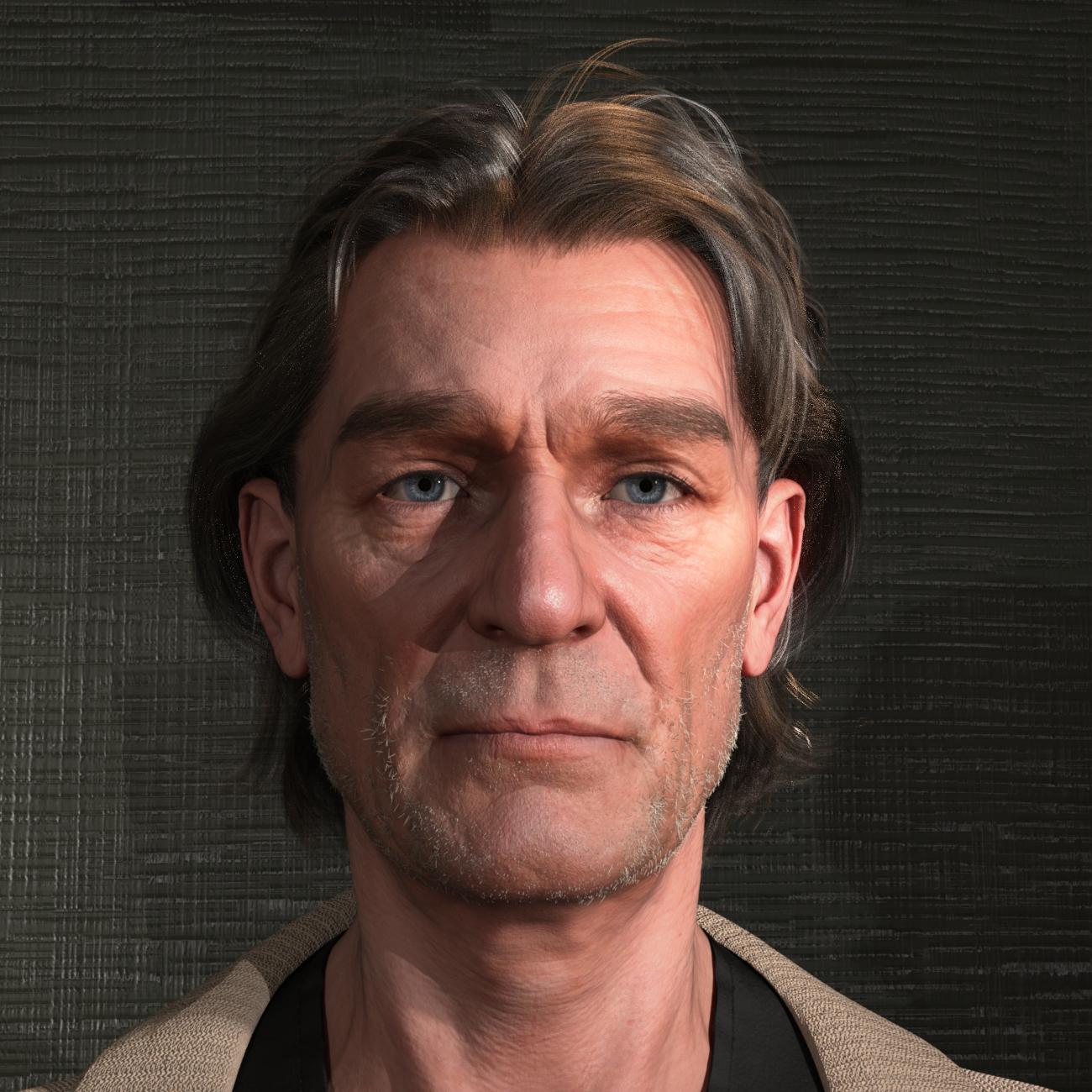
Fantastic looking character! Might I ask which product has that kind of facial hair? I've been looking for something patchy like that.
That is the Old George Beard and Old George Facial Hair with the respective OGB Shorter shaping options cranked up to 100%. I too was looking for a patchy look here and was pretty happy with this product. I had thought I'd used a non-stock shader, but in reviewing the scene, it does appear that the texture is the default for the product.
The head itself is made with 55% Walter and 100% one of my shapes sourced from the original G8 Face Transfer transferred to G9 via ManFriday's converter.
And, although I fully expect that Edna 9 (lol, or whoever) is working her way toward release even as we speak, you can even use Walter as the base of a serviceable older woman. This is a five-minute test with part Walter, part one of my FT/MF characters and Base Feminine.
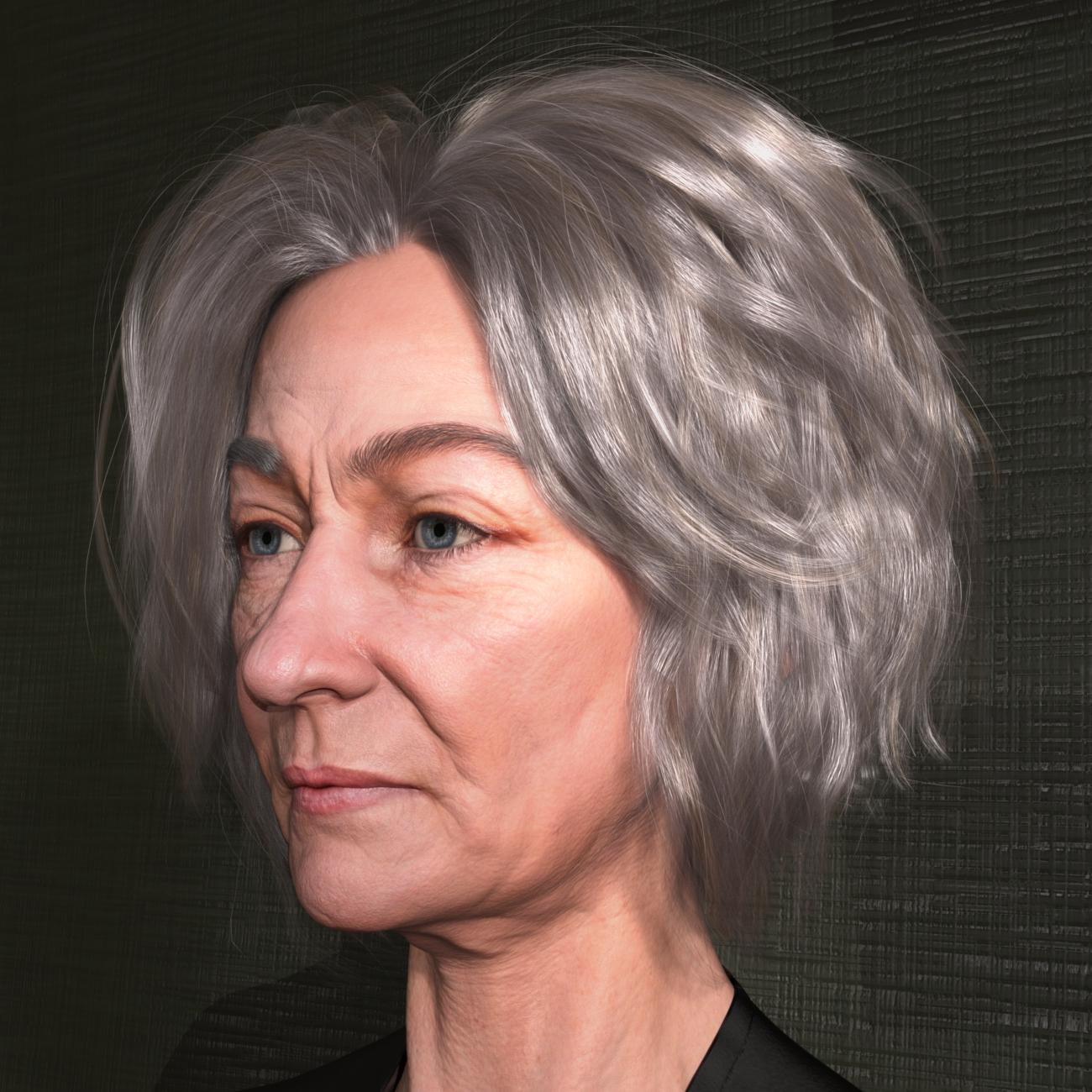
Oh wow, that was the beard from the pro bundle? Dang, I didn't catch that from the promos. Thank you so much for taking the time to let me know! The hair looks great too. Maybe I should have gotten the pro bundle instead of just the character and the suit. And the mix with the feminine morph works rather nicely too.
Problem with custom character eyelids / eyesIf you had the body morph dialed, adjusted rigging to shape and the distortion was gone... it still means the body morph was wongly made 'cause it affected the rigging and vertices of the character's head.
Character SplitterHi Mike3D, great to hear you're still refining the script, thank you! I successfuly used it again last night, this time with G8f. Perfect result! This time I somehow forgot to add the morphs to split, but then without closing the scene, I did it right choosing different head / body morph names, and it worked as hoped and, interestingly, for the first time in my splits it didn't need rigging to shape. I then used the user friendly "find morph" option and deleted the unneeded ones - thanks for that function! I'm not sure I can post the log (from another PC), I'll try. And, I did wonder about your workflow. Question: Do you start with a base figure, and then zero it, so that when you next add the D-Former it's in the correct position? I assume that's true. So, the next question is: How do you add your morph(s) to be split? The only managable way I could think of to add my many morphs (a dial spun character) was to have it loaded in the scene, a separate figure, then copy and paste it to the 1st one (which normally would work) but it's been failing. So, my workflow is: 1) Load my character to be split. 2) Memorise figure. 3) Zero figure. 4) Add D-Former. 5) Restore figure. (sometimes I've also zeroed resolution) 6) Have the figure selected, open and use script as instructed. The only issue has been the missing rigging adjustment, which is only another click. Wishing you a great day!
 / peacePhoto to 3D for Daz3d Figures
I have looked into Face Transfer... keep getting a message pick from image picker?
Daz 3D is part of

Connect
DAZ Productions, Inc.
7533 S Center View Ct #4664
West Jordan, UT 84084Licensing Agreement | Terms of Service | Privacy Policy | EULA
© 2026 Daz Productions Inc. All Rights Reserved.