-
Keep part of original clothing shape when character morphed
You can leave the buttons as part of the dress and use the Geometry Editor, in Vertex mode, to select each in turn and assign it to a Rigidity group, then select where it would attach to the dress and make that the reference group for that button. It will follow changes projected to that area but will not distort in the process.
Alternatively you can model one button and import it. Use the Geometry Editor to create a Rigid Folow Node on the dress for each button and aprent a copy of the button model to each follow node - again, that will follow chnages to the node area but rigidly so there is no distortion.
Mada has Youtube videos on both approaches.
Looking for DAZ Studio alternatives, better rigging of G8.1, able to use AMD vid card to render?Any “alternate rigging” of genesis 8.1 will result in loss of JCM’s thus bad looking joints,
.....Except Diffeomorphic import to Blender with the basic Daz FK rig. (NO conversion to MHX or rigify)
Manually posing the FK in Blender will be pure torture however you can import Daz poses directly via Diffeo.
Alternatively you can re-rig G81 in blender with Autorig pro($40) and manually create your own corrective morphs with the add-on.
Blender will render Daz scenes & content in both Cycles and EEVEE with non NVIDIA Hardware ,even on Intel UHD graphics with no GPU at all.
such samples here:
Average render time 16-48 seconds per frame

 The Mac FAQ
seansicher_ce107c1d61 said:
Hello, I've run across an issue with using the DAZ Install Manager on the Mac where files will download but then it gets stuck in Ready to Install with "Install Failed". It's not every package, I've been able to successfully download and install content through DIM since this problem started. I've tried the following steps to get these files installed.
1) I've deleted the packages in the Ready to Install tab, and redownloaded them. Same results.
2) I've manually deleted the .zip files and xml files from users/shared/installmanager/downloads and tried redownloading from DIM, Same results.
3) I've manually downloaded the package from the Product Library page. It shows up in ready to install, but then moves back to ready to download in the product updates section. At this point the package is not installed, checking both in the Smart Content in DAZ Studio and in the library hierarchy in My Daz 3D Library. If I click to download from the product updates, it ends up back where I started with "Install Failed".Any suggestions to other ways I could try to get these installed through DIM or otherwise to be able to install and use the metadata features?
Thank you!
I guess the issue is that you need to allow DIM helper in the System Controls Panel, Security and Integrity and the Integrity Tab
Allow full disk access to the DIM helper and DAZ3DIM.appThe Mac FAQHello, I've run across an issue with using the DAZ Install Manager on the Mac where files will download but then it gets stuck in Ready to Install with "Install Failed". It's not every package, I've been able to successfully download and install content through DIM since this problem started. I've tried the following steps to get these files installed.
1) I've deleted the packages in the Ready to Install tab, and redownloaded them. Same results.
2) I've manually deleted the .zip files and xml files from users/shared/installmanager/downloads and tried redownloading from DIM, Same results.
3) I've manually downloaded the package from the Product Library page. It shows up in ready to install, but then moves back to ready to download in the product updates section. At this point the package is not installed, checking both in the Smart Content in DAZ Studio and in the library hierarchy in My Daz 3D Library. If I click to download from the product updates, it ends up back where I started with "Install Failed".Any suggestions to other ways I could try to get these installed through DIM or otherwise to be able to install and use the metadata features?
Thank you!
Automattic sub-D on export?I can't for the life of me seem to export with the bridge without it subdividing automatically. When the "Bake subdivision" box is unticked, I expect the base levels to be exported (that's how it previously worked anyway). Even when ticking the box and choosing either 0 or 1, still subdivides multiple times anyway? Would you be able to tell me what setting might be enforcing this?
On the left is the simple base level but I'm always getting what is on the right, no matter if I choose no divisions or 1 or 2.
It's hard to test because it takes about 10 min to export and import because of this, and it didn't used to do this before as it actually exported the level I set it as.Collective3D Create-A-Room productsOkay, to get you started...
Load a wall segment with the parts you want to keep. Select the wall segment in the Scene tab, and switch to the Geometry Editor tool. Go to the Tool Settings tab and expand the Surfaces group. The idea is to isolate the part(s) you want to keep. To include in the selection, click the + sign. You can only delete selected polygons, so invert the selection if needed, then delete.
Take a moment to plan the next steps. Rename the parts left over in the Scene tab (just slow double-click) to give it an appropriate title (this is the Node Label). You will need a folder to save it to if you don't want to mix it in with the originals.You will need to come up with a unique name for each of the parts. The saved part will load in the exact position it is in now, so make sure it is located where you want it to be.
Once you have what you want, you can Save As -> Support Asset -> Figure/Prop Assets. Enter the name of the file (.duf) that it will be saved under, in the content folder of your choice (must be in a Library). The next dialog (Save Options) is a bit daunting. The Asset directory is where the /data folder will be located (top level). Sub-folders are determined by what you put in Vendor, Product and Item Name. Put the original vendor name, since they actually made the parts. Product can be something new to indicate that it is different from the orignal product. Item Name is the internal name used (aka Node Name, not the same as Node Label), and can be the same as Node Label, but sometimes adds more descriptive or technical details. Clear any metadata entries at this point, that can be entered later for all the parts at the same time.
Accept and that's it. Load your new asset to see if it what you wanted.
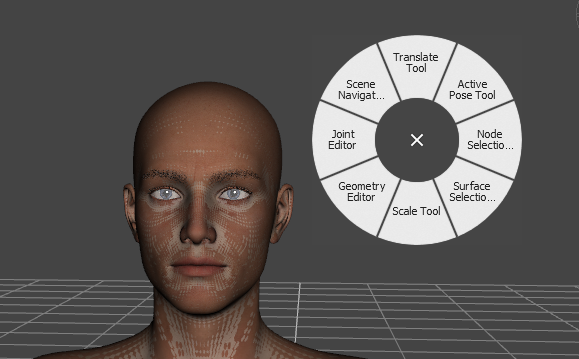
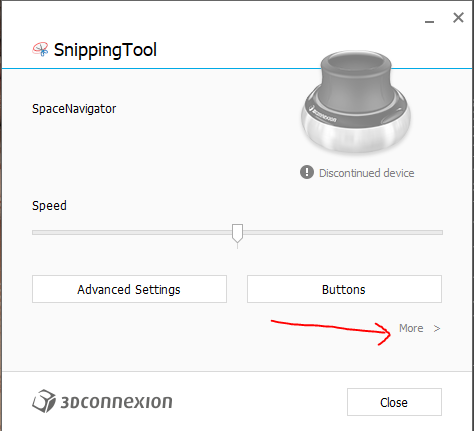
Anyone using a 3DConnexion SpaceMouse?Here is a custom template for Daz3D users of 3DConnexion
Place the file in any location you save your other configurations.
Open 3Dconnexion Home
click on settings there should be an option under more... to import configuration.
Be sure you are making edits for Daz3D and not another application as shown in the image.
I found this set to be very useful.
 Problems Importing Objects
The model, indeed, seems troubled for some reason.
I tried to open various files from it via "import" menu. And while I can confirm that I could open .dae, .3ds and .fbx formats, it seemed like something was going wrong with model, though perhaps it could be fixed.
While .obj files were totally broken. However, I could also open .blend in Blender and export to .obj from here, which provided better results. Still, weirdly, when opening all those formats, either some parts of the ship were gone missing, or - in opposite - appeared differently. What a mistery!
More weird Daz issue makes product unuseableRichard Haseltine said:
windli3356 said:
Richard Haseltine said:
All I can suggest is trying to reinstall one or two of the items and see if they then work - but I have no idea what might cause this.
I reinstalled Daz and put all my contents to another driver, that solved the problem, took me a whole 2 days to reinstall all my stuff. i'm pretty sure Daz's postgresql caused all this, it mess up users local enviorment often, before all morph disappear on these products, I got a "log in error' saying my postgresql wasn't linked. by the time I logged in, that's when things starting getting messy. Daz should really leave their users local enviorment alone.
I doubt the presence or absence of PostghreSQL would affect morphs or joints - except that if morph packs were installed through daz Studio itself (Connect). But joints and geometry are part of the same package so it would not really be possible to have one without the other due to a missing database connection.
It is simply not true that PostgreSQL "meses up users['] local environment" though ti is true that having Daz Studio work online can lead to downloading bad metadata if it gets uploaded in error (it can also fix the issue once the error is corrected).
Using a mix of installation methods can lead to problems, though again I am not sure how it could allow the geometry to load but not the rigging.
I was saying, right before all this disaster started I got this "can't connect to postgresql" error poped out and than when I log back in after a restart, things don't work the same anymore, I only install 5% of my content(content from 3rd party outside of daz store) thro manual file moving, that's the saftest/cleanest way of installation, why would that cause problem since none of these content even sycned to daz metadata?
None of those broken product installed thro DIM or manual file moving
I am not sure how it could allow the geometry to load but not the rigging.
This is for Daz team to know, us to find out, again, it won't even happen if Daz don't "auto merge metadata" randomly to mess with users' self established enviroment.
Move content to external drive questions/problemsjays222 said:
Hello, I've read many many posts about how some users have done this, with many varying opinions and degrees of success.
I want to: Keep Daz installed on local drive, move ALL content/assets to an external drive. This includes DAZ purchased products, products from other providers, and scenes created by me. I use Daz 4.20.0.17 (current as of today), and use DIM for managing DAZ installs. I am using a Mac in case that matters.
First question: When you save a custom scene which uses many DAZ and third party products, custom textures, morphs from different products etc, and you save the scene (.duf) -- does that .duf file contain everything I need to successfully open that scene again regardless of the drive location of my installed products? OR, does the duf file still require pulling in assets from various library items? (in other words, what exactly is inside a duf file?). One of the issues after my move to ext drive was that when loading my scenes Daz kept asking for many missing files. This surprised me for 2 reasons. A) I assumed .duf files were complete and self contained. B) Even if .duf files are reliant on other library assets, I assumed that DAZ cms would know to manage the new location of the assets, and allow previously created scenes to load correctly without manually having to locate them.
The file contains pointers to the assets, otherwise it couldn't beshaed and would waste a lot of disc space with duplicating content. The pointrs are relative for files in a known Content Directory, just the location withind the directory 9e.g. /data/daz 3d/Genesis 8.1/female/some file.dsf) so as long as the content directories are properly set the files should open. One reason they might fail is having one content directory inside another one.
Beyond the above issue, all of my installed content was available and worked under "Products" (albeit with some broken thumbnails), but in Smart Content nothing would open even though the content seems to be there (again, still with some broken thumbnail images).
How was it installed?
Here is what I did:
- Made a copy of all assets and put on external drive. Directories at root level are "My DAZ 3D Library", and another path i use for other content "My Library".
- Changed the paths in Content Directory Manager under "Daz Studio Formats" to point to the above mentioned directories on my external drive.
- In DIM, changed the path under "Content Path Shortcuts" to point to the external drive location "My DAZ 3D Library".
- Deleted from my local drive (moved to trash) the library directories mentioned above.
What happened:
- items showed up under products, and do work, but nothing in Smart Content will open when clicked (can't find it). Some thumbnail images blank.
- my saved scenes ask for missing content when opening
I then tried:
- re-importing metadata in Content Database Maintenance (brought back some thumbnails, but solved nothing else)
- reset database (not sure if that was a good idea, but grasping at this point)
So, I now put all my content back where it was, but am getting some weird issues that didn't happen before I started this process. Most notably when opening my saved scenes, everything looks correct, but all custom morphs that used to be available when editing are no longer there.
Apologies for the long-winded question, but:
- Am I missing or misunderstanding any steps in this process?
- Or, (I ask fearfully) Am I better off uninstalling everything including the Daz app, install Daz on local drive, re-install products directly on external drive? If I do this, will DAZ automatically install my library to local drive by default, or will it ask me where to put my library? Otherwise I may end up in the same place I am now.
I'm concerned that in either case all my existing scenes will no longer load or work correctly. Any help or suggestions at all are greatly appreciated... Thanks!
Move content to external drive questions/problemsHello, I've read many many posts about how some users have done this, with many varying opinions and degrees of success.
I want to: Keep Daz installed on local drive, move ALL content/assets to an external drive. This includes DAZ purchased products, products from other providers, and scenes created by me. I use Daz 4.20.0.17 (current as of today), and use DIM for managing DAZ installs. I am using a Mac in case that matters.
First question: When you save a custom scene which uses many DAZ and third party products, custom textures, morphs from different products etc, and you save the scene (.duf) -- does that .duf file contain everything I need to successfully open that scene again regardless of the drive location of my installed products? OR, does the duf file still require pulling in assets from various library items? (in other words, what exactly is inside a duf file?). One of the issues after my move to ext drive was that when loading my scenes Daz kept asking for many missing files. This surprised me for 2 reasons. A) I assumed .duf files were complete and self contained. B) Even if .duf files are reliant on other library assets, I assumed that DAZ cms would know to manage the new location of the assets, and allow previously created scenes to load correctly without manually having to locate them.
Beyond the above issue, all of my installed content was available and worked under "Products" (albeit with some broken thumbnails), but in Smart Content nothing would open even though the content seems to be there (again, still with some broken thumbnail images).
Here is what I did:
- Made a copy of all assets and put on external drive. Directories at root level are "My DAZ 3D Library", and another path i use for other content "My Library".
- Changed the paths in Content Directory Manager under "Daz Studio Formats" to point to the above mentioned directories on my external drive.
- In DIM, changed the path under "Content Path Shortcuts" to point to the external drive location "My DAZ 3D Library".
- Deleted from my local drive (moved to trash) the library directories mentioned above.
What happened:
- items showed up under products, and do work, but nothing in Smart Content will open when clicked (can't find it). Some thumbnail images blank.
- my saved scenes ask for missing content when opening
I then tried:
- re-importing metadata in Content Database Maintenance (brought back some thumbnails, but solved nothing else)
- reset database (not sure if that was a good idea, but grasping at this point)
So, I now put all my content back where it was, but am getting some weird issues that didn't happen before I started this process. Most notably when opening my saved scenes, everything looks correct, but all custom morphs that used to be available when editing are no longer there.
Apologies for the long-winded question, but:
- Am I missing or misunderstanding any steps in this process?
- Or, (I ask fearfully) Am I better off uninstalling everything including the Daz app, install Daz on local drive, re-install products directly on external drive? If I do this, will DAZ automatically install my library to local drive by default, or will it ask me where to put my library? Otherwise I may end up in the same place I am now.
I'm concerned that in either case all my existing scenes will no longer load or work correctly. Any help or suggestions at all are greatly appreciated... Thanks!
[Released] OBJ Companion [Commercial]Hi, I'm just starting out learning Blender to help me with some DAZ editing, and this looks pretty cool.
I do have a question about the process:
I watched a couple of YouTube videos of doing the export/edit/import process (there are a lot of little steps that seem tedious if you are doing a lot of them, lol)
But one thing mentioned is that the figure/clothing has to be in the standard Zero-Pose before you export to Blender. This seems pretty limiting if you want to morph in a certain pose (i.e. sitting)
But your example shows an upstretched arm morph, and a pokethru fix and export back. So can you just set up a pose and export/edit in that pose/import back in that easily? Thanks!
More weird Daz issue makes product unuseablewindli3356 said:
Richard Haseltine said:
All I can suggest is trying to reinstall one or two of the items and see if they then work - but I have no idea what might cause this.
I reinstalled Daz and put all my contents to another driver, that solved the problem, took me a whole 2 days to reinstall all my stuff. i'm pretty sure Daz's postgresql caused all this, it mess up users local enviorment often, before all morph disappear on these products, I got a "log in error' saying my postgresql wasn't linked. by the time I logged in, that's when things starting getting messy. Daz should really leave their users local enviorment alone.
I doubt the presence or absence of PostghreSQL would affect morphs or joints - except that if morph packs were installed through daz Studio itself (Connect). But joints and geometry are part of the same package so it would not really be possible to have one without the other due to a missing database connection.
It is simply not true that PostgreSQL "meses up users['] local environment" though ti is true that having Daz Studio work online can lead to downloading bad metadata if it gets uploaded in error (it can also fix the issue once the error is corrected).
Using a mix of installation methods can lead to problems, though again I am not sure how it could allow the geometry to load but not the rigging.
Importing wrong geometryI'm trying to export a prop, I've played with the subd levels but no matter what I do when I try and import it as a morph it comes in with wrong geometry. Please help.
Poses thumbnails in content directoryrosseliani said:
Richard Haseltine said:
All saved as Pose presets, all using the name you originally saved with?
I modified all the names the same way to have something consistent, without resaving each pose. Should I resave each pose and delete the self created thumbnails?
Yes, or rename them back to the original name if you canrecall it and then rename them as you wish through Daz Studio (right-click in the Content Library pane under Daz Studio Formats) - the name/relative path are how the files are identified in the database so if you change it outside Daz Studio the link to the rest of the metadata is broken.
Is anyone using Nvidia's Omniverse yet?Luv Lee said:
LFA said:
Hello everyone,
I've learned from a YT user that a 'connector' was announced during CES 2022 in January.
At present time, the basic workflow is the use Omniverse 'Create' to convert fbx assets to USD. In that application, it is possible to assemble and render a complete scene using DAZ assets and Iray shaders. As Wintoons said, there is no issue with DAZ shaders, except for the cornea, as it is the only shader that need a fix by setting Opacity as 0 (You find all surfaces inside the 'Looks' node). From there, you can import into any Omniverse application. In this scenario, still renders will work perfectly with either RTX, Iray or Path Tracing. Also from my tests, animations are not there yet. The matter of fact, I am currently testing DAZ body and facial animations in Machinima, and I have found a small issue. DAZ body animations work fairly in both Create and Machinima, only if the animation file is saved correctly. What I mean by that is, in Create, there are noticeable minor deformations from the original animation file, such as arms rotations may be slightly different. To accomplish that, I have just found out that, in Create, save the (FBX) animation file as *USD using the option: 'Save Flattened As...' instead of 'Save As...'. The USD file will work in both Create and Machinima with slight deviations in the arm joints.
Below is a short video showing my very first scene in Create, a very basic one.

Regards,
Luciano
That looks amazing-- I have had great success with iClone--I just wish we had straight access from DAZ into it as I know not everyone wants to splurge on that--physics too, although I am be getting greedy. Here's an iClone Daz/Omniverse render: https://vimeo.com/748574758
Beautiful render, good work.
RL products are fully compatible with Omniverse and Real Time rendering. The biggest flaw with DAZ figures is the JCM feature that only works in DAZ. Limbs will become slightly misaligned in Omniverse.
I hope that announcement to be released next week will reveal something cool in this direction.
DAZ products in Virtual RealityHa Ha! I think DAZ needs to catch up to the Virtual Reality marketplace. When thinking about building VR worlds their products could fit nicely, with a little adjustment. Image is what happens when I try exporting FBX from DAZ Studio, then import into Blender. Not the "A" pose I started with.
DAZ products in Virtual RealityNot alot on the DAZ forums about using their products for Virtual Reality applications. I was recently trying this VR social program NEOSVR, available on the Steam gaming platform, most of the Avatars are furry fox looking creatures with wings and multiple tails. I guess if you visit the Klingon home world everyone looks like a Klingon. I wanted to use DAZ Studio to create and export a custom Avatar. When I export the FBX file then import it to Neos, the program says it has no human bones and I cannot use it as an avatar. I have spend days researching other ways to re-rig the figure (using Blender 3.2), but nothing has worked so far, and I don't want to purchase more software when this should be a great start using DAZ Studio. Seems to me Avatar creation for VR applications would be a nice sales opportunity for DAZ, since they have such an awesome library of figures, clothing, and props. I tried DAZ customer service, but they admitted they don't support 3rd party products, and all the clever people are on the forums. Any help with this problem would be appreciated. Thanx!
Please clarify something for me - a new Blender userAs for diffeomorphic:
1. Basically once the scene is in blender you can do anything with it, while daz studio is limited in many ways. You can transfer everything, but HD morphs require extensive manual work so it's easier if you can avoid them, the HD shape is transferred easily.
2. There's a tool from @Millighost with some limitations, don't know how it is up to date. https://sites.google.com/site/millighostmix/home/export_dsf_prop
3. The animations you do in blender can transfer back to daz studio, this way you can use more advanced rigs for animation.
4. I don't think so, apart what you can do with the daz studio import tools as usual.
Is anyone using Nvidia's Omniverse yet?I use it often for projects Daz can't handle, it's like Daz but with very little ready to use assets, you can either import your stuffs from iclone/CC, blender or other software, the rendering engine is powered by Nvidia's RTX with native support, but it's not very useful for Daz users who rely their content creation on ready to use assets in DAZ, you can technically export your DAZ stuff to omniverse, on regular content, it will work, but on complex morph such as muscle & vien, it won't look right, not to mention all the deforced hairs, rigging and other stuff. in short, it's not very useful for DAZ users.
Daz 3D is part of

Connect
DAZ Productions, Inc.
7533 S Center View Ct #4664
West Jordan, UT 84084Licensing Agreement | Terms of Service | Privacy Policy | EULA
© 2026 Daz Productions Inc. All Rights Reserved.