-
Who's Next to Join the G8 Family?
Isn't Genesis 8 over ???
She's the 62nd core figure.
Where the full list of characters could you do one up thanks !
https://www.daz3d.com/genesis-8-core-figures
2017 2018 2019 2020 January 01/09/18 - #11 Owen 8
01/23/18 - #12 Karyssa 801/02/19 - #34 Christian 8
01/15/19 - #35 Sydney 801/22/20 - #60 CJ 8
01/28/20 - #61 Dain 8February 02/13/18 - #13 Alexandra 8
02/22/18 - #14 Edward 802/05/19 - #36 Tasha 8
02/19/19 - #37 Landon 802/04/20 - #62 Leroy 8
02/18/20 - #63 Nida 8March 03/13/18 - #15 Aiko 8
03/27/18 - #16 Ollie 803/05/19 - #38 Bridget 8
03/19/19 - #39 Mrs. Chow 8April 04/11/18 - #17 Penny 8
04/24/18 - #18 Edie 804/04/19 - #40 Mr. Woo 8
04/25/19 - #41 Tika 8May 05/09/18 - #19 Mika 8
05/22/18 - #20 Floyd 805/09/19 - #42 Sanjay 8
05/23/19 - #43 Kala 8June
06/15/17 - #01 Victoria 806/05/18 - #21 The Girl 8
06/19/18 - DAZ Dog 806/06/19 - #44 Elios 8
06/20/19 - #45 Ellithia 8July
07/25/17 - #02 Olympia 807/03/18 - #22 Teen Kaylee 8
07/17/18 - #23 Mabel 807/04/19 - #46 Teen Jane 8
07/17/19 - #47 Kanade 8August
08/22/17 - #03 Michael 808/10/18 - #24 Zelara 8
08/21/18 - #25 Toon Dwayne 808/08/19 - #48 Gabriela 8
08/22/19 - #49 Diego 8
08/29/19 - Centaur 8September
09/19/17 - #04 Teen Josie 809/04/18 - #26 Latonya 8
09/18/18 - #27 The Brute 809/05/19 - #50 Babina 8
09/19/19 - #51 Silas 8October 10/03/17 - #05 Stephanie 8
10/17/17 - #06 Lucas 810/02/18 - #28 Gia 8
10/18/18 - #29 Vladimir 810/03/19 - #52 Teen Raven 8
10/19/19 - #53 Yuzuru 8November 11/14/17 - #07 Monique 8
11/28/17 - #08 Darius 811/06/18 - #30 Mei Lin 8
11/22/18 - #31 Lee 811/05/19 - #54 Leisa 8
11/22/19 - #55 Jenni 8
11/28/19 - #56 Robyn 8December 12/12/17 - #09 Charlotte 8
12/26/17 - #10 Sakura 812/04/18 - #32 Eva 8
12/18/18 - #33 Nix 812/05/19 - #57 Darcy 8
12/17/19 - #58 Rynne 8
12/25/19 - #59 Tristan 8[RELEASED] Chess Geografts for Genesis 8 (male and female)[Commercial] - new PA^Thanks outrider42 :)
yeah - I think Daz need to market to the chess-clubs too now ;)
This is legit. One of the things about 3D stuff is that a lot of people outside just do not see a real world use for it...its all virtual inside a computer. Something like this shows there can be a "real world" use for such 3D apps like this that go beyond just making pretty pictures.With some skill people could recreate their family and friends as chess pieces, which could be both entertaining or terrifying, LOL. With so many celebrity look a like models they could have a set based on favorite celebs or characters. Or catgirls. Catgirls vs Wolfgirls. OMG.People who like both chess and scantily clad Victoria with a sword can now print her has an entire army of chess(t) pieces with the irony that the base covers her up more than most skimpy outfits.I'm thinking, not only printing. I've been thinking about carving myself a set of chess pieces for a while, and this product could be fairly useful for rendering the blueprints for that. (making a blueprint is VERY helpful for woodcarving, and since I really can't express in drawing a concept I have in living colour in my mind, Daz is a key product in my favourite hobby)
Though I might look for a slightly narrower base for the pieces (is it possible to morph geografts?), this set will still help a lot with visualization of the concept.Sheaths?OMG it came to me tonight and I tried it and works AWESOME! Victoria 4 univeral horns! they can scale, bend, twist and move side-to-side at 25 different joints. If you have a curved sword, These are amazing!. custom scabbards in any shader you have!
Do you have a link for them? They're not showing up in the store search for me.
"Hide Items I Own" is unchecked.Chevybabe's Dforce SBH Hair Threadhttps://www.daz3d.com/dforce-double-dutch-braids-for-genesis-8-and-genesis-3-females,
YAY for Strand Based Hair!!!
I'd like to include some general information and helpful tips for you to use my new sets in the store :)
What is the difference between strand based hair and fibermesh?
Strand Based Hair is generated inside Daz Studio. Fibermesh is actual mesh generated within Zbrush. Fibermesh can bring even the nicest computers to a painful crawl once it is imported into Daz Studio. Strand Based Hair is so much lighter!! There are a lot less hairs in your viewport, and the rest are generated during the render. I don't know all the magic behind that part, but its really awesome.
SBH ( Strand Based Hair ) is DYNAMIC! - Yes!!!!!!!!!!!!!. As an artist that has been working with Daz Studio and Poser for almost 20 years, this is what I always dreamed of!!!!!! Well I have also dreamed of being a millionaire too, but I'll settle for this
 .
.But what if I don't want to run a simulation? With the ones currently in the store, you do not need to run a simulation unless you want to. There are morphs that will move the hairs around like a traditional hair model too! The coolest part is that you can use the morphs before a simulation, without a simulation, and/ or after a simulation.
How do I use it? Select your figure and load the model like you normally would. Make sure that you do not have the geometry editor tool or the awesome Mesh Grabber Tool selected, pose your figure and render.
How do I use the morphs? These SBH hair models are currently in pieces to add more versatility. Selecting it in the scene tab will make the morphs appear in the parameters tab ( They are parented to the head) . Keep in mid that because these hairs are separate pieces they are grouped. So you will have to expand the options in the scene tab to find the individual pieces. Then just play with the sliders to your liking!
How do I simulate the hair? Welll there are several ways to do this, but the easiest way is to click on the simulate tab and click simulate. No extra settings needed. You can also use a timeline animation, or use the settings provided to use just gravity.
There will be so much versatility!! I have added a ton of separate surfaces so you will be able to easily kitbash these. Shut off certain surfaces to combine them with other SBH hairs orrrr maybe even combine them with some of the regular 3d hair models in the store and make a hybrid!
Technical Stuff:
Line Start With & Line End Width - This is how thick your hair is and how it tapers. I kept mine slightly thicker @ .09. and .03 to keep the amount of generated hairs to a minimum. If you want the hair to be thinner or taper more, you can turn this amount down, but oviously you will have to add more hairs.
Root Radius - This is the mode I have chosen to favor. It doesn't require painted maps or interpolation algorithms ( where hairs can go off in crazy directions for almost no good reason) and it is much more predictable for me when I import my hair from outside programs. With that said, there are no options for the cool stuff like frizz. Sorry guys :(
PS Points (per hair) - for those of you that model this is similar to CVS in a curve. It can control how smooth the hair will look. If you do a simulation and the hair just turns to a straight mess, try turning this down. The lower the setting, the more stiff the hair itself will behave and keep it's shape. Too low and you may end up with some jaggy edges. I feel like 20 to 30 is a good start for these stiffer styles.
PS Hairs (Per guide)- This is fairly self explanatory. If you want a fuller look, you can try adding more hairs. More hairs will probably require more computing power. But feel free to play with the setting.
PS Hair Tip Separation - This is a clumping option. Positive direction moves the hair away from the tip. Negative direction forms a clump at the tip.
Bias and Gain - This also has to do with clumping.
Bias is where along the hair shaft the clumping/non clumping starts. The lower the number the higher up the hair shaft the tip separation starts and vice versa.
Gain is how the bias transitions along the hair shaft.
I don't bother messing with these too much, but feel free to play with them.
PS Hairs and PR Hairs - PS hairs are supposed to be more accurate when simming than PR hairs. Also, I have found that PS hairs have a more delicate, natural look to them. PR hairs are great for adding a little extra bulk or frizz depending on how you use it. To get hair more dense looking, you can add PR hairs one or two at a time. I like to think of PR hairs as a multiplier, so you don't need to add a whole lot. If you want to make the hair appear a little more frizzy, you can play with the distribution radius and the tip separation for the PR hairs.
More Technical Questions * This will be added to as questions come up so all info can be placed in one convenient place
I like to use the NVIDIA Iray Preview. The hair is not showing up in it. How can I preview the hair in that window?
You can view the hairs by going into the parameters tab: viewport line tesselation sides. You can change this setting from 0 to 2 or higher.
I want a certain section of my hair to drape more. Is there a way to do that? Yes! There are a few options you can use to adjust the draping so it suits your particular scene better. You can adjust the PS Points on the surface you select to something higher. The double dutch braids in particular are kept fairly low around 20. This keeps the whole hairstyle fairly stiff. I would start fairly high at maybe 60 and see what results you get and what you are exactly looking for. If it drapes better but its lost too much of your shape you can adjust other options as well.
You can also adjust the Local Shape Constraint Stiffness. Turning this down lower will also make the hair drape more while keeping the shape of the hair more in tact.
You can also adjust the tips of the hair with Local Shape Constraint Tip Stiffness. This will loosen up how the tips drape more. A lower number will spread those tips out more during a simulation.
All of this is a process of trial and error and what exactly you are looking for in an end result.
I want to simulate hair on a figure that is on a floor. When I sim the hair it makes an explosive mess. Help! This wasn't a question posed here yet but I know it's on the way :) You have a few options to handle this situation. If you are on an older computer that doesn't do so well with simulations, try keeping the model's head height as the same level the default figure loads in. I hope that makes sense. When a simulation is going it is essentially pulling those hairs to the end pose. Further away from default equals more pulling.
If you have a decent computer and you don't have an issue with simulations then you can simply change the simulation settings - Pose Transition Time to something higher than 1. The promos I did with Victoria on the floor all had a pose transition time of 3 - but I believe 2 probably would have done just fine.
Some general dhair issues were discussed in a different dforce hair thread and I want to share them here along with solutions.
"Needs greater stability when dealing with hair not pretty much falling straight down, but with head/neck at 'strange' angles.
Hair falls with gravity. If you bend the head to the right, then the hair should essentially fall to the right. However, depending on the style of the hair; you may need to use a pose, a morph, or a simulation setting to nudge the hair in that direction. If it is a stiffer style, you will more than likely need to adjust the points or the stiffness.
I have had on several occassions tried to get a hair to flow a certain way. Case in point : https://www.daz3d.com/dforce-soft-curls-for-genesis-8-and-genesis-3-females the promo with victoria on the ground. I tried several animations to get her hair to fall like that. Using morphs i was able to nudge the hair the way i wanted but it still didn't fall the way i had hoped. Simply changing the simulation controls "Start Bones from Memorized Pose" to off used gravity instead of an animation. It's a lot of trial and error. Understanding your options, settings, and little tricks along the way can give some wonderful results. The key is really to be patient. Learning takes time.
"Needs to be affected by wind nodes in a consistent fashion"
I am not quite sure I understand what the author meant by this, so for the time being.. Im going to guess.
Hair that is lodged into a figure will not move. No matter how hard the wind blows.
" Needs to be able to cope with morphs that could produce poke-thru (such as elf ears) without crashing"
If you have poke through, you will get a mess. Plain and simple. The bigger the mess the more likely chance you will have a crash.
I understand you will want these products to do everything and then some that you can throw at it, but please understand we can't forsee all of your creative visions :)
I will look into seeing if morphing within daz studio can potentially be done by a customer. If it can, I will share some info here.
"Needs to handle motion in animations without leaving a 'trail' of hair floating in the air behind the figure."
I'm guessing that this is referring to producing a still render with a simulated hair animation.
Easy fix. Change the pose transition time to something greater than 1. If you still have trails, adjust to 2. You can also increase the stabilization times to something greater than1.
You can also try and move the figure closer to world center so there is less "pulling" on the hair during the animation.
Now go have some fun and be creative already!I will be here checking this thread as often as I can to help, should you get stuck, have questions, or just wanna show off pretty pictures :)
[RELEASED] Chess Geografts for Genesis 8 (male and female)[Commercial] - new PA^Thanks outrider42 :)
yeah - I think Daz need to market to the chess-clubs too now ;)
This is legit. One of the things about 3D stuff is that a lot of people outside just do not see a real world use for it...its all virtual inside a computer. Something like this shows there can be a "real world" use for such 3D apps like this that go beyond just making pretty pictures.With some skill people could recreate their family and friends as chess pieces, which could be both entertaining or terrifying, LOL. With so many celebrity look a like models they could have a set based on favorite celebs or characters. Or catgirls. Catgirls vs Wolfgirls. OMG.People who like both chess and scantily clad Victoria with a sword can now print her has an entire army of chess(t) pieces with the irony that the base covers her up more than most skimpy outfits.I like your thinking!
[RELEASED] Chess Geografts for Genesis 8 (male and female)[Commercial] - new PA
This is legit. One of the things about 3D stuff is that a lot of people outside just do not see a real world use for it...its all virtual inside a computer. Something like this shows there can be a "real world" use for such 3D apps like this that go beyond just making pretty pictures. With some skill people could recreate their family and friends as chess pieces, which could be both entertaining or terrifying, LOL. With so many celebrity look a like models they could have a set based on favorite celebs or characters. Or catgirls. Catgirls vs Wolfgirls. OMG. People who like both chess and scantily clad Victoria with a sword can now print her has an entire army of chess(t) pieces with the irony that the base covers her up more than most skimpy outfits.^Thanks outrider42 :)
yeah - I think Daz need to market to the chess-clubs too now ;)
G8F - Looking for tiny female body hair. Arms, Face etc.Benita includes vellus hair. See my reference image for here here
It should also work on other characters
Celebrity Look-a-Likes for 3D figures Part 2Aside from MRL Faryn, MRL Tiffany & CS12, other characters likened to Jennifer Lawrence include:
- LYFW Adrienne: https://www.daz3d.com/gallery/images/68400
- VH Foxy: http://www.beammeup.net/blog/3d-celebrities/poser-celebrities-6.php
- Jenn for V4.2 (no longer available): http://pixelsizzle.com/product/jennifer-lawrence-jenn-for-v4-2/
- Biljana HD for Genesis 8 Female: https://www.deviantart.com/isourcetexturespa/art/Biljana-HD-For-Genesis-8-Female-777741245
Personally I could add Tarian HD for Genesis 3 and 8 Female to the list. Any others I've missed, comment is free.
The main morph in this variety pack has a striking resemblence to Jennifer Lawrence.
https://www.daz3d.com/variety-hd-character-morphs-for-genesis-8-female
Carrara Challenge #50: A Special Carrara Anniversary Celebration - Results AnnouncedEntry: #25
Title: Fast Forward 50 (years)
Artist: Dartanbeck
Category: 50
WIP Links: Workflow of the whole thing - feel free to ask questions
Products Used: Urban Sprawl, Genesis, Genesis 2 Female, Victoria 4, EYEdeas 3+ for V4/M4, J-Suit for V4, Artemis X for Genesis, Litsure Hair (Cap and headband) for V4, Carrara Dynamic Hair, Coflek Gnorg's Steampunk Towers and Techno Town Construction Kit, Winnston1984's Elevated Subway, Cybertenko's Hunter Killer Drone, TheAntFarm's M11 Flea, Carrara 8.5 Pro, PD Howler 11
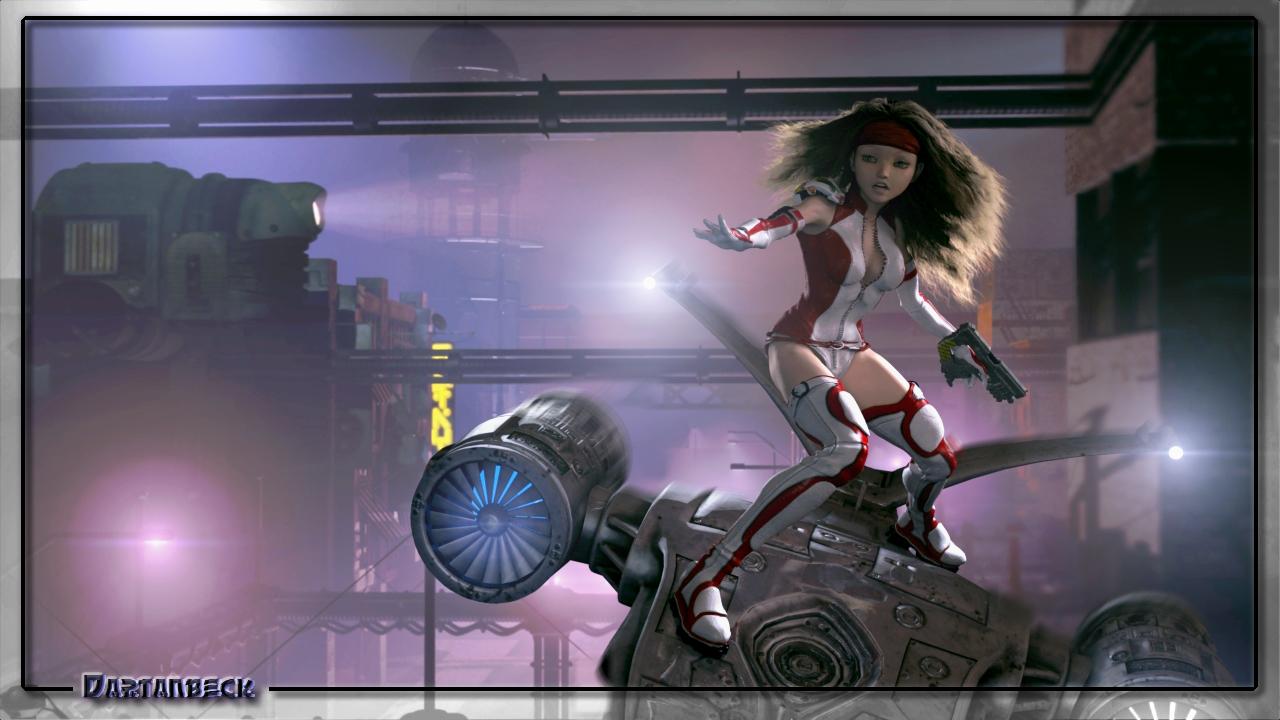
Carrara's physics is something I've kept myself from dabbling with for many years - now I can't seem to get enough of it! It was really fun working with forces to direct the Carrara Hair in this scene. I'm also still experimenting with Carrara's atmospherics combined with clouds and volumetric lighting, which becomes even more fun and challenging in motion. I must say that this image wouldn't have ended up the way it has without all of the individual elements in motion. I captured this nearly a second into the dynamic motion of it all - which was short, being a still conquest.
Celebrity Look-a-Likes for 3D figures Part 2Aside from MRL Faryn, MRL Tiffany & CS12, other characters likened to Jennifer Lawrence include:
- LYFW Adrienne: https://www.daz3d.com/gallery/images/68400
- VH Foxy: http://www.beammeup.net/blog/3d-celebrities/poser-celebrities-6.php
- Jenn for V4.2 (no longer available): http://pixelsizzle.com/product/jennifer-lawrence-jenn-for-v4-2/
- Biljana HD for Genesis 8 Female: https://www.deviantart.com/isourcetexturespa/art/Biljana-HD-For-Genesis-8-Female-777741245
Personally I could add Tarian HD for Genesis 3 and 8 Female to the list. Any others I've missed, comment is free.
Genesis 9 delayed until at least 2020. Will you be buying it?The first Victoria was the Millennium Woman.
Will Victoria 9 be the '20s Woman ?
Personas comprando irreconocibles - Unrecognizable people buyingI get what you are saying... It looks like the product was "pre-morphed", which, it could have been, but should not have been. However, your lips and eyes (how large they are) Seems to imply that you have some comic-character morph loading along with your base-model. As well as the heavily "triangulated" facial form. (Like an Anime-model morph.) Did you, or do you have a toon or anime morph which you recently loaded into your library?
Also check the "Hidden" correctives, in the models parameters. Something may be applied, with a base-value that should not be. (You will have to "Show hidden", to see some of them. Using the MENU-icon with three bars on the top of the window you have open for the parameters tab.)
Are you loading the model from the "Files" tab, or from the "Products" tab (Smart content), or from the "Content Library" view? The "Files" and "Content Library", may only be a partial loading, where as the "Products", may have a loading option that loads ALL settings needed to get that same exact "Look", as the whole product. Sometimes the "File", is just some of the base-forms or skins, not the whole setup, which may have a few other items needed to be loaded, to create the whole character. (Such as specific IRAY loading of textures, or skin-tones, Gloss, Diffuse, as there may be multiple variations for that single model.)
Also, it may have been "made" with a specific lighting that might honestly have to be recreated, exactly, to match the "product image". Especially if the lighting and shadows have been baked-on to the skin and bumps and normals.
Just adding... Simply using the raw morph-slider, may not work. It may depend on another base-morph to be loaded as well, like "Victoria 8", may have to be 50% or 100%, if it was a morph made off a morph, which was made as a morph for "Victoria 8", for instance. EG, It will not look the same with "Olympia 8" or the "Base Gen-8", alone...If it was, they may not have correctly zeroed-out the model. (Which the creator simply needs to be made aware of the issue. It happens... Usually fixed with a simple update which will show in your list, when you use the download manager or load it using the cloud.)
Free Hair and Hair related Items ListMore AprilYsh
Masque Prop & Hair
Aiko 3, P6 Jessi, Stephanie Petite 3, and Victoria 3
http://shop.aprilsvanity.com/classics/masque-prop-hair.htmlSharmane Hair
Aiko 3, Laura, P6 Jessi, Stephanie Petite 3, and Victoria 3
http://shop.aprilsvanity.com/classics/sharmane-hair.htmlDo you promote your work... and how?Mostly what I do is spam Twitter. It's free, and if you pick a few hashtags that either a lot of people follow religiously or ones that get picked up by bots with wide reaches, you're promotion gets in front of a lot of eyeballs. I had someone reach out to me after finding me through a hashtag they regularly follow, so it definitely works.
Another thing I've discovered, and I have no real idea what impact it actually has, is that many of the comic catgories on Amazon are sparsely populated. If you get people to buy your books or read them through KindleUnlimited - even just a couple people a month - you can stay on certain charts indefinitely. A couple of the lists don't even take that many sales or reads to hit #1 for an hour or two or three. Any book landing on any chart gets visibility - think of it like free advertising. But be careful taht your books are at least remotely relevant to the categories because Amazon does watch the comic categories and did try to pull some of my titles from a category even though they clearly belonged. Problem you as an indie has is that Amazon owns Comixolgy, and they tried flooding the comic categories with titles carried through Comixology - even if they have less than zero relevance to the category. If your comics stick in a best sellers list, they will target you. It's not just my experience, but I've seen a lot of my competition delisted from the comic categories if they weren't Comixology titles. Still, if your titles are relevant and you're willing to fight with Amazon, you can place on the best sellers lists in certain categories.
Last year, I set up a Patreon page, and eventually a DeviantArt page. I've been struggling with how to use DeviantArt as a tool. In the last 3 months of 2019, I decided to pull most of my titles from Amazon's KU program and try to sell them on DA, Initially I was disappointed to the point I was ready to give up and relist them in KU, but there have been a couple sales this month, so I'm hopeful, and I'm going to see if I can grow the market there. The thing that makes DA interesting as a platform is in how people can either favorite your work or add it to their own "collections." Because if you happen on someone who likes work similar to yours, your work will be displayed in their list of favorites, or in whatever folder they added you to. For example, if your specialty is rendering Victoria 4 in various skimpy outfits, and someone likes one of you pictures, they might add it to a collection called "Victoria 4 in skimpy outfits." If for whatever reason, another scantily-clad V4 fan comes across their page and looks into their folder, they'll see your picture along with other V4 artists. The more the pictures are liked, the more exposure they get. And no one will be able to get for free any content that you set to be sold, so it's not like people are wildly taking your work for free when you want to charge for it.
Ash ketchum creation
grrr.... even with the head fixer I can not fix this :(
Another good product is Deformers +: Hat Head.
Compatible Figures:
Victoria 4, Michael 4, The Kids 4
Not really the figures I would use ever...
It works just as well with Genesis. I know because that's the only figure I really use, for the most part. I don't use Gen 4 figures. Any Gen 4 characters I have, I use for skins or convert their morphs over to Genesis with Gen X. Hat Head does work on Genesis.
Ash ketchum creationgrrr.... even with the head fixer I can not fix this :(
Another good product is Deformers +: Hat Head.
Compatible Figures:
Victoria 4, Michael 4, The Kids 4
Not really the figures I would use ever...
Other place than DAZ and Rendo ?How about something like https://www.daz3d.com/dforce-mother-goose-outfit-for-genesis-8-females?
Or this https://www.daz3d.com/victoria-iven-for-genesis-3-females
Genesis 3 Female example and improvement discussionThis is Victoria 7 and Victoria 7 HD for Genesis 3
See the full resolutions on DA: http://fav.me/ddononq and http://fav.me/ddonopk
@Polish Metro Police carThere is a police car at Renderosity that is a Crown Victoria. It costs $30. It's mostly being dropped now though for Dodge Challengers (or is it the Dodge Chargers they are using now?).
Where I live down south it's mostly Chargers and Focuses (Foci?) with a few Camaros. I hear that police aren't doing as many high speed chases anymore (too much damage / liability) so musclecars are becoming less common. Mustang is another good choice.
[Released] Character Converter from Genesis 3 Female to Genesis 8 Female(Now Conv JCMs) [Commercial]Message to RiverSoftArt
For some reason I am unable to access my messages, I'm also unable to create a new message?!? Will file a support issie with Daz when this comment is sent.
The answer to the question "Did you convert things twice without deleting morphs? " is that I deleted all morphs in the data folder manually before I comverted the character agan.
The /data/ morph directory chreated when converting Victoria 7 was "DAZ 3D,Heysun Oh,Yannek", converting Victoria 7 HD created the /data/ folder "DAZ 3D,Heysun Oh".
Looking into the original Victoria 7 files, the "pJCMVictoria7ShoulderBndFwd_110_L.dsf" file formulas look like this;
"formulas" : [
{
"output" : "Genesis3Female:#pJCMVictoria7ShoulderBndFwdR?value",
"operations" : [
{ "op" : "push", "url" : "lShldr:/data/DAZ%203D/Genesis%203/Female/Genesis3Female.dsf#lShldr?rotation/y" },
{ "op" : "push", "val" : [ -110, 1, 0, 0, 0 ] },
{ "op" : "push", "val" : [ -85.5, 0, 0, 0, 0 ] },
{ "op" : "push", "val" : 2 },
{ "op" : "spline_tcb" }
]
},
{
"output" : "Genesis3Female:#pJCMVictoria7ShoulderBndFwdR?value",
"stage" : "mult",
"operations" : [
{ "op" : "push", "url" : "Genesis3Female:/data/DAZ%203D/Genesis%203/Female/Morphs/DAZ%203D/Victoria%207/FBMVictoria7.dsf#FBMVictoria7_v1?value" }
]
}
],And the formulas in "pJCMVictoria7ShoulderBndFwd85_L.dsf" look like this:
"formulas" : [
{
"output" : "Genesis3Female:#pJCMVictoria7ShoulderBndFwd85L?value",
"operations" : [
{ "op" : "push", "url" : "lShldr:/data/DAZ%203D/Genesis%203/Female/Genesis3Female.dsf#lShldr?rotation/y" },
{ "op" : "push", "val" : -0.01176471 },
{ "op" : "mult" }
]
},
{
"output" : "Genesis3Female:#pJCMVictoria7ShoulderBndFwd85L?value",
"stage" : "mult",
"operations" : [
{ "op" : "push", "url" : "Genesis3Female:/data/DAZ%203D/Genesis%203/Female/Morphs/DAZ%203D/Victoria%207/FBMVictoria7.dsf#FBMVictoria7_v1?value" }
]
}
],As stated earlier I don't know enought about dsa files to know whar the formula does but it is the only difference in the original files so that may indicate the reason for the:
WARNING: ..\..\..\..\..\src\sdksource\fileinput\dzassetdaz.cpp(5978): Unsupported formula: /data/DAZ%203D/Genesis%208/Female/Morphs/DAZ%203D%2CHeysun%20Oh%2CYannek/Victoria%207/pJCM_RS_Victoria7ShoulderBndFwd_110_R.dsf"Cheerio for now.
I apologize! Somehow I missed your post.
You can try a solution from the forums (https://www.daz3d.com/forums/discussion/22220/duplicate-formulas-error-solved-thank-you-bejaymac):
- load Genesis 8 into an empty scene, you'll get the error message, just click it to carry on.
- Find the offending morph(s) in the Parameters tab, in this case it Actor/Universal/Fantasy SciFi and it's the HFS_Shapes_Head01 morph.
- Dial the morph to make sure it works and then zero it again.
- At one end of the dial you'll see a little "cog", click on it and in the little menu that opens click on Parameter settings.
- In the new window that has just opened you will see a Color A & a Color B, click on Color B to open the color picker.
- Set the color to 254, 254, 254 and click OK.
- Click "Accept" at the bottom of the Parameter Settings window.
- After that window closes go "File > Save As > Support Asset > Save Modified Assets".
DS will do a quick scan of the figure and open a small window that should only have the one file listed, accept it and DS will replace the old file with a new updated one.
Daz 3D is part of

Connect
DAZ Productions, Inc.
7533 S Center View Ct #4664
West Jordan, UT 84084Licensing Agreement | Terms of Service | Privacy Policy | EULA
© 2026 Daz Productions Inc. All Rights Reserved.