-
Lighting on an imported OBJ
Hey complete noob here, so I've figured out how to import a OBJ into Daz 3D using Blender first so that's all good but I can't seem to figure out the lighting. So lets say the OBJ I'm using is a Saloon Bar. The external of the bar looks great, all lit up but the interior is dark and the lights within Daz 3D don't seem to be affecting the model. Is there anyway to get them to work or maybe light the scene before you bring it in?
Dear NathyIf all you did was delete the cloud folder that will not remove it from the database, you must reset the database then re-import the meta data.
Old Attic not loadingHi team, Fugazi Old Attic is not loading for me. Not had a problem before, just started today, I get an error message to say look at the log file. Well, here it is:
Scene and Preload/Attic Preload.duf
2022-09-23 23:55:37.781 [INFO] :: Locking viewport redraw...
2022-09-23 23:55:37.781 [INFO] :: Viewport redraw locked.
2022-09-23 23:55:38.042 [INFO] :: Native format content directories: 2
2022-09-23 23:55:38.042 [INFO] :: Poser format content directories: 2
2022-09-23 23:55:38.042 [INFO] :: Other import format content directories: 0
2022-09-23 23:55:38.042 [INFO] :: Begin asset load (open): /Environments/FG Attic/Ready Scene and Preload/Attic Preload.duf
2022-09-23 23:55:38.043 [INFO] :: /Users/malcolmkarpeta/Documents/DAZ 3D/Studio/My Daz Connect Library/data/cloud/1_47303/environments/fg attic/ready scene and preload/attic preload.duf (1,1): Syntax error - expected '{' or '['
2022-09-23 23:55:38.043 [INFO] :: Error loading asset: /Users/malcolmkarpeta/Documents/DAZ 3D/Studio/My Daz Connect Library/data/cloud/1_47303/environments/fg attic/ready scene and preload/attic preload.duf
2022-09-23 23:55:38.043 [INFO] :: Operation failed
2022-09-23 23:55:38.350 [INFO] :: Unlocking viewport redraw...
2022-09-23 23:55:38.350 [INFO] :: Viewport redraw unlocked.
Any help most appreciated
Thanks
Dear NathyIf you are logging in to DS thus allowing DAZ Connect to call the DAZ servers and download metadata "updates" and maybe unintentionally also installing assets/updates, while you are also installing products and updates with DIM, everything will be installed twice to two separate locations with the DAZ Connect installed products/updates taking priority over the installations made with all the other methods (DIM/DAZ Central/Manual installation)
Set your DS for off-line mode by setting the Startup options as in the attachment, and uninstall everything in 'Smart' Content that gives you the option to do so.
Logging in to DS and working in Online mode is needed only when one chooses to use DAZ Connect within DS as their primary means of installing products, and in that case there is no sense in using DIM or DAZ Central to install them.
Need Help: Diffeomorphic + Rigify *SOLVED*I ran into problems while using Diffeomorphic to import a G8.1F figure, in the process replacing the Daz rig with Rigify one. (I'm using Diffeo 1.6.2 with Blender 3.1.0.) At this point I'm stumped, and I hope someone can offer a quick solution.
I have two assets that are parented to the Daz limbs. When using Diffeo to import with the default Daz rig set, these assets are parented properly in Blender; however, when imported with the rig changed to Rigify, the assets end up detached. Worse, they stay where they are as I proceed to apply Daz poses to the figure in Blender.
Below are screenshots ...
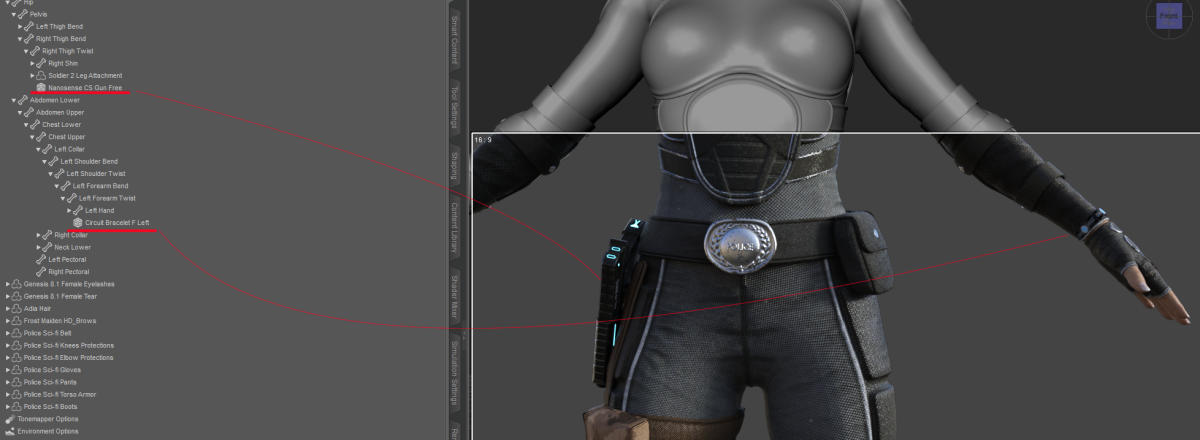
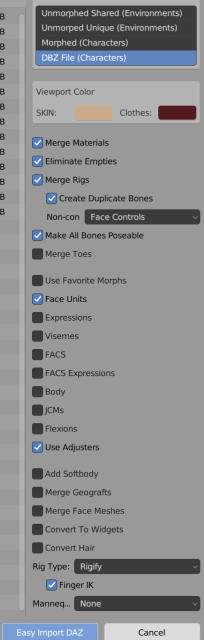
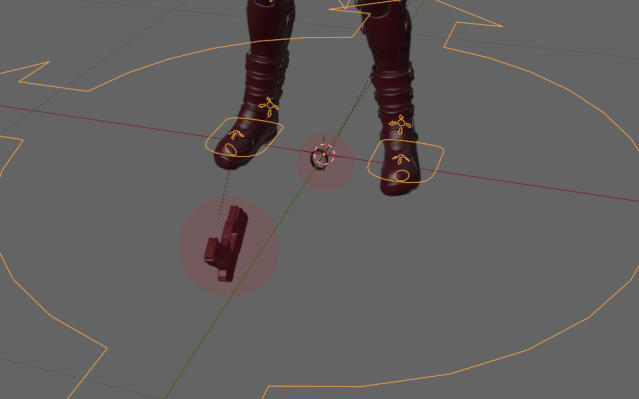
I've heard a lot of great things about Rigify and I'm eager to begin using it. This problem, however, is a showstopper. I'm not sure how I can proceed without fixing it. Any help is much appreciated.
Cheers!
Daz Bridge Support Is Here!So, folks, my problem is that the physical model does not import when I utilize BRIDGE to transfer from daz STUDIO to C4D; just the IK rigs do. I repeatedly uninstalled DAZ Central, Studio, and Bridge. and I have no idea what the upgrade changed.
UltraScenery - new territory [Commercial]I should have included an image with my earlier question about using an imported mesh for the terrain base. This is a screencap of the terrain I was futzing with, created and surfaced in World Machine. Whatever the answer is about USC or USCXT building on an import like this, I thought you'd like to see the info on an optimized mesh. I don't know how WM produces them, but I'm pretty sure Blender can create similar optimization, and it's probably possible to get similar results using Decimator. If you could adopt it, this could help further reduce the memory footprint of UltraScenery.
FWIW, just thiught I'd share.
Slider Preservation?milkwasabi said:
I apologize if I'm not asking this in the right place, I'm new to this forum. Is it possible to export from Daz, import to blender, and export from blender to import back into Daz and preserve sliders and whatever else? To simplify my question (Or the opposite... Lol) I'm trying to modify a body shape in blender, but I want to modify it while it has the attachments I put on (for example, breastacular and golden palace) because to my knowledge I can't import my modified genesis 8 into Daz and apply after the fact. (If this isn't true, please let me know how! Would make this so much easier haha) Also for future reference, is it possible to use collision in these sort of assets (breastacular and golden palace) for Unreal? Sorry, I suck at summarizing myself and putting things into words but any and all help is appreciated, thank you!!
Do you really need to sculpt changes to the geografts at the same time?
If your concern was about being able to add geografts to a modified figure after having sculpted the figure in Blender, you actually can add geografts to the edited figure in Daz provided you load in the changes to your figure using Morph Loader Pro. This process just imports the edited figure into Daz Studio as a new morph (or "shapekey", to use blender parlance).
Usually the process for creating Daz morphs would be to export the objects or figures from Daz Studio at their Base Resolution without any attachments (i.e., without eyelashes, tear, the geografts you mentioned).
Then after you modiffy, i.e., sculpt changes in Blender, you would export out of Blender as an obj and load in the changes using Morph Loader Pro.
Note: You can only make changes to the mesh at base resolution (unless you have the HD toolset, which only vendors get access to.) For that reason, any high-res changes you sculpt in Blender would have to be baked down from high res mesh onto the base resolution mesh into displacement or normal maps.
Important points to remember:
- Blender won't preserve vertex order on import/export unless you tell it to (preservation of vertex order is needed for the morphs to look like theyre supposed to)
- Morph Load Pro requires vertex count to remain the same between original and morphed shapes, otherwise it wont import.
Daz to Unreal : How to get nice shading on character ?!IS IT POSSIBLE TO IMPORT EMISSIVE MATERIALS WITH DAZ TO UNREAL PLUGING?
Night city scenes are totally dark in unreal, do i need to create my own materials for transfer?
Why is this not a thing?
I want my neon lights back etc...
Exporting from DAZ to Blender FBX Model ProblemDryreL said:
I found the solution. Import your fbx model into Blender and press Alt + G, Alt + R, Alt + S while in Pose Mode. Don't forget to select all bones. If you press a it will select all of them. And that's it!
Great solution: it works for me!
The big announcement on September 21, 2022 - place your bets!Ghosty12 said:
Gordig said:
The expectation/demand that so many people seem to have that G9 is fully compatible with previous generations is just weird as hell to me. I started using DS during the G8 era, and I always assumed that G8 would eventually be superseded by something. If Daz is releasing a new generation of figures (or figure, as the case is with G9), I would much rather they prioritize whatever makes the figure better than previous generations than try to make it backwards compatible, because those goals are very much at odds with each other where 3D models are concerned.
The one thing why some folks want some form backwards compatibility, is with the content they have acquired over the years that being mainly clothing, hair and character morphs. And that last bit character morphs is a big one for many, they may have a character they love using a lot but the base character generation that the character is based on may have some limitations.
They then see that the next newer base character generation has some things they love, and as such want to port their favourite character to that new generation. This is why there are products that make it a bit easier to do this.
The thing with Genesis 9 after watching a bit of the announcement video, that may make this a bit more difficult is how they have changed where the main facial features such as eyes and mouth are in the figures tree they are no longer under the head sub tree like it has been for years.
...exactly. This was part of the reason I have stuck with G3 as a certain plugin called Generation Xwas not updated for G8. Sadly the PA passed on before G8 was released so that put an end to mixing in shapes and morphs from older figures. I do this a pretty much regularly as I design custom characters of my own (I rarely if ever use a character "out of the box" save for Aiko 3, toon characters, and the Troll) So in one character there may be small amounts of a half dozen or more figures/characters.
This was part why I was a very late adopter of G8 as I could only import morphs form G3 (via a plugin by Zev0) but none of the older ones. This almost compete lack of backwards compatibility is a huge waste as I'm not about to send the thousands I previously invested in this into the dustbin because it no longer is compatible with the current "state of the art" figure.
G9 may morph and pose better but that's a small trade-off for ditching a large part of my content library.
Pendraia said:
Actually the original genesis had the most compatibility, alternative uv's for all millennium 4 figures and autofit for millennium 3 and 4. They reduced the amount of compatibility since then imo... that said if you have skills with a modelling program clothing is easily compatible with any figure. Creating alternative uv's requires a lot more skill.
Most people don't have a lot of cash to spare so being able to use their previous investment is important to them.
...
 Slider Preservation?I apologize if I'm not asking this in the right place, I'm new to this forum. Is it possible to export from Daz, import to blender, and export from blender to import back into Daz and preserve sliders and whatever else? To simplify my question (Or the opposite... Lol) I'm trying to modify a body shape in blender, but I want to modify it while it has the attachments I put on (for example, breastacular and golden palace) because to my knowledge I can't import my modified genesis 8 into Daz and apply after the fact. (If this isn't true, please let me know how! Would make this so much easier haha) Also for future reference, is it possible to use collision in these sort of assets (breastacular and golden palace) for Unreal? Sorry, I suck at summarizing myself and putting things into words but any and all help is appreciated, thank you!!The big announcement on September 21, 2022 - place your bets!
WendyLuvsCatz said:
I might not be able to watch it easily now either since Malwarebytes has decided to block Google on my bedroom PC
can of course on ipad or on my main PC but this sticks a big spanner in my Youtube viewing on my 50" TV
am trying unsuccessfully to import my browser settings to Opera on it
Edge it is also blocked
well obviously can watch Youtube itself but not signed in with Google so cannot get freebie

unless I disable Malwarebytes
not doing that
I am having this issue as well. I did some research and found that it is supposedly a false positive regarding a cookie that MW Bytes thinks is a trojan.
It started small at first; triggered by some banner ads on legitmate websites.
Recently it seems to have expanded across other sites as well.
I don't have the details handy as my notes are on the computer that was having the issues.
It is annoying though. I know the warnings pop up repeatedly.
Possible solution to "bad lexical cast" exception in DS log fileTime for another one of my overly detailed wordy posts that probably affects 0.01% of people! So the odds are, you are better off skipping this one.
I think it will be most useful for someone who is not finding any good search results when searching for a warning they found in their log file. When I searched I only found 3 discussions and none of them focused on this particular warning to the point of figuring it out, with one possible exception linked below that deserves credit.
Anyway, to increase the chances of a search hit here is the full warning I was getting:
[WARNING] :: ..\..\..\..\..\src\sdksource\cloud\dzcloudtasknotifier.cpp(178): Token X cast failed in TableProduct::loadIntoMap cast failed with exception: bad lexical cast: source type value could not be interpreted as targetThe "X" took many different values in my logs but it looks like it was probably meant to be a product id.
What got rid of the warnings for me was moving zipped backups out of their original location. This is what I mean:
I had (1) copied "Content Database" to another drive (2) created a zipped backup in the old place called "Content Database.zip" (3) deleted the original "Content Database" and finally (4) created a symlink "Content Database" in the old location pointing to its new location.
I did something similar with "My Daz Connect Library" but I don't think that caused the warnings.
The missing step (2b) was that I should have moved "Content Database.zip" out of the directory that also contained "Content Database". My fix was to make a "bak" subdirectory and put "Content Database.zip" into it.
At least in the case of the Content Database folder, it looks like Daz gets confused by in-place zipped backups? But only for certain key folders, I guess. I also have zipped backups in place for that "use 8.0 expressions with 8.1 figures" fix, but that doesn't confuse Daz.
Thanks to Daz_Rawb who hinted at the solution here:
https://www.daz3d.com/forums/discussion/110601/lost-found#Comment_1538761
where he wrote, in part, "It looks like you may have some old zip files with old metadata lying around or some hand-built metadata."
yep-a-roonie-bob!
OBJ Export Import Resize ProblemThanks to both. The scale import/export settings in Studio 4.20 were messing me up. On my old machine, Studio 4.14 defaults to Studio export settings and scale (1 to 1) but my new setup defaults to custom, which naturally throws scale way off. Appreciate the help!
OBJ Export Import Resize ProblemLook at your import and export settings. The import scale should be the reverse of export relative to 100%.
E.g. 100% export, 100% import or 1% export, 10000% import.
OBJ Export Import Resize ProblemWhatever I export a mesh from Studio as an obj. file -- be it a G8F figure or an eyebrow mesh or whatever -- for some reason when I import it back into Studio, the re-imported .obj is Godzilla sized compared to the original file that was exported. This is regardless of whether the obj was even modified in another program before re-import.
This is only happening to me in Studio 4.20. It just tested it in 4.148 on my old computer and rescaling does not occur upon re-import. Has something changed in 4.20 and how can I fix it?
The big announcement on September 21, 2022 - place your bets!WendyLuvsCatz said:
I might not be able to watch it easily now either since Malwarebytes has decided to block Google on my bedroom PC
can of course on ipad or on my main PC but this sticks a big spanner in my Youtube viewing on my 50" TV
am trying unsuccessfully to import my browser settings to Opera on it
Edge it is also blocked
well obviously can watch Youtube itself but not signed in with Google so cannot get freebie
unless I disable Malwarebytes
not doing that
Mine at work just did that too... I disabled it so I could check my personal mail, and noticed gmail was down. Also got complaints from users about not getting emails from gmail users (I guess I do IT for gmail now). Looks like google got flagged by some anti-spam/anti-malware.
The big announcement on September 21, 2022 - place your bets!namffuak said:
WendyLuvsCatz said:
I might not be able to watch it easily now either since Malwarebytes has decided to block Google on my bedroom PC
can of course on ipad or on my main PC but this sticks a big spanner in my Youtube viewing on my 50" TV
am trying unsuccessfully to import my browser settings to Opera on it
Edge it is also blocked
well obviously can watch Youtube itself but not signed in with Google so cannot get freebie
unless I disable Malwarebytes
not doing that
I've got the same problem - either MalwareBytes has an issue or someone has walked all over parts of Google. I'm trying to figure out which.
Yes, all things Google blocked by MalwareBytes. Reddit says MalwareBytes has a team looking into it.
The big announcement on September 21, 2022 - place your bets!WendyLuvsCatz said:
I might not be able to watch it easily now either since Malwarebytes has decided to block Google on my bedroom PC
can of course on ipad or on my main PC but this sticks a big spanner in my Youtube viewing on my 50" TV
am trying unsuccessfully to import my browser settings to Opera on it
Edge it is also blocked
well obviously can watch Youtube itself but not signed in with Google so cannot get freebie
unless I disable Malwarebytes
not doing that
I've got the same problem - either MalwareBytes has an issue or someone has walked all over parts of Google. I'm trying to figure out which.
Daz 3D is part of

Connect
DAZ Productions, Inc.
7533 S Center View Ct #4664
West Jordan, UT 84084Licensing Agreement | Terms of Service | Privacy Policy | EULA
© 2026 Daz Productions Inc. All Rights Reserved.