-
Outfit IDs [Solved! ]
Female outfit is the coat from Victoria Iven I think, I don't know what texture was used though.
With the necklace from Edwardian Accessories.
Character identificationLooks like that is the Base Victoria 8
Check out her Makeup Option 2 with the High Translucency Option applied afterwards
ElliNovica & Forum Members Tips & Product Reviews Pt 12Shades of Blue Poses (Gen 8/ V8) Mixable Expressions Tika 8 / G8F IG Diva Room Poses/Expressions (G8F) In A Bundle Too
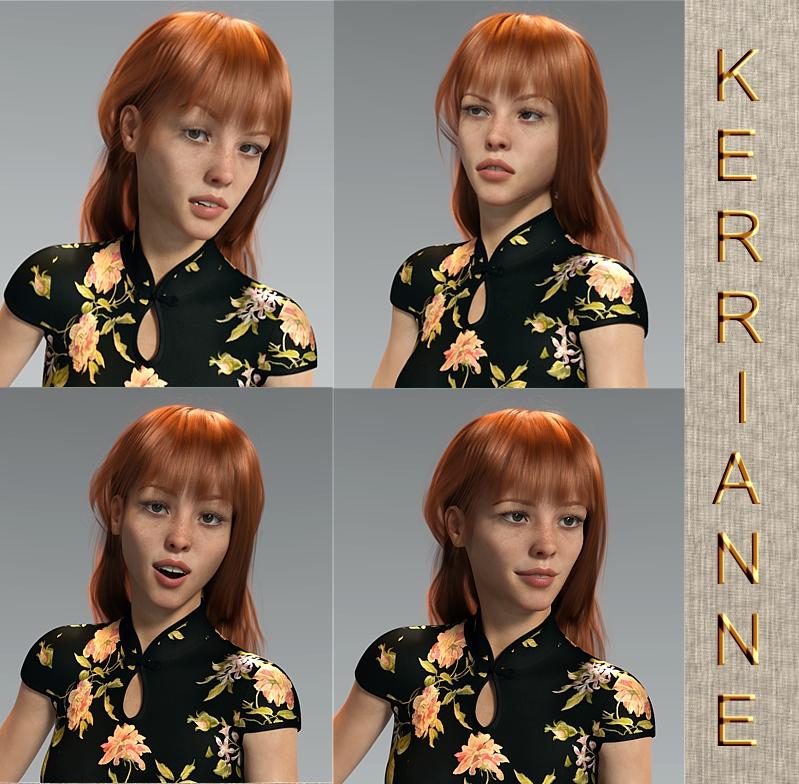
Wanted to give a shout out to some expression and pose sets which make it really easy to tweak slightly and get a fun result. They show moods very easily. Shown on Kerrianne, sold elsewhere.
Long Qipao Dress (G8F) Liv Hair (G3F / G8F) I tried Vance Hair and it looked flat and fake. May have been the lighting. The Liv Hair wasn't quite dark enough for the shade of auburn I wanted (and one was too dark) so I used Surfaces and darkened the light one.
Note Kerrianne's plumper area between the brow and the upper eyelid. So realistic! Not exactly "hooded" but definitely more fat stored above the eyelid. Click on the second one to enlarge and click again. Easily seen.
 RRRR - But You Promised - Render Contest *closed*
@dennisgray41: Nice Entry! Don't forget to post it in the enties only thread (following the instructions in the first post, with a tag (used later in voting)
Entry thread is linked in first post but I put a link here tooThanks again. Now how do I manage to find 3 youg ladies, at least one of whom is in a bikini in a dark grungy industrial environment?
@dennisgray41: Nice Entry! Don't forget to post it in the enties only thread (following the instructions in the first post, with a tag (used later in voting)
Entry thread is linked in first post but I put a link here tooThanks again. Now how do I manage to find 3 youg ladies, at least one of whom is in a bikini in a dark grungy industrial environment?
You need to edit your entry to follow the guidelines:
Should look like (example)Tag: Dennis#1
But Santa, you promised me a Victoria 8! This is a V4.
<Image>
This is bacause it takes ages to setup the voting of every entry looks differentWhy won't my picture work right?
Your picture work absolutely, just edit you entry so it has a tag:<name>#number in it so it makes it easier for voting.
Ok. I did that.
Perfect!
RRRR - But You Promised - Render Contest *closed*@dennisgray41: Nice Entry! Don't forget to post it in the enties only thread (following the instructions in the first post, with a tag (used later in voting)
Entry thread is linked in first post but I put a link here tooThanks again. Now how do I manage to find 3 youg ladies, at least one of whom is in a bikini in a dark grungy industrial environment?
@dennisgray41: Nice Entry! Don't forget to post it in the enties only thread (following the instructions in the first post, with a tag (used later in voting)
Entry thread is linked in first post but I put a link here tooThanks again. Now how do I manage to find 3 youg ladies, at least one of whom is in a bikini in a dark grungy industrial environment?
You need to edit your entry to follow the guidelines:
Should look like (example)Tag: Dennis#1
But Santa, you promised me a Victoria 8! This is a V4.
<Image>
This is bacause it takes ages to setup the voting of every entry looks differentWhy won't my picture work right?
Your picture work absolutely, just edit you entry so it has a tag:<name>#number in it so it makes it easier for voting.
Ok. I did that.
RRRR - But You Promised - Render Contest *closed*@dennisgray41: Nice Entry! Don't forget to post it in the enties only thread (following the instructions in the first post, with a tag (used later in voting)
Entry thread is linked in first post but I put a link here tooThanks again. Now how do I manage to find 3 youg ladies, at least one of whom is in a bikini in a dark grungy industrial environment?
You need to edit your entry to follow the guidelines:
Should look like (example)Tag: Dennis#1
But Santa, you promised me a Victoria 8! This is a V4.
<Image>
This is bacause it takes ages to setup the voting of every entry looks differentWhy won't my picture work right?
Your picture work absolutely, just edit you entry so it has a tag:<name>#number in it so it makes it easier for voting.
RRRR - But You Promised - Render Contest *closed*@dennisgray41: Nice Entry! Don't forget to post it in the enties only thread (following the instructions in the first post, with a tag (used later in voting)
Entry thread is linked in first post but I put a link here tooThanks again. Now how do I manage to find 3 youg ladies, at least one of whom is in a bikini in a dark grungy industrial environment?
You need to edit your entry to follow the guidelines:
Should look like (example)Tag: Dennis#1
But Santa, you promised me a Victoria 8! This is a V4.
<Image>
This is bacause it takes ages to setup the voting of every entry looks differentWhy won't my picture work right?
RRRR - But You Promised - Render Contest *closed*@dennisgray41: Nice Entry! Don't forget to post it in the enties only thread (following the instructions in the first post, with a tag (used later in voting)
Entry thread is linked in first post but I put a link here tooThanks again. Now how do I manage to find 3 youg ladies, at least one of whom is in a bikini in a dark grungy industrial environment?
You need to edit your entry to follow the guidelines:
Should look like (example)Tag: Dennis#1
But Santa, you promised me a Victoria 8! This is a V4.
<Image>
This is bacause it takes ages to setup the voting of every entry looks differentRRRR But You Promised - Entries only threadTag: Dennis#1
But Santa, you promised me a Victoria 8! This is a V4.RRRR - But You Promised - Render Contest *closed*I finally got this to render! It crashed 4 times. how did I do?
merry making style for genisis8, fairie's lipstick
Christmas decorations, big red bell
v4 hooded cloak, worn by V4 doll
juggling act for V4, worn by V4 doll.
"But Santa, you promised me a Victoria 8! This is a V4.
 Weird problem with Victoria 4.2 randomly changing body part positions.
DAZ 4.12.0.86
I load Victoria 4.2 into my scene. When I move her around, with Victoria v4.2 selected, using xtranslate, ytranslate and ztranslate, her arms and legs start to automatically change into different poses. Does anyone know what's causing this? If I use xrotate, yrotate and zrotate, her hips, legs and arms start randomly changing positions? This is so bizarre.
Can Genesis 2 Duf's be made to work with V4?If you apply a native .dsa, .dsb or .pz2 MAT to V4, you can then save it directly as a .duf MAT (File > Save As > Material Preset). Because the original surface names are retained the .duf will load OK back onto V4.
I know that .duf files cannot be viewed from the Poser Formats library, but I think native V4 MATs (.dsa, .dsb and .pz2) can be viewed in the DAZ Studio Formats library. So if the concern is easy access to MATs all you really need to do is put a set of copies in the DAZ folders.
Draagonstorm's batch converter changes the surface names to Genesis 2 names. If you need to apply these MATs to V4 you can do so by creating a Surface Selection Set for V4 which will include all the Genesis 2 surface names mapped back to the original V4 names. Unfortunately this takes a bit of time to do, and there does not seem to be a way to save them, so each time you load a new V4 you will need to recreate the Surface Selection Sets anew, so I have written a brief script which will load Genesis 2 Surface Selection Sets onto Victoria 4 in a jiffy (attached). Let me know if you have any problems with it.
YAWIQ (Yet Another Wardrobe Identification Question)The first set I believe is here https://www.daz3d.com/fwsa-erynn-hd-for-victoria-8-and-lf-erynn-lingerie searched under 'lingerie'

The second not sure
Second is here https://www.daz3d.com/dforce-vivacious-chemise-for-the-genesis-8-females
 with the texture here: https://www.daz3d.com/dforce-vivacious-chemise-add-on-textures
 IRAY Photorealism?
I figured out the appearence of the UV seams .. They appear when rendering with spectral.
Never used spectral but it's good to know, thank you. Then on other discussions it seems chromatic sss works fine only with spectral. It's a shame since chromatic is used with some characters as Victoria 8 for example. Nevertheless depending on the settings it seems sometime you can switch to mono without too much of a difference.
As a side note for exporting skins to cycles it is good to avoid chromatic as well, since it isn't converted fine by diffeomorphic. To be fair it is also not documented at all in the iray documentation.
Thus the more I know about iray the more I see iray is not ready for production, from the black eyes issue to the blurry denoiser and now spectral seams .. that's a mess.
Best skin quality-wise for young characterProbably Josie because of the eyebrows. Younger women usually have thicker eyebrows. Or any of them if you remove the eyebrows and use other thicker ones. Freckles can also make a character seem younger but 18-20 is not really that young...
I plan to remove the brows for sure and use other ones whichever the skin.
Do you really believe the quality of all maps is the same?
I think Elizabeth.
Any particular reason?
I have some of those characters. Give me some time and I'll render them using the same face morph and light conditions. That way you can better compare which one would serve your character first.
I am also rendering them all with same lighting, different skins, it is still hard to choose just from appearance in one light. I plan to use the character in a VN so it will be under a lot of lights in the end, but I am not experienced enough to judges a skin just from one or two light sets.
Best skin quality-wise for young characterI think Elizabeth.
Best skin quality-wise for young characterHi there,
I created a new character and I now want to add a skin to it.
I have narrowed it down to quite a few, that more or less match the colour I want (with little tweaking to translucency).
It is very hard for me to choose only one from these so if you guys could say which from these are of higher quality, so that I have few left to choose from.
My character is around 18-20 years old, if that matters (maybe some skins have details for higher age).
Babina, Bridget, Elizabeth, Gilia, Josie, Kimm, Myriel, Olivia, Psionne, Sharah, Victoria.
Thanks
Dain 8
I think the male figures are great. It's the modern male clothing that usually falls short in terms of looking real to me - especially when it comes to anything with a tailored shirt collar, necktie and coat lapels.I'm not going to return it because I want to support male content, but my gosh the only good thing about the bundle is Dain himself. I am a sad panda.

I've been a Daz customer for over 16 years now, my days of buying something I think is substandard 'to support male content' are past. From what I have seen, it only perpetuates the 'eh, good enough' attitude in it's production. That's just my opinion, everyone should spend their money how they see fit.
I do agree in part, but since I got two other pro bundles that had more stuff in them that is better/I'll use, I'll take it as a wash and just be done with daz at this point. I'm sure when Victoria 9 eventually comes out with "super realistic boob bounce and glute squish" the males will be pushed aside anyways. ¯\_(ツ)_/¯
(Lock) Difference V4 and V4.2Victoria 4.2 has been the current version of Victoria 4 for ages - since before Genesis (1) was released. 4.1 added the eyebrow element (as a bone parnted to the head), 4.1 or 4.2 switched from embedded morphs to the ExP system to allow more expansions. Anything that works for Victoria 4 should be fine with 4.2.
Questions from an Ex Poser UserConforming prop? In D/S we save File > save as > Support files > figure/prop ... save it to an intelligent location {not in the Runtime structure but in My Library someplace} Props don't conform. Clothing conforms. If it's a clothing prop then first it needs to be made into a clothing piece [rigged using the transfer utilities].
I have to check that out. What I want to achive is: I have a prop which a figure should hold in it's hand when loaded. Or a piece of jeweltry which autoconnects to the right place of the figure and is also parented to it. It works if I load a Poser prop that was conforming to Victoria 4. Not exactly, but ok. But I don't know how to create and save such thing in DS.
I am a week on business trip now and cannot check right away. So sorry, if I answer delayed.
Daz 3D is part of

Connect
DAZ Productions, Inc.
7533 S Center View Ct #4664
West Jordan, UT 84084Licensing Agreement | Terms of Service | Privacy Policy | EULA
© 2026 Daz Productions Inc. All Rights Reserved.