-
Steering on a car I built (I gave up, so we can close this)
Standard Import. So I saved the entire thing as a bunch of .objs and then deleted the original Blender file (Because I thought this was a one-off thing... I have so many models now that if I don't do that I end up with gigabytes of random crap) I know it was a boneheaded move, but every time I learn this lesson I end up spending days cleaning out directories... I don't know which is MORE of a time-suck...
Anyway, there are about 10 or so pieces: The body of the car, the suspension of the car (without front wheels), two front wheels (one model, though) a steering wheel, the person's body, the persons' head, a lower hand and an upper hand (which are duplicated).
Thank you all for helping me.... this has been remarkably frustrating. I'm grateful you've put so much time into it. :)
New Daz 3D 'Safe Search' FilterStrange facts
FG College Dorm Floor is flagged as Mature Content
FG Senior College Dorm Bundle isn't.Bundles don't inherit the flag of the included content.
Metadata is probably the weakness of Daz3D Shop, it's a full time job for an ISFJ person.
Loungewear Adventure Styles for Verse Clothing Sets is flagged as Mature Content
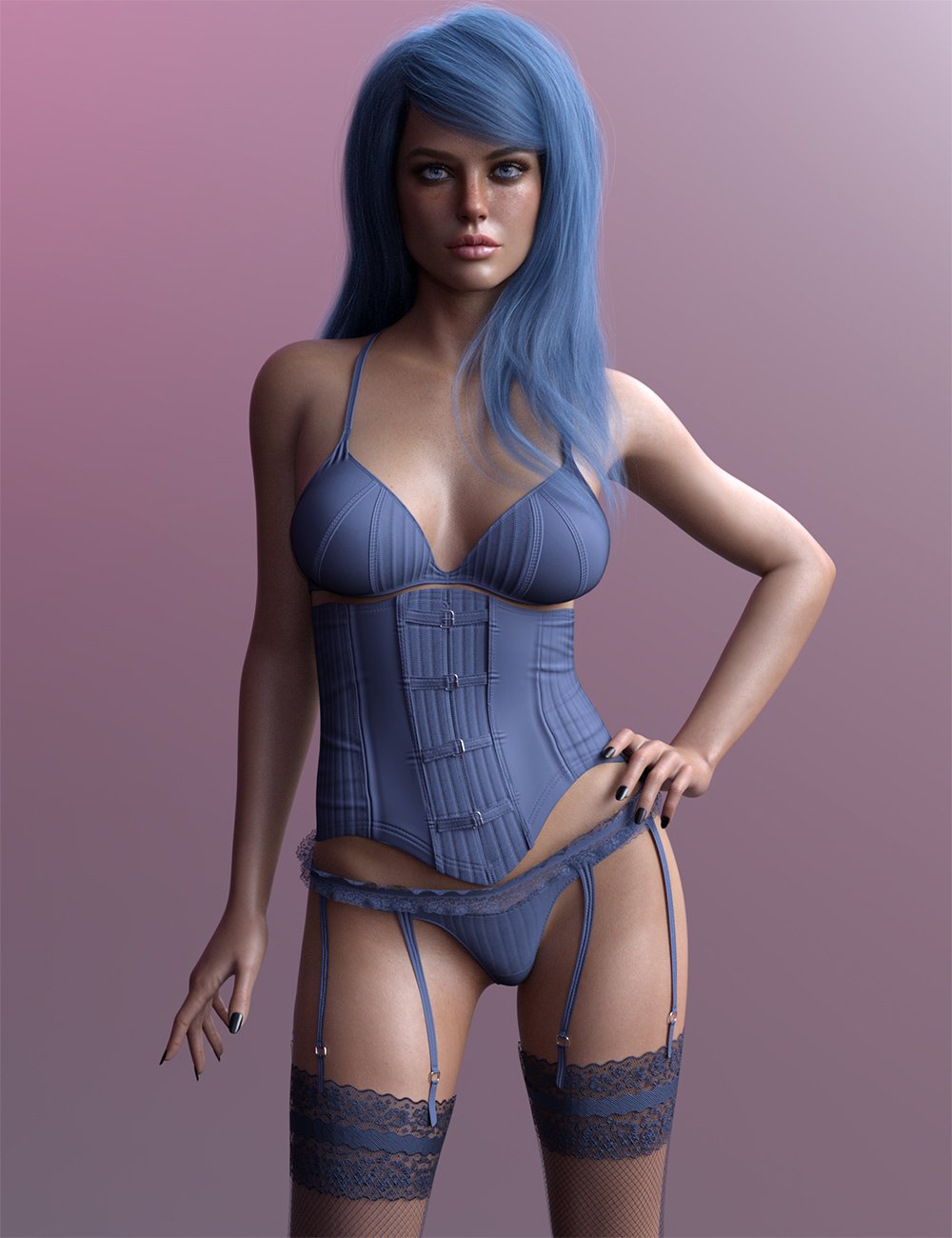
X Fashion Leather Lingerie Set isn't.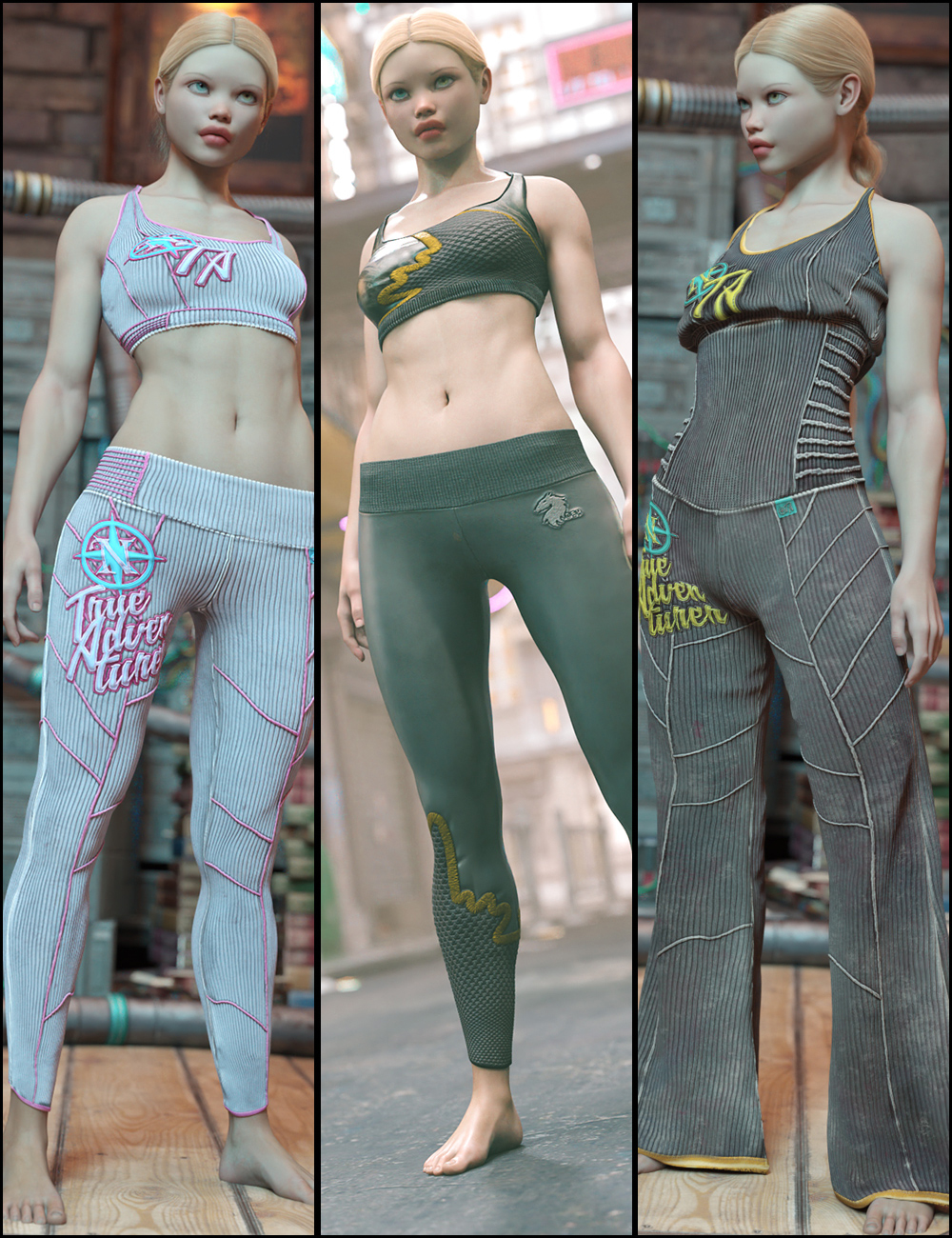
 Steering on a car I built (I gave up, so we can close this)
Aabhnormal,
Right Click on the "Parameters" Tab and go to "Preferences > Show HIdden Properties". That should make a hidden property visable again, while still being hidden.
Question for you: Are you importing the model via the standard import option or are you doing it through the "Figure Setup" tab?
In regards to sending models between Daz Studio and Blender, in the screen shots below please refer to images 6-8 for exporting. If everything is to its correct scale in blender, then also make sure you apply the scale in Blender before exporting (image 5). This could be causing the scale issue in Daz Studio
Genesis 9 Coming Soon! Preorder Victoria 9 HD TodayWith the upcoming release of Genesis 9, I thought it might be a good idea to revisit making clothes for Genesis 1. Genesis 9 uses the same unimesh for both the female and the male. There are female and male base full body morphs to model gender-leaning clothes for. Jay Versluis and Fugazi have a pre-copy of Genesis 9 and made a video for using Marvelous Designer to make a dress for the female full body morph and still rigged for the unimesh. Most of us don't have Genesis 9 yet, including me, but it occurred to me that this workflow is similar to creating for Genesis 1. Therefore, I put together a tutorial as a series of screen shots to use Marvelous Designer to make a skirt tailored to the Genesis 1 Basic Female, and then rigged for the genesis 1 base.
Jay and Fugazi Genesis 9 female to unimesh here - https://www.youtube.com/watch?v=lkHsq7aZYjc
My free Genesis 1 female to unimesh tutorial using screenshots starting here - https://www.daz3d.com/forums/discussion/comment/7729546/#Comment_7729546
Both do the modeling in Marvelous Designer and then import the OBJ in Daz Studio for rigging. My copy of Marvelous Designer is old, before they went subscription. So if you have a current license or take advantage of a free trial, you will have a slightly different interface with some additional tools.
Free Tutorial - Marvelous Designer for Clothes for Unimesh (Genesis 1 for G9)Mods - I put this here but move if appropriate. The tutorial is free, but maybe only clothes/props/characters, etc go here.
With the upcoming release of Genesis 9, I thought it might be a good idea to revisit making clothes for Genesis 1. Reportedly, Genesis 9 uses the same unimesh for both the female and the male. Therefore, there are female and male base full body morphs to model gender-leaning clothes for. Jay Versluis and Fugazi have a pre-copy of Genesis 9 and made a video for using Marvelous Designer to make a dress for the female full body morph and still rigged for the unimesh. Most of us don't have Genesis 9 yet, including me, but it occurred to me that this workflow is similar to creating for Genesis 1. Therefore, I put together a tutorial as a series of screen shots to use Marvelous Designer to make a skirt tailored to the Genesis 1 Basic Female, and then rigged for the genesis 1 base.
Jay and Fugazi Genesis 9 female to unimesh here - https://www.youtube.com/watch?v=lkHsq7aZYjc
My free Genesis 1 female to unimesh tutorial using screenshots starting here - https://www.daz3d.com/forums/discussion/comment/7729546/#Comment_7729546
Both do the modeling in Marvelous Designer and then import the OBJ in Daz Studio for rigging.
We need to talkwsterdan said:
wolf359 said:
Speaking of lipsyncing,
The newest commit of Diffeo has added the ability to bake animated morphs to animated shape key frames!!.

Giving us the ability to use Daz Mimic basic, Anilip2 ,Iphone,MOHO.dat files on our Daz genesis figures in Blender AFTER re-rigging the body with autorig pro.
So no more struggling with the ARP face rig
just import your facial animation from your preferred Daz native method, or use the built in Diffeo MOHO importer along with the free Autolipsyncotizer app.
Exciting times !!
That's very good news. I just used DAZ's 32-bit Mimic to lip synch just over 10 minutes of audio (58 voice tracks) saving each one as a partial Pose Preset (it took 85 minutes), allowing me to apply them as partial poses in 64-bit D|S to any Genesis 3 figures (I've done the same with DAZ 8 earlier this month).It works beautifully applying them to characters without changing any of the characters' other animation, so two people walking side-by-side can now have a conversaiton without breakig stride.
Thanks for the update! Haven't started moving to Blender yet, but knowing this is done really makes things look a little brighter.
Just be aware that diffeo is only for the windows version of Blender.
Steering on a car I built (I gave up, so we can close this)Still working on this problem. Sorry guys. I just re-imported the entire model again, but because of the way I built it in Blender, I can't import it as one thing... so we still have a lot of different objs that I'm putting together in the hierarchy. I did reimport them so they are not scaled, though. They are "natural" in size.
I'm now starting to rig them. I'll report back. :)
Diomede's Notepad, Sketchpad, and Chilling Pad20 - Preliminary Thoughts for Adapting Genesis 1 Workflow to Genesis 9
General There is good reason to believe that the same basic steps will work for genesis 9. I intend to create three Avatars for my version of MD. The Base G9, the G9F, and the G9M. For gendered clothing I will model the garment using MD or a more general modeling program to G9F or G9M as appropriate. I will then use reverse deformation in the rigging stage of Daz Studio transfer utility. For items that are unigender, I can create morphs for the clothing item that fit each avatar and then import those as substitutions for the default morph created by the transfer utility.
UVMapping - I have not discussed that above. MD can have decent UVMaps derived from the 2D panels, but that may depend on whether the mesh needs to have retopology.
Retopology - the default of my old version of MD uses triangles. It can change to quads but the results around edges and seams are not good. May be better off brushing up on retopology in other programs - and if so, then also brushing up on UVMapping in other programs.
Diomede's Notepad, Sketchpad, and Chilling Pad16 - Start a new Daz Studio Scene with Genesis 1 in Basic Female morph set to 1. Import the Skirt OBJ
Will be using the transfer utility.
In the import options, make sure to use Daz Studio scale to match the MD export setting.
The skirt should load fitting the Basic Female shape of Genesis 1.
Any Model Conversion Artists around? Convert model to GenesisWhich JoJo? Also, if you're referring to JoeQuick's hedgehog, I highly doubt that was a conversion, but rather that Joe sculpted that off of the G8 mesh. In any event, it's possible to shrinkwrap G8's mesh around the model you want to import using a modeling program. How well that works will depend on your own familiarity with the process and how similar the figure you're trying to fit is to the figure you're trying to adapt.
Transferring presets to a new PCMany thanks, Richard.
Yes, I can locate my characters/wearables etc. within the Content Library.
I understand your instructions but, on my old system, i'm trying to workout where that 'first Daz Studio Format content directory' would be and what the content should look like.
Would the Exported Userdata be in a separate folder within that Support folder? I have done the 'Export Userdata' on my old system but am having trouble locating this exported data.
When I look in the Support folder where I think this data has been stored, there is almost 10,000 items in there but, skimming through it, I don't see any of my saved characters, wearables etc.
My other question is, when I do reimport that metadata onto the new system, is there going to be clash between the data that is already in the new system Support folder with the metadata being imported from the old system?
I appreciate your assistance on this, Richard and hope my ramblings make sense to you.
Cheers, Ian
Oh, Misty, I forgot my Complaint ThreadRezca said:
N-RArts said:
 Holy meatballs Batman! The model of a ship that I've been trying to import to Daz for several years (because its high in polys), has actually loaded! Although I suppose it's going to take a few more years, just to sort out its maps
Sorting out maps ooof. Having to carry stuff between apps there's a lot of that going on, and it's SUCH a pain when the textures are in weird places or named in strange ways...
Sorting maps is all I seem to do these days, and in my case, it's not just between apps. It's between computers... Plus,the maps are the wrong way around. It was originally a Lightwave model, so those maps need to be flipped horizontally... At least (looking at one map), that's what I'm hoping.
Diomede's Notepad, Sketchpad, and Chilling Pad2 - Import the Daz Figure OBJ as an Avatar to Marvelous Designer
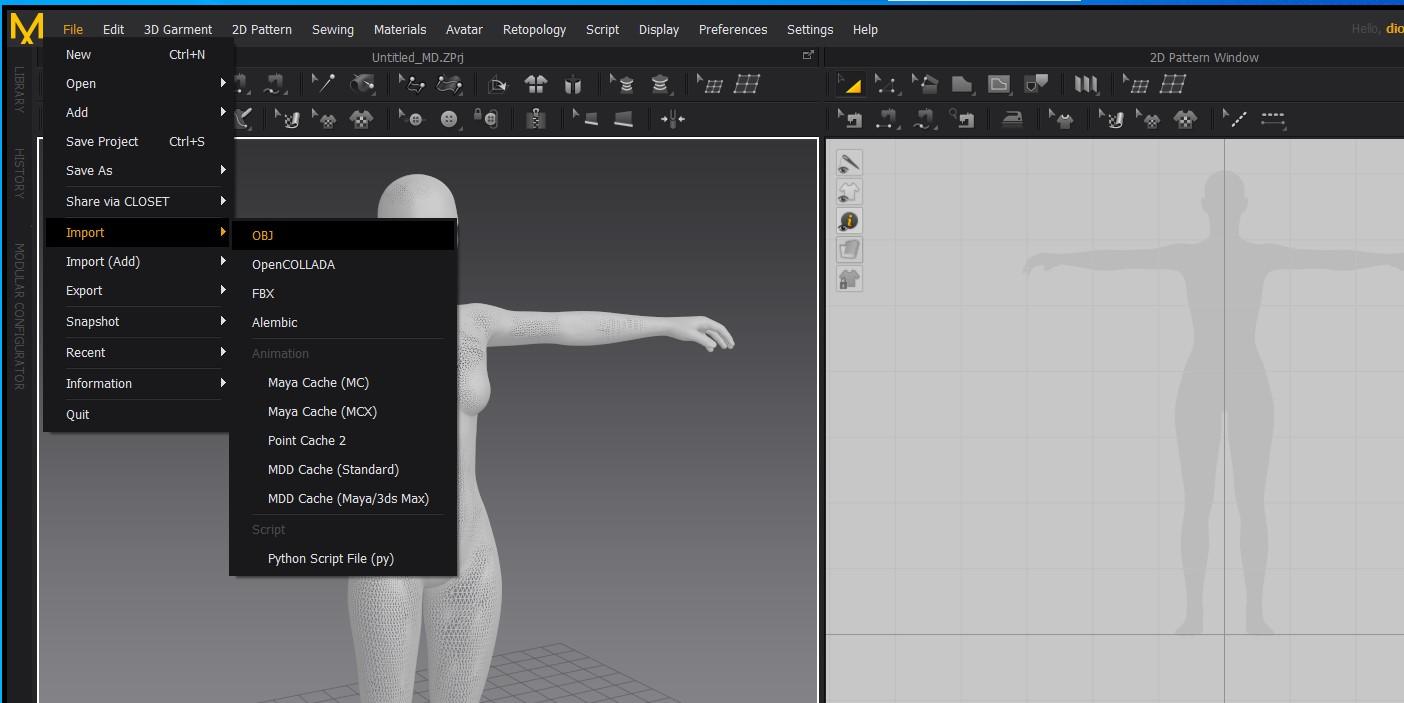
- start up Marvelous Designer. Use the file menu to import the Genesis Basic Female because that is the shape will be designing for.
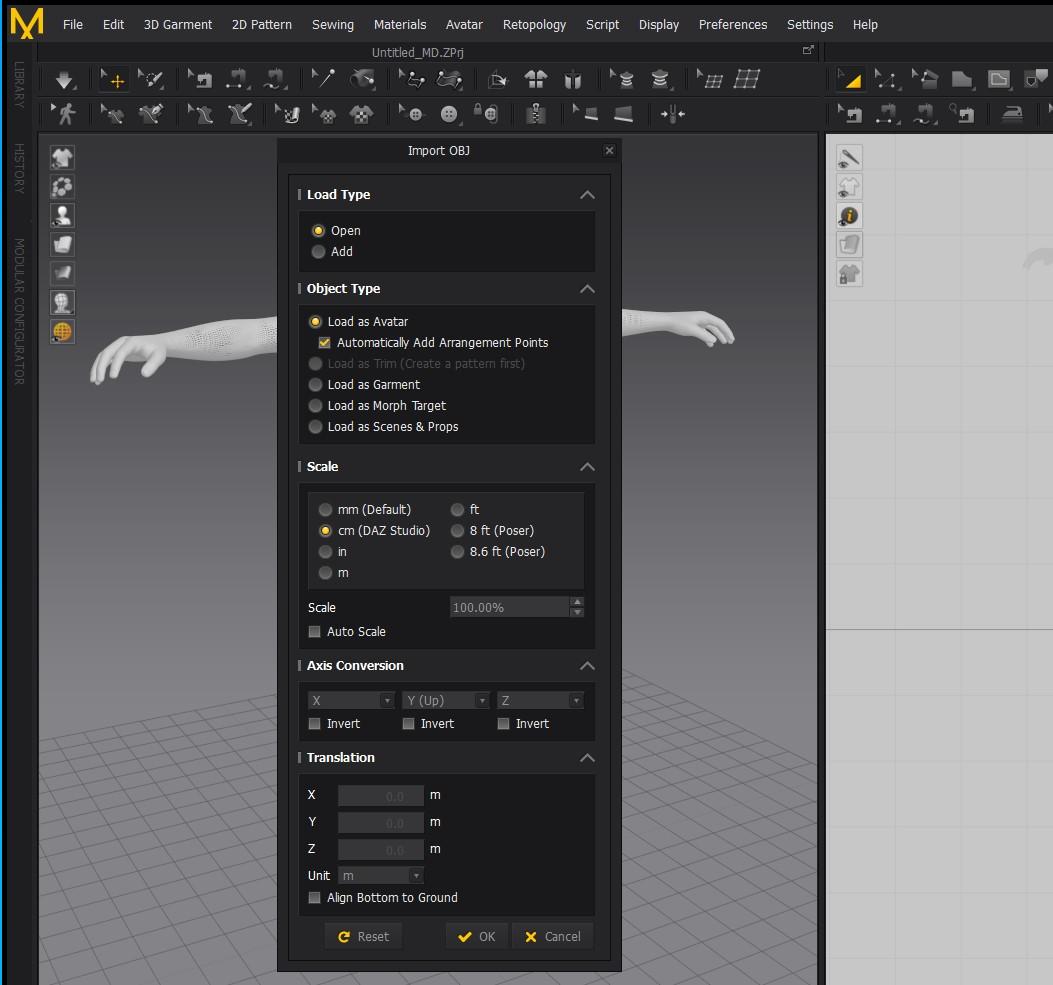
In the import menu, make sure to use the Avatar option and to use the Daz Studio scale. Also check arrangement points..
 Oh, Misty, I forgot my Complaint Thread
N-RArts said:
Holy meatballs Batman! The model of a ship that I've been trying to import to Daz for several years (because its high in polys), has actually loaded! Although I suppose it's going to take a few more years, just to sort out its maps Sorting out maps ooof. Having to carry stuff between apps there's a lot of that going on, and it's SUCH a pain when the textures are in weird places or named in strange ways...
Imported Cyber Distric from KitbachIF you can get the .obj imported into Hexagon [whether over the DS bridge or on its own], you can [hopefully] toggle transparency on, "faces" - select [right-click drag] one prop, then "copy" count to 10, "delete" count to 10, "paste" ... and it should reappear as its own obj in the scene tab. Select it and export it OUT as .obj to the desktop or wherever. Delete it from Hexagon. Repeat for each prop.
When all done, fresh instance of Hexagon [to clear memory], import in one prop and polish it - either export it out again or send it over the bridge to DS [have DS closed so Hexagon can open it]. Remove any "0" shading domains in DS. Polish the prop and save it as a Figure/Prop asset to some logical place in My Library but not in the Runtime folders.
Oh, Misty, I forgot my Complaint ThreadUrgh! I need a lottery win. I should never have looked on eBay. I guess that pre-order will have to wait until next week.
Our kitten has now discovered the top of the curtain rail. On the back of the sofa, he can get to the top of the curtain in two jumps. When he reaches three months (next week), I'd like to try and "clicker" train him. The internet says that it's possible... Although, at the moment, the thought could be classed as an "Expectation vs. Reality" meme/thing.
There's something a friend said in a message to me about our kitten. That if things carry on the way they are, Toby's going to become a real piece of work when he's older. Just watching him as a kitten now, I think my friend is going to be right. This must've been what happened when our ginger and white boy was a kitten (1995 - I wasn't really around when our ginger and white was growing up - I was in school, or out with "friends").
Holy meatballs Batman! The model of a ship that I've been trying to import to Daz for several years (because its high in polys), has actually loaded! Although I suppose it's going to take a few more years, just to sort out its maps We need to talkwolf359 said:
Speaking of lipsyncing,
The newest commit of Diffeo has added the ability to bake animated morphs to animated shape key frames!!.
Giving us the ability to use Daz Mimic basic, Anilip2 ,Iphone,MOHO.dat files on our Daz genesis figures in Blender AFTER re-rigging the body with autorig pro.
So no more struggling with the ARP face rig
just import your facial animation from your preferred Daz native method, or use the built in Diffeo MOHO importer along with the free Autolipsyncotizer app.
Exciting times !!
That's very good news. I just used DAZ's 32-bit Mimic to lip synch just over 10 minutes of audio (58 voice tracks) saving each one as a partial Pose Preset (it took 85 minutes), allowing me to apply them as partial poses in 64-bit D|S to any Genesis 3 figures (I've done the same with DAZ 8 earlier this month).It works beautifully applying them to characters without changing any of the characters' other animation, so two people walking side-by-side can now have a conversaiton without breakig stride.
Thanks for the update! Haven't started moving to Blender yet, but knowing this is done really makes things look a little brighter.
How do you/can you update UVs in Daz Studio?If you're bringing additional mesh the object will need to be imported and then you apply uv's in the surface tab as others have mentioned.
Another thing that might help is that if you have polygon groups these come in with an object import and can be converted to surfaces quite easily. I recently did this with an object that I imported in DS that was created in Zbrush.
If you need to know this feel free to contact me and I'll walk you thru it. I don't won't to overwhelm you with too much info if you're not worrying about setting up surfaces and just using the default.
Genesis 9 Coming Soon! Preorder Victoria 9 HD TodayPerttiA said:
Catherine3678ab said:
PerttiA said:
Catherine3678ab said:
My understanding [hope it's correct] is that, without additional mesh resolutions, G9 is itself HD [compared to G8] so that would make for better morphing possibilities by everybody.
The problem is that one can only import morphs at base resolution. No use exporting G9 at higher mesh resolution to Blender, make morphs there, when you can't import them back to the figure in DS.
One could only use the mesh tools that work inside DS to make the morphs.
Yes, but if that 'base' resolution is a higher resolution than the 'base' resolution of G8, it would enable more detailed morphs none the less.
We have been shown the G9 base resolution mesh, doesn't look much higher resolution than G8/G81, and it's missing vertices to build smaller details like the pokies and navel.
I don't recall mention of the navel but the pokies "etc" are allegedly arriving as geografts.
A lot of that extreme face detail we're seeing is likely done with the textures - which if I caught the comment correctly, comes with G9. :-)
We need to talkSpeaking of lipsyncing,
The newest commit of Diffeo has added the ability to bake animated morphs to animated shape key frames!!.
Giving us the ability to use Daz Mimic basic, Anilip2 ,Iphone,MOHO.dat files on our Daz genesis figures in Blender AFTER re-rigging the body with autorig pro.
So no more struggling with the ARP face rig
just import your facial animation from your preferred Daz native method, or use the built in Diffeo MOHO importer along with the free Autolipsyncotizer app.
Exciting times !!
Daz 3D is part of

Connect
DAZ Productions, Inc.
7533 S Center View Ct #4664
West Jordan, UT 84084Licensing Agreement | Terms of Service | Privacy Policy | EULA
© 2026 Daz Productions Inc. All Rights Reserved.