-
Moving my content to a different drive
gfdamron1 said:
I'm looking at My DAZ 3D Library on my external drive, which is where I've been trying to install the non DAZ sourced assets.
In "Smart" Content, or the Content Library?
The Products and Categories in Content Library are also database driven views, which rely on metadata like "Smart" Content does - Metadata for DAZ store bought products is made by DAZ (not by the PA's), products bought from other sources do not have that data.
If the product is correctly installed, it will be found in Content Library, under DAZ Studio Formats -> [Name of your Content Library]Attached also instructions for manual installation
Store data in a SceneWorking out which products were used:
http://docs.daz3d.com/doku.php/public/software/dazstudio/4/referenceguide/scripting/api_reference/samples/metadata/list_products_used/start
http://docs.daz3d.com/doku.php/public/software/dazstudio/4/referenceguide/scripting/api_reference/samples/remote_operation/extract_data_from_products_used/startCompressing files into a zip
Extracting fiels from a zip
Import DS settings/plugins into a fresh DS installationHi! I recently got a new computer and installed a new Daz Studio on my new HDD. I moved my library over and everything is working fine so far, but I have 2 questions
- Is it possible to transfer my plugins to the new installation without reinstalling/configuring them?
- Is there any way to import/copy my workspace settings(tab configurations, custom actions etc.) from my old DS installation? Where do i find the files?
Thanks in advance!
Any course/tutorial recommendations for Beginner Creators?Patience, it takes time to learn all the ropes. See how the products you purchased were made. Clothing for example has a LOT of extra morphs to be made also for them to work correctly on their target figures.
https://www.daz3d.com/catalogsearch/result/?q=tutorials
And as was mentioned, there are video tutorials over on YouTube and a few other video sites.
VERY generally speaking, import .obj into D/S, decorate it, Save it as a Figure/Prop asset. Make some more mats for it. Save those as Mat presets to a subfolder of the newly made prop.
Hair made in other programs, unless it's also like a 3D mesh, will only work in the program that made it. One can make some nice hair in D/S too. The PAs [so I understand] have access to a few more creation tools when it comes to hair and HD morphs.
Custom pJCM IgnoredTimotheus said:
I am attempting to add a custom pJCM to a clothing item for Genesis 8 Female. The JCM is pJCMShldrFront_p110_Bend_p40_R. When I import the morph, Morph Loader Pro reports success, but the new morph is not implemented. I still see the auto-generated one. The same process worked fine for the corresponding JCM on the left side and for countless other JCMs I have done for this clothing and other items in the set. I double checked everything and tried it multiple times. The morph is simply ignored, and there's no error in the log.
Any ideas?
Tim
Sure. D/S does not recognize 2 morphs with the same name. Before bringing in your new morph, rename the "name" and "label" to something like "delete" [so you remember which one not to save], dial it to "0" -- then bring in and make the new morph "reverse deformations". If it works as desired, put it to zero and then save that new one. Then delete the clothing from the scene and load it afresh. Check that the morphs are as expected.
IF perchance you had ever saved the autogenerated morph, then with D/S closed, dig through the data folders and manually delete it.
importing daz poses in blendermzxrae said:
I only recently started to export characters to blender and I now want to import a pose from daz and apply them on the character in blender or add them to the pose library. Ive already searched for quite a while now but couldnt find anything helpful. Does anyone of you know a simple solution or a good tutorial?
Before I use Diffeomorphic to export the figure to Blender, I set the figure in A-pose within Daz. Apparently this helps to ensure the fingers and the feet/toes are posed correctly once a Daz pose is applied in Diffeo. If you followed the instructions in the Diffeo blog for importing a figure and setting up the rig, then applying a pose is a matter of (1) selecting the rig/bones, then (2) clicking Import Pose to bring up a file dialog window, and (3) choosing the pose. (In the screen shot I've taken, I go directly into the My Daz 3D Library to pick out a pose in the subfolders.)
Hope this helps.
Cheers!
[Released] Environment Set Splitter * Commercial *Totte said:
OK, it comes in as groups, but the FBX importer still doesn't do it correctly, yet. So maybe in the future this can be done.
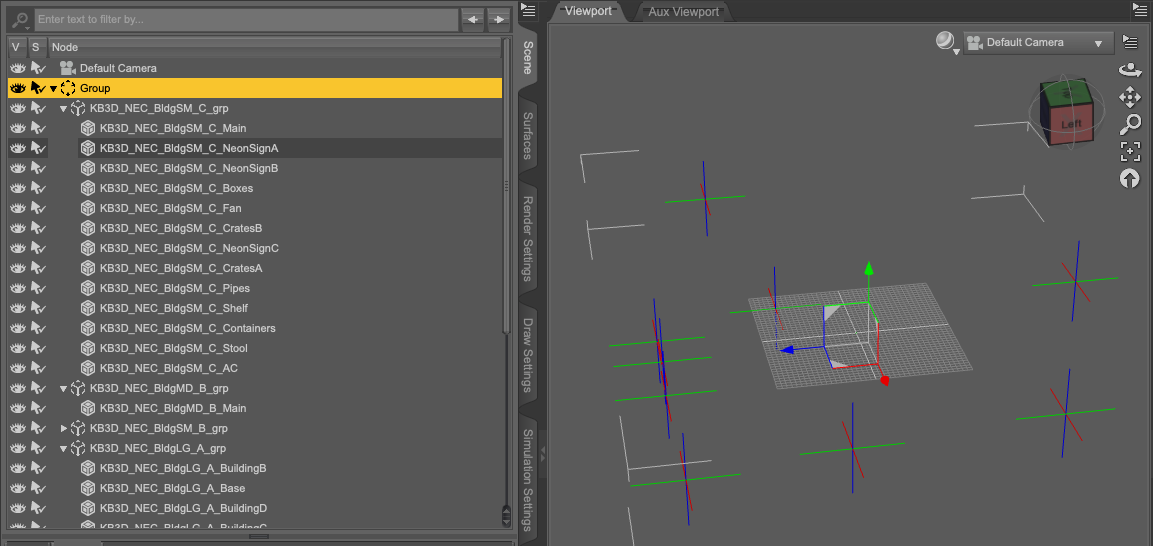
I use Poser 11 Pro to import Kitbash3D fbx for DS because the fbx in DS is broken, from my point of view. From Poser 11, buildings come as groups, and then I must begin a long process of Geometry Edit deleting, moving to world center, scaling to G8, saving, reloading, repeat. If there's a quicker way, I'd jump on it. Automated would be even better.
Animation mesh distortion when scaling model down to 1%Thanks, its been a real struggle... I'm stuck on this issue for a long time now.
I've been trying scale down a G2 Male to 1%, via morph import, (scaling only via transformer, will give the error: "node root as been scaled" in the game engine I need it to be imported to).
So, whenever I scale via transformer all works well in DAZ, but when I scale via morph import (the only way the game engine accepts the model), the mesh gets all twisted If I apply any pose or move body parts.
I just need to fix the distortion of the mesh when I apply a pose, after this downscale procedure!
Any course/tutorial recommendations for Beginner Creators?Hello Daz3d community, I am a new Daz user for 1 months now and I am pretty good with the basics, but for me there is a lack of knowledge on the creator part (mainly because I couldn't find any good tutorials for it). I am creating my assets in Blender, but as soon as I import them into Daz I get completly lost on what to do with it. (mainly custom hair and clothing)
Some tutorials are pretty bad at explaining, for example this one, which cuts off the moment you import it into daz, anyway... https://blog.daz3d.com/create-your-own-3d-hair-with-daz-studio-and-blender/
Do you have any video/course recommendations for me, which explains every detail and step until I can sell my items?
Cheers
importing daz poses in blenderIf you're using diffeo, there's an import pose option where you save the pose in daz as a pose preset, and apply it in Blender. In the Daz to Blender Bridge, there used to be an export pose option I believe, or if you posed it in Daz, it automatically exported that way into Blender. I haven't used the bridge in a long time, just diffeo now.
importing daz poses in blenderI only recently started to export characters to blender and I now want to import a pose from daz and apply them on the character in blender or add them to the pose library. Ive already searched for quite a while now but couldnt find anything helpful. Does anyone of you know a simple solution or a good tutorial?
Custom pJCM IgnoredI am attempting to add a custom pJCM to a clothing item for Genesis 8 Female. The JCM is pJCMShldrFront_p110_Bend_p40_R. When I import the morph, Morph Loader Pro reports success, but the new morph is not implemented. I still see the auto-generated one. The same process worked fine for the corresponding JCM on the left side and for countless other JCMs I have done for this clothing and other items in the set. I double checked everything and tried it multiple times. The morph is simply ignored, and there's no error in the log.
Any ideas?
Tim
Diffeomorphic 1.62 convert to rigify eyes control?Padone said:
- Does it work with the standard G8F or is this error specific to a custom figure ?
- From the error message I see you use blender 3.1, did you try 3.2.2 ?
- Exactly what's your version of the plugin ?
Don't use the latest commit since it has issues.
https://bitbucket.org/Diffeomorphic/import_daz/issues/1145/import-jcms-crashes-in-commit-ef873b8
Thanks for the reply!
The plugin version is 1.6.2, which I believe is the last one. The problem does not happen to 1.6.1.
I used blender 3.1 because I use octane render, in which 3.1 is the latest. But I think I should be able to import the character with 3.2.2 and then open the file with 3.1 again. I will try that.
Diffeomorphic 1.62 convert to rigify eyes control?- Does it work with the standard G8F or is this error specific to a custom figure ?
- From the error message I see you use blender 3.1, did you try 3.2.2 ?
- Exactly what's your version of the plugin ?
Don't use the latest commit since it has issues.
https://bitbucket.org/Diffeomorphic/import_daz/issues/1145/import-jcms-crashes-in-commit-ef873b8
[Released] Environment Set Splitter * Commercial *Totte said:
WendyLuvsCatz said:
Totte said:
smaker1 said:
In my cart also :-)
What about fbx files like those from Kitbash3D,... ? Generate one prop for each building
Thanks
I looked into that, but as the KitBash3D files has no Mesh Groups set up, there is no way to figure out what meshes belong to which main scene object, like is this pipe a part of building 1,2 3 or 4 for example. You see that of you open them in for example Hexgon or Blender, just a long list of mesh objects without any grouping, and no metadata file either that describes which object belong where.
they load grouped in buildings in Carrara

Hmm, interesting, probably depends on what the format is. Did you use obj or fbx?
cannot recall but Carrara can import obj as separate meshes as well as FBX rigged so in place
I am not sure why D|S messes up the latter so much
a decent FBX import is something many people would love especially for rigged stuff
mixamo errorwolf359 said:
trojanx97 said:
wolf359 said:
What is the "freemon" plugin?
its a plugin for daz3d to use mixamo animations easy with one click
it used to work properly and easily for last 1 year but few days ago mixamo and daz3D ASCII .FBX file import is giving an error so the plugin is not working anymore
Is the developer stil active?? perhaps they could update it.
i emailed the dev he replied and says his plugin is working fine ( which it is if you use old downloaded files from mixamo )
but new files downloaded from mixamo doesnt work or even get imported properly into daz3d ... you can test it yourself download mixamo ASCII .fbx file and import it in daz3d it will show messed up
[Released] Environment Set Splitter * Commercial *WendyLuvsCatz said:
Totte said:
smaker1 said:
In my cart also :-)
What about fbx files like those from Kitbash3D,... ? Generate one prop for each building
Thanks
I looked into that, but as the KitBash3D files has no Mesh Groups set up, there is no way to figure out what meshes belong to which main scene object, like is this pipe a part of building 1,2 3 or 4 for example. You see that of you open them in for example Hexgon or Blender, just a long list of mesh objects without any grouping, and no metadata file either that describes which object belong where.
they load grouped in buildings in Carrara
Hmm, interesting, probably depends on what the format is. Did you use obj or fbx?
[Released] Environment Set Splitter * Commercial *Totte said:
smaker1 said:
In my cart also :-)
What about fbx files like those from Kitbash3D,... ? Generate one prop for each building
Thanks
I looked into that, but as the KitBash3D files has no Mesh Groups set up, there is no way to figure out what meshes belong to which main scene object, like is this pipe a part of building 1,2 3 or 4 for example. You see that of you open them in for example Hexgon or Blender, just a long list of mesh objects without any grouping, and no metadata file either that describes which object belong where.
they load grouped in buildings in Carrara
[Released] Environment Set Splitter * Commercial *Totte said:
smaker1 said:
In my cart also :-)
What about fbx files like those from Kitbash3D,... ? Generate one prop for each building
Thanks
I looked into that, but as the KitBash3D files has no Mesh Groups set up, there is no way to figure out what meshes belong to which main scene object, like is this pipe a part of building 1,2 3 or 4 for example. You see that of you open them in for example Hexgon or Blender, just a long list of mesh objects without any grouping, and no metadata file either that describes which object belong where.
Thanks for the feedback Totte. I tried :-) !
[Released] Environment Set Splitter * Commercial *smaker1 said:
In my cart also :-)
What about fbx files like those from Kitbash3D,... ? Generate one prop for each building
Thanks
I looked into that, but as the KitBash3D files has no Mesh Groups set up, there is no way to figure out what meshes belong to which main scene object, like is this pipe a part of building 1,2 3 or 4 for example. You see that of you open them in for example Hexgon or Blender, just a long list of mesh objects without any grouping, and no metadata file either that describes which object belong where.
Daz 3D is part of

Connect
DAZ Productions, Inc.
7533 S Center View Ct #4664
West Jordan, UT 84084Licensing Agreement | Terms of Service | Privacy Policy | EULA
© 2026 Daz Productions Inc. All Rights Reserved.