-
Getting on the 9 train, or notWill confess I have zero interest in toon stuff as well. But I must say it's good that the Filament renderer is being developed. I had hoped more of it when it was introduced, and Filatoon is a useful tool aimed for it, maybe there will be other tools - coping with transparency better will be a step forward. Regards, Richard.FilaToon / Cell shaded rendering with Filament
scorpio said:
TheNathanParable said:
Loaded up an old Girl 6 scene I had lying around and used V3D's FilaToon converter to update it. <3
https://www.daz3d.com/gallery/user/6736226870624256#gallery=newest&page=1&image=1358107
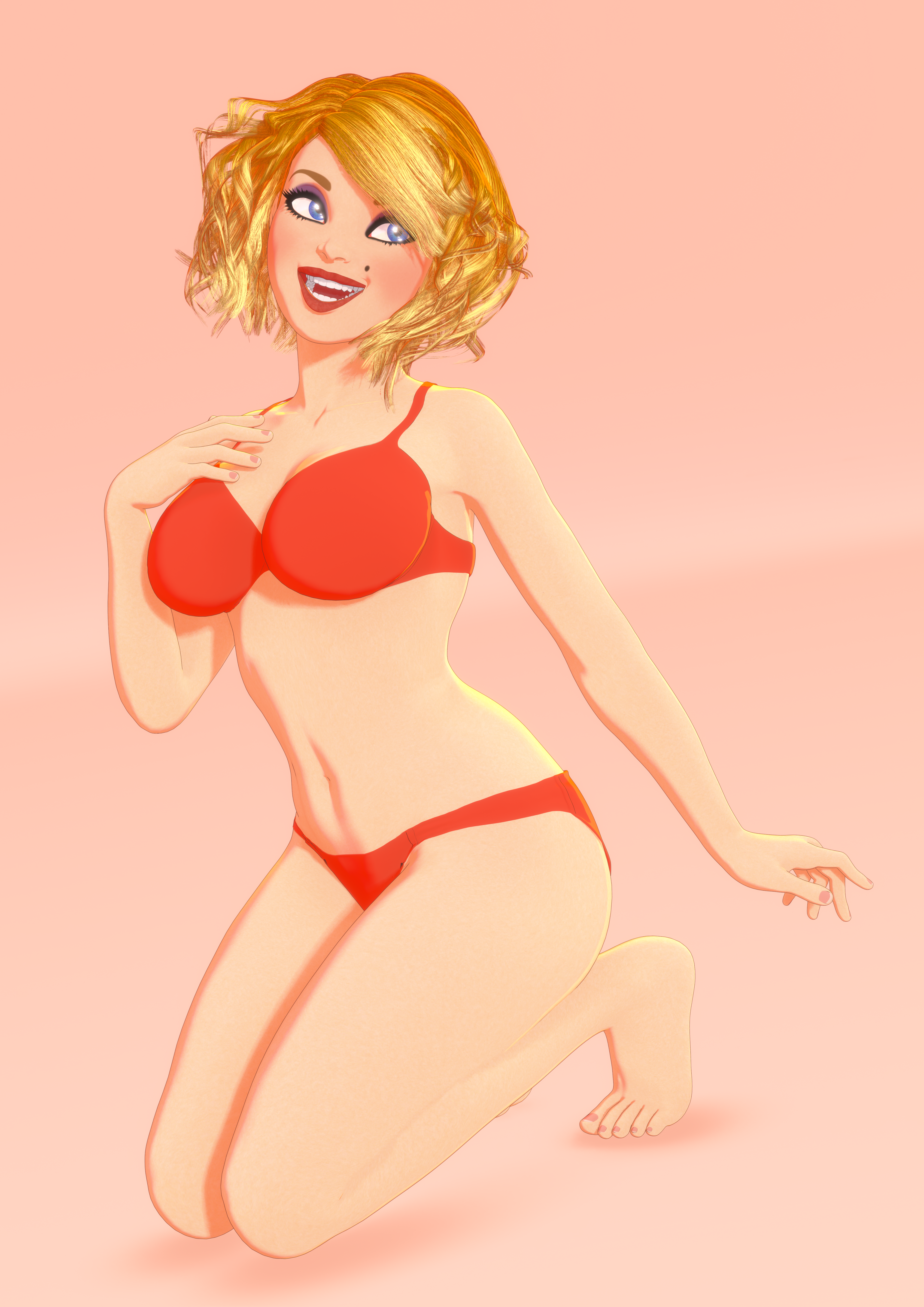
Very nice, but how do you get those soft ground shadows
The ground is the multiplane cyclorama. Both the ground and the character use the "environment weight" option in the filatoon shader (ground is 0.2, character is 0.1). This not only means that they'll be affected *slightly* by the HDRI lighting, but it also means that the ambient occlusion shadows in Filament will actually appear on those surfaces (filament's AO seems to be directly tied to the HDRI). Bump up the strength a lot to make it more obvious without having to increase the environment weight, you get some nice soft AO shadows.
Released : V3D FilaToon Converter, Manager and Tools (Commercial)A lot of things here while I was sleeping ! I'm gonna try to gather all my answers in this single post.
@barbult, thank you so much for sharing your renders here ! I'm happy to see it keeps on saving you time so that you can have more fun or creativity :) That was the goal of it ! And thanks also for the answers/remarks you gave here which are what I would have answered :
- yes, filatoon looks like "real" filatoon only if you render it using Filament
- yes the conversion / customization is compatible with any generation since it works on surfaces and shading (ignoring what figure supports it, except during the conversion stage where it analysis a few stuff including the figures to identify what surface/shader types it should use)
- yes the hair conversion does not always provide good results, but this is not not because of the conversion itself, rather because some hair "geometries" are not or badly adapted to be rendered as toon.
@"kyoto kid" :
the converter "only" requires Daz Studio Default content (the free package coming with DS) to be installed, since it is where it picks the convenient shader for the convenient surfaces. I added a few optional LUT shaders and one optional "glass/water" shader. The conversion will (uncheckable option) load the filatoon draw option node required in the scene as well as a distant light to start with. If you want specific lights, you can set up your own spots/point lights as in Iray, or even use dedicated commercial light products, but the distant light included is enough to start with. If you want custom shaders, you can also use your own customized shaders or existing dedicated commercial shaders, but the "Daz Default Content" Filatoon shaders used by default by the converter are enough to start with.
Please note that Genesis 9 Starter essentials is also required for the checkable option to load the filatoon draw node to be loaded properly (otherwise you can load it via the main menu).
Oh and it also requires a version of Daz Studio compatible with Filatoon (4.22 min I think).
For now the only things which are really tempting for me in the store are hair or background images, because not all hair "geometry" is compatible with a good toon look, and background HDR (not working as HDR but used as backgrounds) are not "toony", but rather super realistic.
Released : V3D FilaToon Converter, Manager and Tools (Commercial)...the second one doesn't look all that bad except for the shadow on the background as you can't turn that off in Iray.
I never bothered with Filament as I felt I had enough to on my plate with Iray (particularly skins and lighting). Also, don't you need the other add-ons like for lighting and surfaces (or is that all included with the converter?).
This would be great for graphic novels without having tpo buy other third party software.
Released : V3D FilaToon Converter, Manager and Tools (Commercial)Here is my Aiko 7 FilaToon scene "accidently" rendered in Iray, to demonstrate what happens if you don't render with Filament.
Released : V3D FilaToon Converter, Manager and Tools (Commercial)kyoto kid said:
...so I looked at this, pretty interesting as it would save having to use 2D software to get similar results. however, a couple questions.
Does it work on other generations or just G9 ( all the Fila Toon content seems to be G9 based)
Yes. It applies FilaToon shaders. Shaders can be applied to any surface. I have used it on G9, G3 (Aiko 7 attached) and props without any problem. It will save you HOURS.
Does it require the Filament render engine?
Well, it you want the result to look as intended, yes, you must view and render your scene with Filament. You can still use the converter and apply the shaders and view or render with another draw style or render engine, but it won't look "right". I've sometimes forgotten to change my render engine from NVIDIA Iray to Viewport, and it happily renders in Iray, but doesn't look right. Then I have to kill the Iray render and change the render engine to Viewport (I have the viewport in Filament draw style for this, of course.)
Released : V3D FilaToon Converter, Manager and Tools (Commercial)...so I looked at this, pretty interesting as it would save having to use 2D software to get similar results. however, a couple questions.
Does it work on other generations or just G9 ( all the Fila Toon content seems to be G9 based)
Does it require the Filament render engine?
Anime Toons and Filatoon Shader Q&AImago said:
Mada said:
It won't. You need the changes that were made to the filament renderer in the program code in Daz Studio for it to work properly.
So, I guess I will never use that. Thanks for the answer, though.
You still can install a DS 4.23 Public Build if you want to... while keeping those multiple older DS versions... as I know latest version brings you crash.
Anime Toons and Filatoon Shader Q&AMada said:
It won't. You need the changes that were made to the filament renderer in the program code in Daz Studio for it to work properly.
So, I guess I will never use that. Thanks for the answer, though.
Anime Toons and Filatoon Shader Q&AImago said:
Someone knows a way to make Filatoon work in 4.21?
It won't. You need the changes that were made to the filament renderer in the program code in Daz Studio for it to work properly.
Released : V3D FilaToon Converter, Manager and Tools (Commercial)barbult said:
I created and rendered this scene with Iray, then used the converter to convert to FilaToon shaders. Wow, that was fast and easy! I still have a lot to learn about the tool, I just jumped in and selected the Convert option. I merged in my own Filament Draw Settings and Distant Light from a DS subset I had created earlier. The Iray render uses a background image in the Environment pane, but that doesn't show up in Filament, so I added an AI cartoonish background with Photoshop after saving the Filament render as PNG with transparent background.
A quick trial ! Thank you barbult !
 Released : V3D FilaToon Converter, Manager and Tools (Commercial)
I created and rendered this scene with Iray, then used the converter to convert to FilaToon shaders. Wow, that was fast and easy! I still have a lot to learn about the tool, I just jumped in and selected the Convert option. I merged in my own Filament Draw Settings and Distant Light from a DS subset I had created earlier. The Iray render uses a background image in the Environment pane, but that doesn't show up in Filament, so I added an AI cartoonish background with Photoshop after saving the Filament render as PNG with transparent background.
Question about upgrading DS on a MacThe issue is with some plugins by Manfriday and maybe other PAs but personnaly, I only had problem with I think OBJ Companion because something was changed inside Daz Studio, breaking OBJ Companion. They reverted the change / fixed it (no idea what they dit) in Daz Studio Public Beta 4.23.0.4 but for some reasons, they don't seem to be ready to us it as a replacement for the current general release.
So if you want to install Daz Studio 4.23, the best way to do it is by installing the Public Beta alongside Daz 4.22 and everything should work correctly. Just 'purchase' access to it here:
https://www.daz3d.com/daz-studio-beta
I can't speak for the futur, but the current 4.23.0.4 is as stable as the older version I'm also keeping on my Mac (Daz Studio 4.21), enough that I rarely launch the oldest version: both are still prone to crash when launching certains scripts, but neither seems to be worse than the other and they are some nice improvments in the latest version.
Just a warning if don't usually play with the Tone Maping settings and kept the default values: with Daz Studio 4.23, Daz decided to change the default value for Crush Blacks and Burn Highlight so if you feels like the image is brighter and prefers the way they previously looked, just go to Render Settings > Tone Mapping and set Burn Highlight to 0.25 instead of 1 and Crush Blacks to 0.2 instead of 0.
Regarding Filatoon, it should not be able make any problem for the MacOS version of Daz Studio because Filament is nowhere to be seen in it. I don't remember if it was explained by Richard Haseltine or Totte, but if you search a bit the previous pages from the discussion linked by GhostofMacbeth, someone explained why Filament is still not available on Mac and will not be available until Daz is finally ready to release a version of Daz Studio using a more recent version of, I think, Qt.
This program is total trash.Use Blender (I know long learning time but it is FREE) and the daz bridge. Dont install everything, do a search for the stuff you need for your project and only install what you need. Uninstall everything else. I tried animating in Daz studio! Dont do it!!!! I just use Blender or in my case Lightwave. Daz studio is better for stills or in my case Opengl or Filament. Get Comic Life or just use GIMP. Dont rent software from Adobe, there are great opensorce alternatives. If you are not using this for business but hobby it is just throwing away money. Rental Software is the worst!!!!! Most important >>>DO NOT GET RID OF YOUR OLD INSTALLERS FOR THE DAZ STUDIO SUITE!!!<<< Daz does not like to let you install older version of Studio and some just work better than others, and getting Daz to let you get old installers is like getting teeth pulled! It is always painfull and hard to do with Daz Support, I would almost say you may need to go visit them In Utah and bring some bribes. LOL
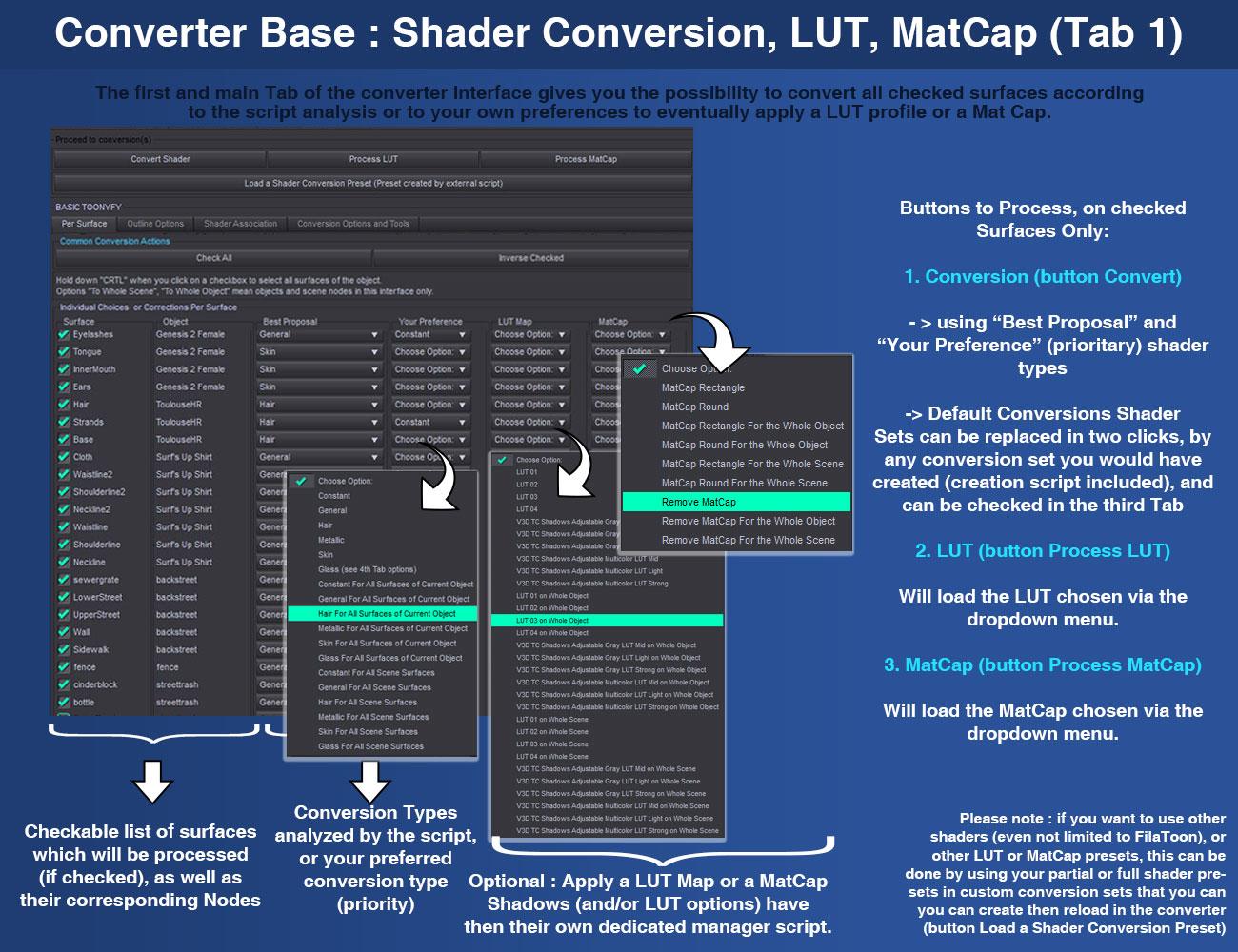
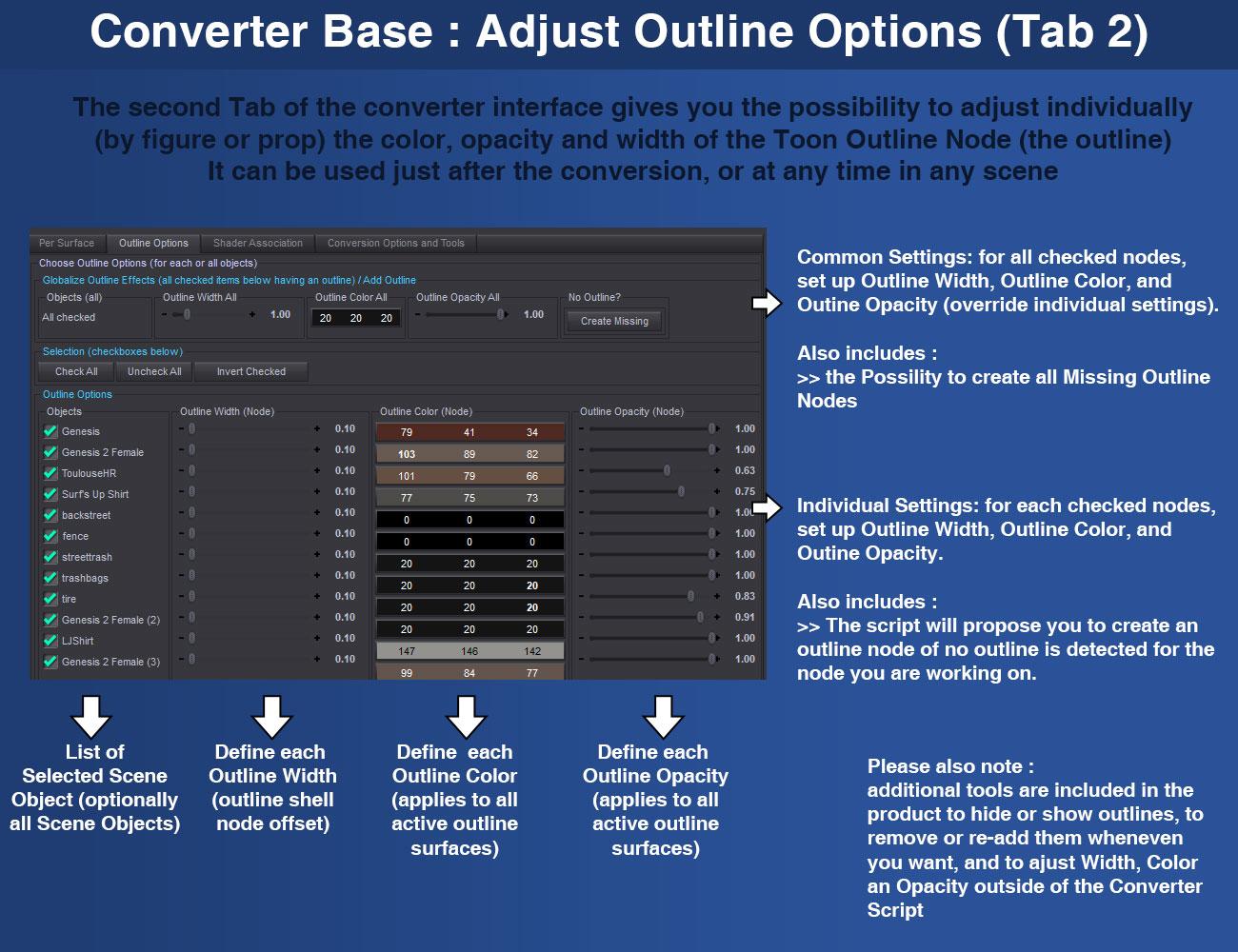
Released : V3D FilaToon Converter, Manager and Tools (Commercial)Here is the product description as well as a few images:
Boost your creativity and simplify your workflow with V3D FilaToon Converter, Manager, and Tools, a powerful and flexible set of utilities designed to make working with FilaToon shaders easier than ever. Whether you're a beginner or a seasoned professional, these tools save you time on repetitive tasks, so you can focus on what really matters: creating stunning art.
Main Features and Benefits
1. Effortless Conversion with Advanced Flexibility
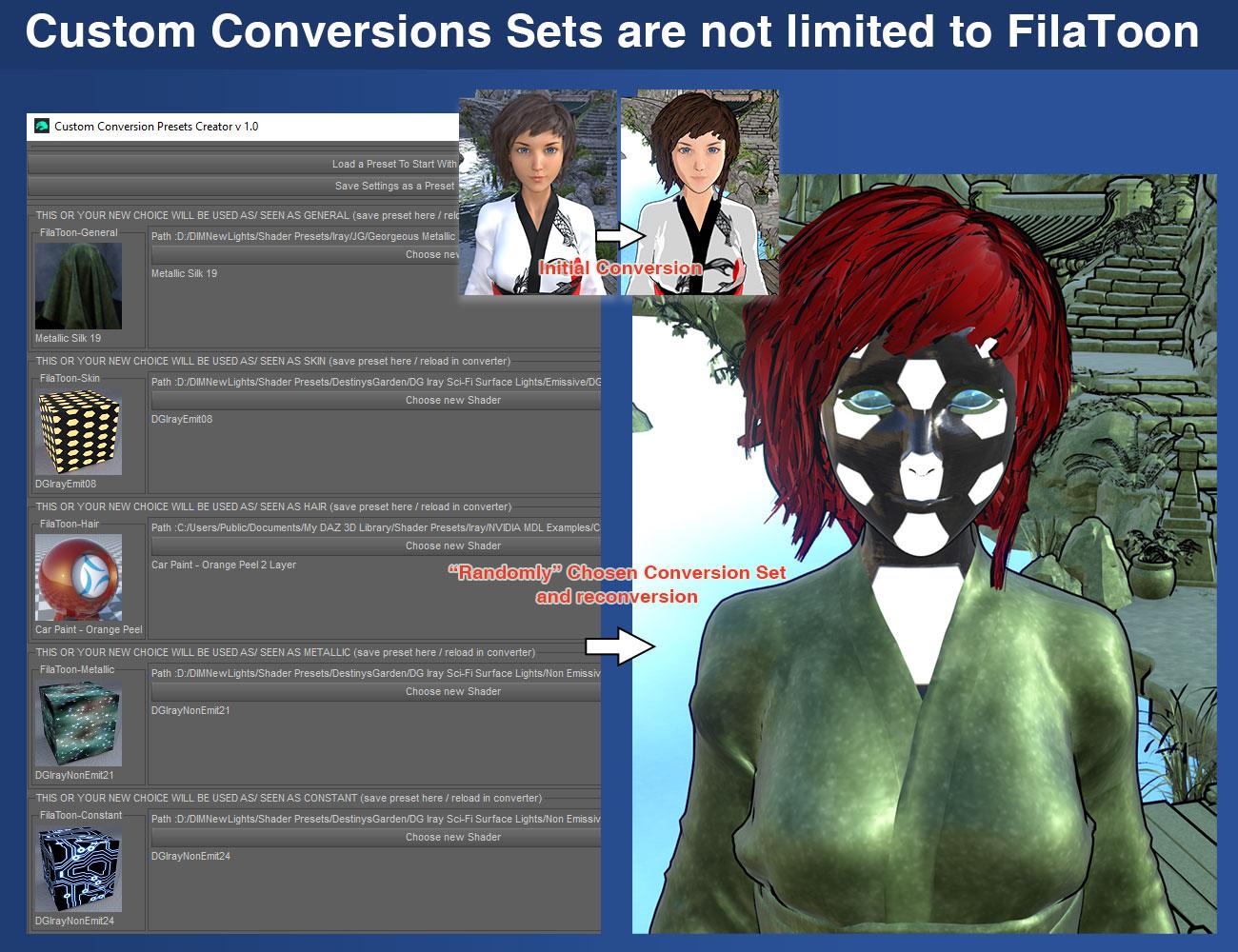
The Converter and Base Tools script transforms all surfaces in your scene— using figures, props, or selected surfaces—with ease. Unlike other workflows, the Converter is smart enough to exclude outlines by default, ensuring they aren’t inadvertently included during conversions. Additionally, you retain full control:- Custom Conversion Sets dedicated script: Create reusable presets for each surface type (General, Metallic, Skin, Hair, Constant) and save them as .txt files. These presets can be reloaded anytime for consistent and flexible results and are not limited to FilaToon.
- Additional Tools and Options: Apply LUTs or MatCaps, manage Outline properties, adjust shader conversion sets, or redefine shader type associations directly within the converter.
2. Comprehensive Colors and Shadows Management
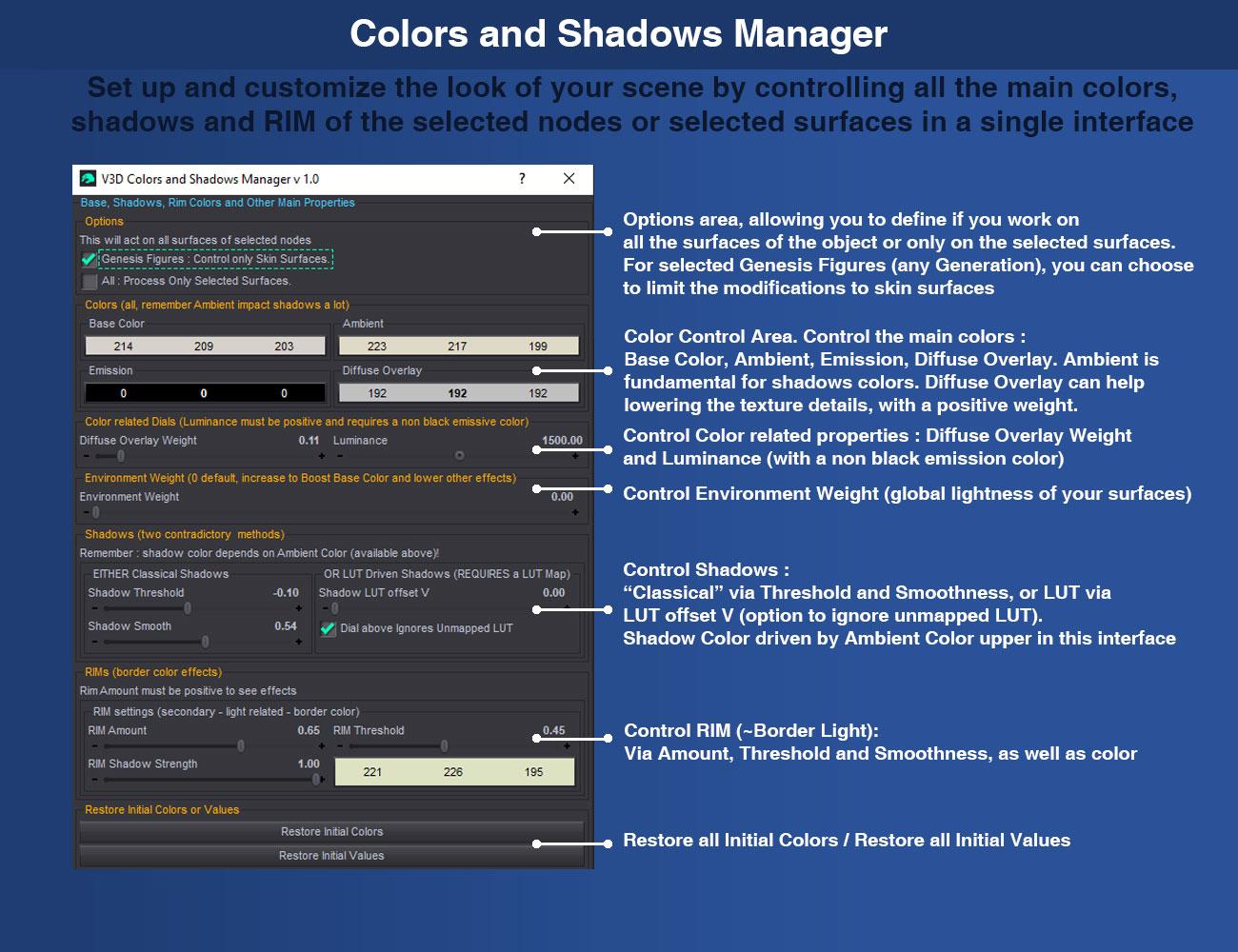
The Colors and Shadows Manager centralizes key shader parameters in one intuitive interface. Effortlessly adjust Base, Emissive, Overlay, Ambient, and RIM colors, as well as shadows and RIM effects, across selected nodes or surfaces.
3. Precise Outline Control – No More Manual Selections!
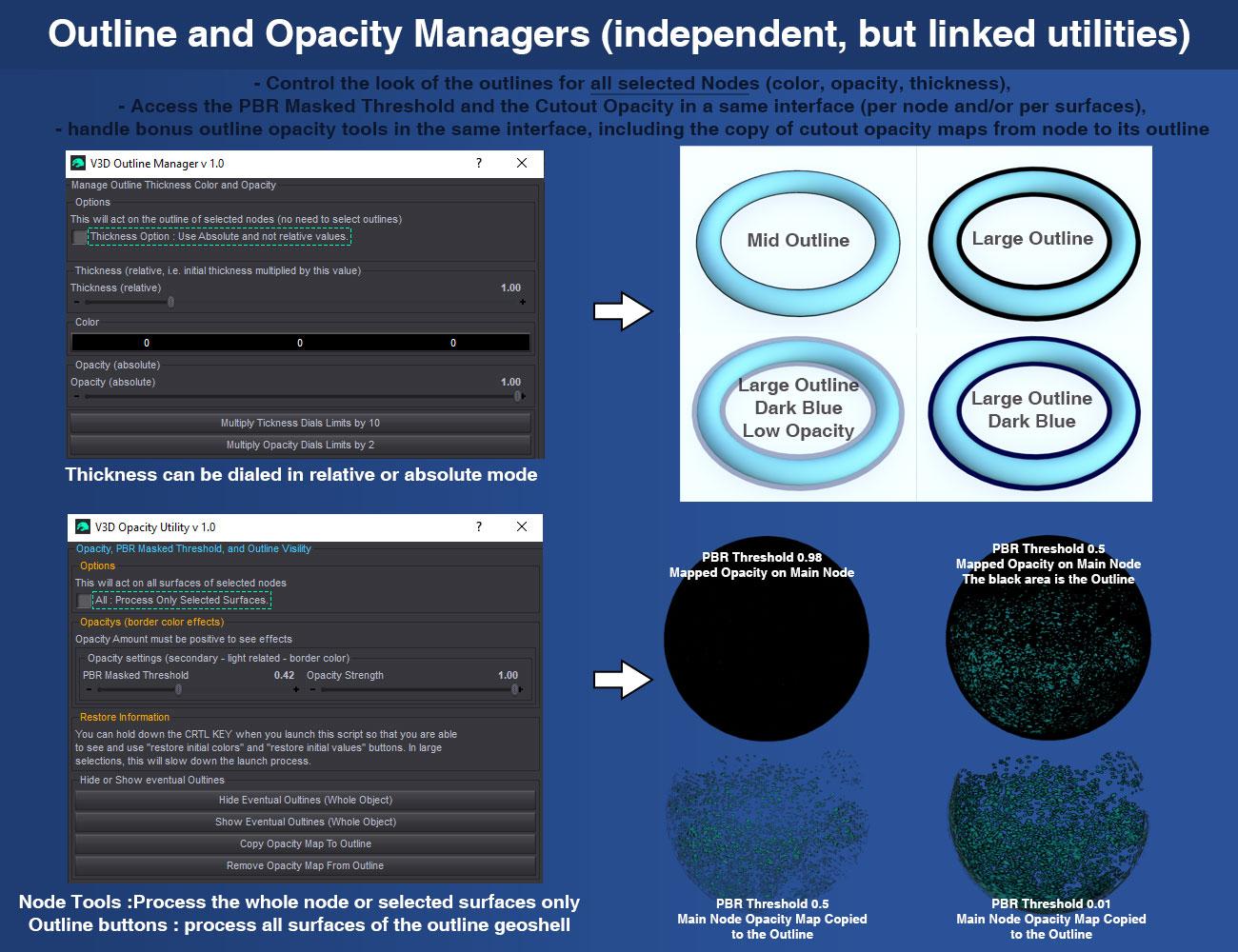
Managing outlines has never been easier. The Outline Manager eliminates the need to manually select outlines as child nodes, simply select the main prop and figure and with this tool, you can:- Adjust thickness, color, and opacity.
- Add or remove outlines for selected nodes.
- Automatically include or exclude outlines during opacity management using the Opacity Utilities.
These tools ensure your outlines are perfectly integrated into your artistic vision, and you’ll never waste time hunting for them again.
4. Smart Opacity Management
Handle FilaToon's unique opacity system effortlessly with the Opacity Utilities. Adjust PBR Masked Threshold and Cutout Opacity in a single interface, and manage opacity maps with tools to:- Hide or show outlines.
- Copy opacity maps from nodes to outlines.
- Save and restore opacity maps via text files to avoid accidental data loss (two dedicated scripts included).
5. Efficient Light and Environment Balancing
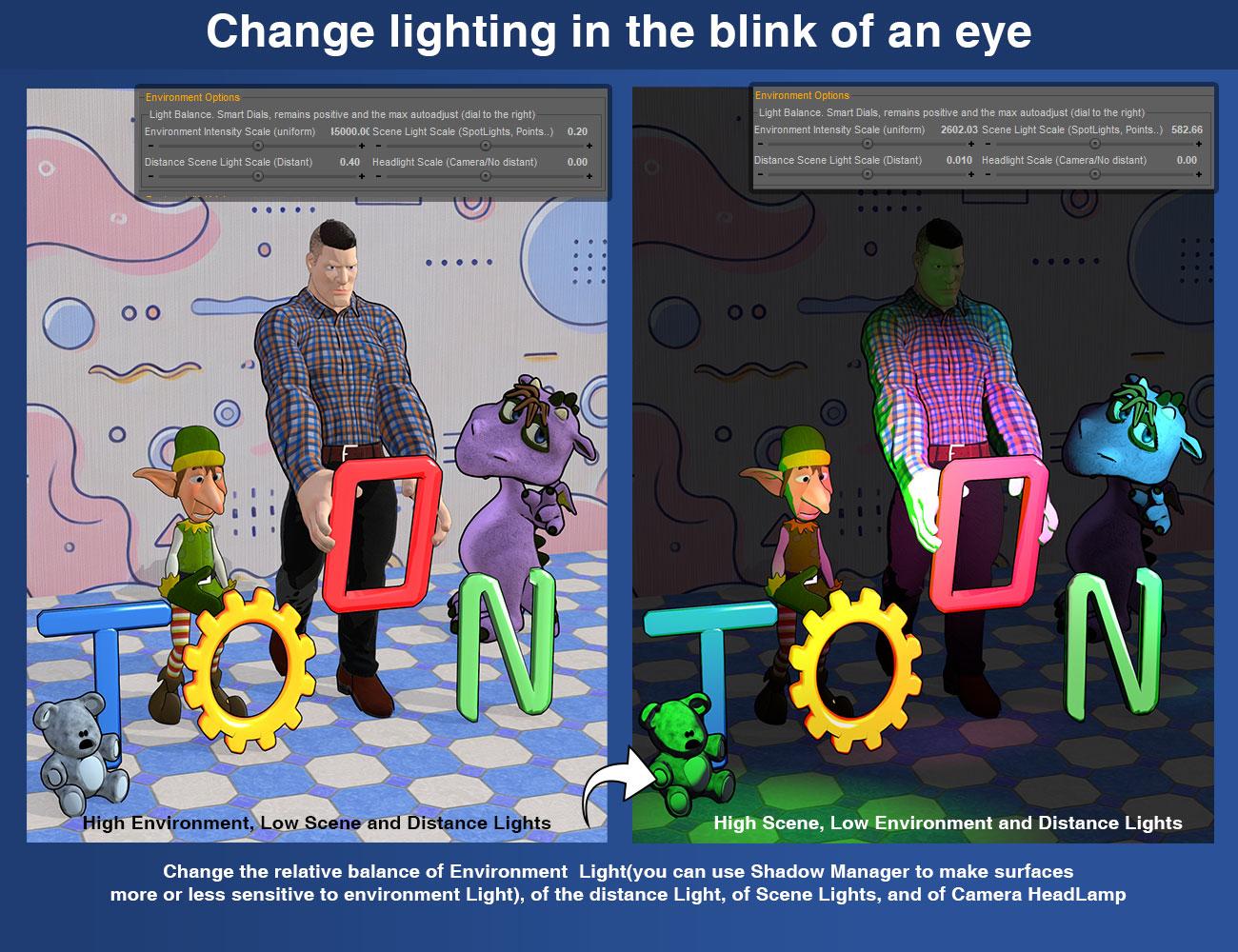
Lighting is critical to achieving the perfect render. The Light and Environment Utility simplifies balancing environment, distance, scene, and headlamp lighting for optimal results.
6. Additional Time-Saving Features
- Dedicated Conversion tools for Genesis figures, with optimized handling for eye materials, glass options, Multi-checkbox selection for quick batch adjustments...
- Selective conversion options: Choose the exact shader types to be converted (e.g., Skin only, General and Hair, or all surfaces).
- Filament-ready functionality: (optional) Automatically switch to Filament mode, add any required Filament Draw Options Node, and include an optional Distant Light for optimal rendering.
- And many more…
Why Choose V3D FilaToon Converter, Manager, and Tools?
Stop wasting time on tedious selections, manual tweaks, hunting down surface settings, and browsing through your content. With its smart design and user-friendly interfaces and scripts, this toolset simplifies your workflow without sacrificing creative control. Key advantages include:- Smart Conversion: The converter proposes the best shaders while letting you customize your preferences, with many additional options for enhanced flexibility.
- Full Flexibility: From shader management to lighting and opacity, every tool is designed to adapt to your specific needs.
- Advanced Options: Dedicated converter features for Genesis figures, optional tools or choices for handling glass surfaces, additional LUT maps, and Filament-based FilaToon requirements.
- Time-Saving Automation: Say goodbye to repetitive tasks like fastidious conversion, manual shader adjustments, outline management or light balance.
Whether you're just starting with FilaToon or an advanced user looking to optimize your workflow, V3D FilaToon Converter, Manager, and Tools offers the perfect combination of automation, flexibility, and control to help you create faster and more intuitively. Unleash your creativity now and take your FilaToon experience to the next level!


 FilaToon / Cell shaded rendering with Filament
TheNathanParable said:
Hylas said:
To get the right angles, couldn't you just parent everything except the camera to the mirror, then scale the mirror by -100% on the appropriate axis?
That might work, though I worry it might turn everything inside out...will have to test that soon.
Has anyone tried https://www.daz3d.com/glass-for-filament? The blurb says:
"Glass for Filament is a collection of glass shaders optimized for the filament render engine, ranging from dirty, textured, and plain reflective glass. Color variations are also included."
I just ran across it in my runtime. Unfortunately I am on one of my Macs and can't test it as filament and filatoon doesn't work on them.
Mary
FilaToon / Cell shaded rendering with FilamentFilatoon has me paying close attention to what hair models end up being given away in the weekly freebies, as older hair is less complex and more friendly to Filament and by extention filatoon.
Anime Toons and Filatoon Shader Q&Acrosswind said:
benniewoodell said:
So I'm finally able to start playing around with this and I've read through the hair posts and I'm really lost. This is the Ash hair for G9 and I applied the hair filatoon material and it looks kind of like iray hair still in filament. I don't see the outline being drawn. Is this how it should look or is there a way to make it look more toony like the hairs I'm seeing in this thread? It very well could be this is how it will be and the hairs I'm seeing utilize the filatoon materials better, but I figure I'd ask. Thank you!
Yea, it's an SBH. So some tricks may be needed when using it with Filatoon / Filament.
0) Geo-shell outline doesn't work well on SBH with high tessellation level, it probably make your Vieport doomed... So remove it firstly !
1) Select Ash Hair, turn on Preview PR Hair and set Viewport Line Tessellation Sides to 3.
2) With Filatoon shader on the hair, keep a texture map from SBH in Base Color slot with Filatoon shader on the hair node. Turn on Diffuse Overlay and assign the Opacity map from this hair product. (ss1)
3) Increse Line Start / End Width values till you're satisfied with the result. (ss2)Then the hair should be cartoonized. Finetune other settings on the filatoon surfaces as needed.
Edit: This is just one of the options... and different SHB may need different settings because they use different Hair Generation Mode... some use Root Radius, some use Target Surfaces with Mask maps...so Good luck !
Step 2: How do you find Diffuse Overlay on a surface with FilaToon Hair shader?
Edit: Oh, are you using FilaToon Base instead of FilaToon Hair shader?
Anime Toons and Filatoon Shader Q&Acrosswind said:
benniewoodell said:
So I'm finally able to start playing around with this and I've read through the hair posts and I'm really lost. This is the Ash hair for G9 and I applied the hair filatoon material and it looks kind of like iray hair still in filament. I don't see the outline being drawn. Is this how it should look or is there a way to make it look more toony like the hairs I'm seeing in this thread? It very well could be this is how it will be and the hairs I'm seeing utilize the filatoon materials better, but I figure I'd ask. Thank you!
Yea, it's an SBH. So some tricks may be needed when using it with Filatoon / Filament.
0) Geo-shell outline doesn't work well on SBH with high tessellation level, it probably make your Vieport doomed... So remove it firstly !
1) Select Ash Hair, turn on Preview PR Hair and set Viewport Line Tessellation Sides to 3.
2) With Filatoon shader on the hair, keep a texture map from SBH in Base Color slot with Filatoon shader on the hair node. Turn on Diffuse Overlay and assign the Opacity map from this hair product. (ss1)
3) Increse Line Start / End Width values till you're satisfied with the result. (ss2)Then the hair should be cartoonized. Finetune other settings on the filatoon surfaces as needed.
Edit: This is just one of the options... and different SHB may need different settings because they use different Hair Generation Mode... some use Root Radius, some use Target Surfaces with Mask maps...so Good luck !
Thank you so much for taking the time to do this explaination! I'll play around with it some more tonight when I get home. I'm very excited at the idea of doing my film in filatoon now that I'm seeing what it can do.
Anime Toons and Filatoon Shader Q&Abenniewoodell said:
So I'm finally able to start playing around with this and I've read through the hair posts and I'm really lost. This is the Ash hair for G9 and I applied the hair filatoon material and it looks kind of like iray hair still in filament. I don't see the outline being drawn. Is this how it should look or is there a way to make it look more toony like the hairs I'm seeing in this thread? It very well could be this is how it will be and the hairs I'm seeing utilize the filatoon materials better, but I figure I'd ask. Thank you!
Yea, it's an SBH. So some tricks may be needed when using it with Filatoon / Filament.
0) Geo-shell outline doesn't work well on SBH with high tessellation level, it probably make your Vieport doomed... So remove it firstly !
1) Select Ash Hair, turn on Preview PR Hair and set Viewport Line Tessellation Sides to 3.
2) With Filatoon shader on the hair, keep a texture map from SBH in Base Color slot with Filatoon shader on the hair node. Turn on Diffuse Overlay and assign the Opacity map from this hair product. (ss1)
3) Increse Line Start / End Width values till you're satisfied with the result. (ss2)Then the hair should be cartoonized. Finetune other settings on the filatoon surfaces as needed.
Edit: This is just one of the options... and different SHB may need different settings because they use different Hair Generation Mode... some use Root Radius, some use Target Surfaces with Mask maps...so Good luck !
Daz 3D is part of

Connect
DAZ Productions, Inc.
7533 S Center View Ct #4664
West Jordan, UT 84084Licensing Agreement | Terms of Service | Privacy Policy | EULA
© 2026 Daz Productions Inc. All Rights Reserved.