-
Blender 3.3 Hair System
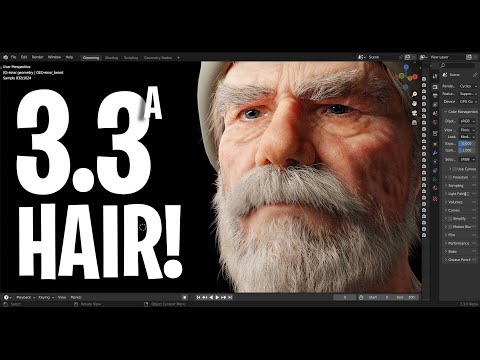
Blender implemented a new hair system for 3.3.
When I have tested it out on basic geometry like Suzanne head, the groom process is responsive and fast, but grooming hairs on a Daz figure is incredibly slow. Even if i import a base res mesh of Genesis 8 as an obj and attempt to create hair curves using the new system, it's so laggy.
Has anyone had any sucess with it?
For context:
 How to save a rigged model?
I am sculpting objs in ZBrush and importing to daz for rigging and posing. I successfully rigged a model but saving as obj doesn't save the rig... I saved the figure template and loaded that into the figure setup which seemed to work... however the next day I import the figure template and create the model the rig is broken.. is there a way to export the model AND rig so that it won't mess up? Thank you.
Path Length vs performance ?Richard Haseltine said:
I had to remove one of your images due to the language in at least one of the folder names.
Bear in mind that files contain only the relative path for things thata re in a content directory, when loading they add that rlative path to each content directory in turn until they run out of directories or find a copy of the file. With as many directories as you have that is potentially a lot of checks, making the process very slow for files in the later content directoris. It is better to hav as few content directories as you absolutelt need - no more than ten active at any time is the suggestion.
sorry about that ... probably the folder covering useless freebies ...
===
I don't often go up to the highest numbered ones in fact the 5 or six most active directories are on a different drive.
---
but one of the trade off is this is my sorted content and it's basically hard coded so the structure can't be lost.
---
some system of showing content (without it being actively installed) would be wonderful ...
Access to our data is a major challenge if you have very much.
----
I'm using dummy dufs and pngs... that don't have any connections but will show the image of an object in the folder it's in or a texture -- not a shader but a sign or such that wouldn't be visible unless I create a dummy file.
the dummy file has a duf extention and the picture has duf.png and daz displays it in the content library ..
I still have to go to the folder to import the object but I know where it is (and yes Iprobably have a few thousand so an index is necessary).
same for textures -- that have been made .. signs etc. i can't click them and have anything happed but I can see where they are. and apply them to a scene object.
---
mixamo errorWendyLuvsCatz said:
cannot find but wasn't that Free Nomen or something similar, the Facemotion capture guy
yes thats the guy i bought the plugin from his website
but the thing is plugin is working fine still with old downloaded files its the mixamo update that messed up daz import system
if you download a ASCII from mixamo today and import it in daz3d it will show up messed up and with errors
[Released] Content Wizard [Commercial]robertswww said:
@RiverSoftArt I think Lou just tried over again (as a test), with a different directory, but it still failed on the smart content.
Looking at the last of their 5 screenshots above, the error Log says: Creating support file... Success
But, it then apparently fails at: Error Importing product into Smart Content database
Under the Smart Content Daz Documentation: http://docs.daz3d.com/doku.php/public/read_me/index/67507/start
Your last "Resolved Issue" on 2020-02-25 was:
Fixed Error importing product into Smart Content database error@RiverSoftArt Do you remember what exactly it was causing this error that you fixed?
Do you think if Lou does a Reset Database will help?
In DAZ Studio, click on the hamburger menu in the Content Library pane, select Content DB Maintenance, select Reset Database. Once that is done, select Content DB Maintenance again and select Re-Import Metadata.
(NOTE: Don't Reset the Database if you install Content with Daz Connect)Correct. I started over. I'm hesitant resetting database. I think I did that once on mac and all my content showed up as new, with the blue frame around them. Doesn't affect work, but it annoys me.
Trying to make a 3d library databaseSofaCitizen said:
hacsart said:
I coiuld be way off base here, but if CMS is indeed a PostgreSQl database, should it not be possible to import its data into Excel or Access via an MS query data connection?
Technically that should be possible - as long as you are careful not to change anything. I saw an old thread somewhere where someone posted the outside connection details for the DB but when I tried a few weeks back it didn't work. Not sure if that means that the connection details have changed since that post or I was just doing something wrong.
Here's one somewhat recent post I see on the subject :
PostgreSQL question *SOLVED!!!* - Daz 3D Forums
I haven't done a lot of searching on the topic. For my purposes, pulling the data would save a little time in terms of data entry, but the main goal of my cataloging project is a bit different than what is likely lurking in there. I'll try to post something later - it's been a long few days IRL (which actually does involve SQL).
Trying to make a 3d library databasehacsart said:
I coiuld be way off base here, but if CMS is indeed a PostgreSQl database, should it not be possible to import its data into Excel or Access via an MS query data connection?
Technically that should be possible - as long as you are careful not to change anything. I saw an old thread somewhere where someone posted the outside connection details for the DB but when I tried a few weeks back it didn't work. Not sure if that means that the connection details have changed since that post or I was just doing something wrong.
Trying to make a 3d library databaseI coiuld be way off base here, but if CMS is indeed a PostgreSQl database, should it not be possible to import its data into Excel or Access via an MS query data connection?
[Released] Content Wizard [Commercial]@RiverSoftArt I think Lou just tried over again (as a test), with a different directory, but it still failed on the smart content.
Looking at the last of their 5 screenshots above, the error Log says: Creating support file... Success
But, it then apparently fails at: Error Importing product into Smart Content database
Under the Smart Content Daz Documentation: http://docs.daz3d.com/doku.php/public/read_me/index/67507/start
Your last "Resolved Issue" on 2020-02-25 was:
Fixed Error importing product into Smart Content database error@RiverSoftArt Do you remember what exactly it was causing this error that you fixed?
Do you think if Lou does a Reset Database will help?
In DAZ Studio, click on the hamburger menu in the Content Library pane, select Content DB Maintenance, select Reset Database. Once that is done, select Content DB Maintenance again and select Re-Import Metadata.
(NOTE: Don't Reset the Database if you install Content with Daz Connect)DazToBlender Rigging IssueHello! I've recently started using both Daz and Blender, and I've been trying to import a model from Daz to Blender using the Diffeomorphic add-on, everything goes smoothly with the character and model being imported and visible in the program, however once I try to merge the rigs and then convert to rigify, I'm faced with this error. Trying to convert to rigify again only gives me the error "Unable to locate bone lowerAbdomen", I've seen tutorials on how to install the add-on and they've had no issues, however when I attempt it, it seems like I receive this issue, did I install it incorrectly or am I missing a setting????
Saving Gen7 clothing set up for Gen8 - Answered, many thanks.I think the combatibility base is saved in metadata (Runtime\Support), using Notepad++ it should be possible to search and replace that information for a bunch of files at the same time - Afterwards, refresh metadata in the database.
[Released] Turbo Loader for Genesis 8 and 8.1 [Commercial]gellenburg said:
RiverSoftArt said:
gellenburg said:
I have a strange issue where Turbo Loader isn't "seeing" all of my products.
I have repeatedly gone through the "Enable All" and "Reset Content Directories" and for both G8F and G8M Turbo Loader isn't seeing all of my products that are installed.
Even tried clearing out the txt files in the Cache folder and "Scan for Morphs" again.
No luck.
Are you logged in? That can help. If DS does not provide the metadata for a product, TL has to default to using folder names to make a "pseudo" product.
The only thing that brings them back is to re-install them with DIM!
And I HAVE confirmed that there are NO *.TLOFF files in my /data directory.
This is driving me insane.
Edit: I three Content Directories configured in Conent Library: "My DAZ 3D Library" which is what got installed by default (Drive F:) and "Third-Party Library" for all my Rendo*++ purchases, and a "Dev" content library for some things I'm working on (though it's currently empty and not enabled).
I also use 4.20 Pro and 4.20 Pro Public Beta though I'm experiencing this problem with the stable release and NOT the public beta.
And yes, both installs of Studio have the exact same Content Library configurations.
Ok I refreshed the metadata. Ran the "Enable All" utility and then loaded up TL for G8M and then ran Scan for Morphs.
Trust me when i tell you I have MUCH more than 364 G8M products. MUCH much more.

The above is from DAZ Studio 4.20 Pro.
...
...
The following is from 4.20 Pro Public Build ... (And by the way this is much closer to the number of G8M products I have installed though I still think it's a low number.

...
...
Interesting side note but updating the metadata with DAZ Connect doesn't seem to have fixed anything. Every product is a "Unknown Product",
Strange. That should have definitely helped. All morphs are still enabled and then you cleared the list and rescanned?
The other question is, in the Pro version, what directories are in the Content Directory Manager? TL "knows" only the directories that DS knows about. If some directories are hidden from DS, they will be hidden from TL.
[Released] Turbo Loader for Genesis 8 and 8.1 [Commercial]RiverSoftArt said:
gellenburg said:
I have a strange issue where Turbo Loader isn't "seeing" all of my products.
I have repeatedly gone through the "Enable All" and "Reset Content Directories" and for both G8F and G8M Turbo Loader isn't seeing all of my products that are installed.
Even tried clearing out the txt files in the Cache folder and "Scan for Morphs" again.
No luck.
Are you logged in? That can help. If DS does not provide the metadata for a product, TL has to default to using folder names to make a "pseudo" product.
The only thing that brings them back is to re-install them with DIM!
And I HAVE confirmed that there are NO *.TLOFF files in my /data directory.
This is driving me insane.
Edit: I three Content Directories configured in Conent Library: "My DAZ 3D Library" which is what got installed by default (Drive F:) and "Third-Party Library" for all my Rendo*++ purchases, and a "Dev" content library for some things I'm working on (though it's currently empty and not enabled).
I also use 4.20 Pro and 4.20 Pro Public Beta though I'm experiencing this problem with the stable release and NOT the public beta.
And yes, both installs of Studio have the exact same Content Library configurations.
Ok I refreshed the metadata. Ran the "Enable All" utility and then loaded up TL for G8M and then ran Scan for Morphs.
Trust me when i tell you I have MUCH more than 364 G8M products. MUCH much more.
The above is from DAZ Studio 4.20 Pro.
...
...
The following is from 4.20 Pro Public Build ... (And by the way this is much closer to the number of G8M products I have installed though I still think it's a low number.
...
...
Interesting side note but updating the metadata with DAZ Connect doesn't seem to have fixed anything. Every product is a "Unknown Product",
[Released] Content Wizard [Commercial]@lou_harper From your Log, it looks like it is trying to save the file on your E-drive in the following folder location: DAZ CONTENT/3rd
First, make sure the 3rd folder exists.
You also have the Error creating metadata for Daz Studio import. Note that this is happening in the same folder location.
Check inside your 3rd folder and make sure it has the Runtime and Support folders (for Metadata). If not, create them as such:
DAZ CONTENT/3rd/My DAZ 3D Library/Runtime/Support/[Released] Turbo Loader for Genesis 8 and 8.1 [Commercial]Why would the metadata change and not an Updated file be released that has a new .dsx file to be imported into Postgres? I mean why even have this metadata update thing be online to begin with? I save all of my DIM ZIP files in case I ever need to re-install them. I thought the whole purpose of the the Smart Content and having a Postgres database server running locally on my system was to provide the necessary metadata.
Very confused.
 [Released] Turbo Loader for Genesis 8 and 8.1 [Commercial]
gellenburg said:
This is what I was trying to avoid. :-(

If I accidentally click that icon DAZ Connect is going to download the file.
As long as the product is installed (has a coloured thumbnail) it will not be downloaded through Connect. If you work offline, once the metadata is up to date, then you will have a chnace to cnacel if you do accidentally try to open an uninstalled product.
[Released] Turbo Loader for Genesis 8 and 8.1 [Commercial]gellenburg said:
This is what I was trying to avoid. :-(
If I accidentally click that icon DAZ Connect is going to download the file.
If you connect using DAZ Connect, you'll see the metadata update progress on the status bar. Don't click anything, just wait till it's done, and log out.
[Released] Turbo Loader for Genesis 8 and 8.1 [Commercial]gellenburg said:
No. I'm not logged-in. Every time I login DAZ Connect tries to install products and I hate DAZ Connect.Forgive my ignorance but why would there be different metadata supplied by DAZ3D.com than what's already installed in my Smart Content?
I'll try logging-in.........
Using DAZ Connect should only update metadata, not install products automatically.
[Released] Turbo Loader for Genesis 8 and 8.1 [Commercial]RiverSoftArt said:
Are you logged in? That can help. If DS does not provide the metadata for a product, TL has to default to using folder names to make a "pseudo" product.
No. I'm not logged-in. Every time I login DAZ Connect tries to install products and I hate DAZ Connect.
Forgive my ignorance but why would there be different metadata supplied by DAZ3D.com than what's already installed in my Smart Content?
I'll try logging-in.........
[Released] Turbo Loader for Genesis 8 and 8.1 [Commercial]gellenburg said:
I have a strange issue where Turbo Loader isn't "seeing" all of my products.
I have repeatedly gone through the "Enable All" and "Reset Content Directories" and for both G8F and G8M Turbo Loader isn't seeing all of my products that are installed.
Even tried clearing out the txt files in the Cache folder and "Scan for Morphs" again.
No luck.
Are you logged in? That can help. If DS does not provide the metadata for a product, TL has to default to using folder names to make a "pseudo" product.
The only thing that brings them back is to re-install them with DIM!
And I HAVE confirmed that there are NO *.TLOFF files in my /data directory.
This is driving me insane.
Edit: I three Content Directories configured in Conent Library: "My DAZ 3D Library" which is what got installed by default (Drive F:) and "Third-Party Library" for all my Rendo*++ purchases, and a "Dev" content library for some things I'm working on (though it's currently empty and not enabled).
I also use 4.20 Pro and 4.20 Pro Public Beta though I'm experiencing this problem with the stable release and NOT the public beta.
And yes, both installs of Studio have the exact same Content Library configurations.
Daz 3D is part of

Connect
DAZ Productions, Inc.
7533 S Center View Ct #4664
West Jordan, UT 84084Licensing Agreement | Terms of Service | Privacy Policy | EULA
© 2026 Daz Productions Inc. All Rights Reserved.