-
Star Wars Renders 2013 +
After figuring out how to import Genesis 8 characters into Unreal Engine from DAZ Studio, I made a working lightsaber for the characters to play with.
 How to restore or backup Categories?
If you are going to use only Default Categories, you can just export the metadata files for each product that is affected. If the changes are already done to the Default Categories, they will be present in the metadata for any product that uses them, and will be exported into the new metadata file. Faster than editing them manually. Note that the categories will be read-only once re-imported or re-installed; you can add to or delete, but can't move nor rename.
How to restore or backup Categories?Thanks. I'll look further into it but I have no real desire to potentially modify hundreds of metadata files. :(
How to restore or backup Categories?Not sure, if you are messing with Vendor data categorizations. That info comes from the installed Vendor metadata, which I imagine isn't part of UserData. It might keep what you have added, but not what you have removed. Kind of what happens when you try to remove a Default Category from some asset, only to have it stubbornly return the next time you edit the metadata. Read-only Vendor data...
By modifying the metadata file itself, you can guarantee that it can be restored properly when re-installing (if you update the product package with the new metadata file).
Control rig on UE5The Daz ControlRig is within the plugin folder as shown in the attached image below, needs to enable show engine content and show plugin content on the settings of the content browser. Drag and drop the ControlRig into the scene to use it.
Check the Fix Bone Rotations and Zero Root Rotation when importing from Daz will fix distorted ControlRig for UE5.
I prefer using UE4.27 to import Daz and use the ControlRig, Retarget Manager, etc. Current DazToUnreal Bridge v2022.2.18 can be installed to multiple Unreal versions including UE4.27, the bridge includes ControlRig for UE5.0 but not for UE4. For UE4.27 to use Daz ControlRig there is custom made asset available:
https://github.com/guto88/ControlRigForDaz3DMoving Morphs from Centuar 8 to Centuar7Hmmmm been struggling with this most of the day Gen3 Centaur does have the "male centaur additive " and that is just the centaur horse body , and if I unparent the Genesis8 male Centaur body from the Genesis8 male ,then delete the Genesis8 male,eyelashes and Geoshell ,drop the resolution on both bodies to base ,........ then I have 2 centaur bodies that look the same ,so does that mean I could then ,apply a shape to the G8horse body ,export it ,then import that shape as morph on the G3 horse body ?
Can I export a whole scene from Daz into Blender?Complete Daz sets & props import just fine via Diffeomorphic
 Control rig on UE5
Supermont said:
if i recall, "Zero Root Rotation on Import" at the DazToUnreal plugin settings breaks this rig.
there another rig included named "Genesis8ControlRig" try it instead
a bit new to all of this. i have been using daz to unreal but always wanted to pose them inside unreal. where exactly can i find this Genesis8controlrig once in unreal ? would really appreciate
CAR AND BIKE LOVERS THREAD - MARK V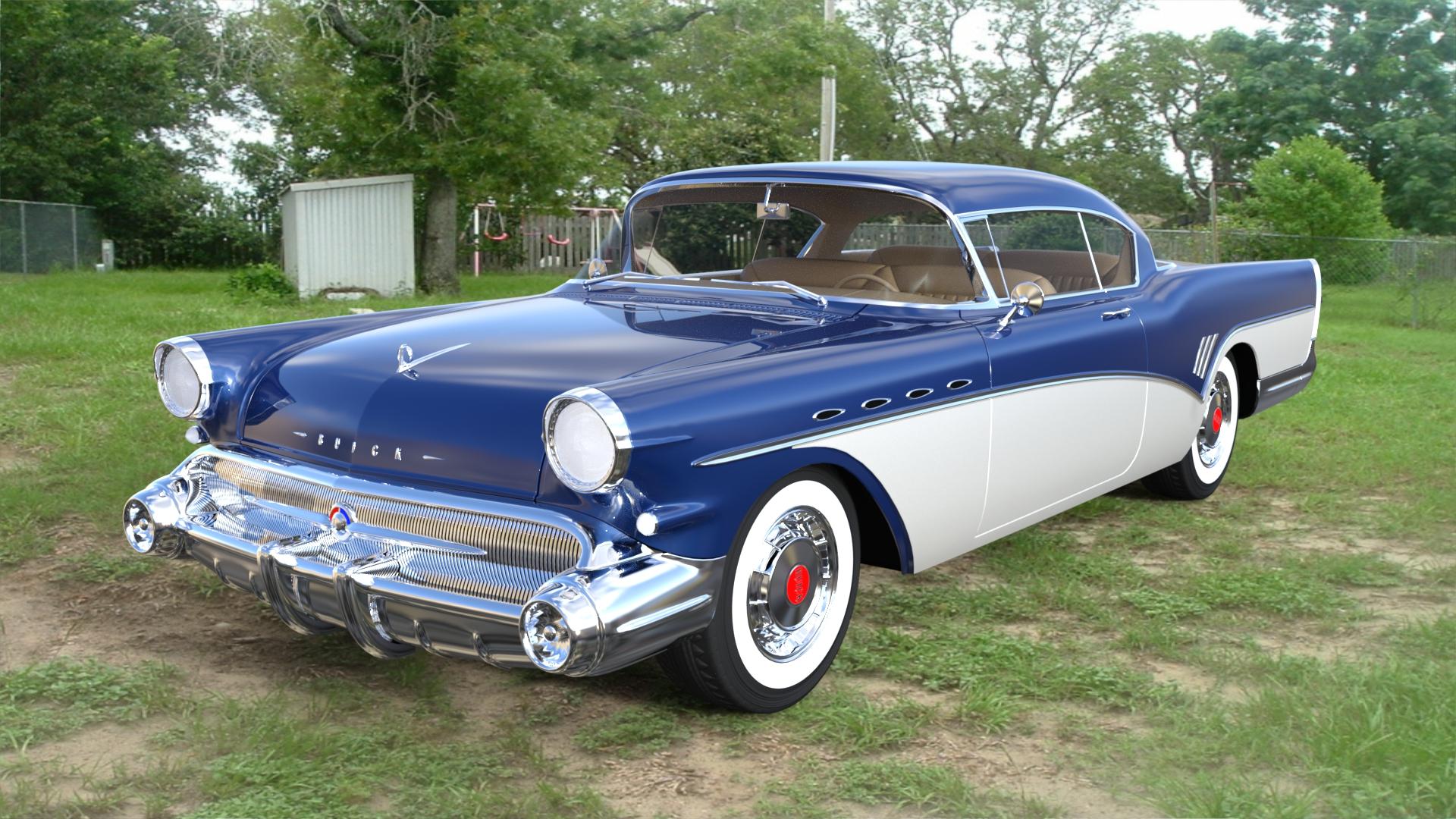
I found a real nice site that is full of cars. Most are in FBX format and are exploded all over the place when imported into Daz. But if you have the time and patients to find each piece ( and some are way out in space...lol) then you can move them back to the center and assemble the car. Most have some real nice textures that come in the zip file. They apply normally and are tagged accordingly. Here is one I found and got. Do NOT ask me for the link to the site as Daz may not like me putting links to other sites up here, if they say it's ok, then I will tell you all where to go. There are tons of free cars there and it is a lagit site. Like I said, most are in FBX format and will import into Daz, only many are exploded. Here is one I got yesterday and worked on last night and today assembling the parts.
1957 Buick Roadmaster. Sweeeeeeet!
Texture traces when I change material in BlenderI think you didn't set roughness to 0, mine looks same as your screenshot when I use 0.5 roughness. You should see the problem when you set it to 0, I'm really wondering your result. Thanks again for your help.
Padone said:
Sorry I can't reproduce the issue, here everything works fine without seams. Are your render settings good enough ? Try with full global illumination. Or try rendering with the cpu to see if it's the card drivers that go nuts.
- import the figure
- delete all materials
- create a new material and set transmission = 1
Virtual Reality and DAZ StudioExpozures said:
There's one I've been following on Steam for a while...development is super slow on it, almost to the point of being vapourware. But, developer says that soon(TM) you'll be able to export your scenes back into Daz.
Right now, it's pretty much just a porn VR game, but he's releasing the importer soon(TM) for Genesis 3, and 8/8.1 shortly after, then claims that he'll have an exporter as well.
Would be cool to be able to import characters and scenes into a VR world, pose things life-sized, then export back out and render up the image.
What is the game? Mirage??
question about Facegen head formatzombiewhacker said:
Which version of FaceGen are you using? Only FaceGen Artist Pro allows you to import head shapes into DAZ Studio.The other versions (FaceGen Modeller, FaceGen 3D Print) do not.
Also Artist Pro doesn't import .obj files as far as I know. It generates head shapes for Genesis characters using photographs.
I'm using facegen artist pro 3 64bit.
question about Facegen head formatWhich version of FaceGen are you using? Only FaceGen Artist Pro allows you to import head shapes into DAZ Studio.The other versions (FaceGen Modeller, FaceGen 3D Print) do not.
Also Artist Pro doesn't import .obj files as far as I know. It generates head shapes for Genesis characters using photographs.
How to restore or backup Categories?NorthOf45 said:
jjoyner said:
Over the past few weeks, I’ve been trying to get better organization of the categories for my installed content. Some products install and create a new category for its content and sometimes the category will contain many items and sometimes just one or two. Wherever possible, I’m trying to simplify the category structure. For example, I have no need for an apron to be categorized as Wardrobe – Outerwear – Tops – Apron. A categorization of simply Wardrobe is fine for me.
For some content, I can change and simplify the categorization in Smart Content. In many instances, though, when I change the categorization, the item keeps the old categorization as well. For example, changing an item’s categorization from Environment – Office – Desk to simply Prop may result in the item now being an Environment and a Prop instead of just a Prop. I know that I can delete a Category and I have done that for content that only has items from one product and then categorized the items as I wish.
Other than deleting a category (some have hundreds of items from many products), is there a way to change an item’s category such as in my desk example so that it only appears in one categorization?
From my experience, metadata files must be modified to force a change on "Vendor" data categorizations. Those seem to hang on no matter how many times you try to change it in the DB Editor. (Other modifications lke Compatibility, or Content Type, do as expected). Edit the metadata file, then re-import metadata (fastest from DIM). Somtimes it takes two tries to make it stick.
You can also edit the metadata from a Product view (DB Editor with two tabs) and export a new metadata file, but EVERY categorization will be considered Vendor data, and make them read-only. PITA if it ends up in your custom categories, since it makes the whole branch read-only.
Thanks for the info. I'm in no rush ... just taking my time. I've always been a dabbler/hobbyist at this stuff and am now retired. My thinking is that rather than touch metadata files, I'll eventually start to delete problemmatic categorizations. That will free the content in them to be categorized as I wish.
How to restore or backup Categories?jjoyner said:
Over the past few weeks, I’ve been trying to get better organization of the categories for my installed content. Some products install and create a new category for its content and sometimes the category will contain many items and sometimes just one or two. Wherever possible, I’m trying to simplify the category structure. For example, I have no need for an apron to be categorized as Wardrobe – Outerwear – Tops – Apron. A categorization of simply Wardrobe is fine for me.
For some content, I can change and simplify the categorization in Smart Content. In many instances, though, when I change the categorization, the item keeps the old categorization as well. For example, changing an item’s categorization from Environment – Office – Desk to simply Prop may result in the item now being an Environment and a Prop instead of just a Prop. I know that I can delete a Category and I have done that for content that only has items from one product and then categorized the items as I wish.
Other than deleting a category (some have hundreds of items from many products), is there a way to change an item’s category such as in my desk example so that it only appears in one categorization?
From my experience, metadata files must be modified to force a change on "Vendor" data categorizations. Those seem to hang on no matter how many times you try to change it in the DB Editor. (Other modifications lke Compatibility, or Content Type, do as expected). Edit the metadata file, then re-import metadata (fastest from DIM). Somtimes it takes two tries to make it stick.
You can also edit the metadata from a Product view (DB Editor with two tabs) and export a new metadata file, but EVERY categorization will be considered Vendor data, and make them read-only. PITA if it ends up in your custom categories, since it makes the whole branch read-only.
Virtual Reality and DAZ StudioThere's one I've been following on Steam for a while...development is super slow on it, almost to the point of being vapourware. But, developer says that soon(TM) you'll be able to export your scenes back into Daz.
Right now, it's pretty much just a porn VR game, but he's releasing the importer soon(TM) for Genesis 3, and 8/8.1 shortly after, then claims that he'll have an exporter as well.
Would be cool to be able to import characters and scenes into a VR world, pose things life-sized, then export back out and render up the image.
How to restore or backup Categories?mikethe3dguy said:
NorthOf45 said:
Sounds like the database is messed up with bad references. You are probably just refreshing the bad data by re-categorizing. Too bad it can't be recovered, as far as I know. If you are going to do your categorization from scratch, I suggest maybe resetting the database, and re-importing the metadata. This will restore all the metadata from the Manifest Archive (all the installed stuff). Then try adding a few custom categories to see if they show up.
Re-importing gives you the option to include the UserData, which at this point is useless, it seems, so leave those out, if there are any.
ETA: Yes, this is the nuclear option...
Doesn't "reset database" require re-installing EVERYTHING... I mean: all content? How do you re-import metadata other than re-installing the content? Unless that's what you meant.
It depends how you install - through Daz Studio yes, a reset will wipe all reference to the products (though on reinstalling it should notice that the files are there and just validate them without redownloading) but through Install manager or Central no, the metadata fils are still there and can be read in with the reimport Metadata command in the same Content DB maintenance dialogue as the reset command.
How to restore or backup Categories?NorthOf45 said:
Sounds like the database is messed up with bad references. You are probably just refreshing the bad data by re-categorizing. Too bad it can't be recovered, as far as I know. If you are going to do your categorization from scratch, I suggest maybe resetting the database, and re-importing the metadata. This will restore all the metadata from the Manifest Archive (all the installed stuff). Then try adding a few custom categories to see if they show up.
Re-importing gives you the option to include the UserData, which at this point is useless, it seems, so leave those out, if there are any.
ETA: Yes, this is the nuclear option...
Doesn't "reset database" require re-installing EVERYTHING... I mean: all content? How do you re-import metadata other than re-installing the content? Unless that's what you meant.
How to restore or backup Categories?Sounds like the database is messed up with bad references. You are probably just refreshing the bad data by re-categorizing. Too bad it can't be recovered, as far as I know. If you are going to do your categorization from scratch, I suggest maybe resetting the database, and re-importing the metadata. This will restore all the metadata from the Manifest Archive (all the installed stuff). Then try adding a few custom categories to see if they show up.
Re-importing gives you the option to include the UserData, which at this point is useless, it seems, so leave those out, if there are any.
ETA: Yes, this is the nuclear option...
Moving Morphs from Centuar 8 to Centuar7Seems like you could apply the morphs to the figure, then export just the geograft and import them as morphs on the G7 geograft, since as far as I know they're identical. I believe it's possible to spawn the morph controller on G3, or move it after creation. I've done similar things in the past. I'll play around with it tomorrow.
Daz 3D is part of

Connect
DAZ Productions, Inc.
7533 S Center View Ct #4664
West Jordan, UT 84084Licensing Agreement | Terms of Service | Privacy Policy | EULA
© 2026 Daz Productions Inc. All Rights Reserved.