-
No nipples on G9 ?
You are not allowed to show barebreasted females. Not sure if ok, if you removed textures.
But essentially that is what you get with the base implementation.
You could get something like https://www.daz3d.com/genesis-9-body-shapes
that has some more, and then charcters might have a nipple morph.
The issue with G9 is that although G9 overall has a higher mesh density, then it is more homogenious, meaning that in base resolution there is not enough mesh to shape nipples, so they require a HD morph, which is only avaioable for Daz PAs.
Clothes disappear in the figureYou appear to have a morph applied to the figure - by design or because something isntalled was not set yup correctly - and that is not being projected into the fitted items - which generally any morph should be, certainly suggesting this is a badly done character shape from somewhere.
Cute & Simple Outfit Character in Main Promo ImageThank you for your reply, I missed that. Yes, maybe that is her. She seems slightly different but maybe a morph or two was used in the outfit promo. I just added Kui to my cart (and she is currently on sale which is great). Thanks again!
Blender 4.0 obj import/export.If the vertex order has changed then the apparent vertex positions will have changed, so it will generate deltas on loading as a morph even though nothing was actually moved.
As for scaling, that will depend on the scale on export from DS - OBJ doesn't havea set size, so as long as it isn't scaled in Blender the only requirement is that export from and import to DS use matching settings.
Blender 4.0 obj import/export.If so, that is wrong... even if there may be no distortion, there'll be a wrong Scale after importing OBJ with MLP...
I don't know how your issue came from... or maybe you can double check if you dialed the right property / morph in the right path... because if you did nothing in between step 5 and 6 as you described..., you should have no way to import OBJ back to G8F as there's no delta change in terms of geometry... or if you did sculpt sth.. then you should have got wrong scale after import rather than a distortion. So "the issue" looks pretty odd to me....
Crossing GenerationsWord of caution with the converters... If the converter converts individual morphs within the dialed-up character from one generation to another, there may be problems if one has the same morph packages installed for both generations (for example Growing Up)
Crossing Generationskyoto kid said:
...it sounds as if the OP wants to be able to transfer characters that he/she dialled up in G3 to G8.without having to rebuild the character from scratch again as a G8 one
Not sure how XTransfer would handle this as it targets individual G3 morphs and/or morph folders that are selected om the script. Saving a custom dialled character as a "character" or "shape" preset wouldn't work as those are saved in the :Library>Presets>Character/>Shape, folder. Not the Library>Data one which is where all morphs are stored
I tested that idea by saving a character preset of a custom G3 character I created but XTransfer does not "see" it in the Library>Presets folder even though it is there..
I do not have the G3 to G8 character converter so I cannot test that.
You can use XTransfer to transfer each individual dial you need (it can be done all at once) and the simply re-dial your custom character in G8.
Crossing Generations...it sounds as if the OP wants to be able to transfer characters that he/she dialled up in G3 to G8.without having to rebuild the character from scratch again as a G8 one
Not sure how XTransfer would handle this as it targets individual G3 morphs and/or morph folders that are selected om the script. Saving a custom dialled character as a "character" or "shape" preset wouldn't work as those are saved in the :Library>Presets>Character/>Shape, folder. Not the Library>Data one which is where all morphs are stored
I tested that idea by saving a character preset of a custom G3 character I created but XTransfer does not "see" it in the Library>Presets folder even though it is there..
I do not have the G3 to G8 character converter so I cannot test that.
Crossing GenerationsIf I'm not mistaken, an element to keep in mind is that only PAs have the tools to convert HD Morphs: for end users, there is, as far as I can tell, no way to convert an HD Morph for Genesis 3 to Genesis 8.
Who Is This Character from recent DAZ Sale Banner?Hey Folks! I saw a sale a week or so ago and one of the promo images had a character on it I would love to pick up. Trouble is, there wasn't any info on it in the advertisement and the DAZ Support team has sent me over here to see if anyone might know which character/morph/combo thereof this character is? Any ideas!? Thanks!
-Chris
Blender 4.0 obj import/export.crosswind said:
"Legacy" way is discontinued in Blender 4.x, and vertex order is kept as default with Wavefront (*.obj) importer / exporter. There won't be any issue as long as you DO NOT change vertex order, remesh, retopo, etc. I've been using Wavefront (*.obj) importer / exporter since 3.x... so far so good.
1. Clear Daz Scene
2. Load Genesis 8 Basic Female, remove lashes
3. Set Mesh Resolution to Base, SubDivision Level 0
4. Export .obj
5. Blender 4.0 import .obj (split By Object, etc. all unchecked)
6. Blender 4.0 export .obj (selected only, groups all unchecked, no modifiers)
7. Daz Morph Loader Pro, create the morph, reverse deformations
8. Apply the morph.
...Blender bug report? Or is it something esoteric like "you must check Object Groups on import"?
 Free Flexion Enhancement for G8/8.1F. Also SWM Flex Vein Control
terry_duquette said:
takezo_3001 said:
Any hope for a G9 version?
G9 SWM Muscularity Morph Add-Ons, Adds Flexions, Bulk and Details - Daz 3D Forums
Requires the SWM muscle package, unfortunately I haven't been able to figure out a way to do the Flexing veins on G9 yet, because the HD morphs available to date don't have individual left and right areas. TD
WOW, thanks for the link, it just so happens that I re-purchased SWM's muscularity morphs, so it works out magnificently., thanks again for the incredibly useful morph system!
AOBB's Marianne G9(F) head morph. No materials nor textures. Commercial use allowed!Well, I haven't made a head morph that wasn't a look-alike in a long while, so sculpting Marianne was a real pleasure.
You may use her in noncommercial and commercial projects (in which case I ask that you give me credit).
I hope you like her!


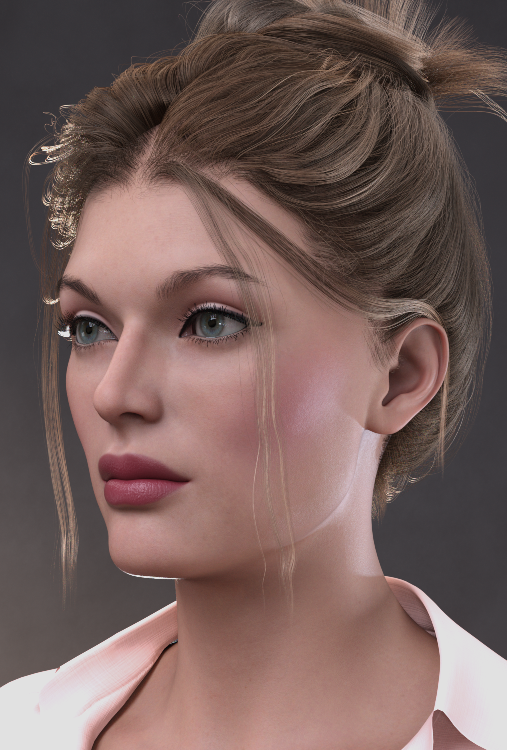
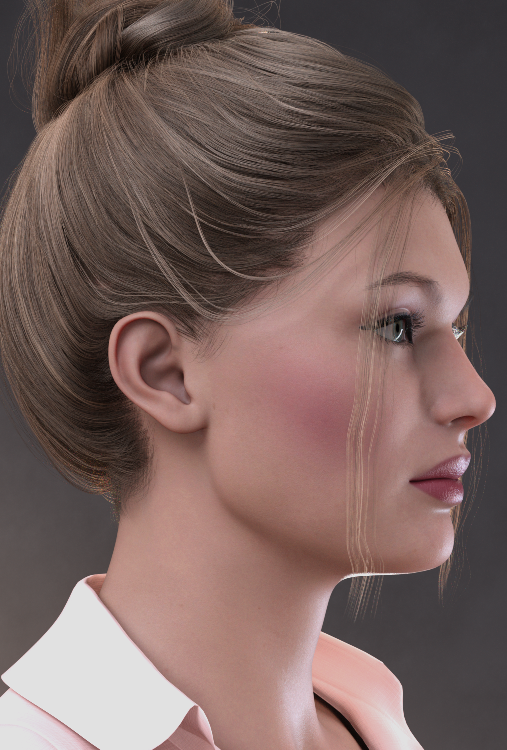
Assets used in promos:
Beautiful Brows for G8F (Brow 1)
Chevybabe25 dForce Feisty Feather Bun for G9
Arryn_Onnel's Elvina outfit for G9
Cherubit's Charlotte for G9 (skin texture)
Enjoy and please post your Marianne renders in this thread! I'd love to see them!
Cheers,
AOBB
Aniblocks and Animations Export - DazToBlender Bridgebenniewoodell said:
Check out the diffeomorphic plug-in, you can import animated sequences in as a pose preset. Just have to go to poses and then import action, have your animation saved as a pose preset and it'll be brought in. And there's sliders for viseme and expressions in diffeomorphic as well. Right now facial expressions do not transfer over, but in another thread it was mentioned Thomas is working on that right now, so hopefully soon. The materials have some differences between Daz to Blender Bridge and Diffeomorphic, if you prefer the DTB Bridge, just save the character as it's own file, bring it in with diffeomorphic and then append the materials from the other file and just switch the materials out. That's still way faster than importing pose by pose. For me it's really hit or miss, some characters look fantastic in diffeo and meh in DTB and vice versa, so it's just a matter of playing around with it.
A whole freaking day I was looking for a solution to this with no success until I found this, thank you sir.
Saving "full character", for saleA Character Preset will save shape and materials (and will embed any custom morph not save as an asset, but will load them only if used to load a new figure). Save any custom morphs (not containing shaping baked from other morphs) as morph assets (File>Save As>Support Assets>Morph Asset) before saving the Character preset.
Crossing GenerationsYou can use these products to transfer the morphs you used from G3 to G8:
- https://www.daz3d.com/character-converter-from-genesis-3-male-to-genesis-8-male
- https://www.daz3d.com/character-converter-from-genesis-3-female-to-genesis-8-female
Problem applying custom eyelashes to figureYou probably need to edit the weight-maps for the lashes on the eyelid bone (I can't recall its name) or add a custom close morph or both - projection, of morphs when they are applied or joint weights with Transfer tool, is fairly simple-minded adn does not cope well with mesh that is far from the skin, especially if it is angled rather than projecting straight out.
AIUTO...CHI CONOSCE L’ITALIANO? PARTE QUATTORDICICerto che avete la fissa per dover usare per forza le pose pronte di altre figure.
 Posate il modello e salvate tutto così da avere un set apposito quando vi serve.
In ogni caso, ho spulciato un poco la loro licenza, non si possono usare i modelli in nessun modo al di fuori di VRoid o del circuito di appartenenza. Nemmeno come base per creare morph per G1.

Quindi, è ancora compito nostro creare dei morph degni.
 [Released] ManFriday's Seamster (clothes rigging for Daz Studio) [Commercial]
Hello everybody! It's been a while, but I've been busy working on something big that came out today.
https://www.daz3d.com/seamster
ManFriday's Seamster is a plugin for Daz Studio 4.21 and higher that makes rigging clothes for Daz Studio significantly easier.
Reduce your risk of Repetitive Strain Injury (RSI)!
Making 3D clothing for Daz Studio usually involves the following phases:
- Modeling and UV-mapping the clothing with 3D modeling software (such as Marvelous Designer) and exporting it in the OBJ file format.
- Importing the OBJ onto a Genesis figure in Daz Studio and rigging it (giving it bones and making them work with weightmaps and corrective morphs).
- Texturing.
Seamster helps with step 2, which many consider the most tedious part of making clothes for Daz Studio. It greatly reduces the many clicks that are normally required, reducing the risk of forgetting something along the way, which can otherwise lead to a lot of lost time and frustration. It imports your clothing OBJ and runs Transfer Utility with just two clicks. It helps you with checking and painting the weightmaps for all the bones and with making corrective morphs for certain bone rotations. It can also help with creating rigid follow nodes (RFNs).
Seamster has been developed with the help and support of some of the most respected clothing makers who are publishing in the Daz Store. I sincerely hope that this will make the tedious process of rigging clothes for Daz Studio much easier and produce more and better clothes for our favorite platform.
Attaching the PDF user manual which has an overview of what the product does, an introduction to riggingin in general, and all the details.
AIUTO...CHI CONOSCE L’ITALIANO? PARTE QUATTORDICI@Imago Si può esportare in FBX tranquillamente (al momento ho solo un problema con i joint che mi restano tutti orizzontali ma ci sto lavorando.. già ho appena scoperto come rendere la figura compatibile con le pose dei G9). Inoltre potresti usare le figure generate da Void Studio come sola base per creare dei morph tuoi (senza dunque distribuire il file).Daz 3D is part of

Connect
DAZ Productions, Inc.
7533 S Center View Ct #4664
West Jordan, UT 84084Licensing Agreement | Terms of Service | Privacy Policy | EULA
© 2026 Daz Productions Inc. All Rights Reserved.
















