-
Importing OBJ. Files.........???
The OBJ and MTL should generally be kept together... I can't think of any reason to separate them, so yeah keep them together.
OBJ import to DAZ generally works for me, but you have to make sure the MTL file is properly referencing the materials/textures... Usually that's not a problem since I'm either exporting from Blender or 3D Coat... but if the references are broken or the MTL is somewhere else, stuff will go wrong.
And as mentioned previously above, you'll always have to reconfigure the textures for DAZ/IRay
[Solved]Where can I learn to solve about unexpected stretch of fibermesh hair from ZBrush?Thanks ;) And good luck with that weighting extra work.
I just though of something else : send your mesh to ZBrush using GoZ if you want to. But send it back to Daz through .obj because GoZ doesn't sent Face Groups info (polygroups).
Create a polygroup in Zbrush for all the very first polygon(s) of each hair strand and define them all as 1 or more polygroups (as many polygroups as you have bones influencing the mesh). Then export your hair from ZBrush as .obj. Import that in Daz and you'll get Face Groups automatically created rom the polygroup information.
1/ Face Groups will help you a lot to select hair(s) when weighting vertices.
2/ Face Groups will help to create Surface Groups in order to set different dForce Surface properties so that hair simulates without falling.
Polygroups that become face groups are very, very useful when working on custom made assets. Same goes in Blender with Vertex groups that will also be converted into Face Groups.
Importing OBJ. Files.........???Is there any foolproof technique for importing OBJ. files into DAZ Studio with the textures applied? I can import OBJ. geomertry every single time without a hitch, but importing OBJ. with textures applied is always hhit or miss. From what I understand, as long as the OBJ. file references the .MTL file exactly as it is named it should import the textures that are in the same folder.
I have found that the name of the .MTL file can't have any spaces, dashes or underscores.
I'm not sure what the protocal is for for the first few lines of either the .OBJ or .MTL files, for example, placing # at beginning of line or spaces between lines or whatever the syntax rules are.
Does the OBJ anf MTL files have to be in the same folder as the textures?
Thanks,
I am having postgreSQL cms error againI were posted a discussion about it but i were moved to new pc and it was working fine but i moved to new city with my old pc for educational porpuses and now i installed daz3d again and i am getting the same error which says "A valid PostgreSQL CMS connection could not be established". And i cant login or reimport the metadata of the files that i already downloaded. I really could use some help here.
Btw when i try to install postgre sql after i deleted it from DIM windows gives an error message which is added in attachments. It is in Turkish language but here is translated exact words:
app name: windows driver model
error: Another version of this product is already installed. Cannot continue installation of this version.
Use "add and remove programs" in control panel to configure or uninstall an existing version of this product
but i cannot see any postgre sql file there
Genesis 9 we are back in the game Carrara usersmmm wonder why mine fail to import, shall try my other computer Win10, was my Win 7
same thing i/0 error
maybe upload your eye duf (it's just a character preset so OK)
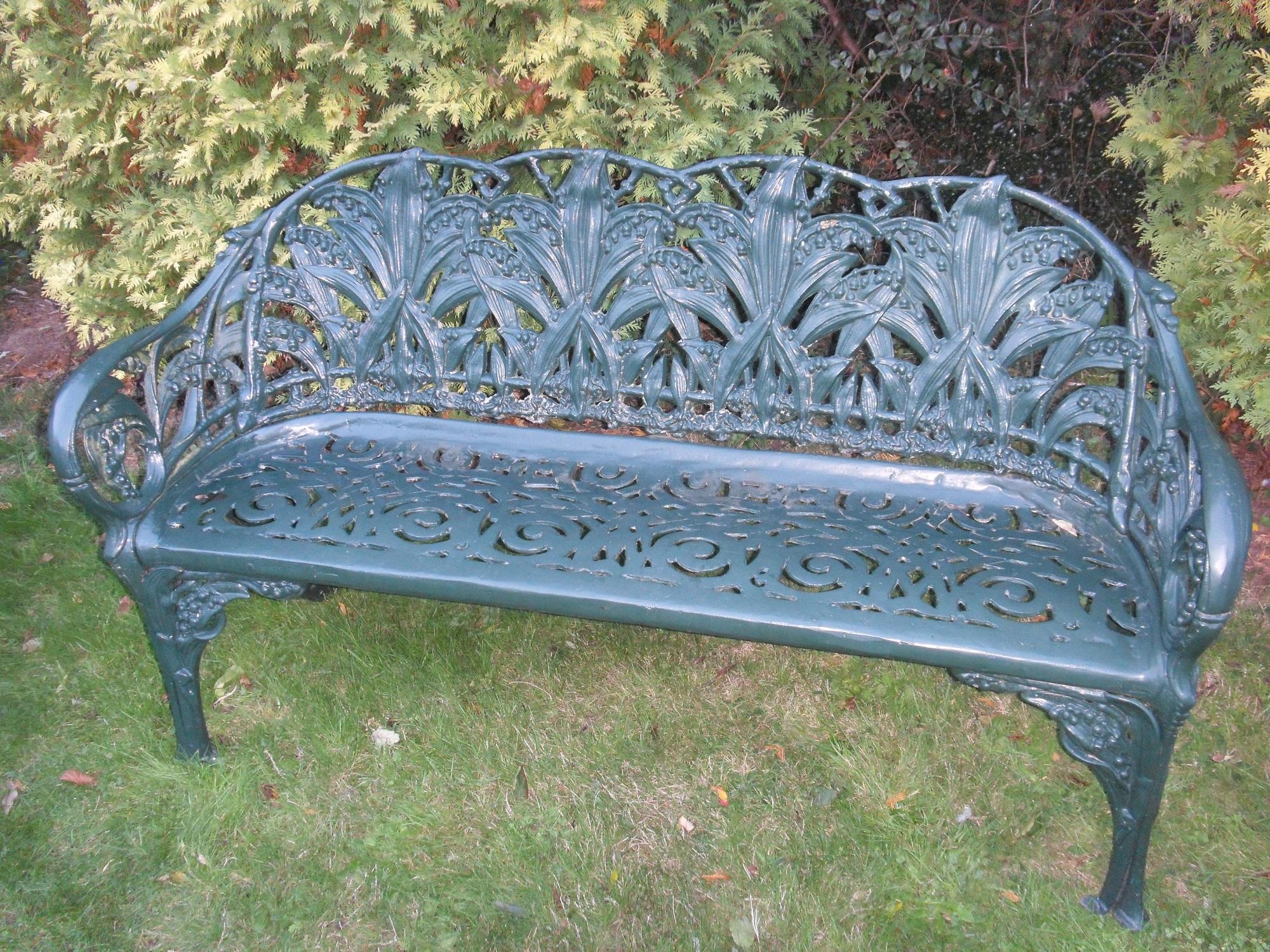
Cast iron garden bench project - completed!EDIT: it's now live at https://www.deviantart.com/perlk/art/Free-Art-nouveau-style-garden-bench-DS-OBJ-934228397 and Renderosity coming soon!
I'm creating my own thread so I can stop hijacking richardandtracy's thread!
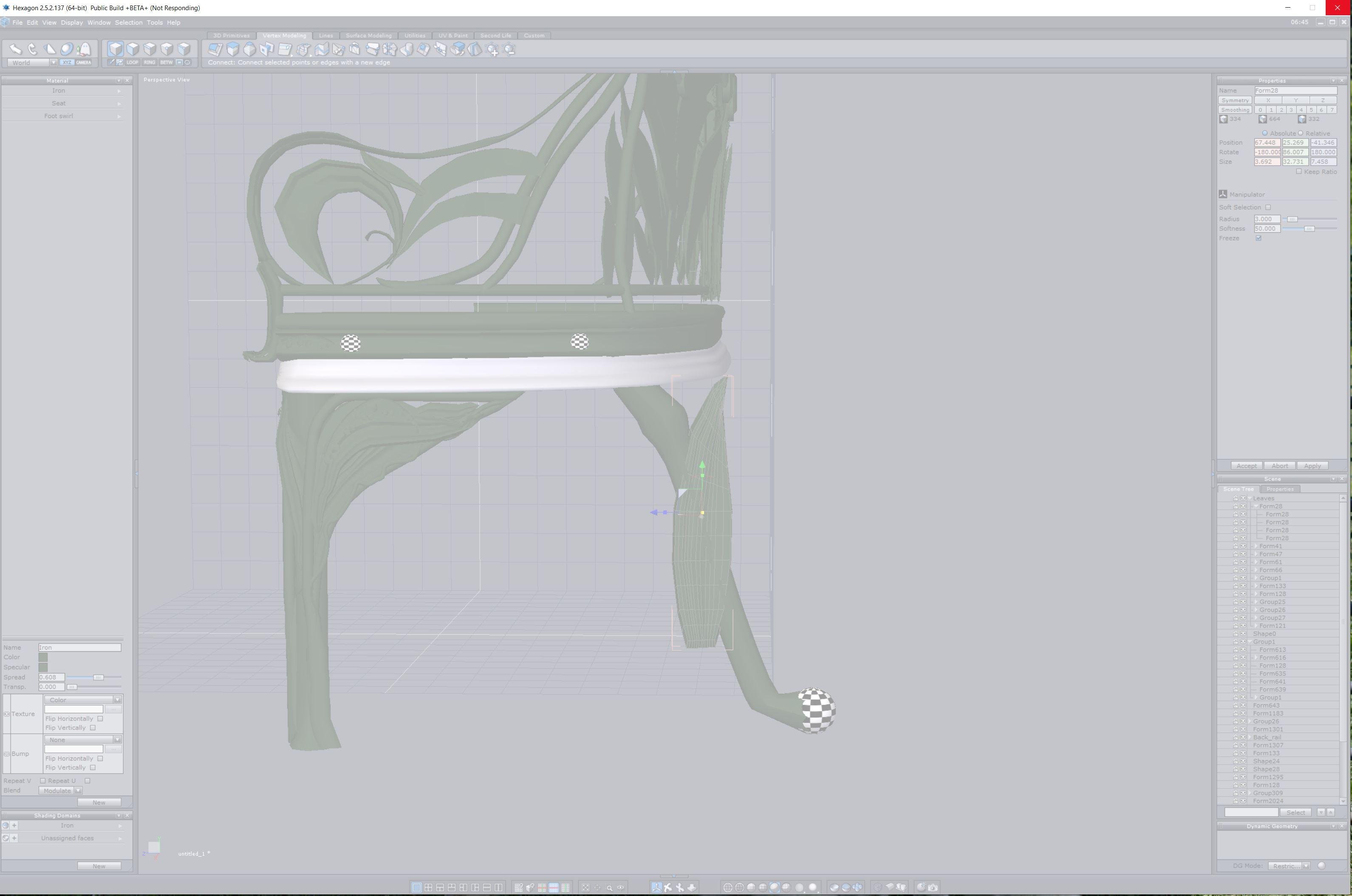
Here's my progress so far. The stupidly high polygon count is definitely going to be the death of this thing. I've done a fair job I think of trying to capture the original spirit of the thing (https://www.daz3d.com/forums/uploads/FileUpload/41/866b2b3256eb001dbbf9905312f716.jpg) but it's so detailed it might crash anything that tries to run it without a ridiculous graphics card. So now I am trying to figure out how to reduce the polygon count without losing the detail. This has definitely been quite a learning opportunity for me. And while I'm not going to be getting a job building models any time soon, I am pretty proud of it.
Last DS import looks interesting:
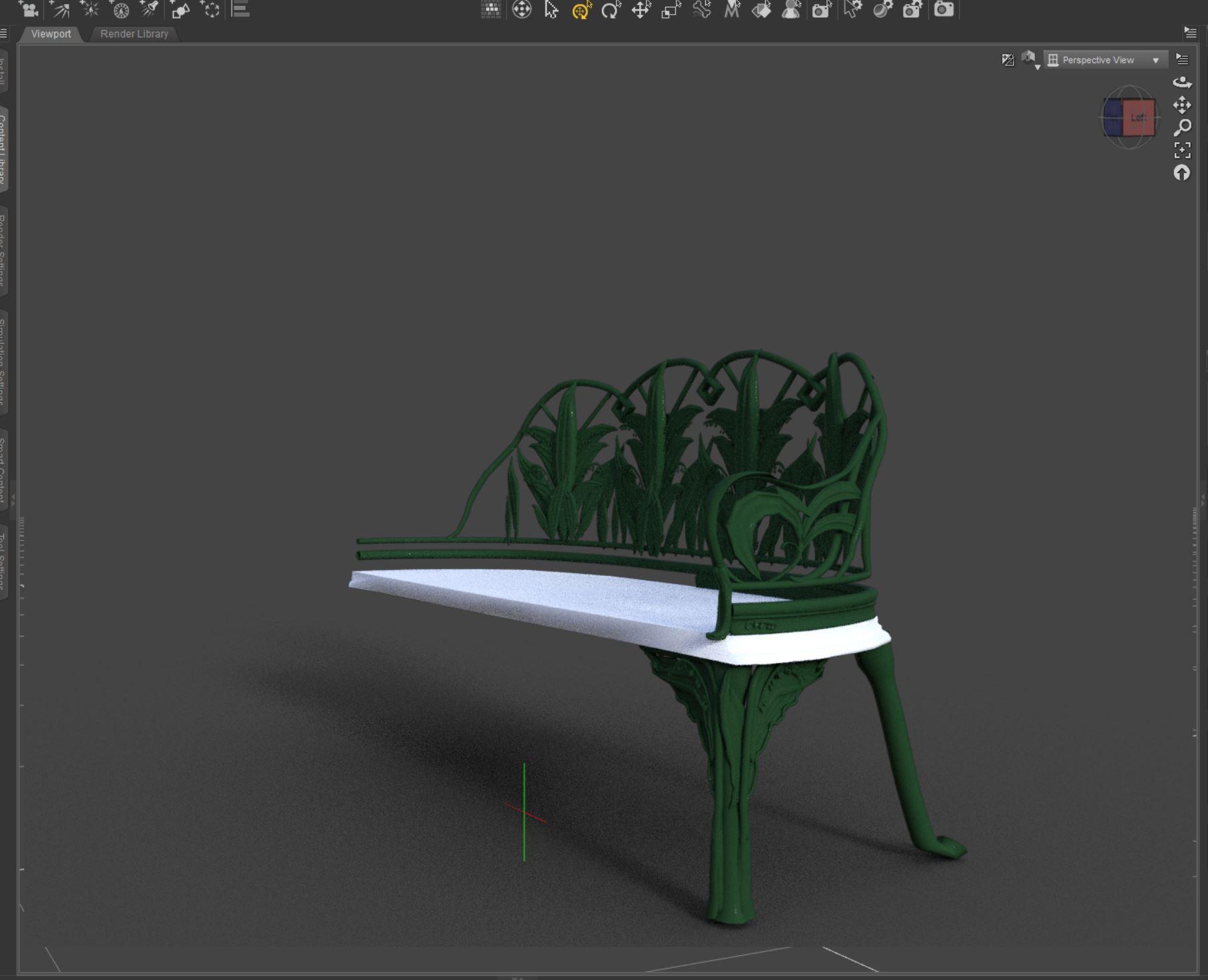
I have a feeling Blender would be a heck of a lot more stable to be modeling this in...if only it had usable controls.
Chugging along on save....been 3 minutes so far, graphics card running 100%...not looking too promising. :-(
 The Mac FAQ
Thank you Totte and wsterdan for your ideas. I did try everything you mentioned, and same result. No smart content works at all, no thumbs etc. But when browsing in content library it is in fact connecting to the ext drive, and loads some content, almost always with files it can't find (/data/, /textures/ etc). it seems random. So i happened to notice a few times that the missing files, although they exist on my ext drive, the file names are out of case (RTPfile.jpg might be Rtpfile.jpg for example). I then checked my sandisk SSD and realized it is in fact formatted to MAC OS extended (case sensitive). So, now I'm thinking that might the root of all (or most) of the issues I'm encountering. Does that make sense? It seem unlikely daz purchased products would be not case correct in their names and paths, but stranger things have happened. Could case sensitive errors cause the smart content to totally not work?
It's either this, or I have to think it's errors in the database that are not correcting themselves (I did reset the database, and re-imported metadata)... Will investigate further. (errrg)
Getting MDL code for a materialThose MDL files are part of the picture, but a DzBrickMaterial is, I think, more than that. For example, if you import the PBRSkin material into the shader mixer, you can see it is composed of many bricks, only some of which are Custom MDL bricks which reference the pbr_skin.mdl file. So, my assumption is that there is a compilation process that transforms the entire brick network into some MDL code which is given to Iray. There are some hints of such a thing in the SDK, such as
DzBrickSet::getFullShaderPath(),DzBrickSetCompilerMgr,DzShaderCompilerProcess, but I don't quite see how it all fits together.How to permanently remove content from data base so it won't show up in Smart ContentThe metadata and database entries will be restored, it won't redownload installed files if you delete them (but nor will it know they are not still there - if you want to remove Connect-installed content you must do it within Daz Studio via the right-click menu on the product)
UltraScatterPro Feature RequestThis might be a feature request or just need someone to point out what I am missing...
In UltraScatterPro, you can reuse a previous scatter set up with the Import Settings function. But if you use this, you still need to go to each panel and change the seed values. If you don't, it just copies the previous scatter exactly.
It would be nice if there was a "Randomize Seeds" check box alongside the Import Settings option.
Modify Daz character rig for Unreal skeletonKrys Kryngle said:
Have you tried Eufy yet? I did some initial tests today and it seems to work. I just need to figure out how to re-copy shape keys now. Diffeo does a great job importing them, I just lose them in the conversion process and the bones are all renamed to match UE4.
Before converting the G8.1 character with Uefy, the morphs need to be converted to shapekeys with Diffeomorphic: Advanced Setup -> Morphs -> Convert Morphs To Shapekeys, because the deforming skeleton will be swapped to the new Unreal skeleton, the morphs can't be controlled from Diffeomorphic.
Don't follow some instructions from the videos to delete the shape keys then transfer them back. Use Diffeomorphic Setup -> Apply Rest Pose to apply the mannequin pose to the character and keep the shapekeys. Also don't use the Uefy "Extract Mesh", instead delete the mesh's armature deform modifier then parent to the new Rigify rig, this way the shapekeys are preserved and don't need the extra process to transfer them back.
----------------------------------------------------------------------------------------------
Summary of the workflow using Diffeomorphic, Rigify, Uefy2:
Create UE Mannequin:
Create original Unreal mannequin rig as reference skeleton:
In Object mode: Shift-A -> Armature -> Uefy Script -> Reference Skeleton -> UE4 Mannequin Proxy (A-Pose)Import Character:
Import G8.1 character with Diffeomorphic
Refresh List to pick the armatures of the character and the reference Mannequin.
Unrig Armature so that the deform bones are not constrained for Uefy script to pose them
Merge bone weights and reduce bones
Translate the character bone names to match mannequin bone names
Automatically roll the matched bones to mimic bone orientations of mannequin reference
Adjust some bones position to better match the mannequin
Use Uefy to automatically pose the character to match the Unreal reference skeletonCreate Metarig:
Generate metarig using Uefy G8.1 preset for the character
Use Uefy to automatically pose metarig to match the Unreal reference skeleton
Check and tweak the metarig bone joints to precisely match character's converted deform bonesCreate Controlling Rig:
Generate controlling rig from the metarig using Rigify for the character
Detach the character meshes from its own armature and parent them to the new Rigify rig
Hide the character's own armature as it's done with the purpose, new deform skeleton will be generated from Rigify rigBuild Skeleton:
Build new mannequin skeleton from the Rigify rig.
During the build skeleton process it automatically swaps the Rigify rig's hidden deform rig to the new mannequin skeleton.Make Animations:
New animations for the converted skeleton are based on Blender orientation.
Export the new character into Unreal with this Blender orientated skeleton.
This character is used to receive animations made from Blender.Export Converted Character:
Roll the new skeleton to match Unreal axis orientation (After this step it's not compatible with Rigify and can't be animated)
Export the character again into Unreal with Unreal orientated skeleton.
This character can use Unreal animation packs without retargeting.Export Animations:
Export Blender animations and choose the Blender orientated skeleton to receive new animations.
Retarget animations to the other character which has the Unreal orientated skeleton.is there a way to save smiles with a pose?You can also use puppeteer pane, create a dot in that, then save out the puppeteer preset by using "save as" > "puppeteer preset". be careful with it though since this will restore the entire figure with ALL morphs used. a workaround is to lock the figure morphs you want the pose to apply to, or to go into preview mode in the pupeteer pane, then click your dot, this should keep the figure morphs intact and only pose the figure.
Been using puppeteer while doing collaboration work with other artists most of the time since you can just save a ton of poses that way without having to browse for them in a filesystem jungle, and instead just import them to the new figure and you got a list of dots you can go through quickly for various poses.
What are the limitations on reading Poser Content items?1) Poser 7 and newer rigging isn't compatible with any version of DS, the Poser Import plugin can only read and convert the old "Parametric" rigging.
2) Poser and DS can't use each others shaders as they are specific to the render engines being used.
Any Poser content you import into DS will use the old Default Surface Shader which uses RSL and can be used by 3Delight.
However DS can only read the Poser 4 material settings in any Poser files (CR2,PP2,PZ2,MC6 and MT5), and the P4 settings can only use a handful of the texture types (diffuse,bump, trans etc).
Any materials that only use the Poser 5+ Material Room settings, means that the P4 settings will be empty, so DS wont be able to load anything from those.Most of us old hands (DS 1.3) learned very early on not to use the Poser material settings, but to rather make our own in DS after the product was loaded.
3) As has been mentioned PMDs can be a pain, they really only work in DS when "called" from a CR2, as they can be hit or miss when called from a PZ3 scene file, and just wont work with a PP2 prop or INJ/REM PZ2.
There is another issue with Poser morphs most probably aren't aware of, normally to INJect a morph into a figure, that figure needs a morph channel to already exist. That is what PMDs were created for as they create the channel "on the fly", however since Poser 9 no Poser figure needs morph channels to already exist, even for non PMD INJ/REM PZ2s. As long as the data in the PZ2 is correct, then P9+ just slots the data onto which ever body part the data needs to be on.
4) Poser dynamics, clothing just loads as a static prop, but can "usually" be used with dforce without any issues.
Poser dynamic hair is Poser only and DS can't use it.5) Things that can crash DS -
Circular ERC.
Poser has a thing called "Cross Talk", that's where the outfit on figure 2 takes the morph settings from figure 1. Most vendors never got the morph channel names right for it to be an issue, some others tried various methods to stop it, and some went totally ape**** about stopping it. Those are the ones that have the ERC from hell, and DS hates them, DS4 isn't as bad with them as it used to be so most wont crash it, but the items that do load aren't always fully working.Stray code in the OBJ.
UVMapper Pro has had an issue for a long time, it holds onto data in RAM from the previous mesh, and only closing the program will clear it. If you don't close it and work and save a second mesh, then some of the first mesh data will be attached to the end of the OBJ for the second mesh, and 9 times out of 10 DS will crash when it tries to load the OBJ.What are the limitations on reading Poser Content items?richardandtracy said:
I have a small amount of old Poser Content P4/5, but there are some interesting newer props I've not touched, because I'm not sure how they'll open in DS. So, can I ask..
- Are there any newer versions of Poser files that DS can't read the geometry and rigging (eg P11 or P12)?
- Are there any known incompatibilities with shaders etc that will cause DS to curl up & die/crash with no warning?
- Does Poser/Firefly have shader scripting (like nVidia MDL) that would be so complex it's easier to delete all shaders and start from scratch in iRay?
- Are there procedural shaders known in the wild that are entirely free of textures?
- To a large extent I would expect most Poser content to import like old 3delight stuff. Is that an overly optimistic hope with new Poser content?
I'd really like to ask if you could tell me what I need to know, but that wouldn't be particularly useful given that I don't think you'll believe how little I know.
I get the feeling that Poser can render just as realistically as DS, but it seems fewer people have the skills to force Poser to that level. Is it because there is a problem with the rendering engine or are they trying to squeeze the ultimate last bits out of a 3delight equivalent renderer?
I'm also wanting to get my head around why the Poser prop promo images look so out-dated compared to DS props and whether it's inherent in the props or an artefact of the vendor or package.
Most poser content works properly in DS with a bit of fiddling, but there are exceptions:
- Figures using Poser weight mapping (like La Femme and L'Homme, and items for them) or capsule rigging (a few poser 8 figures) will load with tons of warnings and distort when posed in DS.
- Poser dynamic cloth would be static objects in DS. Sometimes using dForce on them will work well, sometimes not.
- Poser dynamic hair, characters using PMD injection, or procedural materials won't work at all. They shouldn't cause crashes but simply won't load.
- Python scripts won't work at all
- Poser lights are usually pretty useless in DS as the parameters are very different
Materials will need to be adjusted as DS doesn't read most of the parameters from Poser materials, only basic settings like diffuse, transparency, basic bump, reflection, and specular strength but for example displacement or specular maps won't be read.
The Mac FAQjays222 said:
Hello, I've tried to get help in tech forum (one reply which unfortuntely didn't help), searched til i'm blue in the face, and also sent request to Daz support, and no reply after many weeks. Since I'm a Mac user -- and this might be Mac specific -- i'm hoping someone here might be able to help.
I need to move my library to an external drive, which i've read should be quite simple, but Daz seems to not recognize the lib on my external SSD. I copied "My DAZ 3D Library" to external drive, and updated the path in Content Directory Manager, but in Daz the library is broken. I also adjusted install manager path in case that matters.
I've successfully connected a new path in DAZ (e.g. "/Volumes/my other daz stuff/") to that same external drive, and I can save and load files from the external drive just fine. But not when I point to the library files for some reason. I also tried a few options in Content Database Management (re-import metadata), and no luck. Double-checked folder names and paths.
I've since reverted back to using my internal drive and all is well, but my system is choking and I need to clear up drive space real bad. (MAc Mini m1, was on Big Sur when I tried this, but now on Monterey, Daz 4.20)
If anyone here has done this sucessfully on Mac, if you wouldn't mind listing the steps just in case I've messed this up somewhere along the lines. Any ideas would be greatly appreciated. Thanks!
I recenty moved my whole library from a 4TB spinning drive to a 4TB SSD due to the fact the spinning disk is from 2014 and I don't have thunderbolt 1 on the new macStudio.
(I've done this before too, so no big deal).
The things to do (and don't have DS running while doing it)
- Copy the whole Directory from it's root to the new location.
- In DS add it in Content Directory Pane and drop the old one
- In DIM Also change the installation location
- Rename the old one so it fails to find it (good test before deleting it)
- In DS - go to the Hamburger menu Content DB Mananement and reinit Database and then Reimport metadata
- Now check with DIM that the thumbs, download dir etc at still valid, or copy those too to the new drive and remap thier paths in DIM
- Now you can delete the old direcrtory,
- Now you should be up and running,
One thing to keep in mind (that Apple seems to have fixed in macOS 11+ is that if a machine goes to sleep and then comes back, an external drive might get a new drive name
For example /Volumes/MyData will come back as /Volumes/MyData1, which will break all paths. The ugly thing is that Finder still shows it as MyData.The Mac FAQjays222 said:
Hello, I've tried to get help in tech forum (one reply which unfortuntely didn't help), searched til i'm blue in the face, and also sent request to Daz support, and no reply after many weeks. Since I'm a Mac user -- and this might be Mac specific -- i'm hoping someone here might be able to help.
I need to move my library to an external drive, which i've read should be quite simple, but Daz seems to not recognize the lib on my external SSD. I copied "My DAZ 3D Library" to external drive, and updated the path in Content Directory Manager, but in Daz the library is broken. I also adjusted install manager path in case that matters.
I've successfully connected a new path in DAZ (e.g. "/Volumes/my other daz stuff/") to that same external drive, and I can save and load files from the external drive just fine. But not when I point to the library files for some reason. I also tried a few options in Content Database Management (re-import metadata), and no luck. Double-checked folder names and paths.
I've since reverted back to using my internal drive and all is well, but my system is choking and I need to clear up drive space real bad. (MAc Mini m1, was on Big Sur when I tried this, but now on Monterey, Daz 4.20)
If anyone here has done this sucessfully on Mac, if you wouldn't mind listing the steps just in case I've messed this up somewhere along the lines. Any ideas would be greatly appreciated. Thanks!
Forgive me if you've done this already and I just misunderstood, but did you add the library in its current location in Preferences? I've been moving my libraries around every year or so without an issue. It sounds like you did, but maybe you should remove it and then add it rather than edit the pathway?
It does sound like you've done everything necessary; I typically copy my working library to the new drive, then go into the Content Manager, delete the old library from the list and point to the new one, accept and you should be good to go. The only thing I can thing of is that if you edited the pathway instead of deleting and pointing to the new one, you may have made a typo.
Attached is the two screens I step through to add a new library to the program.
Let me know if that helps.
The Mac FAQHello, I've tried to get help in tech forum (one reply which unfortuntely didn't help), searched til i'm blue in the face, and also sent request to Daz support, and no reply after many weeks. Since I'm a Mac user -- and this might be Mac specific -- i'm hoping someone here might be able to help.
I need to move my library to an external drive, which i've read should be quite simple, but Daz seems to not recognize the lib on my external SSD. I copied "My DAZ 3D Library" to external drive, and updated the path in Content Directory Manager, but in Daz the library is broken. I also adjusted install manager path in case that matters.
I've successfully connected a new path in DAZ (e.g. "/Volumes/my other daz stuff/") to that same external drive, and I can save and load files from the external drive just fine. But not when I point to the library files for some reason. I also tried a few options in Content Database Management (re-import metadata), and no luck. Double-checked folder names and paths.
I've since reverted back to using my internal drive and all is well, but my system is choking and I need to clear up drive space real bad. (MAc Mini m1, was on Big Sur when I tried this, but now on Monterey, Daz 4.20)
If anyone here has done this sucessfully on Mac, if you wouldn't mind listing the steps just in case I've messed this up somewhere along the lines. Any ideas would be greatly appreciated. Thanks!
farewell carraraI agree that Daz Studio should or at least could have done a lot of great things with Carrara but from what i see now, blender seems to be much easier and have already very nice sculpting tools and even the hair system with cycles is a great tool.
Daz dynamic hair would be awesome if it would get a better support that it can also be used in other applications but maybe it needs to get converted first (also an option i would like to see native within Carrara).An integrated GPU renderer would be pretty nice so Iray support seems to be perfect for supporting with Daz Iray settings.
But well, somehow it looks a little like DS have just got Carrara to extract the modeler and name it Hexagon as it really seem to be very similar but anyway. I don't know why they don't do anything more with Carrara, maybe it's because that many people are using blender with an already build in export/import function.
I just started to work with blender myself but still use some functions from Carrara's modeler as they still seem to be easier to handle in the way i like it.
But Carrara will stay my main software for rendering (with octane)What are the limitations on reading Poser Content items?I have a small amount of old Poser Content P4/5, but there are some interesting newer props I've not touched, because I'm not sure how they'll open in DS. So, can I ask..
- Are there any newer versions of Poser files that DS can't read the geometry and rigging (eg P11 or P12)?
- Are there any known incompatibilities with shaders etc that will cause DS to curl up & die/crash with no warning?
- Does Poser/Firefly have shader scripting (like nVidia MDL) that would be so complex it's easier to delete all shaders and start from scratch in iRay?
- Are there procedural shaders known in the wild that are entirely free of textures?
- To a large extent I would expect most Poser content to import like old 3delight stuff. Is that an overly optimistic hope with new Poser content?
I'd really like to ask if you could tell me what I need to know, but that wouldn't be particularly useful given that I don't think you'll believe how little I know.
I get the feeling that Poser can render just as realistically as DS, but it seems fewer people have the skills to force Poser to that level. Is it because there is a problem with the rendering engine or are they trying to squeeze the ultimate last bits out of a 3delight equivalent renderer?
I'm also wanting to get my head around why the Poser prop promo images look so out-dated compared to DS props and whether it's inherent in the props or an artefact of the vendor or package.
Regards,
Richard.
[SOLVED] Already rigged and fitted asset > getting rid of a morph by modifying the base shape.Oh all right. I got all excited ;) It updates the geometry (same topology) and also the UVs. I misunderstood and thought it'd be a bit more than that.
Sure, I'll import the new version and use Transfer Utility to transfer rig and weights from the first socks to the modified ones an adjust what's needed.
Thanks Mada ;)
Daz 3D is part of

Connect
DAZ Productions, Inc.
7533 S Center View Ct #4664
West Jordan, UT 84084Licensing Agreement | Terms of Service | Privacy Policy | EULA
© 2026 Daz Productions Inc. All Rights Reserved.