-
I've messed up so bad I don't even know what I've done.
I meant to comment earlier that you should feel free to redact any sensitive personal data, so good for you for doing that.
From your comments above, I believe your Daz Studio installation on drive G is the one launched from your desktop icon, and it is working. It is the installation that was done by Daz Central. Drive G is the one you want to use. So all that is very good news. Correct me if I got any of this wrong.
1) Are you confident that your external drive always mounts as drive G? Does it ever mount with any other drive letter? Some people have problems with using an external drive for Daz Studio, because the drive letter would change from time to time. The content Directory Manager is being told to look at G. If your same external drive mounts to a different drive letter in Windows, Daz Studio won't be able to find your content. Since your desktop icon for Daz Studio also points to drive G, if the drive letter changes, that could explain why sometimes you can't launch Daz Studio from that desktop icon. A drive letter issue could be the root of some of your mysterious intermittent problems. I believe there is a way to ensure that it always mounts as drive G, but I need to research that.
2) Your Content Directory Manager is telling Daz Studio to look for content on drive F and drive G. You want all of your content on G because you need F for other things. So we need to correct the Content Directory Manager paths. I like to be conservative and as safe as possible, so first we will create a backup content set that we can just restore if necessary. This does not back up your content files! It only backs up the list of places where Daz Studio looks for content.
- Launch Daz Studio from the icon on your desktop.
- Open the Content Directory Manager again (directions above on October 19 if you forgot how to open it)
- In the Content Directory Manager window, at the top, you will see "Content Sets". Right now you have only one content set which is named "Current Directories". We are going to make a copy of that set as a backup before we change it.
- Click on "Current Directories" to select it.
- Once you have selected "Current Directories, the Copy button on the left side becomes active.
- Click the Copy button.
- A new set will be created called "Current Directories Copy".
- Click the Accept button. The Content Directory Manager window will close.
- Open the Content Directory Manager again.
- Verify that the original "Current Directories" is still the active one (it has the highlighted dot beside it) and there is a new content set named "Current Directories Copy" that has an empty (not highlighted) dot next to it.
- Now, if our attempt to fix the paths where Daz Studio looks, is unsuccessful, you can go back to what you had in the Content Directory Manager before.
3) In your first message, you mentioned that install B on the F drive was completely empty. If that is accurate, then those Content Directory Manager entries for paths on the F drive aren't contributing anything useful, and we can remove them from "Current Directories". We probably need to be a little careful about the Daz Connect Data path. If you ever logged in to Daz Studio, I would expect to find files in the F drive folder listed for the Daz Connect Data. Even if you never installed anything inside Daz Studio, if you are logged in, Daz Studio automatically downloads metadata files. They are small. but they are configured to go on your F drive right now. If you use Daz Central for content installation, there is no need to log in to your Daz account from inside Daz Studio. If you are set up to automatically log in, we should change that to avoid other troubles.
Getting on the 9 train, or notcautiously interested but not spending until things I need available like pose/animation conversion or better yet an import pipeline and morph packages
Missing Product Icons in Smart ContentRecently I am missing more and more product icons in my Content view. Current example is the new Victoria 9 product. I have uninstalled and re-installed, and updated metadata to no avail. I assume the product icon is located in the Support Folder in My DAZ Connect Library/data/cloud/1_87472/runtime/support
I have attached both a screen shot of my Smart Content view and the JPG from the support folder. This product has been missing the icon since I originally downloaded the product the day it was released. I install everything via Smart Content, I have DIM but only use that to install/update programs and I do have DAZ Central.
The product works correctly.
Any help would be appreciated.
Ava High Heel Boots render problemhansolocambo
You know, I don't think I tried looking at the texture(s) in xnview (my preferred viewer) or in gimp. I have noticed when I'm fixing missing icon images that sometimes a file is of type jpg but the metadata is bad. Resaving the jpg as jpg using xnview corrects this. What exactly it's doing I couldn't say, though additional info shows up for the jpg after re-saving. This has been a fix for a number of jpg icons for products. I should have tried that for the boot image(s).
Guess I'll grab them again when on sale and *if* they still have that problem I'll try that.
Since iRay preview mode (viewport) worked, which I could watch the textures load in the log when switching viewport mode, I expected iRay render to have the same result. This is the curiosity, when iRay loads for preview as opposed to loading for render, why would this fail? I'll have to wait to test again.
Thanks for the insight.
Ron's Ripped Fabric[...] install error on the screen [...] It will not connect.
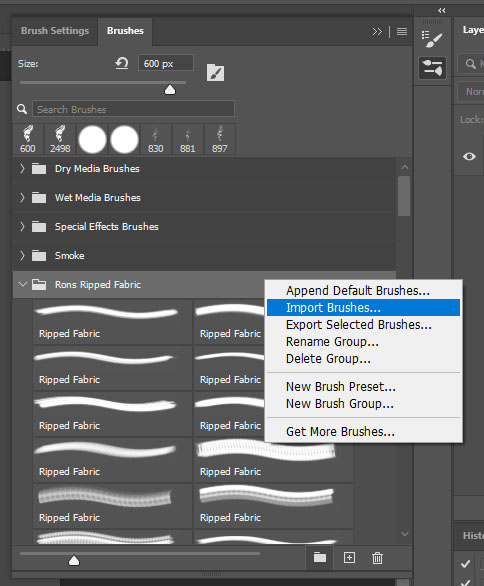
Not sure of what that means (Θ_Θ;). Ron's Ripped Fabric is just an abr file. A collection of custom brushes. DIM or Daz have nothing to do with that.
In Photshop go to your Brushes Panel (WIndow > Brushes)
In this panel you see a list of brushes folders (General Brushes, etc.).
Rright-click > Import Brushes > load the "Rons Ripped Fabric.abr" from where it is in your hard drive.
And there you go. You now have a new Brushes Folder called Rons Ripped Fabric. That you can use to paint ripped details in the opacity map of your clothes (Black will be what's transparent, white what's visible).
 Cheapest way to go about a scene.
Dos it appear in the Content Library under Daz studio Formats>My Library>People>Some folders? Smart Content requires additional metadata which freebies do not always include, and which would have to be imported anyway (is there a Runtime/Support folder with a .dsx file in it?).
Roadmap / Future of DAZ3D?FSMCDesigns said:
Personally I am all for improving Daz Studio more instead of making it easier to export product out of it and into other apps. I would love to do away with the bridges and bring more functions into DS. A great first start would be more options for IMPORTING and make sure they actually work
Those export options have to be there because I frankly do not believe Daz can keep up. This isn't going to change by removing bridges. Animating in Daz is a joke. Physics in Daz is an embarrassment. Iray is neat, but it is slow and so niche that nobody ever benchmarks it. I do not believe Daz will ever compete in these areas. To kill the bridges would kill the workflow of anybody who uses them. Why would you do that? This is an asset company anyway. They will not survive if their assets are exclusive to an extremely niche program that has these issues that will never get fixed. How can anyone think that is a path to success. Some companies can get away with a walled garden, Daz is not one of them.
That doesn't mean that I believe Daz should give up on those things. I would love it if Daz made these things fantastic and users found they had no reason to export. Rather I just don't think they will be able to match what other software are doing.
But I can totally agree on import options being needed. Maybe some people would not be exporting as much if they could import more stuff properly into Daz. This can work both ways.
Adding the textures imported with a new assetOK, I'll try to make this as simple as possible.
Rendering is the last step of the process (minus any post-production like color grading and compositing), which takes the 3D objects in your program and converts them into an image or movie. You wouldn't render something in DS, then bridge it over to Blender and render again, then transfer it into Unity for yet another render. If you're making a game, Unity will be doing the rendering while you're playing the game, so there is no reason to render in other programs before you get to Unity.
The Alley is an environment made for DS with Iray materials. If you want it in Unity, you can try using the Daz to Unity bridge. If that doesn't work, you can export the whole set as an OBJ and import that into Unity. There is not necessarily any need to open it in Blender unless there are specific things you need to do in Blender that you can't do in either DS or Unity.
products has disappeared from content librarythere is no tab in content library that says "products" in collassped position it just says -daz studio formats-poser formats- other import formats
it is missing products and categories tabs
Genesis 8 Textures on Genesis 9?Moved to Technical Help as it is a content rather than a Daz Studio question.
Not dierctly - the UVs are different and so are the surface groups, so remapping wouldn't be an option. What you could do is export both figures as OBJ (ideally with Genesis 9 shaped to match Genesis 8), import them into a suitable modelling application (I think Blender would do), apply your maps to 8, and bake them to new maps on 9.
Importing genesis 9/ Vicky 9 into UE5When will (can you) import Vicky 9/genesis 9 into UE5?
Importing geometry shells into UE5How do I (can I) import geometry shells on a character or item posed in Daz into UE5? Is that even a thing? If not is there a way someone (obviously not me) can make it a thing? Particularly for 8/8.1/9 genesis?
The Amazing PD Howler Dogwaffle Tips, Tricks, and Discussion ThreadThe best way to open a png is to open it using the brush menu.
Brush>Open
Once you have it in the brush, then you can store the brush as an image, and from there it should import directly to your main buffer image.
Sometimes, the codex just isn't "right" for the image buffer because it uses Image Magix, but the Custom Brush tool handles things in a different manner. And also, loading a png through the brush is the only way to preserve the transparency.
Hope that helps!
(But you really should upgrade to the newest version of PD Howler/Artist for all the new shinies! You can go to the author's website (name of program dot com) to find the most most recent version)
IF you have any other questions just holler!Blender Addon: Daz For Blender Bridge: Everything from DTB 2022 + 14 more featuresUpdate:
Now you can import Genesis 9 without error.
Custom shape does not work on G9. You have to wait for Offcial DTB 2022's update. I won't waste my time on that just because Daz changes Genesis's bone name again.
Genesis 9 clothing questions & answersThe weightmap is for quick and fast poke through fixes, especially after layers in dforce or extreme poses. If you want to use the fix in multiple scenes then its better to export a morph and import that into your clothing.
The Mac FAQjays222 said:
Totte said:
OK, so just to recap the current state of your vs. my system, to see if I forgot something:
- [Your system] The content is now on a remote drive (size and type unknown to me)
- [My system] The content is on a remote 4TB SSD drive
- [Your system] CMS has been "reset" and metadata reimported.
- [My system] CMS has been "reset" and metadata reimported.
What file system are you using on the external drive?
I use AFPS (no encryption and no case sensitive <--- Very important)
Thats right Totte, I mentioned that I just realized my Sandisk SSD was formatted MAC OS extended (case sensitive). I would never have imaged that path references or file names in DS would (or could) ever be different than the names in the library files. Makes no sense to me why that would be, but it is in fact the "case"! I'll post here if reformatting does in fact clear everything up, or not. Thanks again for your time, very much appreciated...
The issue is that historically there have been a directory named for example Runtime/Textures/SomePA, but on the PAs machine it was Runtime/textures/SomePA , that causes all the internal content links to look that directory, but on a case sensitive system these two are different. Later validator (a PA tool) do check for this, but only the past two-three years.
Face Transfer on Genesis 9So when do you think we'll be able to use Face Transfer on Genesis 9? I tried and all it did was import a clothed Genesis 8 Male figure and applied the transfer to it. I haven't tried again to see if that was just a fluke.
Gen8 Poses on Gen9?I do use Cascadeur, which disappointingly does not have BVH export, and I no longer have access to MotionBuilder. I've only done BVH import to DS on G8, and that's worked out fine for me the few times I've done it. I think that might have been with Mixamo animations remapped to G8 in MotionBuilder, though.
Gen8 Poses on Gen9?Gordig said:
I've never had a problem with BVH import, but admittedly I haven't done a whole lot of it.
legacy figures and Genesis 1 & 2 never were a problem for me
Genesis 3+ with the twist bones broke it
I worked around using G1 but now that's not possible
of course if you have something like MotionBuilder that's a whole different story
I admit I never tried Cascadeur which if I am not mistaken you use
Gen8 Poses on Gen9?I've never had a problem with BVH import, but admittedly I haven't done a whole lot of it.
Daz 3D is part of

Connect
DAZ Productions, Inc.
7533 S Center View Ct #4664
West Jordan, UT 84084Licensing Agreement | Terms of Service | Privacy Policy | EULA
© 2026 Daz Productions Inc. All Rights Reserved.