-
Freebie Challenge February 2024 - "The Glow Up" - Main Thread
emanuela1 said:
Glow up
Graduation is the end of a tough journey and the the beginning of a new beautiful one. A fresh start! Ready to glow!
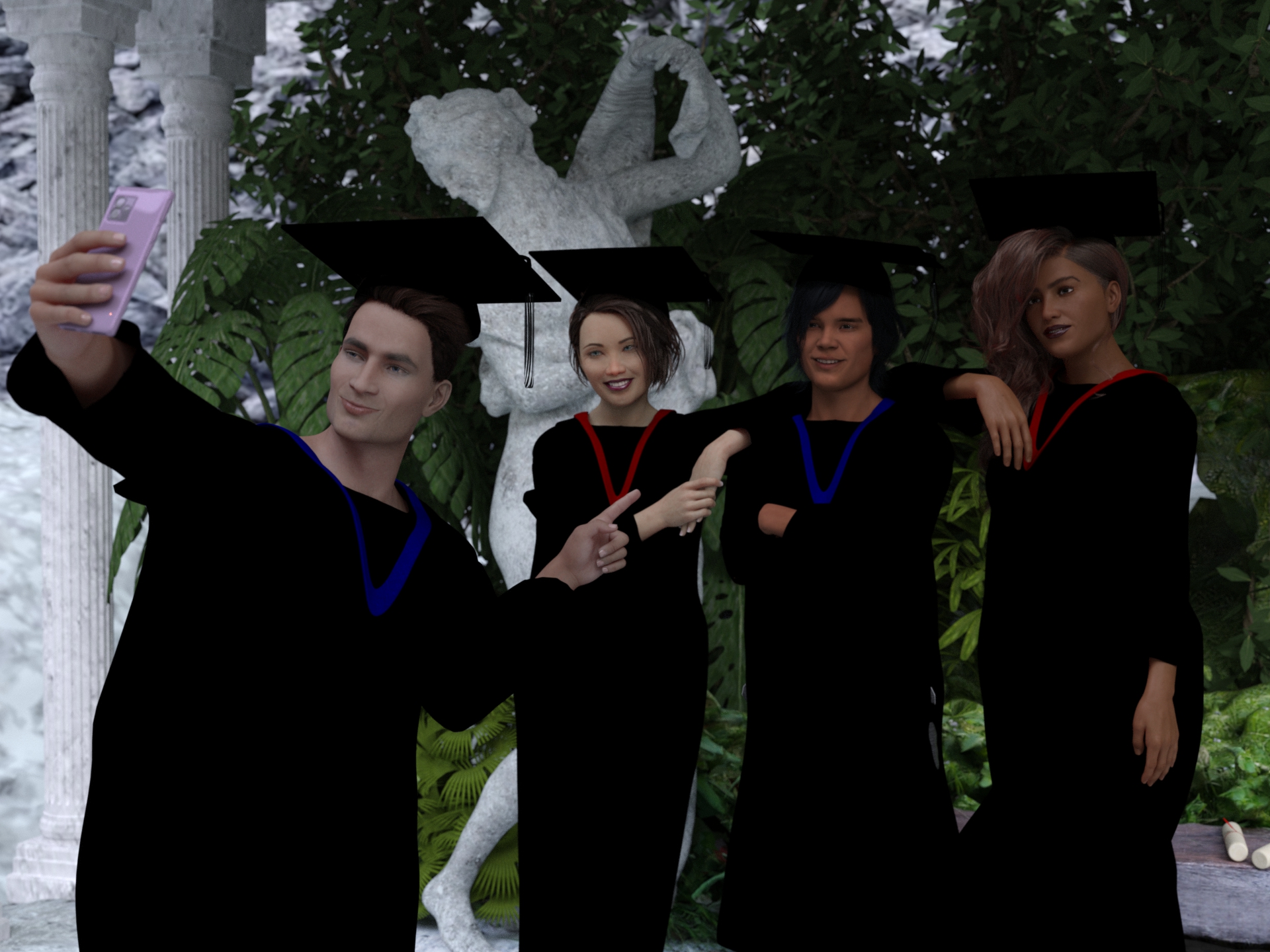 Glow up
Freebies
Quiet Sanctuary for DAZ by Shreddder
https://www.renderosity.com/freestuff/items/96094/quiet-sanctuary-for-dazHDRI Bethnal Green Entrance By Andreas Mischok
https://polyhaven.com/a/bethnal_green_entranceSmartphone Prop by Foxclaw
https://www.renderosity.com/freestuff/items/87343/smartphone-propGenesis Graduation Gown
https://www.wilmapsdigitalcreations.co.uk/view_product.php?id=98Genesis Graduation Gown Lengthen Morph
https://www.wilmapsdigitalcreations.co.uk/view_product.php?id=100"STRONG" for G8M Character Morph & Pose by Mar3D
https://www.renderosity.com/freestuff/items/82833/strong-for-g8m-character-morph-amp-poseAmy AiMei for Genesis 8 Female (morphs only)by amyaimei
https://www.deviantart.com/amyaimei/art/Amy-AiMei-for-Genesis-8-Female-morphs-only-687709757Sokka For G8M
https://www.renderhub.com/khoshekh/sokka-for-g8mMukta for Genesis 8 Female
https://www.renderhub.com/zaap/mukta-for-genesis-8-femaleEveryday Hair Style for Genesis 8 Male(s) by zoro_d
https://www.renderosity.com/freestuff/items/80194/everyday-hair-style-for-genesis-8-malesJill For G8F DL by CheckerToo (Hair)
https://www.deviantart.com/checkertoo/art/Jill-For-G8F-DL-852699253UPDATE - V Devil May Cry 5 Hair Prop for G8M
https://sharecg.com/v/93558/browse/21/DAZ-Studio/UPDATE-V-Devil-May-Cry-5-Hair-Prop-for-G8MSide Swept ROse Hair (G3F , G8F) by zoro_d
https://www.renderosity.com/freestuff/items/79533/side-swept-rose-hair-g3f-g8f-part-1
https://www.renderosity.com/freestuff/items/79534/side-swept-rose-hair-g3f-g8f-part-2
https://www.renderosity.com/freestuff/items/85860/free-update-for-biker-outfit-g8f-and-sideswept-hairEntry approved, please move to entries thread!
Freebie Challenge February 2024 - "The Glow Up" - Main ThreadNatural Glow
This playful faerie loves to stay up late to explore after dark. Tonight, she has found a strange group of glowing magical spheres, and is absolutely fascinated by them. Can she discover their secrets before the sun rises and they melt away?
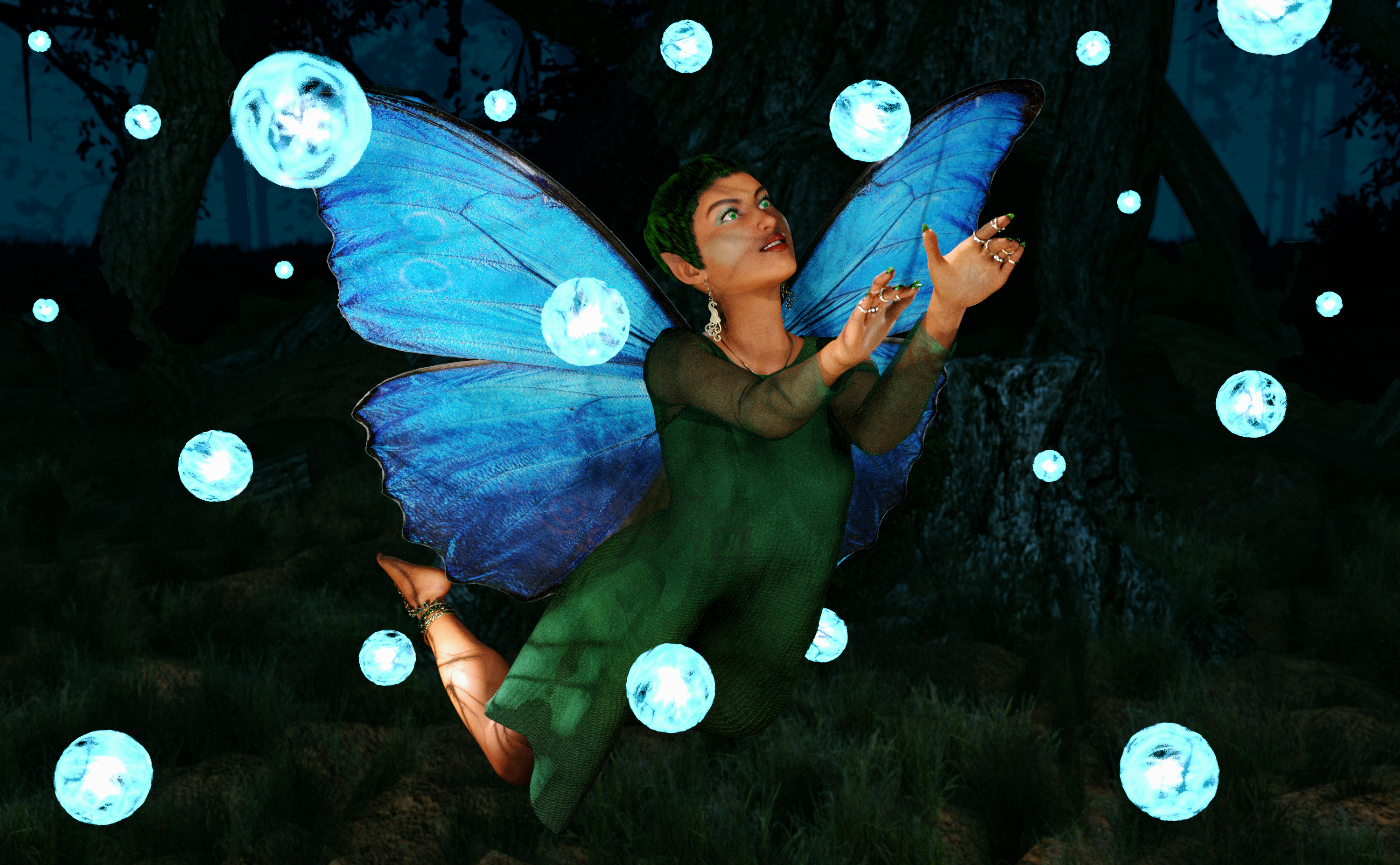
Freebies:
Chameleon ROse 2 for Genesis 8 Female (nail and lashes morphs, eye materials, nails and makeup) - https://www.renderosity.com/mod/freestuff/chameleon-rose2-for-genesis-8-female/85859
SY 200 Morphs Genesis 8 (morph tweaks) - https://sharecg.com/v/91888/favorite/21/DAZ-Studio/SY-200-Morphs-for-Genesis-8-Head-and-Body
Nail Art for Genesis 8 and 8.1 Females (Rings) - https://www.renderosity.com/freestuff/items/92918/nail-art-for-genesis-8-and-81-females
Celtic Jewelry for Genesis 8 and 9 (Necklace) - https://3dshards.com/product/celtic-jewelry-for-genesis-8-and-9/
Peacock Jewelry Set for G8F and G9 (Earrings) - https://3dshards.com/product/peacock-jewelry-set-for-g8f-and-g9/
Xmas Bundle (tunic) - https://www.renderosity.com/freestuff/items/84013/xmas-bundle
Barefoot Sandals for Genesis 8 Female (Foot decorations) - https://www.renderosity.com/freestuff/items/90436/barefoot-sandals-for-genesis-8-female
Sickleyield Hair Pack 01 Genesis 8 (Hair) - https://sharecg.com/v/97201/favorite/21/DAZ-Studio/SY-Hair-Pack-01-Genesis-8
Butterfly for Daz Studio Iray (wings) - https://www.sharecg.com/v/95763/browse/21/DAZ-Studio/Butterfly-for-dazstudio-iray
Fairy Poses (pose base) - https://fantasiesrealm.com/market/Designers/AngellsGraphics/Fairy-Poses-for-G3F-G8F-Exclusive
Shimmery Sheer Shaders 2 (on overdress) - https://sharecg.com/v/95898/browse/21/DAZ-Studio/Shimmery-Sheer-Fabrics-II
Iray Jewelry Shaders (on jewelry) - https://sharecg.com/v/95893/favorite/21/DAZ-Studio/Iray-Jewelry-Shaders
Gradient Silk Shaders for DS (on underdress) - https://www.renderosity.com/freestuff/items/73388/gradient-silk-shaders-for-ds
Misty Pines HDRI - https://polyhaven.com/a/misty_pines
AAL Plasmaball (Glow Lights) - https://sharecg.com/v/74972/favorite/21/DAZ-Studio/AAL-Plasmaball
Fairy Tree for Daz (Environment) - https://sharecg.com/v/99565/favorite/21/DAZ-Studio/Fairy-Tree-for-DAZ
No Count:
Tayanna (base character and skin) - Was free, cannot find now
Funky Madness Hair Shaders (on hair) - Was free, cannot find now
Paid:
None
I tweaked the materials, the lights and the pose. Set up and rendered within Daz Studio Iray. Postwork in Pixelmator.
I’ve attached the before post render (the one that says Raw Render) and the finished image file.
Freebie Challenge February 2024 - "The Glow Up" - Main ThreadGlow up
Graduation is the end of a tough journey and the the beginning of a new beautiful one. A fresh start! Ready to glow!
Glow upFreebies
Quiet Sanctuary for DAZ by Shreddder
https://www.renderosity.com/freestuff/items/96094/quiet-sanctuary-for-dazHDRI Bethnal Green Entrance By Andreas Mischok
https://polyhaven.com/a/bethnal_green_entranceSmartphone Prop by Foxclaw
https://www.renderosity.com/freestuff/items/87343/smartphone-propGenesis Graduation Gown
https://www.wilmapsdigitalcreations.co.uk/view_product.php?id=98Genesis Graduation Gown Lengthen Morph
https://www.wilmapsdigitalcreations.co.uk/view_product.php?id=100"STRONG" for G8M Character Morph & Pose by Mar3D
https://www.renderosity.com/freestuff/items/82833/strong-for-g8m-character-morph-amp-poseAmy AiMei for Genesis 8 Female (morphs only)by amyaimei
https://www.deviantart.com/amyaimei/art/Amy-AiMei-for-Genesis-8-Female-morphs-only-687709757Sokka For G8M
https://www.renderhub.com/khoshekh/sokka-for-g8mMukta for Genesis 8 Female
https://www.renderhub.com/zaap/mukta-for-genesis-8-femaleEveryday Hair Style for Genesis 8 Male(s) by zoro_d
https://www.renderosity.com/freestuff/items/80194/everyday-hair-style-for-genesis-8-malesJill For G8F DL by CheckerToo (Hair)
https://www.deviantart.com/checkertoo/art/Jill-For-G8F-DL-852699253UPDATE - V Devil May Cry 5 Hair Prop for G8M
https://sharecg.com/v/93558/browse/21/DAZ-Studio/UPDATE-V-Devil-May-Cry-5-Hair-Prop-for-G8MSide Swept ROse Hair (G3F , G8F) by zoro_d
https://www.renderosity.com/freestuff/items/79533/side-swept-rose-hair-g3f-g8f-part-1
https://www.renderosity.com/freestuff/items/79534/side-swept-rose-hair-g3f-g8f-part-2
https://www.renderosity.com/freestuff/items/85860/free-update-for-biker-outfit-g8f-and-sideswept-hairDiffeomorphic DAZ Importer version 1.7.0 releasedHey Padone,
I saw that you and Thomas had added the armature transformation technique.
Thanks for that!
I haven't had a chance to try it out yet, but if I can get the corrective pose exported to Unreal Engine, it might make it possible to keep just one mesh, like we discussed.
For the moment, I've opted for several baked meshes, as indicated in my previous post, and I swap them at runtime in Unreal Engine when necessary.I've also recently switched to the HD import, which seems to produce a slightly better mesh than the standard import, even at subdivision 0 (particularly at eye/mouth level).
As expected, having to maintain several meshes has added more work for me in Blender.
What's more, the HD import sometimes works strangely and seems more complex than the standard import.
So I've automated my workflow to make my work easier, and in doing so I've noted a number of points that I'd like to pass on to you and Thomas.
Note that I'm still using version 1.7.2.1935 of Diffeomorphic.
1/
There is an error in the "Convert Morphs To shapekeys" function when it is called by a script.
Line 1047, replace the line:items = dict([(key, key) for key in rig.keys() if not self.specialKey(self, key)])by :
items = dict([(key, key) for key in rig.keys() if not self.specialKey(key)])(just remove "self, ")
Also, if the mesh has no shapekeys (ob.data.shape_keys is None), the script will fail.
I think there's also a problem with the drivers, but I'm not sure if it's linked to the Convert Morphs To Shapekeys function.
It seems that when converting morphs to shapekeys, some drivers end up pointing to invalid shapekeys.
You can see this kind of message in the console:ERROR (bke.fcurve): C:\Users\blender\git\blender-v400\blender.git\source\blender\blenkernel\intern\fcurve_driver.cc:170 dtar_get_prop_val: driver has an invalid target to use (path = key_blocks["pJCMAbdomen2Fwd_40"].value)2/
There are a few Diffeomorphic functions that I haven't managed to call via script without first modifying them.
I'm not a python developer or a plugin developer on Blender, so maybe it's just me that hasn't figured out how to use them.
For example :
Convert to shapekeys: I don't get the impression that you can convert shapekeys "by label" as you can via the popup.
In my case, I've duplicated what's done in GeneralMorphSelector.invoke() in a function so that I can call it and fill in the variables that are used by the code and then fill in the "items" variable with the morph labels.
Perhaps it would also be interesting to be able to provide a list of morph names (so as not to convert everything).Import Custom Morphs: I don't know if it's possible to specify the file(s) to import?
I didn't see if it was possible to override "LS.theFilePaths" directly, so I've added a parameter to do this.Transfer shapekeys: I don't get the impression that you can transfer all the shapekeys (the equivalent of the popup when everything is ticked).
It might be interesting to update these functions so that users can call them in their scripts.
For my part, I've made some quick changes to make it work, but they're more workarounds than anything else, so it's not worth submitting a patch.
3/
I had a lot of trouble getting the HD import to work.
I have the impression that there are differences with the standard import that I can't explain.One of the most important is that I can't get the morphs imported properly for the HD mesh with Easy Import.
I've done a lot of tests and in the end I'm not sure what's going on, but it seems to be linked to the HD mesh transforms.
Indeed, if I do an HD import and keep the base mesh ("keep base meshes" in global settings), the two meshes are perfectly aligned in Blender, but the HD mesh doesn't have its transforms applied.
I think that's why the shapekeys aren't transferred correctly, because the functions that do the transfer in Diffeomorphic return an error when the transforms aren't applied.
It's just a guess, maybe I'm wrong, but it's the most logical explanation I've come up with for why morphs imported during HD import are causing a problem.
Finally, I got round the problem by not importing any morphs with Easy Import during an HD import.
I then manually call up the standard and custom morph import functions on the HD mesh after applying the transforms to all the meshes, and it seems to work fine.I've also had the odd case of some shapekeys being duplicated (with .001 .002 in their names).
At first, I thought this was due to changes I'd made to the python code but even after reverting everything, I still had the problem.
Unfortunately, I couldn't find the cause of these duplicates. The strange thing was that the shapekeys that were duplicated didn't all work, so it was necessary to check which one was right and delete the others.
If I have any more information about this, I'll repost a message.Problem with FaceTransfer 1Richard Haseltine said:
Face Transfer 2 does not change Face Transfer (1) in any event, it adds support for Genesis 9.
The lack of depth in the shape is a common complaint, people tend to use https://www.daz3d.com/face-transfer-shapes-for-genesis-8 which is designed specifically to adjust for these issues.
Thanks...
 How to register Measure Metrics.
Thanks I followed the instructions and was able to register Face Transfer but apparently for Measure Matric I had to install some other stuff.
Will do that and try again
Thanks again
Tutorial: Coral 8.1 Tail for Genesis 8.1 MaleI assumed since Coral came with male genitalia, that the idea was to morph her into a male if we wanted a merman ... was I wrong?
Autofit not working rightAnd can you usually when fitting to that figure? The types ar extra files with different rigging that can be used in place of the base figure (AutoFit essentially changes the shape and then runs Transfer Utility using the template specified in Type).
Moving a model mesh and its skleletonI've cut away most of a human figure to create a rigged and morph-rich sub-figure (think of say a severed hand which will be used to terrorise any number of genesis generations trapped in a haunted house) and saved the result as its own new figure asset.
BUT the kept mesh and skeleton are in the same relative location and orientation as they were on the original human figure. I'd like to be able to set the figure up so that, for instance, it is sitting on the floor on its wrist stump waiting to beckon some unsuspecting genesis to its doom.
I can, of course, do this by moving the figure in the scene, but I'm wondering if there is a way move the entire skeleton to the new origin (0, something, 0) and the new orientation, and with the skleleton, the mesh, so that the figure loads in this more "neutral" position no longer reflecting the figure's original position on the source human figure.
I did try a transfer utility job on a relocated / reoriented prop mesh, but that appears to be based around an assumption that the new mesh is pretty much where the old mesh was and so mostly failed to be useful.
Thoughts? Cheers, Lx
Recent issue with autofitting G1 gloves to G2 (Caused by newer versions of Daz)I loaded up an old scene, and noticed that the gloves that were autofitted to the Genesis 2 character were looking strangely warped. Seems it's caused by adjusting the chest depth of the character. This particular scene was done in 2021, so I'm curious what might have broken the autofitting.
EDIT: Seems this is caused by more recent versions of Daz. I reinstalled 4.12, which is what I was using at the time, and the issue doesn't occur. Think this might also be related to an issue I had with some old G1 characters having their hair morph off their heads, again due to the chest depth. So this has been broken since at least 4.16, since I used both that and the latest version of Daz and encountered this problem. Sure would be nice if Daz would allow us to rollback to older versions via the install manager or something instead of having to hold onto the old installers.
UPDATE; (new log attached 01 March 2024) Problems applying expressions to G8 femalesAll of those JSON warnings makes me wonder if your Alexandra 8 DUF is corrupt.
Most of those "Warnings" in the log are "missing files" problem is that vast majority are files from the started essentials and/or the head and body morph packs, which DIM shows as being installed.
Problem with FaceTransfer 1Face Transfer 2 does not change Face Transfer (1) in any event, it adds support for Genesis 9.
The lack of depth in the shape is a common complaint, people tend to use https://www.daz3d.com/face-transfer-shapes-for-genesis-8 which is designed specifically to adjust for these issues.
Problem with FaceTransfer 1Hi!
I have the version of DAZ 4.22 and I have a problem with Face Transfer 1.
Yes, I know, there is FT2 already, but I can't afford to buy 50$ to get the serial number right now.
The problem is: no matter which photo or pics I use, the whole mouth is flattened and crushed as if the character had received an hammer strike on the teeth.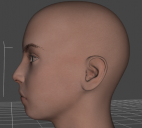
No one of the parameters about lips and mouth seems able to fix this thing. I checked online - and here on the forum - and despite I found people who complained about the same problem, I didn't find the relative solution.
So I have to ask you: how can I fix the mouth of my characters? Or at least, where can I find the solution to this mess?
Clothing Distortion on thin bodies (between and under breasts)There was another thread discussing this recently, and it's not currently an easy issue to fix.
Most (well made) clothes will have correctives for most of the breast morphs in Daz's main morph pack (e.g. https://www.daz3d.com/genesis-8-female-body-morphs for G8F, and the appropriate equivalents for other generations), so sticking to those can help a lot, but it's not perfect and the moment you start getting into unsupported PA morphs you've got a whole new pickle. While it's a port in a storm, Fit Control cannot possibly perfectly account for every possible way a vendor may have morphed a figure, so its results are varied and often tedious to reach.
I have my own method to fix distortions in the breast area - big or small - but it's complicated to set up manually (although nearly automatic once set up) and it's something I'm still trying to get automated to make it more accessible to others.

 UPDATE; (new log attached 01 March 2024) Problems applying expressions to G8 females
Do you have the basic morph packs isntalled?
Mechasar's Characters Catalog: Who's next? (commercial)Ninefold said:
Hi Mechasar! I'm a huge fan of your work. I particularly love Natural Movements Pack, which is what got me on board with Genesis 9. However, I've been getting some weird behavior on the first ring finger knuckle of each hand, as seen in the screenshots, which I made for another thread a while back. (The negative screenshots are because I thought the problem might be that the morph was inverted, but that's clearly not quite it.) This looks to me like it's probably an error, rather than how these morphs are intended to look. Is there any chance of a fix?
Thank you, I’m very pleased! Ok, If I understood correctly you think the bend radius of the fourth knuckle is too large and smooth. Unfortunately I can’t submit any modification request in this case, because this kind of issue will be considered as a “subjective preference” rather than a functional error. Anyway, I checked again that morph, and I need to point out some features first:
- You should use the highest subdivision level on your model when the NMP is on, the higher the levels the more the detail will be defined.
- When you bend the phalanges, those Up-Down finger morphs have been designed to perform at best individually. But when you close the fist, the “Hand Left/Right Fist” morph has to activate in order to correct the overall look of the hand. Since these “Hand Left/Right Fist” morphs are controlled by the “Pose Controls” box, my suggestion is to use the hand poses from that box when you want your model to close its hand, avoiding to bend its fingers one by one.
I can also exclude that morph was meant to be used in “reverse”, because all the morphs were created adding positive values only. It was just designed as it is. I can show you how to turn that morph off at least, without using negative values.
Following these steps you can redesign the “Hand Left/Right Fist” automatic morph, so the effect of the “Ring Finger Down” morph will be minimized when you use the quick poses of the “Pose Controls” box, but without affecting it when you’ll bend the ring finger alone.- Load a base Genesis 9 model in your scene and select it.
- Right click on Parameters pane and flag “Edit Mode”.
- Go to “Parameters/Natural Movements Set/Hands”, right click on “Ring 1 Left Down” and select “Show in Property Hierarchy”.
- Expand the selected morph in the Property Hierarchy pane until you see the content of its Sub-Components and Controllers.
- Go back to the “Parameters/Pose Controls/Hand/Left”, now drag and drop the “Left Fingers Fist” into the “Ring 1 Left Down/Controllers/1st Stage (Add/Subtract)” line of the Property Hierarchy pane.
- Expand this added morph until you see the content of the “Attribute” line, then be sure the “Save with” line is set on the same Natural Movements Pack morph (Ring 1 Left Down), and change the value of the “Scalar” line from 1 to -0.6/-0.7 (I think these values are good enough, but you can use -1 if you need to completely override the effect).
- Do the same thing dragging and dropping the “Left Fingers Grasp” morph.
- Repeat the same instruction for the right hand (“Right Fingers Fist” and “Right Fingers Grasp” morphs into “Ring 1 Right Down”).
- Now you can go to File/Save As/Support Asset/Morph Asset(s), select “Mechasar” in the vendor name box and “Genesis 9 Natural Movements Pack” in the product name box, then flag the “Genesis 9/Natural Movements Set/Hands/Ring 1 Left Down” and “Genesis 9/Natural Movements Set/Hands/Ring 1 Right Down” morphs ONLY in the properties box, then accept.
- Remember to go back to the Parameters pane and deselect the edit mode.
PLEASE NOTE this action is irreversible, so if you need to restore the pack as it was, you will need to delete it completely then reinstall it. Hope this can help.
Mechasar's Characters Catalog: Who's next? (commercial)Hi Mechasar! I'm a huge fan of your work. I particularly love Natural Movements Pack, which is what got me on board with Genesis 9. However, I've been getting some weird behavior on the first ring finger knuckle of each hand, as seen in the screenshots, which I made for another thread a while back. (The negative screenshots are because I thought the problem might be that the morph was inverted, but that's clearly not quite it.) This looks to me like it's probably an error, rather than how these morphs are intended to look. Is there any chance of a fix?
Tara 9, breaking your heart, stealing your soul.Ninefold said:
jd641 said:
I think the elbow issue is a general G9 problem, I'm still waiting a specific bend morph product that usually gets released with each generation to fix these issues but it seems to be taking longer than I expected.
There are actually two already, Ultimate Natural Bend Morphs for G9F and Natural Movements Pack.
It's still disappointing that G9 without additional morph packs bends worse than G8 without additional morph packs.
In the Tara 9 HD promo, shoulder-armpit area looks off as well.
OT - Who knows about tank printers?JasmineSkunk said:
Okay, so here's this issue... The Canon G3270 is a tank type printer, meaning it doesn't have a cartridge. Instead it has independant empty tanks that you pour the ink directly into. Okay so I have already researched and found out that it can be turned into a sublimation printer. A sublimation printer uses specialized sublimation ink formulas to be used to transfer designs onto shirts and stuff with a heat press. I am not trying to do that, actually, but....
The issue is that the Black ink used by Canon is a hybrid ink that is both dye and pigment. The individual magenta, cyan, and yellow are already a dye based only ink. Only the black is a mix. The problem with the black hybrid ink is that it can not be used very nicely with printable vinyl due to the pigment in the formula... and I want to use it to print on printable vinyl with my cricut.
Okay so, I'm wondering that since it can be turned into a sublimation printer, can I just use a dye based ink in the black tank, or perhaps use a brand for epson that is known to work well with printable vinyl...and if I can would I use all the epson line or just change out the black, if this is even posbsible...
I hope all that made sense... LOL
It cannot be turned into a a real dye sublimation printer because in that technology the ink is IN the paper, not in the printer or the print heads. Those printers use the heat of the printers rolling heads to melt the dye waxes in the appropriate places on the paper to create the image. That's why the print process requires 3 passes, one for each primary dye wax color. If someone is calling printing on a vinyl sheet in an inkjet technology printer sublimation they are wrong.
And furthermore, no, the tank is subset part of the module called the cartridge that contains the ink jet print head nozzles as well. It's the same tech except the cartitridges are bigger and called tanks because you can refill them. It's still the same tech and yes, they can print to that special vinyl paper some businesses sell. Don't ask me about steadfastness though.
I believe, when using that special vinyl paper in such a printer yu choose "photo paper" as the paper type, rather than "normal paper".
I can tell you I have inkjet photos printer on inkjet photo paper from Kodak from 25 years ago that still looks as good the day it was printed. And I have a small Canon Dye Sublimation printer still and printers printed as early as 2007 on special dye sublimation paper from Canon from 18 years ago also still loook like the day they were printed.
Any way to refresh DAZ studio after installing new morphsBy installing new morphs, I meant copying all necessary morph files in my library. In order to use the added morphs, I usually restart DAZ studio but it takes more than 10 minutes to do that. Is there any way to "refresh" DAZ studio without restarting?
Daz 3D is part of

Connect
DAZ Productions, Inc.
7533 S Center View Ct #4664
West Jordan, UT 84084Licensing Agreement | Terms of Service | Privacy Policy | EULA
© 2026 Daz Productions Inc. All Rights Reserved.