-
[SOLVED] How to change where Daz saves its metadata
PerttiA said:
Judging by what you wrote, it sounds like you are installing your content with DIM, but also logging in to DS... You should not be doing both.
DIM installs the metadata to \Runtime\Support\, but that is not where the metadata updates during starting DS are saved. See the attachment for how to set your DS startup options to stop logging in to DS.Thank you for the answer! Makes total sense! In that case I'll just keep using DIM (which is what I've always used, I didn't know I shouldnt login), stop automatic login, and i'll delete that new folder it created with the metadata :) Thank you again!
New Release: Bringing Daz figures To Life in UE5catmaster said:
dave_0aa47f5a80 said:
You mention that the preferred method for exporting the fbx from Blender is via bult-in fbx exporter. I'd really appreciate it if you could let me know the optimal fbx export settings, as I'm not very familair with Blender.
Attached the export and import settings for SKM and for animations, the settings work for UE5.1 and Blender3.3, may not work for earlier versions because they updated their FBX importers and exporters.
It seems the baked morph curves are stored with the meshes not with the skeleton in FBX, to export animations with morph curves, the FBX needs to export both armature and meshes, updated the attached images with corrected export and import settings to export animations with morph curves.
1044083166 said:
How do you fix JCM shapekeys and could you please tell the general idea? Thank you!
https://www.daz3d.com/forums/discussion/596666/modify-daz-character-rig-for-unreal-skeleton#latest
This thread discusses two different approaches, converting G8 to UE4 skeleton vs Rigging G8 and preserving original deform bones.
If using Epic skeletons the characters need custom JCMs which would be provided by DTL plugin.
If using the original Daz JCMs the G8 skeleton needs to be preserved.Using Diffeomorphic to convert morph drivers to shape keys during retargeting process, Diffeomorphic can bake JCM morph curves into retargeted animations. For this to work it needs to retarget animations to G8 skeleton using AutoRig Pro, G8 deform bones are needed for Diffeomorphic to generate JCM curves.
The original Daz JCMs are designed for DQS and they're not enough to fully solve the skinning problem for game engines, in order to make the original Daz JCMs work without DQS, they can be re-sculptured using the Blender plugin Pose Shape Keys: https://studio.blender.org/training/blender-studio-rigging-tools/pose-shape-keys/
The JCM morphs shown in the attached images are the original Daz JCMs, they're not enough to solve the skinning problem like the flat knees or the distorted shoulders during extreme motions, after the JCMs are re-sculptured the skin deform would be much better.
i'm not fan of baking jcm into animations, because it's means which they only work "on that animation" and the same process must be applied do all animations, which is much better a realtime by using the jcm as morphs as they are supposed to be which means which they can be used into any animation at any time since they are made at run time this is why most peoples don't use stuffs like updrape(cloth pluging) to simulate cloth physics because they are "not real time" and pre made in some cases can look not "realistic than realtime physic based stuffs.
for me i would keep then as morphs rater than "baked into animations", because again in some cases they could not look 'natural" or realistic as in "realtime based" can be.
[SOLVED] How to change where Daz saves its metadataJudging by what you wrote, it sounds like you are installing your content with DIM, but also logging in to DS... You should not be doing both.
DIM installs the metadata to \Runtime\Support\, but that is not where the metadata updates during starting DS are saved. See the attachment for how to set your DS startup options to stop logging in to DS.Wrote this on another thread;
The structure of (traditional) DAZ Content Library is actually quite logical, but when trying to find a simple "push button" solutions for new users, DAZ has created a situation where different default functions do not play well together.
-At first the (new) user is offered DAZ Central for downloading and installing DAZ Studio and all the content that comes with it, no other alternatives are offered or even mentioned.
-When the user has downloaded and installed everything with the default settings/options and starts DS the first time, one is presented with a dialog that asks the user to log in, with the default option to keep logging in automatically in the future, giving the user the impression that logging in is necessary.
-Once the user is in DS and starts browsing the available content in 'Smart' Content, one is told that the content is not installed (with DAZ Connect), giving the user the impression that the content needs to be installed again, when in fact it is not necessary.
-If the user does as is suggested, the content gets downloaded and installed the second time to another location, taking twice the storage space. The installation location is non-traditional, which does not work with scripts and older content, and whatever gets installed by DAZ Connect, overrides the installations made by the other installation methods (DIM/DAZ Central/Manual installation), even when the DAZ Connect installations fail to work due to for example decryption failures.The general concensus is that the DIM is the best tool for installing DAZ content.
DAZ Central is just a simplified version of DIMDAZ Connect inside DAZ Studio was created at a time DAZ experimented with encrypted content, which did require logging in to DS/DAZ servers to verify the users licence for that content. The experimentation with encrypted content was ended some 5-6 years ago, but the user is still asked to log in without being told why or being warned about the possible consequences and side effects - The decryption errors are due to the content still being encrypted at DAZ servers that are used by DAZ connect to download them.
Personally I use manual installation as it gives me total control over the installations without having to track down settings in an installation program to get it to do what I want. The only thing the installation programs have is the ability to uninstall content with a push of a button, otherwise everything works just as if the content was installed by any other method.
[SOLVED] How to change where Daz saves its metadataEvery time I load Daz lately, it imports all almost 5k products' metadata, again and again. First it was trying to import to a drive unit I no longer have (changed recently) and was getting an error in the log. Now, I changed my current drive to the old unit letter, and it created a folder there to which all thumbnails and .json files are going.
My question is How do I change where this metadata goes? I don't want it to be in this folder. I tried looking over preferences and even on DIM and I don't see that folder being called anywhere.
Recording Studio Models - Acoustic Foam HelpHow about this OBJ file?
50cm square, 5cm backing thickness, 6.25cm wedge width, 7.5cm wedge height.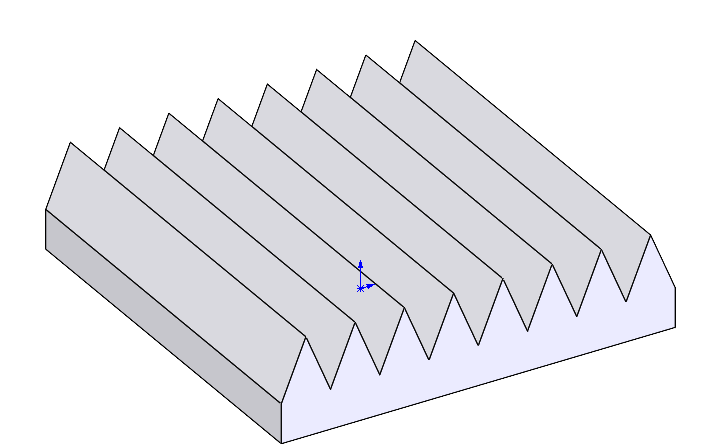
Just a simple obj file to import & apply a texture to. Texture mapping = cuboid style.
Regards,
Richard
Diffeomorphic DAZ Importer version 1.6.0 releasedrugeyohe said:
@Padone Do you have any advice for bending knees and elbows? When you do that they look weird. I don't know if it is about weight painting. Should I use shape keys to fix them?
If you're talking about G9 make sure to put the "Base Joint Correctives" morph to 1. Apparently G9 has a controller now to adjust the strength of JCMs and on import it's set to 0 and your JCMs have 0 impact.
New Release: Bringing Daz figures To Life in UE5dave_0aa47f5a80 said:
You mention that the preferred method for exporting the fbx from Blender is via bult-in fbx exporter. I'd really appreciate it if you could let me know the optimal fbx export settings, as I'm not very familair with Blender.
Attached the export and import settings for SKM and for animations, the settings work for UE5.1 and Blender3.3, may not work for earlier versions because they updated their FBX importers and exporters.
It seems the baked morph curves are stored with the meshes not with the skeleton in FBX, to export animations with morph curves, the FBX needs to export both armature and meshes, updated the attached images with corrected export and import settings to export animations with morph curves.
1044083166 said:
How do you fix JCM shapekeys and could you please tell the general idea? Thank you!
https://www.daz3d.com/forums/discussion/596666/modify-daz-character-rig-for-unreal-skeleton#latest
This thread discusses two different approaches, converting G8 to UE4 skeleton vs Rigging G8 and preserving original deform bones.
If using Epic skeletons the characters need custom JCMs which would be provided by DTL plugin.
If using the original Daz JCMs the G8 skeleton needs to be preserved.Using Diffeomorphic to convert morph drivers to shape keys during retargeting process, Diffeomorphic can bake JCM morph curves into retargeted animations. For this to work it needs to retarget animations to G8 skeleton using AutoRig Pro, G8 deform bones are needed for Diffeomorphic to generate JCM curves.
The original Daz JCMs are designed for DQS and they're not enough to fully solve the skinning problem for game engines, in order to make the original Daz JCMs work without DQS, they can be re-sculptured using the Blender plugin Pose Shape Keys: https://studio.blender.org/training/blender-studio-rigging-tools/pose-shape-keys/
The JCM morphs shown in the attached images are the original Daz JCMs, they're not enough to solve the skinning problem like the flat knees or the distorted shoulders during extreme motions, after the JCMs are re-sculptured the skin deform would be much better.
ISO Short Fingernail Morph for G8/8.1FThere is a way if you get Hexagon which is free and from here, it is relatively easy to make the required morph to how you want it. The reason for Hexagon is that Daz Studio has a great import / export bridge, for such things.
 Diffeomorphic DAZ Importer version 1.6.0 released
@rugeyohe You have to import the jcms. The fast way is to just check them in easy import.
https://diffeomorphic.blogspot.com/p/morphs-section-version-16.html
Getting "import failed" on all attemptsIf I had that figure, I'd try it myself. Do other figures import correctly? The fact that it's a standalone figure rather than a Genesis morph might be part of the problem.
(Spanish) Alguien me puede ayudar a suavizar ropa pegada :(If you want to simlate rather than rig, just import the clothing model, apply a dForce Modifier (Dynamic) Edit>Object>Geometry>Add dForce Modifier : Dynamic Surface, then try simulating to see if it works. You may need to do further work, depending on how the clothing was made - parts such as buttons will probably fall off, and edges may pull apart, but it should be a useful test.
Importing Rigged Model - Need Help ASAP!Sorry, I know this discussion was a while back, but I found the trick to making Mixamo work, is a few things:
1) In Daz, use a G2M/F model
2) In the scene tab, right click on the model and choose select all (provided the G2 model is the only item in the scene)
3) Edit> Figure> Limits> select to turn off limits
4) Edit> Figure> Locks> select to unlock everything
5) Have the figure in a T pose before exporting
6) Import/Upload into Mixamo
7) Choose your mocap
8) Export as FBX 6.1
9) When you import your newly downloaded fbx, choose "Mixamo" when you see the dialog box
Be sure to save as a pose file, so that you can use it with other models
That is how I made the following Michael Jackson YT vid - https://youtu.be/nqwWyNWknY0
Animating in Blender over Daz?Thanks for clarifying.
I'm finding the rigging in Blender a bit strange as of course the Daz figure isn't native to the program unlike in DS. Do people tend to pose using the default Diffeo import, or do they use Rigify/MHX?
I guess what's strange to me is that Daz excels at posing its characters, and given much of animation is posing - isn't it odd to trade this for less bespoke rig options?
Items disappearing from product libraryWendyLuvsCatz said:
it's a bit scary if stuff can be remotely removed from your computer
they have always vehemently denied this possibility
In the OP's case, while the product has not been removed from the computer, logging in and letting DAZ Connect update the metadata (which it does automatically), may have made it look like the product is no longer installed - Which would also explain why the product reappeared after the second purchase even without reinstalling it.
Yet another reason, why one should never log in to Daz Studio.
Diffeomorphic DAZ Importer version 1.6.0 releasedHere's a example, I only used tesselation 1 to reduce the export and import time a bit.
Daz to Blender BridgePadone said:
The material method is straight in the import dialog as in the picture I posted above you can't miss it. If you don't have it be sure to update the plugin, and/or look in the global settings if you disabled it.
Yuo can spot the used morphs in daz studio by the currently used tool in the parameter tab. There's usually a "mouth realism" that's HD.
Thanks for your time and patience Padone, it is really appreciated.
I have found the Material section in the Global settings bacause I could not find the Material method in the Import dialog (I guess I missed the unmissable).
I have also re-imported the character in a new blend scene, HD this time... Mouth problem solved.
Now I guess I'll have to either delete the character (and all Daz related things) from my previous scene and append the new HD character's blend file, or go the other way around and append a cleaned version of the old scene with only the wanted props and lights to the new.
I'll try one and if something bugs, I'll switch methods.
But thanks again.
When I got into 3d modeling a few years back, it was only to build up scenes as reference for my 'canvas and brush' paintings (more conveniant and cheaper than hiring models). Now that I am getting into 3d for the sake of actual 3d creation, I'm realizing how steep the learning curve can be.
Metadata Attached to Product FilesIf you move/rename inside Daz Studio's Content Library, using right-click menus, the metadata will not break (as long as the database isn't reset).
Daz to Blender BridgeThe material method is straight in the import dialog as in the picture I posted above you can't miss it. If you don't have it be sure to update the plugin, and/or look in the global settings if you disabled it.
Yuo can spot the used morphs in daz studio by the currently used tool in the parameter tab. There's usually a "mouth realism" that's HD.
Diffeomorphic DAZ Importer version 1.6.0 releasedBelow's an example with the Pixie hair that comes with G9. If you can import the Pixie hair then it's the same for all dforces.
Daz to Blender BridgePadone said:
In your example you're using the principled option that's expected to be fixed in some cases, because the principled shader is limited as for iray conversion. Also you use the HD morph for the teeth so you need either to export HD or remove the HD morph in daz before exporting.
https://diffeomorphic.blogspot.com/p/material-settings-version-151.html
I am sorry, but this is way beyond my level of understanding of the DAZ or Blender environments. I looked around and read as much as I could of the Diffeomorphic documentation. But I'm still quite lost.
How can you tell that some parts are HD morphs and others are not? You also say that I am using Principled. I don't remember choosing that, so how can I choose otherwise. Is it something that can be remedied after the fact or do I have to re-import the character all over again? That implies correcting the pose again to fit the props in the scene that were not in the Daz set (which is a bit tedious).
Daz 3D is part of

Connect
DAZ Productions, Inc.
7533 S Center View Ct #4664
West Jordan, UT 84084Licensing Agreement | Terms of Service | Privacy Policy | EULA
© 2026 Daz Productions Inc. All Rights Reserved.