• Daz 3D
  • Shop
  • 3D Software
    • Daz Studio Premier
    • Daz Studio
    • Install Manager
    • Partnerships
    • AI Training data
    • Exporters
    • Daz to Roblox
    • Daz to Maya
    • Daz to Blender
    • Daz to Unreal
    • Daz to Unity
    • Daz to 3ds Max
    • Daz to Cinema 4D
  • 3D Models
    • Genesis 9
    • Genesis 8.1
    • Free 3D Models
  • Community
    • Gallery
    • Forums
    • Blog
    • Press
    • Help
  • Memberships
    • Daz Premier
    • Daz Plus
    • Daz Base
    • Compare
  • Download Studio
ADVANCED SEARCH
  • Menu
  • Daz 3D
ADVANCED SEARCH
Add image
  • Shop
  • 3d Software
    • Daz Studio Premier
    • Daz Studio
    • Install Manager
    • Partnerships
    • AI Training data
    • Exporters
    • Daz to Roblox
    • Daz to Maya
    • Daz to Blender
    • Daz to Unreal
    • Daz to Unity
    • Daz to 3ds Max
    • Daz to Cinema 4D
  • 3D Models
    • Genesis 9
    • Genesis 8.1
    • Free 3D Models
  • Community
    • Our Community
    • Gallery
    • Forums
    • Blog
    • Press
    • Help
  • Memberships
    • Daz Premier
    • Daz Plus
    • Daz Base
    • Compare

Notifications

You currently have no notifications.

Loading...
Daz 3D Forums > Search
  • How do i get parameters(value,min,max) of morphs , And set morphs parameters

    Please do put the question in the body of the post

    Once you have the morph use morph.getValueChannel() to get its DzFloatProperty numeric controller, and then get the value, limits and so on from that.

    By

    Richard Haseltine Richard Haseltine December 2023 in Daz Script Developer Discussion
  • Original Face Transfer and Genesis 9

    Just wanted to pass this on to those who have the original Face Transfer add-on. With Daz now selling Face Transfer 2 that includes the Genesis 9 figure, I decided to check something in my copy of the original. When you choose a picture to use, there is an option to use the Genesis 9 male/female. I don't own FT2 so I don't know what bells and whistles it includes, but I currently happy with FT1. Plus, there's a bonus. As you know, when doing a face transfer for a Genesis 8 figure you have to find a picture of the person with their long hair tied back. But if you are like me, all the pics I have are with the hair styled naturally. Meaning you end up with bangs plastered on the forehead or/and hair shadow or the hair itself painted on the cheeks. But when you choose the Genesis 9 figure for the face transfer, the hair disappears. The face is all one tone.

    I wonder why the same program does one thing with Genesis 8 figure, but does a better job with Genesis 9?

    Anyway, I just wanted to pass this along to my fellow artists.

    By

    wildbillnash wildbillnash December 2023 in Daz Studio Discussion
  • This character like ?

    If this is a photo you could use face transfer utility available on DAZ.

    By

    its_wayne its_wayne December 2023 in Product Suggestions
  • Did anyone do a Clothing Converter from V3,V4,M3,M4 to Genesis 3,8,9 M&F

    Can I ask what you want to do with the Gen 3 & 4 clothing? It's frequently not as good as G3-G9 clothing in the way it's made, but sometimes has more imagination. Is it that making you want to use it on the later generations?

    I'm curious, as I have gone to some efforts to take clothing from Genesis 3/8 to V3 so I can use my V3 characters (which I haven't been able to transfer to G8 satisfactorily, so taking clothing the other way was more practical). In the end I got to use new clothing on V3 and V3 characters, and I'm delighted.

    Regards,

    Richard.

    By

    richardandtracy richardandtracy December 2023 in The Commons
  • Reset animation timeline at a certain frame

    As per your case, technically, the commonly-used trick is

    1. Select all keyframes at frame 18 (drag LMB to frame select...), copy / paste to frame 1.
    2. Go back to frame 18, select the clothing item, set its Resolution Level to Base in Parameters pane, export it to OBJ file.
    3. Go to frame 1, clear simulation result, import the OBJ file into the clothing item with Morph Loader Pro, with options: Reverse Dformations - Yes, Overwrite Existing - Delta Only. Then dial the morph.

    By

    crosswind crosswind December 2023 in New Users
  • Face Transfer 2

    Thank you for sharing your experiments! So the one created by FT1 is the one one the left hand side,  looking straight at the pictures - am I getting this right? Weird, would have thought it the other way round! Also, are you not getting the 'eyeballs wrong size and wrong position'-problem when converting the figure with Manfriday's converter to G9? Or how did you handle that here? 

    Thanks again, I wish you would publish something like a tutorial on FT and also on how you create these amazing source figures in AI.

    The one from FT1/G8.x -> ManFriday -> G9 is the one on the left in the head-on shot. The one created in G8 has the narrower head shape. In the profile shot, you can see she has the more sharply defined lips and chin, which is the result of the Face Transfer Shapes that I applied before converting the shape. (FT2 is better out of the box in that regard but could still use a nudge. And yes, I did some rudimentary testing of applying the FT1/ManFriday head shape to the FT2 shape, with mixed and inconclusive results which I'm still pondering.)

    There are definitely issues in G9 converted figures with fit and tracking of the eye. I'll revisit that and see if - on further testing - I have any nuggets of wisdom to share. 

    Thanks for clarifying! I now bought FT2 as I got it down to something like 18 bucks, which I thought was very reasonable. Will hopefully find time to play with it on the week-end. I think I will also try the AI sites you mentioned for some source material. 
    If any nuggets are forthcoming in your own testing, please do share! wink

    By

    tsroemi tsroemi December 2023 in The Commons
  • Let's appreciate/discuss today's new releases - ongoing thread

    I really love the looks of the "Dragonhide PCS for Genesis 9 Bundle". And the same is true for the previous iteration.

    I had these things in my cart at least a dozen times, but they never lasted until checkout.

    And here is why: 
    I can`t wrap my head around the question, how a pilot would fit and/or act in its inside.
    In my mind it does only work as a robotic iteration or if one would scale it up several times and place a full size cockpit in its head.
    The only types of humanoids i could imagine, who would fit in such an armor, would look like these:
    (EDIT: or could be the arch-enemy from that Tank Girl movie   wink )

    And this just doesn`t work for me. It would be sth. that i buy and most likely never make use of.
    If anyone who owns the products could provide some renders with a human in front of the armor to get a more precise impression on how it would translate
    it would be very much appreciated.

    EDIT 2: this picture is not meant to violate the owners copyright, but to explain the situation (educational purpose if one may say so)
    and i DO LIKE the bundles a lot! I just wish there would be an option to morph them towards a more realistic(?)/reasonable(?) shape


    By

    f.boschanski f.boschanski December 2023 in The Commons
  • Genesis 9, Inflating Cloth in Marvelous designer 11 (Solved)

    If you import it with no patterns from that product, there won't be settings of particle distance ~~

    I just don't know why... unless you name the product that I can check if I have it for a test...

    Edit: Actually, if you wanna make an FBM on this item for a G9 character, you don't have to sim it in MD with G9 avatar or morph target. Instead, you may do it in DS, by using dForce modifier, with a lower Contraction-Expansion Ratio, then export / import via Morph Loader Pro, that'll also do.

    By

    crosswind crosswind December 2023 in Technical Help (nuts n bolts)
  • Genesis 9, Inflating Cloth in Marvelous designer 11 (Solved)

    from a product.
    Skin offset and particle distance has no effect.
    And I shouldn't change the particle distance, cos the geometries will change, and I can't import it back as a morph.


    By

    James James December 2023 in Technical Help (nuts n bolts)
  • Genesis 9, Inflating Cloth in Marvelous designer 11 (Solved)

    What do you mean by "make a morph of other people clothing" ?  You import clothing from DS into MD and simulate it based on a G9's avatar ?

    How does the "inflating" look like ? sort of collapsing ? (with unwelded mesh...?)  Better post a screenshot.

    By

    crosswind crosswind December 2023 in Technical Help (nuts n bolts)
  • Genesis 9, Inflating Cloth in Marvelous designer 11 (Solved)

    I use MD 11 to make a morph of other people clothing.

    But recently I use genesis 9. And everytime I simulate a cloth in MD 11 on Genesis 9 avatar, the cloth inflating very much.

    Do you know how to not make the cloth inflating on G9?

    By

    James James December 2023 in Technical Help (nuts n bolts)
  • Face Transfer 2

    tsroemi said:

    paulawp (marahzen) said:

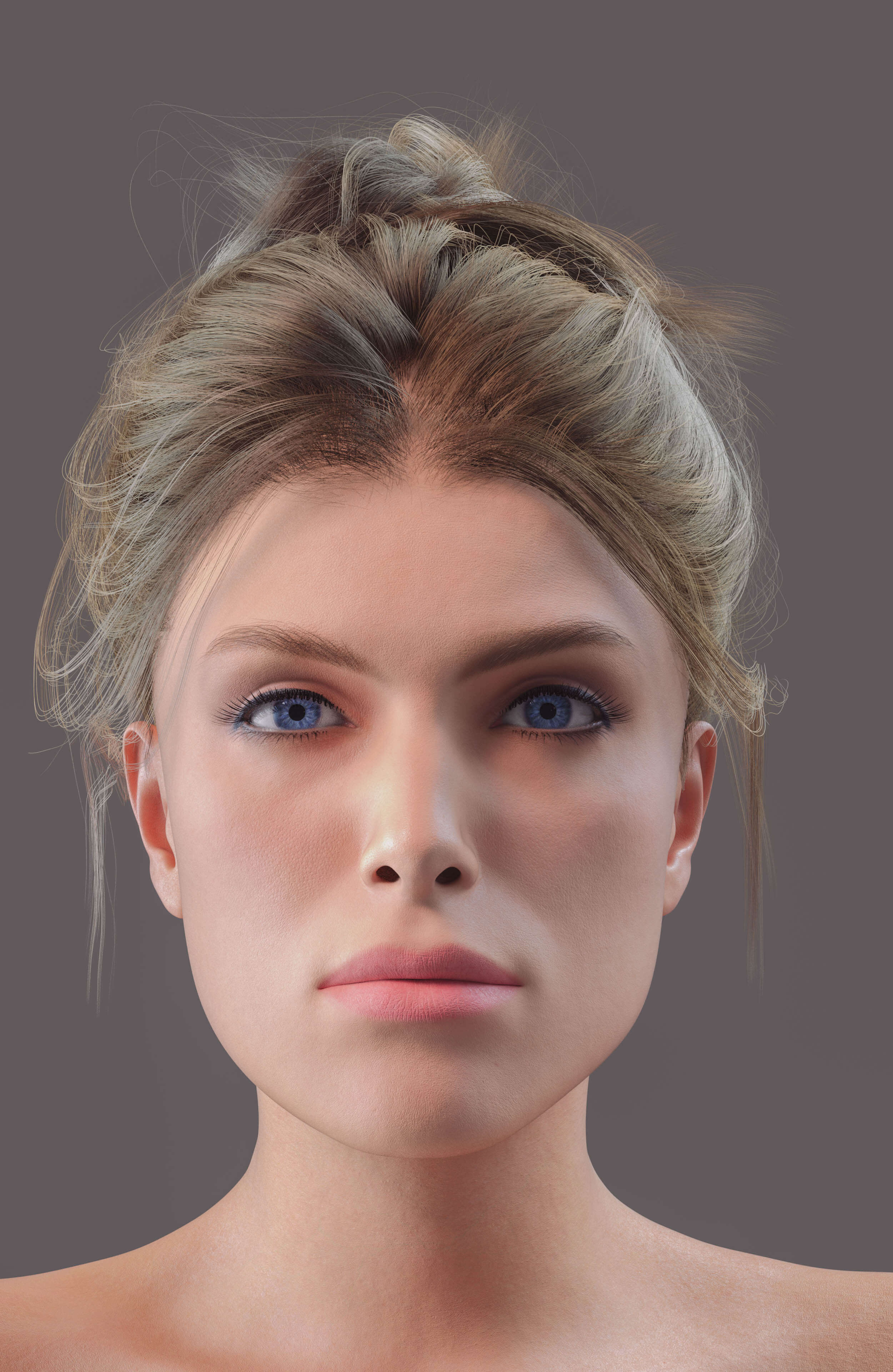
    I figured that it was worth sharing this experiment. This is a comparison of the shape created by original Face Transfer to that created by Face Transfer 2, on G9s with the texture created by FT2. The shape created by FT1 was created on a G8.1 Female, to which I applied Face Transfer Shapes at about 70%, and also fixed the head and neck to more closely approximate a stock G8.1 figure. (FT1 makes heads that are too small - I would create the FT shape, then load a second stock G8.1 figure and twiddle neck length and head propagation scale until the FT figure was approximately correct compared to the stock figure.) I then used ManFriday's converter to convert that shape to G9 and create a dial for it. The FT2 shape is just FT2 + Base Feminine as you get when doing a FT2 with "Feminine" selected. The one with blue eyes is the one that came from G8.

    Seeing them side by side makes me suspect that while I am still testing all options - which include more than just Face Transfer - FT2 may end up being my choice. It gets rid of that oval android head shape that I have never liked in G8. However, it would be nice to have a bit better lip and chin definition and as others have noted on this thread, there is a problem with FT2 ears. Some are better than others, but the best are not great and sometimes they are downright deformed and unusable.

    Thank you for sharing your experiments! So the one created by FT1 is the one one the left hand side,  looking straight at the pictures - am I getting this right? Weird, would have thought it the other way round! Also, are you not getting the 'eyeballs wrong size and wrong position'-problem when converting the figure with Manfriday's converter to G9? Or how did you handle that here? 
    Thanks again, I wish you would publish something like a tutorial on FT and also on how you create these amazing source figures in AI.

    The one from FT1/G8.x -> ManFriday -> G9 is the one on the left in the head-on shot. The one created in G8 has the narrower head shape. In the profile shot, you can see she has the more sharply defined lips and chin, which is the result of the Face Transfer Shapes that I applied before converting the shape. (FT2 is better out of the box in that regard but could still use a nudge. And yes, I did some rudimentary testing of applying the FT1/ManFriday head shape to the FT2 shape, with mixed and inconclusive results which I'm still pondering.)

    There are definitely issues in G9 converted figures with fit and tracking of the eye. I'll revisit that and see if - on further testing - I have any nuggets of wisdom to share. 

    By

    paulawp (marahzen) paulawp (marahzen) December 2023 in The Commons
  • What's the proper way to split head/body morphs on a character shorter/taller than the default?

    If you need a head morph on the base figure with Attenuate by HeadSplit dFormer,  you shouldn't have scaled down the figure's "height" by dialing any morph related to Scale, Height, Proportion Height... etc. i.e., keep the figure's height with no change before exporting to OBJ.


    By

    crosswind crosswind December 2023 in New Users
  • What's the proper way to split head/body morphs on a character shorter/taller than the default?

    I made a morph for G8.1m and it works fine with the full body. I then split it using the headsplit deformer and it does work but it sinks the head into the character's chest (the full character is shorter than default). How can I avoid that and will the same solution work for the body only morph?

    By

    G3Renderworks G3Renderworks December 2023 in New Users
  • Face generator now loads G9 figures... any way to default to Gen 8?

    https://www.daz3d.com/forums/discussion/662091/face-transfer-2#latest

    If you have a Genesis 8 figure selected then face Transfer will use that, if you have no figure selected it will default to creating a Genesis 9 figure. Face Transfer 2 does not stop Face Transer from working, you are not forced to buy FT2 is you do not want it. There is active discussion in the release threads for Daz Studio https://www.daz3d.com/forums/discussion/665996/daz-studio-pro-beta-version-4-22-1-41#latest , https://www.daz3d.com/forums/discussion/656716/daz-studio-4-22-0-x-pro-general-release#latest and (in the wrong forum, of course) in a thread on Face Transfer 2 https://www.daz3d.com/forums/discussion/661746/face-transfer-2#latest

    By

    Richard Haseltine Richard Haseltine December 2023 in Daz Studio Discussion
  • Face Transfer 2

    Artini said:

    I like the character made with Face Transfer 2,

    but do not like dark stains on the face and light border on the upper lip.

    I haven't seen so much of that in FT2. What was the source image? 

    By

    paulawp (marahzen) paulawp (marahzen) December 2023 in The Commons
  • Face Transfer 2

    I like the character made with Face Transfer 2,

    but do not like dark stains on the face and light border on the upper lip.

    By

    Artini Artini December 2023 in The Commons
  • Face generator now loads G9 figures... any way to default to Gen 8?

    I got the latest update of Studio out of habit, and I don't see much change except Genesis is a non-binary figure not compatible with Genesis 8. With Face transfer, it automatically loads a Gen 9 figure even though I have no intentions of abandoning the massive resources I have collected foe Genesis 8. I further learn that to continue to use Face Transfer, now I have to spend $35 to upgrade to a second liscense. I know the secret to making money in DAZ is to make previous genesis figures obsolete so you have to buy all the same stuff all over again for yet another figure, it's been a bane since DAZ replaced Genesis with Genesis 2. However, I do not feel I should have to forced into Genesis 9. To be frank, defaulting new FT characters to Genesis 9 may be a slick marketing move, but infuriating since the plug in for Genesis 8 that I paid for is now useless. Is there a way to detect if a liscense has been purchased for Genesis 9, and if none exists, to default to Genesis 8, or have a preference dialog that you can choose which figure to load when loading a new Face transfer character?

    By

    Brycescaper Brycescaper December 2023 in Daz Studio Discussion
  • Gen 9 body shapes

    As below - You have to buy some morph packages if you don't sculpt the figure yourself, for instance

    https://www.daz3d.com/genesis-9-body-shapes

    https://www.daz3d.com/easy-shape-master--age-control-and-shape-tuning-for-genesis-9

    https://www.daz3d.com/vinme-morphs-for-genesis-9

    By

    crosswind crosswind December 2023 in Daz Studio Discussion
  • Merry Christmas to everyone that hangs out in the Daz forums ...

    Matt_Castle said:

    WillowRaven said:

    Awesome, lol ... please tell me how you got hotpants on the horse end and what elements went into this amazing scene.

    I created clone shapes to fit Genesis 8 and 9 clothes to the centaur - the process has more steps and manual intervention than auto-fitting, but it gets the job done if you're prepared to crunch through it.

    Some things, like cutting holes to fit trousers to the front of the centaurs (here messing around with Lyoness's Tinsley Outfit) are a lot more involved and require use of Blender to make changes to the geometry, but just fitting stuff to the hindquarters isn't massively more complicated than reshaping it and then running it through Transfer Utility. (Although I'll often go in and cut a tail hole even then).

    As far as the other one, I list most of the assets I used on the gallery link.

    Way too much work for my needs, but so much fun to look at. :)

    By

    WillowRaven WillowRaven December 2023 in The Commons
Previous Next
Adding to Cart…

Daz 3D is part of Tafi

Connect

DAZ Productions, Inc.
7533 S Center View Ct #4664
West Jordan, UT 84084

HELP

Contact Us

Tutorials

Help Center

Sell Your 3D Content

Affiliate Program

Documentation Center

Open Source

Consent Preferences

JOIN DAZ

Memberships

Blog

About Us

Press

Careers

Bridges

Community

In the Studio

Gallery

Forum

DAZ STORE

Shop

Freebies

Published Artists

Licensing Agreement | Terms of Service | Privacy Policy | EULA

© 2026 Daz Productions Inc. All Rights Reserved.