-
New Bluejaunte character alert - Ensley HD
I have baked a set to match the male UV, and I have used them some, too.

How would one bake a set to the match the male UV? This sounds interesting.
I'm sorry I never saw this question. I think you need to UV swap product first for the UVs to be available, but I'm not 100% sure. The procedure is the same as baking a unique G2 or G3 skin to match the base. You use the Map Transfer tool, but instead of selecting the base for the target, you select the opposite sex base. That's where having the UV swap product comes in.
So once done you will have a full set of textures fit to the other sex. Then you can use the nice roughness textures and materials of a bluejaunte girl on males in the same way I did for Victoria. This doesn't make them look feminine at all. It compliments pretty much any skin.
I wouldn't do a good job explaining, but this thread does, and it has helpful pictures. This was what I went by when I did mine. https://www.daz3d.com/forums/discussion/95701/tutorial-converting-custom-genesis-2-uvs-to-genesis-3#latest
@outrider42 thank you so much for this. I spent the weekend trying to figure out how to transfer the maps from G8F to G8M. I use UV swap on the figure itself and it works well, but I want to use G8F skin on the male AFE mesh and of course you need a Male map for this.I will study this thoroughly.
I used the UV swap first to get the female skin on the male. Then use the map transfer like described. I forgot I left that first step out. The process is actually pretty easy once you do it a couple times, its just getting the default templates to match the correct textures. Genesis 3/8 make this a lot easier since there are fewer different surfaces and groups than Genesis 2 had. And G8 makes it even easier because now all the related eye textures are one template. Basically all the surfaces that share the same texture are grouped together.
If you use a bluejaunte skin like say Nadya, you kind of only need to do it once, LOL. I think Nadya works particularly well because of how her fair skin settings seem to work more unilaterally with less tweaking. And like the newer BJ girls, she uses fewer maps to get the job done, and the maps are more optimized. Basically the newer BJ girls are more VRAM friendly and render slightly faster, too. So I think there is a real benefit to using newer ones like Nadya. I'm sure Ensley's would work great, too. Plus since Ensley has a new foot displacement texture, you could even convert that with this process and give the male that same foot displacement.
I can't find my Nix pictures for some reason, so I made a couple new ones. The is "Bluejaunte Nix". He is using Nadya roughness and bump maps. His base, trans color, and normals are still Nix. I used a bright light to show how the skin reflects it across the surface. This might be the closest we get to bluejaunte male without kidnapping bluejaunte. But this is why one would do that whole process, as it lets me use these new Nadya textures with ANY Genesis 8 male, even Genesis 3.


I am not using any HD morph, I don't have his. But that might be a consideration since I am using the Nadya bumps. I could maybe switch Nix bumps back in, but I still like Nadya's. Going this route does mean you are depending on your normals and mesh for those character specific details more than before. However I think the trade off is well worth it. His skin looks like skin to me. Grab a mesh body hair and you are in business.
I suppose the only real negative is the lack of a matching genital roughness texture. I think there was a free UV map at Rendo that somehow uses the torso texture on the Daz genital prop. I've never used it, so I have no idea how well it could work. But I happened to scroll over it one day looking at freebies.
Also, if you are doing some sort of comic like material, having bluejaunte skin on a male will make the men look like they belong in the same world with the bluejaunte women. That's really the biggest win, I think. There is no male that looks quite like the bluejaunte females. Now I could could place this Nix in a scene with Nadya or somebody and he would not look out of place.
Multiple Heads with posesI tried to make a three-headed dragon with DAZ Dragon 3. I took two extra dragon figures, shrunk everything except the head, neck, and chest (for alignment purposes) to nothing, then aligned them with the main body and parented them to it. The problem happens when I try to pose the dragon. Some poses work fine. Other poses, however, have the extra two heads become offset. I tried locking them. I tried fitting them to the main dragon. Nothing I tried works.
Poses included in the DAZ Dragon 3 base product and DAZ Dragon 3, Victoria 8 and Michael 8 Poses seem to work fine. The DAZ Dragon 3 Fantasy Poses not only doesn't work, but also makes the dragon very tiny and upside-down (does not happen with a regular dragon). Dragon Master Poses, Cinematic Poses for DAZ Dragon 3, and Dragon Trainer's Toolbox do not work. Oriental Dragon and DAZ Dragon 3 Poses works with some poses but not others, though the offset is less severe. The Dragon Master Pose Control works fine. I do not currently own any other dragon pose sets.
Is there some way to fix this problem, or will I have to not use those poses?
Report sales errors here: "There's Always Another Sale™""Daz 3D has let us know that they are working on the issue with the sales rules and it shouldbe fixed in a few minutes. In the meantime we have a contest. Post what your favorite product is and why. The most entertaining 3 answers that have been posted when the issue is fixed each get $150 store credit added to their acount. Here is my post"
Victoria 8 , who continues the long linage of Victorias...since the very 1st Victoria 1. The beginnings od DAZ.
Probably too late, butDoes anyone know the name for these outfits?Hi there!
The second image you linked the hair is Rasta Hair from outoftouch, makeup looks like LIE Make-up Set 2 from Neikdian, the character looks like RY Tessa with one of the Super Natural Brows from RedzStudio. For the outfit the jacket is X-Fashion Street Dancer from Xtrart-3d but the undershirt I'm not sure about as I can't see enough of it to tell.
Hope this helps!
ElliNew Bluejaunte character alert - Ensley HD
@outrider42 thank you so much for this. I spent the weekend trying to figure out how to transfer the maps from G8F to G8M. I use UV swap on the figure itself and it works well, but I want to use G8F skin on the male AFE mesh and of course you need a Male map for this.I have baked a set to match the male UV, and I have used them some, too.
How would one bake a set to the match the male UV? This sounds interesting.
I'm sorry I never saw this question. I think you need to UV swap product first for the UVs to be available, but I'm not 100% sure. The procedure is the same as baking a unique G2 or G3 skin to match the base. You use the Map Transfer tool, but instead of selecting the base for the target, you select the opposite sex base. That's where having the UV swap product comes in.
So once done you will have a full set of textures fit to the other sex. Then you can use the nice roughness textures and materials of a bluejaunte girl on males in the same way I did for Victoria. This doesn't make them look feminine at all. It compliments pretty much any skin.
I wouldn't do a good job explaining, but this thread does, and it has helpful pictures. This was what I went by when I did mine. https://www.daz3d.com/forums/discussion/95701/tutorial-converting-custom-genesis-2-uvs-to-genesis-3#latest
I will study this thoroughly.
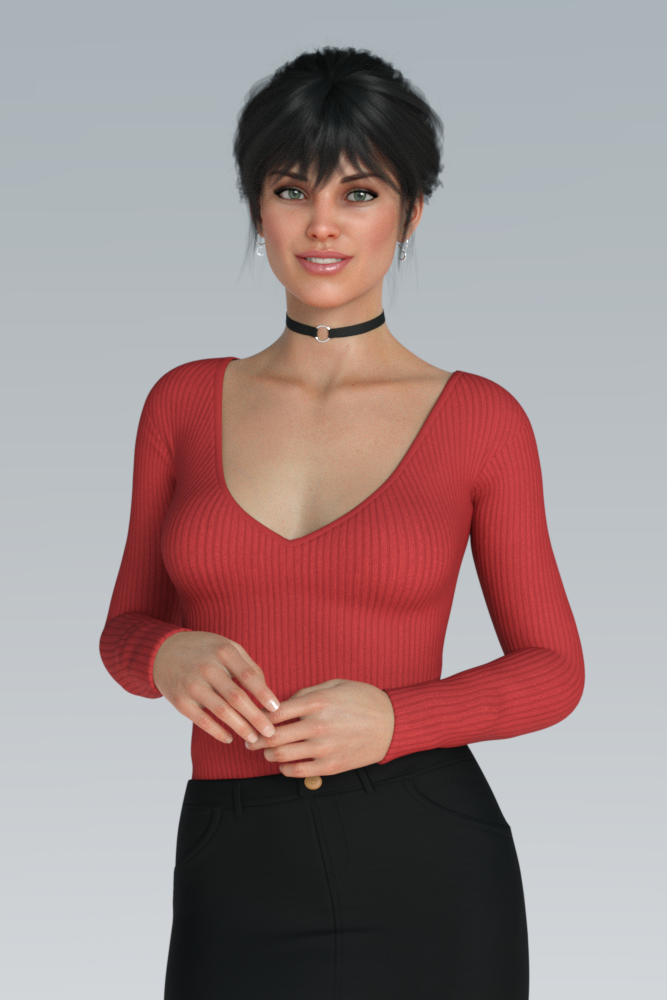
Help identifying character pleaseBest I could whip up. Michelle's texture, so I tried dialing in a bit of her head as well, didn't look quite right. Added in a bit of the Tara 2 (same vendor as Michelle) head morph as well. Looks close, but not quite. Those expressions in the promos really set it off, and they're hard to duplicate.
65% Michelle's head, 32.5% Tara 2 - it's not DEAD ON, but it's in the ballpark.
Yes, I agree. I'd buy those settings in a set of presets as a DAZ product.
New Bluejaunte character alert - Ensley HDI have baked a set to match the male UV, and I have used them some, too.
How would one bake a set to the match the male UV? This sounds interesting.
I'm sorry I never saw this question. I think you need to UV swap product first for the UVs to be available, but I'm not 100% sure. The procedure is the same as baking a unique G2 or G3 skin to match the base. You use the Map Transfer tool, but instead of selecting the base for the target, you select the opposite sex base. That's where having the UV swap product comes in.
So once done you will have a full set of textures fit to the other sex. Then you can use the nice roughness textures and materials of a bluejaunte girl on males in the same way I did for Victoria. This doesn't make them look feminine at all. It compliments pretty much any skin.
I wouldn't do a good job explaining, but this thread does, and it has helpful pictures. This was what I went by when I did mine. https://www.daz3d.com/forums/discussion/95701/tutorial-converting-custom-genesis-2-uvs-to-genesis-3#latest
Help identifying character pleaseBest I could whip up. Michelle's texture, so I tried dialing in a bit of her head as well, didn't look quite right. Added in a bit of the Tara 2 (same vendor as Michelle) head morph as well. Looks close, but not quite. Those expressions in the promos really set it off, and they're hard to duplicate.
65% Michelle's head, 32.5% Tara 2 - it's not DEAD ON, but it's in the ballpark.
Looks great! What hair is that btw? If you make the hair a very dark brown instead of black it will match even more.
EDIT: Is it Mega Updo?
Help identifying character pleaseBest I could whip up. Michelle's texture, so I tried dialing in a bit of her head as well, didn't look quite right. Added in a bit of the Tara 2 (same vendor as Michelle) head morph as well. Looks close, but not quite. Those expressions in the promos really set it off, and they're hard to duplicate.
65% Michelle's head, 32.5% Tara 2 - it's not DEAD ON, but it's in the ballpark.
Looks great.
/em tags thread
Help identifying character pleaseBest I could whip up. Michelle's texture, so I tried dialing in a bit of her head as well, didn't look quite right. Added in a bit of the Tara 2 (same vendor as Michelle) head morph as well. Looks close, but not quite. Those expressions in the promos really set it off, and they're hard to duplicate.
65% Michelle's head, 32.5% Tara 2 - it's not DEAD ON, but it's in the ballpark.
That is very good looking. Comparing the two, I personally like your version a bit better.
The beauty of the genesis models is how easy it is to whip up a custom character just by dialing in a few character morphs here and there.
Help identifying character pleaseBest I could whip up. Michelle's texture, so I tried dialing in a bit of her head as well, didn't look quite right. Added in a bit of the Tara 2 (same vendor as Michelle) head morph as well. Looks close, but not quite. Those expressions in the promos really set it off, and they're hard to duplicate.
65% Michelle's head, 32.5% Tara 2 - it's not DEAD ON, but it's in the ballpark.
Who's Next to Join the G8 Family?- Genesis got 9 core figures (4 females and 5 males)
- Genesis 2 got 22 core figures (15 females and 7 males)
- Genesis 3 got 34 core figures (21 females and 13 males)
- Genesis 8 reached 68 core figures (42 females and 26 males)
https://www.daz3d.com/genesis-8-core-figures
2017 2018 2019 2020 January 01/09/18 - #11 Owen 8
01/23/18 - #12 Karyssa 801/02/19 - #34 Christian 8
01/15/19 - #35 Sydney 801/22/20 - #60 CJ 8
01/28/20 - #61 Dain 8February 02/13/18 - #13 Alexandra 8
02/22/18 - #14 Edward 802/05/19 - #36 Tasha 8
02/19/19 - #37 Landon 802/04/20 - #62 Leroy 8
02/18/20 - #63 Nida 8March 03/13/18 - #15 Aiko 8
03/27/18 - #16 Ollie 803/05/19 - #38 Bridget 8
03/19/19 - #39 Mrs. Chow 803/03/20 - #64 Jonathan 8
03/17/20 - #65 Josephene 8April 04/11/18 - #17 Penny 8
04/24/18 - #18 Edie 804/04/19 - #40 Mr. Woo 8
04/25/19 - #41 Tika 804/07/20 - #66 Dasan 8
04/22/20 - #67 Alawa 8May 05/09/18 - #19 Mika 8
05/22/18 - #20 Floyd 805/09/19 - #42 Sanjay 8
05/23/19 - #43 Kala 805/06/20 - #68 Valentino 8 June
06/15/17 - #01 Victoria 806/05/18 - #21 The Girl 8
06/19/18 - DAZ Dog 806/06/19 - #44 Elios 8
06/20/19 - #45 Ellithia 8July
07/25/17 - #02 Olympia 807/03/18 - #22 Teen Kaylee 8
07/17/18 - #23 Mabel 807/04/19 - #46 Teen Jane 8
07/17/19 - #47 Kanade 8August
08/22/17 - #03 Michael 808/10/18 - #24 Zelara 8
08/21/18 - #25 Toon Dwayne 808/08/19 - #48 Gabriela 8
08/22/19 - #49 Diego 8
08/29/19 - Centaur 8September
09/19/17 - #04 Teen Josie 809/04/18 - #26 Latonya 8
09/18/18 - #27 The Brute 809/05/19 - #50 Babina 8
09/19/19 - #51 Silas 8October 10/03/17 - #05 Stephanie 8
10/17/17 - #06 Lucas 810/02/18 - #28 Gia 8
10/18/18 - #29 Vladimir 810/03/19 - #52 Teen Raven 8
10/19/19 - #53 Yuzuru 8November 11/14/17 - #07 Monique 8
11/28/17 - #08 Darius 811/06/18 - #30 Mei Lin 8
11/22/18 - #31 Lee 811/05/19 - #54 Leisa 8
11/22/19 - #55 Jenni 8
11/28/19 - #56 Robyn 8December 12/12/17 - #09 Charlotte 8
12/26/17 - #10 Sakura 812/04/18 - #32 Eva 8
12/18/18 - #33 Nix 812/05/19 - #57 Darcy 8
12/17/19 - #58 Rynne 8
12/25/19 - #59 Tristan 8Great!
I just needed something like this.
Thanks!
Strange specks appearing in rendersHi! After some time, strange specks have been appearing in Daz Studio renders. It's still there after the render is finished. I have to take the repair brush in Photoshop (the one that looks like a band aid) and fix it. I am curious if anyone else have been having the same problem and of course a tip to solve it. I'm running Daz studio on a PC with Windows 10 64 bit system. A Nvidia Quadro K6000 Graphics Card with 12 GB of VRAM. My PC has 32 GB of RAM and a Intel i7-8700 3.20 GHz CPU.
Apart from this, Daz Studio crashes all the time. Every day there's some new problem. Sometimes it doesn't even start. Opening an old project with only e.g. Victoria 8 can take ten minutes plus. The I often get the message of duplicate files. Opening the report file I can't seem to understand one thing of it, where to start etc.
Which software to use for Animationwell that particular one was in Carrara using the Octane render plugin and Xurge outfits on Victoria and Michael 2,3&4!
not a genesis in sight

it didn't take terribly long but Octane is not cheap, there is no free one for Carrara
you could plausibly do that in DAZ studio with the free tier though, I just prefer Carrara as a long time user of it.
The point is you can fit a lot more legacy Poser figures in a scene than any genesis figures because they use a lot of RAM, not just VRAM I can only render 2 or 3 genesis1;2:3&8 at the most on my PC and then CPU not GPU
compositing you only need render one at a time as a png series with alpha
then you put your scene together in your video editor
(Another) Can anyone identify this character?Maybe a mix of sliders for Gayll and Victoria 8?
I'm startng to conclude she's a custom morph. Looks slightly older than pure Gayll, and noticeably younger than pure Victoria 8. Somewhere on par with Tika, Josie, Kaylee or Raven 8.
Is Anatomy 4 Pro Bundle worth?Assuming you mean https://www.daz3d.com/anatomy-4-pro-bundle it is for the fourth generation Daz figures, Victoria 4 and Michael 4, which are Poser-format figures which pre-date the first Genesis. A major part of the bundle is not related to what you want even then - just the Shapes++ and Muscle Morphs really - so I don't think it would be what you wanted. Which figure(s) are you mainly working with?
What is the character used in the promo image.Looks like some Victoria in it.
(Another) Can anyone identify this character?Maybe a mix of sliders for Gayll and Victoria 8?
[Resolved] "No Suit for G8M": Any other users out there? Not understanding how this works!I chose gold glitter because it was handy. I think that the first thing that newbies need to learn is the difference between a shader and a material. A shader is a texture/bump/normal whatever that is applied to a given surface like a face, a pupil, or a torso. A meterial is a set of hierarchal shaders applied to a set of surface such as Victoria 8 default texture which applies shaders to everything from arms to pupils... A geograft is literally like a grafted limb as opposed to a garment which merely covers a the limb. In any case, this will become second nature to you...
If you would design a core character and bundle, what would it be?Like combo bundles of the iconic characters. Victoria/Stephanie, Michael/David, Aiko/Hiro (close to gen3 look), The Girl/The Guy (close to gen7 look since this was the first 'official' Guy from DAZ).
Daz 3D is part of

Connect
DAZ Productions, Inc.
7533 S Center View Ct #4664
West Jordan, UT 84084Licensing Agreement | Terms of Service | Privacy Policy | EULA
© 2026 Daz Productions Inc. All Rights Reserved.