-
Animating not possible on DS 4.20/Mac?
wsterdan said:
and you can then save the file and import it as a tidy, single file into your editing software.
Atleast this works like a charm, thanks again!
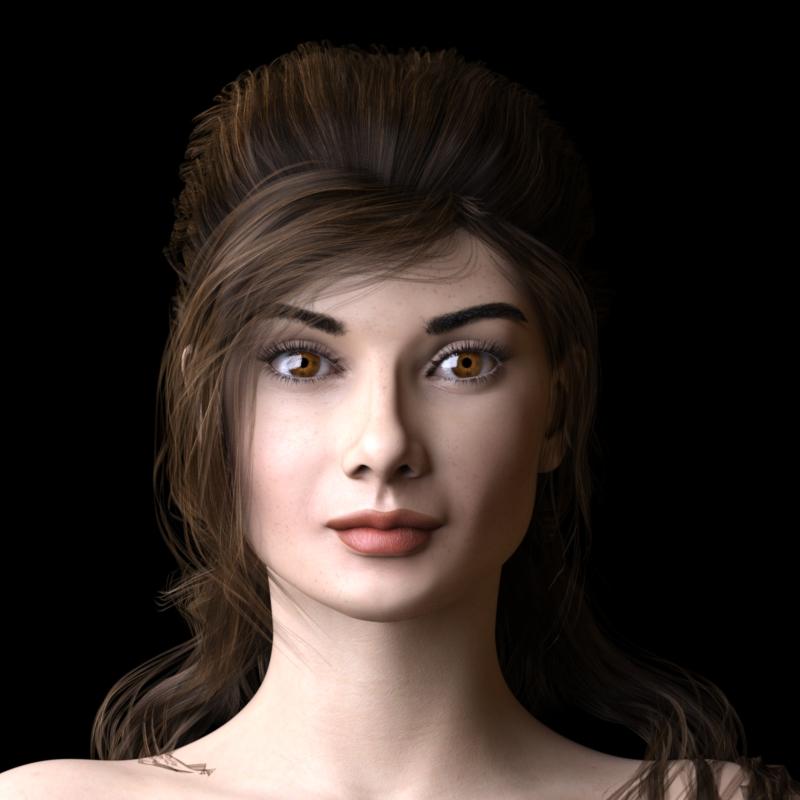
AOBB's Luminous v4 for G8.1F (aka Audrey Hepburn). No materials nor textures included.Needless to say, I don't have all the fancy things for 8.1, in fact I don't have many for 8 either. So things like brows, lashes, and nose adjustment just aren't available to me. Really, I'm glad that I didn't do much with 8.1 cause just a few months later out come 9 and I'd have to start all over again. I think I just wait and use 8 until lots of freebies come out for the new one. Anyway, those sort of things aren't what I was concerned with. It was just the basic import. Mine still look to fat, not long enough compared to yours. I've attached a render of the front view of my import (with the best brows and lashes I have). As you can see it looks to fat. What am I doing wrong? Anyway no matter what I think of my import, I do like the you stuff, very much so. they are just about the only thing I use 8.1 for., so thanks a bunch for all your work and generosity.
 "!UberAreaLight Base.duf" from "Default Resources for DAZ Studio" fails to load
In my opinion,, Daz has too many options for installing the same content.
1. Manual
2. Daz Connect ( inside Studio requires to login)
3. Daz Central (Newest and "simplest")
4. Daz Install Manger a.k.a DIM (oldest, most reliable, and most capable)#2 Installs to a completely different directory tree and structure. Thus breaking most scripts and many products.
Can't be used to install Studio itself or plugins.#3 Lacks some of the advanced options an experienced user will want. Including the choice to NOT update something.
#4 Needs to be told where you want to put your content library , and inside Studio the Content Library location needs to be set. Currently DIM and Studio don't talk to each other to sync this settings.w
If a user employees #2 and a combination of any of the other methods to install content they end up with what I call "Install Salad". Leading to unusable content and cryptic errors most new users can't decipher.
You are right, a point in time is coming when 1 method will need to be the focus at the expense of the others.
I choose #4 Daz Install Manager (DIM) as it does everything with the most options. Though I would like to see some dependency tracking and configuration syncing with the apps it installs content for.
Many new users end up logging in inside Daz which downloads database metadata for use with Connect (#2) then also install the same products with DIM, which uses a different set of metadata to accommodate the different file locations, and they end up with afore mentioned "Install Salad". Products installed twice with conflicting metadata.
Eliminating Connect and Central would go along way towards solving alot of the product install issues.
"!UberAreaLight Base.duf" from "Default Resources for DAZ Studio" fails to loadPerttiA said:
Ender said:
PerttiA said:
The problem is probably in having installed the Überarealight with DAZ Connect within DS.
Actually I didn't install anything with DAZ Studio Pro internally before this morning (this error is an incident of yesterday) and, moreover, using DAZ internal tools this morning to update/install packages helped me fixing many issues, for example the double instances of every asset belonging to "Genesis 8 Starter Essentials" caused by (I guess) some malformed record in the database, that is regretably not very easy to manipulate (despite I have been able to read it in a PostgreSQL client).
You do realize, that installing stuff within DS, installs products into completely different location and that installation steals priority over all the other instances of that product, even when the DAZ Connect installed version does not work due to decompression errors (happens quite often) or the product using scripts that don't work with the non-traditional location, or due to the product being otherwise incompatible with that installation location.
Since such products are essentially JSON files with cross references and some image files for texture mapping I can hardly believe that it is that hard to manage and eventually fix the Database. Even the PostgreSQL database is accessible.
In fact, based on what I am observing and my experience as a software engineer I would say that such problems are related to some issues with filesystem/database sync. The way I fixed the double Genesis 8 assets is quite twisted. I had 2 Genesis 8 Basic Female, 2 Genesis 8.1 Basic Female, etc. Both copies of each asset were pointing to the same filesystem resource (translated: the same path on disk). The solution came in "Products" tab of the "Smart Content" pane where I found 2 Genesis 9: one without thumbnail and with "Install" item in the contextual menu, able to open a Windows Explorer window opened in the containing directory; one with the thumbnail but uncapable to open the system Explorer. I updated the metadata of the first one then unsinstalled both somehow and reinstalled. I did the same with "Genesis 8 Starter Essentials".
I don't know what is happening yet but I can assure that I did nothing special before yesterday.
"!UberAreaLight Base.duf" from "Default Resources for DAZ Studio" fails to loadHello all,
just for curiosity I attempted to merge "!UberAreaLight Base.duf" in to the scene (empty one). Suddenly DAZ Studio presented me a modal dialog with an error message, prompting me to search for more details in the error log.
2022-11-10 11:44:45.003 [INFO] :: Prepare asset load (open): /Light Presets/omnifreaker/UberAreaLight/!UberAreaLight Base.duf
2022-11-10 11:44:45.003 [INFO] :: Locking viewport redraw...
2022-11-10 11:44:45.003 [INFO] :: Viewport redraw locked.
2022-11-10 11:44:45.058 [INFO] :: Native format content directories: 6
2022-11-10 11:44:45.059 [INFO] :: Poser format content directories: 3
2022-11-10 11:44:45.059 [INFO] :: Other import format content directories: 0
2022-11-10 11:44:45.059 [INFO] :: Begin asset load (open): /Light Presets/omnifreaker/UberAreaLight/!UberAreaLight Base.duf
2022-11-10 11:44:45.072 [INFO] :: *** Scene Cleared ***
2022-11-10 11:44:45.072 [INFO] :: Determining missing assets...
2022-11-10 11:44:45.072 [WARNING] :: Invalid node selection for "preset_shader" type.
2022-11-10 11:44:45.072 [INFO] :: Error loading asset: D:/Program Files/DAZ 3D/Applications/Data/DAZ 3D/My DAZ 3D Library/data/cloud/1_13176/light presets/omnifreaker/uberarealight/!uberarealight base.duf
2022-11-10 11:44:45.072 [INFO] ::     Operation failed
2022-11-10 11:44:45.114 [INFO] :: Unlocking viewport redraw...
2022-11-10 11:44:45.114 [INFO] :: Viewport redraw unlocked.
What catches my eyes (thanks to my experience as a software engineer) is the line stating `
[WARNING] :: Invalid node selection for "preset_shader"type.´ even if I don't know what exactly means apart from the fact that there should be a `preset_shader` property somewhere in that file and it is invalid enough to fail the flow of the program.While I continue investigating I would really appreciate if anybody has a clue about this.
Thanks all for your help
[Released] ManFriday's Render Queue 3 [Commercial]hasu0703 said:
ManFriday said:
hasu0703 said:
Hi. I am very happy with the new product, all the complaints of the previous one have been resolved.
The queue saving method has been changed to json, can this be rewritten during batch rendering?
I would like to create scenes on another pc while rendering and then add the new scenes to the queue.I'm assuming you are talking about two PCs accessing the same queue file over a network while rendering. I wouldn't recommend that.
The new Render Queue 3 stores a lot of progress information in the JSON queue files while processing the queue and keeps writing it to disk while rendering. If you launch a queue on machine 1 and have the same queue file open on machine 2, machine 1 will keep overwriting any changes you made on machine 2. It's like working on the same Word document on a network from two machines when user 1 keeps saving changes to it.
So my suggestion is to use a second queue file. Hope this helps!
Thank you for your response.
I wanted to create scenes one after another and add them to the queue as I rendered them.
But other than that, I am very satisfied.I'm afraid using the same queue file from two computers is not possible under the current design. However, I might add an "import queue" button where you can merge the scenes from one queue file with another. This would allow you to use a temporary secondary queue file that you can add scenes to, and when the first queue is done rendering, you can add it.
New Gen 9 update today, where can I read about any changes?-
2022-10-25 Updated:
-
Reduced shorts and shirt textures from 4k to 2k
-
Updated metadata
-
Fixed morphs on the shirt
-
Fixed a problem with Proportion Smaller Body Only
-
Animating not possible on DS 4.20/Mac?Sven Dullah said:
Using DS 4.20 on Mac/Monterey (IntelXeon)
I have two major problems:
1) If I render to movie I get an error...unable to save animation, would you like to try again or use a different name.
2) If I render to image files, all RiCurves remain static, ie all brows and bodyhair I make with GB Express or using "create SBH" refuse to conform to anything else but the pose where the timeline pointer is, before I hit render. However, rendering any frame as a still works perfectly fine.
This leaves me with the option of rendering x number of stills and importing them to my video editor...
Is the RiCurves problem documented somewhere? Do they work under Windows?
Help!
ETA: adding testrenders with SBH; frame 0 and 30, to clarify what happens.
Rendering to a .mov file is definately broken, and has been for a while.
I can't help with the RiCurves, but if you're rendering a set of images you might try using Quicktime Player to "Open Image Sequence"; it's a little faster and more lightweight than most movie editing software, allows you to choose the framerate when you import (every now and then I accidently render in the wrong frame rate, this fixes it on import and the audio lip syncs perfectly in the movie editing software) and you can then save the file and import it as a tidy, single file into your editing software.
Genesis 9 clothing questions & answersprinzeugen said:
Any way to make V9 feet fit into a pair of V8s shoes ??
Flat shoes should work fine with autofit. High heels as always will take more work - its not a straightforward rig that I can transfer with a template. A lot of it depends on the foot pose, height of the heel etc - plus the fact that you have to bake in joint rotations for high heels to work properly. Its all the same problems we run into with transferring high heels from previous generations to the next.
If you really really want to have the shoes and don't mind if they're props you can try lining up G8 as close as possible to G9 feet and export that as an obj, then import and parent. They won't bend on the toes but you'll have something to use :)
edit: of course you need left and right shoes in that case - so either use the geometry editor after importing to delete the extra shoe, or use a modeler to delete so you end up with a left and right shoe obj
Timeline problem - please helpbenniewoodell said:
Did you import the objects on like frame 10 and moved them on frame 0 to where you wanted them? There would have to be a keyframe on the objects somewhere that's causing them to move. Check the objects and make sure there's not a keyframe set.
I never moved anything in that room. Only with the character, but he does not play any role in the animation
Timeline problem - please helpDid you import the objects on like frame 10 and moved them on frame 0 to where you wanted them? There would have to be a keyframe on the objects somewhere that's causing them to move. Check the objects and make sure there's not a keyframe set.
Diffeomorphic DAZ Importer version 1.6.0 releasedThe original idea behind diffeomorphic is to use daz studio to generate the figure then import in blender. Not to use blender as a replacement for daz studio. Then many tools were added to allow for advanced requests by "power users" but personally I'm not a fan of that I like the original idea and to keep things simple. Below it's what I found about changing daz clothes inside blender.
I'd rather make many versions of the figure with different outfits in daz studio then export to blender.
http://diffeomorphic.blogspot.com/2021/07/changing-outfits.html
Import Hair from Blender to Daz?Yes take this as fun if it helps and don't force to deadlines. You may try to import in blender and render there, I can be of more help in blender. I wish you to get back soon with your health and have a good time with your partner.
An Import workflow for KITBASH3D kitsMelissaGT said:
I still don't understand the difference between FBX and OBJ and why one would want to use one over the other in Daz or Blender.
I don't use Blender, but in my experience, FBX usually applies all maps to their appropriate places, whereas OBJ often does not. Before Daz broke their FBX importer, this was the case. And with Poser import it still is.
How to convert UV Tiles into UDIMs?Theu should not be doing this as the UVs are Daz' property. In any event, if you have an editor capable of handling UVs you just need to export a base resolution OBJ, open in your editor and switch to UV edit/layout, select all the polyugons for oen island, and use the translate tool to move them a whole number of units along the U axis. Deselect, seelct the next island, and move that. When done export the OBJ and load it as a UV set in Ds (Surface pane option menu>Edit>Load UV Set). The main gotcha is to make sure your editor preserves vertex and polygon order on import/export.
Diffeomorphic DAZ Importer version 1.6.0 releasedIs it possible to import poses into blender that are not directly controlled by bone sliders? For example, these poses are - https://www.daz3d.com/hands-dial-up-for-genesis-8-male
I tried to import these poses, but nothing happens.
An Import workflow for KITBASH3D kitsI import their kits all the time without using Poser--I just use Blender and Daz If you load the product in blender and then choose "External Data/Find Missing Files" from the File Menu, the texture files will be loaded and you can then export each bit of the scene as individual .obj files, the textures being transferred as well. Easy! Just note that if you save an .obj with a longer file name, ie more than about 8 characters, the textures will often not get transferred correctly--something to do with file name limitations, I'd imagine.
An Import workflow for KITBASH3D kitsWith Poser fbx import, all the maps go where they are needed. Uber Iray generally sets the shaders on KB3D buildings realistically; so, not much tweaking is required. The emissive channel wasn't much work with the older KB3D sets that only needed streetlights and building overheads, but the newer sets take awhile longer since there are emissives everywhere. Still, it's a bit like gardening once you've started, and once you know what looks right, the workflow is straightforward.
Thanks, @Greymom!
Seek advice on truncating a spheroid in Blender.For specific advice on modeling techniques I guess you'll be better answered at blender artists, since here on daz most of us import from daz studio. I myself am not good at modeling hard surfaces. Of course you could also go with sculpting and retopology you can do anything that way, but it's not fast.
You can also use subdivision, below I cutted a simple hole in a sphere for example.
Problem with OBJ Models Imported Into DazIf the object wasn't exported with the same axes, you need to correct for that in the import dialogue. In DS, Y is up and Z is forward, and some programs reverse those, so try Y as forward and Z as up.
Daz 3D is part of

Connect
DAZ Productions, Inc.
7533 S Center View Ct #4664
West Jordan, UT 84084Licensing Agreement | Terms of Service | Privacy Policy | EULA
© 2026 Daz Productions Inc. All Rights Reserved.