-
Novica & Forum Members Tips & Product Reviews Pt 13
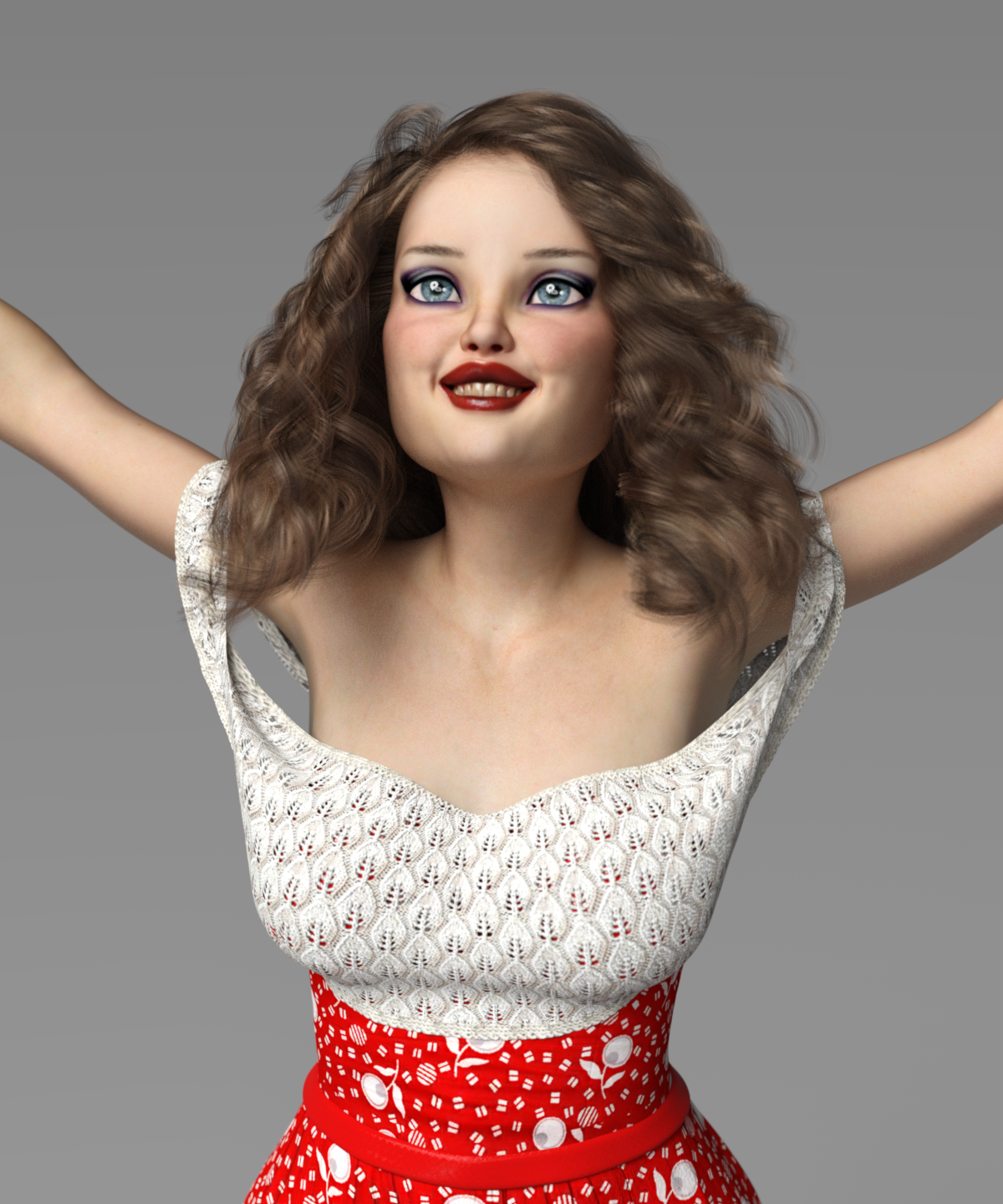
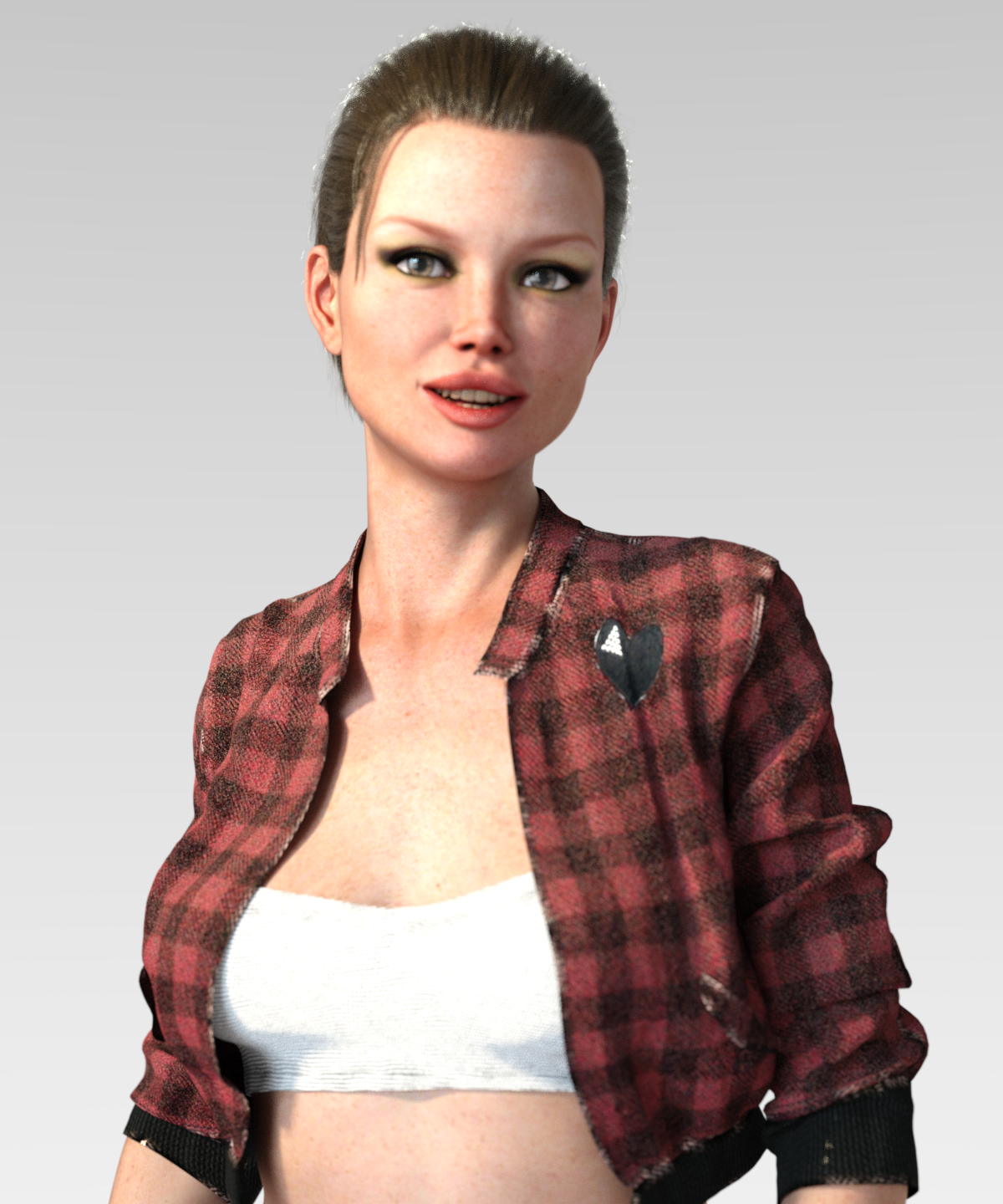
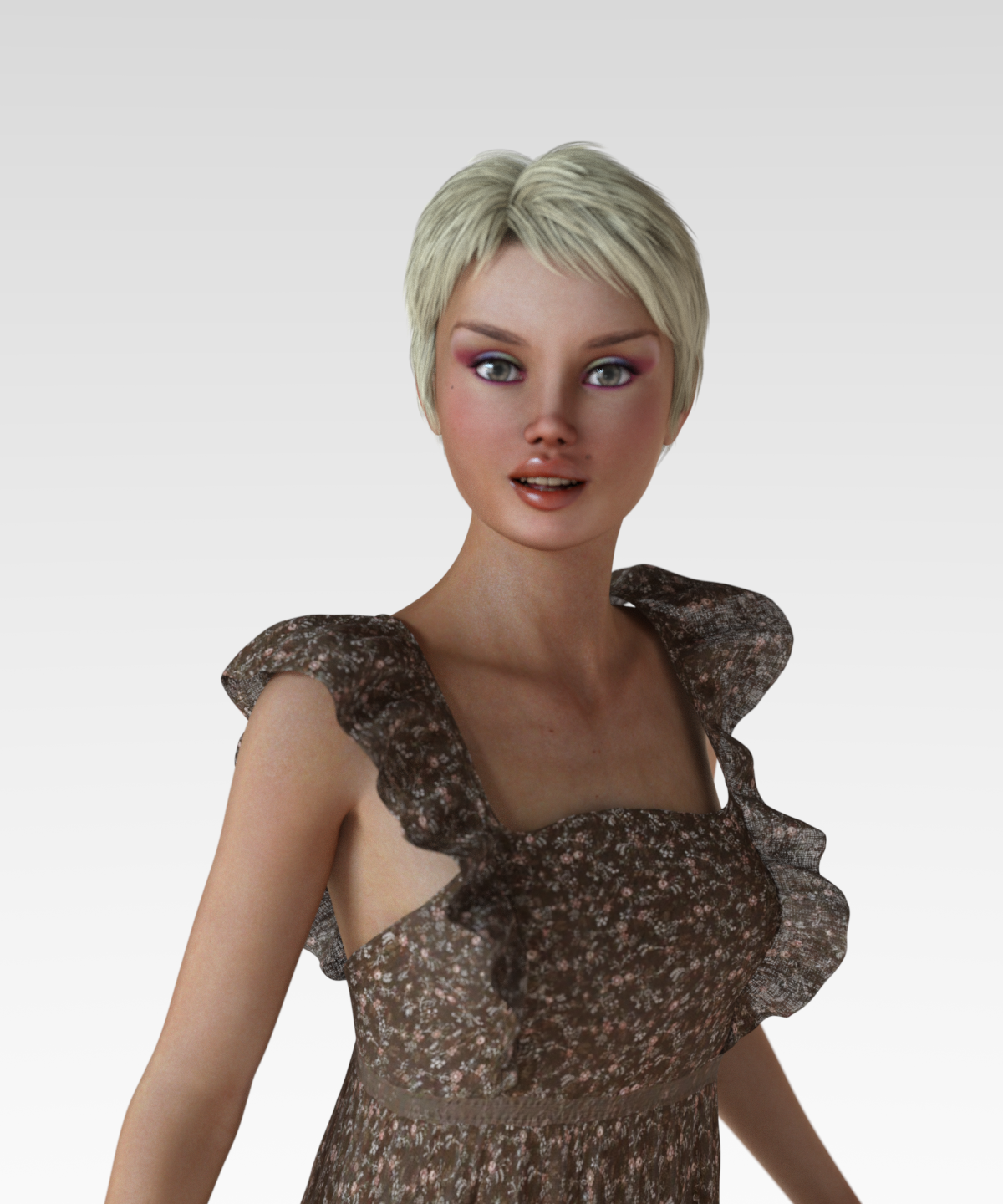
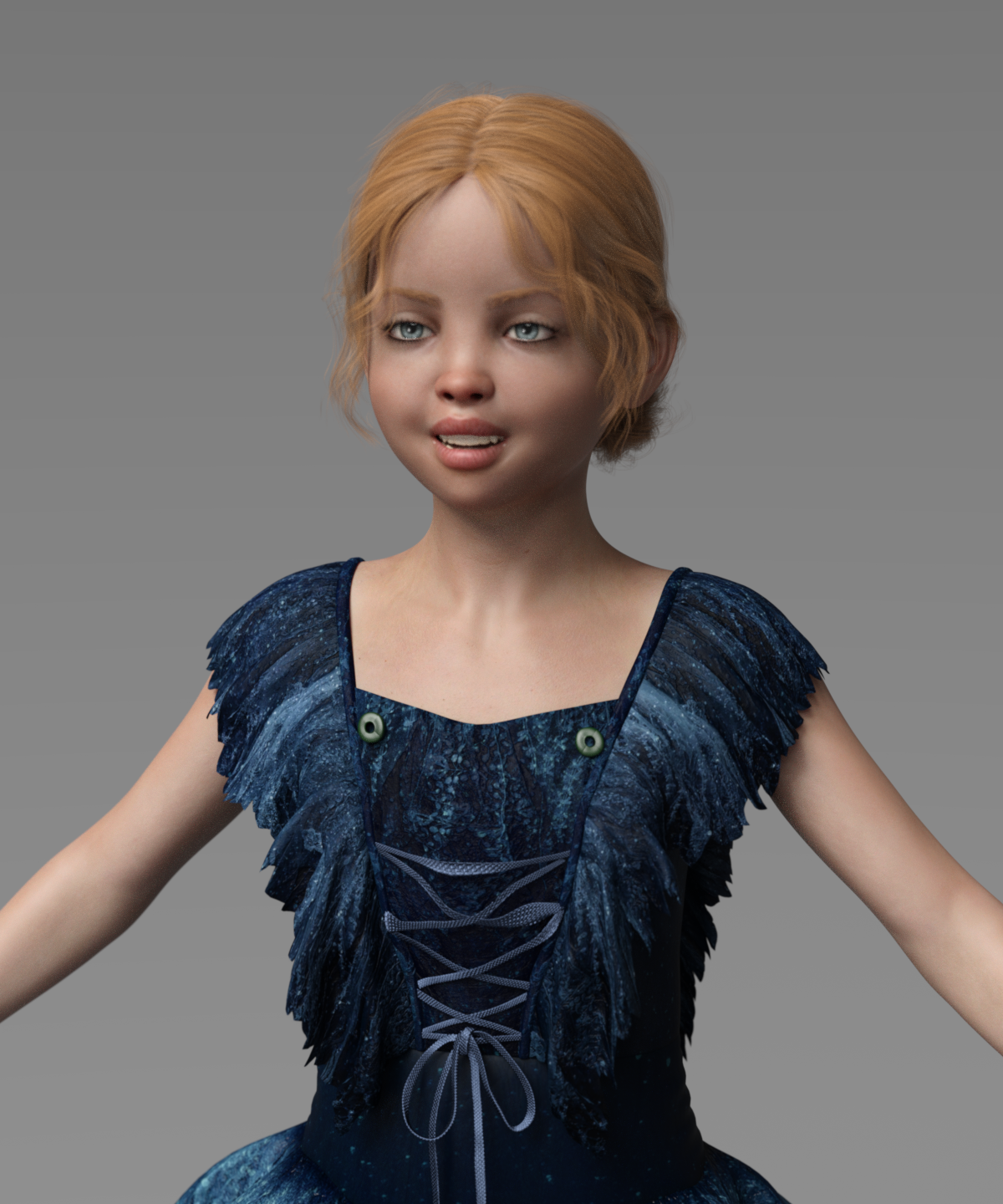
So here are the first four characters:
BD Bronte for The Girl 8 - yellow teeth
BD Corsen for Victoria 8 - teeth okay
BD Jayde for Teen Josie 8 - teeth okay
BD Willow for G8F - too white, solid (I didn't dig into this, but I tried 3 or 4 eye colors and only the default one appears in the render, no change.)I did not try to adjust the teeth color. I did my best to pose them to be visible. A child with a big smile is a scary thing.
Mary
 Novica & Forum Members Tips & Product Reviews Pt 13
I am finding the BD gals have horrid teeth. I've tested under multiple lights. Even changing things to white doesn't seem to have much impact. (Original surface settings are greens and blues!) How do you substitute in someone else's teeth?
Take a look at Jaiyana's teeth (also a BD gal) and Lenore. Also shown is Jayde.
Jaiyana is with whitening and changes in multiple surfaces. They still look yukky.
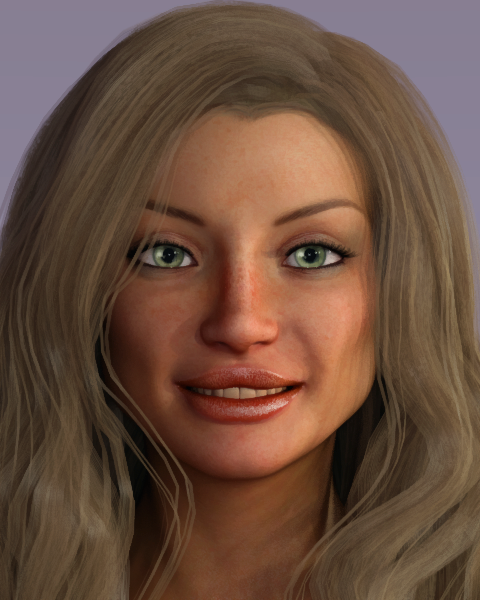
There are no words for Lenore. Can someone double check her to see if my studio just loaded something wrong? This is the default materials. I did it three times, from scratch, different lighting. And these are lights I use all the time, it's NOT the lights.
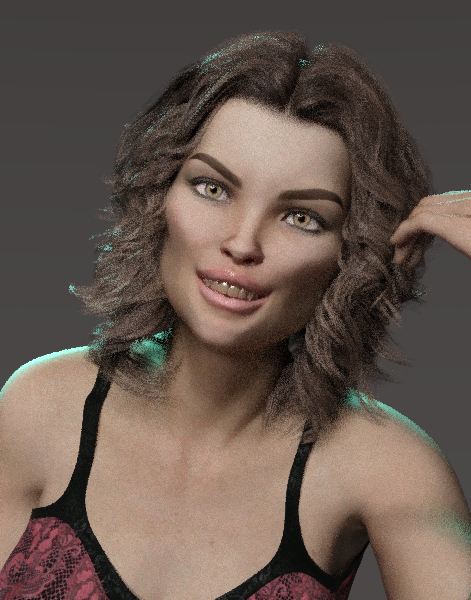
I lightened Jayde's too but they weren't as bad IIRC.
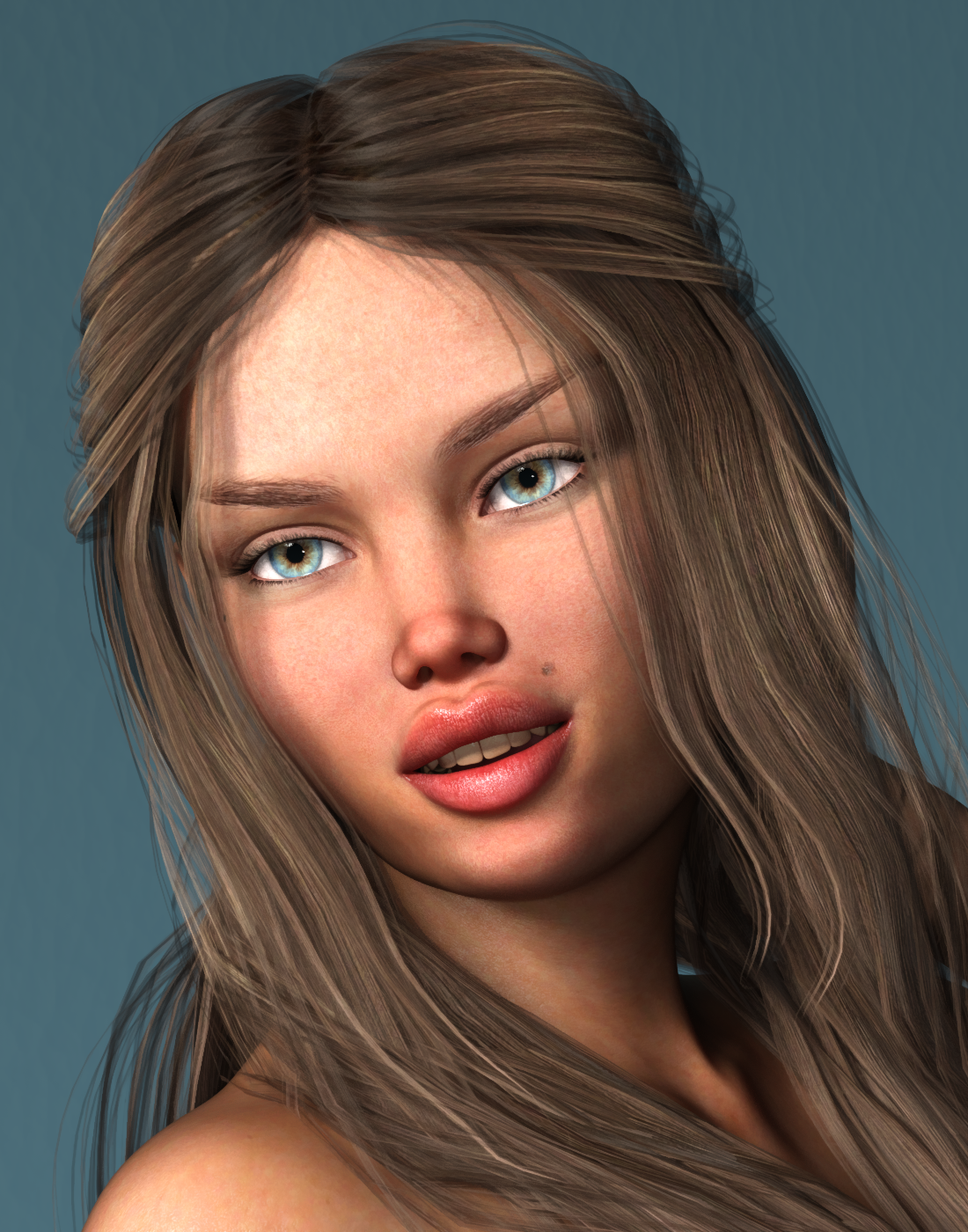 [Released] Character Converter from Genesis 3 Female to Genesis 8 Female(Now Conv JCMs) [Commercial]
Ack! Somehow this testing changed the default load-out for G3F. Now every character I open comes with Taurette dialed in.
I am having this same problem, except they will open dialed in to whatever character I last converted.
Any fix for this?
I never heard back from @thistledownsname. I do not have Taurette. My guess is that converting Taurette creates a generically named morph that is pulled in. I would check what morphs were created when converting Taurette and try deleting them ALL first (to see if it is truly something that happened because of using the character converter) and then moving them back in one-by-one to find the problem morph.
Thank you for getting back to me.
Im sorry I did not mention that I was not using Taurette. I have tried it with Bethany 7, Victoria 7, Karen 7, and Adele for Genesis 3 Female as well as some Rendo characters.
I have tried deleting the morphs, and the first character converted works fine,Bbut then the next convrsions will load with the previous character`s morphs.
Hmmm. I would need to see a log of the first and second conversion. Also, are you using the latest? A new version came out last month.
[Released] Character Converter from Genesis 3 Female to Genesis 8 Female(Now Conv JCMs) [Commercial]Ack! Somehow this testing changed the default load-out for G3F. Now every character I open comes with Taurette dialed in.
I am having this same problem, except they will open dialed in to whatever character I last converted.
Any fix for this?
I never heard back from @thistledownsname. I do not have Taurette. My guess is that converting Taurette creates a generically named morph that is pulled in. I would check what morphs were created when converting Taurette and try deleting them ALL first (to see if it is truly something that happened because of using the character converter) and then moving them back in one-by-one to find the problem morph.
Thank you for getting back to me.
Im sorry I did not mention that I was not using Taurette. I have tried it with Bethany 7, Victoria 7, Karen 7, and Adele for Genesis 3 Female as well as some Rendo characters.
I have tried deleting the morphs, and the first character converted works fine,Bbut then the next convrsions will load with the previous character`s morphs.
After 20+ years...I've encountered one huge problem with the search function in DIM. You can't search for all Genesis products. It will only find items with the word "Genesis" in the name. I've worked around it by searching for "5, 6, 7, 8," This will catch Victoria 5, Michael 6, etc. Unfortunately you also get anything with that number in the name.
there's a default filter however.. can't say if it works for you.. It's "Filter by Name ---> Daz 3D Figures" - all main generations are there..
Oh my goodness, I didn't know of this function! Clicking the little spyglass icon opens up a ton of search parameters! Very cool - thank you!
UltraScenery [Commercial]No disrespect to your picture (which I really do love), it shows one of the things I dislike about US. The formats that have structure (lake, river, roads, etc.) all look the same. So I've started to be able to recognize when people use them.
I totally agree. It reminds me of a friend who lived in California for a while, or my sister (who lives in Victoria but spends a lot of time in Vancouver); when we watch TV shows together, they're always saying "oh, there's that place!" And even having only been to Van twice and never to Toronto can recognise a lot of locations - maybe not where they really are, but as the "oh, this other show shot in the same place."
Nevertheless, this is an awesome product even just out of the box. When one starts to fiddle with the various terrain maps, it has so much potential.
After 20+ years...I've encountered one huge problem with the search function in DIM. You can't search for all Genesis products. It will only find items with the word "Genesis" in the name. I've worked around it by searching for "5, 6, 7, 8," This will catch Victoria 5, Michael 6, etc. Unfortunately you also get anything with that number in the name.
there's a default filter however.. can't say if it works for you.. It's "Filter by Name ---> Daz 3D Figures" - all main generations are there..
After 20+ years...I've encountered one huge problem with the search function in DIM. You can't search for all Genesis products. It will only find items with the word "Genesis" in the name. I've worked around it by searching for "5, 6, 7, 8," This will catch Victoria 5, Michael 6, etc. Unfortunately you also get anything with that number in the name.
June 2020 - Daz 3D New User Challenge - Scenes, Landscapes, and Working ModularlyINTERMEDIATE CHALLENGE: Kitbashing. "Goddess" I used Alawa 8 and Stella Hair as they were. I added the Dragon Empress by Arki helmet and horns, used the jacket and top from the Mythos for Centaur 7 outfit (removed the fur trim and duplicated the center jewel and loop to use as decorations to hold the overskirt to the belt); Tyto Ensemble loin (changed edge color of belt to blend better and changed the fabric of the loincloth itself), used the skirt and overskirt from Arki's Miellyn outfit, and borrowed Ktarya's necklace. The statues are Victoria 5 in the Skadi outfit for V4, then I covered them in a rock shader from Mec, and used that same rock shader to cover the rest of the rocks to match, some from Jack Tomalin and the rest were a rubble pile, I don't remember seeing the artist's name, sorry. I wanted them to look like the statues were carved from the stone. The moon is my photo, the fractal is from RAWExchange, and the rest is brushwork from Karen Alsop and Skybox. Whew! But this was fun!
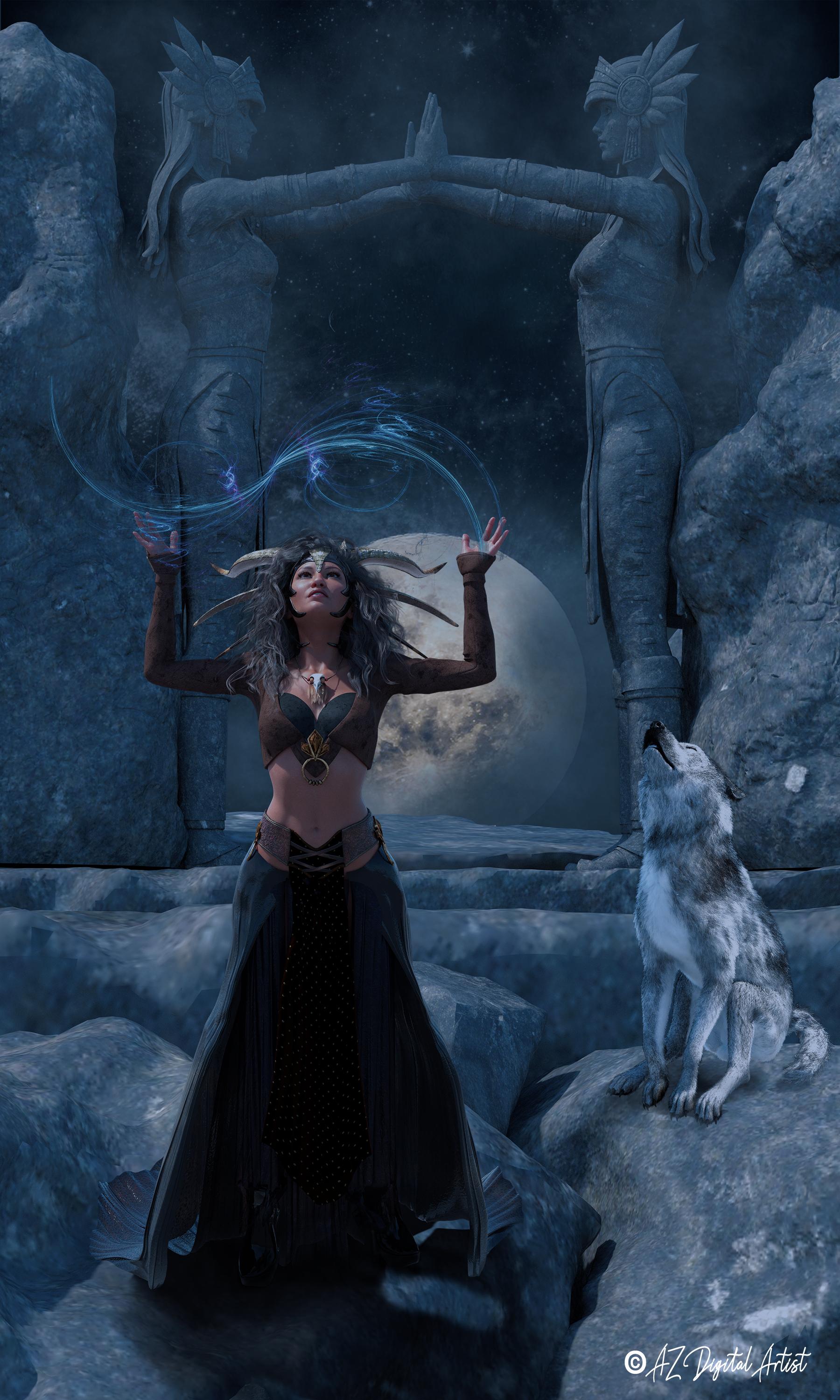
That's amazing! Very inspiring.
How crazy were you during the new semi-annual PC+ sale?I'm mostly a Poser user, still interested in a lot the older stuff, as I took a Poser/DAZ break between 2010 and 2016..
Rejoined the PC May this year - perfect timing.
Orders placed: 49 (including freebies)
Gift Cards on sale: 2
BYOB: around 20 (hadn't been a PC member since 2009; really went wild on Jack Tomalin, David Brinnen and Forbidden Whispers items.)
PC for a day: around 12, including the Michael and Victoria 7 Pro bundles, and three Genesis 2 base characters
Plus some DAZ originals on sale.
And one of my monthly PC coupons on Stonemason's Steets of Asia 2
No Anniversary Bundles.
In all it was good for a little over six new pages in my product library.
At 40 downloadable products per page that makes over 240 in total
Installed at this moment: zero. That's for July...... (Hoping for very few interesting sales this month, i really need a break, and to save some money for October...)
Browsing though the offers, my wishlist, of which I cleared quite a bit, went from around 500 items to 900 items, (At least, there are few real priority items left, a lot of it is in the category nice to have...)
Goth/horror beauty in gift card promo?Thank you Divamakeup! ;-)
It's from the Gallery: https://www.daz3d.com/gallery/#images/1014816/
The artist is Morris (the PA who created Daisy 8's textures). In the description, she says "This is a 1/2D8 and 1/2V8 morph", so 1/2 Daisy 8 and 1/2 Victoria 8.
She credits this as well, so it's probably where the rings come from: https://www.daz3d.com/hand-salon--fake-nails-and-jewelry
You're welcome. Really beautiful skin textures you created for Daisy 8, by the way!
June 2020 - Daz 3D New User Challenge - Scenes, Landscapes, and Working ModularlyINTERMEDIATE CHALLENGE: Kitbashing. "Goddess" I used Alawa 8 and Stella Hair as they were. I added the Dragon Empress by Arki helmet and horns, used the jacket and top from the Mythos for Centaur 7 outfit (removed the fur trim and duplicated the center jewel and loop to use as decorations to hold the overskirt to the belt); Tyto Ensemble loin (changed edge color of belt to blend better and changed the fabric of the loincloth itself), used the skirt and overskirt from Arki's Miellyn outfit, and borrowed Ktarya's necklace. The statues are Victoria 5 in the Skadi outfit for V4, then I covered them in a rock shader from Mec, and used that same rock shader to cover the rest of the rocks to match, some from Jack Tomalin and the rest were a rubble pile, I don't remember seeing the artist's name, sorry. I wanted them to look like the statues were carved from the stone. The moon is my photo, the fractal is from RAWExchange, and the rest is brushwork from Karen Alsop and Skybox. Whew! But this was fun!
Goth/horror beauty in gift card promo?It's from the Gallery: https://www.daz3d.com/gallery/#images/1014816/
The artist is Morris (the PA who created Daisy 8's textures). In the description, she says "This is a 1/2D8 and 1/2V8 morph", so 1/2 Daisy 8 and 1/2 Victoria 8.
She credits this as well, so it's probably where the rings come from: https://www.daz3d.com/hand-salon--fake-nails-and-jewelry
That "1/2D8 and 1/2V8" part really confused the heck out of me at first. I thought it was some fancy 3d term I'd not encountered before; God knows there's enough of them! Then I realized what it actually stood for /facepalm
And that is a beautiful render @JeniMorris!
Goth/horror beauty in gift card promo?Thank you Divamakeup! ;-)
It's from the Gallery: https://www.daz3d.com/gallery/#images/1014816/
The artist is Morris (the PA who created Daisy 8's textures). In the description, she says "This is a 1/2D8 and 1/2V8 morph", so 1/2 Daisy 8 and 1/2 Victoria 8.
She credits this as well, so it's probably where the rings come from: https://www.daz3d.com/hand-salon--fake-nails-and-jewelry
Daz Studio - Suggestions for useabilityI recently decided to jump on the DAZ Studio bandwagon, and for the most part I've been pretty happy with the resuts I've gotten.
Having been a Poser user for the last 20+ Years I found it a dificult transition, mostly because of all the annoying things you have to get used to, [read "Put up with"]
Still overall its a decent product and I applaud your efforts in keeping it a viable app for 3D.
In the spirit of making it an even better product, here's some feasible suggestions you should consider.1.) 0.5 to 1 Second delay for selection highlight (TO ALLEVIATE) blinding flashes.
Possible Epilepsy episodes could be avoided simply by putting a one second or even a half-second delay on the mouse cursor as it passes by objects in the scene.
Trying to get my mouse from one side of the frame to another, should not cause me to reach for a headache pain reliever.
Why does it have to "FLASH" on absolutely everything as it passes by?
Half a second delay - that's all I ask. This would be a wonderful fix I'm sure many people would appreciate.2.) Get rid of clicking on tabs to hide panels.
The little arrows do a fine job of hiding the panels. Granted they are still too tiny to be of any real use, but still.
I hate it when I'm trying to get something done and I click on a tab and all the panels disappear. WHY DO WE NEED THIS ?
It's a useless annoying feature - dump it.3.) Search Box - Search Block!
For the most part I LOVE that you can search almost any panel to find something.
I HATE it when you are trying to find something, either an object or a morph and can't because you just realized that stupid couple of letters in the search bar is stopping you from finding it.
A perfect fix would be to make it so the program only holds the input from the search bar till you hit <enter> then erases it! GOD! Would that ever be a welcome relief!4.) CPU, GPU or BOTH?
Why is it there is virtually no information on what these tick boxes ACTUALLY do? I originally thought that having both boxes ticked would be the best of both worlds, but apparently that's not so.
Doing some test renders on a Victoria 8 (with Monika Hair) I only noticed a few seconds difference on my stopwatch between the three options (CPU, GPU, Both) What's the deal here?
Can't you get the program to render using BOTH? Of course that would require you to have decent coding engineers, so maybe not.5.) FIT Camera Mounted Headlamps with GELS or Trans Maps.
As a videographer, I sometimes use LED lights mounted on my camera to throw some light on a subject in places where there are low or non-existent lighting.
The use of these on the user created cameras in DAZ is a nice touch, at least we can turn them OFF or DOWN. But why can't they act like real lights?
What would be ideal is if you could arrange it so that there was a dropdown menu next to the "HEADLAMP" where we could load either gels or trans-maps to create an effect.
This should be pretty easy to accomplish and I think it would make a lot of people happy.6.) Why Can't I save an AREA RENDER!
Sometimes I need something fast that's only part of the picture. I might do an area render and it comes out just the way I like it - perfect! Except DS doesn't allow me to save it!
WTF? I mean it took a long time to do this area render and its exactly what I need - why can't I save it? To make things worse If I accidentally touch it - it GOES AWAY!
This could mean hours of wasted time! That area render process needs a SERIOUS re-think!7.) No UNDO for adding content - BAD!
This is a huge time waster. I can't believe that there's no undo for adding something to the scene.
Half the time it’s the wrong prop or texture, then I have to go hunt it down in scene hierarchy (because a lot of time its not easily clickable in the scene) and then delete it.
When Poser first added multiple "undos" to their app it was one of the best things they ever did. There's also a HUGE amount of things that definitely NEED to be in UNDO.
(see #13 Prefs Menu)8.) Reparenting in the Hierarchy Menu - Too wonky to work, too important to die!
Why is it when I want to reparent something in the Scene tab it goes haywire. Once I grab the item and try to move it, nested sections that normally require stupid amounts of clicking,
suddenly start opening all over the place and make it very hard to put the item where you want it. Is there any way to stop this? Oh and of course there's NO UNDO for that either.
In fact there is a HUGE amount of things that don't fall under the UNDO category. Another problem with the Hierarchy menu is that clicking on something in the posing or surfaces menu
opens up EVERYTHING in the Hierarchy menu. Scrolling all the way up to collapse these menus takes even more time, exascerbated by the infinitesimally small size of the scroll bars,
and I'm using a 50" 4K TV as a monitor!9.)What? No Autosave?
And here you thought those crashes were infrequent! - RIGHT!
I've had to set a timer on my phone for every 5 minutes to save this thing so I don't lose hours of time. FIX THIS!10.) Symmetry Keys Screwed up.
Why is it you have to literally POUND the keyboard buttons to make Symmetry pop up? What's wrong with that??
And why is it that popup - more often than not CRASHES the app? It doesn't know when it's toggled, and as a result tries to put up 2 at once - which crashes the app.
Same thing happens with the save command if I accidentally press 2 keys at once.11.) What is with this parenting problem?
I don't understand why creating a group and putting people in it prevents you from selecting anything in it other than through the scene tab.
It also creates massive problems with shells. Can't this be fixed?12.) Options (Preference Menu) Update
As an Adobe user, I get used to having control of what's going on in my app, like how many "Load Previous Scene" listings I get to see.
The "options" menu that's currently avbailable is almost useless for user interopoerability.13.) Posing options (By Model)
Its bad enough that most vendors still have no idea how to ZERO the hip joint before committing the pose, But having all these V4 poses, and unusable V5 poses taking up all the screen real estate is too annoying for words. Can't we just have another category "by Model" added to "By Region" or "by Function"? How amazing would that be. Another time waster put out to pasture.
And why is it that even when I "Lock" a figure's SCALE, everytime I add a new pose it changes the scale back to 100%. Can't this be fixed?
Why bother having the "lock" function if it doesn't work?That's all for now. I will continue to update this post as I find more things that need to be addressed. Hopefully somebody from the DAZ Dev team will look in on this and respond and I can enjoy the same repore I have with Poser in the suggestions area.
King Wash LaundromatThe original looks good, and Polish does good work.
I guess I can also use that spaceship.
/benny
EDIT: Now I am all ready with gift card balance for Victoria 9 to launch.
 The older generation: Victoria 2/3, Michael 2/3 and their children renders
Cagedrei MultiVic, head is Victoria 1 and body is Possette. I think she could be Harley
Oh my, Harley she is. LOL
The older generation: Victoria 2/3, Michael 2/3 and their children rendersCagedrei MultiVic, head is Victoria 1 and body is Possette. I think she could be Harley
Goth/horror beauty in gift card promo?It's from the Gallery: https://www.daz3d.com/gallery/#images/1014816/
The artist is Morris (the PA who created Daisy 8's textures). In the description, she says "This is a 1/2D8 and 1/2V8 morph", so 1/2 Daisy 8 and 1/2 Victoria 8.
She credits this as well, so it's probably where the rings come from: https://www.daz3d.com/hand-salon--fake-nails-and-jewelry
What was your first DAZ purchase, and how long ago?Michael and Victoria back in September 2000.
Daz 3D is part of

Connect
DAZ Productions, Inc.
7533 S Center View Ct #4664
West Jordan, UT 84084Licensing Agreement | Terms of Service | Privacy Policy | EULA
© 2026 Daz Productions Inc. All Rights Reserved.