-
Please do not forget Hexagon
Hi
I agree with update hexagon

So it becomes unnecessary to switch to other 3d modeller when it lacks that function
Import. Stl?
Compiled to 64bit possible?
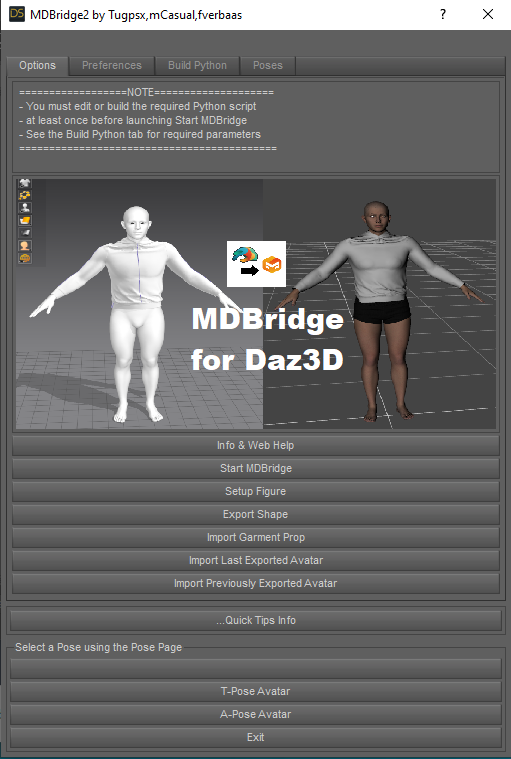
MDBridge for Daz3DHere is a project I have been working on and it will be released shortly is now available.
This is a port of Fverbaas MDBridge to Daz Studio. The script will allow Daz Studio to send poses and receive clothing from Marvelous Designer.

Here is a quick YouTube video of MDBridge for Daz Studio.

A typical session will always start with “Start MDBridge”, usually followed by “Setup Figure”. You can then change attention to MD to load the avatar in an A-pose and morph to T-Pose and Posed Avatar for testing prior to creating or fitting a garment to your avatar. Once the garment is fitted to the A-pose you can use the “Morph to” option to test the garment on your Daz posed figure. If you would like to change the avatar’s pose in Marvelous Designer, you can simply select the “Start/Stop AutoUpdate” option in MD and send a new pose from Daz Studio with the “Export Shape” option. When done you can export the garment from MD, back to Daz Studio using the “Export Thin Garment” option and the “Import Garment Prop” option in Daz Studio to get the result in your Daz scene. For more complete info consult the main manual
• Start MDBridge: Starts your session. It launches Marvelous Designer with the bridge functions running. The first time you use the bridge Daz Studio will ask you to select the location of the Marvelous Designer executable file. The information will be stored so you not need to do this again. You will likely find the executable in the default install path: C:/Program Files/Marvelous Designer 9 personal/MarvelousDesigner9_Personal_x64.exe ◦ If you want to change this later you can use the preference page options to select the folder location.
• Setup Figure: This is an automated option that will send your figure’s current pose as well as a compatible A-pose and T-pose to Marvelous designer as the essential avatars. The data is stored on your hard disk in a temporary folder that can be chosen on the preference tab. The data will normally remain available between sessions unless you or the operating system do a clean-up.
• Export Shape lets you export the current posed shape of the selected figure in your scene.
• Import Garment Prop lets you import the geometry that MD made of the garment fitted to the posed figure. The name of the garment prop is forDaz3D. ◦ If there is already a prop with the name 'forDaz3D’ in the scene, another prop will be added with the new import. If you want to keep the current 'forDaz3D' prop rename it in your scene.
DOWNLOAD HERE if not working below
Male Chest Breath MorphsFor chest breathing, the morph is very easy to do with Blender, regardless of the 3D character.
Just import the character's OBJ file and use the Lattice modifier to deform very slightly the rib cage.
There are many tutorials for the Lattice modifier. In a few minutes you will be able to do this job.Daz Central Arbitrarily Changes Order On ItemsThat's a shame. I'll rely on the Smart Collection tab in the meantime, but I did quite enjoy the aesthetic quality of DC (large tiles, links out to purchase page, etc.). My ideal situation would be to pull the product metadata into a CSV sheet so that users (me) could organize them by whatever values they contain in the DB (purchase date, size, title, any tags, etc.).
Thank you for your response.
morphing a geograft asset in custom poseTo create custom shapes for specific poses you could use the morph system of Blender :
Export Genesis as obj, no SubD, default pose.
Import in Blender. Create a Shape Key.
Export Genesis in your final pose. Export as obj.
Import in Blender. Add that second obj as a second Shape Key on the first imported Genesis.
Now do the same with the Geograft. Export it as base, default pose and shape. Import in Blender and create a Shape Key.
Export the same geograft in the final pose. Import in Blender, add that as a 2nd Shape Key on the base geograft.
In Blender, slide the 2nd Shape Key for both Genesis and the geograft.
You now have your final pose for both, but as morphs. Create a 3rd Shape Key for the geograft and make modifications to the geometry to shape it the way you want. NONE of the vertices connected to the Genesis can be moved, even so slightly. Or morph won't be usable on the Daz geograft.
Once your geograft is shaped as you want, slide the 2nd Shape Key down to 0. Geograft is now in its default base pose but with your modifications added to it. Export that geograft from Blender as obj. Import in Daz using morph loader pro.
You can now, in Daz, go to the keyframe of your final pose. And load your custom geograft morph.
As for your issue, I guess it's related to the fact that you may have moved one or more vertices from the open edges (the ones connected to Genesis). That's very probably why the morph can't be used, as I can confirmed that all that still works as usual in the most recent version of Daz.
Importing blender animations for propsYou can import a vertex cache animation with obj and morph loader. Don't know if there's a plugin to automate this.
edit. Found this.
Import not workingHi all! I export a model from Daz3D, and when I load it into cinema 4d, it shows this information - "Nothing to import. You have to export from DAZ Studio first."
Please, help.
Diffeomorphic DAZ Importer version 1.6.0 released@Padone do you think it is so diffrent to import it into unreal5? I wanted to know your opinion can you import shapekeys and other stuffs to unreal 5? Does unreal 5 even has bone control or you need to make everything in blender even bone moves than import to unreal?
Problem with renderingHi,since yesterday evening I have a problem with daz,after about 2 seconds after clicking the render button the application pauses rendering with a blank window.From the logs it looks like not enough vram but earlier I rendered images on this scene and nothing like this happened One g
2022-11-17 13:56:39.214 [INFO] :: Rendering image
2022-11-17 13:56:41.332 Iray [INFO] - IRAY:RENDER :: 1.0 IRAY rend info : Updating geometry.
2022-11-17 13:56:41.332 Iray [INFO] - IRAY:RENDER :: 1.0 IRAY rend info : Updating motion transforms.
2022-11-17 13:56:41.333 Iray [INFO] - IRAY:RENDER :: 1.0 IRAY rend info : Importing scene graph.
2022-11-17 13:56:41.536 Iray [INFO] - IRAY:RENDER :: 1.0 IRAY rend info : Auto instancing compression ratio 1.00 (Full instancing compression ratio 1.00)
2022-11-17 13:56:41.536 Iray [INFO] - IRAY:RENDER :: 1.0 IRAY rend info : Importing geometry for motion time 0
2022-11-17 13:56:41.730 Iray [INFO] - IRAY:RENDER :: 1.0 IRAY rend info : Geometry import (1 triangle object with 3 M triangles, 0 fiber objects with 0 fibers (0 segments), 1 triangle instance yielding 3 M triangles, 0 fiber instances yielding 0 segments) took 0.194 s
2022-11-17 13:56:41.731 Iray [INFO] - IRAY:RENDER :: 1.0 IRAY rend info : Updating section objects.
2022-11-17 13:56:41.731 Iray [INFO] - IRAY:RENDER :: 1.0 IRAY rend info : Updating materials.
2022-11-17 13:56:41.838 Iray [INFO] - MATCNV:RENDER :: 1.0 MATCNV rend info : found 232 textures, 0 lambdas (0 unique)
2022-11-17 13:56:41.848 Iray [INFO] - IRAY:RENDER :: 1.0 IRAY rend info : Emitter geometry import (13 light sources with 15122 triangles, 1 instance) took 0.001 s
2022-11-17 13:56:41.848 Iray [INFO] - IRAY:RENDER :: 1.0 IRAY rend info : Updating volumes.
2022-11-17 13:56:41.849 Iray [INFO] - IRAY:RENDER :: 1.0 IRAY rend info : Updating environment.
2022-11-17 13:56:41.849 Iray [INFO] - IRAY:RENDER :: 1.0 IRAY rend info : Updating lens.
2022-11-17 13:56:41.849 Iray [INFO] - IRAY:RENDER :: 1.0 IRAY rend info : Updating lights.
2022-11-17 13:56:41.849 Iray [INFO] - IRAY:RENDER :: 1.0 IRAY rend info : Updating object flags.
2022-11-17 13:56:41.850 Iray [INFO] - IRAY:RENDER :: 1.0 IRAY rend info : Updating backplate.
2022-11-17 13:56:41.853 Iray [INFO] - IRAY:RENDER :: 1.0 IRAY rend info : Updating caustic portals.
2022-11-17 13:56:41.854 Iray [INFO] - IRAY:RENDER :: 1.0 IRAY rend info : Updating decals.
2022-11-17 13:56:41.861 Iray [INFO] - IRAY:RENDER :: 1.0 IRAY rend info : Using iray core convergence estimate.
2022-11-17 13:56:41.861 Iray [INFO] - IRAY:RENDER :: 1.0 IRAY rend info : Allocating 1-layer frame buffer
2022-11-17 13:56:41.869 Iray [INFO] - IRAY:RENDER :: 1.0 IRAY rend info : Using batch scheduling, caustic sampler disabled
2022-11-17 13:56:41.869 Iray [INFO] - IRAY:RENDER :: 1.0 IRAY rend info : Initializing local rendering.
2022-11-17 13:56:41.872 Iray [INFO] - IRAY:RENDER :: 1.0 IRAY rend info : Initializing OptiX Prime for CUDA device 0
2022-11-17 13:56:41.877 Iray [INFO] - IRAY:RENDER :: 1.0 IRAY rend info : Rendering with 1 device(s):
2022-11-17 13:56:41.877 Iray [INFO] - IRAY:RENDER :: 1.0 IRAY rend info : CUDA device 0 (NVIDIA GeForce GTX 1080)
2022-11-17 13:56:41.877 Iray [INFO] - IRAY:RENDER :: 1.0 IRAY rend info : Rendering...
2022-11-17 13:56:41.877 Iray [INFO] - IRAY:RENDER :: 1.9 IRAY rend progr: CUDA device 0 (NVIDIA GeForce GTX 1080): Processing scene...
2022-11-17 13:56:42.332 Iray [INFO] - IRAY:RENDER :: 1.3 IRAY rend info : Importing lights for motion time 0
2022-11-17 13:56:42.332 Iray [INFO] - IRAY:RENDER :: 1.3 IRAY rend info : Initializing light hierarchy.
2022-11-17 13:56:42.519 Iray [INFO] - IRAY:RENDER :: 1.3 IRAY rend info : Light hierarchy initialization took 0.187 s
2022-11-17 13:56:42.550 Iray [INFO] - IRAY:RENDER :: 1.9 IRAY rend info : CUDA device 0 (NVIDIA GeForce GTX 1080): Scene processed in 0.673s
2022-11-17 13:56:42.550 [WARNING] :: ..\..\..\..\..\src\pluginsource\DzIrayRender\dzneuraymgr.cpp(367): Iray [ERROR] - IRAY:RENDER :: 1.9 IRAY rend error: CUDA device 0 (NVIDIA GeForce GTX 1080): Not enough memory for kernel launches (222.797 MiB (354.047 MiB) required, 0.000 B available). Cannot allocate framebuffer.
2022-11-17 13:56:42.550 [WARNING] :: ..\..\..\..\..\src\pluginsource\DzIrayRender\dzneuraymgr.cpp(367): Iray [ERROR] - IRAY:RENDER :: 1.9 IRAY rend error: CUDA device 0 (NVIDIA GeForce GTX 1080): Failed to setup device frame buffer
2022-11-17 13:56:42.550 [WARNING] :: ..\..\..\..\..\src\pluginsource\DzIrayRender\dzneuraymgr.cpp(367): Iray [ERROR] - IRAY:RENDER :: 1.9 IRAY rend error: CUDA device 0 (NVIDIA GeForce GTX 1080): Device failed while rendering
2022-11-17 13:56:42.550 [WARNING] :: ..\..\..\..\..\src\pluginsource\DzIrayRender\dzneuraymgr.cpp(367): Iray [WARNING] - IRAY:RENDER :: 1.9 IRAY rend warn : CUDA device 0 (NVIDIA GeForce GTX 1080) ran out of memory and is temporarily unavailable for rendering.
2022-11-17 13:56:42.555 [WARNING] :: ..\..\..\..\..\src\pluginsource\DzIrayRender\dzneuraymgr.cpp(367): Iray [WARNING] - IRAY:RENDER :: 1.9 IRAY rend warn : All available GPUs failed.
2022-11-17 13:56:42.555 [WARNING] :: ..\..\..\..\..\src\pluginsource\DzIrayRender\dzneuraymgr.cpp(367): Iray [ERROR] - IRAY:RENDER :: 1.9 IRAY rend error: Fallback to CPU not allowed.
2022-11-17 13:56:42.555 [WARNING] :: ..\..\..\..\..\src\pluginsource\DzIrayRender\dzneuraymgr.cpp(367): Iray [ERROR] - IRAY:RENDER :: 1.9 IRAY rend error: All workers failed: aborting render
2022-11-17 13:56:42.555 [ERROR] Iray :: Internal rendering error.
2022-11-17 13:56:42.717 [INFO] :: Saved image: C:\Users\\AppData\Roaming\DAZ 3D\Studio4\temp\render\r.png
2022-11-17 13:56:42.724 [INFO] :: Finished Rendering
2022-11-17 13:56:42.776 [INFO] :: Total Rendering Time: 3.65 seconds
2022-11-17 13:56:46.144 Iray [INFO] - IRAY:RENDER :: 1.0 IRAY rend info : Device statistics:
2022-11-17 13:56:46.144 Iray [INFO] - IRAY:RENDER :: 1.0 IRAY rend info : CUDA device 0 (NVIDIA GeForce GTX 1080): 0 iterations, 0.679s init, 0.005s render
one character and a small room The card is gtx1080 and the scene takes only 300mbvram
Daz to Maya not showing up in the Daz studio Scripts tab.SpaceCoyote said:
I'm having the same problem. I've tried to install/uninstall Daz Studio and Daz to Maya using Daz Central in every possible order I can think of, without and with Studio being open, and I never get the "Script" menu in the top menu bar.
Oh my, after quite a day of trying to get all this to work, I've finally had success. Turns out the documentation on the Daz to Maya help page is outdated and there is no longer a "Scripts" menu in the menu bar after installing the Daz to Maya bridge. Instead, sending your Daz model is done by going to File > Send To > Daz to Maya. This will open a window that has updated instructions on how to install the bridge in Maya, including this very useful YouTube video:
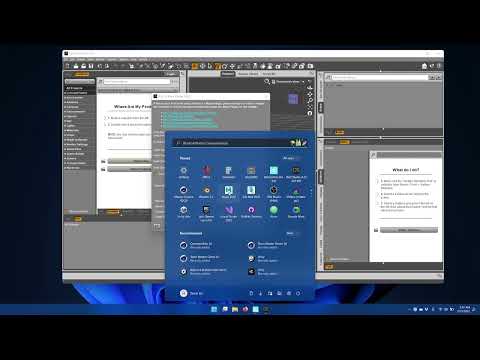
I also had to do one extra step in order to launch the Daz Import window in Maya, which was to install PyMEL, otherwise Maya would give me an error. I think PyMEL was an optional install that I chose not to install when I updated to the latest version of Maya so others may not encounter this problem.
[Tutorial] retargeting animations inside unreal to Daz CharactersAnother method for retargeting animations in Unreal 4.x: Export the animation from as an FBX. (Right click, Asset Actions.) Import the FBX back into Unreal and choose the new skeleton. Done.Pose unimportedgolem841 said:
I use DazStudio 4.20 017, Blender 3.3, Dzblender bridge2022.2.18.42
When I try to import a posed figure, the pose is not or not completely imported.
I keep skeletal mesh, export morphs is unticked.
I suppose there's something I'm doing wrong somewhere.
When I try to apply a pose from the Daz Library to the figure, I receive an error message in Python.
I'm totally new to Blender.
I Also tried to install Diffeo before the official bridge, there are maybe some interferences with "residues" I forgot to delete.
Could somebody give me a hint ?
Thanks a lot
the same question +1
Multiple objects/object groups not all importing into UE5 togetherTried using earlier versions of DTU and it wouldn't import into UE5 at all. Like I had to completely uninstall UE5 reinstall it reinstall the latest DTU to get it to work again at all. I'd ask how to downgrade to Daz 4.20 but that's probably gonna cause me a different set of hell. Is there a good third option? Is DTU gonna get fixed at all ever? At least these issues?
Metadata Attached to Product FilesIf you leave the files alone and create links (which you could place in an entirely separate content directory, so you would never need to see the "bad" tree) then the links will inherity nay metadata settings for the file they point to, regardless of how you move the link files.
Best skins for Blender?Padone said:
The best option you have is to get a custom skin shader for blender. Otherwise you can use the principled shader and fine tune the textures there. As for diffeomorphic the bsdf option will try to import the iray materials and usually does a good job, but the materials in blender will then have the same issues they have in iray that you commented about.
My personal opinion is that most daz PAs are very "creative" when it comes to materials especially for skins, and rarely they follow the pbr rules that are also explained in the uber shader docs. Since iray is very flexible and allows for non-pbr materials this results in a mess with daz materials in general.
Interesting shader. Can you recommend something similar for Cycles?
Metadata Attached to Product FilesYeah, No, sorry. I still want Metadata attached to files.
I wont put the artists on blast but theres one artist (not here) who always puts Clothing in "Clothes" (cant rename folders in daz to exsisting folder names they wont merge)
Another issue I just had Daz artist put a shader preset pack in Iray/Artist Name/Iray (again)/ and then in Product Name.
So If you have to create new folders, then find n copy from old folder, retrack to new folder and paste, each time for every folders duf set, and still possible the data breaks. Dont you think it'd be much easier to have data connected and just drag n drop/copy n paste in bulk with file explorer, refresh in DS, and be done with it?
Best skins for Blender?The best option you have is to get a custom skin shader for blender. Otherwise you can use the principled shader and fine tune the textures there. As for diffeomorphic the bsdf option will try to import the iray materials and usually does a good job, but the materials in blender will then have the same issues they have in iray that you commented about.
My personal opinion is that most daz PAs are very "creative" when it comes to materials especially for skins, and rarely they follow the pbr rules that are also explained in the uber shader docs. Since iray is very flexible and allows for non-pbr materials this results in a mess with daz materials in general.
Re-Organising Similar ContentFor DAZ products, I install with DAZ Connect when possible. All files are installed in separate product folders by SKU in your user defined DAZ Connect folder. DAZ Connect does not install anything in DAZ Studio Formats library. You do that by creating links/shortcuts to populate the DAZ Studio Formats library in any folder structure that YOU prefer. You can even build the folder structure via Windows OS in the DAZ Studio Formats folder tree before creating the links/shortcuts within DAZ Studio. Just refresh your DAZ Studio Formats library to update the folders structure. You need to have the Smart Content Tab and DAZ Studio Formats library on separate pane to populate the DAZ Studio Formats library with links and move the tab after finishing. I've attached a picture of a working setup for creating the links/shortcuts.
You'll run into a couple of issues.
1. Some products won't work when installed via DAZ Connect, typically scripts or some product has some special characters in the product icons and they don't work (a few pose products I've ran into.) I install those using DIM into a separate DAZ Studio Formats library. The Smart Content tab will show the product where you can create the links/shortcuts into your "Work from" DAZ Studio Formats library.
2. 3rd party products you can continue to install manually. I create DIM installers with metadata using Content Package Assist and install with DIM.
3. Multi-figure products, such as hair, can be a challenge to decipher what files are for which figure using the Smart Content Tab because those products aren't typically categorized by figure. To assist in separating the product by figure, I "Browse to folder location" to see the folder structure by figure, ie: G8M, G8F and place an x in front of the folder name I want to block those files from displaying. Refresh Smart Content and those figure's files will show "missing", but you'll be able to display the files for the figure you're working on. Links/shortcuts will not be created from the "missing" files so you can grab visible and missing files and shortcuts will only be created for the visible files. This blocking and unblocking folders within a product helps identifying what is what when creating your links/shortcuts. When finished with a figure, I change the x to a z and unblock the next figure. After finishing with that product, I unblock everything allowing all files visible in Smart Content and the DAZ Studio format library.
I even go the extra mile and re-categorized those products by figure so they show separated on the Smart Content tab. ie: Hair/Genesis 8 Female/ then the typical subcategories of a hair product. Make sure to create new support files for these products and Export User Data regularily.
Using links/shortcuts to populate your DAZ Studio Formats allows you to create alternate libraries easily. For instance, I have a Bundle folder when I create links/shortcuts for each Bundle and it's products. When each bundle is complete, from the Windows OS, I COPY each product into to their final folder structure ie: People, Hair, Poses, etc. You can do the same for a theme folder structure.
BTW, if you have Poser format products that you buy from DAZ3D and can see them in the Smart Content tab, you can create working links/shortcuts to populate your DAZ Studio Format library. Ironically, the attached picture I had created long ago shows creating links/shortcuts with a Poser product, but concept is the same with a DAZ Studio product.
As products are updated via DAZ Connect the links/shortcuts will be up to date too. The only drawback is if the update involves a folder structure change. You'll notice this when your DAZ Studio Formats library show broken links. With a little sleuthing you can figure out the product and update the links accordingly.
Try a few products to get a feel if this is the way to organize your product library.
Getting on the 9 train, or not
Agreed.xyer0 said:Daywalker Designs said:
Padone said:
benniewoodell said:
I'm going to have to pick them up and see how well they transfer into Blender through Diffeo and wait to see how they are in Maya after the Maya Bridge is updated for G9.
Again, since G9 is HD based it is harder both to import and use in blender or any other platform. May be the toon figures don't use HD but it would be an exception. Actually G9 imports fine with diffeo for the base jcms and the HD shape via multires, while HD morphs require baking to displacement maps and a whole lot of manual work to make them functional, and displacement doesn't work in eevee.
To export to blender or other apps G3-G8 is much better than G9.
It's not HD based; it has a higher base mesh density than G8 and older did. The only things that have HD morphs that load by default are the Navel and the Mouth.
Padone's definition of "HD based," if I've been paying attention, is something like: "Cannot be used as a convincing naked human without HD." So, yeah, HD based.
Getting on the 9 train, or notDaywalker Designs said:
Padone said:
benniewoodell said:
I'm going to have to pick them up and see how well they transfer into Blender through Diffeo and wait to see how they are in Maya after the Maya Bridge is updated for G9.
Again, since G9 is HD based it is harder both to import and use in blender or any other platform. May be the toon figures don't use HD but it would be an exception. Actually G9 imports fine with diffeo for the base jcms and the HD shape via multires, while HD morphs require baking to displacement maps and a whole lot of manual work to make them functional, and displacement doesn't work in eevee.
To export to blender or other apps G3-G8 is much better than G9.
It's not HD based; it has a higher base mesh density than G8 and older did. The only things that have HD morphs that load by default are the Navel and the Mouth.
Padone's definition of "HD based," if I've been paying attention, is something like: "Cannot be used as a convincing naked human without HD." So, yeah, HD based.
Daz 3D is part of

Connect
DAZ Productions, Inc.
7533 S Center View Ct #4664
West Jordan, UT 84084Licensing Agreement | Terms of Service | Privacy Policy | EULA
© 2026 Daz Productions Inc. All Rights Reserved.