-
OBJ Clothes will not fit
Okay..I have been going crazy here. I purchased a dress from turbosquid https://www.turbosquid.com/3d-models/3d-model-ancient-greek-woman-dress-1916472 and I am trying to make it fit onto G8.1 but NOTHING I do makes it fit at all. I import it as an object, at which point the dress shows up at around knee level, I move it up, as you can see in picture two - it does not fit. I then use Transfer Utility to try to make it fit - it goes back to around knees and now I cannot move it at all. I have tried rigging it, I have tried the transfer utility, I have tried adding dforce - nothing makes this dress fit. At my wits ends now. Also I am COMPLETELY new to Daz/Blender/3D so if this is an easy fix forgive the ignorance.
drag to parent stopped workingA clunkier alternative is to import the OBJ into the scene, Edit>Object>Rigging>Convert prop to Figure, then use the right-click>Create options from the Joint Editor tool to add bones.
Integration of live-action footage and computer generated imagery.Creating a Shot for an Animatic with After Effects on YouTube by Wobbe Koning. Tutorial is 11'32".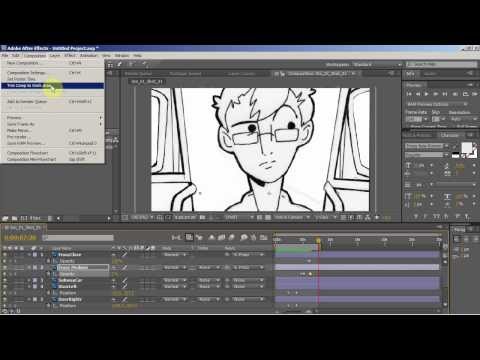 How to / show and tell video created for his Animation Production class at Montclair State University. The example is taken from the MetroCAF 2009 Opening animation, the artwork is by Anna Kania (now Leung). She drew the pictures and then scanned them in making layers that could be animated.
 So using these ideas above, without even drawing, one could take Daz renders in layers to make animations or animatics. Or, (my English teachers would freak if I started a sentence in their class with Or) if you are not good at drawing, you can import your render into your photoshop program and add a layer which you can trace over or use the find edges under the effects tab in menu.Unreal to Daz
Hello all,
Almost all of the discussions are around Daz to Unreal, but I am trying to see if I can work the opposite.
The end goal: a high res still image render of Daz 3d characters in a high res Unreal created environment.
Background: I am neither an expert nor even an advanced user in either Daz or Unreal, but I have a concept in mind for a visual novel. It requires high res, high quality environments for the near photo quality characters.
The problem: If I go Daz-to-Unreal, the quality of the character is not there. It is close, perhaps 75% of what it could be from what I have seen, but not what I am looking for. I can't create the environment I need in Daz, so I need the Unreal environment. However, I can't get the two to marry up together at their best quality. I can get a great still image from Unreal, but no character. I can get a great still image of a character from Daz, but not in the environment with the associated lighting and shadows etc (it is an outdoor setting).
I tried to get some of the Unreal assets into Daz to see if I could recreate parts of the environment in Daz and then do some Photoshop work (my real expertise), but the OBJ/FBX import would not work for the assets I have tried.
In summary, I have run head long into a problem that seemed to be an easy proposition initially.
Anybody try something similar?
Thanks so much,
Sagan: A DAZ Studio to Blender Alembic ExporterPadone said:
@TheMysteryIsThePoint With the latest commit Thomas added an option to turn off rigs in diffeomorphic. This helps importing alembic animations without unnecessary overhead. Please let us know if there's anything you want to add or report.
Hi @Padone
I'm not sure I understood. If Diffeo does or does not import the rig, what does that have to do with Alembic?
What do you mean by "This helps importing alembic animations"? Does Diffeo import Alembic, and I'm unaware?
I must be missing something because I don't see how importing the rig or not importing the rig has anything to do with Alembic, which has no concept of a rig, any way. Can you clarify?
Daz to Unreal Bridge - Meet the TeamHello - I have purchased several assets from the Daz 3D store along with their respective interactive licenses for a game project I have hired some developers to make for me. I cannot find how to import the assets into Unreal Engine 5 so my game development team, implement, program, and animate them as needed. Is there anyone that can point me in the right direction so my devs can start making progress with the actual assets?
Thank you!Genesis 9 clothing questions & answersDiomede said:
Mada said:
The way I handle thickness is by adding a lip - it catches the light during renders and imo makes an outfit feel more rounded and not so thin. The less loops you can manage on the lip the better the dforce result will be because it doesn't have to release as much energy.
This is how I do it in Modo - it should be the same in most of the modelling programs out there
....
The next problem you then have with dforce is when you run a sim the edges drop out, especially if its a bit heavier - the way around that is to use a dforce dynamic surface add on. There's a lot of other uses for it too so its good to learn how to use it. You can keep edges from falling out - but you can also use it to keep edges closer to each other, add support in a hoop skirt, keep layers apart so they don't sim through each other etc.
....
Thanks you so much for the explanation of dforce dynamic surface add on bridged connection. I had been shown a similar method but I failed to understand. I followed your example much better. I had been struggling with using a (some long syllable) mesh. I think the term is nonmanifold edge, but that might not be correct. Essentially, where you have bridged the lip back to the main mesh, the (long syllable) method has a single mesh with that edge extending in three directions instead of two. The yellow edge in the attached pic. I really struggled with that. My modeler did not like it at all. Can't wait to try the add-on bridge approach tomorrow.
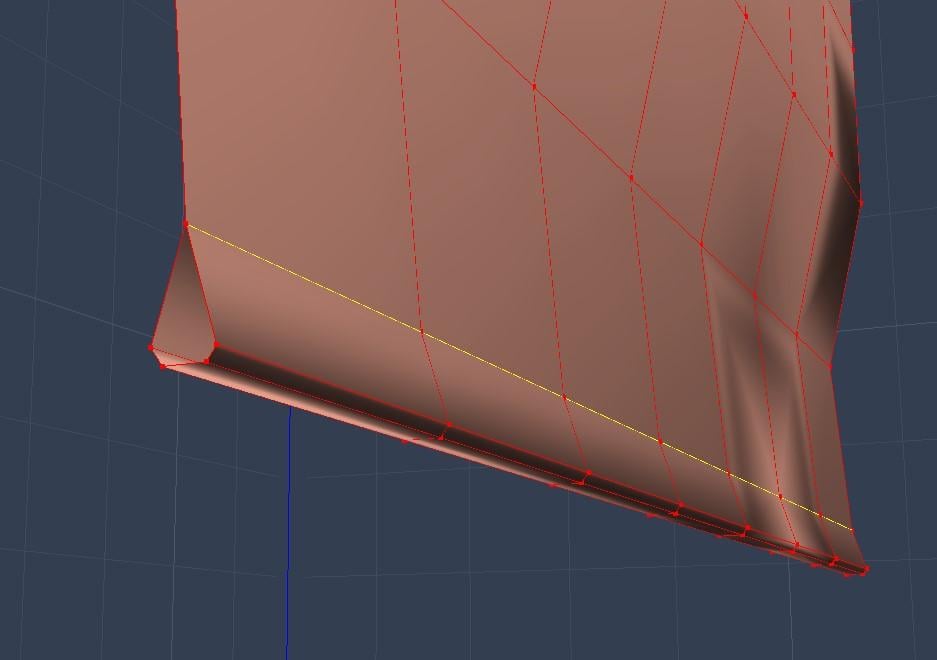
Yay. Thank you once again, Mada.
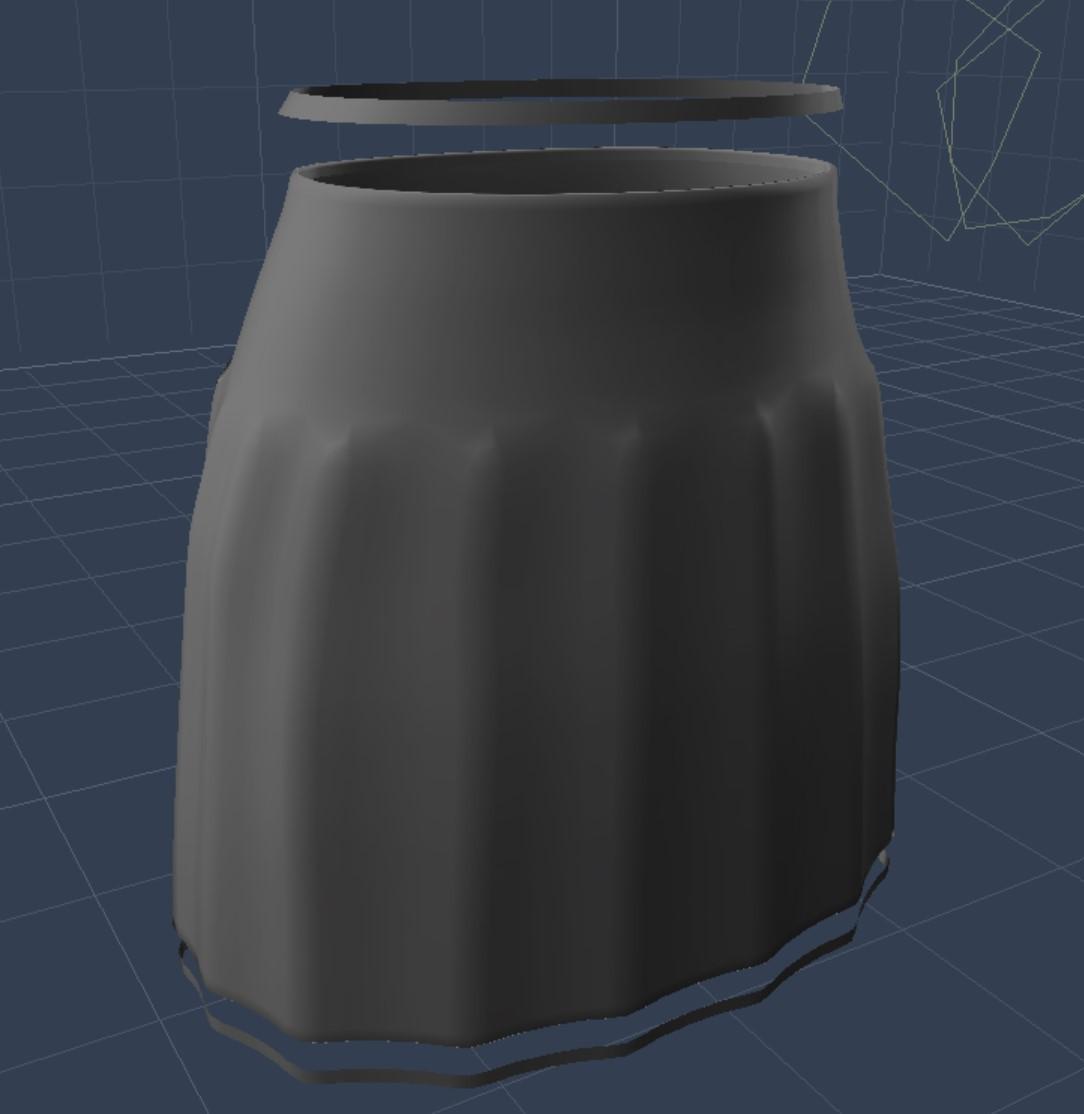
Although I am still away from my main computer, I just had to do a test now. Couldn't wait until after the Thanksgiving holiday. I don't have Marvelous Designer on my current device, but I modeled a skirt in a simple modeler. I was able to model the add-on strips while avoiding the non-manifold edge with some strategic ordering of saving, deleting, bridging,copying, and pasting. In the attached pic I have moved the add-on for the waistband and the hem so they can be seen.
I followed your video here https://www.youtube.com/watch?v=lOWdOSQVRco#t= to create the DForce add on for the appearance of thickness.
Worked great. I do have a question about saving everything for sharing. The order seems to be to create the main garment as a figure/prop asset first. Then import the DForce dynamic add-on obj and create a figure prop asset for that seprately. Then in the final step save the main garment again but this time as a wearable preset with the add-on conformed. I can use it for my own use.
Question - Is that wearable preset capable of being shared with data files and garment+add-on without further steps? Or does the combined garment have to be saved as a figure/prop asset with its own product name?
 How do I get Genesis 9 into Blender or Zbrush for content creation?
Blender
Set Up Blender Units. Unit System : Metric System ; Length : Centimeters.
- Daz > Export as obj > Import in Blender > Create a Shape Key for the base/default shape > Create 1 shape key per custom morph > export those shaped Genesis as obj > Import in Blender with Morph Loader Pro
ZBrush
Install GoZ for DAZ Studio , Configure GoZ in ZBrush (specifiy the path to Daz). Then :
- Daz > File Send to ZBrush > Create a Layer for the base/default shape > Create 1 layer per custom morph > Tool GoZ to send the morph back to Daz as a morph slider.
N.B : Blender saves everything in the .blend file. Whereas ZBrush saves necessary files in a temporary folder (C:\Users\Public\Pixologic\GoZProjects\Default\My_Object.goz)
If ZBrush is amazing for creating morphs, this system of temporary files is terrible : you'll be able to work on your morph just fine, but if you sleep on it and work a day later, even opening the same Daz file and the same ZBrush file, you might end up with some issues (scaling, morph not conform, etc). I'm less used to Blender's sculpting tools, but it feels, with my "short" Blender experience, to be a way more stable and pro solution to create Daz morphs. On top of that ZBrush tends to weld vertices without asking if you're ok. And it's very easy to end up with a morph that won't work. Whereas Blender always respects the original topology.
I can't advise more one than the other. I used ZBrush for about 6 years, outstanding app really and ultra useful for Daz. I used Blender for only about a year... All I know is that the more I use Blender, the less I feel the need to go back to ZBrush.
Prop Creation in 3DS Max - Best PracticesFirst you create some object in any 3d application. Then export it to obj format. Launch Daz Studio and import this object into the program. Details (for Blender) here:
Your prop is in the Daz Studio now. Morphs for it are created in the same 3D application (the object is morphed by the tools of your program). Then the morphed object is also exported to obj file.
But now you don't import the object into Daz Studio as usual. You have to transfer it using the Morph Loader Pro plugin (with your prop active in the scene, of course). Details at the end of this video:
That is, the first obj file is your prop, and the second is its morph. The number and order of vertices must be unchanged, otherwise the Morph Loader will not accept the morph object and will report an error in the log file.
Issue with obj imports from blender deformingHaving an issue with some objs deforming when I import them from blender. All of them were originally Cyberpunk 2077 assets that were imported into blender. In blender they look fine and have no modifiers, but when I export them and import into daz they deform. Is there anything specific that would cause this?
I searched for this issue but I didn't find anything so I wanted to ask. If a blend file is needed I can get that as well.
Images: https://imgur.com/a/po3jbKM - I tried uploading them but it didn't work for me
[SOLVED] {kinda} Eyeball/Inner Mouth Morphs affecting Body VerticesEdit: After much brainstorming I've discovered that I have nothing to do with it. It's just something Daz Studio does, the same happens for other morph products on the market. So... it's solved as in, it's not solvable, but it causes no problems. If you're struggling with the same problem, just leave it.
In short: custom morphs made for Genesis 9 eyeballs have some effect on the body geometry as well, as discovered after using "Select Morph Vertices". And I can't remove them. Nor do I have any idea how this is possible.
Here's a breakdown of what's happening.
- I zero the eyeballs and change the resolution from High to Base (I do the same with the body as well);
- I export the eyeballs (and eyeballs alone);
- I import them to Blender and move the necessary vertices around;
- I export the Eyeballs, back in Daz Studio I have Genesis 9 Eyes selected in the scene (still zeroed and base res) and I load them through Morph Loader Pro;
- Genesis 9 Eyes still selected I navigate to the new morph (Actor/Head/Face/Eyes/myCustomDirectoryName) in the Parameters tab;
- Now I click on Genesis 9 in the scene, switching to the body geometry itself and still see the same morph in the same directory on this geometry.
- Now I right click on the morph (in Edit Mode of course) and choose "Select Morph Vertices". And it selects some random vertices on the body. I have no idea why or how it's even possible. I know it's not supposed to be happening.
I try the good old "Heart the Morph>Double Click>Morph Editing>Clear Selected Deltas from Favorites", Daz Studio tells me I need to select the geometry on which this morph is located, aka Genesis 9 Eyes, instead of Genesis 9, otherwise it doesn't work. But when I select Genesis 9 Eyes, then the vertices selected on Genesis 9 geometry are not affected at all.
Another interesting fact is that I CAN see this morph while I have Genesis 9 selected, even though it belongs to Genesis 9 Eyes. I can't do the same with the morphs I haven't made myself, like the Head Shapes from Daz itself. As soon as I go to Genesis 9, the morphs for the eyeballs simply disappear from Parameters tab, and I have no idea what causes this difference. Whatever tutorials I learnt creating morphs from, didn't teach me this. Is anyone here who can/is willing to?
Can anybody tell me if Genesis 9 has any improved features as far as animation?WendyLuvsCatz said:
rilla said:
WendyLuvsCatz said:
MAX Biped is the most commonly used bone hierarchy AFAIK
this doesn't seem any closer to any I have seen such as Unreal or Makehuman options and BVH import still broken
I can retarget and animate it easily enough elsewhere
https://www.daz3d.com/forums/discussion/591351/genesis-9-coming-soon-preorder-victoria-9-hd-today/p1
"Improved Posing & Animation
With enhanced bone hierarchy and industry-standard naming."
I'm not understanding what this means in Gen9. I get industry-standard naming, but "enhanced bone hierarchy"...?
What does that mean? What changed in the bone structure between 8 & 9?
no idea why you quoted me when I am as baffled as you

LOL! That gave me a good laugh! thanks lol!
Can anybody tell me if Genesis 9 has any improved features as far as animation?rilla said:
WendyLuvsCatz said:
MAX Biped is the most commonly used bone hierarchy AFAIK
this doesn't seem any closer to any I have seen such as Unreal or Makehuman options and BVH import still broken
I can retarget and animate it easily enough elsewhere
https://www.daz3d.com/forums/discussion/591351/genesis-9-coming-soon-preorder-victoria-9-hd-today/p1
"Improved Posing & Animation
With enhanced bone hierarchy and industry-standard naming."
I'm not understanding what this means in Gen9. I get industry-standard naming, but "enhanced bone hierarchy"...?
What does that mean? What changed in the bone structure between 8 & 9?
no idea why you quoted me when I am as baffled as you
Can anybody tell me if Genesis 9 has any improved features as far as animation?WendyLuvsCatz said:
MAX Biped is the most commonly used bone hierarchy AFAIK
this doesn't seem any closer to any I have seen such as Unreal or Makehuman options and BVH import still broken
I can retarget and animate it easily enough elsewhere
https://www.daz3d.com/forums/discussion/591351/genesis-9-coming-soon-preorder-victoria-9-hd-today/p1
"Improved Posing & Animation
With enhanced bone hierarchy and industry-standard naming."
I'm not understanding what this means in Gen9. I get industry-standard naming, but "enhanced bone hierarchy"...?
What does that mean? What changed in the bone structure between 8 & 9?
Can anybody tell me if Genesis 9 has any improved features as far as animation?MAX Biped is the most commonly used bone hierarchy AFAIK
this doesn't seem any closer to any I have seen such as Unreal or Makehuman options and BVH import still broken
I can retarget and animate it easily enough elsewhere
Content shortcut?ahh, ok, manual install.
I use Daz Install Manager (DIM) for everything. It's easier for me to manage nearly 6,000 assets that way.
I'm not certain if the metadata is included in manual installs, but I assume it would be if downloaded from the Daz store.
Other than the "Filter by Context" box is unchecked at the bottom of the pane, The only thing I can think of right now for why you wouldn't be seeing your long list of shaders would be that the metadata for those products for some reason wasn't imported to the database.
Maybe someone with more experience working with manual installs can help with that part.
Your screenshot shows at least a few of them did get imported.
Content shortcut?IceCrMn said:
If you can please, would you post a screenshot of what you are seeing.
I need to see the Surfaces pane open to the Presets tab and the Scene pane with your item selected just like in my screenshot.
Shaders installed from the Daz store will have the metadata needed to use the Presets tab, shaders from other stores most likely won't.
I can't show all the presets that are there, but I went through them and it's only the handful that have ever been there.
I never auto install anything.
Content shortcut?If you can please, would you post a screenshot of what you are seeing.
I need to see the Surfaces pane open to the Presets tab and the Scene pane with your item selected just like in my screenshot.
Shaders installed from the Daz store will have the metadata needed to use the Presets tab, shaders from other stores most likely won't.
DAZ achieves new lows in customer support (but appears to have ambitions to go lower still)Panzer Emerald said:
nemesis10 said:
Ron Knights said:
criket, have you tried using Crossover?! Crossover allows you to create a "bottle" to run the installer in a simulation of Windows. I used Crossover many times when I had a Mac, and wanted to run old Windows installers.
I forget the price, but it is well worth it. It's certainly easier than what you've endured so far.
Unfortunately, I don't think it works. The installers were designed to work in the era of OS 9 and early Windows. OS X was introduced and the installers ran using Rosetta. Eventually, Rosetta was deprecated. In my experiments, the installers for Windows and OS X wrote to different system folders with appropriate permissions so simply placing the files where they should be isn't enough. You could use Crossover to activate the Windows installer but you can't make it write to the proper OS X system folders.
I should say that this isn't strictly Daz's fault. In this case, they are the broker for a vendor who has passed away. It isn't clear that they have access to the assets that the installers use.
Bolded for emphasis.
Also, it could be a lack of bodies to fill positions in the service (food and retail mainly) industry in general. You see it everywhere, all the people who used to work in that sector left after COVID for numerous reasons, not wanting to be dealing with Karen-esque customers anymore being one of them.
could just be Daz lost a lot of their CS people to other remote or warehouse jobs.
I actually don't think this is this is what is going on. Creators make their products, package them, and Daz3d creates the metadata, and posts them for sale and download. Support can troubleshoot if there is an issue with Daz Studio, errors in a script, morph, or mat than can be seen in a text editor etc. Otherwise, they contact the creator to fix the problem. In this case, the creator has passed away and so can not do support. The company does not have the power or legal right to reverse engineer a creator's product. Exactly like Amazon, the company can accept a return, contact the vendor, and deal with a broken product that way. They can't disassemble a product to update it. This is an unusual situation where technology was rapidly changing and, in this case, the installers were never updated.
Elbow bending problem in blender 3.3 with daz to blender bridgeSo here is a comparison between elbow bending in blender 3.2.2 and 3.3.1
It is the same blender file and the only difference is the blender version.
I think the problem is that the default DaztoBlender rig fails to load some jcms or shapekeys in blender 3.3
Another issue with this is that when you just import a character into blender, it does work as intended.
However after some saving and loading, material tweaking, some rendering and then all of sudden it just does not want to work anymore
I tried reimporting the model and it worked at that moment and 1 day later the elbow problem came out.
And then I used blender 3.2 to open that file, the elbow worked as usual again and I think this happens to knee bending as well.
Currently I am back with blender 3.2.2 but I really wish this could be solved since blender 3.3 gives a render speed boost of my scenes with latest driver
Oh btw, I tried blender 3.3.0 and it didn't give any difference.
Daz 3D is part of

Connect
DAZ Productions, Inc.
7533 S Center View Ct #4664
West Jordan, UT 84084Licensing Agreement | Terms of Service | Privacy Policy | EULA
© 2026 Daz Productions Inc. All Rights Reserved.