-
how to load a morph for v4?
You mean Inject a Head / Body morph from the runtime folder or export OBJ and import OBJ as morph slider with Morph Loader Pro ?
If you mean the latter, you have to first go to : Edit - Figure - Rigging - Convert Figure to Weight Mapping : General Weight Mapping, then export / import OBJ with MLP. You'll find the morph slider under "Morphs/Morph Loader" (the path by default)
Daz Studio BETA - version 4.23.0.4! (*UPDATED*)Dolce Saito said:
Richard Haseltine said:
When you first use a morph, or bend a joint that triggers a corrective morph, the morph deltas (the shape change) have to be loaded from disc. Also, every time you make a change DS has to trace through the links to and from the changed bone/shape to look for links that may be affected by the change and so need updating.
Hi Richard;
Thanks for the knowledge. I already knew most of this. But I would like to point to the problem that "it happens all the time". So, not when first used.
Yesterday, I did something very drastic. Deleted almost all of my content, started by first uninstalling all connect items from the studio itself. And moved everything to the content directory by reinstalling everything from DIM. While doing this, at certain point I barely had any 3rd party plug-ins, only had genesis 3/8 and a few vanilla morphs give or take. Also my ssd drive was almost %90 empty. At this point, I opened a genesis figure, did the same test. UI froze again.
Unfortunately, I couldn't be able to identify root cause yet. However, this only occurs in Daz studio and during character movement.
I identified the source of the problem after 2 full days of trial-error. It is a bios setting, which decides to slightly overclock the cache sram frequency when the system is under heavy load for raptor lake processors (13900ks). Daz Studio is very sensitive to the system's state, so it was the only application for me that got destabilized with this setting. I disabled it and after that no more UI freezes on viewport.
how to load a morph for v4?how to load a morph for v4?
there is no sliders I can find for imported morphs, thnks for letting me know how it's done
Why are G8 nails messed up?crosswind said:
In Parameters pane, with Show Hidden Properties checked, selecte Currently Used and see if there's any body morph(s) dialed...
I did that and scrolled through until my eyes crossed over and this is the only thing I found–I assume Toon Generations. Turning it to 0 made no difference, which is no surprise since the enable is at 0. Turning that up didn't help either.
Why are G8 nails messed up?In Parameters pane, with Show Hidden Properties checked, selecte Currently Used and see if there's any body morph(s) dialed...
Let's appreciate/discuss today's new releases - ongoing thread
I'm still going to get it for the variety, need to see if I've got separate armpit hair that will work with G9. Most body hair is all one piece now, and armpit hair doesn't transfer well because it's on both sides of a joint. I understand why it's such a difficult piece to create, but with so few options I think it's worth it for someone to do...AmnesiacThief said:Hylas said:
A guy that's hairy all over but shaves his armpits... *SIGH*
I agree. I likely would've grabbed this, but its incomplete without armpit hair. Luckily, I already have Jepe's Sandor character package which includes excellent strand-based body hair.
x4 PCIe 4.0 bottleneck for RTX A4000, how relevant is it?privatepixels99 said:
Dear All,
I'm considering upgrading my older HP z440 Intel rig to something AMD AM5-based. I have a RTX A4000, which i lurve. Relatively low-power, quiet, fast enough for me. The motherboard I'm looking to build my new rig on (ASRock B650M PG Riptide) has two x16 PCIe 4.0 slots, but only one has 16 lanes. The second one has 4 lanes.
My question is whether my understanding of Daz Iray rendering is correct. As I understand it, a scene is pushed to the GPU and fills up the framebuffer of the GPU. If the scene fits, there will be minimal back and forth over the PCIe bus - just the results of a render pass. This would suggest that the performance penalty of sticking an additional RTX A4000 in the four-lane slot would be less punative than say in a video editing or gaming scenario where lots of data runs over the PCIe bus at any given moment.
Is my (primitive) understanding correct?
Thanks.
Yes, I believe so - you would see an impact in the initial data transfer, but once the render started it should make very little difference (certainly not enough to lose the benenfit of having two cards instead of one working on the render).
Genesis 9 nipples: too low?alienarea said:
For example, Gia 8 and Amelia 9 have very similar bodies except for the face. Put them side by side and you will see.
Two different characters looking different is not evidence. I could absolutely morph a G8F figure to have her nipples lower, or a G9 figure to have her nipples higer.
The figures can be morphed. The body shapes can be changed. Where G9's nipples are by default does not particularly force where a morph creator can choose to have them in the end.
This? This is the G8F centaur. (If you look at her feet, you can see where I've had to simplify the shape of the toes because of the available mesh detail).

For a fuller demonstration, I did it as an experiment that eventually turned into this transformation sequence on my gallery. There is no compositing there, that is me morphing a figure the whole way between human and centaur.
If I (someone with no special vendor tools at all) can make a horse into a person, then anyone creating morphs for G9 absolutely has the flexibility to morph exactly where the nipples are on the breast. If they've put the nipples somewhere, they *chose* to do that, it is not a fundamental limitation of G9.
It's not about the converter.
And yet, if I do a conversion with my own tools, the nipples line up just fine.
John 9!Elor said:
Catherine3678ab said:
To dispel a myth, yes there is an included HD Add-On.
It's included in the bundle, but before Kara 9 (I think), the HD morph was part of the base figure product (hence the HD moniker in the name of that base product: Victoria 9 HD, Michael 9 HD, etc).
Right, somebody must have complained about that then.
John 9!Catherine3678ab said:
To dispel a myth, yes there is an included HD Add-On.
It's included in the bundle, but before Kara 9 (I think), the HD morph was part of the base figure product (hence the HD moniker in the name of that base product: Victoria 9 HD, Michael 9 HD, etc).
John 9!Elor said:
tsroemi said:
Also, it looks to me like we're not getting any real body shape included with the character itself anymore - ? Just something like the base masculine shape. So, no HD, no body shape ...
Maybe Daz added it since your message, but the main page of John 9 lists a 'John 9 Full Body Shape' morph.
Thanks, what I meant was that the included body shape seems very generic to me and very 'doughy'.
But seeing the renders posted above, I don't really care all that much anymore, cause the textures DO look gorgeous, and the head morph as well. And I've lots of body shapes I can play with. Might actually get the figure or even one of the bundles today.
John 9!tsroemi said:
Also, it looks to me like we're not getting any real body shape included with the character itself anymore - ? Just something like the base masculine shape. So, no HD, no body shape ...
Maybe Daz added it since your message, but the main page of John 9 lists a 'John 9 Full Body Shape' morph.
John 9!Textures are are big reason for me to pick up any character and they look fantastic in the renders. With most characters, you could probably dial in an equivalent if you were patient enough, but it's the textures that set really set them apart imo. Saying that, good to see a character with a distinctive, well-executed head morph. Good addition to the gene pool and a great time saver.
Not sold on the outfits myself. Feels like we've plenty of similar options already. But they seem to be good quality and I do kind of like the tunic.
Genesis 9 nipples: too low?Matt_Castle said:
alienarea said:
I logged a ticket about it to Daz some month ago, still waiting on a reply.If you are asking for changes to the base figure, that is utterly impracticable. Daz cannot make changes to the base figure without breaking everything built off it.
If the morphs I provided earlier aren't sufficient, even Daz can't do much more than that at this stage. For a rough analogy, it'd be like trying to swap out a building's foundations after it's finished. (And yes, while I'm sure it has been done on occasion, firstly, analogies are not direct parallels and secondly, I'm sure it was a huge job).
As someone who's mucked around a lot with the technical guts of this, trust me, it's not possible to alter the base figure without causing huge problems.
using the RSSY Character Converter,
I will add that as far as any converter, decisions have to be made about how to map one figure onto another.
When it comes to something like my stupid projects to convert clothes to centaurs...
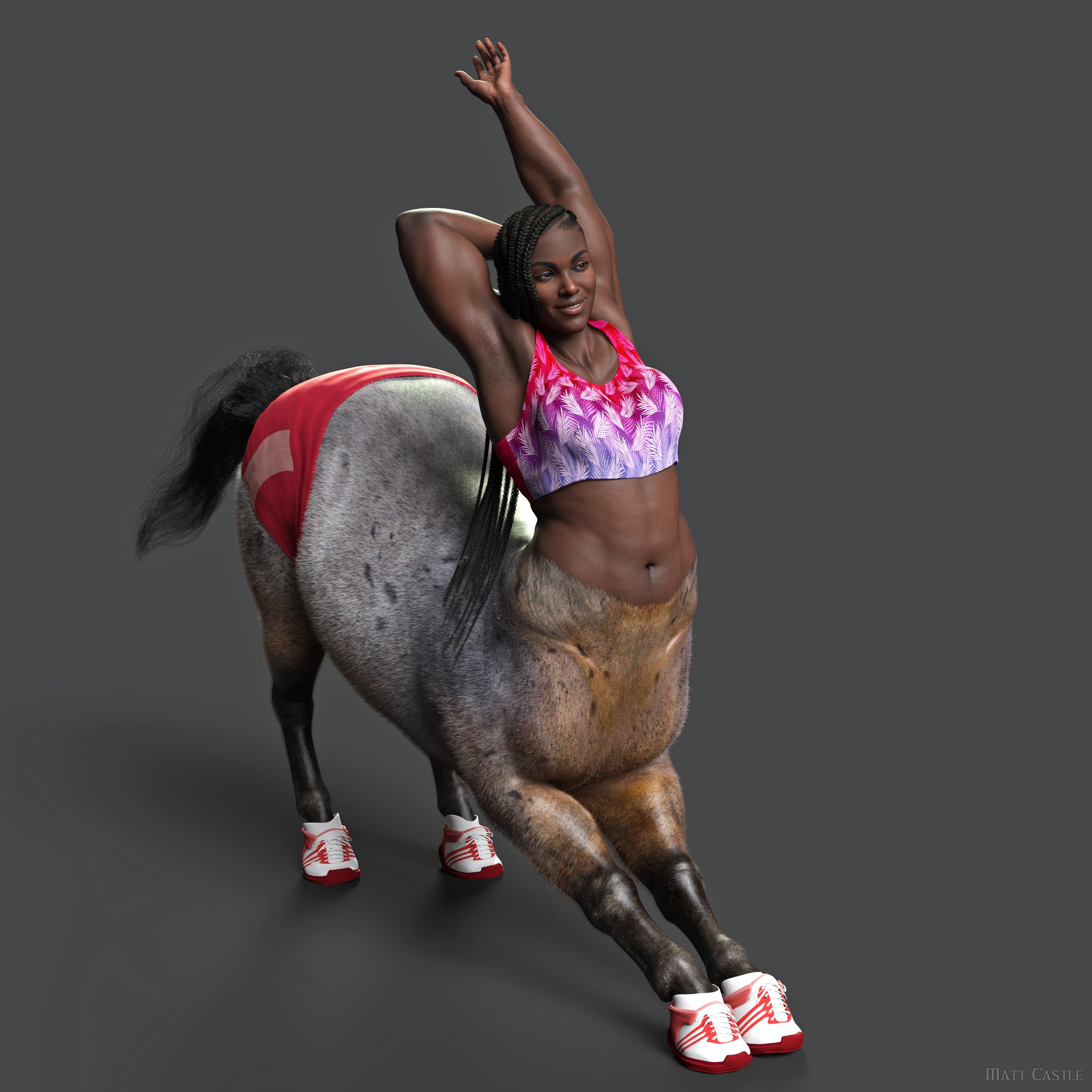
... I have had to tell it which parts of a normal humanoid G8 figure to fit to which parts of the horse body; there's not one single objectively correct answer. (Honestly, I've had some really, really bizarre results when asking an AI to generate images of centaurs wearing clothes, because as "obvious" as it might seem to humans how things should fit, it's not actuall a fixed rule).
Indeed, I've actually got several conversion templates that map things differently so I can try to get the best look. Even on a humanoid-to-humanoid transfer, the creator has to make choices about what factors they priortise reproducing, and the end results will never be identical in all circumstances.
The fact that a converter doesn't make G8 and G9 look absolutely identical is not entirely down to G9 as a base model, some of it is that that's that vendor's interpretation of how the transfer should be done.
It's not about the converter. For example, Gia 8 and Amelia 9 have very similar bodies except for the face. Put them side by side and you will see.
I would post pictures, but the nudity of this topic doesn't allow.
Marahzen's Musings on Creating Characters (and other matters)Before I talk about why I turned my back on FaceGen and walked away, I suppose I should start off with a conversation about Face Transfer. [Here of course, I mean the "original" Face Transfer Unlimited, vs Face Transfer 2, which recently became available. Despite sharing a name, FT2 is significantly different in output than Face Transfer - a game changer that will get its turn in this story when the time comes.]
https://www.daz3d.com/face-transfer-unlimited
I had actually bought Face Transfer months before I first put it into serious use in late October 2021 - back in the summer, around the two-month mark of my Daz career - but like many people who try Face Transfer once, I didn't realize the critical necessity of using Face Transfer Shapes, without which you cannot reasonably use Face Transfer. The dreaded "Voldemort face" ...
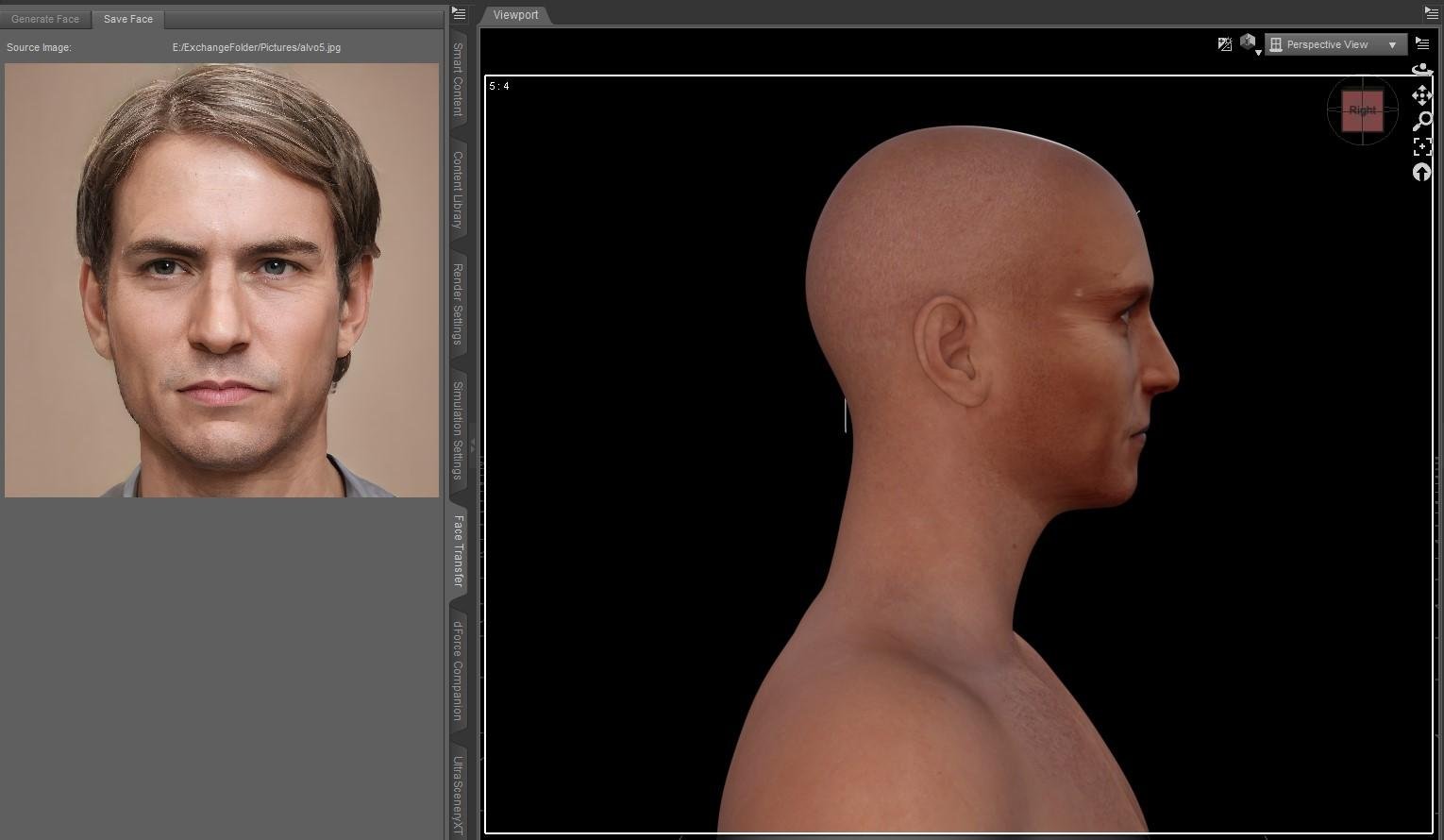
Oh, and you also have to be really good at Photoshop, which I was not.
For me at the time, it was not the only Daz toy that I'd bought that I totally didn't get how to use, so I shrugged and moved on, figuring I'd revisit later on when I was better at Daz.
One day, the time had come to go back and take another look at Face Transfer, and this time, I tried Face Transfer Shapes - which solves the problem of the freakish flat profile.
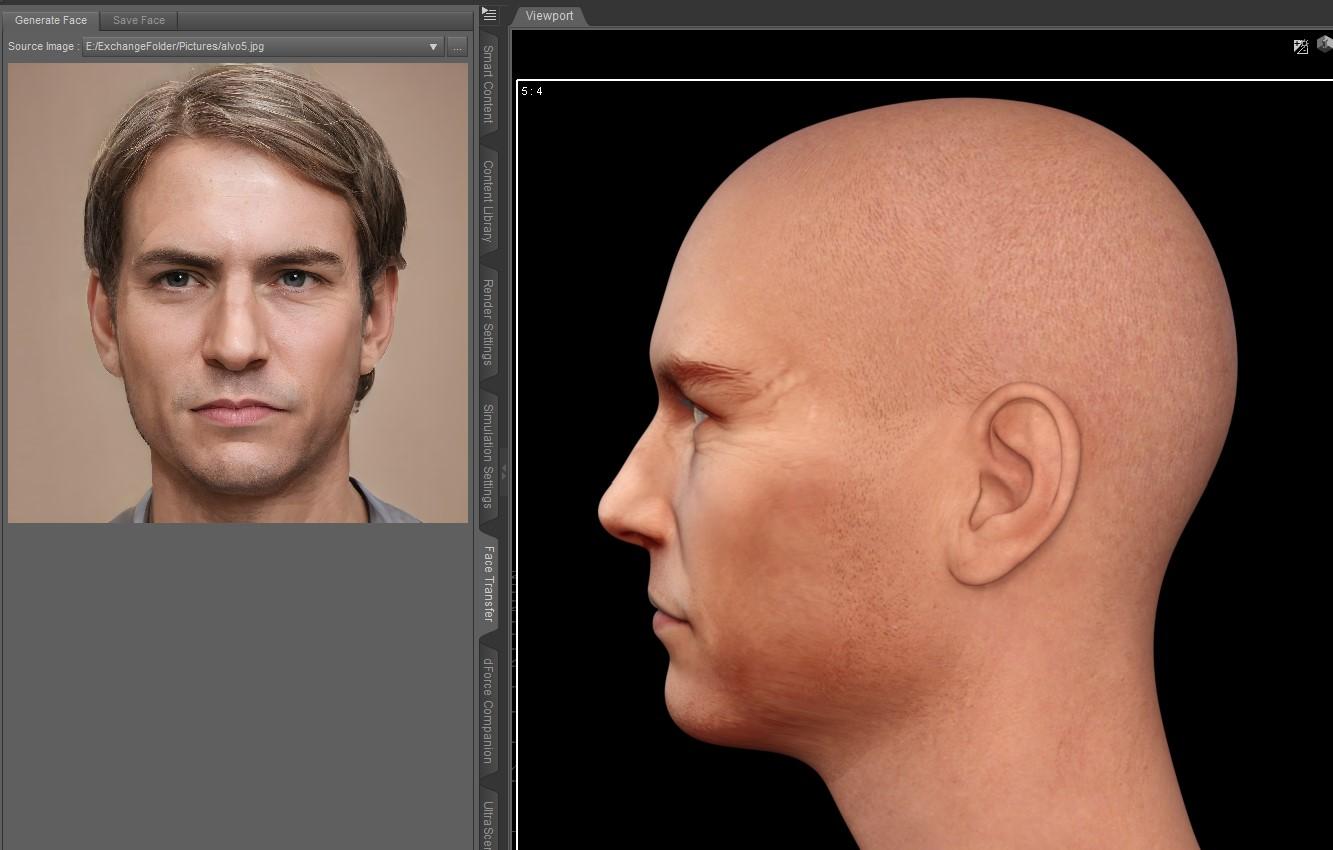
https://www.daz3d.com/face-transfer-shapes-for-genesis-8
And while this particular source image was not the best one to start with, I noticed that where it wasn't badly discolored, the skin was a much more reasonable tone than my initial experiments with just replacing the Base Color mat on a stock G8/G8.1 figure. I tested with others among my major characters and some were ... well, not as bad as this one.
But also at this moment, I stumbled across a product called Altern8, which I had just picked up during a sale.
https://www.daz3d.com/altern8--skin-shader-system-for-genesis-8
I had no clue whatsoever how it was supposed to be used, and I didn't have any of the characters it references (at that time, I had no use at all for characters and had only bought a couple of Pro bundles, just to - well - have all of the parts, even if I never used them for anything). I bought this Altern8 thing and for some reason, by lucky chance, I had a newly created Face Transfer character and after I randomly clicked a bunch of options, I had something that, on a good day, was a quantum leap from my original generation of characters. I wouldn't say I had mastered the mystery of Iray Uber, but at least I finally had characters that used it.
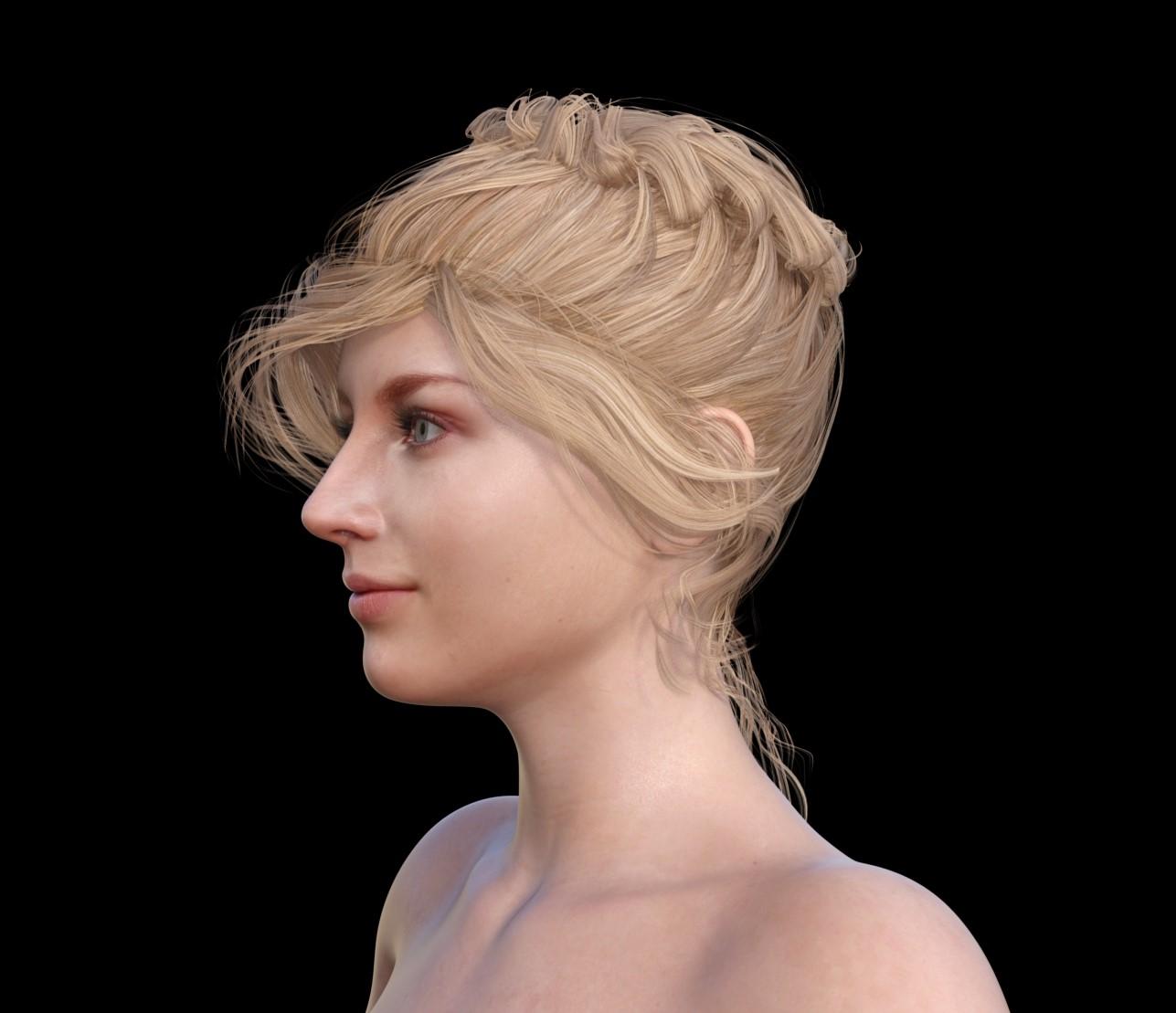
I'm not even going to discuss the steps I followed, other than to note that it was totally off-label usage of the product that the PA surely wouldn't endorse.
But, it worked for me for the better part of the next year.
Getting on the 9 train, or notWonderland said:
I'm finding I'm spending way too much time trying to morph G9 to look more like G3 and it's dawning on me, why don't I just use G3? I like the body proportions and faces so much better. Even the bends are better IMO. I like G8 too but I have so much content, she takes like 45 minutes to load. I was thinking of converting some G3 or G8 characters to G9, but why? The make-up system is awful and I can't tweak iris colors or lip gloss easily. After all this time, I still find no advantage to G9. At least these sales are great for scooping up older content at great prices.
I agree 1000%
I fight for hours with this character just to make it look somewhat attractive....
Enough of this time sucking... back to G3 and G8...done.
JD
How to remove gap between eyelash and eyecrosswind said:
More likely the issue came from character head morph(s) that you dialed on this figure. If you zero the head morph dial(s) and the issue's gone, that's it...
Then it'll be a bit cumbersome to make a fix... You just check if that's the culprit as above-mentioned first of all...
I appreciate your reply. You nailed it.
Based on my experiment, I think the problem occurred because I used G8F texture on G8.1F figure. With texture of G8.1F, the problem has gone away.
From baby fresh to older than dirtI haven't tried them but there's the Growing Up Skins products that complement the morph sets of the same name for G3 & G8. Since the youngest morph is 5 Years, I don't know how suitable they'd be for infants/toddlers. But Caryn 8 & Tobyn 8 should have those covered? (I bought 1 of them at release but I don't think I ever used the model.)
Genesis 9 nipples: too low?alienarea said:
I logged a ticket about it to Daz some month ago, still waiting on a reply.If you are asking for changes to the base figure, that is utterly impracticable. Daz cannot make changes to the base figure without breaking everything built off it.
If the morphs I provided earlier aren't sufficient, even Daz can't do much more than that at this stage. For a rough analogy, it'd be like trying to swap out a building's foundations after it's finished. (And yes, while I'm sure it has been done on occasion, firstly, analogies are not direct parallels and secondly, I'm sure it was a huge job).
As someone who's mucked around a lot with the technical guts of this, trust me, it's not possible to alter the base figure without causing huge problems.
using the RSSY Character Converter,
I will add that as far as any converter, decisions have to be made about how to map one figure onto another.
When it comes to something like my stupid projects to convert clothes to centaurs...
... I have had to tell it which parts of a normal humanoid G8 figure to fit to which parts of the horse body; there's not one single objectively correct answer. (Honestly, I've had some really, really bizarre results when asking an AI to generate images of centaurs wearing clothes, because as "obvious" as it might seem to humans how things should fit, it's not actuall a fixed rule).
Indeed, I've actually got several conversion templates that map things differently so I can try to get the best look. Even on a humanoid-to-humanoid transfer, the creator has to make choices about what factors they priortise reproducing, and the end results will never be identical in all circumstances.
The fact that a converter doesn't make G8 and G9 look absolutely identical is not entirely down to G9 as a base model, some of it is that that's that vendor's interpretation of how the transfer should be done.
Getting on the 9 train, or notThe hd morph restriction is increasingly an issue. I didn't think so before, but... yes, it's a hindrance to have no access. And as much as oso likes to tell us it's no big deal, I disagree and it's one more reason I don't touch g9.
Daz 3D is part of

Connect
DAZ Productions, Inc.
7533 S Center View Ct #4664
West Jordan, UT 84084Licensing Agreement | Terms of Service | Privacy Policy | EULA
© 2026 Daz Productions Inc. All Rights Reserved.