-
Hallelujah! Finally Got a DSON Core File to Load In Carrara
yes installing D|S sets up content manager and the metadata, you only need open D|S once
Hallelujah! Finally Got a DSON Core File to Load In CarraraWendyLuvsCatz said:
glad it works and understand the hesitancy as even with DAZ studio metadata not everything does
Thanks. Yes, I've only tried a handful of DSON products in DS over the last several months, one did not work. This is the first time I've tried DSON import to Carrara in a very long time, having given up long ago. I dunno why I tried it, but I'm glad I did.
I don't remember the last time a Poser format product did not work in Carrara, and I've use hundreds, maybe thousands.
BTW, I said above that you (or somebody) suggested that to get a DSON file to import to Carrara, I needed DS "loaded". I meant to say "installed". When the file worked in Carara, DS was not running, but was installed, which was not the case in my earlier DSON import attempts that failed in Carrara. (I'm saying DSON, but I'm not sure the difference between that and DUF).
Blender Noobie having issues with morphs (shape keys). Please help?Hi DaremoK & Mystery,
Thank you both for your comments. I'll definitely look into those things you mentioned.
Yes, I fully agree on how fickle Blender can be on those sim settings, and how insanely advanced a subject like Cloth Sims is for someone like me. That was why I had originally planned on just doing all those morphs first.
But there was something in all those tutorials that I watched which just made me want to give it a try, and the surprise I got from my initial results through following their advice instantly hooked me into fully pursuing it. I saw that I wasn't the first to pursue the idea of doing bat/dragon wings (seems to almost be like a Holy Grail pursuit for some of us
 ), both with just webbings between the fingers along with a sleeve around the elbow joint (that was an idea I had started out with, too), and other people who had chosen to use entirely enveloping meshes. I did discount the idea of just using webbing for the main sail, as my goal was to get the elbow to slide up and down within a sleeve just like real bat wings do. Several of my initial efforts did involve the stitching function, but I soon found that they didn't hold up very well once the bones begin to move, so I had given up on that idea and opted instead for a fully solid, enveloping, but closer-fitting, mesh, with just the fingertips poking through openings specially made for them. Many of the efforts by others posted on Blender discussion boards had left several clues for me to consider, try out, and got me much closer to what I needed than I could ever have imagined on my own.
Of course, most all the advancements and setbacks I had were due to the Cloth settings—as well as a handful of adjustments that needed to be made to the membrane mesh (poke-throughs, where the membrane was far too close to the wing bones, were a major cause of detonations, it seems). Rereading many of those lessons learned from other people helped me find what was going wrong there. Fortunately, I am quite aware of the need for frequent saves--right now, I have something like 80 files (most @ 390MB, with several at 780MB & 1+GB--and my Hard Drive will thank me for when I get around to cleaning up some of this!) saved from when I started playing with this on Nov 18!
And yes, I did remember to use the Hook function, as nearly all the tutorials I saw had made quite a lot of noise about them. The Hook in Blender is clearly similar to the Pin function that exists in DAZ Studio's Cloth Simulator, and I knew Blender had to have something like that, although it did take me quite a while before I could locate any tutorials on how to make Hook Objects follow the Armature/Bone movements of the wing fingers—which was the critical factor I needed to know how to do before ever seriously thinking about trying to make this work. I already knew DS had such an ability to have Pins follow figure bones, but it is way too early to think about trying to import this crap into DS because of the trouble I have in getting figures to rig in it.
However, I was evidently still doing something wrong with how I was doing the anchoring in Blender, as you can see from those screen shots in my last post. There are portions of the cloth still attached to the ends of the fingers, even as the rest of the skin was being shredded into confetti. LOL! Fortunately, after a bit more fiddling with pinning the Hooks over the last few tries, I finally succeeded with my first Cloth Sim the day after my last post! Whoot! :D
I can hardly believe it had only been a couple weeks since I started playing with Cloth Sims! TBH, I really still have NO idea of what I did to finally make it work--other than just paying lots of attention to those tutorials and advice from far more experienced folks, like you guys! Thank you so very much!!
There were clearly multiple issued I had to T/S, and I suspect the final problem was due to my pinning the cloth anchors only with the edge vertices of the mesh to the fingers rather than anchoring several faces around the finger joints, as I had evidently done along the body segments, where the results were far better right from the start. I had tried doing that much earlier in my efforts, but I did so by anchoring the mesh along ALL the finger bones rather than just to the end bones--evidently I mistakenly took it to extremes in both directions before eventually finding that happy middle ground.
And I'm still seeing quite a bit of glitchiness creep into the membrane mesh, especially as the dragon begins drawing the wings back in. But I made sure to save all the custom changes I had made to the Cloth Sim settings (in TWO .blend copies of the final work, AND in a handy Word Document, no less!) Right now, I think my mesh just needs a bit more refinement at this point.
So, while I needed a few days to render the images for showing off my acomplishment, I'm planning to give it another go, hopefully with a better mesh, and I'm definitely going to apply what I learned to this new one, and we'll see. Also, I'll look into the things you guys mentioned, as they'll probably help speed up the processing times--although exploding meshes very early in the sims before baking had generally told me I was on a wrong track, so I didn't waste too much time trying to take every single simulation to its conclusion.
In the meantime, I needed to take a few days to respond to your comments. I created some renders in DAZ from this first successful effort and have posted the results in the Gallery here and on my DevianArt account. And yes, I know Blender can do the same level of, if not superior, renders over DAZ (I've seen Sintel), but I'm far more experienced in DAZ and I've got zip in the way of making anything look decent in Blender--although I want to eventually learn how to do that, too. Here is a beauty shot of the dragon from my Gallery page:
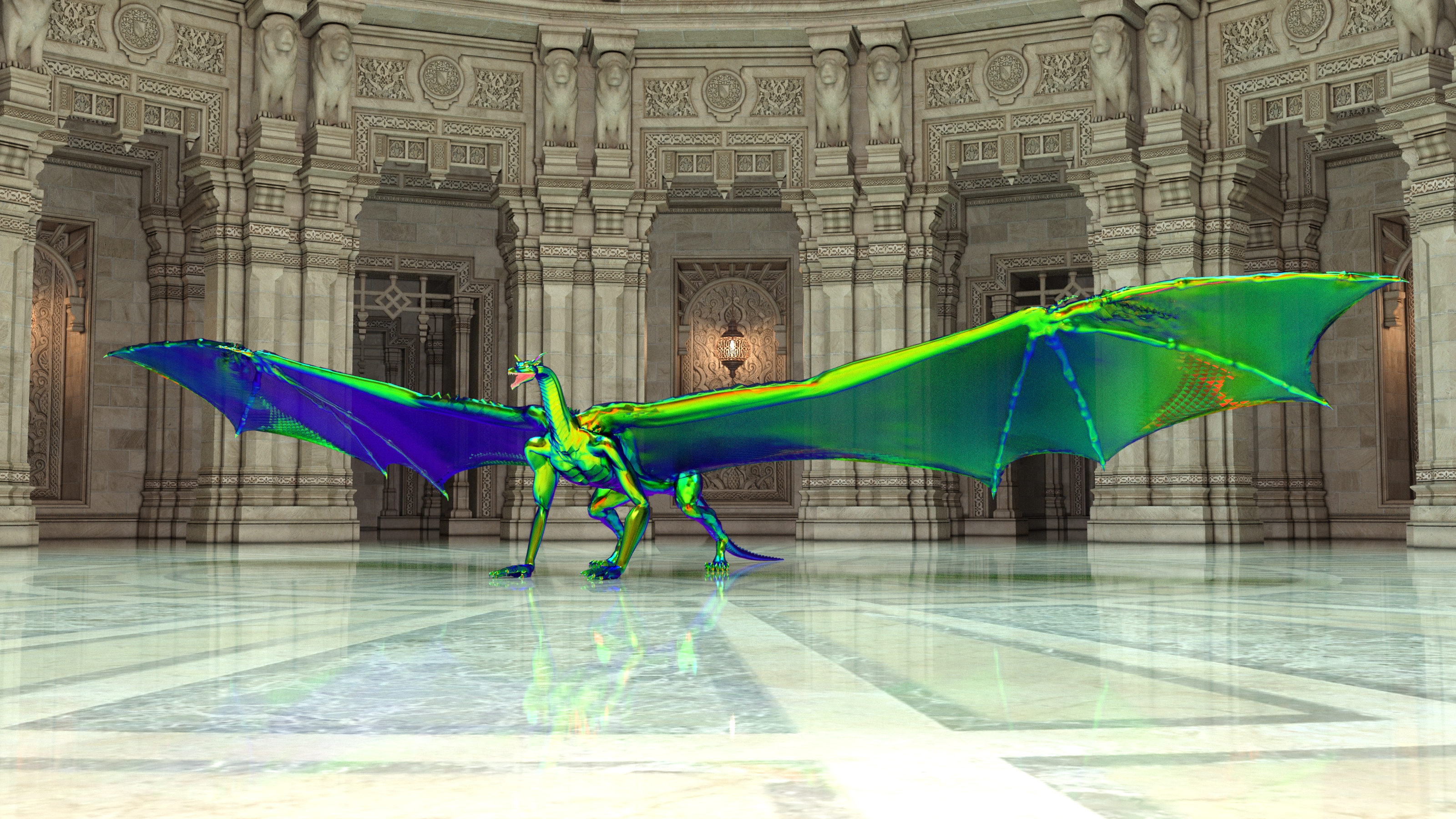
And the animated .gif file I made from the Baking is posted at my DeviantArt account, with a far less taxing texture used.
(BTW, the issue with the dragon's hands poking through the floor in the .gif animation are entirely due to the way the dragon was created in Blender and imported into DAZ--there's really not a good floor-level default pose for the figure--and at the time, I was more concerned about getting the Cloth Sim to work with the wing bones than worrying about the rest of the dragon.... oops!
 Just so you know, for my future work, I've added a floor plane in the .blend file to give me a reference surface--I promise I'll do better with the next results! )
Cheers,
Ryuu
Hallelujah! Finally Got a DSON Core File to Load In Carraraglad it works and understand the hesitancy as even with DAZ studio metadata not everything does
Testing hair with Diffeomorphic 1.6.2 and problems with hair shineYeah same question as OP. Just need a method to make the hairs a bit more shiny/glossy. Anyone got any good custom shader setups for that or any advice? I really don't wanna use particle hair even tho there is an exceptional hair converter by Cinus, cause with the standard imported hair I can just use the bones to move parts or import custom morphs for shaping/adjusting much easier than having to comb or rig particle hair.
Also side question, any particlar reason when importing a pose into blender using the daz library why does the character have to move back to world orgin with the newly imported pose? Is there a way to stop that or is that just how it has to work?
Windows and PrivacyDaywalker Designs said:
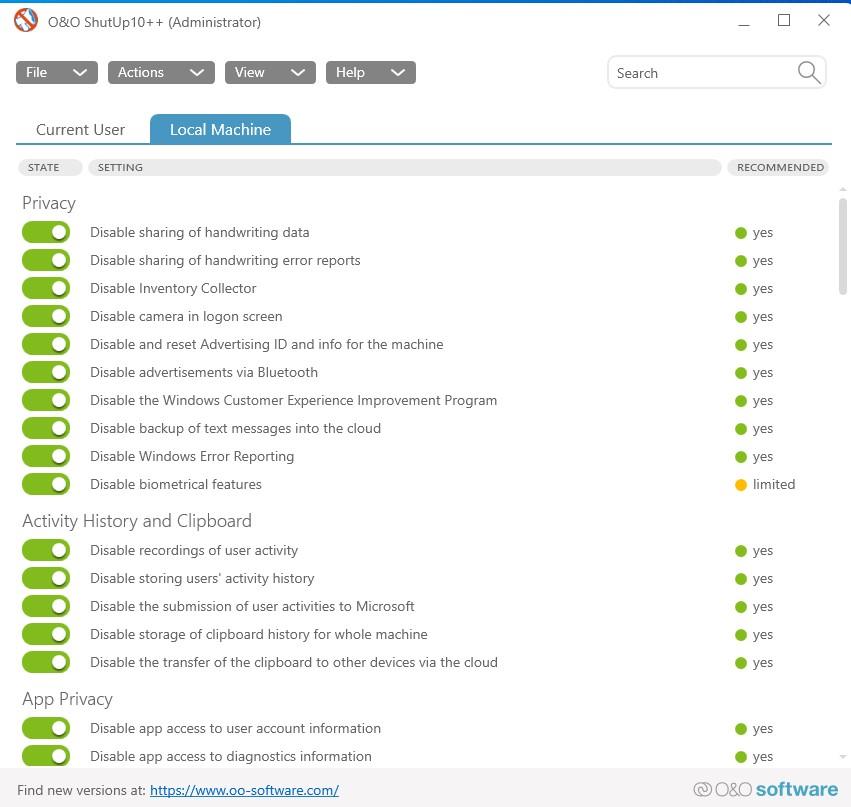
I'd love to see a way to tell Microsoft "Hey, if these settings are turned off, leave them off when you install the update; I don't want them on at all."
Yes, then how would they spy on you? After using the program and exporting the settings, import your settings after the dreaded updates. Then, tell me why they want this.
 Why can't artists be bothered to use the right categories? :/
^Vanity folders are now required by Daz (putting 2 of my products in a different folder from their related products). It's not always something PAs have control over.
The metadata is all done by Daz. No PA input here.
looking for a triangular portal or framehttps://www.daz3d.com/everyday-morphing-primitives for Poser, there is a triangle in one of the promo pics.
but to get exactly wht your looking for 10minutes in blender wihtout any knowledge of blender is also possible. open blender insert primative, export OBJ import into Daz Studio.
FLUIDOS II for Daz Studio - update 2.2 [commercial]Writer25 said:
Alberto said:
Writer25 said:
I see, that's already more info that I could gather from 2 hours fo searching. Thank you. :')
I'm using the "standard" in-built liquid simulator that comes free with every copy of Blender; the simulation type I've tried to run is FLIP.
To help you pin-pointing my exact setup; this is the .blend file I've tried exporting (you'll need to adjust the cache path but beyond that it should be good to go): https://mega.nz/file/oiYA3D6a#gYNO1z05f0VZm-G_yPAXoiFWJL_rxGn6FdrX4cCBxVo
I reviewed the Blender manual and some sites. The manual says this about the VDB files in the cache:
OpenVDBAdvanced and efficient storage format. All simulation objects (i.e. grids and particles) are stored in a single.vdbfile per frame.The standard fluid simulator in Blender uses these VDB files as storage files, but not for exporting the simulation. This is similar to the plugin PARSIS for Daz Studio: It saves particles data in VDB files, but not for export.
However, Blender can export its fluids simulation as OBJ Animation (you must bake the mesh first).
Alright, then we've found the crux of the issue. I'm aware of how the export proces for animated obj. files (sequences) works for Blender, and also know of a plugin which would the import of this within DAZ for animation.
However the thing that had me so stocked about your plugin, was the fact that it also support bubble/foam particle effects in itself. I understand this is done through instancing to reduce the load on the software? Which is a shame since if you export into .obj all the instances are converted back into objects, causing immense file bloat and more memory drawn from the GPU when you eventually render the .obj file.
So in conclusion; FLUIDOS II cannot take point-type vdb files at the moment, and will also likely not be able to do so in the (near) future?
I don't know about Blender, but Fluidos doesn't use instances in bubble/foam/spray particles. In fact, all those particles are contained in a single object.
And the problem with the point-type VDB files is that there are used as storage files, and there isn't a "standard" format for these files. Blender creates these only for internal storage purposes. Blender and only Blender uses them. In order to port them to another software, you need a bridge or a converter (with the risk that the format in Blender can be changed at any moment).
I think that soon or later, Blender will be capable to export the simulation as level sets or fog VDBs, either natively or by means of an add-on. But, to my knowledge, not for now.
Pages in store loading very slow?Been this way for a week or more. I have been having to look up promos to identify 'Required Products' for a texture set as I set up metadata on really old sets. Or fixed other ones that were still broken years after being released. Took about 15 seconds to load. I got to stare at a lot of white space, with a headache. Eight more to go.
FLUIDOS II for Daz Studio - update 2.2 [commercial]Alberto said:
Writer25 said:
I see, that's already more info that I could gather from 2 hours fo searching. Thank you. :')
I'm using the "standard" in-built liquid simulator that comes free with every copy of Blender; the simulation type I've tried to run is FLIP.
To help you pin-pointing my exact setup; this is the .blend file I've tried exporting (you'll need to adjust the cache path but beyond that it should be good to go): https://mega.nz/file/oiYA3D6a#gYNO1z05f0VZm-G_yPAXoiFWJL_rxGn6FdrX4cCBxVo
I reviewed the Blender manual and some sites. The manual says this about the VDB files in the cache:
OpenVDBAdvanced and efficient storage format. All simulation objects (i.e. grids and particles) are stored in a single.vdbfile per frame.The standard fluid simulator in Blender uses these VDB files as storage files, but not for exporting the simulation. This is similar to the plugin PARSIS for Daz Studio: It saves particles data in VDB files, but not for export.
However, Blender can export its fluids simulation as OBJ Animation (you must bake the mesh first).
Alright, then we've found the crux of the issue. I'm aware of how the export proces for animated obj. files (sequences) works for Blender, and also know of a plugin which would the import of this within DAZ for animation.
However the thing that had me so stocked about your plugin, was the fact that it also support bubble/foam particle effects in itself. I understand this is done through instancing to reduce the load on the software? Which is a shame since if you export into .obj all the instances are converted back into objects, causing immense file bloat and more memory drawn from the GPU when you eventually render the .obj file.
So in conclusion; FLUIDOS II cannot take point-type vdb files at the moment, and will also likely not be able to do so in the (near) future?
Holiday Giveaways 2022!barbult said:
riuken1 said:
Nice render barbult and thanks AprilYSH. I just notice wen I filter by contex it no show in my assesories, againg thanks for this nice tiara.
Thanks for the compliment, riuken1. The tiaras are properly categorized, but they do not have any character compatibility set, so they never show up when filter by context is checked. You could submit a help request to ask Daz to update the metadata, or you could just set it yourself with the Content DB Editor in the Content Library pane. As far as I can tell, it is a prop parented to the character's head. It is not rigged to any particular character shape. I think you could parent it to any character and adjust the size to fit in the Parameters pane. Maybe that is why there is no particular character compatibility set in the Metadata.
Is cool that can be use with diferents shapes, I was thinking was just for G9, Maybe I do it my self as a practice in daz.
Importing genesis 9/ Vicky 9 into UE5You can do it now... Do not need any special conversion application algorythm or nothing. It just a matter of WHAT can be done with G9 once it's in UE5
Open DAZ, create the character you want, Export as FBX, 2012 is a good option, Select the place to save it.
Open UE5, select Import, navigate to your FBX, and import...
I've been playing around with it to see how far it will go (I.E. if animations can be imported.)
Is DAZ ever gonna be better with handling dense geometry?I find DAZ Studio handles very dense geometry very wel, better than Blender
it's the textures that are an issue
I can import massive fractals Zbrush struggles with un UV mapped and unTextured but of course Zbrush imports those same fractals with vertex colours
How do I import an underlay imageI'm looking to import a 2d underlay background image into daz to use as a refrence guide for posing a figure. After spending way too much time trying to find information on how this is done with no luck, I figured it'd probably be faster to ask the forum. Can someone either show me where to find the tutorial on this or walk me through how it's done?
Thanks
FLUIDOS II for Daz Studio - update 2.2 [commercial]Alberto said:
Writer25 said:
Alberto said:
Writer25 said:
Thank you for the quick response and of course.
It doesn't seem the attach a file option is working for me, but I've uploaded it to mega.nz.
You can find it here: https://mega.nz/file/Q6RD1bRT#xxD2v7AlUDdwYLVLBwispXujAz2Du6ttchvym97f8Fk
It's a simple simulation of a standard cube being liqufied and dropped into the the domain (so basically a cookie-cutter test run to see if I could import a simple liquid simulation from Blender). Frame 15 (mega.nz link) is the one where it has just made contact with the bottom of the domain.
I checked the vdb.
The vdb_view utility (included in OpenVDB) couldn't open it. Houdini couldn't open it.
Examining more in-depth, I found that it isn't a level set, it's not even a fog-type vdb. It's a Points-type vdb (contains particles information).
Try to see if there is an option to export level set vdbs.
I see no such option in Blender and to be honest I've got no idea what the difference between these level sets and point-type vdb are. Is point-type vdb a more outdated form of storing vdb data in OpenVDB? Is there a way to convert points-type vdb into level sets? I don’t know why but the answers to these questions are very hard to find on the internet. (When googling “blender fluid level set” I get no hits that delve into the subject, which is very odd considering the extensive documentation and tutorials Blender normally has.)
To be honest I’m starting to feel defeated. I was hoping that this plugin could be used as the bridge to render vdb files from external software’s directly in DAZ… If Blender can only write points-type vdb that’s dead in the water, right? :/
Daz Studio (and Fluidos and ABAS) can read these vdb files: https://www.openvdb.org/download/ (sample models), these: https://www.thepixellab.net/vdb-clouds-pack, and these: https://jangafx.com/software/embergen/download/free-vdb-animations/ (at least in part).
The point type is a format to store particles' information unlike the level-set and fog types. The latter types store surfaces or volumes.
What addon are you using in Blender to create the fluid simulation? If possible, I could check it and tell you if there is a possibility to transform the data.
I see, that's already more info that I could gather from 2 hours fo searching. Thank you. :')
I'm using the "standard" in-built liquid simulator that comes free with every copy of Blender; the simulation type I've tried to run is FLIP.
To help you pin-pointing my exact setup; this is the .blend file I've tried exporting (you'll need to adjust the cache path but beyond that it should be good to go): https://mega.nz/file/oiYA3D6a#gYNO1z05f0VZm-G_yPAXoiFWJL_rxGn6FdrX4cCBxVo
FLUIDOS II for Daz Studio - update 2.2 [commercial]Writer25 said:
Alberto said:
Writer25 said:
Thank you for the quick response and of course.
It doesn't seem the attach a file option is working for me, but I've uploaded it to mega.nz.
You can find it here: https://mega.nz/file/Q6RD1bRT#xxD2v7AlUDdwYLVLBwispXujAz2Du6ttchvym97f8Fk
It's a simple simulation of a standard cube being liqufied and dropped into the the domain (so basically a cookie-cutter test run to see if I could import a simple liquid simulation from Blender). Frame 15 (mega.nz link) is the one where it has just made contact with the bottom of the domain.
I checked the vdb.
The vdb_view utility (included in OpenVDB) couldn't open it. Houdini couldn't open it.
Examining more in-depth, I found that it isn't a level set, it's not even a fog-type vdb. It's a Points-type vdb (contains particles information).
Try to see if there is an option to export level set vdbs.
I see no such option in Blender and to be honest I've got no idea what the difference between these level sets and point-type vdb are. Is point-type vdb a more outdated form of storing vdb data in OpenVDB? Is there a way to convert points-type vdb into level sets? I don’t know why but the answers to these questions are very hard to find on the internet. (When googling “blender fluid level set” I get no hits that delve into the subject, which is very odd considering the extensive documentation and tutorials Blender normally has.)
To be honest I’m starting to feel defeated. I was hoping that this plugin could be used as the bridge to render vdb files from external software’s directly in DAZ… If Blender can only write points-type vdb that’s dead in the water, right? :/
Daz Studio (and Fluidos and ABAS) can read these vdb files: https://www.openvdb.org/download/ (sample models), these: https://www.thepixellab.net/vdb-clouds-pack, and these: https://jangafx.com/software/embergen/download/free-vdb-animations/ (at least in part).
The point type is a format to store particles' information unlike the level-set and fog types. The latter types store surfaces or volumes.
What addon are you using in Blender to create the fluid simulation? If possible, I could check it and tell you if there is a possibility to transform the data.
FLUIDOS II for Daz Studio - update 2.2 [commercial]Alberto said:
Writer25 said:
Thank you for the quick response and of course.
It doesn't seem the attach a file option is working for me, but I've uploaded it to mega.nz.
You can find it here: https://mega.nz/file/Q6RD1bRT#xxD2v7AlUDdwYLVLBwispXujAz2Du6ttchvym97f8Fk
It's a simple simulation of a standard cube being liqufied and dropped into the the domain (so basically a cookie-cutter test run to see if I could import a simple liquid simulation from Blender). Frame 15 (mega.nz link) is the one where it has just made contact with the bottom of the domain.
I checked the vdb.
The vdb_view utility (included in OpenVDB) couldn't open it. Houdini couldn't open it.
Examining more in-depth, I found that it isn't a level set, it's not even a fog-type vdb. It's a Points-type vdb (contains particles information).
Try to see if there is an option to export level set vdbs.
I see no such option in Blender and to be honest I've got no idea what the difference between these level sets and point-type vdb are. Is point-type vdb a more outdated form of storing vdb data in OpenVDB? Is there a way to convert points-type vdb into level sets? I don’t know why but the answers to these questions are very hard to find on the internet. (When googling “blender fluid level set” I get no hits that delve into the subject, which is very odd considering the extensive documentation and tutorials Blender normally has.)
To be honest I’m starting to feel defeated. I was hoping that this plugin could be used as the bridge to render vdb files from external software’s directly in DAZ… If Blender can only write points-type vdb that’s dead in the water, right? :/
Making Clones of G9 - Tutorialriuken1 said:
Hello, and thanks for the tutorial Catherine, I have a questiong. is any way to minimize strange deformations that happen wen we autofit clothign and use pose in the character? what I mean some times using s pose, the cloting streach like is glue to a part of the bodie.
Yes, the 'new' clothing may require some adjustment morphs to deal with the Partial Joint Control Morphs in the target figure. I have a tutorial on how to make those too. Plus there are video tutorials made by others on YouTube. Or for a quick fix, one scene type thing, one can make a quick morph to address the issue.
If the figure is an extreme morph character [i.e. a Gorilla], then it may also require a Full Body Morph to be made. And yes I have a tutorial for that as well.Using auto-fit to make clothing is a starter. All the same issues as one encounters when making clothing from scratch can start at this point too. There are some products in the store to help with these issues for the previous generations, but not yet for Genesis 9. Sickleyield might be working on something, we hope.
For some clothing items, it can be better to export out an .obj file. For eg. load G9, load the one piece of clothing, dial in the clone shape of the target figure, hide all except that one clothing piece - export that out as .obj. Load target figure and import in the .obj file. Make the clothing. [n.b. .obj must be landing exactly where it should be - if it is not, make it so it does]
In making 'new' clothing, one then may have some options [depending upon whether or not various products were purchased] to use Projection Templates which may contain some morphs, etc. to help the new clothing get a good start.In making clothing from an .obj -- I recall near the beginning of these features being available, that one had to use one of the template options [at the bottom of the dialog] in order to get ANY bones into the clothing. Better late than never I guess, I've recently discovered that no we don't have to use one of those templates SO if anybody is trying to make gloves or footwear requiring toe bones -- don't use the templates and then the clothing should have 'all' the bones [except the face ones of course] of the Source figure.
n.b. Before saving ANY morphs, etc. for the 'new' clothing item, FIRST SAVE the clothing item [use different name, folders, not to overwrite the original product].
FLUIDOS II for Daz Studio - update 2.2 [commercial]Writer25 said:
Thank you for the quick response and of course.
It doesn't seem the attach a file option is working for me, but I've uploaded it to mega.nz.
You can find it here: https://mega.nz/file/Q6RD1bRT#xxD2v7AlUDdwYLVLBwispXujAz2Du6ttchvym97f8Fk
It's a simple simulation of a standard cube being liqufied and dropped into the the domain (so basically a cookie-cutter test run to see if I could import a simple liquid simulation from Blender). Frame 15 (mega.nz link) is the one where it has just made contact with the bottom of the domain.
I checked the vdb.
The vdb_view utility (included in OpenVDB) couldn't open it. Houdini couldn't open it.
Examining more in-depth, I found that it isn't a level set, it's not even a fog-type vdb. It's a Points-type vdb (contains particles information).
Try to see if there is an option to export level set vdbs.
Daz 3D is part of

Connect
DAZ Productions, Inc.
7533 S Center View Ct #4664
West Jordan, UT 84084Licensing Agreement | Terms of Service | Privacy Policy | EULA
© 2026 Daz Productions Inc. All Rights Reserved.