-
NEW! Novica & Invited Guest Contributors Tips & Product Reviews Pt 6
Okay, call me crazy, now I'm looking at Mog Ruith. All the add-ons and Mog Ruith are only .80 (96% off) so now I'm wondering if anyone has any renders of those? Even if they aren't stellar, would be good for DOF background buildings for period pieces. Even in theme parks where they have different time periods.
I used this a LONG time ago. It's by, believe it or not, Stonemason. For .80 Millennium Environment and Private Places goes with it. With DOF these would be interesting. They have props, it's not just a background. Parts of these actually morph. I don't have Private Places, I'll see about the Millennium Environment for a render tomorrow. Gotta get some sleep, up early this morning, so ttyl.
I have Millennium Environment and Private Places installed in DS 4.9.1.25 with Daz Connect. Private Places gives missing file errors and I cannot get it to work at all. Time for another bug report. This will be my third today and it isn't even noon.


That sounds like the bug that's fixed in the latest public beta (4.9.1.27).
I hope that is all it takes to fix it. It is frustrating that 4.9 and Daz Connect were released with so many things not working.
I read what you wrote in Jen's Updated Products thread -- it sounds like the add-on wasn't updated when the Mil Environment was, rather than it being the bug that was fixed.
Thanks for the additional information. I guess I'll have to wait and hope it will get updated.
Are the Poser files set up as .pz2's or .pp2/.cr2? If .pz2's don't work then it's probably the bug that's fixed in the latest beta, but .pp2/.cr2 would need to be updated.
NEW! Novica & Invited Guest Contributors Tips & Product Reviews Pt 6Okay, call me crazy, now I'm looking at Mog Ruith. All the add-ons and Mog Ruith are only .80 (96% off) so now I'm wondering if anyone has any renders of those? Even if they aren't stellar, would be good for DOF background buildings for period pieces. Even in theme parks where they have different time periods.
I used this a LONG time ago. It's by, believe it or not, Stonemason. For .80 Millennium Environment and Private Places goes with it. With DOF these would be interesting. They have props, it's not just a background. Parts of these actually morph. I don't have Private Places, I'll see about the Millennium Environment for a render tomorrow. Gotta get some sleep, up early this morning, so ttyl.
I have Millennium Environment and Private Places installed in DS 4.9.1.25 with Daz Connect. Private Places gives missing file errors and I cannot get it to work at all. Time for another bug report. This will be my third today and it isn't even noon.
That sounds like the bug that's fixed in the latest public beta (4.9.1.27).
I hope that is all it takes to fix it. It is frustrating that 4.9 and Daz Connect were released with so many things not working.
I read what you wrote in Jen's Updated Products thread -- it sounds like the add-on wasn't updated when the Mil Environment was, rather than it being the bug that was fixed.
Thanks for the additional information. I guess I'll have to wait and hope it will get updated.
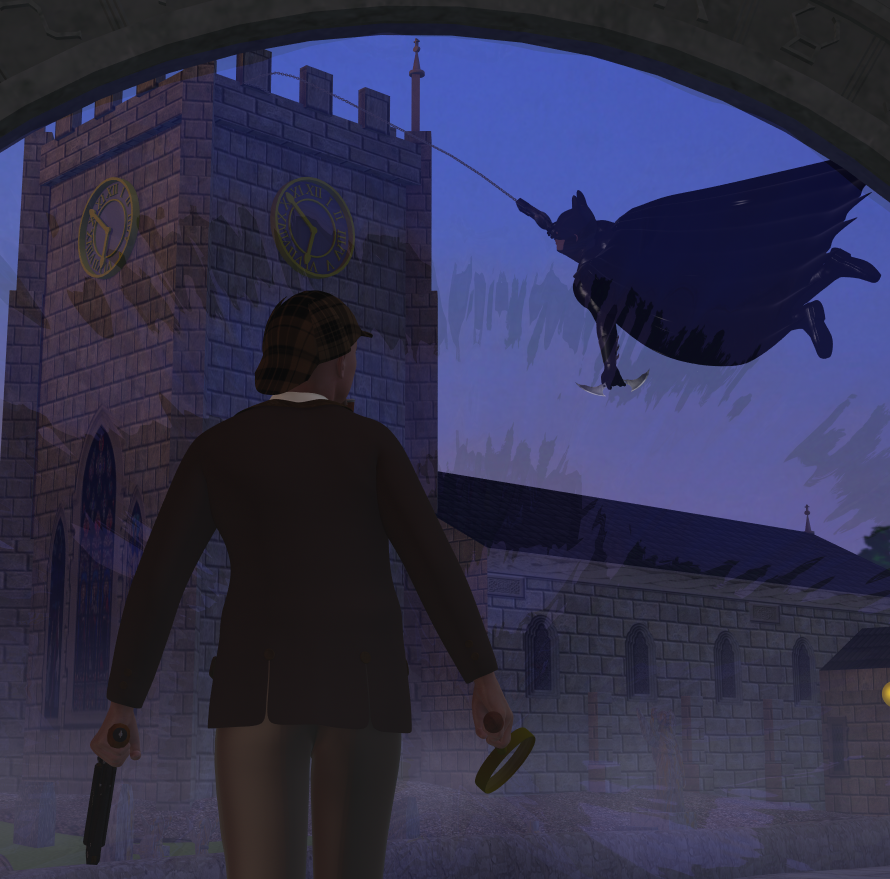
3d Art Freebie Challenge----February:"EleMENtary, my dear Watson!" ( entries)My 3rd entry continues my Sherlock Holmes theme, but this time it goes a bit sci-fi.
Window Through Time and Space
Working on a case mr. Holmes comes across this weird device, that seems to be showing things from different time and place. What would happen, if I stepped through this "window"? He thinks. Maybe it leads into a great adventure, filled with mystery. "Only one way to find out.", he thinks before stepping through and meeting the greatest detective of modern days.
Not counting: Genesis Male (both charatcters)
# = requires free registration
1) The set: The Village High Street #
2) The sky from Golden Sunsets -backdrop package
3) Mr. Holmes' hat and magnifying glass: Sherlock Holmes Props #
4) Mr. Holmes' Jacket and pants: Genesis Riding Outfit #
5) Mr. Holmes' gun: Steampunk Gun #
6) fog: RDNA Atmospherics - Fog Vol 1 #
7) Batman cowl: Batman Cowl for M4 #
8) Batsuit: Batman for Supersuit #
9) Batman's arm bracers: Ninja Bracers #
10) Batcape
11) Batarang: Batarang set #
12) Grapple gun: Grapple gun set #
13) Chain: 50ft Easy Pose Chain #
14) Earless Morph to Hide Batman's human ears: SickleYield's Mutation for Genesis #
15) Portal: StargatePaid: Supersuit fo Genesis
 GENESIS 3
I've been using this 'updater' successfully now all day. I tried the cloth convert - 'transfer active morphs' after conforming. The specific conforming cloth is Powerages garter/stockings and works fine except the toes seem to be locked in a specific spot so when one appliea another pose there is an extreme distortion/displacement of the toes material - see screen shot below. Any help, ideas, suggestions would be highly appreciated.
Try locking and/or zeroing translations on the toes.
I'll try that - but I've noticed that the transfer of the character brings over to poser 4 props - ik-toes_ 3 or some such notation. I will go back and transcribe if necessarry But what are these?
How to change morphs location?Someone can remember me the way to move morphs from a location to another?
I'm not talking about folder, but "labels"... For example, if I tranfer an old morph from V4 to Genesis using GenX2, the morphs are listed under Actor/GenX/Victoria4. But I want to move the brows morphs from there to the "Brows" list in the Genesis' head, to have it more accessible when I make an expression.
I was able to do it time ago, but now it seems I forgot how to do it (I'm getting old, sigh!).
Suggestions about PromosI always liked the setups where the main promo image (the one that shows in the store) is a nice, artistic, "here's an example of the product used in a setting" type deal, but then additional promos show individual items/morphs/poses/etc. that are in the product with nothing external detracting from a "this is what you get" kind of thing.
I'm going to advise any who does promos NOT to do it like this. I was directed to make promos twice like this and both flopped doing this method. After some emails with me going off, I went back to artistic method and made much more money.
And actually a promo suggestion I would rather make in morph-based product is to have a big splash promo: "If the figure seems to big or muscular for you, this is Genesis. USE THE DIALS to adjust him" This is why I have so many promos and one or two where I turn down my morphs to show the shape can be changed because people forget that shapes and morphs can be mixed together or used in smaller percentages.
But of course that would be kicked out by art ;)
Fixing deformed bendsHoping someone can tell me what I'm doing wrong here. I am working on a character that I've done extensive sculpting on the G2F base figure in Hexagon. One of the mods was to shorten the figure and make heer more compact. So, after bringing it back into Daz as a full body morph, and trying to pose it, it went all silly putty. Poking around, I found that the bones were not in place, and I spent some time moving them back into the relative positions and resizing them a bit to fit.
So, now posing works pretty much as it should, but I am getting deformed areas at the elbows and knees, and a bit at the underarm. I'm attaching a screen cap. Can someone clue me in on how to repair this?
Thanks!
Selbsthilfegruppe DAZ Studio - Beispiele, Fragen, Diskussion und sonstiges GequatscheDu kannst die verschlüsselte
Hi Leute,
auch mal Zeit, hier was nachzufragen :)
Arbeite mich grade in DazStudio 49 ein. Nachdem es so aussieht, dass ggf künftig mehr Encrypted Content existiert, nun eine wesentliche Frage, zu der ich bislang noch keine Antwort gefunden habe: Kann ich von einem verschlüsselten Inhalt Teile des Meshs exportieren, um einen Morph zu erstellen? Beziehungsweise Teile der Szene zu exportieren, um diese dann beispielsweise in Modo weiterzuverwenden?
Danke vorab!
Gruß, Peter
Die Exportfunktionen (Also z.B. Export in ein OBJ) ist auch bei verschlüsselten Inhalten möglich. Falls Du Hexagon benutzt, kannst Du per Hexagon-Brücke auch wie gehabt Morphs herstellen.
Die Exportfunktion findest Du unter Files-->Export.
Das Problem dürfte aber dann anfangen, wenn Du für so einen z.B. in VUE erzeugten Morph das Ganze wieder mit dem Original zusammenbringen willst. Das habe ich noch nicht getestet, aber falls Du da Erfahrungen machst, poste das doch einfach mal hier.
 Hexagon Morphs gehen ohne Probleme über die Brücke.
Es sind bei einem als "verschlüsselt" ausgewiesenen Artikel verschlüsselt:
- .duf - Dateien
- Sie können exportiert werden nach:
- mdd
- bhv
- dae
- cr2
- fbx
- mi
- obj
- u3d
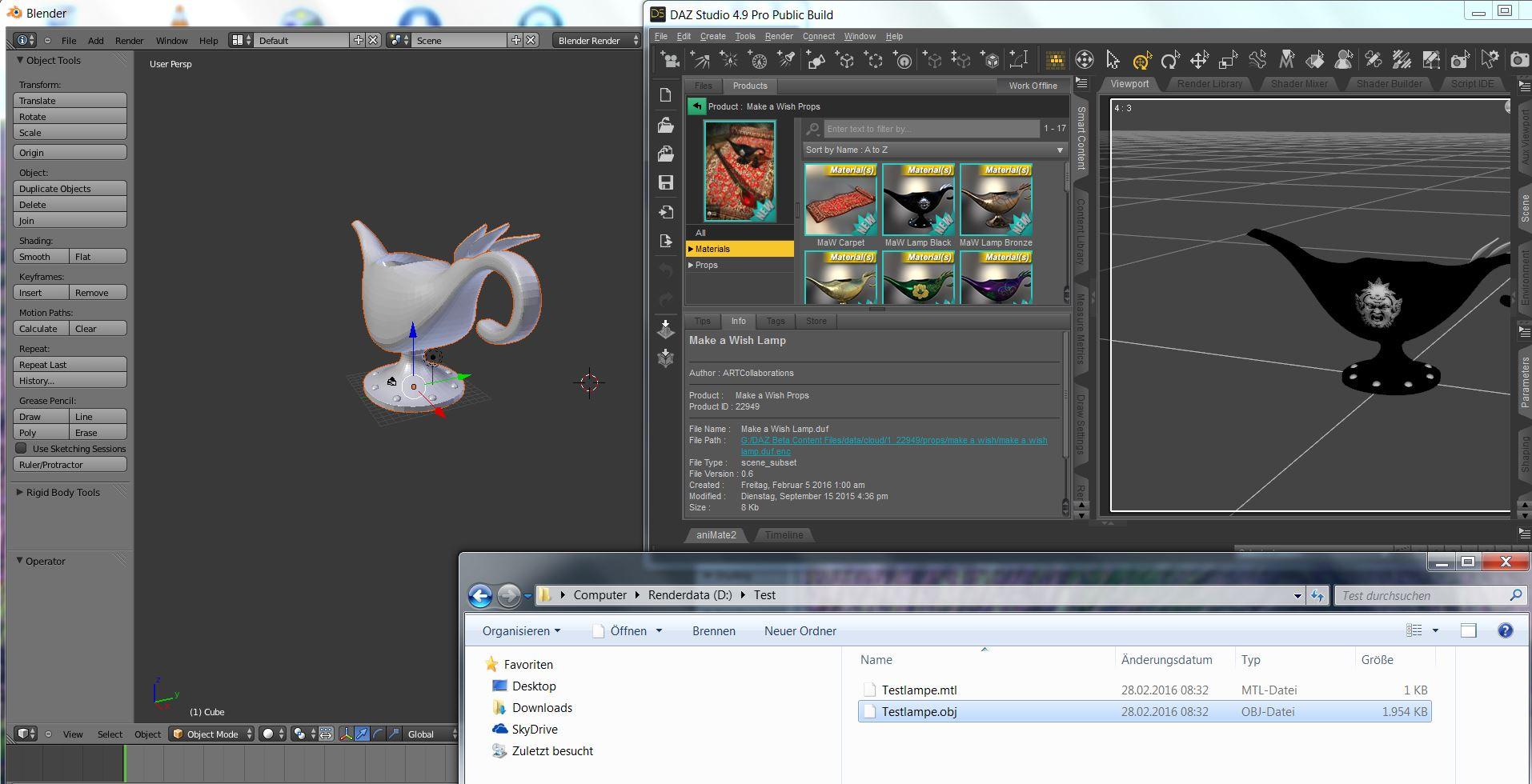
Als Beispiel mal die Freebie-Lampe, die ich als obj exportiert habe, und die sich anschließend problemlos in Blender laden lässt:
 NEW! Novica & Invited Guest Contributors Tips & Product Reviews Pt 6
Okay, call me crazy, now I'm looking at Mog Ruith. All the add-ons and Mog Ruith are only .80 (96% off) so now I'm wondering if anyone has any renders of those? Even if they aren't stellar, would be good for DOF background buildings for period pieces. Even in theme parks where they have different time periods.
I used this a LONG time ago. It's by, believe it or not, Stonemason. For .80 Millennium Environment and Private Places goes with it. With DOF these would be interesting. They have props, it's not just a background. Parts of these actually morph. I don't have Private Places, I'll see about the Millennium Environment for a render tomorrow. Gotta get some sleep, up early this morning, so ttyl.
I have Millennium Environment and Private Places installed in DS 4.9.1.25 with Daz Connect. Private Places gives missing file errors and I cannot get it to work at all. Time for another bug report. This will be my third today and it isn't even noon.
That sounds like the bug that's fixed in the latest public beta (4.9.1.27).
I hope that is all it takes to fix it. It is frustrating that 4.9 and Daz Connect were released with so many things not working.
I read what you wrote in Jen's Updated Products thread -- it sounds like the add-on wasn't updated when the Mil Environment was, rather than it being the bug that was fixed.
GENESIS 3I've been using this 'updater' successfully now all day. I tried the cloth convert - 'transfer active morphs' after conforming. The specific conforming cloth is Powerages garter/stockings and works fine except the toes seem to be locked in a specific spot so when one appliea another pose there is an extreme distortion/displacement of the toes material - see screen shot below. Any help, ideas, suggestions would be highly appreciated.
Try locking and/or zeroing translations on the toes.
Pure Hair Sleek and Michael 5Have you tried "Transfer Active Morphs" from the DSON menu?
Question for the toon modelers out thereI've made toony morphs for both Gen 2 and 3. One advantage of gen 3 is the face bones which are particularly nice for toony characters. My gen 2 morph would have needed custom morphed expressions to look good. My gen 3 morph just needs the bones in studio. And its super easy to get big exaggerated expressions with them
NEW! Novica & Invited Guest Contributors Tips & Product Reviews Pt 6Okay, call me crazy, now I'm looking at Mog Ruith. All the add-ons and Mog Ruith are only .80 (96% off) so now I'm wondering if anyone has any renders of those? Even if they aren't stellar, would be good for DOF background buildings for period pieces. Even in theme parks where they have different time periods.
I used this a LONG time ago. It's by, believe it or not, Stonemason. For .80 Millennium Environment and Private Places goes with it. With DOF these would be interesting. They have props, it's not just a background. Parts of these actually morph. I don't have Private Places, I'll see about the Millennium Environment for a render tomorrow. Gotta get some sleep, up early this morning, so ttyl.
I have Millennium Environment and Private Places installed in DS 4.9.1.25 with Daz Connect. Private Places gives missing file errors and I cannot get it to work at all. Time for another bug report. This will be my third today and it isn't even noon.
That sounds like the bug that's fixed in the latest public beta (4.9.1.27).
I hope that is all it takes to fix it. It is frustrating that 4.9 and Daz Connect were released with so many things not working.
Question for the toon modelers out thereGenesis 3 is supposed to have improvements explicitly for export to gaming fbxes which sort of implies toon style models too. They can decimate to be smaller files and look better at higher decimated percentages than earlier Genesis characters.
The Morph 3D characters in the Unity Asset Store are based on Genesis 2 Male and Genesis 2 Female and have alot of adjustments that can be made in the Unity editor that are already organized for you programmtically and so that's nothing to sneeze at. The question is will those be upgraded to Genesis 3 Male and Female?
The original Genesis has an advantage somewhat for programmers and resource management because the same base figure is used for the all the characters.
NEW! Novica & Invited Guest Contributors Tips & Product Reviews Pt 6Okay, call me crazy, now I'm looking at Mog Ruith. All the add-ons and Mog Ruith are only .80 (96% off) so now I'm wondering if anyone has any renders of those? Even if they aren't stellar, would be good for DOF background buildings for period pieces. Even in theme parks where they have different time periods.
I used this a LONG time ago. It's by, believe it or not, Stonemason. For .80 Millennium Environment and Private Places goes with it. With DOF these would be interesting. They have props, it's not just a background. Parts of these actually morph. I don't have Private Places, I'll see about the Millennium Environment for a render tomorrow. Gotta get some sleep, up early this morning, so ttyl.
I have Millennium Environment and Private Places installed in DS 4.9.1.25 with Daz Connect. Private Places gives missing file errors and I cannot get it to work at all. Time for another bug report. This will be my third today and it isn't even noon.
That sounds like the bug that's fixed in the latest public beta (4.9.1.27).
Question for the toon modelers out thereThose are some good points. I only have original Genesis morphs to play around with now, but I think what everybody is saying is right. 1 best suited for all kinds of general things. Some day I'll fork over the cash to morph 3 but I'm pretty impressed so far. Thanks for the advice!
G3M Ears In/OutMy Jesse product has a morph to adjust the ears in/out (Ear Angle)
3d Art Freebie Challenge----February:"EleMENtary, my dear Watson!" ( main thread)I've been having some computer problems lately, but it seems to work now enough to post my final entry. Those problems may also prevent me to partake in next month or two, since anything more demanding than net browsing, would likely to kill this machnine completely, so until I get a new computer, I can't do any renders.
But into matter at hand...
My 3rd entry continues my Sherlock Holmes theme, but this time it goes a bit sci-fi.
Window Through Time and Space
Working on a case mr. Holmes comes across this weird device, that seems to be showing things from different time and place. What would happen, if I stepped through this "window"? He thinks. Maybe it leads into a great adventure, filled with mystery. "Only one way to find out.", he thinks before stepping through and meeting the greatest detective of modern days.
Not counting: Genesis Male (both charatcters)
# = requires free registration
1) The set: The Village High Street #
2) The sky from Golden Sunsets -backdrop package
3) Mr. Holmes' hat and magnifying glass: Sherlock Holmes Props #
4) Mr. Holmes' Jacket and pants: Genesis Riding Outfit #
5) Mr. Holmes' gun: Steampunk Gun #
6) fog: RDNA Atmospherics - Fog Vol 1 #
7) Batman cowl: Batman Cowl for M4 #
8) Batsuit: Batman for Supersuit #
9) Batman's arm bracers: Ninja Bracers #
10) Batcape
11) Batarang: Batarang set #
12) Grapple gun: Grapple gun set #
13) Chain: 50ft Easy Pose Chain #
14) Earless Morph to Hide Batman's human ears: SickleYield's Mutation for Genesis #
15) Portal: StargatePaid: Supersuit fo Genesis
Links check out...entry accepted.
How can I mix body parts of 2 different Genesis 2 figuresThe only way I know is to use a modelling application that will allow you to selectively apply a morph to a base mesh (modo and ZBrush are the ones that come to mind), then manually tidy up the join and either load the result as a new morph or as two morphs (top of Giselle, bottom of Keike) and mix them in DS.
GENESIS 3I've been using this 'updater' successfully now all day. I tried the cloth convert - 'transfer active morphs' after conforming. The specific conforming cloth is Powerages garter/stockings and works fine except the toes seem to be locked in a specific spot so when one appliea another pose there is an extreme distortion/displacement of the toes material - see screen shot below. Any help, ideas, suggestions would be highly appreciated.
Daz 3D is part of

Connect
DAZ Productions, Inc.
7533 S Center View Ct #4664
West Jordan, UT 84084Licensing Agreement | Terms of Service | Privacy Policy | EULA
© 2026 Daz Productions Inc. All Rights Reserved.