-
HD Add On VS Normal Mapping Brawl!
Saving them as png will loose information; they are enormous because of all the information they contain. How much it will matter (if at all) will vary between rendered images.
Compared side by side at 100% in Photoshop? Yes. In an actual render? Not likely. I'm super anal when it comes to image fidelity and I've never noticed a difference.
On a separate note, I took a look at Babina 8's normals and they seem much smaller in file size than other normal .tifs that I remember...I wonder if they are now compressing their .tifs. (Yeah, they have to be because Victoria 7's normal .tifs are 48mb compared to Babaina 8's at ~3mb...so what I said above would only apply to uncompressed .tifs.)
Scooby-Doo characters?That idea of yours looks very close to what Daphne should look like. I may consider this idea when I have some extra money. I already do have the Lollipop Hair, so the hairband is taken care of. I do have a scarf, but it was a bigger one and it was a freebie on another site.
So all I really need is Ruby, The Girl 7, Aiko 7, the Layered Fringe hair, and the Super dress and leggings. I may already have restaurant server shoes, as I believe I have a waitress uniform in my inventory, unless it's an underestimation.
So now that we got Daphne taken care of, all we need is to find out how to do Shaggy and Fred and even Scooby.
I wasn't all that happy with my previous attempt, so I gave it another go, using FSWA Finley for Victoria 7 along with some other morph tweaking:
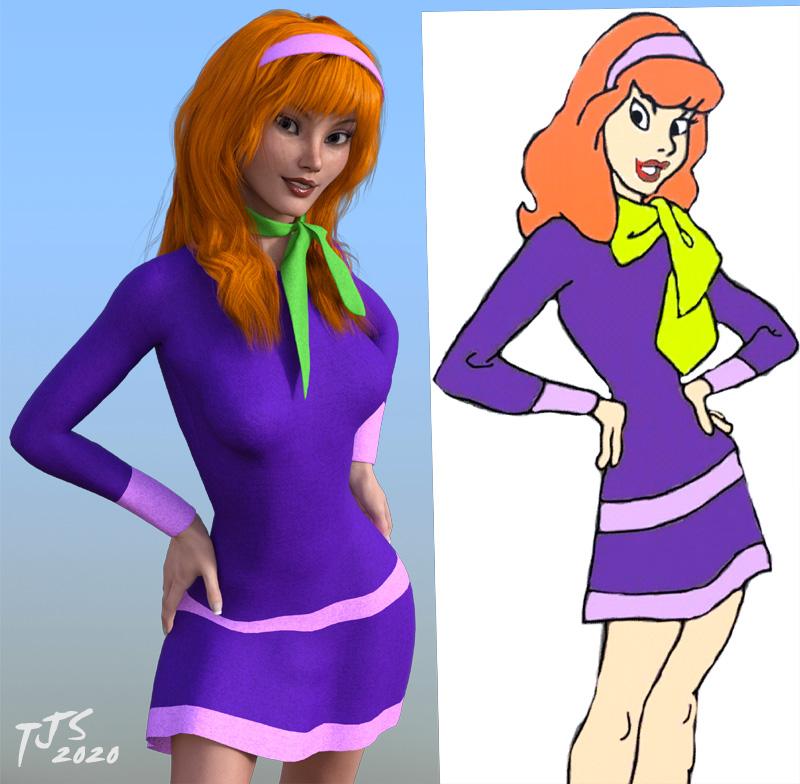
This looks a bit closer to the cartoon art IMHO, for the face (body is a bit wider ATM). What do you think?
Star Trek Builders Unite 8: THE REBOOTI'm having a devil of a time figuring out how to use any of these - seems they all require figures that are only available for purchse? I can't seem to find any that will work with only the free content you get with Daz. Paid content is a non-starter for me as I have no income at the moment thanks to all this crap going on. I'm not trying to do animation or anything, I just need a variety of characters in TMP and/or TWOK uniforms in a couple of different natural poses (walking, standing at a console, standing and talking, etc.) to populate still set renders like the one attached (which was made in Blender). The reference image I used in creating the attached render shows some good examples of what I mean. I'd greatly appreciate any help anyone could provide.
I was about to call you out on lifting pictures from seanr on scifi-meshes to use for your own nefarious purposes...lol. I enjoyed your bridge renders back in the early 2000s, and am glad to see you're back at work! Daz just released a free (at the moment--I'd grab it immediately) Daz-Blender bridge that might be of interest to you, in terms of rendering Poser/Daz figures within blender itself. I use both, but personally prefer Daz for figure work, given how it was designed for that purpose in particular. If you go to the first page of this thread, there is a compliation of free Trek stuff for Poser/Daz. If you're looking for a TWOK uniform to match that set you're working on, that's where I'd start looking. The best TNG-era stuff I've found is by nvent3d on Rendo, in my opnion, but it's not free. There are still some uniforms to be found on sharecg that mostly make use of Valiant and Courageous, which are outfits for the old Victoria 4 and Michael 4 figures. Those outfits can be used on the newer Genesis figures with auto-fit and figure clone techniques. As for poses, the free Genesis figures come with basic poses that can be used for getting started. You just need to install the "essential" packages for Genesis, Genesis 2, etc. For free or nearly-free stuff, that's where I'd start.
"Scooby" Daphne outfitOOPS............hit the wrong button, didn't mean to post that so I'll finish the thaught.............
"OK, I have tried dialing all manner of combinations, and I cannot nail down the Daphne look. She seems to have a fairly simple face but getting her to look right in 3D just might be impossible. Tj I'm not having any luck replicating what you did either...........*sigh.
No worries! I wasn't very happy with my 'stand in' so I took a more serious stab at Daphne. What do you think of this one?
She's based on FWSA Finley for Victoria 7, with some additional morphs. I was trying to keep the angled eyes without her looking Asian, if that makes sense...
If you like this version, let me know and I can post up my morph dial settings. I have a number of different morph kits in my collection, so hopefully you have some/most of them...
Also, I used the mesh grabber tool to adjust the hair so some of it draped over the head band better, while pushing in other parts of the hair underneath the headband, in an attempt to clean up the headband area so that I wouldn't need to do a lot of post work/edit out a bunch of strands that were poking thru the headband. I didn't do any post work to this image, other than to apply the gradient background behind the render after resizing the image and adding my sig.
July, 2020 - Daz 3D New User Challenge - Portrait Rendering and LIEUpdate for my Beginner's Challenge
Victoria the 1st
Shortened her hair on the right side to eliminate (I hope!) clipping... gonna be a busy week, so I suspect this is my "final" entry... but i'm still interested in advice, comments, and critiques.
~ Andy

Shortening the hair really changes her look. It is softening and eliminating some of the shadows. It isn't always easy to deal with hair clipping.
Thank you very much for your comments, Kismet2012...
Not that I'll have the time (or skill) to do anything about it, but do you have any suggestions on how do deal with the issue? I played around a bit trying to move her hair without shortening - but those still had clipping issues except moving the hair back, which totally changed the look and practically eliminated the shadows all together...maybe move/mess/add/change the lighting? Right now there's just the HDRI (stock) and a single spot, coming from her right and above...
~ Andy
Who is this character??It is funny that this particular character is brought up so much. It is like clockwork with any new Goldtassel release. She certainly does stand out from everything else in Dazney Land, even among Sangriart's impressive stable she stands out with her rosy cheeks and bright smile. She is not another Victoria (ironic since the actress she is based on has played Victoria...the Queen.) Man if Sangriart could ever post her in this store she'd make quite a mint, LOL. As it is I bet she drives quite a few to buy her.July, 2020 - Daz 3D New User Challenge - Portrait Rendering and LIEUpdate for my Beginner's Challenge
Victoria the 1st
Shortened her hair on the right side to eliminate (I hope!) clipping... gonna be a busy week, so I suspect this is my "final" entry... but i'm still interested in advice, comments, and critiques.
~ Andy
Shortening the hair really changes her look. It is softening and eliminating some of the shadows. It isn't always easy to deal with hair clipping.
GENERAL FREEBIE REQUESTS part 3Other than the cybernetic implant over at Rendo which requires Victoria 4.2 Boydsuit Expansion, are there any sci-fi/android/Borg occular/cybernetic implant freebies?
I might buy Jennica next Lyoness sale because her one looks great, but in case there's an alternative that can save me some pennies (I love pennies)
https://www.renderosity.com/mod/freestuff/borg-implant/77544
https://www.sharecg.com/v/37915/browse/11/Poser/M4-Eyepiece
Edit To Add: This is currently on sale in Fast Grab: https://www.daz3d.com/borg-for-genesis-8-female-s
GENERAL FREEBIE REQUESTS part 3Other than the cybernetic implant over at Rendo which requires Victoria 4.2 Boydsuit Expansion, are there any sci-fi/android/Borg occular/cybernetic implant freebies?
I might buy Jennica next Lyoness sale because her one looks great, but in case there's an alternative that can save me some pennies (I love pennies)
"Blade Runner's" Rachael head INJ files. See page 3. Face texture added.Please remember that the proper way to distribute a Victoria 4 morph is as an Inj file, using one of the existing Community Channels, or as a new ExP File to create its own channel rather than as an OBJ.
July, 2020 - Daz 3D New User Challenge - Portrait Rendering and LIEUpdate for my Beginner's Challenge
Victoria the 1st
Shortened her hair on the right side to eliminate (I hope!) clipping... gonna be a busy week, so I suspect this is my "final" entry... but i'm still interested in advice, comments, and critiques.
~ Andy
Show us your Blender Renders@andya There's definitely something odd in your blender settings then. I see a strange "black" skin in your render. I mean Victoria 8 is what we used for testing the volumetric skin together with other characters and they all look good with the default settings. You just have to let the plugin update for minimal requirements. It may be that we overlooked something though.
What blender version are you using ? The plugin is tested with the 2.83 stable release. Also can you please make a render with cycles and full global illumination settings ? This will check if the issue is in the render settings.
Another useful test would be if someone else can check Victoria 8 with diffeo. She works fine for me and the others at diffeomorphic.
https://bitbucket.org/Diffeomorphic/import_daz/issues/24/i-believe-i-nailed-v8-aka-true-iray-skins
Poser Clothes, Daz People??More Simple!
Of course, you can just use the Poser 7 figures in Carrara if you have a version of Poser 7 or later.
This image was done in Carrara using Poser 7 Simon and the Julius Caesar outfit in the leader pack cited above, and the Roman Centurian outfit. Poser 7 Simon and Sydney load directly in Carrara and are used just like Michael 4 and Victoria 4. Carthage Must be Destroyed!
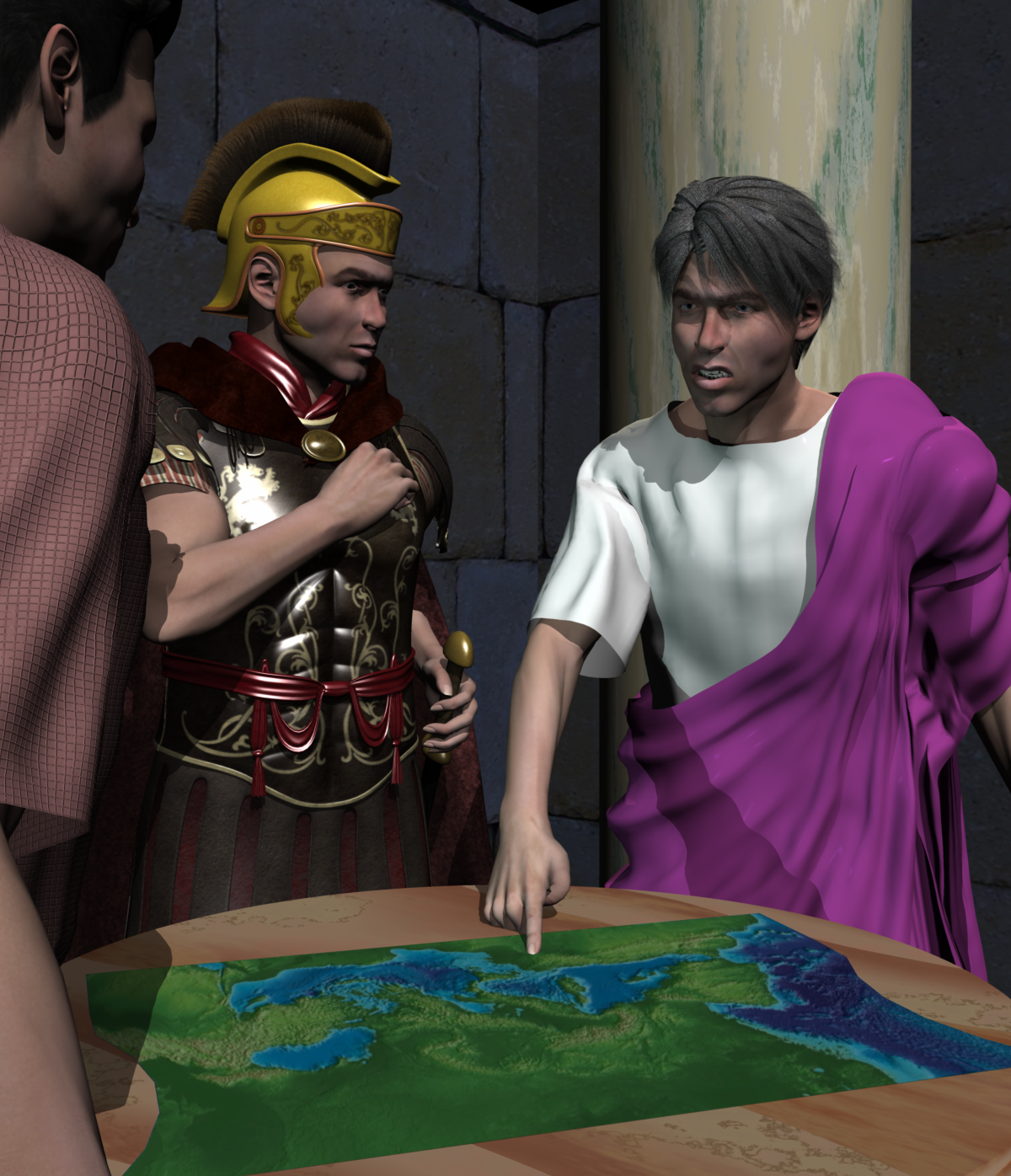 Poser Clothes, Daz People??
This used to be able to be done with a utility by a Poser user named Phil Cooke, or PhilC. The utility was called Wardrobe Wizard and was incorporated in Poser itself for a few versions. PhilC (not to be confused with PhilW of the Carrara world) would release character packs for compatibility. The key was being able to convert from a legacy Poser figure to Victoria 4 or Michael 4. You could then convert the result from V4 / M4 to other Daz3D figures using various transfer utility type options. The current versions of Poser do not have Wardrobe Wizard, I think.
So, for example, I had a set of historical leader outfits for the Poser 7 male. It included a viking outfit for Erik the Red, Ramses II, Genghis Khan, etc. Owning the compatibility pack for Michael 4 allowed conversion from clothing compatible with base Poser figures, like Poser 7 male (Simon) to M4, and then Daz's transfer utility could convert the result for use with Genesis, Genesis 2, etc.
Not perfect, but what is?
Why Are my Genesis1 Legs Becomming DistortedThis nightmare from the twilight zone never seems to end. I removed all the Beautiful Bends files from my computer. Then I opened Studio and loaded the base Genesis, the Michael and Victoria, and a 3rd party "actor" based on Genesis - and ALL of them still have the BBJCM problem. As outrider42 somewhat suggested, I scanned the whole computer for BBJCM - and there are 566 files with BBJCM in the name. I have a LOT of custom characters based on Genesis1. I'm afraid if I delete these 566 files I will forever screw-up my characters.
Searching For Something I THINK Exists...?!What I am thinking of was sold by Arki. They still have a lot of similar-sounding items in the store:
https://www.daz3d.com/dforce-dragon-empress-base-outfit-for-genesis-8-females-by-arki
https://www.daz3d.com/dforce-miellyn-outfit-for-genesis-3-and-8-female-s
https://www.daz3d.com/the-glacierqueen-outfit-for-victoria-4
Show us your Blender Renders@andya If you added the hdri yourself be sure to set the intensity to 2 the same as daz studio. Then Leisa should work fine with the volumetric skin if you render with cycles and the required minimum settings. If you have any doubt as for cycles settings then let the plugin update them for you or set them to full global illumination so you're sure you're good.
Does Victoria 8 work fine for you ? I can do a comparison with her if it may help.
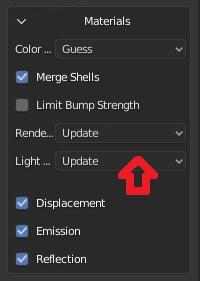
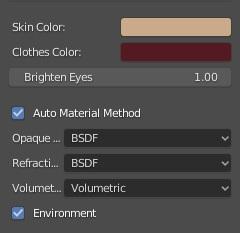
The idea here was to compare the results of the two transfer methods against Daz Studio Iray with as little user intervention as possible. People using these tools may know very little about Blender, so may judge only by what they get 'out of the box'. The defaults are also I think the closest to an 'apples to apples' comparison.
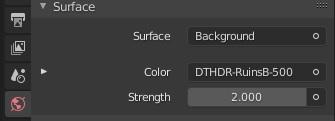
So, I did a fresh install of both plugins and used the defaults provided. Daz Importer was downloaded today. As noted, DazToBlender sticks a Sun light in the scene (maybe because the only light is an HDRI?), so I deleted that. The strength was set to 2 by the Daz Importer, which I used first, and I did not change it thereafter The Daz Importer is set to Warn for the Lighting, and does not warn me, so I assume it is satisfied. It is set to Update for Rennder Settings.
Victoria 8 gives similar results to Leisa 8 - not surprising really as they are both Daz models. Again, neither gets very close to the Iray result, and both would need some work on materials.
Show us your Blender Renders@andya If you added the hdri yourself be sure to set the intensity to 2 the same as daz studio. Then Leisa should work fine with the volumetric skin if you render with cycles and the required minimum settings. If you have any doubt as for cycles settings then let the plugin update them for you or set them to full global illumination so you're sure you're good.
Does Victoria 8 work fine for you ? I can do a comparison with her if it may help.
No differenceI purchased the Victoria 8 HD Addon
https://www.daz3d.com/victoria-8-hd-add-on
but i see no difference between the normal maps and the HD maps...after rendering they both look excatly alike...not what i was expecting.
true iray skins for blender are on the way ..For those interested,
Here's an update on Z-Cycles progress - a custom Blender build that integrates Iray Uber Shader Nodes for Cycles rendering.
I have done a WIP render comparison between Victoria 8 in Iray vs Victoria 8 in Z-Cycles.
The eyes and eyelashes need work. But the rest is nearly there.
Daz 3D is part of

Connect
DAZ Productions, Inc.
7533 S Center View Ct #4664
West Jordan, UT 84084Licensing Agreement | Terms of Service | Privacy Policy | EULA
© 2026 Daz Productions Inc. All Rights Reserved.