-
July, 2020 - Daz 3D New User Challenge - Portrait Rendering and LIE
Update for my Beginner's Challenge
Victoria the 1st
Shortened her hair on the right side to eliminate (I hope!) clipping... gonna be a busy week, so I suspect this is my "final" entry... but i'm still interested in advice, comments, and critiques.
~ Andy

Shortening the hair really changes her look. It is softening and eliminating some of the shadows. It isn't always easy to deal with hair clipping.
GENERAL FREEBIE REQUESTS part 3Other than the cybernetic implant over at Rendo which requires Victoria 4.2 Boydsuit Expansion, are there any sci-fi/android/Borg occular/cybernetic implant freebies?
I might buy Jennica next Lyoness sale because her one looks great, but in case there's an alternative that can save me some pennies (I love pennies)
https://www.renderosity.com/mod/freestuff/borg-implant/77544
https://www.sharecg.com/v/37915/browse/11/Poser/M4-Eyepiece
Edit To Add: This is currently on sale in Fast Grab: https://www.daz3d.com/borg-for-genesis-8-female-s
GENERAL FREEBIE REQUESTS part 3Other than the cybernetic implant over at Rendo which requires Victoria 4.2 Boydsuit Expansion, are there any sci-fi/android/Borg occular/cybernetic implant freebies?
I might buy Jennica next Lyoness sale because her one looks great, but in case there's an alternative that can save me some pennies (I love pennies)
"Blade Runner's" Rachael head INJ files. See page 3. Face texture added.Please remember that the proper way to distribute a Victoria 4 morph is as an Inj file, using one of the existing Community Channels, or as a new ExP File to create its own channel rather than as an OBJ.
July, 2020 - Daz 3D New User Challenge - Portrait Rendering and LIEUpdate for my Beginner's Challenge
Victoria the 1st
Shortened her hair on the right side to eliminate (I hope!) clipping... gonna be a busy week, so I suspect this is my "final" entry... but i'm still interested in advice, comments, and critiques.
~ Andy
Show us your Blender Renders@andya There's definitely something odd in your blender settings then. I see a strange "black" skin in your render. I mean Victoria 8 is what we used for testing the volumetric skin together with other characters and they all look good with the default settings. You just have to let the plugin update for minimal requirements. It may be that we overlooked something though.
What blender version are you using ? The plugin is tested with the 2.83 stable release. Also can you please make a render with cycles and full global illumination settings ? This will check if the issue is in the render settings.
Another useful test would be if someone else can check Victoria 8 with diffeo. She works fine for me and the others at diffeomorphic.
https://bitbucket.org/Diffeomorphic/import_daz/issues/24/i-believe-i-nailed-v8-aka-true-iray-skins
Poser Clothes, Daz People??More Simple!
Of course, you can just use the Poser 7 figures in Carrara if you have a version of Poser 7 or later.
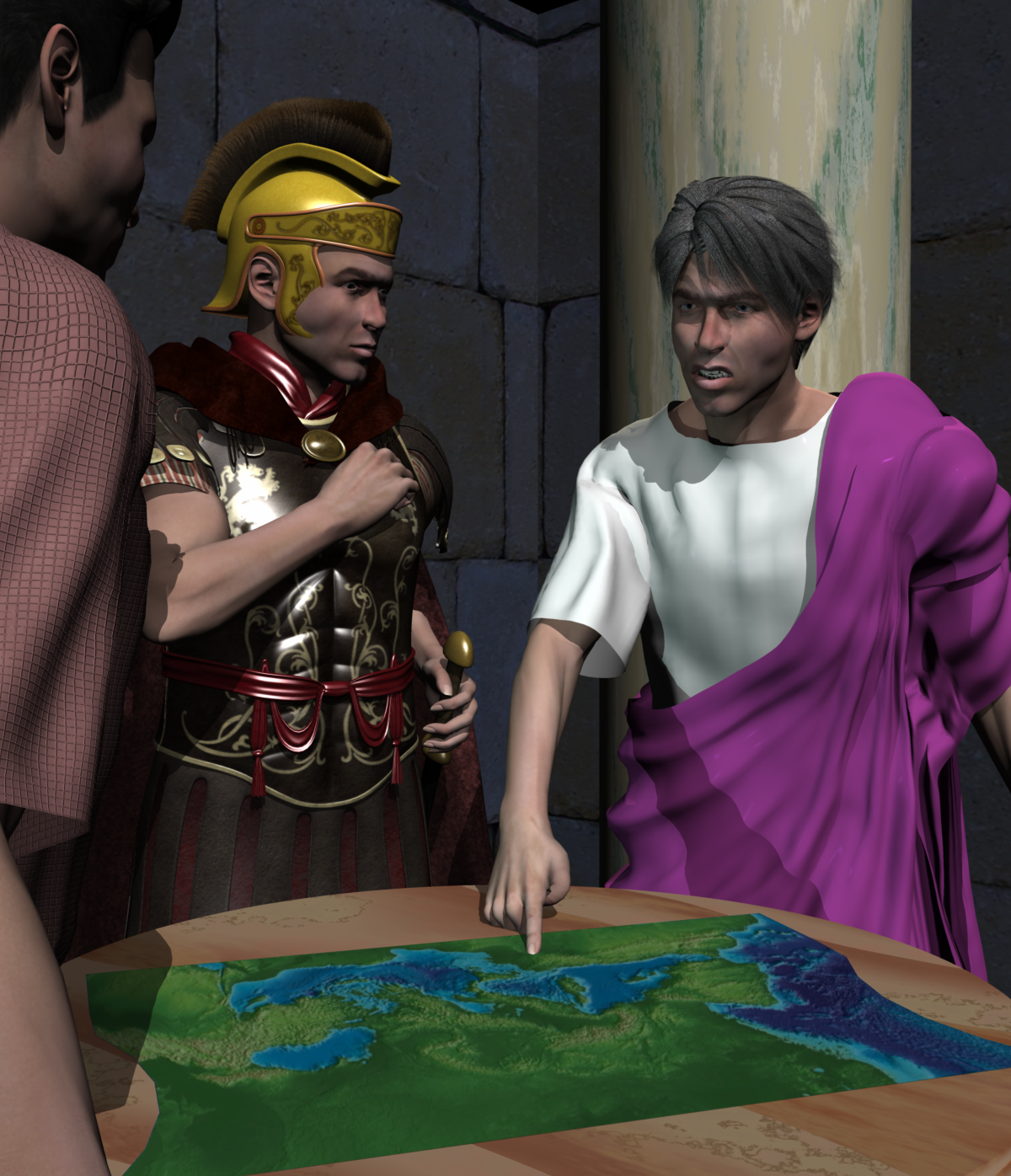
This image was done in Carrara using Poser 7 Simon and the Julius Caesar outfit in the leader pack cited above, and the Roman Centurian outfit. Poser 7 Simon and Sydney load directly in Carrara and are used just like Michael 4 and Victoria 4. Carthage Must be Destroyed!
 Poser Clothes, Daz People??
This used to be able to be done with a utility by a Poser user named Phil Cooke, or PhilC. The utility was called Wardrobe Wizard and was incorporated in Poser itself for a few versions. PhilC (not to be confused with PhilW of the Carrara world) would release character packs for compatibility. The key was being able to convert from a legacy Poser figure to Victoria 4 or Michael 4. You could then convert the result from V4 / M4 to other Daz3D figures using various transfer utility type options. The current versions of Poser do not have Wardrobe Wizard, I think.
So, for example, I had a set of historical leader outfits for the Poser 7 male. It included a viking outfit for Erik the Red, Ramses II, Genghis Khan, etc. Owning the compatibility pack for Michael 4 allowed conversion from clothing compatible with base Poser figures, like Poser 7 male (Simon) to M4, and then Daz's transfer utility could convert the result for use with Genesis, Genesis 2, etc.
Not perfect, but what is?
Why Are my Genesis1 Legs Becomming DistortedThis nightmare from the twilight zone never seems to end. I removed all the Beautiful Bends files from my computer. Then I opened Studio and loaded the base Genesis, the Michael and Victoria, and a 3rd party "actor" based on Genesis - and ALL of them still have the BBJCM problem. As outrider42 somewhat suggested, I scanned the whole computer for BBJCM - and there are 566 files with BBJCM in the name. I have a LOT of custom characters based on Genesis1. I'm afraid if I delete these 566 files I will forever screw-up my characters.
Searching For Something I THINK Exists...?!What I am thinking of was sold by Arki. They still have a lot of similar-sounding items in the store:
https://www.daz3d.com/dforce-dragon-empress-base-outfit-for-genesis-8-females-by-arki
https://www.daz3d.com/dforce-miellyn-outfit-for-genesis-3-and-8-female-s
https://www.daz3d.com/the-glacierqueen-outfit-for-victoria-4
Show us your Blender Renders@andya If you added the hdri yourself be sure to set the intensity to 2 the same as daz studio. Then Leisa should work fine with the volumetric skin if you render with cycles and the required minimum settings. If you have any doubt as for cycles settings then let the plugin update them for you or set them to full global illumination so you're sure you're good.
Does Victoria 8 work fine for you ? I can do a comparison with her if it may help.
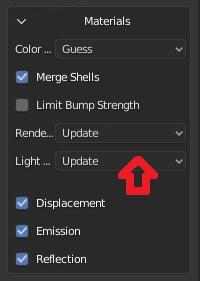
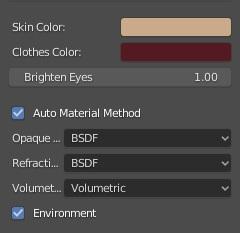
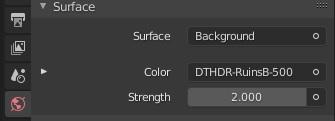
The idea here was to compare the results of the two transfer methods against Daz Studio Iray with as little user intervention as possible. People using these tools may know very little about Blender, so may judge only by what they get 'out of the box'. The defaults are also I think the closest to an 'apples to apples' comparison.
So, I did a fresh install of both plugins and used the defaults provided. Daz Importer was downloaded today. As noted, DazToBlender sticks a Sun light in the scene (maybe because the only light is an HDRI?), so I deleted that. The strength was set to 2 by the Daz Importer, which I used first, and I did not change it thereafter The Daz Importer is set to Warn for the Lighting, and does not warn me, so I assume it is satisfied. It is set to Update for Rennder Settings.
Victoria 8 gives similar results to Leisa 8 - not surprising really as they are both Daz models. Again, neither gets very close to the Iray result, and both would need some work on materials.
Show us your Blender Renders@andya If you added the hdri yourself be sure to set the intensity to 2 the same as daz studio. Then Leisa should work fine with the volumetric skin if you render with cycles and the required minimum settings. If you have any doubt as for cycles settings then let the plugin update them for you or set them to full global illumination so you're sure you're good.
Does Victoria 8 work fine for you ? I can do a comparison with her if it may help.
No differenceI purchased the Victoria 8 HD Addon
https://www.daz3d.com/victoria-8-hd-add-on
but i see no difference between the normal maps and the HD maps...after rendering they both look excatly alike...not what i was expecting.
true iray skins for blender are on the way ..For those interested,
Here's an update on Z-Cycles progress - a custom Blender build that integrates Iray Uber Shader Nodes for Cycles rendering.
I have done a WIP render comparison between Victoria 8 in Iray vs Victoria 8 in Z-Cycles.
The eyes and eyelashes need work. But the rest is nearly there.
Dragon Rider Poses for Genesis 3I've purchased DAZ Dragon 3 Fantasy Poses, and I plan on purchasing Dragon Dreams, Dragon Reign Poses for Dragon 3 & Genesis 8 Female, and Daz Dragon 3, Victoria 8 and Michael 8 Poses in the future. But I've searched through Daz's store several times for dragon rider poses for Genesis 3, and I'm surprised to see that no interacting poses have been made for Genesis 3 and Daz Dragon 3. If an artist here could make a set of dragon-riding poses, and other interacting poses for Genesis 3 and Daz Dragon 3, I would appreciate it. Would anyone else like to see a product like this?
Issue with BrancaFor me, it's a trip to the genesis 8 starter, then figures, load up the genesis 8 female, go for a coffee, then find the character I wanted to load again, click on shapes then textures. If there's an easier way of doing it that I'm missing, I would love to hear it.In Smart Content, click on Figures, type in the box the name of the character you want, eg Victoria 8, double click on the icon, and you are done.
Of course if the character has not been set up as a character in Smart Content, as appears to the case with Branca, that is not going to work.
UltraScenery [Commercial]Almost here!
I reached page 62; Excellent product, excellent thread, thanks to you all
Now I know what masks are and how to use them as well as inverted height effects but all theoretically as my machine was finishing my first experiment
And here it is the final result
Sedor's Outdoor pool https://www.daz3d.com/outdoor-pool-and-poses-for-victoria-8-and-michael-8, 2 ultascenery one with the pond tweaked to have a swimming pool, other one in the background, sun and sky in July at 11:30 at 40ºN,
6 GF8, lots of duplicated UltraTrees in pots or in a hedge (I don't know how to work creating instances, I duplicate nodes instead; can anybody point me where to learn the instances basics?) and bunchs of carnations scaled to big dhalias from Xfrog plants. A day and two nights rendering (I was afk) and a couple of partial renders to correct some things of the final render
And of course following the advice of this great Australian man from Carrara forums whose name I can't remember who always spoke about levels, levels, levels in postrender done in this case with The Gimp
Thanks again to you all for every tips and pieces of advice
Nice! Although I think I'd add some staris or somthing so there's an obvious way to get down to the pond. That or a sidewalk coming around the building - and stairs would be a lot si,pler.
I don't know of any tutorials for instances, but if you want to just play with it they're under Create -> New Node Instance. The main difference between new nodes and instances is that a new node is a copletely independant iteration of whatever it is, whilst the instance will copy textures (and I think, but am not certain of, poses) applied to the main node.
UltraScenery [Commercial]Almost here!
I reached page 62; Excellent product, excellent thread, thanks to you all
Now I know what masks are and how to use them as well as inverted height effects but all theoretically as my machine was finishing my first experiment
And here it is the final result
Sedor's Outdoor pool https://www.daz3d.com/outdoor-pool-and-poses-for-victoria-8-and-michael-8, 2 ultascenery one with the pond tweaked to have a swimming pool, other one in the background, sun and sky in July at 11:30 at 40ºN,
6 GF8, lots of duplicated UltraTrees in pots or in a hedge (I don't know how to work creating instances, I duplicate nodes instead; can anybody point me where to learn the instances basics?) and bunchs of carnations scaled to big dhalias from Xfrog plants. A day and two nights rendering (I was afk) and a couple of partial renders to correct some things of the final render
And of course following the advice of this great Australian man from Carrara forums whose name I can't remember who always spoke about levels, levels, levels in postrender done in this case with The Gimp
Thanks again to you all for every tips and pieces of advice
 Sunless
Hello;
I purchased this product
https://www.daz3d.com/sunless-for-genesis-8-females
hoping to achieve the same results as on the product page promos...but as you can see its not working out for me. I dont know if its the lights or something else. I select Victoria 8 and i applied all the different settings one by one but the only thing that changes is that her skin texture turns pale...but i dont see none of the enhanced details on her skin like in the promos.
I havent got a clue as to why this might be...what am i missing?...
Thanks for your help.
[Released] Character Converter from Genesis 2 Female to Genesis 8 Female [Commercial]Trying out the tool with Paige: https://www.daz3d.com/paige and just can't seem to get the eyes become anything I would consider even close to circular. Tried 2020 several times and got probably the best result, attached, with 2019 and really low tolerance. Ideas? I
've just been removing "sc_paige/RSG2FPaige" from the morphs, am I missing a file and staring at the same conversion with imagined changes? :D
How low was the tolerance? Pushing it down to as low as it can go and not go to zero helps (for the 2019 method). The 2020 method gives the best results usually, but if you have tried it?
You need to be removing the FHM (H is for head) file to see a change (unless overwrite morphs is checked, not that I recommend that as it is so slow).
Well, I tried a bunch of settings down to 0.0005 on 2019, the one that gave the best result (posted above). I did have overwrite on, so it wasn't all in my head :D
I also understand now my confusion re: the FHM. Paige is a victoria 6 based character that has no custom body. It applies 30 % victoria 6 and then adds body morphs from the gen 2 morph pack to it. No FBM being created.
The head, otoh, applies 30 % vicky 6 and the "sc_paige" morph at 100. Sc_paige morph is not being recognized as an FHM.
The character also applies pupil and iris size morphs which are getting ported over (not sure if there are no corresponding ones or if the naming has been changed).
I was ecstatic when I discovered this, since I assumed that the eye morphs would be the culprits. Unfortunately, they weren't, the results were identical from a character preset saved without them.
Now I'm wondering it the issue is the sc_paige headmorph and the fact that it isn't getting recognized as an FHM one? Any further ideas? I did port over vicky 6, which worked just fine.
Late edit: I verified everything else ports over fine and its indeed SC_Paige, the non-FHM head morph, that causes the distortion.
There is a field in the options where you can specify the string to look for (that the morph name starts with). You could try changing that to get the script to recognize it.
Unfortunately, that didn't help, the results were identical (but thanks for pointing out what I had gloriously missed!).
FWIW, I took a stab at taking Paige to genesis 3 with genx2, and that worked fine AFTER I removed the separate eye morphs that didn't seem to have an impact on the g8 conversion (I also use sloshwerks's clone instead of the default one, but that's one of the reason I'm trying to get rid of the damn thing).
Can you post the log? I want to ensure the "head" morph was identified.
Pm'd you, as it was a mile long. Thanks for taking the time to look at this, I always feel comfortably buying your tools since I know you're going to go out of your way to help your customers.
Thank you for the kind words.

Ok, it looks like this conversion did the exact opposite of what you wanted
 . Because you had overwrite morphs ON, it removed the existing morphs, including the victoria head morph (which hopefully was fantastic). Then, it could not find the Paige morph to make it a head morph. (Unfortunately, the one debug option I seem to NOT have output is what string you input, but it should have been "Paige" I think. If you search for the string "Head Morphs", you can find the morphs it is converting, and which ones the script thinks are head morphs:
2020-07-24 14:46:33.068 Converting Morphs: FBMVictoria6Body,FHMVictoria6Head,PHMEyelashesLength,Paige
2020-07-24 14:46:33.068 DEBUG: Head Morphs:
2020-07-24 14:46:33.068 DEBUG: Other Morphs: FBMVictoria6Body,FHMVictoria6Head,PHMEyelashesLength,Paige
As you can see, Head Morphs is blank and the FHMVictoria6Head is going to use the 2019 conversion method (all the morphs in "Other Morphs" use that, only the Head Morphs are converted using the 2020 method).
My recommendation is
- Delete the morphs in data/DAZ 3D/Genesis 8/Female/Morphs under the FIRST directory for Daz Studio Formats specified in the Content Directory Manager (F2->"Content" tab->"Content Directory Manager..." button)
- Change the head morph prefix back to FHM
- UNCHECK Overwrite morphs so it won't keep reconverting morphs later
- Convert Paige
- Delete ONLY the Paige morph from data/DAZ 3D/Genesis 8/Female/Morphs
- Change the prefix to Paige
- Convert Paige. Because you have overwrite Morphs unchecked, if you check the log, you should see something like this:
-
2020-07-24 14:46:33.068 Converting Morphs: Paige
2020-07-24 14:46:33.068 DEBUG: Head Morphs: Paige
2020-07-24 14:46:33.068 DEBUG: Other Morphs:
-
That was it! I completely missed that "SC_Paige" was a dial that just pretty much applied "Paige", and couldn't imagine it worked like that... next time will be sure to compare the file sized to see which one is the morph!
Thanks again for both your help and your amazing product(s) - the attached quick render also uses v4 to g8 hair converter. :)
Awesome! I am glad you got it working. And thank you for posting the image; it looks great!
Daz 3D is part of

Connect
DAZ Productions, Inc.
7533 S Center View Ct #4664
West Jordan, UT 84084Licensing Agreement | Terms of Service | Privacy Policy | EULA
© 2026 Daz Productions Inc. All Rights Reserved.