-
Legacy UVs for Genesis 3 [Commercial]
since these are geocrafted bodyparts, will my custom and purchased G3 morph sets still work???
mcjApplique Geo-Follower script for Daz StudioD-Forms are part of Daz Studio and i dont think i ever saw shape options
i have 2 or 3 morph-creator scripts where you can select only vertices inside a cube or a cylinder
for my example, and the boot length i could use mcjAddStretchMorph https://sites.google.com/site/mcasualsdazscripts4/mcjaddstretchmorph
i find it easier to get precise and even deformations, plus you can combine many deformations in 1 morph
the stretch morph for this column was probably obtained using mcjAddStretchMorph
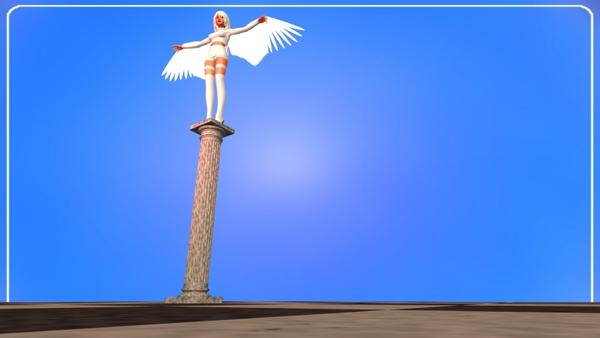
nice results casual
you think it is possible giving the d-former a different shape
say torus square or donut ?
Star Trek Builders Unite 7: The Continuing MissionHi, I'm very late to the party and I'm amazed by what you guys have achieved! I've never used Daz 3d before but I thought I'd give it a play as I've been doing a cheesy TMP era comic book on Youtube using screenshots from the movie and I've been getting to the point where I'd like to put in some action. As you may recall, there just isn't any in TMP.
I've managed to knock up male and female version of the TMP uniforms just fine using V4 Courageous and fiddle with the phaser to produce some basic poses. I will most likely just paste the real actors's heads on the images and do long distance shots in any event and hope it doesn't look terrible. I have a couple of beginner's queries though:
1. I've downloaded Bluto's TMP security outfit but I'm getting an error message requesting a pathway to a .pmd file. Is that because I need M4 valiant to use the morph on?
2. I've downloaded the space people morph for V4 and M4 but I can't seem to figure out how to get the morphs to show up under M4 or V4 or in Genesis. Any tips?
3. I've downloaded the M3 & V3 TOS character morphs (what no Chekov?) and the likenesses are not quite as good as they look in the images on the download site. Am I losing some of the likeness because I only have the M4/V4 morph and if so, is it worth downloading the M3/V3 morph for Genesis to achieve a better result? The morphs on the Star Trek Legends site look amazing - especially Sulu, Scotty, Rand, Chapel, and Valeris. I'd love some tips on how to get that good!
On the height issue, I was really surprised that Majel Barrett was only 5'9". She looks really tall in the show because everybody else is so short. The original FASA game gave each of the characters' strength scores based on the heights of the actors but added 5 (I think) to all the men (except McCoy) to make them a bit more buff.
2. To get any M4 or V4 morph to work properly on Genesis you'll have to have V4 and M4 and have a morph transferring program. To get mine to transfer I used Genesis Generation X2 (I think, I haven't used it in a really long time) which takes the loaded morphs on a V4 or M4 and then creates a full blown morph to apply to a Genesis figure. At least that's how I did it, there's probably other methods too.
3. Yes, you'll lose some of the character morphs looks if you don't have the right backwards compatible morph for Genesis. You'd need to apply the V3 morph or M3 morph to your Genesis first, then the character morph, and it'd work out. I'm looking to use a few well known characters in some things I'm working on but I haven't really played with the morphs much other than to test if they worked, but that's how I got the best results.Can you tell me his texture and morph? Who create him?Hi,
I like this picture a lot. He looks much like M7 but not only.... there must be more...
http://www.daz3d.com/media/shop/sale-promo/04-18/01.jpg
Not only M7 morph and not only M7 texture I think...
Can you identify him? Are you the artist behind and know, what you did to create the pic?
Is the pic in the gallery with more info?
Thank you for reading my questions ;)
Keep rendering!
Novica & Forum Members Tips & Product Reviews Pt 7I've retested the 3A Creative Morphs Merchant Resource Set 1, I used Expressions instead of Smile Delight, and the smiles/lip posing for several of them isn't going to work for me. That one enlarges the eyelashes and frankly makes the figure cartoony, and the smiles on several seem, for lack of a better word, bloated/stiff. If you're looking for a fun ear product, the variety of those is really good, and there is a separate nose morph category, but I was going for the entire head, not just noses, and don't need the elf/creature ears. I tested them on the Gen3 Female. It says:
"collection of morphs that can be mixed and matched with any other morph sets that are owned, or used as a base to create your own unique characters"
however, when I used it with any other character, the morphs really stacked, so perhaps you'd want to do the slider thing instead of a complete character and ease the morphing together. Anyone else who has tried it and gotten results they like, feel free to share. I think it's going to depend on which character, which morphs you happen to use. (I was only using Gen3F for the first 12 tests, then tested it on Roxanne and a few other gals.)
EDIT: I am keeping it btw because it was the product that triggered discounts for quite a few things in the cart.
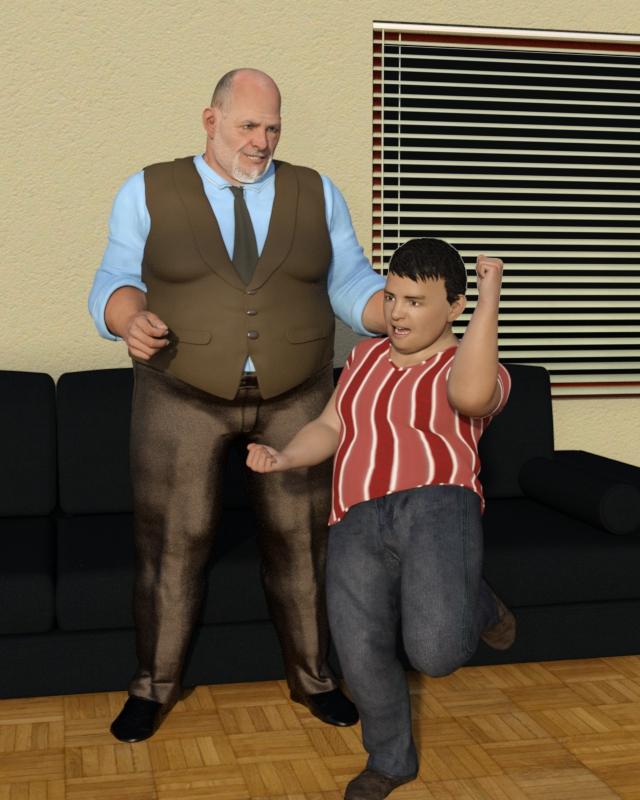
Novica & Forum Members Tips & Product Reviews Pt 7Travels and taxes being done, I finally had a chance to do a new render. I didn't have much time to check out the store while I was gone but did pick up George HD for Genesis 3 Male. I was hesitant until I saw some images barbult posted in another thread where she used him dialed in at varying amounts. At full strength, he's a bit extreme for my taste. As Renomista has already posted some renders of him, I was just going to show how well he works with Growing Up for Genesis 3 Male morphs.
The father (or grandfather) in the scene has George dialed in at 74%. The boy has him dialed in at 54%, with Youth morph at 61% and Youth Proportion Adjustment at 20%. The man uses George's texture while the boy uses Growing Up Skin Merchant Resource for Genesis 3 Male. Both skin textures were adjusted with the Iray Smart Converter. The image was rendered in DS4.8.
I was pleased with how the growing up morphs scaled George down and made his face more youthful while keeping a family resemblance. Autofit of clothing worked well for both. I do wish George had a separate head morph, as the body could be blended with a broader range of characters then.
Thats Great. I tried him out with Growing up (as I do with all new Characters) and it did not work out at all withh "full" George
Dialing him in only partial achieves exactly was I was looking for. Thanks for the tip!
Novica & Forum Members Tips & Product Reviews Pt 7Travels and taxes being done, I finally had a chance to do a new render. I didn't have much time to check out the store while I was gone but did pick up George HD for Genesis 3 Male. I was hesitant until I saw some images barbult posted in another thread where she used him dialed in at varying amounts. At full strength, he's a bit extreme for my taste. As Renomista has already posted some renders of him, I was just going to show how well he works with Growing Up for Genesis 3 Male morphs.
The father (or grandfather) in the scene has George dialed in at 74%. The boy has him dialed in at 54%, with Youth morph at 61% and Youth Proportion Adjustment at 20%. The man uses George's texture while the boy uses Growing Up Skin Merchant Resource for Genesis 3 Male. Both skin textures were adjusted with the Iray Smart Converter. The image was rendered in DS4.8.
I was pleased with how the growing up morphs scaled George down and made his face more youthful while keeping a family resemblance. Autofit of clothing worked well for both. I do wish George had a separate head morph, as the body could be blended with a broader range of characters then.
Both are great looking characters. Thanks for explaining how you created them.
Novica & Forum Members Tips & Product Reviews Pt 7Travels and taxes being done, I finally had a chance to do a new render. I didn't have much time to check out the store while I was gone but did pick up George HD for Genesis 3 Male. I was hesitant until I saw some images barbult posted in another thread where she used him dialed in at varying amounts. At full strength, he's a bit extreme for my taste. As Renomista has already posted some renders of him, I was just going to show how well he works with Growing Up for Genesis 3 Male morphs.
The father (or grandfather) in the scene has George dialed in at 74%. The boy has him dialed in at 54%, with Youth morph at 61% and Youth Proportion Adjustment at 20%. The man uses George's texture while the boy uses Growing Up Skin Merchant Resource for Genesis 3 Male. Both skin textures were adjusted with the Iray Smart Converter. The image was rendered in DS4.8.
I was pleased with how the growing up morphs scaled George down and made his face more youthful while keeping a family resemblance. Autofit of clothing worked well for both. I do wish George had a separate head morph, as the body could be blended with a broader range of characters then.
Celebrity Look-a-Likes for 3D figures Part 2How well do any of the movie star character morphs for V4 or M4 transfer to Genesis figures? Has anyone tried with any reasonable success?
Reasonably well. It can vary from character to character, but many of the characters (just regular v4 stuff, not based off famous people) I have attempted seemed to turn out well enough. Granted, I haven't tried that many.
Edit, I see you said Genesis, as in Genesis 1? The ones I have done are for Genesis 2.
Celebrity Look-a-Likes for 3D figures Part 2How well do any of the movie star character morphs for V4 or M4 transfer to Genesis figures? Has anyone tried with any reasonable success?
Michael 4 for Genesis 2 male OR V4 for G2Female How to use?There are the main Daz morph sets
http://www.daz3d.com/genesis-2-male-s-morphs-bundle
http://www.daz3d.com/genesis-2-female-morphs-bundle
then there are various PA sets
http://www.daz3d.com/ghost-of-macbeth-morphs-for-genesis-2-male-s
http://www.daz3d.com/shimuzu-s-head-morphs-for-michael-6
http://www.daz3d.com/genesis-2-female-mixed-morph-resource-kit
http://www.daz3d.com/genesis-2-female-body-morph-resource-kit-1
http://www.daz3d.com/genesis-2-female-morph-resource-kit-ii
http://www.daz3d.com/genesis-2-head-morph-resource-kit
http://www.daz3d.com/muscularity-morphs-for-genesis-2-female-s
http://www.daz3d.com/muscularity-morphs-for-genesis-2-male-s
http://www.daz3d.com/shape-shift-for-genesis-2-male-s-m6
http://www.daz3d.com/shape-shift-for-genesis2-female-base-and-v6
for example
Star Trek Builders Unite 7: The Continuing Missionthe security uniforn were made to be used with m4 and m4 valient , if you are trying to use it with genesis , i have no idea why its calling for pmd's
i use poser and have no idea why it does what it does in daz studio.
the spacepeople morphs were made to be used with m4 and v4 if you are using them with genesis , you will need the help of someon better versed in daz studios . i would asl pdsmith , i know that he updated several morph for genesis .
im sorry i couldnot be of more help
Installing Genesis 3V7 is a morph of G3 Female - so you need to download/install theGenesis 3 Starter packages.
looking for middle aged figures, male and female-- any suggestions?I'll do up a middle aged guy later today to demonstrate. Zev0s aging morphs plus base morph pack can cover a lot of ground.Superheroes Rebooted - Ready to Rrrrrender?Yes, scaling these days is a no brainer, thank GOD. Back in the day when I made my first morph for Freak 3 normalizing his hands and feet... that was really not that easy! lol
looking for middle aged figures, male and female-- any suggestions?@timmins.william -- he's very good, but he's not middle aged, and illustrates the problem.
Among the things that happen to people and their faces as they hit their mid-40s to 50s is that they get "thicker". You'll notice your neck size go up, more jowls . . . most of the models tend to focus on "wrinkly" and a more aged texture.
That effect isn't middle aged, its more "wizened" and old. (but its very good) -- he looks 65-75, but definitely not 50.
Novica said:
I posted this link in my Art Studio thread, quite a few people didn't know it existed so far as aging morphs. It gives you a variety, some subtle. You'd never know it from the main promo either.
Thanks . . . the upper right morph looks promising.
But in general, I think modelers would do well to have a look at some references. The face is super subtle, and we're very attuned to it. A very youthful shape -- eg little fat-- with aged textures and wrinkles looks "old". "Middle aged" is something very different .. . its in the softening of jaw contours, more fat around the neck, a slight hollowing below the eyes, subtle wrinkles.
Installing Genesis 3So, Gensis 3 Starter is an official genesis 3?
A morph package with poses says I need gen3 models, and victoria 7. The installation auto-gives starter essentials.
If I buy Victoria 7, and summon on, is that what covers Genesis 3 figure requirement? Since Vic7 is Gen3, and the way this work is by adding on the DLC to the pre-given start essentials, I guess that is the official way to use Gen3? Or, do I buy Gen3 package, as a standalone, on top of Victoria 7 and starter essentials?
I'm guessing Gen3 starter just lets you add on the official buyables, in the Gen3 category, such as Vic7, and Vic7 counts as the proper addon and usage of the starter essentias, without me needing to buy extra other Gen3. If I bought VIc7, I am using gen3...Michael 4 for Genesis 2 male OR V4 for G2Female How to use?Morphs aren't made compatible by this product - you can use GenX 2 with the right plug-ins to make morphs that pretty closely, but not exactly, match the originals or you can use the Transfer Utility (Kattey has a thread with instructions).
For textures, if the materials are in Poser format or the old DS script based formats (.dsa, .dsb or .dse) then you must apply the materials to a real Micahel 4, if you have one, or to Genesis (the disadvantage of using Genesis is that it lacks the eye overly layer that both Genesis 2 and Michael 4 have so any settings for that will be lost), then File>Save as>Materials Preset - that preset should then work to apply the settings to Genesis 2.
Michael 4 for Genesis 2 male OR V4 for G2Female How to use?Here are some images. The Genesis 2 Male shaped with M4 body. And a Character set for M4 that i would like to use.
I also included an image of the M4 morph injections. Are they even useable anymore? with my M4for G2M package. I tried injecting but nothing happened
Star Trek Builders Unite 7: The Continuing MissionHi, I'm very late to the party and I'm amazed by what you guys have achieved! I've never used Daz 3d before but I thought I'd give it a play as I've been doing a cheesy TMP era comic book on Youtube using screenshots from the movie and I've been getting to the point where I'd like to put in some action. As you may recall, there just isn't any in TMP.
I've managed to knock up male and female version of the TMP uniforms just fine using V4 Courageous and fiddle with the phaser to produce some basic poses. I will most likely just paste the real actors's heads on the images and do long distance shots in any event and hope it doesn't look terrible. I have a couple of beginner's queries though:
1. I've downloaded Bluto's TMP security outfit but I'm getting an error message requesting a pathway to a .pmd file. Is that because I need M4 valiant to use the morph on?
2. I've downloaded the space people morph for V4 and M4 but I can't seem to figure out how to get the morphs to show up under M4 or V4 or in Genesis. Any tips?
3. I've downloaded the M3 & V3 TOS character morphs (what no Chekov?) and the likenesses are not quite as good as they look in the images on the download site. Am I losing some of the likeness because I only have the M4/V4 morph and if so, is it worth downloading the M3/V3 morph for Genesis to achieve a better result? The morphs on the Star Trek Legends site look amazing - especially Sulu, Scotty, Rand, Chapel, and Valeris. I'd love some tips on how to get that good!
On the height issue, I was really surprised that Majel Barrett was only 5'9". She looks really tall in the show because everybody else is so short. The original FASA game gave each of the characters' strength scores based on the heights of the actors but added 5 (I think) to all the men (except McCoy) to make them a bit more buff.
Daz 3D is part of

Connect
DAZ Productions, Inc.
7533 S Center View Ct #4664
West Jordan, UT 84084Licensing Agreement | Terms of Service | Privacy Policy | EULA
© 2026 Daz Productions Inc. All Rights Reserved.